一、问题根源:
是微信小程序中原生 Canvas 组件与普通 DOM 元素混合使用时的经典渲染不同步问题,在长页面滚动时尤为明显。下面我将详细分析原因并提供完整的解决方案。
二、问题细分排查
- 渲染层差异(最主要原因)
微信小程序的渲染架构分为逻辑层和视图层,而视图层又分为:
WebView 渲染层:所有普通的 view、text、image 等组件都在这里渲染
原生组件层:Canvas、map、video、camera 等组件是系统原生渲染
这两个层是独立渲染的,当页面滚动时:
WebView 层的标签会立即跟随滚动
原生 Canvas 层的重绘会有几毫秒的延迟
这种微小的时间差在人眼看来就是 "轻微上下偏移" 的抖动效果 - 单位混用问题
你的代码中同时使用了px和rpx两种单位:
Canvas 尺寸硬编码为260px(固定像素)
卡片、边距等使用rpx(自适应像素)
在不同分辨率的设备上,rpx会自动缩放,但px不会,导致 Canvas 和标签的相对位置在不同设备上不一致,滚动时偏移更明显。 - 计算时机问题
你在onLoad生命周期中计算标签位置,但此时:
页面 DOM 还未完全渲染完成
Canvas 的实际尺寸可能还不是最终值
计算出的标签位置本身就存在微小误差
三、解决方案:使用 Canvas 2D 新接口(彻底解决)
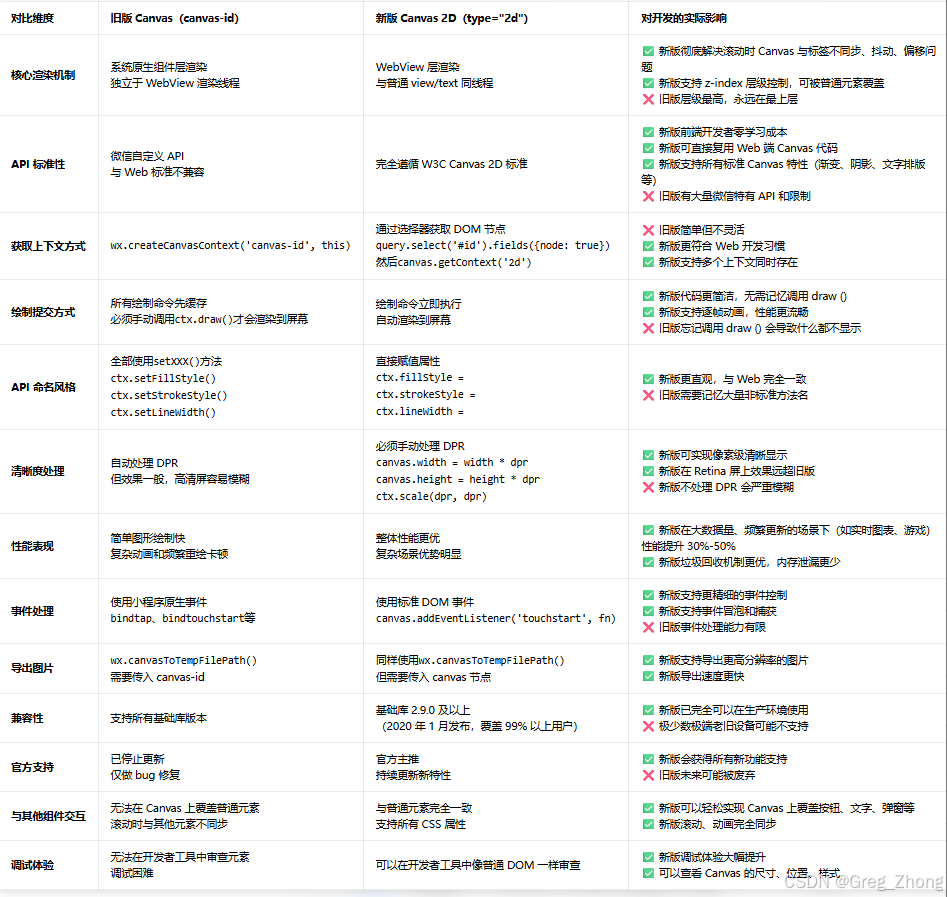
微信小程序从基础库 2.9.0 开始支持Canvas 2D 接口,它不再是原生组件,而是和普通元素一样在 WebView 层渲染,从根本上解决了不同步问题。
canvas和canvas 2d的区别
完整代码
html
	<!-- 场景能力雷达图 -->
			<view class="card radar-card">
				<text class="card-title">场景能力雷达图</text>
				<view class="radar-wrapper">
					<view class="radar-container">
						<!-- 使用type="2d"的新Canvas -->
						<canvas type="2d" id="sceneRadarCanvas" class="radar-canvas" style="width: 260px; height: 260px;"></canvas>

						<!-- 动态渲染标签 -->
						<view class="radar-labels">
							<text class="radar-label" wx:for="{{radarLabels}}" wx:key="index"
								style="left: {{item.left}}px; top: {{item.top}}px; text-align: {{item.align}}; transform: {{item.transform}};">
								{{item.name}}
							</text>
						</view>
					</view>

					<view class="radar-legend">
						<view class="legend-item">
							<view class="legend-line gray"></view>
							<text class="legend-text">Day 1 前测</text>
						</view>
						<view class="legend-item">
							<view class="legend-line blue"></view>
							<text class="legend-text">Day 30 后测</text>
						</view>
					</view>
				</view>
			</view>
javascript
/**
 * @page report_result
 * @description 测评结果主页面 - 高精度还原蓝狐原型设计
 * @module 康复报告模块
 * @usage 展示SADL满意度、场景适应、CHHIE-S三个维度的测评结果
 */

Page({
  data: {
    currentTab: 0,
    tabs: ['SADL满意度', '场景适应', 'CHHIE-S'],

    // 12角雷达图(顺时针标签)
    sceneList: [
      { name: '家庭聚餐', category: '社交与餐饮', before: 4, after: 2, change: -2 },
      { name: '嘈杂餐厅', category: '社交与餐饮', before: 5, after: 3, change: -2 },
      { name: '广场舞', category: '社交与餐饮', before: 4, after: 2, change: -2 },
      { name: '地铁公交', category: '公共交通与出行', before: 4, after: 3, change: -1 },
      { name: '高铁机场', category: '公共交通与出行', before: 5, after: 4, change: -1 },
      { name: '过马路', category: '公共交通与出行', before: 4, after: 2, change: -2 },
      { name: '办公会议', category: '职场与教育', before: 3, after: 2, change: -1 },
      { name: '讲座培训', category: '职场与教育', before: 4, after: 2, change: -2 },
      { name: '视频通话', category: '数字化与服务', before: 4, after: 2, change: -2 },
      { name: '政务柜台', category: '数字化与服务', before: 5, after: 1, change: -4 },
      { name: '家庭电视', category: '家庭与个人', before: 4, after: 2, change: -2 },
      { name: '菜市场', category: '家庭与个人', before: 4, after: 2, change: -2 }
    ],

		// 雷达图数据
		sceneRadarData: {
			before: [4, 5, 4, 4, 5, 4, 3, 4, 4, 5, 4, 4],  // 对应上面的before
			after: [2, 3, 2, 3, 4, 2, 2, 2, 2, 1, 2, 2]     // 对应上面的after
		},

		// 雷达图标签位置
		radarLabels: []
},

  onLoad() {

  },

  onReady() {
    if (this.data.currentTab === 1) {
      setTimeout(() => {
        this.initRadar();
      }, 100);
    }
  },

  onTabChange(e) {
    const index = parseInt(e.currentTarget.dataset.index);
    this.setData({ currentTab: index });

    if (index === 1) {
      setTimeout(() => {
        this.initRadar();
      }, 100);
    }
  },

	//每一个标签,支持标签上下左右微调、角度的微调
	initRadar() {
		const canvasSize = 260; // px
		const centerX = canvasSize / 2;
		const centerY = canvasSize / 2;

		// 与Canvas绘制逻辑完全一致的雷达半径
		const radarRadius = canvasSize * 0.75 / 2; // = 97.5px
		const sides = 12;
		const angleStep = (2 * Math.PI) / sides; // 30度 = π/6弧度

		const labels = [];

		//  格式:{ r:径向距离, x:水平偏移(+右-左), y:垂直偏移(+下-上), t:变换, a:对齐 } // 索引: 标签名(角度)
		const labelConfigs = [
			{ r: 6, x: 0, y: 0, t: 'translate(-50%, -100%)', a: 'center' },  // 0: 家庭聚餐(顶部)
			{ r: 6, x: 0, y: 0, t: 'translate(0%, -100%)', a: 'left' },     // 1: 嘈杂餐厅(右上30°)
			{ r: 6, x: 0, y: -5, t: 'translate(0%, -50%)', a: 'left' },      // 2: 广场舞(右60°)
			{ r: 6, x: -3, y: -20, t: 'translate(0%, 0%)', a: 'left' },        // 3: 地铁公交(右下90°)
			{ r: 6, x: 0, y: -22, t: 'translate(0%, 0%)', a: 'left' },        // 4: 高铁机场(最右下120°)
			{ r: 8, x: -5, y: -20, t: 'translate(0%, 0%)', a: 'right' },       // 5: 过马路(底部右150°)
			{ r: -12, x: 0, y: 0, t: 'translate(-50%, 0%)', a: 'center' },    // 6: 办公会议(底部)
			{ r: 8, x: 0, y: -20, t: 'translate(-100%, 0%)', a: 'right' },    // 7: 讲座培训(底部左210°)
			{ r: 8, x: 6, y: -2, t: 'translate(-100%, -50%)', a: 'right' },  // 8: 视频通话(左下240°)
			{ r: 6, x: 0, y: -6, t: 'translate(-100%, -50%)', a: 'right' },  // 9: 政务柜台(左270°)
			{ r: 8, x: 0, y: 6, t: 'translate(-100%, -100%)', a: 'right' }, // 10: 家庭电视(左上300°)
			{ r: 8, x: -15, y: 0, t: 'translate(0%, -100%)', a: 'center' }    // 11: 菜市场(顶部左330°)
		];

		for (let i = 0; i < sides; i++) {
			const angle = i * angleStep - Math.PI / 2;
			const c = labelConfigs[i];

			// 基础位置计算 + 独立微调
			let x = centerX + (radarRadius + c.r) * Math.cos(angle) + c.x;
			let y = centerY + (radarRadius + c.r) * Math.sin(angle) + c.y;

			labels.push({
				name: this.data.sceneList[i].name,
				left: x,
				top: y,
				align: c.a,
				transform: c.t
			});
		}

		this.setData({ radarLabels: labels }, () => {
			this.drawSceneRadar(canvasSize, canvasSize);
		});
	},

  // 绘制雷达图
  async drawSceneRadar(canvasWidth, canvasHeight) {
    // 获取Canvas实例
    const query = wx.createSelectorQuery().in(this);
    const res = await new Promise(resolve => {
      query.select('#sceneRadarCanvas')
        .fields({ node: true, size: true })
        .exec(resolve);
    });

    const canvas = res[0].node;
    const ctx = canvas.getContext('2d');

    // 设置Canvas实际尺寸(解决模糊问题)
    const dpr = wx.getSystemInfoSync().pixelRatio;
    canvas.width = canvasWidth * dpr;
    canvas.height = canvasHeight * dpr;
    ctx.scale(dpr, dpr);

    const centerX = canvasWidth / 2;
    const centerY = canvasHeight / 2;
    const radius = Math.min(centerX, centerY) * 0.75; // 雷达图占Canvas的75%
    const sides = 12;
    const angleStep = (2 * Math.PI) / sides;

    // 清空画布
    ctx.clearRect(0, 0, canvasWidth, canvasHeight);

    // 绘制背景网格(6层)
    ctx.strokeStyle = 'rgba(148, 163, 184, 0.25)';
    ctx.lineWidth = 1;

    for (let i = 1; i <= 6; i++) {
      ctx.beginPath();
      const r = (radius / 6) * i;
      for (let j = 0; j < sides; j++) {
        const angle = j * angleStep - Math.PI / 2;
        const x = centerX + r * Math.cos(angle);
        const y = centerY + r * Math.sin(angle);
        j === 0 ? ctx.moveTo(x, y) : ctx.lineTo(x, y);
      }
      ctx.closePath();
      ctx.stroke();
    }

    // 绘制轴线
    ctx.beginPath();
    for (let i = 0; i < sides; i++) {
      const angle = i * angleStep - Math.PI / 2;
      const x = centerX + radius * Math.cos(angle);
      const y = centerY + radius * Math.sin(angle);
      ctx.moveTo(centerX, centerY);
      ctx.lineTo(x, y);
    }
    ctx.stroke();

    // 绘制前测数据
    this.drawRadarData(ctx, centerX, centerY, radius, sides, this.data.sceneRadarData.before, '#94a3b8', 'rgba(148, 163, 184, 0.15)');

    // 绘制后测数据
    this.drawRadarData(ctx, centerX, centerY, radius, sides, this.data.sceneRadarData.after, '#0ea5e9', 'rgba(14, 165, 233, 0.2)');
  },

  // 绘制雷达图数据
  drawRadarData(ctx, centerX, centerY, radius, sides, data, strokeColor, fillColor) {
    const angleStep = (2 * Math.PI) / sides;
    const maxValue = 5;  // 最大值为5

    // 绘制填充区域
    ctx.beginPath();
    ctx.fillStyle = fillColor;
    for (let i = 0; i < sides; i++) {
      const value = data[i] || 0;
      const r = (radius * value) / maxValue;
      const angle = i * angleStep - Math.PI / 2;
      const x = centerX + r * Math.cos(angle);
      const y = centerY + r * Math.sin(angle);
      if (i === 0) {
        ctx.moveTo(x, y);
      } else {
        ctx.lineTo(x, y);
      }
    }
    ctx.closePath();
    ctx.fill();

    // 绘制边框线
    ctx.beginPath();
    ctx.strokeStyle = strokeColor;
    ctx.lineWidth = 2;
    for (let i = 0; i < sides; i++) {
      const value = data[i] || 0;
      const r = (radius * value) / maxValue;
      const angle = i * angleStep - Math.PI / 2;
      const x = centerX + r * Math.cos(angle);
      const y = centerY + r * Math.sin(angle);
      if (i === 0) {
        ctx.moveTo(x, y);
      } else {
        ctx.lineTo(x, y);
      }
    }
    ctx.closePath();
    ctx.stroke();

    // 绘制数据点
    for (let i = 0; i < sides; i++) {
      const value = data[i] || 0;
      const r = (radius * value) / maxValue;
      const angle = i * angleStep - Math.PI / 2;
      const x = centerX + r * Math.cos(angle);
      const y = centerY + r * Math.sin(angle);
      ctx.beginPath();
      ctx.arc(x, y, 3, 0, 2 * Math.PI);
      ctx.fillStyle = strokeColor;
      ctx.fill();
    }
  },
css
/* 基础样式 */
.report-container {
  min-height: 100vh;
  background-color: #f6f8fa;
  display: flex;
  flex-direction: column;
	/* letter-spacing: 1rpx;不能全局设置,单个容器设置,影响小容器字体换行 */
}

/* 标签栏 */
.tabs-container {
  display: flex;
  background-color: #ffffff;
  padding: 0 20rpx;
  position: relative;
  border-bottom: 1rpx solid #f0f0f0;
}

.tab-item {
  flex: 1;
  display: flex;
  justify-content: center;
  align-items: center;
  padding: 28rpx 0;
  position: relative;
}

.tab-text {
  font-size: 28rpx;
  color: #64748b;
  font-family: -apple-system, BlinkMacSystemFont, 'Segoe UI', Roboto, sans-serif;
}

.tab-item.active .tab-text {
  color: #1f2937;
  font-weight: 600;
}

.tab-indicator {
  position: absolute;
  bottom: 0;
  left: 0;
  width: 33.33%;
  height: 4rpx;
  background-color: #0ea5e9;
  transition: transform 0.3s ease;
}

/* 内容区域 */
.content-scroll {
  flex: 1;
  height: calc(100vh - 320rpx);
  padding: 20rpx 0; /* 修改:左右padding改为0,通过card的margin来控制 */
  overflow-x: hidden;
}

/* 卡片基础样式 - 精确还原原型阴影 */
.card {
  background-color: #ffffff;
  border-radius: 30rpx;
  padding: 30rpx; /* 保持内部padding为30rpx */
  margin: 0 40rpx 25rpx 40rpx; /* 修改:添加左右margin 40rpx,保持底部margin 25rpx */
  box-shadow: 0 2rpx 26rpx 0 rgba(140, 163, 197, 0.15);
}

/* 卡片基础样式 - 精确还原原型阴影 */
.card {
  background-color: #ffffff;
  border-radius: 30rpx;
  padding: 30rpx;
  margin-bottom: 50rpx;
  box-shadow: 0 2rpx 26rpx 0 rgba(140, 163, 197, 0.15);
}

.card-title {
  font-size: 32rpx;
  font-weight: 700;
  color: #1f2937;
  margin-bottom: 20rpx;
  font-family: -apple-system, BlinkMacSystemFont, 'Segoe UI', Roboto, sans-serif;
}

/* 主评分卡片 */
.main-card {
  position: relative;
}

.card-header {
  display: flex;
  align-items: flex-start;
  margin-bottom: 30rpx;
}

.header-icon-box {
  width: 72rpx;
  height: 72rpx;
  background-color: #f0f9ff;
  border-radius: 10rpx;
  display: flex;
  align-items: center;
  justify-content: center;
  margin-right: 20rpx;
  flex-shrink: 0;
}

.icon-square {
  width: 30rpx;
  height: 30rpx;
  border: 4rpx solid #0ea5e9;
}

.header-info {
  display: flex;
  flex-direction: column;
}

.header-title {
  font-size: 32rpx;
  font-weight: 700;
  color: #1f2937;
  margin-bottom: 8rpx;
  font-family: -apple-system, BlinkMacSystemFont, 'Segoe UI', Roboto, sans-serif;
}

.header-subtitle {
  font-size: 24rpx;
  color: #64748b;
  font-family: -apple-system, BlinkMacSystemFont, 'Segoe UI', Roboto, sans-serif;
}

/* 分数对比区域 */
.score-compare {
  display: flex;
  align-items: center;
  justify-content: space-between;
  margin-bottom: 30rpx;
}

.score-box {
  flex: 1;
  border-radius: 30rpx;
  /* padding: 20rpx; */
  display: flex;
  flex-direction: column;
  align-items: center;
	height: 152rpx;
	justify-content: center;
}

.score-box.gray {
  background-color: #f9fafc;
}

.score-box.blue {
  background-color: #f0f9ff;
  border: 2rpx solid rgba(14, 165, 233, 0.1);
}

.score-label {
  font-size: 24rpx;
  color: #64748b;
  margin-bottom: 10rpx;
  font-family: -apple-system, BlinkMacSystemFont, 'Segoe UI', Roboto, sans-serif;
}

.score-box.blue .score-label {
  color: #0ea5e9;
}

.score-wrap {
  display: flex;
  align-items: baseline;
}

.score-num {
  font-size: 50rpx;
  font-weight: 700;
  color: #475569;
  line-height: 1;
  font-family: -apple-system, BlinkMacSystemFont, 'Segoe UI', Roboto, sans-serif;
}

.score-box.blue .score-num {
  color: #0ea5e9;
}

.score-unit {
  font-size: 24rpx;
  color: #475569;
  margin-left: 4rpx;
  font-family: -apple-system, BlinkMacSystemFont, 'Segoe UI', Roboto, sans-serif;
}

.score-box.blue .score-unit {
  color: #0ea5e9;
}

.score-arrow {
  font-size: 28rpx;
  color: #94a3b8;
  margin: 0 15rpx;
}

.score-arrow-text {
  font-size: 28rpx;
  color: #94a3b8;
  margin: 0 15rpx;
}

/* 改善状态条 */
.improvement-bar {
  display: flex;
  align-items: center;
  justify-content: space-between;
  background-color: #dcfce7;
  border-radius: 20rpx;
	padding: 0rpx 30rpx;
  margin-bottom: 30rpx;
	height: 80rpx;
}

.improvement-text {
  font-size: 28rpx;
  font-weight: 700;
  color: #15803d;
  font-family: -apple-system, BlinkMacSystemFont, 'Segoe UI', Roboto, sans-serif;
}

.improvement-tag {
	width: 90rpx;
height: 32rpx;
  font-size: 22rpx;
  font-weight: 700;
  color: #ffffff;
  background-color: #15803d;
  padding: 6rpx 16rpx;
  border-radius: 22rpx;
  font-family: -apple-system, BlinkMacSystemFont, 'Segoe UI', Roboto, sans-serif;
}

/* 总结文本 */
.summary-box {
  /* 移除 flex 布局,让文本自然换行 */
}

.summary-label {
  font-size: 26rpx;
  font-weight: 700;
  color: #475569;
  font-family: -apple-system, BlinkMacSystemFont, 'Segoe UI', Roboto, sans-serif;
  display: inline;  /* 确保和内容在同一行 */
}

.summary-content {
  font-size: 26rpx;
  color: #475569;
  line-height: 1.6;
  font-family: -apple-system, BlinkMacSystemFont, 'Segoe UI', Roboto, sans-serif;
  display: inline;  /* 确保和标签在同一行 */
}

/* 三维度分析 */
.dimension-row {
  display: flex;
  justify-content: space-between;
	margin: 20rpx 0;
}

.dimension-item {
  flex: 1;
  border-radius: 20rpx;
  padding: 30rpx 0 0 20rpx;
  margin-right: 20rpx;
	height: 228rpx;
}

.dimension-item:last-child {
  margin-right: 0;
}

.dimension-item.full {
  flex: none;
  margin-right: 0;
  margin-top: 20rpx;
}

.dimension-item.green {
  background-color: #dcfce7;
}

.dimension-item.orange {
  background-color: #fef3e2;
}

.dimension-item.blue {
  background-color: #f0f9ff;
}

.dim-label {
  font-size: 22rpx;
  font-weight: 700;
  margin-bottom: 16rpx;
  display: block;
  font-family: -apple-system, BlinkMacSystemFont, 'Segoe UI', Roboto, sans-serif;
}

.dimension-item.green .dim-label {
  color: #15803d;
}

.dimension-item.orange .dim-label {
  color: #ea590a;
}

.dimension-item.blue .dim-label {
  color: #0ea5e9;
}

.dim-score-row {
  display: flex;
  align-items: center;
  margin-bottom: 10rpx;
}

.dim-score-old {
  font-size: 36rpx;
  font-weight: 600;
  color: #475569;
  font-family: -apple-system, BlinkMacSystemFont, 'Segoe UI', Roboto, sans-serif;
}

.dim-arrow {
  font-size: 28rpx;
  color: #94a3b8;
  margin: 0 16rpx;
}

.dim-arrow-text {
  font-size: 28rpx;
  color: #94a3b8;
  margin: 0 16rpx;
}

.dim-change-arrow-text {
  font-size: 24rpx;
  color: #15803d;
  margin-right: 6rpx;
  font-weight: 700;
}

.dim-change-arrow-text.orange {
  color: #ea590a;
}

.dim-change-arrow-text.blue {
  color: #0ea5e9;
}

.dim-change-arrow-text.green {
  color: #15803d;
}

.dim-score-new {
  font-size: 50rpx;
  font-weight: 700;
  font-family: -apple-system, BlinkMacSystemFont, 'Segoe UI', Roboto, sans-serif;
}

.dimension-item.green .dim-score-new {
  color: #15803d;
}

.dimension-item.orange .dim-score-new {
  color: #ea590a;
}

.dimension-item.blue .dim-score-new {
  color: #0ea5e9;
}

.dim-score-new.orange {
  color: #ea590a !important;
}

.dim-score-new.blue {
  color: #0ea5e9 !important;
}

.dim-change-row {
  display: flex;
  align-items: center;
  margin-bottom: 8rpx;
}

.dim-change-arrow {
  width: 0;
  height: 0;
  border-left: 6rpx solid transparent;
  border-right: 6rpx solid transparent;
  border-top: 8rpx solid #15803d;
  margin-right: 10rpx;
  transform: rotate(180deg);
}

.dim-change-arrow.orange {
  border-top-color: #ea590a;
}

.dim-change-arrow.blue {
  border-top-color: #0ea5e9;
}

.dim-change-arrow.green {
  border-top-color: #15803d;
}

.dim-change-text {
  font-size: 22rpx;
  font-weight: 700;
  font-family: -apple-system, BlinkMacSystemFont, 'Segoe UI', Roboto, sans-serif;
}

.dimension-item.green .dim-change-text {
  color: #15803d;
}

.dimension-item.orange .dim-change-text {
  color: #ea590a;
}

.dimension-item.blue .dim-change-text {
  color: #0ea5e9;
}

.dim-change-text.orange {
  color: #ea590a !important;
}

.dim-change-text.blue {
  color: #0ea5e9 !important;
}

.dim-change-text.green {
  color: #15803d !important;
}

.dim-fullscore {
  font-size: 22rpx;
  color: #94a3b8;
  font-weight: 700;
  font-family: -apple-system, BlinkMacSystemFont, 'Segoe UI', Roboto, sans-serif;
}

/* 进度条 */
.progress-list {
  display: flex;
  flex-direction: column;
	padding-bottom: 33rpx;
}

.progress-item {
  margin-bottom: 30rpx;
}

.progress-item:last-child {
  margin-bottom: 0;
}

.progress-label-row {
  display: flex;
  justify-content: space-between;
  margin-bottom: 10rpx;
}

.progress-name {
  font-size: 26rpx;
  color: #475569;
  font-family: -apple-system, BlinkMacSystemFont, 'Segoe UI', Roboto, sans-serif;
}

.progress-value {
  font-size: 26rpx;
  color: #0ea5e9;
  font-weight: 500;
  font-family: -apple-system, BlinkMacSystemFont, 'Segoe UI', Roboto, sans-serif;
}

.progress-track {
  height: 16rpx;
  background-color: #f1f5f9;
  border-radius: 8rpx;
  overflow: hidden;
}

.progress-fill {
  height: 100%;
  background-color: #0ea5e9;
  border-radius: 8rpx;
}

/* 时间线 */
.timeline {
  padding-left: 20rpx;
}

.timeline-item {
  display: flex;
  align-items: flex-start;
  margin-bottom: 10rpx;
  position: relative;
}

.timeline-dot {
  width: 24rpx;
  height: 24rpx;
  border-radius: 50%;
  background-color: rgba(14, 165, 233, 0.3);
  margin-right: 20rpx;
  margin-top: 6rpx;
  flex-shrink: 0;
}

.timeline-dot.active {
  background-color: rgba(14, 165, 233, 0.3);
}

.timeline-dot.current {
  background-color: #0ea5e9;
}

.timeline-line {
  position: absolute;
  left: 10rpx;
  top: 24rpx;
  width: 4rpx;
  height: calc(100% - 24rpx);
  background-color: rgba(14, 165, 233, 0.3);
}

.timeline-date {
  font-size: 24rpx;
  color: #64748b;
  font-family: -apple-system, BlinkMacSystemFont, 'Segoe UI', Roboto, sans-serif;
}

.timeline-content {
  padding-left: 44rpx;
  margin-bottom: 30rpx;
}

.timeline-content.first {
  margin-top: -10rpx;
}

.timeline-text-group {
  display: flex;
  flex-direction: column;
	margin-bottom: 20rpx;
}

.timeline-title {
  font-size: 28rpx;
  font-weight: 700;
  color: #1f2937;
  margin: 20rpx 0;
  font-family: -apple-system, BlinkMacSystemFont, 'Segoe UI', Roboto, sans-serif;
}

.timeline-title.current {
  color: #0ea5e9;
}

.timeline-detail {
  font-size: 26rpx;
  color: #475569;
  font-family: -apple-system, BlinkMacSystemFont, 'Segoe UI', Roboto, sans-serif;
}

/* 雷达图 - 最终硬编码版本 */

.radar-container {/* 新增:雷达图容器 - 关键!使用相对定位作为基准 */
  position: relative;
  width: 260px;
  height: 260px;
  margin: 0 auto;
}

.radar-canvas {
  display: block;
}

.radar-labels {/* 标签容器 - 绝对定位覆盖在Canvas上 */
  position: absolute;
  top: 0;
  left: 0;
  width: 100%;
  height: 100%;
  pointer-events: none; /* 让标签不阻挡Canvas事件 */
}

.radar-label {/* 标签样式 - 使用绝对定位 */
  position: absolute;
  font-size: 24rpx;
  color: #64748b;
  white-space: nowrap;
	/* 关键:让标签中心对准计算点 */
  /* transform: translate(-50%, -50%);  */
}

.radar-legend {
  display: flex;
  justify-content: center;
  gap: 40rpx;
  margin-top: 30rpx;
}

.legend-item {
  display: flex;
  align-items: center;
  gap: 12rpx;
}

.legend-line {
  width: 40rpx;
  height: 4rpx;
  border-radius: 2rpx;
}

.legend-line.gray {
  background-color: #94a3b8;
}

.legend-line.blue {
  background-color: #0ea5e9;
}

.legend-text {
  font-size: 24rpx;
  color: #64748b;
}


/* 场景明细 */
.scene-card {
  padding-bottom: 10rpx;
}

.scene-list {
  display: flex;
  flex-direction: column;
}

.scene-item {
  display: flex;
  align-items: center;
  padding: 24rpx 0;
  border-bottom: 1rpx solid #f1f5f9;
}

.scene-item:last-child {
  border-bottom: none;
}

.scene-icon-box {
  width: 60rpx;
  height: 60rpx;
  margin-right: 20rpx;
  flex-shrink: 0;
}

.scene-icon {
  width: 100%;
  height: 100%;
  background-color: #f1f5f9;
  border-radius: 10rpx;
}

.scene-info {
  flex: 1;
  display: flex;
  flex-direction: column;
}

.scene-name {
  font-size: 28rpx;
  color: #1f2937;
  margin-bottom: 6rpx;
  font-family: -apple-system, BlinkMacSystemFont, 'Segoe UI', Roboto, sans-serif;
}

.scene-category {
  font-size: 22rpx;
  color: #94a3b8;
  font-family: -apple-system, BlinkMacSystemFont, 'Segoe UI', Roboto, sans-serif;
}

.scene-scores {
  display: flex;
  align-items: center;
  padding-left: 20rpx;
}

.score-col {
  display: flex;
  flex-direction: column;
  align-items: center;
  padding: 0 10rpx;
}

.score-dot {
  width: 16rpx;
  height: 16rpx;
  border-radius: 50%;
  margin-bottom: 6rpx;
}

.score-dot.gray {
  background-color: #94a3b8;
}

.score-dot.blue {
  background-color: #0ea5e9;
}

.score-arrow-h {
  width: 30rpx;
  height: 4rpx;
  background-color: #e2e8f0;
  margin-top: 6rpx;
}

.score-change {
  font-size: 24rpx;
  color: #0ea5e9;
  font-weight: 500;
  font-family: -apple-system, BlinkMacSystemFont, 'Segoe UI', Roboto, sans-serif;
}

/* 分级解读 */
.level-list {
  display: flex;
  flex-direction: column;
}

.level-item {
  display: flex;
  align-items: stretch;
  background-color: #ffffff;
  border-radius: 20rpx;
  border: 2rpx solid rgba(0, 0, 0, 0.06);
  margin-bottom: 20rpx;
  overflow: hidden;
  height: 122rpx;
}

.level-item.current {
  border-color: rgba(245, 158, 12, 0.15);
}

.level-badge {
  display: flex;
  align-items: center;
  justify-content: center;
  width: 140rpx;
  height: 122rpx;
  font-size: 26rpx;
  font-weight: 700;
  font-family: -apple-system, BlinkMacSystemFont, 'Segoe UI', Roboto, sans-serif;
  flex-shrink: 0;
}

.level-badge.green {
  background-color: #dcfce7;
  color: #15803d;
  border-right: 2rpx solid #bef1d1;
}

.level-badge.yellow {
  background-color: #fffbeb;
  color: #924210;
  border-right: 2rpx solid rgba(245, 158, 12, 0.15);
}

.level-badge.red {
  background-color: #fee2e2;
  color: #d94040;
  border-right: 2rpx solid #ffd4d4;
}

.level-info {
  flex: 1;
  /* padding: 20rpx 24rpx; */
  display: flex;
  flex-direction: column;
  justify-content: center;
  min-height: 122rpx;
	margin-left: 24rpx;
	padding-right: 30rpx;
}

.level-name {
  font-size: 28rpx;
  font-weight: 700;
  color: #15803D;
  margin-bottom: 8rpx;
  line-height: 1.2;
  font-family: -apple-system, BlinkMacSystemFont, 'Segoe UI', Roboto, sans-serif;
}

.level-item.current .level-name {
  color: #924210;
}

.level-desc {
  font-size: 24rpx;
  color: #475569;
  line-height: 1.4;
  font-family: -apple-system, BlinkMacSystemFont, 'Segoe UI', Roboto, sans-serif;
}

.level-summary {
  margin-top: 30rpx;
  display: flex;
  flex-wrap: wrap;
	padding-bottom: 50rpx;
}

.summary-normal {
  font-size: 26rpx;
  color: #475569;
  font-family: -apple-system, BlinkMacSystemFont, 'Segoe UI', Roboto, sans-serif;
}

.summary-highlight {
  font-size: 26rpx;
  font-weight: 700;
  font-family: -apple-system, BlinkMacSystemFont, 'Segoe UI', Roboto, sans-serif;
}

.summary-highlight.red {
  color: #d94040;
}

.summary-highlight.yellow {
  color: #924210;
}

/* 底部间距 */
.bottom-spacer {
  height: 300rpx;
}

/* 底部操作栏 */
.bottom-bar {
  position: fixed;
  bottom: 0;
  left: 0;
  right: 0;
  background-color: #ffffff;
  padding: 20rpx 40rpx;
  padding-bottom: calc(20rpx + env(safe-area-inset-bottom));
  box-shadow: 0 -4rpx 20rpx rgba(0, 0, 0, 0.08);
}

.tips-box {
  display: flex;
  align-items: flex-start;
  background-color: #f0f9ff;
  border-radius: 16rpx;
  padding: 24rpx;
  margin-bottom: 20rpx;
}

.tips-icon {
  width: 40rpx;
  height: 40rpx;
  background-color: #0ea5e9;
  border-radius: 50%;
  margin-right: 16rpx;
  flex-shrink: 0;
}

.tips-text {
  flex: 1;
  font-size: 24rpx;
  color: #475569;
  line-height: 1.5;
  font-family: -apple-system, BlinkMacSystemFont, 'Segoe UI', Roboto, sans-serif;
}

.btn-row {
  display: flex;
  gap: 20rpx;
}

.btn-share {
  flex: 1;
  height: 84rpx;
  display: flex;
  align-items: center;
  justify-content: center;
  background-color: #f1f5f9;
  border-radius: 42rpx;
  font-size: 28rpx;
  color: #475569;
  font-family: -apple-system, BlinkMacSystemFont, 'Segoe UI', Roboto, sans-serif;
}

.btn-primary {
  flex: 1;
  height: 84rpx;
  display: flex;
  align-items: center;
  justify-content: center;
  background-color: #0ea5e9;
  border-radius: 42rpx;
  font-size: 28rpx;
  color: #ffffff;
  font-weight: 500;
  font-family: -apple-system, BlinkMacSystemFont, 'Segoe UI', Roboto, sans-serif;
}