若该文为原创文章,转载请注明出处
本文章博客地址:https://hpzwl.blog.csdn.net/article/details/161026020
长沙红胖子Qt(长沙创微智科)博文大全:开发技术集合(包含Qt实用技术、树莓派、三维、OpenCV、OpenGL、ffmpeg、OSG、单片机、软硬结合等等)持续更新中...
Qt开发专栏:项目实战(点击传送门)
需求
工控系统上新增cpu使用率和内存使用率,并需要每秒检测绘制曲线。
Demo_v1.0.0
windows运行包下载地址
CSDNf粉丝0积分下载:https://download.csdn.net/download/qq21497936/92866962
博主用户名有QQ技术群,进QQ群,点击"文件 "搜索"cpu",群内与博文同步更新)
功能描述 v1.0.0
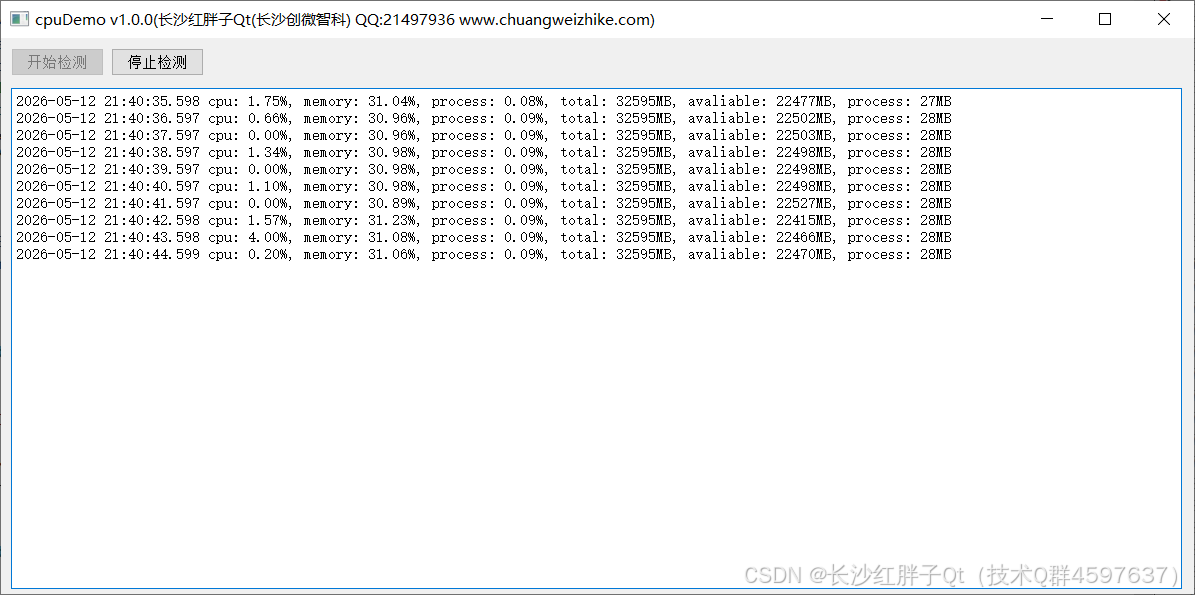
- windows上定时检测cpu使用率和内存使用率。
- 循环1s一次,基本对cpu零消耗(区别于QProcess占用cpu和内存循环跑的方式)。
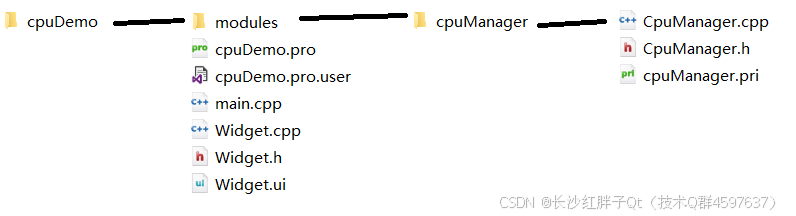
模块化部署
关键源码
cpp
#include "CpuManager.h"

#include <Windows.h>
#include <Pdh.h>
#include <psapi.h>

#include <QTimer>

#include <QDebug>
#include <QDateTime>
//#define LOG qDebug()<<__FILE__<<__LINE__
//#define LOG qDebug()<<__FILE__<<__LINE__<<__FUNCTION__
//#define LOG qDebug()<<__FILE__<<__LINE__<<QThread()::currentThread()
//#define LOG qDebug()<<__FILE__<<__LINE__<<QDateTime::currentDateTime().toString("yyyy-MM-dd")
#define LOG qDebug()<<__FILE__<<__LINE__<<QDateTime::currentDateTime().toString("yyyy-MM-dd hh:mm:ss:zzz")

static PDH_HQUERY cpuQuery;
static PDH_HCOUNTER cpuTotal;

CpuManager::CpuManager(QObject *parent)
    : QObject(parent),
      _running(false),
      _checking(false),
      _intervalMs(1000)
{

}

void CpuManager::slot_start()
{
    if(_running)
    {
        LOG << "It's already running!";
        return;
    }

    initCpuMonitor();

    _running = true;
}

void CpuManager::slot_stop()
{
    if(!_running)
    {
        LOG << "It's not running!";
        return;
    }
    _running = false;
}

void CpuManager::slot_startCheck()
{
    if(!_running)
    {
        LOG << "It's not running!";
        return;
    }
    if(_checking)
    {
        LOG << "It's already checking!";
        return;
    }

    QTimer::singleShot(1, this, SLOT(slot_loop()));

    _checking = true;
}

void CpuManager::slot_stopCheck()
{
    if(!_running)
    {
        LOG << "It's not running!";
        return;
    }
    if(!_checking)
    {
        LOG << "It's not checking!";
        return;
    }

    _checking = false;
}

void CpuManager::slot_loop()
{
    if(!_running || !_checking)
    {
        LOG << "if(!_running || !_checking)";
        return;
    }

    // 获取cpu使用率
    double cpuUsage = getCpuUsage();
    // 获取内存使用大小
    quint64 totalMem;
    quint64 avaliMem;
    getSystemMemory(totalMem, avaliMem);
    // 获取本进程内存使用大小
    quint64 processMem = getProcessMemory();

    // 抛出信号
    emit signal_cpuCheck(cpuUsage, totalMem, avaliMem, processMem);

    // 定时继续执行下一次
    QTimer::singleShot(_intervalMs, this, SLOT(slot_loop()));
}

void CpuManager::initCpuMonitor()
{
    PdhOpenQuery(NULL, 0, &cpuQuery);
    PdhAddCounter(cpuQuery, L"\\Processor Information(_Total)\\% Processor Time", 0, &cpuTotal);
    PdhCollectQueryData(cpuQuery);
}

double CpuManager::getCpuUsage()
{
    PDH_FMT_COUNTERVALUE value;
    PdhCollectQueryData(cpuQuery);
    PdhGetFormattedCounterValue(cpuTotal, PDH_FMT_DOUBLE, NULL, &value);
    return value.doubleValue;
}

void CpuManager::getSystemMemory(quint64 &totalMem, quint64 &availMem)
{
    MEMORYSTATUSEX memoryStatusex;
    memoryStatusex.dwLength = sizeof(memoryStatusex);
    GlobalMemoryStatusEx(&memoryStatusex);

    totalMem = memoryStatusex.ullTotalPhys / (1024 * 1024);
    availMem = memoryStatusex.ullAvailPhys / (1024 * 1024);
}

quint64 CpuManager::getProcessMemory()
{
    PROCESS_MEMORY_COUNTERS processMemoryCounters;
    if(GetProcessMemoryInfo(GetCurrentProcess(), &processMemoryCounters, sizeof(processMemoryCounters)))
    {
        return processMemoryCounters.WorkingSetSize / (1024 * 1024);
    }
    return 0;
}

int CpuManager::getIntervalMs()
{
    return _intervalMs;
}

void CpuManager::setIntervalMs(int intervalMs)
{
    _intervalMs = intervalMs;
}
工程模板

本文章博客地址:https://hpzwl.blog.csdn.net/article/details/161026020