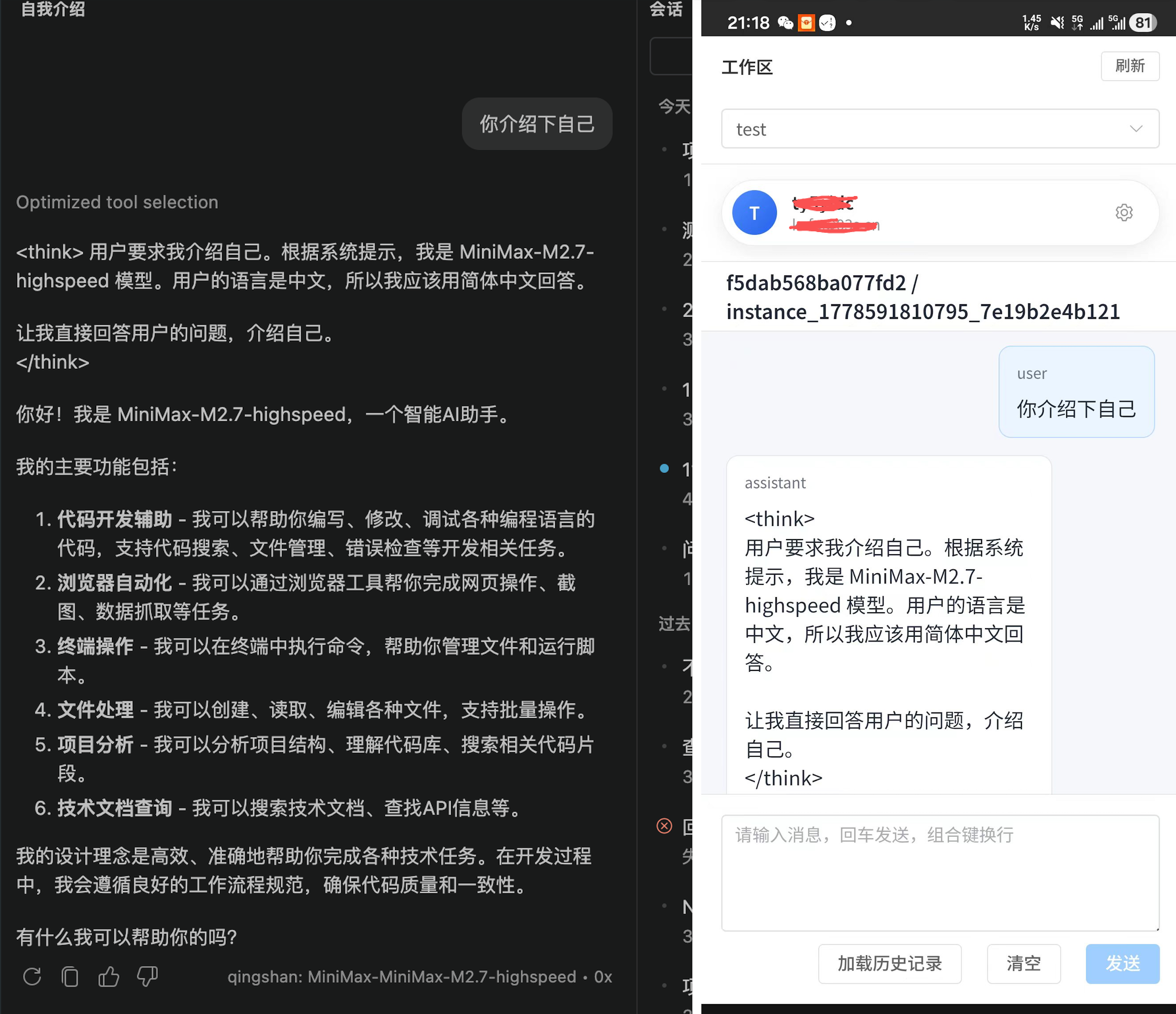
LLS OAI 2.7.0 远程办公重磅发布:远端发起任务、自动提交 Copilot Chat、实时回传模型过程,让 VS Code 成为团队智能协作节点
LLS OAI 是一款面向 VS Code 的 AI 编程扩展,核心目标是让 GitHub Copilot Chat 能够接入更多 OpenAI 兼容接口与 Anthropic 模型服务。它支持多供应商管理、本地大模型连接、密钥安全存储、可视化配置、工具调用、聊天记录保存、提示词增强、专家模式、多语言界面以及多模态输入转发等能力。对于希望在 Copilot Chat 中使用 DeepSeek、Ollama、LM Studio、vLLM、LocalAI、自建代理或企业内部模型网关的开发者来说,LLS OAI 提供了一个统一、灵活且更贴近工程实践的接入层。
在人工智能深度进入研发流程的今天,开发者的工作方式正在从"单人本地操作"逐步走向"远程协同、自动化调度、跨系统联动"。传统的 VS Code Copilot Chat 更偏向于本机交互:开发者坐在电脑前输入问题,模型在本地编辑器中返回结果。但在真实团队场景里,很多需求并不只发生在编辑器窗口内。团队可能希望在网页端发起一次代码分析,让远端服务器统一调度任务;运维人员可能希望通过控制台把问题推送到某位开发者的 VS Code;自动化平台可能希望在某个流水线步骤中触发模型完成排查、生成说明或给出修复建议;管理者也可能希望把模型响应、工具调用、执行过程回传到外部系统做统一展示和追踪。为了让这些场景真正落地,LLS OAI 在 2.7.0 中推出了全新的"远程办公"能力。它让 VS Code 不再只是一个孤立的本地 AI 入口,而是可以通过 WebSocket 和 Webhook 与外部系统建立双向连接:远端可以把消息发送到你的 Copilot Chat,扩展会自动接收、自动注入、自动提交;模型执行过程中的请求、流式输出、工具调用、完成结果和错误信息,也可以按同一个请求标识实时回传给远端。这样,无论你是在办公室、家中,还是让自动化系统代替你发起任务,都能把 VS Code 中的 AI 能力接入更大的工作流。
核心亮点
一、远端消息自动进入 Copilot Chat
远程办公功能支持通过 WebSocket 接收服务端下发的 server.chat_message 消息。只要连接建立,远端发送的文本就会自动进入当前活动的 Chat Input,并直接提交执行,不再需要开发者手动复制、粘贴或点击确认。
这意味着你可以在外部网页、团队控制台、自动化平台或自建服务中发起任务,让 VS Code 中的 Copilot Chat 自动开始工作。
二、完整回传模型执行过程
当模型开始响应后,扩展会把完整的 model.* 生命周期事件回传给远端,包括:
- 模型请求开始
- 流式输出片段
- 工具调用事件
- 工具调用结果
- 最终完成结果
- 错误信息
远端系统不仅能知道"模型最后说了什么",还可以实时观察模型的生成过程、工具调用过程和失败原因,适合做远程看板、任务追踪、审计日志、自动化 Agent 编排等场景。
三、requestId 全链路保持一致
在 2.7.0 中,远程办公协议会严格保留服务端在 server.chat_message 中下发的 requestId。扩展端接收到该请求后,会把同一个 requestId 绑定到本次模型执行的所有 model.* 事件上。
这保证了远端系统可以用一个请求标识完整追踪从"远端发起任务"到"模型完成响应"的全过程,避免多任务并发时事件混淆,也更符合请求响应配对的协议语义。
四、WebSocket 与 Webhook 完全解耦
远程办公同时支持 WebSocket 和 Webhook 两种通道:
- WebSocket:适合实时双向通信,远端可以发送消息,扩展也可以实时推送模型事件。
- Webhook:适合把模型事件回调到外部 HTTP 服务,便于接入已有业务系统。
两种通道在 2.7.0 中已经完全解耦。WebSocket 是否发送,只判断远程办公开关、WebSocket 开关和连接在线状态;Webhook 则只受自己的配置影响。你可以只用 WebSocket,也可以只用 Webhook,或者两者同时启用。
适用场景
团队远程协作
团队成员可以在统一平台中提交问题,由远程服务推送到开发者的 VS Code 中执行,让 AI 辅助能力不再局限于本机输入框。
自动化研发工作流
在 CI、代码审查、任务系统、告警系统中自动触发 Copilot Chat,让模型参与问题分析、日志解释、修复建议生成和文档补全。
远端 Agent 调度
自建服务可以把 VS Code 作为一个具备模型能力和工具能力的执行节点,通过 WebSocket 发送任务,并实时接收执行过程。
多端控制与展示
你可以在网页端、移动端或内部管理后台发起请求,并把模型输出过程实时展示给其他成员,实现更灵活的 AI 工作台。
一句话介绍
LLS OAI 2.7.0 远程办公,让 VS Code Copilot Chat 变成可远程调用、可实时回传、可接入团队系统的智能工作节点。
推荐宣传短句
- 把 Copilot Chat 接入你的远程工作流。
- 远端发起任务,VS Code 自动执行,结果实时回传。
- WebSocket 与 Webhook 双通道,让 AI 编程助手连接团队系统。
- 保留 requestId 全链路追踪,复杂任务也能清晰关联。
- 支持私有化部署,也支持快速使用官方服务。
发布说明摘要
LLS OAI 2.7.0 新增远程办公能力,支持通过 WebSocket 接收远端聊天消息并自动提交到 Copilot Chat,同时将模型请求、流式输出、工具调用、完成结果和错误事件实时回传到远端。新版完整保留服务端下发的 requestId,实现请求与响应的全链路关联;WebSocket 与 Webhook 通道完全解耦,可独立启用;设置页新增美观的使用方式区域,支持私有化部署与官方服务入口,并提供多语言链接和隐私提示。
关于 LLS OAI
LLS OAI 是一款 VS Code 扩展,让 GitHub Copilot Chat 能够连接任意 OpenAI 兼容或 Anthropic API 提供商,并通过远程办公能力把 VS Code 接入团队协作与自动化工作流。
核心功能
🔌 多供应商支持
同时管理多个 API 提供商(OpenAI、DeepSeek、SiliconFlow、Ollama、Anthropic Claude、Google Gemini 等),不同供应商独立配置 API Key,统一界面管理。
🔐 企业级安全存储
所有 API Key 通过 VS Code 原生 Secret Storage 加密存储,密钥不暴露在配置文件中,仅本地保存。
🎨 可视化配置界面
告别手动编辑 JSON,使用直观的 WebView 图形界面,鼠标点击即可完成所有配置。
🔧 完整工具调用支持
完美支持 Function Calling / Tool Use,Copilot 调用工具时扩展自动处理请求和结果返回。
📊 灵活模型配置
每个模型独立设置上下文长度、最大 Tokens、Temperature、Top-P 等参数,同一模型可创建多份配置。
💾 导入导出功能
一键导出配置为 JSON 备份,快速恢复或多设备同步。API Key 不随配置导出,确保安全。
⚡ 实时状态监控
状态栏实时显示当前模型和提供商信息,无需打开配置界面即可快速切换。
🌐 多语言界面
配置界面支持简体中文、繁体中文、英语、韩语、日语、法语、德语,自动跟随 VS Code 显示语言。
🛰️ 远程办公
通过 WebSocket 与 Webhook 与外部系统双向连接,远端可发起任务、自动提交到 Copilot Chat,模型执行过程实时回传,支持私有化部署与官方服务。
快速开始
- 在 VS Code 中搜索 "LLS OAI" 并安装
- 按
Ctrl+Shift+P/Cmd+Shift+P打开命令面板,输入LLS OAI: Manage Providers - 点击 "Add Provider" 添加你的 API 提供商和模型
- 打开 Copilot Chat,选择 LLS OAI 提供商和模型即可开始对话
- 如需远程办公,前往设置页启用 WebSocket / Webhook 通道,并填入服务端地址
让 VS Code 成为团队智能协作节点。
远程办公让你的 AI 编程助手能被远端调用、实时回传、接入团队系统。
立即体验: VS Code Marketplace | GitHub
LLS OAI 2.7.0 Remote Work Major Release: Trigger Tasks Remotely, Auto-Submit to Copilot Chat, Stream Model Activity Back in Real Time --- Turn VS Code into a Smart Collaboration Node for Your Team
LLS OAI is a VS Code AI coding extension whose core goal is to let GitHub Copilot Chat connect to a much wider range of OpenAI-compatible APIs and Anthropic model services. It supports multi-provider management, local LLM integration, secure key storage, visual configuration, tool calling, chat history persistence, prompt enhancement, expert mode, multilingual UI, and multimodal input forwarding. For developers who want to use DeepSeek, Ollama, LM Studio, vLLM, LocalAI, self-hosted proxies, or enterprise internal model gateways inside Copilot Chat, LLS OAI provides a unified, flexible, and engineering-friendly integration layer.
As AI moves deep into the software development lifecycle, developers' workflows are shifting from "solo local operation" toward "remote collaboration, automated orchestration, and cross-system integration." Traditional VS Code Copilot Chat is built around local interaction: the developer sits in front of the editor, types a question, and the model responds inside that same window. But in real team scenarios, many needs simply don't fit inside that editor window. A team may want to trigger a code analysis from a web console so that a remote server can dispatch tasks uniformly; an SRE may want to push a problem from a dashboard directly into a specific developer's VS Code; an automation platform may want a pipeline step to invoke the model to investigate, generate explanations, or suggest fixes; managers may want every model response, tool call, and execution step streamed back to an external system for unified display and audit. To make these scenarios actually work in production, LLS OAI 2.7.0 introduces the brand-new Remote Work capability. VS Code is no longer an isolated local AI entry point --- it can now establish bidirectional connections with external systems through WebSocket and Webhook. The remote side can push messages straight into your Copilot Chat, and the extension will auto-receive, auto-inject, and auto-submit them. The model's lifecycle --- request start, streamed deltas, tool calls, completion result, and errors --- can be streamed back to the remote side in real time, all tagged with the same request ID. Whether you're at the office, at home, or letting an automated system kick off tasks on your behalf, you can now wire the AI capabilities inside VS Code into a much larger workflow.
Highlights
1. Remote Messages Flow Straight into Copilot Chat
Remote Work supports inbound server.chat_message events delivered over WebSocket. Once the connection is up, any text the remote sends is automatically placed into the active Chat Input and submitted for execution --- no manual copy, paste, or confirm click required.
This means you can trigger tasks from an external web page, a team console, an automation platform, or any self-hosted service, and Copilot Chat inside VS Code will start working on them automatically.
2. Full Model Execution Streamed Back
Once the model begins responding, the extension streams the complete model.* lifecycle back to the remote side, including:
- Model request start
- Streamed output chunks
- Tool-call events
- Tool-call results
- Final completion result
- Error information
The remote system doesn't just learn "what the model said last" --- it can observe the generation process, tool invocations, and failure causes in real time. This is ideal for remote dashboards, task tracking, audit logs, automated agent orchestration, and similar use cases.
3. End-to-End requestId Consistency
In 2.7.0, the Remote Work protocol strictly preserves the requestId issued by the server inside server.chat_message. Once the extension accepts that request, the same requestId is bound to every model.* event emitted during that execution.
This guarantees that the remote system can use a single request identifier to follow the entire trip from "remote-triggered task" to "model response complete." It eliminates event mix-ups when many tasks run concurrently, and fully matches the request-response pairing semantics required by the protocol.
4. WebSocket and Webhook Are Fully Decoupled
Remote Work supports both WebSocket and Webhook channels at the same time:
- WebSocket --- best for real-time bidirectional traffic. The remote can push messages and the extension can push model events back in real time.
- Webhook --- best for callback-style integration into existing HTTP services and business systems.
In 2.7.0 the two channels are fully decoupled. Whether WebSocket sends a message depends only on the Remote Work master switch, the WebSocket switch, and the online status; Webhook is governed solely by its own configuration. You can run WebSocket only, Webhook only, or both at once.
Use Cases
Distributed Team Collaboration
Team members submit problems through a shared platform; the remote service forwards them to a developer's VS Code for execution. AI assistance is no longer limited to whoever is sitting in front of the keyboard.
Automated Engineering Workflows
Trigger Copilot Chat automatically from CI, code review, ticketing, or alerting systems, so the model can participate in problem analysis, log interpretation, fix suggestions, and documentation generation.
Remote Agent Orchestration
A self-hosted service can treat VS Code as an execution node equipped with model and tool capabilities --- dispatch tasks over WebSocket and receive the execution trace in real time.
Multi-Surface Control and Display
Initiate requests from a web app, a mobile client, or an internal admin panel, and stream the model's output to other team members in real time --- a far more flexible AI workbench.
One-Liner
LLS OAI 2.7.0 Remote Work turns VS Code Copilot Chat into a smart work node that can be invoked remotely, streamed back in real time, and wired into your team's systems.
Suggested Taglines
- Plug Copilot Chat into your remote workflow.
- Tasks triggered remotely, executed inside VS Code, streamed back live.
- WebSocket + Webhook dual channels --- connect your AI coding assistant to your team systems.
- End-to-end requestId tracing keeps even complex workflows perfectly correlated.
- Self-host it, or use our hosted service to get started in minutes.
Release Notes Summary
LLS OAI 2.7.0 introduces Remote Work: inbound chat messages can be received over WebSocket and auto-submitted into Copilot Chat, while model request, streamed output, tool calls, completion results, and error events are streamed back to the remote side in real time. The release fully preserves the server-issued requestId to provide end-to-end request/response correlation. WebSocket and Webhook channels are fully decoupled and can be enabled independently. The settings page ships with a redesigned Usage section supporting both self-hosted deployment and the official service, with localized links and a clear privacy notice.
About LLS OAI
LLS OAI is a VS Code extension that lets GitHub Copilot Chat connect to any OpenAI-compatible or Anthropic API provider, and --- via Remote Work --- wires VS Code into team collaboration and automation workflows.
Core Features
🔌 Multi-Provider Support
Manage multiple API providers (OpenAI, DeepSeek, SiliconFlow, Ollama, Anthropic Claude, Google Gemini, and more) at the same time, with independent API Key configuration per provider, all from one unified UI.
🔐 Enterprise-Grade Secure Storage
All API Keys are encrypted with VS Code's native Secret Storage. Keys never appear in plain config files and are stored locally only.
🎨 Visual Configuration
No more hand-editing JSON. An intuitive WebView UI lets you complete every configuration with a few clicks.
🔧 Full Tool-Calling Support
First-class support for Function Calling / Tool Use. When Copilot invokes tools, the extension handles request dispatch and result return automatically.
📊 Flexible Model Configuration
Each model can independently set context length, max tokens, temperature, top-p, and more. The same model can have multiple configurations side by side.
💾 Import / Export
One-click export of your configuration as a JSON backup for quick recovery or cross-device sync. API Keys are excluded from exports for safety.
⚡ Real-Time Status
The status bar shows the current model and provider at a glance, so you can switch quickly without opening the configuration panel.
🌐 Multilingual UI
The configuration UI is fully localized in Simplified Chinese, Traditional Chinese, English, Korean, Japanese, French, and German, and follows the VS Code display language automatically.
🛰️ Remote Work
Bidirectional integration with external systems through WebSocket and Webhook. The remote side can trigger tasks, the extension auto-submits them to Copilot Chat, and model execution is streamed back live. Supports self-hosted deployment as well as the official service.
Quick Start
- Search for "LLS OAI" in VS Code and install the extension.
- Press
Ctrl+Shift+P/Cmd+Shift+Pto open the command palette and runLLS OAI: Manage Providers. - Click "Add Provider" to register your API provider and models.
- Open Copilot Chat, pick the LLS OAI provider and model, and start chatting.
- To enable Remote Work, open the settings page, switch on the WebSocket / Webhook channels, and fill in your server endpoint.
Turn VS Code into a smart collaboration node for your team.
Remote Work makes your AI coding assistant remotely callable, live-streamed, and team-system ready.
Try it now: VS Code Marketplace | GitHub