RichText 是 Flutter 中用于显示富文本 的组件,可以在同一段文字中设置多种样式(不同颜色、大小、字体、加粗、图标等)。
效果图
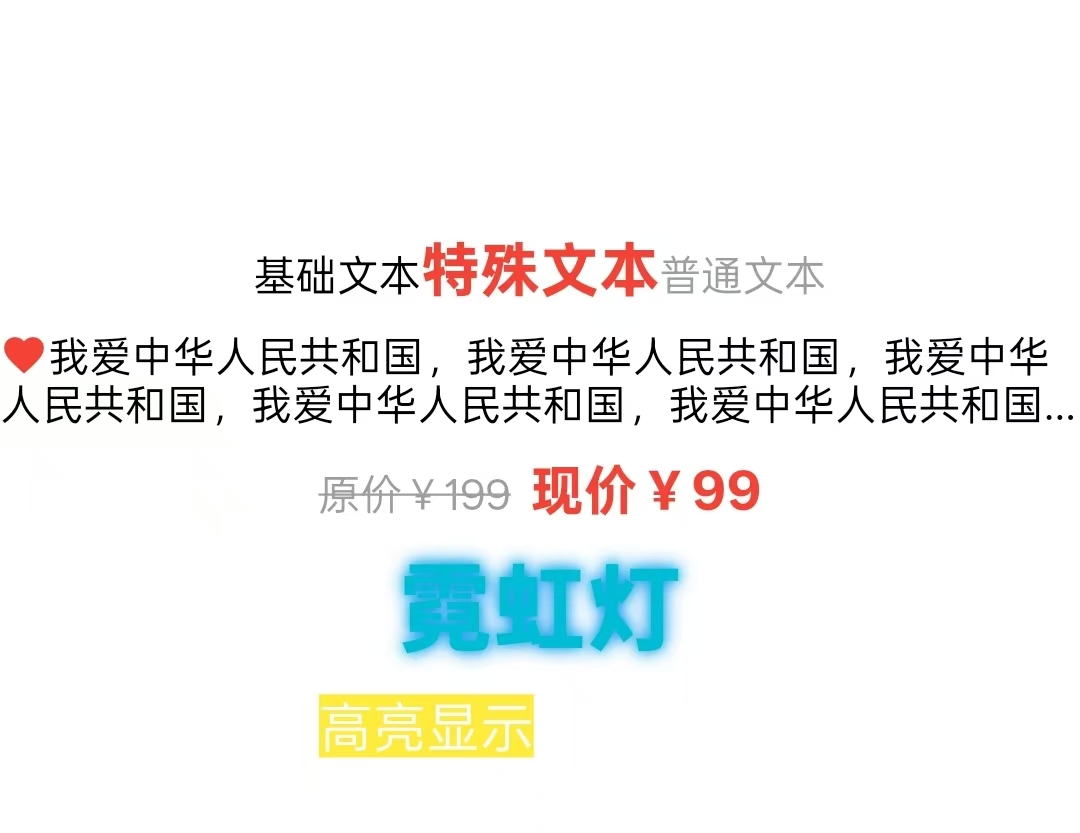
1.不同格式的文本
Dart
//1.不同格式的文本
          RichText(
              text: TextSpan( //文本片段
                  text: "基础文本",
                  style: TextStyle(fontSize: 14,color: Colors.black),
                  children: [
                    TextSpan(
                      text: '特殊文本',
                      style: TextStyle(fontSize: 20,color: Colors.red,fontWeight: FontWeight.bold),
                      recognizer: TapGestureRecognizer()//点击事件
                        ..onTap = (){
                          print("用户点击了特殊文本");
                        }
                    ),
                    TextSpan(
                      text: "普通文本",
                      style: TextStyle(fontSize: 14,color: Colors.grey),
                    )
                  ]
              )
          ),
2.图片嵌入文本
Dart
//2.图片嵌入文本
          SizedBox(height: 10,),
          RichText(
            text: TextSpan(
              children: [
                WidgetSpan( //嵌入组件
                  child: Icon(Icons.favorite, color: Colors.red, size: 16),
                  alignment: PlaceholderAlignment.middle, //对齐方式
                ),
                TextSpan(
                  text: '我爱中华人民共和国,我爱中华人民共和国,我爱中华人民共和国,我爱中华人民共和国,我爱中华人民共和国,',
                  style: TextStyle(color: Colors.black, fontSize: 14),
                ),
              ],
            ),

            softWrap: true,//允许换行,这个不写也是默认可以换行的
            maxLines: 2,//最多几行
            overflow: TextOverflow.ellipsis,//超出显示省略号
          ),
3.带删除线的文本
Dart
//3.带删除线
          RichText(
            text: TextSpan(
              children: [
                TextSpan(
                  text: '原价¥199',
                  style: TextStyle(
                    color: Colors.grey,
                    decoration: TextDecoration.lineThrough,//删除线,decoration: underline-下划线
                    fontSize: 14,
                  ),
                ),
                TextSpan(text: '  '),
                TextSpan(
                  text: '现价¥99',
                  style: TextStyle(
                    color: Colors.red,
                    fontWeight: FontWeight.bold,
                    fontSize: 18,
                  ),
                ),
              ],
            ),
          ),
4.文字阴影效果
Dart
//4.文字阴影效果
          RichText(
            text: TextSpan(
              children: [
                TextSpan(
                  text: '霓虹灯',
                  style: TextStyle(
                    fontSize: 32,
                    fontWeight: FontWeight.bold,
                    color: Colors.cyan,
                    shadows: [
                      Shadow(
                        offset: Offset(0, 0),
                        blurRadius: 10,
                        color: Colors.cyan,
                      ),
                      Shadow(
                        offset: Offset(0, 0),
                        blurRadius: 20,
                        color: Colors.blue,
                      ),
                    ],
                  ),
                ),
              ],
            ),
          ),
5.带背景色的文本
Dart
//5.带背景色的文本
          RichText(
            text: TextSpan(
              children: [
                TextSpan(
                  text: '高亮显示',
                  style: TextStyle(
                    backgroundColor: Colors.yellow,
                    fontSize: 18,
                  ),
                ),
                TextSpan(
                  text: ' 普通文本',
                  style: TextStyle(fontSize: 18),
                ),
              ],
            ),
          ),