文章目录
- [uni-app 组件总结](#uni-app 组件总结)
-
- 内置组件
- 扩展组件
-
- 配置
- [uni-badge 角标](#uni-badge 角标)
- [uni-breadcrumb 面包屑导航栏](#uni-breadcrumb 面包屑导航栏)
- [uni-card 卡片](#uni-card 卡片)
- [uni-collapse 折叠面板](#uni-collapse 折叠面板)
- [uni-countdown 倒计时](#uni-countdown 倒计时)
- [uni-data-checkbox 选择器](#uni-data-checkbox 选择器)
- [uni-data-picker 级联选择器](#uni-data-picker 级联选择器)
- [uni-data-select 下拉框](#uni-data-select 下拉框)
- [uni-datetime-picker 日期选择器](#uni-datetime-picker 日期选择器)
- [uni-drawer 抽屉](#uni-drawer 抽屉)
- [uni-icons 图标](#uni-icons 图标)
- [uni-grid 网格](#uni-grid 网格)
- [uni-indexed-list 索引列表](#uni-indexed-list 索引列表)
- [uni-list 列表](#uni-list 列表)
- [uni-nav-bar 导航栏](#uni-nav-bar 导航栏)
- [uni-rate 评分](#uni-rate 评分)
- [uni-tag 标签](#uni-tag 标签)
- [uni-popup 弹出框](#uni-popup 弹出框)
uni-app 组件总结
内置组件
text
vue
<text>hello world</text>icon
<icon type="success" size="26" />
<icon type="warn" size="26" />
view
<view>
    <view>hello</view>
    <view>world</view>
</view>
button
<button type="primary">页面主操作 Normal</button>
<button type="primary" loading="true">页面主操作 Loading</button>
<button type="primary" disabled="true">页面主操作 Disabled</button>
<button type="default">页面次要操作 Normal</button>
<button type="default" disabled="true">页面次要操作 Disabled</button>
<button type="warn">警告类操作 Normal</button>
<button type="warn" disabled="true">警告类操作 Disabled</button>
progress
<progress :percent="20" show-info stroke-width="3" />scroll-view
vue
<template>
	<scroll-view scroll-y="true">
		<view class="item itemA">A</view>
		<view class="item itemB">B</view>
		<view class="item itemC">C</view>
	</scroll-view>
</template>

<style scoped>
	.item {
		width: 100vw;
		height: 100vh;
	}

	.itemA {
		background-color: red;
	}

	.itemB {
		background-color: green;
	}

	.itemC {
		background-color: blue;
	}
</style>
swiper
vue
<template>
	<swiper class="swiper" circular :indicator-dots="true" :autoplay="true" :interval="2000" :duration="duration">
		<swiper-item>
			<view class="item itemA">A</view>
		</swiper-item>
		<swiper-item>
			<view class="item itemB">B</view>
		</swiper-item>
		<swiper-item>
			<view class="item itemC">C</view>
		</swiper-item>
	</swiper>
</template>

<style scoped>
	.swiper {
		width: 100vw;
		height: 400rpx;
	}

	.item {
		width: 100%;
		height: 100%;
		display: flex;
		justify-content: center;
		align-items: center;
		color: white;
	}

	.itemA {
		;
		background-color: red;
	}

	.itemB {
		background-color: green;
	}

	.itemC {
		background-color: blue;
	}
</style>
radio
vue
<script setup>
	const onChange = (e) => {
		console.log(e.detail.value);
	}
</script>
<template>
	<view>
		<radio-group @change="onChange">
			<label>
				<radio :value="true" checked /><text>男</text>
			</label>
			<label>
				<radio :value="false" /><text>女</text>
			</label>
		</radio-group>
	</view>
</template>
checkbox
vue
<script setup>
	const onChange = (e) => {
		console.log(e.detail.value);
	}
</script>
<template>
	<view>
		<checkbox-group @change="onChange">
			<label>
				<checkbox value="red" :checked="true" />红
			</label>
			<label>
				<checkbox value="green" />绿
			</label>
			<label>
				<checkbox value="blue" />蓝
			</label>
		</checkbox-group>
	</view>
</template>
input
<input focus placeholder="自动获得焦点" />
<input maxlength="10" placeholder="最大输入长度为10" />
<input type="number" placeholder="这是一个数字输入框" />
<input password type="text" placeholder="这是一个密码输入框" />
<input type="digit" placeholder="小数点的数字键盘" />
<input type="idcard" placeholder="身份证输入键盘" />
textarea
<textarea placeholder-style="color:#F76260" placeholder="固定高度输入框" />
<textarea placeholder="高度自适应输入框" auto-height />
picker
单例选择器:
vue
<script setup>
	import {
		ref
	} from "vue"
	const address = ref(["北京", "上海", "广州"])
	const index = ref(-1)
	const onChange = (e) => {
		index.value = e.detail.value
	}
</script>
<template>
	<picker mode="selector" @change="onChange" :value="index" :range="address">
		<view v-if="index===-1">请选择</view>
		<view v-else>{{address[index]}} </view>
	</picker>
</template>
vue
<script setup>
	import {
		ref
	} from "vue"
	const address = ref([{
			name: "北京",
			value: "beijing"
		},
		{
			name: "上海",
			value: "shanghai"
		},
		{
			name: "广州",
			value: "guangzhou"
		}
	])
	const index = ref(-1)
	const onChange = (e) => {
		index.value = e.detail.value
	}
</script>
<template>
	<picker mode="selector" @change="onChange" :value="index" :range="address" range-key="name">
		<view v-if="index===-1">请选择</view>
		<view v-else>{{address[index].name}} </view>
	</picker>
</template>
多列选择器:
vue
<script setup>
	import {
		ref
	} from "vue"
	const list = ref([
		["男", "女"],
		["足球", "篮球", "乒乓球"],
	])
	const multiIndex = ref([0, 0])
	const onChange = (e) => {
		console.log("e.detail.value", e.detail.value);
		multiIndex.value = e.detail.value;
		console.log(multiIndex.value);
	}
</script>
<template>
	<picker mode="multiSelector" @change="onChange" :value="multiIndex" :range="list">
		<view>请选择:{{ list[0][multiIndex[0]]}} - {{list[1][multiIndex[1]]}}</view>
	</picker>
</template>
时间选择器:
vue
<template>
	<picker mode="time" :value="time" start="09:01" end="21:01" @change="onChange">
		<view>请选择:{{time}}</view>
	</picker>
</template>

<script setup>
	import {
		ref
	} from "vue"
	const time = ref("12:01")
	const onChange = (e) => {
		time.value = e.detail.value
	}
</script>
日期选择器:
vue
<script setup>
	import {
		ref
	} from "vue"
	const date = ref(formatDate())
	const startDate = ref(formatDate("start"))
	const endDate = ref(formatDate("end"))
	const onChange = (e) => {
		date.value = e.detail.value
	}

	formatDate()

	function formatDate(type) {
		const date = new Date()
		let year = date.getFullYear()
		let month = date.getMonth() + 1
		let day = date.getDate()

		if (type === "start") {
			year = year - 10
		} else if (type === "end") {
			year = year + 10
		}
		month = month > 9 ? month : "0" + month
		day = day > 9 ? day : "0" + day
		return `${year}-${month}-${day}`
	}
</script>

<template>
	<picker mode="date" :value="date" :start="startDate" :end="endDate" @change="onChange">
		<view>请选择:{{date}}</view>
	</picker>
</template>
image
vue
<script setup>
	import {
		ref
	} from "vue"

	const errInfo = ref("")
	const imageError = (e) => {
		errInfo.value = e.detail.errMsg
	}
</script>

<template>
	<image style="width: 200px; height: 200px; background-color: #eeeeee;" :mode="center"
		src="https://qiniu-web-assets.dcloud.net.cn/unidoc/zh/shuijiao.jpg" @error="imageError"></image>
	<view>{{errInfo}}</view>
</template>
navigator
vue
<navigator url="navigate/navigate?title=navigate" hover-class="navigator-hover">
	<button type="default">跳转到新页面</button>
</navigator>
<navigator url="redirect/redirect?title=redirect" open-type="redirect" hover-class="other-navigator-hover">
	<button type="default">在当前页打开</button>
</navigator>
<navigator url="/pages/tabBar/extUI/extUI" open-type="switchTab" hover-class="other-navigator-hover">
	<button type="default">跳转tab页面</button>
</navigator>
web-view
<web-view :webview-styles="webviewStyles" />扩展组件
uni-ui 是DCloud提供的一个跨端ui库,它是基于vue组件的、flex布局的、无dom的跨全端ui框架。
由于uni-app独特的easycom技术,可以免引用、注册,直接使用各种符合规则的vue组件。
配置
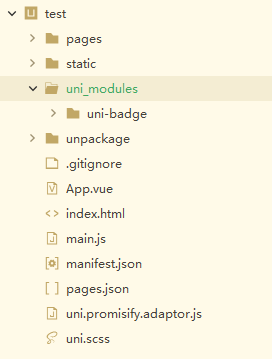
将指定组件放入 uni_modules 目录下,即可使用:
uni-badge 角标
vue
<view>
    <uni-badge :text="8" absolute="rightTop" :offset="[-3, -3]" size="small">
    	hello world
    </uni-badge>
</view>
<view>
    <uni-badge :is-dot="true" text="0" absolute="rightTop" size="small">
    	hello world
    </uni-badge>
</view>
uni-breadcrumb 面包屑导航栏
vue
<uni-breadcrumb separator=">">
    <uni-breadcrumb-item>
        首页
    </uni-breadcrumb-item>
    <uni-breadcrumb-item>
        菜单A
    </uni-breadcrumb-item>
    <uni-breadcrumb-item>
        菜单B
    </uni-breadcrumb-item>
</uni-breadcrumb>
uni-card 卡片
vue
<uni-card title="基础卡片" sub-title="副标题" extra="额外信息"
          thumbnail="https://qiniu-web-assets.dcloud.net.cn/unidoc/zh/unicloudlogo.png">
    <text>这是一个带头像和双标题的基础卡片,此示例展示了一个完整的卡片。</text>
</uni-card>
uni-collapse 折叠面板
vue
<script setup>
	import {
		ref
	} from "vue"
	const value = ref(["0"])
	const content = ref("这是一些内容这是一些内容这是一些内容这是一些内容")
</script>
<template>
	<view>
		<uni-collapse v-model="value">
			<uni-collapse-item title="默认开启">
				<view class="content">
					<text class="text">{{content}}</text>
				</view>
			</uni-collapse-item>
			<uni-collapse-item title="折叠内容">
				<view class="content">
					<text class="text">折叠内容主体,这是一段比较长内容。默认折叠主要内容,只显示当前项标题。点击标题展开,才能看到这段文字。再次点击标题,折叠内容。</text>
				</view>
			</uni-collapse-item>
			<uni-collapse-item title="禁用状态" disabled>
				<view class="content">
					<text class="text">禁用状态内容主体,页面上是看不到这段话的。</text>
				</view>
			</uni-collapse-item>
		</uni-collapse>
	</view>
</template>
uni-countdown 倒计时
vue
<!-- 一般用法 -->
<uni-countdown :day="1" :hour="1" :minute="12" :second="40"></uni-countdown>

<!-- 不显示天数 -->
<uni-countdown :show-day="false" :hour="12" :minute="12" :second="12"></uni-countdown>

<!-- 修改颜色 -->
<uni-countdown color="#FFFFFF" background-color="#00B26A" border-color="#00B26A" :day="1" :hour="2" :minute="30" :second="0"></uni-countdown>
uni-data-checkbox 选择器
单选:
vue
<script setup>
	import {
		ref
	} from "vue"

	const value = ref(0)
	const range = ref([{
		"value": 0,
		"text": "篮球"
	}, {
		"value": 1,
		"text": "篮球"
	}, {
		"value": 2,
		"text": "篮球"
	}])
	const onChange = (e) => {
		console.log(e.detail.value);
	}
</script>
<template>
	<view>
		<uni-data-checkbox v-model="value" :localdata="range" @change="onChange"></uni-data-checkbox>
	</view>
</template>
多选:
vue
<script setup>
	import {
		ref
	} from "vue"

	const value = ref([0, 1])
	const range = ref([{
		"value": 0,
		"text": "篮球"
	}, {
		"value": 1,
		"text": "篮球"
	}, {
		"value": 2,
		"text": "篮球"
	}])
	const onChange = (e) => {
		console.log(e.detail.value);
	}
</script>
<template>
	<view>
		<uni-data-checkbox multiple v-model="value" :localdata="range" @change="onChange"></uni-data-checkbox>
	</view>
</template>
uni-data-picker 级联选择器
vue
<script setup>
	import {
		ref
	} from "vue"

	const items = ref([{
			text: "水果",
			value: "1-0",
			children: [{
					text: "橘子",
					value: "1-1"
				},
				{
					text: "苹果",
					value: "1-2"
				},
				{
					text: "香蕉",
					value: "1-3"
				}
			]
		},
		{
			text: "蔬菜",
			value: "2-0",
			children: [{
					text: "西红柿",
					value: "2-1"
				},
				{
					text: "茄子",
					value: "2-2"
				}
			]
		},
		{
			text: "零食",
			value: "3-0",
		}
	])

	const onChange = (e) => {
		console.log(e.detail.value);
	}
</script>
<template>
	<view>
		<uni-data-picker :localdata="items" popup-title="请选择品种" @change="onChange"></uni-data-picker>
	</view>
</template>
uni-data-select 下拉框
vue
<script setup>
	import {
		ref
	} from "vue"

	const range = ref([{
			value: 0,
			text: "篮球"
		},
		{
			value: 1,
			text: "足球"
		},
		{
			value: 2,
			text: "羽毛球"
		},
	])
	const value = ref(0)

	const onChange = (e) => {
		console.log(e);
	}
</script>
<template>
	<view>
		<uni-data-select v-model="value" :localdata="range" @change="onChange"></uni-data-select>
	</view>
</template>
uni-datetime-picker 日期选择器
日期选择器:
vue
<script setup>
	import {
		ref
	} from "vue"

	const date = ref("")
	const onChange = (e) => {
		date.value = e
	}
</script>
<template>
	<view>
		<uni-datetime-picker type="date" v-model="date" @change="onChange" placeholder="请选择日期"></uni-datetime-picker>
	</view>
</template>
日期时间选择器:
vue
<script setup>
	import {
		ref
	} from "vue"

	const datetime = ref("")
	const onChange = (e) => {
		datetime.value = e
	}
</script>
<template>
	<view>
		<uni-datetime-picker type="datetime" v-model="datetime" @change="onChange" placeholder="请选择日期"></uni-datetime-picker>
	</view>
</template>
uni-drawer 抽屉
vue
<script setup>
	import {
		ref
	} from "vue"

	const drawer = ref()
	const showDrawer = () => {
		drawer.value.open()
	}
	const closeDrawer = () => {
		drawer.value.close()
	}
</script>
<template>
	<view>
		<button type="primary" @click="showDrawer">显示</button>
		<uni-drawer ref="drawer" mode="left">
			<scroll-view scroll-y style="height: 100%; padding: 10px;">
				<button size="mini" plain @click="closeDrawer" style="width: 100%;">关闭</button>
				<view v-for="item in 60" :key="item" style="text-align: center;">
					hello world {{item}}
				</view>
			</scroll-view>
		</uni-drawer>
	</view>
</template>

<style lang="scss">
	* {
		box-sizing: border-box;
	}
</style>
uni-icons 图标
内置图标:
<uni-icons type="contact" size="30"></uni-icons>
<uni-icons type="arrow-down" size="30"></uni-icons>
字体图标:
vue
<template>
	<view>
		<uni-icons customPrefix="customicons" type="zhuanfa" color="#5e6d82" :size="22" />
		<uni-icons customPrefix="customicons" type="wenjian" color="#5e6d82" :size="22" />
	</view>
</template>

<style lang="scss">
	@font-face {
		font-family: "customicons";
		src: url("/static/fonts/iconfont.ttf") format("truetype");
	}

	.customicons {
		font-family: "customicons" !important;
	}

	.youxi:before {
		content: "\e60e";
	}

	.wenjian:before {
		content: "\e60f";
	}

	.zhuanfa:before {
		content: "\e610";
	}
</style>
uni-grid 网格
vue
<script setup>
	const onChange = (e) => {
		const index = e.detail.index
		uni.showToast({
			title: `点击第${index+1}个宫格`,
			icon: 'none'
		})
	}
</script>
<template>
	<uni-grid :column="4" :highlight="true" @change="onChange">
		<uni-grid-item v-for="(item, index) in 10" :index="index" :key="index">
			<view class="grid-item-box" style="background-color: #fff;">
				<uni-icons type="image" :size="30" color="#777" />
				<text class="text">文本信息</text>
			</view>
		</uni-grid-item>
	</uni-grid>
</template>
uni-indexed-list 索引列表
data.js:
javascript
export default {
  'list': [{
    'letter': 'A',
    'data': [
      '阿克苏机场',
      '阿拉山口机场',
      '阿勒泰机场',
      '阿里昆莎机场',
      '安庆天柱山机场',
      '澳门国际机场'
    ]
  }, {
    'letter': 'B',
    'data': [
      '保山机场',
      '包头机场',
      '北海福成机场',
      '北京南苑机场',
      '北京首都国际机场'
    ]
  }, {
    'letter': 'C',
    'data': [
      '长白山机场',
      '长春龙嘉国际机场',
      '常德桃花源机场',
      '昌都邦达机场',
      '长沙黄花国际机场',
      '长治王村机场',
      '常州奔牛机场',
      '成都双流国际机场',
      '赤峰机场'
    ]
  }]
}
vue
<script setup>
	import {
		ref
	} from "vue"
	import data from "./data.js"

	const list = ref(data.list)
	const bindClick = (e) => {
		console.log("选中:", e.item);
		console.log("已选中", e.select);
	}
</script>
<template>
	<uni-indexed-list :options="list" :show-select="true" @click="bindClick" />
</template>
uni-list 列表
vue
<uni-list>
    <uni-list-item title="列表文字" note="列表描述信息"></uni-list-item>
    <uni-list-item :disabled="true" title="列表文字" note="列表禁用状态"></uni-list-item>
</uni-list>
vue
<uni-list :border="true">
    <!-- 显示圆形头像 -->
    <uni-list-chat :avatar-circle="true" title="uni-app"
                   avatar="https://qiniu-web-assets.dcloud.net.cn/unidoc/zh/unicloudlogo.png"
                   note="您收到一条新的消息"
                   time="2020-02-02 20:20"></uni-list-chat>
    <!-- 右侧带角标 -->
    <uni-list-chat title="uni-app" avatar="https://qiniu-web-assets.dcloud.net.cn/unidoc/zh/unicloudlogo.png"
                   note="您收到一条新的消息" time="2020-02-02 20:20" badge-text="12"></uni-list-chat>
    <!-- 头像显示圆点 -->
    <uni-list-chat title="uni-app" avatar="https://qiniu-web-assets.dcloud.net.cn/unidoc/zh/unicloudlogo.png"
                   note="您收到一条新的消息" time="2020-02-02 20:20" badge-positon="left" badge-text="dot"></uni-list-chat>
    <!-- 头像显示角标 -->
    <uni-list-chat title="uni-app" avatar="https://qiniu-web-assets.dcloud.net.cn/unidoc/zh/unicloudlogo.png"
                   note="您收到一条新的消息" time="2020-02-02 20:20" badge-positon="left" badge-text="99"></uni-list-chat>
    <!-- 显示多头像 -->
    <uni-list-chat title="uni-app" :avatar-list="avatarList" note="您收到一条新的消息" time="2020-02-02 20:20"
                   badge-positon="left" badge-text="dot"></uni-list-chat>
    <!-- 自定义右侧内容 -->
    <uni-list-chat title="uni-app" :avatar-list="avatarList" note="您收到一条新的消息" time="2020-02-02 20:20"
                   badge-positon="left" badge-text="dot">
        <view class="chat-custom-right">
            <text class="chat-custom-text">刚刚</text>
            <!-- 需要使用 uni-icons 请自行引入 -->
            <uni-icons type="star-filled" color="#999" size="18"></uni-icons>
        </view>
    </uni-list-chat>
</uni-list>
uni-nav-bar 导航栏
vue
<uni-nav-bar left-icon="back" left-text="返回" right-text="菜单" title="标题"></uni-nav-bar>
<uni-nav-bar shadow left-icon="left" right-icon="cart" title="标题" />
uni-rate 评分
vue
<uni-rate v-model="value" @change="onChange" />
<uni-rate :readonly="true" :value="2" />
uni-tag 标签
vue
<uni-tag text="标签" type="primary" />
<uni-tag :inverted="true" text="标签" type="primary" />
<uni-tag :circle="true" text="标签" type="primary" />
<uni-tag :mark="true" text="标签" type="primary" size="default" />
uni-popup 弹出框
提示:
vue
<script setup>
	import {
		ref
	} from "vue"

	const message = ref()
	const msgType = ref("")
	const messageText = ref("")
	const messageToggle = (type) => {
		msgType.value = type
		messageText.value = type
		message.value.open()
	}
</script>

<template>
	<view class="container">
		<uni-section title="提示消息" type="line">
			<button @click="messageToggle('success')">成功</button>
		</uni-section>
		<view>
			<uni-popup ref="message" type="message">
				<uni-popup-message :type="msgType" :message="messageText" :duration="2000"></uni-popup-message>
			</uni-popup>
		</view>
	</view>
</template>
对话框:
vue
<script setup>
	import {
		ref
	} from "vue"

	const alertDialog = ref()
	const msgType = ref("")
	const dialogToggle = (type) => {
		msgType.value = type
		alertDialog.value.open()
	}
	const onConfirm = () => {
		console.log("确定");
	}
	const onClose = () => {
		console.log("关闭");
	}
</script>

<template>
	<view class="container">
		<uni-section title="对话框示例" type="line" class="hideOnPc">
			<button @click="dialogToggle('success')">成功</button>
		</uni-section>
		<view>
			<uni-popup ref="alertDialog" type="dialog">
				<uni-popup-dialog :type="msgType" cancelText="关闭" confirmText="同意" title="通知" content="hello world!"
					@confirm="onConfirm" @close="onClose"></uni-popup-dialog>
			</uni-popup>
		</view>
	</view>
</template>
输入框:
vue
<script setup>
	import {
		ref
	} from "vue"

	const inputDialog = ref()
	const inputDialogToggle = () => {
		inputDialog.value.open()
	}
	const onConfirm = (val) => {
		uni.showToast({
			title: `${val}`,
			icon: 'none',
		})
	}
</script>

<template>
	<view class="container">
		<button class="button" type="primary" @click="inputDialogToggle">输入对话框</button>
		<view>
			<uni-popup ref="inputDialog" type="dialog">
				<uni-popup-dialog ref="inputClose" mode="input" title="输入内容" value="对话框预置提示内容!" placeholder="请输入内容"
					@confirm="onConfirm"></uni-popup-dialog>
			</uni-popup>
		</view>
	</view>
</template>