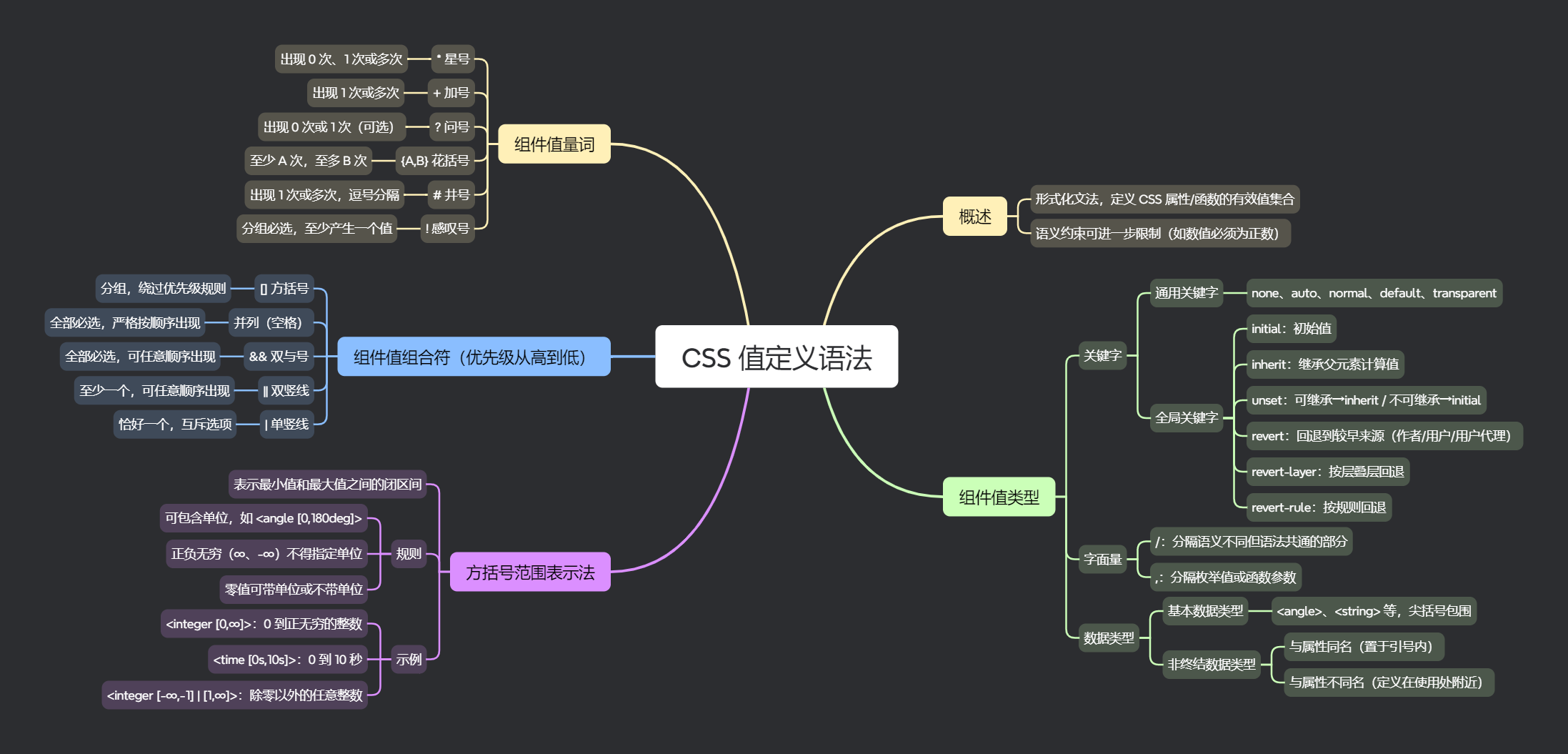
CSS 值定义语法是一种形式化文法,用于定义某个 CSS 属性或函数所允许的有效值集合。除了这一语法之外,有效值集合还可能受到语义约束的进一步限制(例如,要求某个数值必须严格为正数)。
定义语法描述了允许哪些值,以及这些值之间的交互关系。一个组件可以是关键字、被视为字面量的某些字符,或是某个给定 CSS 数据类型的值,亦或是另一个 CSS 属性的值。
组件值类型
关键字
通用关键字
具有预定义含义的关键字按字面出现,不加引号。例如:none、auto 或 normal。
css
/* 1. none --- 表示"无"或"不应用" */
a { text-decoration: none; }      /* 无下划线 */
ul { list-style: none; }          /* 无列表标记 */
div { display: none; }            /* 不显示且不占位 */
img { border: none; }             /* 无边框 */

/* 2. auto --- 由浏览器自动计算 */
div { margin: 0 auto; }             /* 自动外边距(水平居中需配合宽度) */
div {position: absolute; inset: 0; margin: auto; } /* 绝对定位居中 */
div { overflow: auto; }           /* 滚动条按需显示 */
img { width: auto; height: auto; } /* 使用默认宽高 */

/* 3. normal --- 表示默认常规状态 */
p { font-style: normal; }         /* 常规字体(非斜体) */
span { font-weight: normal; }     /* 常规字重(400) */
p { white-space: normal; }      /* 常规空白处理 */

/* 4. default --- 表示浏览器或系统默认表现 */
button { cursor: default; }       /* 默认光标(箭头) */

/* 5. transparent --- 表示完全透明 */
div { background-color: transparent; }  /* 透明背景 */
CSS 全局关键字
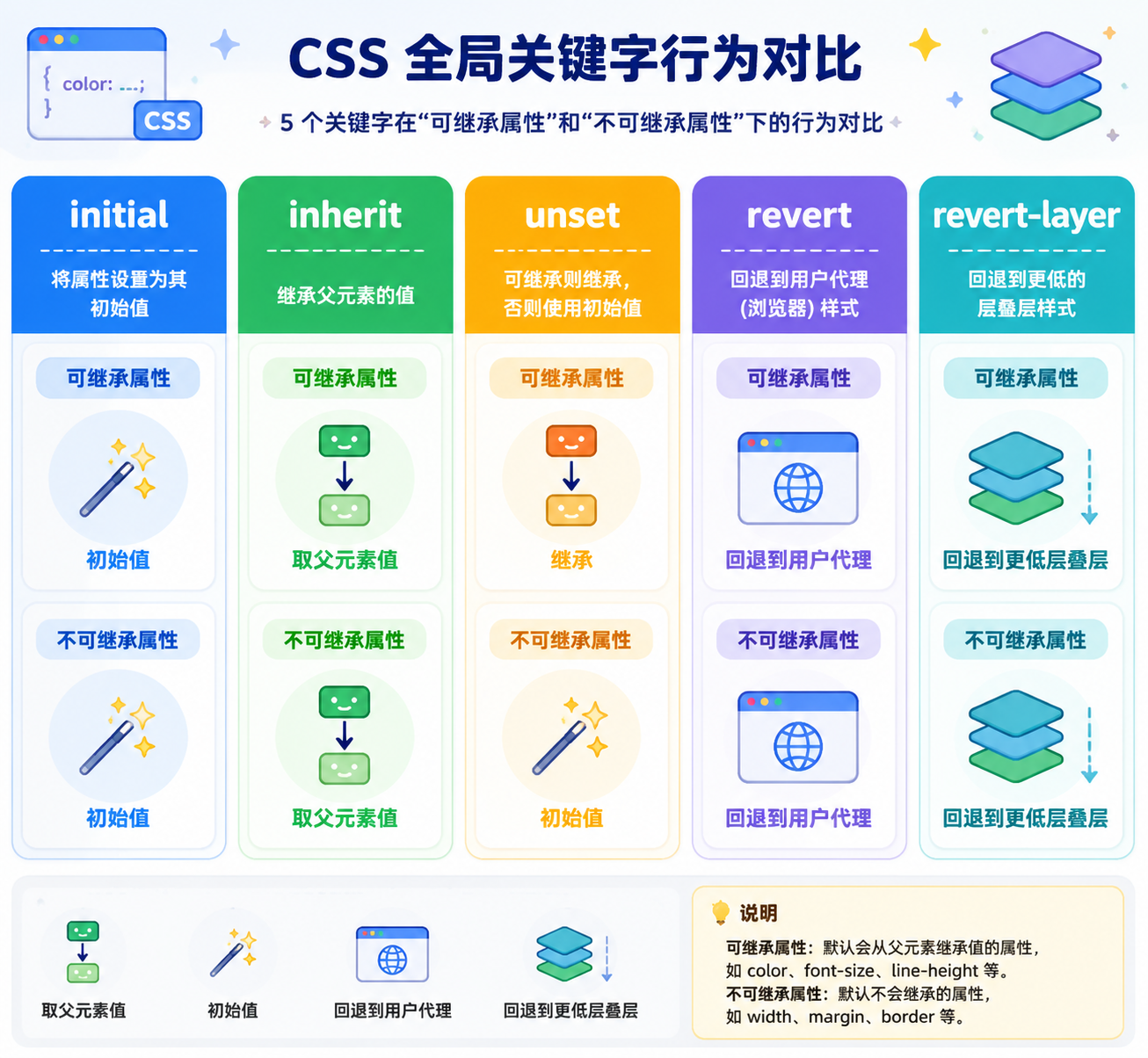
所有 CSS 属性都接受 inherit、initial、revert、revert-layer 和 unset 这些关键字。它们不会显示在值定义中,而是被隐式定义的。
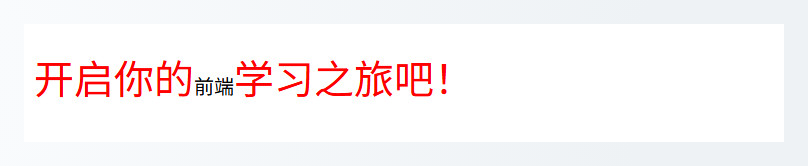
initial:表示属性的初始值(即 CSS 规范中定义的默认值)。
css
p {
  font-size: 2em;
  color: red;
}

p span {
  font-size: initial;
  color: initial;
}
inherit:表示继承父元素的计算值。
css
.parent {
  color: red;
  a {
    color: inherit;
  }
}

input, textarea, button, select {
  font-family: inherit;
  font-size: inherit;
  color: inherit;
}
unset:根据属性是否继承来决定行为:
- 对可继承属性,它等效于
inherit - 对不可继承属性,它等效于
initial
css
.parent {
  border: 2px solid blue;
  color: red;

  .child {
    border: unset;
    color: unset;
  }
}

button {
  background: #4CAF50;
  color: white;
  border: 2px solid #388E3C;
  padding: 10px 20px;
}

.reset-btn {
  all: unset;
}
revert:把级联回滚到较早的来源的值。行为依赖于声明所属的来源:
- 浏览器默认样式:等效于
unset - 用户样式:回退到用户代理的默认样式
- 作者样式:回退到用户样式(若存在);否则,回退到用户代理的默认样式
html
<!DOCTYPE html>
<html lang="zh-CN">

<head>
  <meta charset="UTF-8">
  <title>全局关键字-revert</title>
  <style>
    .container1 > button {
      padding: 10px 20px;
      border: 2px solid #388E3C;
      background-color: #4CAF50;
      color: #FFFFFF;
      font-size: 16px;
    }

    .container1 > button:nth-of-type(2) {
      all: revert;
    }

    main {
      border: 3px solid deepskyblue;
      color: deepskyblue;
    }

    section {
      margin: 0.5rem;
      border: 2px dashed yellowgreen;
      color: yellowgreen;
    }

    p {
      color: crimson;
    }

    section.with-revert {
      color: revert;
    }
  </style>
</head>

<body>
  <div class="container1">
    <button>美化按钮</button>
    <button>普通按钮</button>
  </div>

  <main>
    <section>
      <h3>This h3 will be dark green</h3>
      <p>Text in paragraph will be red.</p>
      This stray text will also be dark green.
    </section>
    <section class="with-revert">
      <h3>This h3 will be steelblue</h3>
      <p>Text in paragraph will be red.</p>
      This stray text will also be steelblue.
    </section>
  </main>
</body>

</html>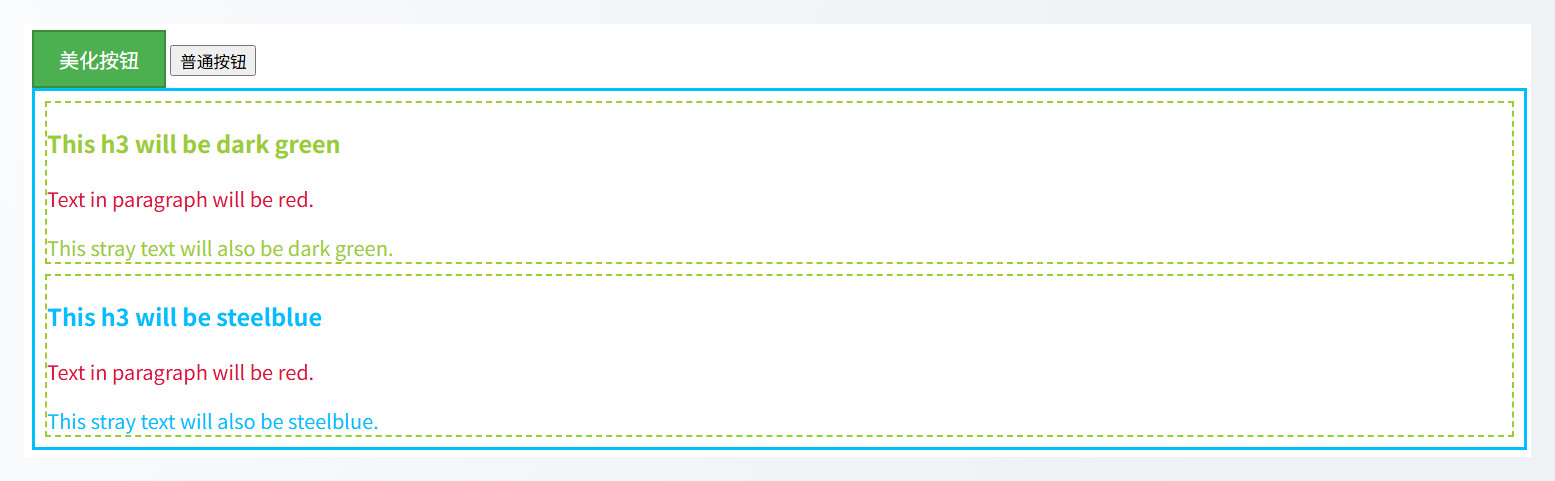
revert-layer:它与 revert 的作用类似,但它回退的依据不是层叠来源,而是层叠层。
- 如果在当前层叠来源中,没有比当前规则优先级更低的声明可供回退,会继续回退到更低的来源。
- 如果当前处于作者样式中,只有唯一一个
@layer,那么,回退到用户样式(如果存在),否则回退到浏览器默认样式。
- 如果当前处于作者样式中,只有唯一一个
css
@layer one {
  h2 {
    color: red;
  }
}

@layer two {
  h2 {
    color: blue;
  }

  h2 {
    color: revert-layer;
  }
}
css
section {
  color: blue;
}

@layer only {
  h2 {
    color: revert-layer; /* color 是一个继承属性,h2 元素的浏览器默认样式中并没有规定 color 的色值,所以,会寻找祖先元素中设置的 color 属性的色值 */
  }
}
revert-rule:它与 revert 和 revert-layer 类似,但它的回退粒度更小。它不是按层叠来源和层叠层进行回退,而是按当前样式规则进行回退。
html
<!DOCTYPE html>
<html lang="zh-CN">
  <head>
    <meta charset="UTF-8">
    <title>全局关键字-revert-rule</title>
    <style>
      p {
        font-weight: 600;
        color: blue;
      }

      p.special {
        color: revert-rule;
        border: 2px solid currentColor;
      }
    </style>
  </head>

  <body>
    <p class="special">This paragraph has special styling.</p>
  </body>
</html>
html
<!DOCTYPE html>
<html lang="zh-CN">

<head>
  <meta charset="UTF-8">
  <title>全局关键字-revert-rule</title>
  <style>
    p {
      color: green;
    }
  </style>
</head>

<body>
  <p style="color: revert-rule">This text uses the stylesheet color.</p>
</body>

</html>
字面量
在 CSS 中,一些字符可以单独出现,如斜杠(/)或逗号(,),它们在属性定义中用于分隔各个部分。
- 逗号常用于分隔枚举中的值,或类数学函数中的参数;
- 斜杠则常用于分隔语义不同但语法共通的部分。通常,斜杠用于简写属性中,以分隔类型相同但属于不同属性的组件。
这两个符号在值定义中均按字面出现。
css
body {
  background-color: #f5f5f5;
  font: 18px/1.6 'Times New Roman', Times, serif;
}
数据类型
基本数据类型
某些数据类型在 CSS 中广泛使用,并在规范中统一定义,适用于所有取值。它们被称为基本数据类型,表示时用尖括号 < 和 > 包围其名称:<angle>、<string> 等。
非终结数据类型
不太常见的数据类型称为非终结数据类型,同样用 < 和 > 包围。
非终结数据类型分为两种:
- 与属性同名的数据类型:名称与某个属性相同,并置于引号内。此类数据类型与该属性拥有相同的取值集合,常用于简写属性的定义中。
- 与属性不同名的数据类型:此类数据类型与基本数据类型非常接近,区别仅在于定义的物理位置不同。其定义通常位于使用该数据类型的属性定义附近。
组件值组合符
方括号 \[\]
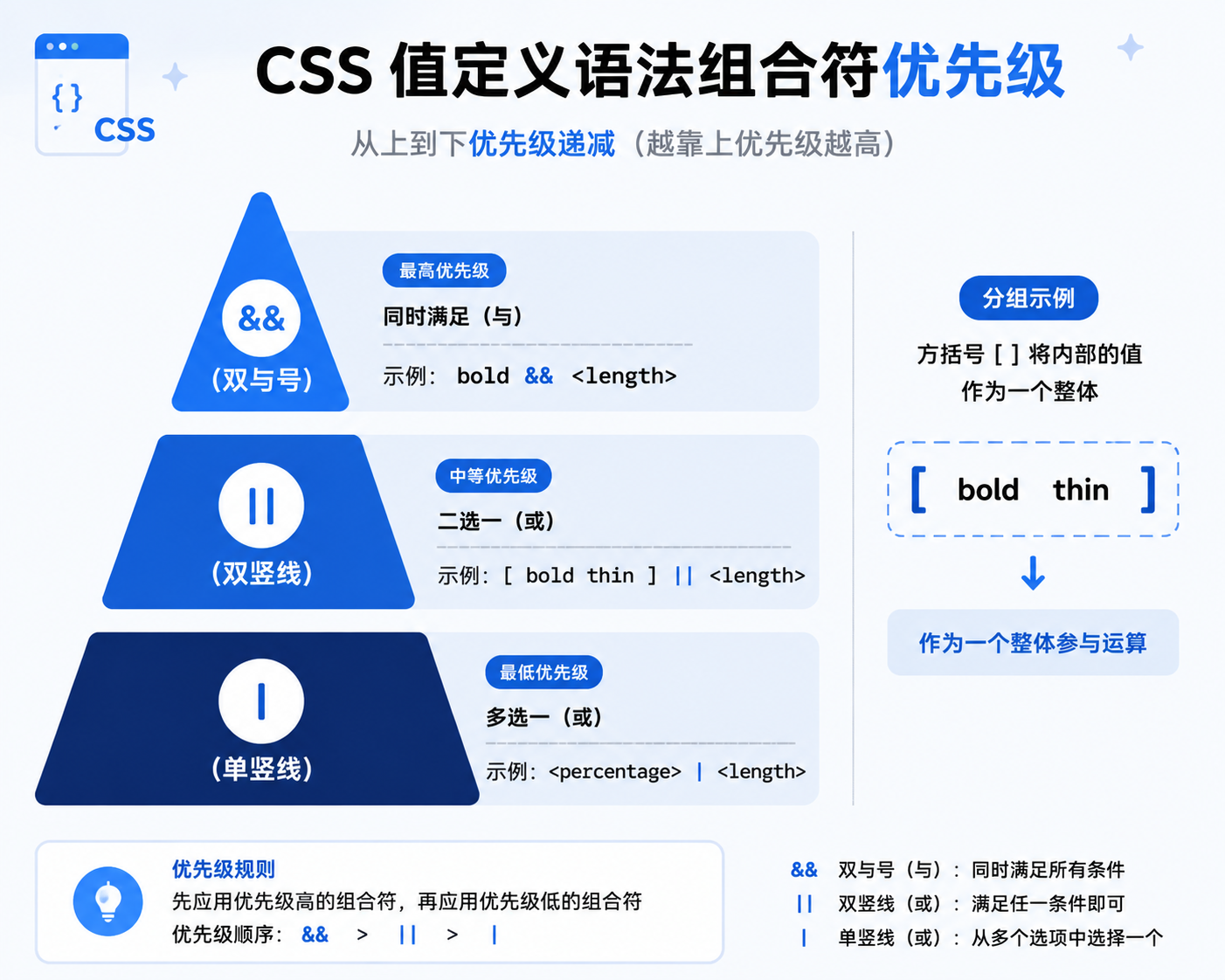
方括号将多个实体、组合符和量词括在一起,将它们作为一个整体组件处理。它们用于将组件分组,以绕过优先级规则。
example = bold [ thin && <length> ]此示例匹配以下值:
bold thin 2vhbold 0 thinbold thin 3.5em
但不匹配:
thin bold 3em,因为bold与方括号定义的组件并列,必须出现在其之前。
并列
将多个关键字、字面量或数据类型并排放置,之间仅用空格分隔,称为并列。所有并列的组件均为必选,且必须按严格顺序出现。
example = bold <length> , thin此示例匹配以下值:
bold 1em, thinbold 0, thinbold 2.5cm, thinbold 3vh, thin
但不匹配:
thin 1em, bold,必须按指定顺序排列bold 1em thin,所有的组件必须出现bold 0.5ms, thin,ms值不属于<length>类型
双与号 &&
用 && 分隔两个或多个组件,表示所有这些实体都是必需的,但可以以任意顺序出现。
example = bold && <length>此示例匹配以下值:
bold 1embold 02.5cm bold3vh bold
但不匹配:
bold,两个组件必须同时出现bold 1em bold,每个组件只能出现一次
并列的优先级高于 &&
bold thin && <length>等价于:
[bold thin] && <length>
匹配以下值:
bold thin 10px3vh bold thin
但不匹配:
bold 0 thin
双竖线 ||
用 || 分隔两个或多个组件,表示所有实体都是可选项:至少必须出现其中一个,且它们可以以任意顺序出现。
example = <number> || <length> || <color>此示例匹配以下值:
1em 1 blueblue 1em1 1px yellow
但不匹配:
blue yellow,每个组件最多只能出现一次bold,不是任何实体所允许的关键字
&& 的优先级高于 ||
bold || thin && <length>等价于:
bold || [ thin && <length> ]匹配以下值:
boldthin 0bold thin 10px10px thin bold
但不匹配:
10px bold thin,如果bold出现,只能出现在thin && <length>整体的前方或后方
单竖线 |
用 | 分隔两个或多个实体,表示所有实体是互斥选项:这些选项中必须恰好出现其中一个。
example = <percentage> | <length> | left | center | right | top | bottom此示例匹配以下值:
3%03.5emleftcenterrighttopbottom
但不匹配:
center 3%,只能出现其中一个组件3em 4.5em,每个组件最多只能出现一次
|| 的优先级高于 |
bold | thin || <length>等价于:
bold | [thin || <length>]匹配以下值:
boldthin10px0 thinthin 2vh
但不匹配:
bold 10px,互斥只能出现其中一个
组件值量词
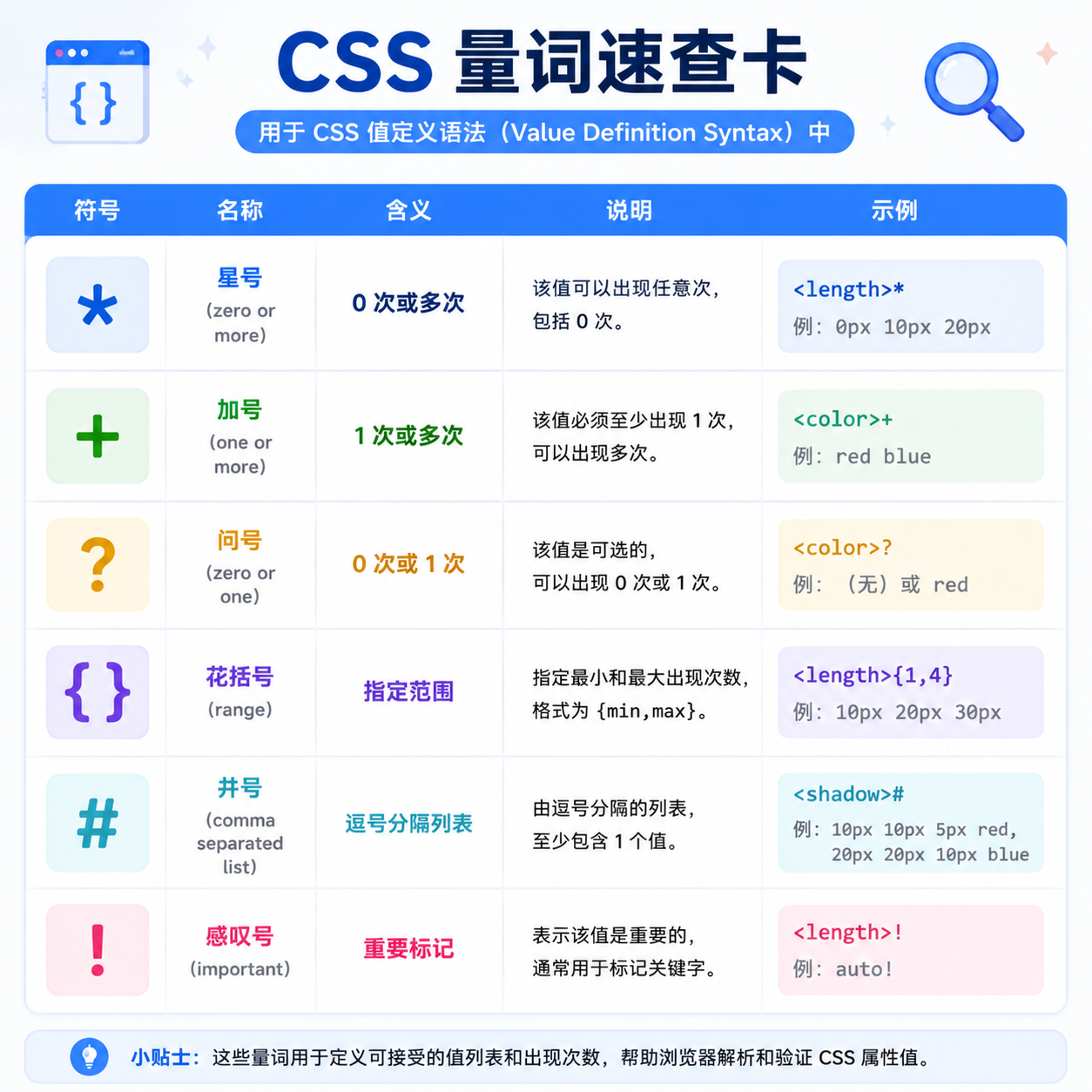
量词是一个符号,表示前一个实体可以重复的次数。不带量词时,实体必须恰好出现一次。量词不可叠加使用,且优先级高于所有组合符。
星号 *
* 量词表示该实体可以出现零次、一次或多次。
example = bold smaller*此示例匹配以下值:
boldbold smallerbold smaller smallerbold smaller smaller smaller,以此类推
但不匹配:
smaller,因为bold是并列的,必须出现在任何smaller关键字之前
加号 +
+ 量词表示该实体可以出现一次或多次。
example = bold smaller+此示例匹配以下值:
bold smallerbold smaller smallerbold smaller smaller smaller,以此类推
但不匹配:
bold,因为smaller必须至少出现一次smaller,因为bold是并列的,必须出现在任何smaller关键字之前
问号 ?
? 量词表示该实体为可选项,出现零次或一次。
example = bold smaller?此示例匹配以下值:
boldbold smaller
但不匹配:
bold smaller smaller,因为smaller最多只能出现一次smaller,因为bold是并列的,必须出现在任何smaller关键字之前
花括号 {}
{} 量词包含两个整数A 和 B(以逗号分隔),表示该实体必须出现至少 A 次,至多 B 次。
example = bold smaller{1,3}此示例匹配以下值:
bold smallerbold smaller smallerbold smaller smaller smaller
但不匹配:
bold,因为smaller必须至少出现一次bold smaller smaller smaller smaller,因为smaller最多只能出现三次smaller,因为bold是并列的,必须出现在任何smaller关键字之前
井号
# 量词表示该实体可以重复一次或多次,但每次出现之间必须用逗号 , 分隔。
example = bold smaller#此示例匹配以下值:
bold smallerbold smaller, smallerbold smaller, smaller, smaller,以此类推
但不匹配:
bold,因为smaller必须至少出现一次bold smaller smaller smaller,因为smaller的不同出现必须用逗号分隔smaller,因为bold是并列的,必须出现在任何smaller关键字之前
# 后面可以可选地跟随花括号,以指示实体重复的次数。
example = bold smaller#{1,3}此示例匹配以下值:
bold smallerbold smaller, smallerbold smaller, smaller, smaller
但不匹配:
-
bold smaller, smaller, smaller, smaller,因为smaller最多只能出现三次example = bold smaller#{2}
此示例匹配以下值:
bold smaller, smaller
但不匹配:
bold smaller,因为smaller必须恰好出现两次
感叹号 !
! 量词位于分组之后,表示该分组为必选,且必须产生至少一个值。即使分组内各项的语法本身允许省略全部内容,也至少有一个组件值不能被省略。
example = [ bold? smaller? ]!此示例匹配以下值:
boldsmallerbold smaller
但不匹配:
- 既无
bold也无smaller,因为二者之一必须出现 smaller bold,因为bold是并列的,必须出现在smaller关键字之前bold smaller bold,因为bold和smaller都只能出现一次
方括号范围表示法 min, max
某些类型的取值可以接受特定范围内的数值。例如,column-count 属性可接受从正整数 1 到正无穷大(含端点)的整数值。相应的语法如下所示:
example = <integer [1,∞]>
<integer> = <number-token>
任何超出此指定范围的值都会导致整个声明无效,因此浏览器会忽略它。
[min, max] 表示最小值和最大值之间的闭区间(含端点)。此表示法用于数值类型表示法中。
- 可以包含单位,例如
<angle [0,180deg]> - 正无穷和负无穷(
-∞和∞)不得指定单位 - 使用单位指定的类型中,零值可以带单位或不带单位。例如
<time [0s,10s]>或<time [0,10s]>
| 语法 | 说明 |
|---|---|
<integer [-∞,∞]> |
从负无穷到正无穷的任意整数 |
<integer [0,∞]> |
从 0 到正无穷的任意整数有效。负整数无效 |
<time [0s,10s]> 或 <time [0,10s]> |
从 0 到 10 秒的任意时长有效 |