通过BIOS中断功能获取各类信息,并将这些数据存储在内存地址0x90000起始的区域。
一、获取参数
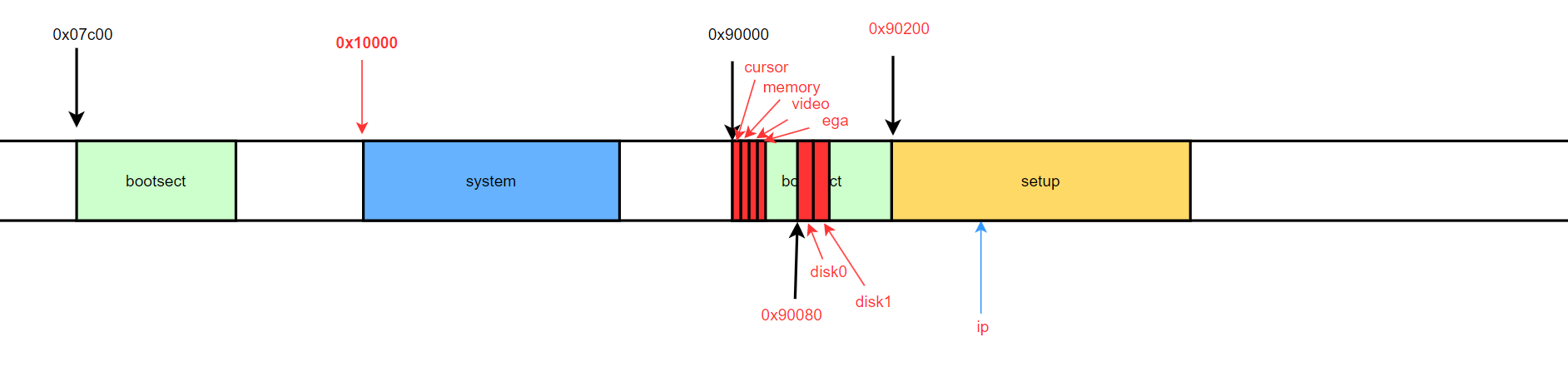
1.1 设置data segment
将数据段设置为0x9000,后续参数从0x90000地址开始依次存储。
INITSEG  = 0x9000
...

 # set data segment
    mov $INITSEG,%ax
    mov %ax,%ds
1.2 获取游标位置
通过BIOS的0x10中断的0x03号功能获取游标位置,结果存储在[0x90000,0x90002)
 # get cursor position
    mov $0x03,%ah
    mov $0x00,%bh
    int $0x10

    # save cursor position
    mov %dx,[0]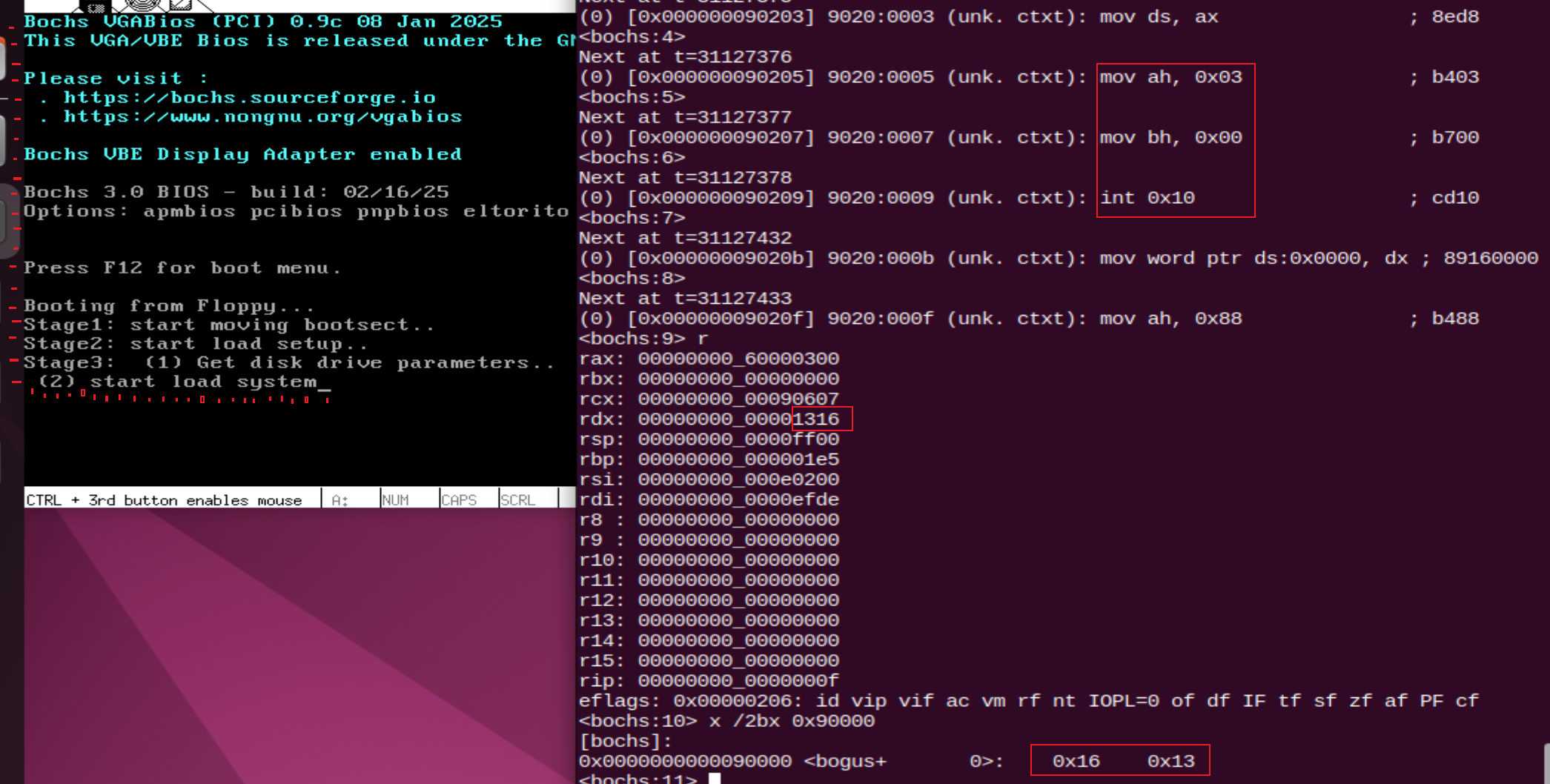
从图中可以手动数出来,row(0,1,2,...,19),col(0,1,2,...,22)和获取的结果一致
1.3 获取内存大小
通过BIOS的0x15中断的0x88号功能获取内存大小,结果存储在[0x90002,0x90004)
    # get memory size (extended mem, kB)
    mov $0x88,%ah
    int $0x15

    # save memory size
    mov %ax,[2]
具体调用方式:
https://www.ctyme.com/intr/rb-1529.htm
AH = 88h

Return:
CF clear if successful
AX = number of contiguous KB starting at absolute address 100000h
CF set on error
AH = status
80h invalid command (PC,PCjr)
86h unsupported function (XT,PS30)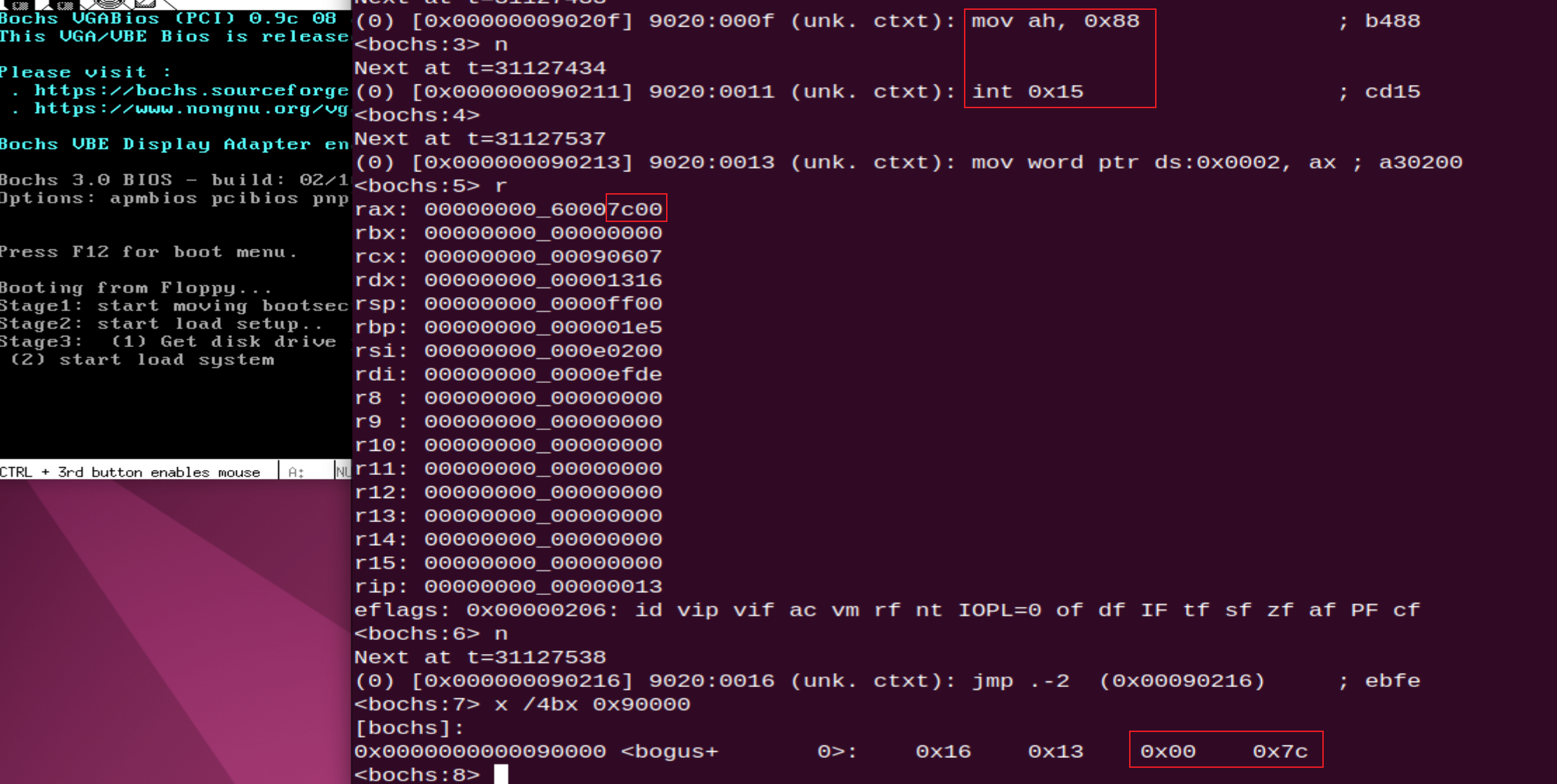
从结果看0x7c00KB=>31MB,而通过此功能获取的大小是0x100000(1MB)以外的大小,加上则刚好32MB,而bochsrc配置如下,正好32MB的内存。
megs: 321.4 获取视频卡数据
通过BIOS的0x10中断的0x0f号功能获取视频卡数据,存储在[0x90004,0x90008)
    # get video-card data
    mov $0x0f,%ah
    int $0x10

    # save video-card data
    mov %bx,[4]
    mov %ax,[6]
具体使用方式:
https://www.ctyme.com/intr/rb-0108.htm
AH = 0Fh

Return:
AH = number of character columns
AL = display mode (see #00010 at AH=00h)
BH = active page (see AH=05h)
Notes: If mode was set with bit 7 set ("no blanking"), the returned mode will also have bit 7 set. EGA, VGA, and UltraVision return either AL=03h (color) or AL=07h (monochrome) in all extended-row text modes. HP 200LX returns AL=07h (monochrome) if mode was set to AL=21h and always 80 resp. 40 columns in all text modes regardless of current zoom setting (see AH=D0h).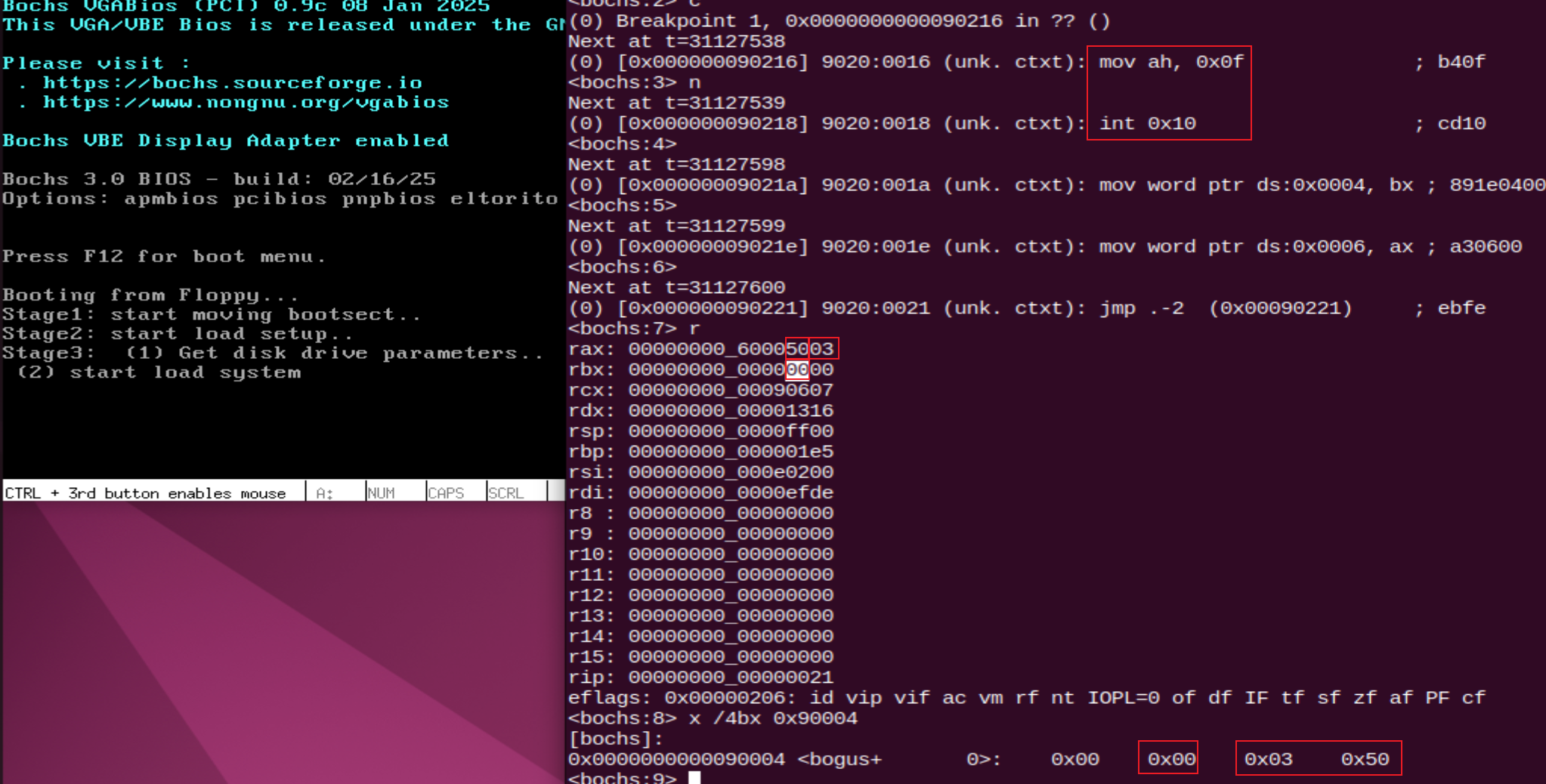
从结果看
| 寄存器 | 值 | 说明 |
|---|---|---|
| al | 0x03 | 彩色显示 |
| ah | 0x50 | 每行80字符 |
| bh | 0x00 | page0 激活 |
| bl | 0x00 |
1.5 获取EGA信息
通过BIOS的0x10中断的AH12h/BL10h功能号获取EGA信息,结果存储在[0x90008,0x9000e)
# get EGA info
    mov $0x12,%ah
    mov $0x10,%bl
    int $0x10

    # save EGA info
    mov %ax,[8]
    mov %bx,[10]
    mov %cx,[12]
具体使用方式:
https://www.ctyme.com/intr/rb-0162.htm
AH = 12h
BL = 10h

Return:
BH = video state
00h color mode in effect (I/O port 3Dxh)
01h mono mode in effect (I/O port 3Bxh)
BL = installed memory (00h = 64K, 01h = 128K, 02h = 192K, 03h = 256K)
CH = feature connector bits (see #00022)
CL = switch settings (see #00023,#00024)
AH destroyed (at least by Tseng ET4000 BIOS v8.00n)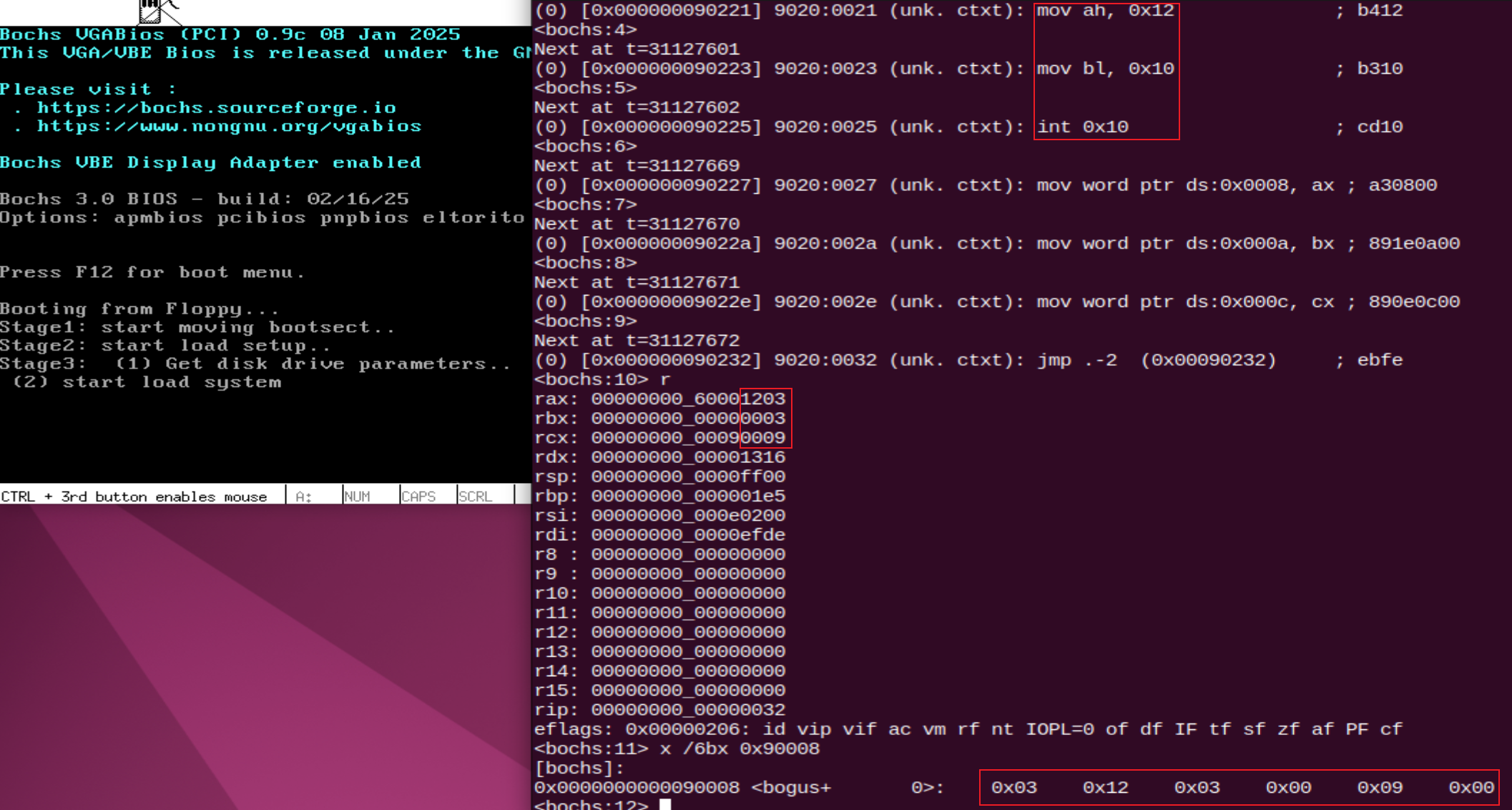
从结果看,
| 寄存器 | 值 | 说明 |
|---|---|---|
| bh | 0x00 | 彩色模式 |
| bl | 0x03 | 256K显示内存 |
| ch | 0x00 | |
| cl | 0x09 | |
| ah | 0x12 | |
| al | 0x03 |
1.6 获取磁盘参数
获取第一块磁盘参数
直接读取BIOS中断向量表中的第0x41项对应的16字节内容,即为第一块磁盘参数,并存储在[0x90080,0x90090)
中断向量表实际上是从0x00000开始的一个索引,每个索引为4字节的地址(2字节段基址+2字节偏移),LDS [4*0x41] %si通过LDS指令将对应的ds:0x104的内容加载到ds:si中,当前已经将ds设置为0x0000,因此加载的是0x00104的值到ds:si,然后读取16字节到es:di(0x9000:0x0080)
 # get hd0 data
    mov $0x0000,%ax
    mov %ax,%ds
    lds [4*0x41],%si
    mov $INITSEG,%ax
    mov %ax,%es
    mov $0x0080,%di
    mov $0x10,%cx
    cld
    rep movsb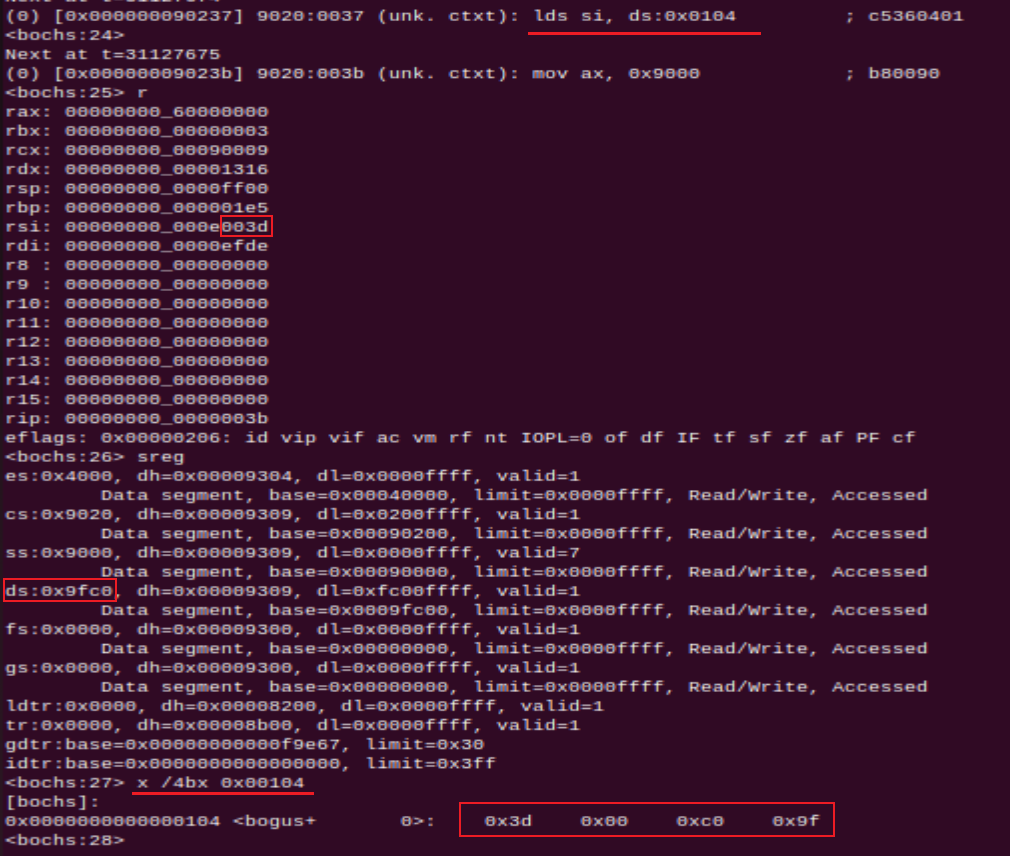
获取第二块磁盘参数
直接读取BIOS中断向量表中的第0x46项对应的16字节内容,即为第一块磁盘参数,并存储在[0x90090,0x900a0)
# get hd1 data
    mov $0x0000,%ax
    mov %ax,%ds
    lds [4*0x46],%si
    mov $INITSEG,%ax
    mov %ax,%es
    mov $0x0090,%di
    mov $0x10,%cx
    cld
    rep movsb
1.7 判断是否是第一块磁盘
 # check that there is a hd1
    mov $0x1500,%ax
    mov $0x81,%dl
    int $0x13
    jc no_disk1
    cmp $3,%ah
    je is_disk1
no_disk1:
    mov $INITSEG,%ax
    mov %ax,%es
    mov $0x0090,%di
    mov $0x10,%cx
    mov $0x00,%ax
    cld
    rep stosb
is_disk1:
判断当前是否是第一个磁盘,当前dl设置0x81(10000001b), bit7设置1表示硬盘,0~6位表示硬盘编号,表示硬盘1,当没有disk1时将清空[0x90090,0x900a0)的空间。
具体使用方式:
https://www.ctyme.com/intr/rb-0639.htm
AH = 15h
DL = drive number (bit 7 set for hard disk)
(AL = FFh, CX = FFFFh, see Note)

Return:
CF clear if successful
AH = type code
00h no such drive
(SpeedStor) AL = 03h hard disk
CX:DX = number of 512-byte sectors
01h floppy without change-line support
02h floppy (or other removable drive) with change-line support
03h hard disk
CX:DX = number of 512-byte sectors
CF set on error
AH = status (see #00234 at AH=01h)

Note: SyQuest can report type 01h or 02h for 'hard disks', since its media is removable
1.8 小结
setup.s第一阶段通过BIOS获取游标位置,内存大小,视频卡信息,EGA信息,磁盘参数等,并将这些内容在原bootsect地址0x90000依次存储,接下来将进行保护模式的准备以及切换。