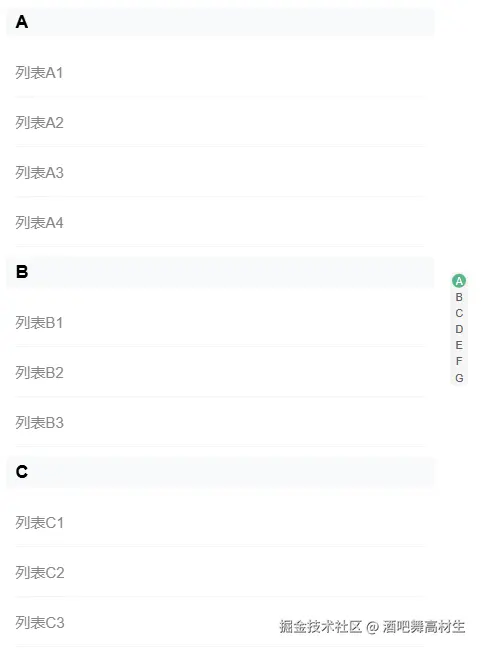
前段时间有个项目,客户需求里有明确的要索引列表,自己花了20分钟写了一个组件,写篇文章记录一下~
很简单一个组件,学前端的都会写,很多容器大小自适应功能都没写,可自行补充。
如有不对的地方希望大佬能指导一下 在下
新建一个.vue文件,代码如下
vue
<!--
使用方法:
props传入indexs和list,indexs(一维数组)为右侧索引列表,list(二维数组)为索引对应的列表
<template>
<IndexList :indexs="['A', 'B', 'C', 'D', 'E', 'F', 'G']" :list="[
                ['列表A1', '列表A2', '列表A3', '列表A4'],
                ['列表B1', '列表B2', '列表B3'],
                ['列表C1', '列表C2', '列表C3', '列表C4'],
                ['列表D1', '列表D2', '列表D3'],
                ['列表E1', '列表E2', '列表E3', '列表E4'],
                ['列表F1', '列表F2', '列表F3'],
                ['列表G1', '列表G2', '列表G3']
            ]" @choose="chooseHandle" :indexScale=".7" />
</template>
<script setup>
const chooseHandle = (text, index) => {
console.log(text, index)
}
</script>
-->
<template>
    <div class="index-list-container">
        <div class="left" ref="listRef" @wheel="scrollHandle">
            <div :id="item" class="list-item" v-for="(item, index) in props.indexs" :key="index">
                <template v-if="props.list.length > index">
                    <div class="title">
                        {{ item }}
                    </div>
                    <div class="list">
                        <ul>
                            <li v-for="(listItem, listIndex) in props.list[index]" :key="listIndex"
                                @click="chooseHandle(listItem, item)">{{ listItem }}</li>
                        </ul>
                    </div>
                </template>
            </div>
        </div>
        <div class="right">
            <div class="index-container" :style="{ transform: `scale(${props?.indexScale})` }">
                <div :class="{ 'index-item': true, 'active-index-item': activeIndex === index }"
                    v-for="(item, index) in props.indexs" @mouseenter="mouseEnterHandle(item, index)" :key="index">
                    {{ item }}
                </div>
            </div>
        </div>
    </div>
</template>
<script setup>
import { ref, defineProps, defineEmits } from 'vue'
const props = defineProps({
    indexs: {
        type: Array,
        default: () => []
    },
    list: {
        type: Array,
        default: () => []
    },
    indexScale: {
        type: Number,
        default: 1
    }
})
const emit = defineEmits(['choose'])
const listRef = ref(null)
const activeIndex = ref(0)
let timer = null
const mouseEnterHandle = (letter, index) => {
    if (listRef.value.children[index].getAttribute('id') === letter) listRef.value.children[index].scrollIntoView({
        behavior: 'smooth',
        block: 'start'
    })
    activeIndex.value = index
}

const scrollHandle = () => {
    if (timer) clearTimeout(timer)
    timer = window.setTimeout(() => {
        const listItems = listRef.value.children
        const scrollTop = listRef.value.scrollTop

        // 遍历找到当前最靠近顶部的项
        for (let i = 0; i < listItems.length; i++) {
            const item = listItems[i]
            const offsetTop = item.offsetTop
            // 下一项的 offsetTop
            const nextOffsetTop = listItems[i + 1] ? listItems[i + 1].offsetTop : Infinity

            // 当前项在可视区内
            if (scrollTop >= offsetTop - 10 && scrollTop < nextOffsetTop - 10) {
                activeIndex.value = i
                break
            }
        }
    }, 100)
}
const chooseHandle = (text, index) => {
    emit('choose', text, index)
}
</script>
<style scoped lang="scss">
.index-list-container {
    width: 100%;
    height: 100%;
    display: flex;

    >.left {
        position: relative;
        padding: 0 10px 0 0;
        overflow-y: auto;
        width: calc(100% - 30px);

        >.list-item {
            >.title {
                display: flex;
                align-items: center;
                padding-left: 10px;
                height: 30px;
                background-color: pink;
                font-weight: 700;
                font-size: 18px;
                color: #000000;
                background-color: #f8f9fa;
            }

            >.list {
                padding: 10px;

                >ul {
                    padding: 0;
                    margin: 0;

                    >li {
                        padding-left: 10px;
                        display: flex;
                        align-items: center;
                        height: 50px;
                        list-style: none;
                        border-bottom: 1px solid #f6f6f6;
                        font-size: 15px;
                        color: #868686;
                    }

                    >li:hover {
                        cursor: pointer;
                        color: #4ea5ff;
                        background-color: #ecf5ff;
                    }
                }
            }
        }

        &::-webkit-scrollbar {
            width: 0;
        }
    }

    >.right {
        width: 30px;
        display: flex;
        justify-content: center;
        align-items: center;

        >.index-container {
            background-color: #f5f5f6;
            border-radius: 10px;
            padding: 3px;
            display: flex;
            flex-direction: column;
            row-gap: 3px;
            transform-origin: center center;

            >.index-item {
                cursor: pointer;
                display: flex;
                justify-content: center;
                align-items: center;
                border-radius: 50%;
                font-size: 15px;
                height: 20px;
                width: 20px;

                // &:hover {
                //     color: #ffffff;
                //     background-color: #55b685;
                // }
            }

            >.active-index-item {
                color: #ffffff;
                background-color: #55b685;
            }
        }
    }
}
</style>
可直接引入使用
如下:
vue
<template>
    <div style="height: 70vh">
            <IndexList :indexs="['A', 'B', 'C', 'D', 'E', 'F', 'G']" :list="[
                ['列表A1', '列表A2', '列表A3', '列表A4'],
                ['列表B1', '列表B2', '列表B3'],
                ['列表C1', '列表C2', '列表C3', '列表C4'],
                ['列表D1', '列表D2', '列表D3'],
                ['列表E1', '列表E2', '列表E3', '列表E4'],
                ['列表F1', '列表F2', '列表F3'],
                ['列表G1', '列表G2', '列表G3']
            ]" @choose="chooseHandle" :indexScale=".7" />
        </div>
</template>
<script setup>
import { ref, defineExpose } from 'vue'
import IndexList from '@/components/IndexList/index.vue'
const chooseHandle = (text, index) => {
    console.log(text, index)
}
defineExpose({
    setDialogVisible
})
</script>
<style scoped lang="scss"></style>
效果图如下: