文本运行类Run的子类型Drawing用于保存word文档中的图片、图表、形状等图形对象,命名空间为DocumentFormat.OpenXml.Wordprocessing,对应document.xml文件内的元素如下图所示。本文学习使用Drawing类将图片保存到Word文档的基本用法。
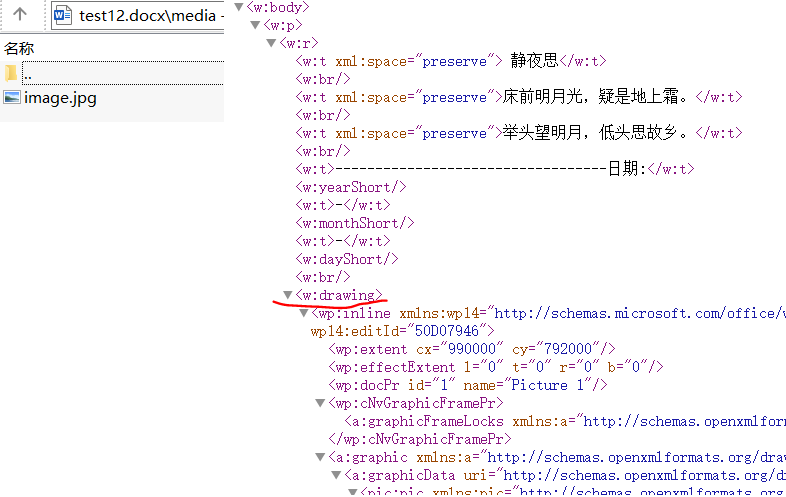
图形类Drawing的类继承链为OpenXmlElement ->
OpenXmlCompositeElement-> Drawing,其主要属性包括以下两个:
1)Anchor属性:浮动式布局,精确控制图形在页面上的绝对位置,并可选择是否随文字移动;
2)Inline属性:嵌入式布局,将图形视为一个大的文本字符,跟随文字流排列,并影响行高。
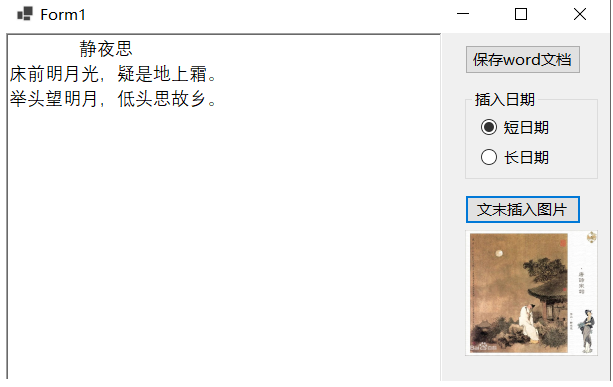
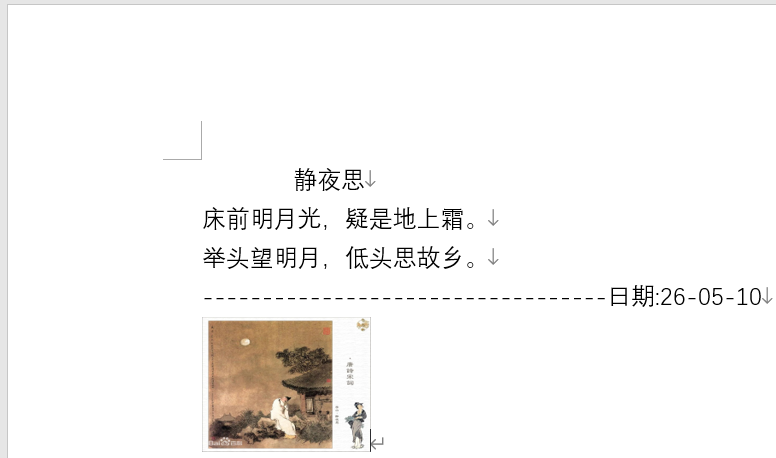
以嵌入式布局为例,将参考文献5中的图片作为配图插入word文档的末尾,示例代码及运行效果如下所示:
csharp
using (WordprocessingDocument wordDocument = WordprocessingDocument.Create(sfd.FileName, WordprocessingDocumentType.Document))
{
    MainDocumentPart mainPart = wordDocument.AddMainDocumentPart();
    mainPart.Document = new Document();
    Body body = mainPart.Document.AppendChild(new Body());

    Paragraph paragraph = body.AppendChild(new Paragraph());
    Run run = paragraph.AppendChild(new Run());

    for (int i = 0; i < txtContent.Lines.Length; i++)
    {
        Text text = new Text();
        text.Space = SpaceProcessingModeValues.Preserve;
        text.Text = txtContent.Lines[i];
        run.AppendChild(text);

        run.Append(new Break());
    }

    run.Append(new Text("----------------------------------日期:"));

    if (rbShortDate.Checked)
    {
        run.Append(new YearShort());
        run.Append(new Text("-"));
        run.Append(new MonthShort());
        run.Append(new Text("-"));
        run.Append(new DayShort());
    }

    if (rbLongDate.Checked)
    {
        run.Append(new YearLong());
        run.Append(new Text("-"));
        run.Append(new MonthLong());
        run.Append(new Text("-"));
        run.Append(new DayLong());
    }

    run.Append(new Break());

    ImagePart imagePart = mainPart.AddImagePart(ImagePartType.Jpeg);
    using (FileStream stream = new FileStream(picImage.Tag as string, FileMode.Open,FileAccess.Read))
    {
        imagePart.FeedData(stream);
    }
    string relationshipId = mainPart.GetIdOfPart(imagePart);

    Drawing drawing = CreateImageDrawing(relationshipId);
    run.Append(drawing);
}

public Drawing CreateImageDrawing(string relationshipId)
{
    return new Drawing(
     new DW.Inline(
         new DW.Extent() { Cx = 990000L, Cy = 792000L },
         new DW.EffectExtent()
         {
             LeftEdge = 0L,
             TopEdge = 0L,
             RightEdge = 0L,
             BottomEdge = 0L
         },
         new DW.DocProperties()
         {
             Id = (UInt32Value)1U,
             Name = "Picture 1"
         },
         new DW.NonVisualGraphicFrameDrawingProperties(
             new A.GraphicFrameLocks() { NoChangeAspect = true }),
         new A.Graphic(
             new A.GraphicData(
                 new PIC.Picture(
                     new PIC.NonVisualPictureProperties(
                         new PIC.NonVisualDrawingProperties()
                         {
                             Id = (UInt32Value)0U,
                             Name = "New Bitmap Image.jpg"
                         },
                         new PIC.NonVisualPictureDrawingProperties()),
                     new PIC.BlipFill(
                         new A.Blip(
                             new A.BlipExtensionList(
                                 new A.BlipExtension()
                                 {
                                     Uri =
                                        "{28A0092B-C50C-407E-A947-70E740481C1C}"
                                 })
                         )
                         {
                             Embed = relationshipId,
                             CompressionState =
                             A.BlipCompressionValues.Print
                         },
                         new A.Stretch(
                             new A.FillRectangle())),
                     new PIC.ShapeProperties(
                         new A.Transform2D(
                             new A.Offset() { X = 0L, Y = 0L },
                             new A.Extents() { Cx = 990000L, Cy = 792000L }),
                         new A.PresetGeometry(
                             new A.AdjustValueList()
                         )
                         { Preset = A.ShapeTypeValues.Rectangle }))
             )
             { Uri = "http://schemas.openxmlformats.org/drawingml/2006/picture" })
     )
     {
         DistanceFromTop = (UInt32Value)0U,
         DistanceFromBottom = (UInt32Value)0U,
         DistanceFromLeft = (UInt32Value)0U,
         DistanceFromRight = (UInt32Value)0U,
         EditId = "50D07946"
     });
}
参考文献
1https://github.com/dotnet/Open-XML-SDK
2https://learn.microsoft.com/zh-cn/office/open-xml/open-xml-sdk