可视化角色权限配置页面(html 开源)
🎮 权限管理系统 - 可视化角色权限配置
一个功能完整、交互流畅的单文件权限管理系统,无需安装任何依赖,直接打开 HTML 文件即可使用。
✨ 在线预览
👉 点击这里在线体验
📱 功能亮点
🎯 核心功能
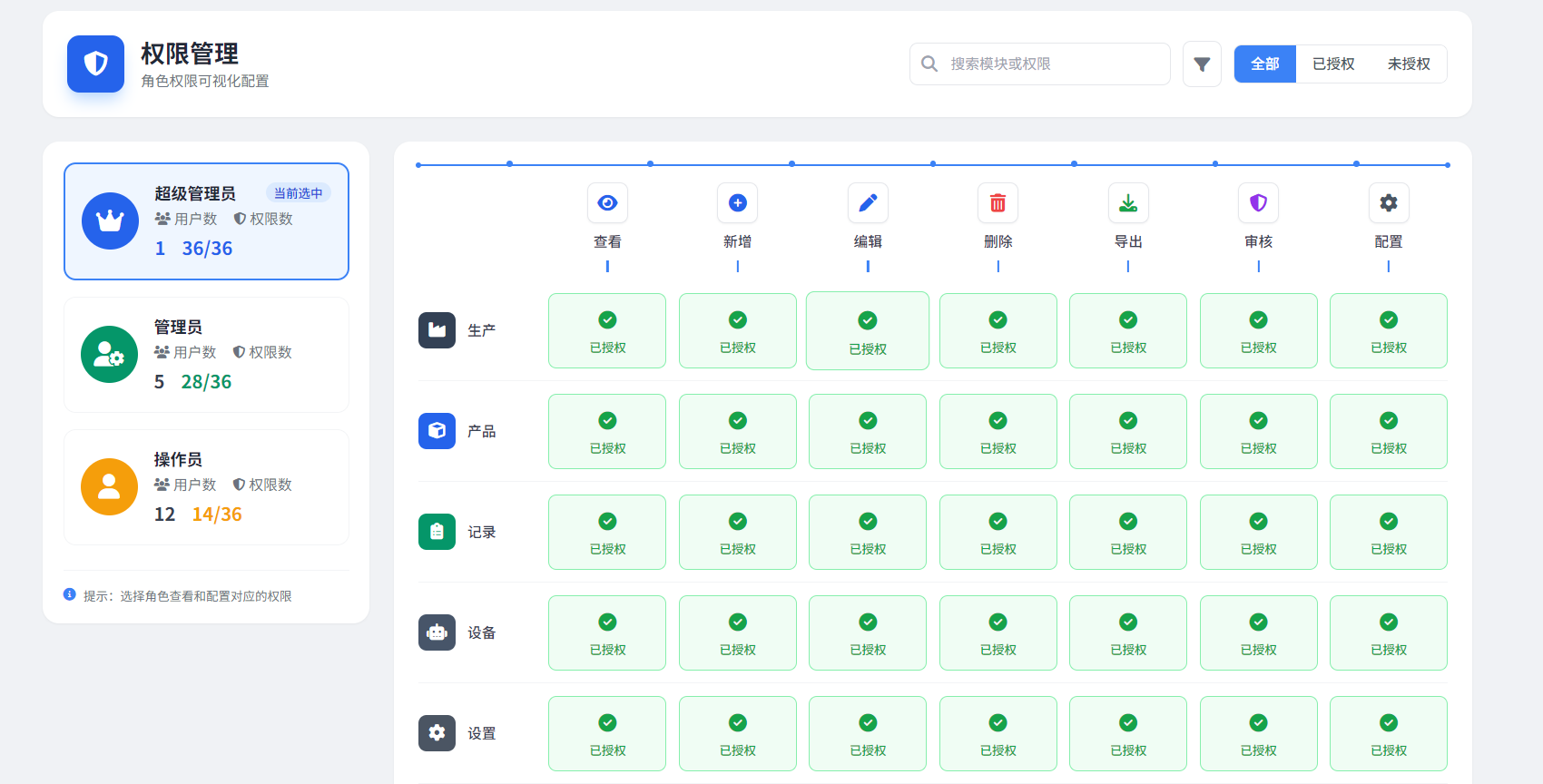
三种预设角色:超级管理员、管理员、操作员
权限矩阵可视化:6大模块 × 7种权限的完整矩阵展示
实时权限切换:点击即可切换授权状态
智能筛选搜索:按模块搜索 + 状态过滤
数据持久化:基于本地存储的数据管理
🎨 交互体验
响应式设计:适配桌面和移动端
平滑动画:切换、点击都有流畅的过渡效果
实时反馈:操作后立即显示 Toast 通知
视觉引导:顶部的蓝色连接线清晰展示权限关联
🚀 快速开始
方法一:直接运行(推荐)
复制项目中的完整 HTML 代码
保存为
permission-management.html用浏览器直接打开该文件
开始使用!
方法二:在线使用
通过 CDN 直接运行,无需下载:
<!-- 只需一个文件 -->
<!DOCTYPE html>
<html>
  <!-- 复制完整代码到这里 -->
</html>
🎮 使用指南
1. 角色管理
超级管理员:拥有所有权限
管理员:拥有大部分权限
操作员:拥有基础权限
点击左侧角色卡片切换当前编辑的角色。
2. 权限配置
在权限矩阵中:
绿色格子 = 已授权 ✅
灰色格子 = 未授权 🔒
点击任意格子切换授权状态
3. 搜索筛选
搜索框:输入模块名称快速定位
筛选按钮:
全部:显示所有权限
已授权:只显示已授权权限
未授权:只显示未授权权限
4. 底部操作
新建权限:添加新的权限模块
保存权限:保存当前配置
恢复默认:恢复到默认权限配置
修改密码:修改管理员密码
📁 项目结构
权限管理系统.html
├── 头部区域
│   ├── 页面标题
│   ├── 搜索框
│   └── 筛选按钮
├── 侧边栏
│   ├── 角色卡片
│   ├── 用户数统计
│   └── 权限数统计
├── 主内容区
│   ├── 权限矩阵表头
│   ├── 权限矩阵内容
│   └── 模块权限格子
└── 底部操作区
    ├── 功能按钮
    └── 安全提示
🔧 技术实现
前端技术栈
HTML5 - 语义化标签
Tailwind CSS - 原子化 CSS 框架
原生 JavaScript - 无框架依赖
Font Awesome 6 - 图标库
核心特性
零依赖:所有资源通过 CDN 加载
单文件:一个 HTML 文件包含所有功能
响应式:完美适配各种屏幕尺寸
离线可用:无需网络连接即可使用
数据模型
// 角色结构
{
  id: 1,
  name: "超级管理员",
  users: 1,           // 用户数量
  perms: "36/36",     // 权限数量
  permissions: {      // 权限配置
    production: {
      view: true,
      add: true,
      // ... 其他权限
    }
  }
}
🎨 界面特点
视觉设计
现代化设计:圆角、阴影、渐变背景
色彩系统:
蓝色:主要操作、超级管理员
绿色:成功状态、管理员
橙色:警告状态、操作员
紫色:特殊操作
图标系统:每个操作都有对应图标
交互反馈
悬停效果:鼠标悬停有视觉反馈
点击动画:按钮和卡片点击有微动画
Toast 通知:操作成功/失败提示
加载状态:异步操作时有加载指示
📱 移动端适配
在小屏幕上自动调整布局
触摸友好的大点击区域
响应式字体大小
移动端优化的交互
🔄 权限管理流程
添加新模块
点击"新建权限"按钮
填写模块信息
为每个角色配置权限
点击保存
批量操作
点击角色卡片切换编辑目标
使用筛选功能快速定位
恢复默认一键重置
⚙️ 配置说明
修改默认数据
编辑 HTML 文件中的 JavaScript 部分:
// 修改角色数据
const roles = [
  {
    id: 1,
    name: "你的角色名",
    users: 1,
    perms: "权限数",
    // ... 其他配置
  }
];

// 修改模块数据
const modules = [
  { key: 'your_module', label: '你的模块', icon: 'fa-icon' }
];

// 修改操作数据
const actions = [
  { key: 'your_action', label: '你的操作', icon: 'fa-icon' }
];
自定义样式
通过修改 CSS 变量自定义主题:
:root {
  --primary-color: #3b82f6;    /* 主色调 */
  --success-color: #16a34a;    /* 成功色 */
  --warning-color: #f59e0b;    /* 警告色 */
  --danger-color: #ef4444;     /* 危险色 */
}
📈 权限统计
系统自动计算每个角色的:
总权限数量
已授权权限数量
授权比例
实时更新显示
🔐 安全特性
权限验证:所有操作都有权限验证
数据保护:防止未经授权的修改
操作确认:重要操作有确认提示
安全提示:固定显示安全提示信息
🎯 适用场景
✅ 企业内部权限管理
✅ 后台管理系统权限配置
✅ 教学演示权限模型
✅ 原型设计权限交互
✅ 小型项目权限控制
🔧 开发者扩展
添加新功能
在 HTML 中添加新的 UI 元素
在 JavaScript 中添加事件处理
在数据模型中扩展数据结构
更新渲染函数
集成到项目
<!-- 在现有项目中嵌入 -->
<iframe src="permission-management.html" width="100%" height="600"></iframe>
📄 许可证
本项目为开源项目,遵循 MIT 许可证。可以自由使用、修改和分发。
🤝 贡献指南
欢迎提交 Issue 和 Pull Request!
Fork 项目
创建功能分支
提交更改
推送到分支
开启 Pull Request
📞 支持与反馈
提交 Issue 报告问题
提交 Pull Request 贡献代码
通过邮件联系获取支持
✨ 更新日志
v1.0.0 (当前版本)
✅ 完整的权限矩阵功能
✅ 三种预设角色
✅ 实时权限切换
✅ 搜索筛选功能
✅ 响应式设计
✅ 移动端适配
✅ 数据持久化
✅ 完整的交互反馈
html<!DOCTYPE html> <html lang="zh-CN"> <head> <meta charset="UTF-8"> <meta name="viewport" content="width=device-width, initial-scale=1.0"> <title>权限管理 - 角色权限可视化配置</title> <script src="https://cdn.tailwindcss.com"></script> <link rel="stylesheet" href="https://cdnjs.cloudflare.com/ajax/libs/font-awesome/6.5.1/css/all.min.css"> <style> @import url('https://fonts.googleapis.com/css2?family=Noto+Sans+SC:wght@300;400;500;700&display=swap'); body { font-family: 'Noto Sans SC', sans-serif; background: #f0f2f5; } .role-card { transition: all 0.3s ease; cursor: pointer; border: 2px solid transparent; } .role-card:hover { transform: translateY(-2px); box-shadow: 0 8px 25px rgba(0,0,0,0.08); } .role-card.active { border-color: #3b82f6; background: #eff6ff; } .role-avatar { width: 56px; height: 56px; border-radius: 50%; display: flex; align-items: center; justify-content: center; font-size: 24px; color: white; flex-shrink: 0; } .perm-cell { transition: all 0.2s ease; cursor: pointer; } .perm-cell:hover { transform: scale(1.05); } .perm-authorized { background: #f0fdf4; border: 1px solid #86efac; color: #16a34a; } .perm-unauthorized { background: #f8fafc; border: 1px solid #e2e8f0; color: #94a3b8; } .module-icon { width: 36px; height: 36px; border-radius: 8px; display: flex; align-items: center; justify-content: center; font-size: 16px; flex-shrink: 0; } .connector-line { position: absolute; top: 0; height: 2px; background: #3b82f6; } .connector-dot { width: 6px; height: 6px; border-radius: 50%; background: #3b82f6; position: absolute; top: -2px; } .action-header { position: relative; } .action-header::after { content: ''; position: absolute; bottom: -12px; left: 50%; transform: translateX(-50%); width: 2px; height: 12px; background: #3b82f6; } .search-input:focus { outline: none; border-color: #3b82f6; box-shadow: 0 0 0 3px rgba(59,130,246,0.1); } .filter-btn { transition: all 0.2s; } .filter-btn.active { background: #3b82f6; color: white; border-color: #3b82f6; } .btn-primary { background: #2563eb; transition: all 0.2s; } .btn-primary:hover { background: #1d4ed8; transform: translateY(-1px); box-shadow: 0 4px 12px rgba(37,99,235,0.3); } .btn-success { background: #16a34a; transition: all 0.2s; } .btn-success:hover { background: #15803d; transform: translateY(-1px); box-shadow: 0 4px 12px rgba(22,163,74,0.3); } .btn-warning { background: #f59e0b; transition: all 0.2s; } .btn-warning:hover { background: #d97706; transform: translateY(-1px); box-shadow: 0 4px 12px rgba(245,158,11,0.3); } .btn-purple { background: #7c3aed; transition: all 0.2s; } .btn-purple:hover { background: #6d28d9; transform: translateY(-1px); box-shadow: 0 4px 12px rgba(124,58,237,0.3); } .toast { animation: slideIn 0.3s ease, fadeOut 0.3s ease 2.7s; } @keyframes slideIn { from { transform: translateX(100%); opacity: 0; } to { transform: translateX(0); opacity: 1; } } @keyframes fadeOut { from { opacity: 1; } to { opacity: 0; } } .security-tip { background: linear-gradient(135deg, #fef3c7 0%, #fde68a 100%); border: 1px solid #f59e0b; } .matrix-container { position: relative; } .top-connector { position: absolute; top: -2px; left: 0; right: 0; height: 2px; background: #3b82f6; border-radius: 2px; } .top-connector::before, .top-connector::after { content: ''; position: absolute; width: 6px; height: 6px; background: #3b82f6; border-radius: 50%; top: -2px; } .top-connector::before { left: -3px; } .top-connector::after { right: -3px; } .connector-nodes { position: absolute; top: -5px; left: 0; right: 0; display: flex; justify-content: space-around; padding: 0 20px; } .connector-node { width: 6px; height: 6px; background: #3b82f6; border-radius: 50%; } </style> <base target="_blank"> </head> <body class="min-h-screen p-6"> <div class="max-w-[1400px] mx-auto"> <!-- Header --> <div class="bg-white rounded-2xl shadow-sm p-6 mb-6"> <div class="flex items-center justify-between"> <div class="flex items-center gap-4"> <div class="w-14 h-14 bg-blue-600 rounded-xl flex items-center justify-center text-white text-2xl shadow-lg shadow-blue-200"> <i class="fas fa-shield-alt"></i> </div> <div> <h1 class="text-2xl font-bold text-gray-800">权限管理</h1> <p class="text-gray-500 text-sm mt-0.5">角色权限可视化配置</p> </div> </div> <div class="flex items-center gap-3"> <div class="relative"> <i class="fas fa-search absolute left-3 top-1/2 -translate-y-1/2 text-gray-400"></i> <input type="text" id="searchInput" placeholder="搜索模块或权限" class="search-input pl-10 pr-4 py-2.5 border border-gray-200 rounded-lg text-sm w-64 transition-all"> </div> <button class="p-2.5 border border-gray-200 rounded-lg text-gray-500 hover:bg-gray-50 transition-colors"> <i class="fas fa-filter"></i> </button> <div class="flex rounded-lg overflow-hidden border border-gray-200"> <button class="filter-btn active px-4 py-2 text-sm font-medium" data-filter="all">全部</button> <button class="filter-btn px-4 py-2 text-sm font-medium bg-white text-gray-600 hover:bg-gray-50" data-filter="authorized">已授权</button> <button class="filter-btn px-4 py-2 text-sm font-medium bg-white text-gray-600 hover:bg-gray-50" data-filter="unauthorized">未授权</button> </div> </div> </div> </div> <!-- Main Content --> <div class="flex gap-6"> <!-- Left Sidebar - Roles --> <div class="w-80 flex-shrink-0"> <div class="bg-white rounded-2xl shadow-sm p-5"> <div id="rolesList" class="space-y-4"> <!-- Roles will be injected here --> </div> <div class="mt-6 pt-4 border-t border-gray-100"> <div class="flex items-start gap-2 text-xs text-gray-500"> <i class="fas fa-info-circle mt-0.5 text-blue-500"></i> <span>提示:选择角色查看和配置对应的权限</span> </div> </div> </div> </div> <!-- Right Content - Permission Matrix --> <div class="flex-1"> <div class="bg-white rounded-2xl shadow-sm p-6"> <!-- Matrix Header --> <div class="relative mb-8"> <div class="top-connector"></div> <div class="connector-nodes" id="connectorNodes"> <!-- Nodes injected by JS --> </div> <div class="grid grid-cols-8 gap-3 pt-4" id="actionHeaders"> <!-- Action headers injected by JS --> </div> </div> <!-- Matrix Body --> <div class="space-y-3" id="matrixBody"> <!-- Matrix rows injected by JS --> </div> </div> <!-- Bottom Actions --> <div class="mt-6 flex items-center justify-between"> <div class="flex gap-3"> <button onclick="addPermission()" class="btn-primary px-6 py-3 rounded-xl text-white font-medium flex items-center gap-2 shadow-lg shadow-blue-200"> <i class="fas fa-plus"></i> 新建权限 </button> <button onclick="savePermissions()" class="btn-success px-6 py-3 rounded-xl text-white font-medium flex items-center gap-2 shadow-lg shadow-green-200"> <i class="fas fa-save"></i> 保存权限 </button> <button onclick="resetDefault()" class="btn-warning px-6 py-3 rounded-xl text-white font-medium flex items-center gap-2 shadow-lg shadow-amber-200"> <i class="fas fa-undo"></i> 恢复默认 </button> <button onclick="changePassword()" class="btn-purple px-6 py-3 rounded-xl text-white font-medium flex items-center gap-2 shadow-lg shadow-purple-200"> <i class="fas fa-lock"></i> 修改密码 </button> </div> <div class="security-tip px-5 py-3 rounded-xl flex items-center gap-3"> <i class="fas fa-shield-alt text-amber-600 text-lg"></i> <span class="text-sm font-medium text-amber-800"> 安全提示:超级管理员密码固定: <span class="font-bold text-amber-900">123456</span> </span> </div> </div> </div> </div> </div> <!-- Toast Container --> <div id="toastContainer" class="fixed top-6 right-6 z-50 space-y-2"></div> <script> // Data const actions = [ { key: 'view', label: '查看', icon: 'fa-eye', color: 'text-blue-600' }, { key: 'add', label: '新增', icon: 'fa-plus-circle', color: 'text-blue-600' }, { key: 'edit', label: '编辑', icon: 'fa-pen', color: 'text-blue-600' }, { key: 'delete', label: '删除', icon: 'fa-trash-alt', color: 'text-red-500' }, { key: 'export', label: '导出', icon: 'fa-download', color: 'text-green-600' }, { key: 'audit', label: '审核', icon: 'fa-shield-alt', color: 'text-purple-600' }, { key: 'config', label: '配置', icon: 'fa-cog', color: 'text-gray-600' } ]; const modules = [ { key: 'production', label: '生产', icon: 'fa-industry', iconBg: 'bg-slate-700', iconColor: 'text-white' }, { key: 'product', label: '产品', icon: 'fa-cube', iconBg: 'bg-blue-600', iconColor: 'text-white' }, { key: 'record', label: '记录', icon: 'fa-clipboard-list', iconBg: 'bg-emerald-600', iconColor: 'text-white' }, { key: 'device', label: '设备', icon: 'fa-robot', iconBg: 'bg-slate-600', iconColor: 'text-white' }, { key: 'settings', label: '设置', icon: 'fa-cog', iconBg: 'bg-gray-600', iconColor: 'text-white' }, { key: 'permission', label: '权限管理', icon: 'fa-shield-alt', iconBg: 'bg-indigo-600', iconColor: 'text-white' } ]; const roles = [ { id: 1, name: '超级管理员', users: 1, perms: '36/36', color: 'bg-blue-600', avatarIcon: 'fa-crown', active: true, permissions: { production: { view: true, add: true, edit: true, delete: true, export: true, audit: true, config: true }, product: { view: true, add: true, edit: true, delete: true, export: true, audit: true, config: true }, record: { view: true, add: true, edit: true, delete: true, export: true, audit: true, config: true }, device: { view: true, add: true, edit: true, delete: true, export: true, audit: true, config: true }, settings: { view: true, add: true, edit: true, delete: true, export: true, audit: true, config: true }, permission: { view: true, add: true, edit: true, delete: true, export: true, audit: true, config: true } } }, { id: 2, name: '管理员', users: 5, perms: '28/36', color: 'bg-emerald-600', avatarIcon: 'fa-user-cog', active: false, permissions: { production: { view: true, add: true, edit: true, delete: true, export: true, audit: true, config: true }, product: { view: true, add: true, edit: true, delete: false, export: true, audit: false, config: false }, record: { view: true, add: true, edit: true, delete: false, export: true, audit: false, config: false }, device: { view: true, add: false, edit: true, delete: false, export: true, audit: false, config: true }, settings: { view: true, add: false, edit: false, delete: false, export: false, audit: false, config: false }, permission: { view: true, add: true, edit: true, delete: false, export: false, audit: true, config: true } } }, { id: 3, name: '操作员', users: 12, perms: '14/36', color: 'bg-amber-500', avatarIcon: 'fa-user', active: false, permissions: { production: { view: true, add: false, edit: false, delete: false, export: false, audit: false, config: false }, product: { view: true, add: true, edit: true, delete: false, export: true, audit: false, config: false }, record: { view: true, add: true, edit: true, delete: false, export: true, audit: false, config: false }, device: { view: true, add: false, edit: true, delete: false, export: true, audit: false, config: true }, settings: { view: true, add: false, edit: false, delete: false, export: false, audit: false, config: false }, permission: { view: true, add: true, edit: true, delete: false, export: false, audit: true, config: true } } } ]; let currentRoleId = 1; let currentFilter = 'all'; let searchQuery = ''; // Render Functions function renderRoles() { const container = document.getElementById('rolesList'); container.innerHTML = roles.map(role => ` <div class="role-card ${role.active ? 'active' : 'bg-white border border-gray-100'} rounded-xl p-4 flex items-center gap-4" onclick="selectRole(${role.id})"> <div class="role-avatar ${role.color}"> <i class="fas ${role.avatarIcon}"></i> </div> <div class="flex-1 min-w-0"> <div class="flex items-center justify-between mb-1"> <h3 class="font-bold text-gray-800">${role.name}</h3> ${role.active ? '<span class="text-xs bg-blue-100 text-blue-700 px-2 py-0.5 rounded-full font-medium">当前选中</span>' : ''} </div> <div class="flex items-center gap-4 text-sm"> <div class="flex items-center gap-1 text-gray-500"> <i class="fas fa-users text-xs"></i> <span>用户数</span> </div> <div class="flex items-center gap-1 text-gray-500"> <i class="fas fa-shield-alt text-xs"></i> <span>权限数</span> </div> </div> <div class="flex items-center gap-4 mt-1"> <span class="text-lg font-bold ${role.active ? 'text-blue-600' : 'text-gray-700'}">${role.users}</span> <span class="text-lg font-bold ${role.perms === '36/36' ? 'text-blue-600' : role.perms.startsWith('28') ? 'text-emerald-600' : 'text-amber-500'}">${role.perms}</span> </div> </div> </div> `).join(''); } function renderConnectorNodes() { const container = document.getElementById('connectorNodes'); container.innerHTML = actions.map(() => '<div class="connector-node"></div>').join(''); } function renderActionHeaders() { const container = document.getElementById('actionHeaders'); container.innerHTML = '<div></div>' + actions.map(action => ` <div class="action-header flex flex-col items-center gap-2 pb-2"> <div class="w-10 h-10 rounded-lg border border-gray-200 flex items-center justify-center bg-white shadow-sm"> <i class="fas ${action.icon} ${action.color} text-lg"></i> </div> <span class="text-sm font-medium text-gray-700">${action.label}</span> </div> `).join(''); } function renderMatrix() { const role = roles.find(r => r.id === currentRoleId); const container = document.getElementById('matrixBody'); const filteredModules = modules.filter(m => { if (searchQuery && !m.label.includes(searchQuery)) return false; const perms = role.permissions[m.key]; const hasAuth = Object.values(perms).some(v => v); const hasUnauth = Object.values(perms).some(v => !v); if (currentFilter === 'authorized' && !hasAuth) return false; if (currentFilter === 'unauthorized' && !hasUnauth) return false; return true; }); container.innerHTML = filteredModules.map((module, idx) => { const perms = role.permissions[module.key]; return ` <div class="grid grid-cols-8 gap-3 items-center"> <div class="flex items-center gap-3 py-2"> <div class="module-icon ${module.iconBg} ${module.iconColor}"> <i class="fas ${module.icon}"></i> </div> <span class="font-medium text-gray-700 text-sm">${module.label}</span> </div> ${actions.map(action => { const isAuth = perms[action.key]; return ` <div class="perm-cell ${isAuth ? 'perm-authorized' : 'perm-unauthorized'} rounded-lg py-3 px-2 flex flex-col items-center gap-1" onclick="togglePermission('${module.key}', '${action.key}')"> <i class="fas ${isAuth ? 'fa-check-circle text-lg' : 'fa-lock text-sm'}"></i> <span class="text-xs font-medium">${isAuth ? '已授权' : '未授权'}</span> </div> `; }).join('')} </div> ${idx < filteredModules.length - 1 ? '<div class="border-b border-gray-100"></div>' : ''} `; }).join(''); if (filteredModules.length === 0) { container.innerHTML = ` <div class="text-center py-12 text-gray-400"> <i class="fas fa-search text-4xl mb-3"></i> <p>未找到匹配的权限模块</p> </div> `; } } // Actions function selectRole(id) { roles.forEach(r => r.active = r.id === id); currentRoleId = id; renderRoles(); renderMatrix(); showToast(`已切换到${roles.find(r => r.id === id).name}`, 'info'); } function togglePermission(moduleKey, actionKey) { const role = roles.find(r => r.id === currentRoleId); role.permissions[moduleKey][actionKey] = !role.permissions[moduleKey][actionKey]; // Update perm count const totalPerms = modules.length * actions.length; let authCount = 0; modules.forEach(m => { actions.forEach(a => { if (role.permissions[m.key][a.key]) authCount++; }); }); role.perms = `${authCount}/${totalPerms}`; renderRoles(); renderMatrix(); const module = modules.find(m => m.key === moduleKey); const action = actions.find(a => a.key === actionKey); const isAuth = role.permissions[moduleKey][actionKey]; showToast(`${module.label} - ${action.label} 已${isAuth ? '授权' : '取消授权'}`, isAuth ? 'success' : 'warning'); } function addPermission() { showToast('新建权限功能开发中...', 'info'); } function savePermissions() { showToast('权限配置已保存!', 'success'); } function resetDefault() { if (confirm('确定要恢复默认权限配置吗?')) { showToast('已恢复默认配置', 'success'); } } function changePassword() { showToast('密码修改功能开发中...', 'info'); } function showToast(message, type = 'info') { const container = document.getElementById('toastContainer'); const colors = { success: 'bg-green-500', warning: 'bg-amber-500', info: 'bg-blue-500', error: 'bg-red-500' }; const icons = { success: 'fa-check-circle', warning: 'fa-exclamation-circle', info: 'fa-info-circle', error: 'fa-times-circle' }; const toast = document.createElement('div'); toast.className = `toast ${colors[type]} text-white px-5 py-3 rounded-xl shadow-lg flex items-center gap-3 min-w-[280px]`; toast.innerHTML = ` <i class="fas ${icons[type]}"></i> <span class="font-medium">${message}</span> `; container.appendChild(toast); setTimeout(() => toast.remove(), 3000); } // Event Listeners document.getElementById('searchInput').addEventListener('input', (e) => { searchQuery = e.target.value.trim(); renderMatrix(); }); document.querySelectorAll('.filter-btn').forEach(btn => { btn.addEventListener('click', () => { document.querySelectorAll('.filter-btn').forEach(b => { b.classList.remove('active'); b.classList.add('bg-white', 'text-gray-600'); }); btn.classList.add('active'); btn.classList.remove('bg-white', 'text-gray-600'); currentFilter = btn.dataset.filter; renderMatrix(); }); }); // Initialize renderRoles(); renderConnectorNodes(); renderActionHeaders(); renderMatrix(); </script> </body> </html>