大家都知道,我们直接修改图片后缀名实际上图片格式还是原来的格式,并没有正确转换图片格式,那么我们应该怎么去做呢,下面我用代码来教大家
先看效果,喜欢使用的小伙伴也可以收藏一下网站,免费使用;
需要功能完整代码的可以点击网站联系我,API对接里面有本人联系方式:https://office.zjdiante.com/imageTool/imageConvertFormat
网站地址:点透办公-免费图片格式转换
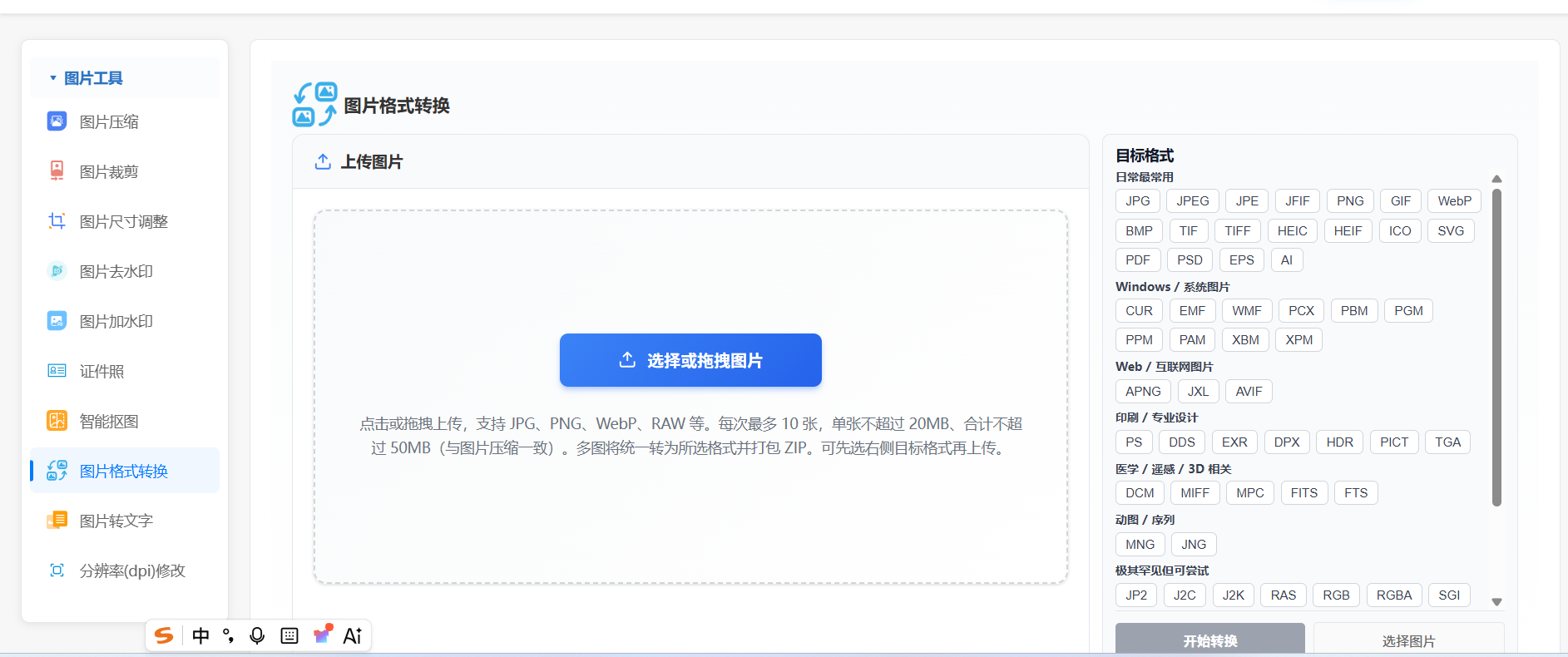
实现思路:前端vue写一下样式上传文件到后端,后端接收文件流;调用安装的 ImageMagick ,使用命名转换一下即可,ImageMagick是一款免费开源的图片处理工具
java后端代码如下:
java
package com.ruoyi.basicTool.imageTool.service;

import com.ruoyi.basicTool.imageTool.utils.FfmpegImageConvertUtils;
import org.springframework.http.MediaType;
import org.springframework.stereotype.Service;
import org.springframework.web.multipart.MultipartFile;

/**
 * 图片格式转换:统一走本机 ImageMagick(与开放平台 URL 转换同源)。
 */
@Service
public class ImageConvertFormatService {

    /**
     * 转换图片格式
     *
     * @param file         原始图片文件
     * @param targetFormat 目标格式(小写),须为 {@link FfmpegImageConvertUtils#supportedTargetFormats()} 之一
     */
    public byte[] convertFormat(MultipartFile file, String targetFormat) throws Exception {
        if (file == null || file.isEmpty()) {
            throw new IllegalArgumentException("请上传图片文件");
        }
        String normalized = targetFormat == null ? "" : targetFormat.toLowerCase().trim();
        if (!FfmpegImageConvertUtils.isValidTargetFormat(normalized)) {
            throw new IllegalArgumentException("不支持的目标格式: " + targetFormat);
        }
        return FfmpegImageConvertUtils.convertBytes(file.getBytes(), file.getOriginalFilename(), normalized);
    }

    public boolean isValidFormat(String format) {
        return format != null && FfmpegImageConvertUtils.isValidTargetFormat(format.toLowerCase().trim());
    }

    public String generateFileName(String originalFileName, String targetFormat) {
        if (originalFileName == null || originalFileName.isEmpty()) {
            return "converted_image." + targetFormat;
        }
        int lastDotIndex = originalFileName.lastIndexOf('.');
        String nameWithoutExt = (lastDotIndex > 0)
                ? originalFileName.substring(0, lastDotIndex)
                : originalFileName;
        return nameWithoutExt + "." + targetFormat;
    }

    public MediaType getMediaType(String format) {
        if (format == null) {
            return MediaType.APPLICATION_OCTET_STREAM;
        }
        switch (format.toLowerCase()) {
            case "jpg":
            case "jpeg":
            case "jfif":
                return MediaType.IMAGE_JPEG;
            case "png":
            case "apng":
                return format.equalsIgnoreCase("apng")
                        ? MediaType.parseMediaType("image/apng")
                        : MediaType.IMAGE_PNG;
            case "gif":
                return MediaType.IMAGE_GIF;
            case "webp":
                return MediaType.parseMediaType("image/webp");
            case "bmp":
                return MediaType.parseMediaType("image/bmp");
            case "tif":
            case "tiff":
                return MediaType.parseMediaType("image/tiff");
            case "avif":
                return MediaType.parseMediaType("image/avif");
            case "heic":
                return MediaType.parseMediaType("image/heic");
            case "heif":
                return MediaType.parseMediaType("image/heif");
            case "ico":
                return MediaType.parseMediaType("image/x-icon");
            case "ppm":
                return MediaType.parseMediaType("image/x-portable-pixmap");
            case "pgm":
                return MediaType.parseMediaType("image/x-portable-graymap");
            case "pbm":
                return MediaType.parseMediaType("image/x-portable-bitmap");
            case "pam":
                return MediaType.parseMediaType("image/x-portable-arbitrarymap");
            case "tga":
                return MediaType.parseMediaType("image/x-tga");
            case "xbm":
                return MediaType.parseMediaType("image/x-xbitmap");
            case "xpm":
                return MediaType.parseMediaType("image/x-xpixmap");
            case "jp2":
            case "j2k":
                return MediaType.parseMediaType("image/jp2");
            case "pcx":
                return MediaType.parseMediaType("image/x-pcx");
            case "sgi":
                return MediaType.parseMediaType("image/sgi");
            case "sun":
                return MediaType.parseMediaType("image/x-sun-raster");
            case "wbmp":
                return MediaType.parseMediaType("image/vnd.wap.wbmp");
            case "fits":
            case "fts":
                return MediaType.parseMediaType("image/fits");
            case "miff":
                return MediaType.parseMediaType("image/x-miff");
            case "psd":
                return MediaType.parseMediaType("image/vnd.adobe.photoshop");
            case "pdf":
                return MediaType.parseMediaType("application/pdf");
            case "dds":
                return MediaType.parseMediaType("image/vnd.ms-dds");
            case "svg":
                return MediaType.parseMediaType("image/svg+xml");
            case "eps":
                return MediaType.parseMediaType("application/postscript");
            case "ai":
                return MediaType.parseMediaType("application/postscript");
            case "ps":
                return MediaType.parseMediaType("application/postscript");
            case "jxl":
                return MediaType.parseMediaType("image/jxl");
            case "exr":
                return MediaType.parseMediaType("image/x-exr");
            case "dpx":
                return MediaType.parseMediaType("image/x-dpx");
            case "jpe":
                return MediaType.IMAGE_JPEG;
            case "pict":
                return MediaType.parseMediaType("image/x-pict");
            case "dcm":
                return MediaType.parseMediaType("application/dicom");
            default:
                return MediaType.APPLICATION_OCTET_STREAM;
        }
    }
}
java
package com.ruoyi.basicTool.imageTool.utils;


import org.apache.commons.lang3.StringUtils;


import java.io.IOException;

import java.nio.file.Files;

import java.nio.file.Path;

import java.util.ArrayList;

import java.util.Arrays;

import java.util.Collections;

import java.util.HashSet;

import java.util.List;

import java.util.Locale;

import java.util.Set;


/**

 * 使用本机 ImageMagick({@code magick})做静态图格式互转(与站内 {@code /app/image/convertFormat} 一致)。

 * <p>目标格式取决于当前 ImageMagick 策略与已启用的编码器;HEIC/HEIF 等需对应 delegate。若某格式未编译进 ImageMagick,执行会失败。</p>

 */

public final class FfmpegImageConvertUtils {


    /**
     * 允许的目标格式(小写,不含点)。
     * <p>jpeg/jpe 与 jpg 等价(输出统一 .jpg)。相机 RAW、视频容器等不作为通用位图导出目标,未列入。</p>
     * <p>具体能否写出取决于本机 ImageMagick 编译项与策略;未启用的编码器会转换失败。</p>
     */
    private static final Set<String> TARGET_FORMATS = new HashSet<>(Arrays.asList(
            /* 一、日常与通用(jpeg/jpe 请求会规范为 jpg) */
            "jpg", "jfif", "png", "gif", "webp", "bmp", "tif", "tiff",
            "heic", "heif", "ico", "svg", "pdf", "psd", "eps", "ai",
            /* 二、Windows / 系统 */
            "cur", "emf", "wmf", "pcx", "pbm", "pgm", "ppm", "pam", "xbm", "xpm",
            /* 三、Web / 现代编码 */
            "apng", "jxl", "avif",
            /* 五、印刷 / 设计 */
            "ps", "dds", "exr", "dpx", "hdr", "pict", "tga",
            /* 六、医学 / 专业容器 */
            "dcm", "miff", "mpc", "fits", "fts",
            /* 七、动图相关 */
            "mng", "jng",
            /* 八、其它(ImageMagick 常见可写后缀;未列全则由策略决定) */
            "jp2", "j2k", "j2c", "ras", "rgb", "rgba", "sgi", "sun", "wbmp", "wpg", "xwd",
            "yuv", "ycbcr", "gray", "cals", "cin", "cut", "dib", "djvu", "hrz", "jbig",
            "otb", "p7", "mtv", "palm", "tpic", "uyvy", "vicar", "viff"
    ));


    /** 允许的源文件后缀(小写,带点):常见位图 + 相机 RAW 等(由 ImageMagick 解码)。 */

    private static final Set<String> SOURCE_EXTENSIONS = new HashSet<>(Arrays.asList(
            ".jpg", ".jpeg", ".jfif", ".jpe", ".png", ".apng", ".webp", ".gif", ".bmp",
            ".tif", ".tiff", ".avif", ".heic", ".heif", ".jp2", ".j2k", ".j2c",
            ".ppm", ".pgm", ".pbm", ".pam", ".tga", ".pcx", ".xwd", ".sgi", ".sun",
            ".ico", ".xbm", ".xpm", ".svg", ".pdf", ".psd", ".eps", ".ai",
            ".cr2", ".cr3", ".nef", ".nrw", ".arw", ".orf", ".rw2", ".raf", ".dng",
            ".pef", ".srw", ".sr2", ".kdc", ".mrw", ".3fr", ".raw"
    ));


    private FfmpegImageConvertUtils() {

    }


    /** 对外文档/校验:支持的目标格式列表(小写)。 */

    public static Set<String> supportedTargetFormats() {

        return Collections.unmodifiableSet(TARGET_FORMATS);

    }


    public static boolean isValidTargetFormat(String format) {

        if (format == null) {

            return false;

        }

        String t = format.trim().toLowerCase(Locale.ROOT);

        if ("jpeg".equals(t) || "jpe".equals(t)) {

            t = "jpg";

        }

        return TARGET_FORMATS.contains(t);

    }


    public static boolean isAllowedSourceFilename(String filename) {

        if (StringUtils.isBlank(filename)) {

            return true;

        }

        String ext = suffixOf(filename);

        if (ext.isEmpty()) {

            return true;

        }

        return SOURCE_EXTENSIONS.contains(ext);

    }


    /**

     * @param inputBytes       原图字节

     * @param originalFilename 原始文件名(决定解码器线索)

     * @param targetFormat     目标格式,如 png、jpg、webp(小写)

     */

    public static byte[] convertBytes(byte[] inputBytes, String originalFilename, String targetFormat)

            throws Exception {

        if (inputBytes == null || inputBytes.length == 0) {

            throw new IllegalArgumentException("图片数据为空");

        }

        String tf = targetFormat == null ? "" : targetFormat.trim().toLowerCase(Locale.ROOT);

        if ("jpeg".equals(tf) || "jpe".equals(tf)) {

            tf = "jpg";

        }

        if (!TARGET_FORMATS.contains(tf)) {

            throw new IllegalArgumentException("不支持的目标格式: " + targetFormat);

        }

        String inName = StringUtils.isNotBlank(originalFilename) ? originalFilename : "image.jpg";

        if (!isAllowedSourceFilename(inName)) {

            throw new IllegalArgumentException("不支持的源图片格式,请使用常见图片后缀(如 JPG/PNG/WebP/TIFF/AVIF/HEIC 等)");

        }

        String inExt = suffixOf(inName);

        if (inExt.isEmpty()) {

            inExt = ".jpg";

        }

        String outExt = tempFileSuffixForOutput(tf);


        Path tempIn = null;

        Path tempOut = null;

        try {

            tempIn = Files.createTempFile("imc_cv_in_", inExt);

            Files.write(tempIn, inputBytes);

            tempOut = Files.createTempFile("imc_cv_out_", outExt);

            List<String> cmd = buildConvertCommand(tempIn, tempOut, outExt);

            ImageMagickRunUtils.runMagick(tempOut, cmd);

            return Files.readAllBytes(tempOut);

        } finally {

            deleteQuietly(tempIn);

            deleteQuietly(tempOut);

        }

    }


    /**

     * 临时输出文件后缀。JFIF 与 JPEG 等价,统一用 .jpg。

     */

    private static String tempFileSuffixForOutput(String tf) {

        if ("jpg".equals(tf) || "jpeg".equals(tf) || "jfif".equals(tf) || "jpe".equals(tf)) {

            return ".jpg";

        }

        if ("j2k".equals(tf)) {

            return ".jp2";

        }

        return "." + tf;

    }


    private static List<String> buildConvertCommand(Path in, Path out, String outExt) {

        String lower = outExt.toLowerCase(Locale.ROOT);

        List<String> c = new ArrayList<>();

        c.add(ImageMagickRunUtils.magickBinary());

        c.add(in.toAbsolutePath().toString());


        if (".jpg".equals(lower) || ".jpeg".equals(lower) || ".jfif".equals(lower) || ".jpe".equals(lower)) {

            c.add("-quality");

            c.add("92");

        } else if (".png".equals(lower)) {

            c.add("-define");

            c.add("png:compression-level=9");

        } else if (".apng".equals(lower)) {

            c.add("-define");

            c.add("png:compression-level=9");

        } else if (".webp".equals(lower)) {

            c.add("-quality");

            c.add("92");

        } else if (".jxl".equals(lower)) {

            c.add("-quality");

            c.add("90");

        } else if (".heic".equals(lower) || ".heif".equals(lower)) {

            c.add("-quality");

            c.add("85");

        } else if (".tif".equals(lower) || ".tiff".equals(lower)) {

            c.add("-compress");

            c.add("Zip");

        } else if (".jp2".equals(lower) || ".j2k".equals(lower) || ".j2c".equals(lower)) {

            c.add("-quality");

            c.add("80");

        } else if (".psd".equals(lower)) {

            c.add("-compress");

            c.add("Zip");

        }


        c.add(out.toAbsolutePath().toString());

        return c;

    }


    private static void deleteQuietly(Path p) {

        if (p == null) {

            return;

        }

        try {

            Files.deleteIfExists(p);

        } catch (IOException ignored) {

            // ignore

        }

    }


    static String suffixOf(String filename) {

        int i = filename.lastIndexOf('.');

        return i >= 0 ? filename.substring(i).toLowerCase(Locale.ROOT) : "";

    }

}