QWidget同时继承于QPaintDevice和QObject两个类,QObject实现元对象系统,QPaintDevice实现画界面功能。
cpp
class Q_WIDGETS_EXPORT QWidget : public QObject, public QPaintDevice
{
...
}
1、分析paintEvent
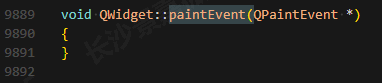
是个空函数,啥也没做。
2、分析QWidget画图过程
update()/repaint()
↓
QEvent::UpdateRequest
↓
QWidgetRepaintManager::paintAndFlush()
↓
QWidgetPrivate::drawWidget(...) // 内部私有
↓
QWidget::paintEvent() // 你要重写的函数
可以发现drawWidget函数在paintEvent之前处理了初始化颜色。
cpp
void QWidgetPrivate::drawWidget(QPaintDevice *pdev, const QRegion &rgn, const QPoint &offset, DrawWidgetFlags flags,
                                QPainter *sharedPainter, QWidgetRepaintManager *repaintManager)
{
    if (rgn.isEmpty())
        return;
    Q_Q(QWidget);

    qCInfo(lcWidgetPainting) << "Drawing" << rgn << "of" << q << "at" << offset << "into paint device" << pdev << "with" << flags;
    const bool asRoot = flags & DrawAsRoot;
    bool onScreen = shouldPaintOnScreen();
    flags = flags & ~UseEffectRegionBounds;
    const bool alsoOnScreen = flags & DrawPaintOnScreen;
    const bool recursive = flags & DrawRecursive;
    const bool alsoInvisible = flags & DrawInvisible;
    Q_ASSERT(sharedPainter ? sharedPainter->isActive() : true);
    QRegion toBePainted(rgn);
    if (asRoot && !alsoInvisible)
        toBePainted &= clipRect(); //(rgn & visibleRegion());
    if (!(flags & DontSubtractOpaqueChildren))
        subtractOpaqueChildren(toBePainted, q->rect());

    if (!toBePainted.isEmpty()) {
        if (!onScreen || alsoOnScreen) {
            //update the "in paint event" flag
            if (Q_UNLIKELY(q->testAttribute(Qt::WA_WState_InPaintEvent)))
                qWarning("QWidget::repaint: Recursive repaint detected");
            q->setAttribute(Qt::WA_WState_InPaintEvent);

            //clip away the new area
            QPaintEngine *paintEngine = pdev->paintEngine();
            if (paintEngine) {
                setRedirected(pdev, -offset);
                if (sharedPainter)
                    setSystemClip(pdev->paintEngine(), pdev->devicePixelRatio(), toBePainted);
                else
                    paintEngine->d_func()->systemRect = q->data->crect;

                //paint the background
                if ((asRoot || q->autoFillBackground() || onScreen || q->testAttribute(Qt::WA_StyledBackground))
                    && !q->testAttribute(Qt::WA_OpaquePaintEvent) && !q->testAttribute(Qt::WA_NoSystemBackground)) {
                    beginBackingStorePainting();
                    QPainter p(q);
                    p.setRenderHint(QPainter::SmoothPixmapTransform);
                    paintBackground(&p, toBePainted, (asRoot || onScreen) ? (flags | DrawAsRoot) : DrawWidgetFlags());
                    endBackingStorePainting();
                }

                if (!sharedPainter)
                    setSystemClip(pdev->paintEngine(), pdev->devicePixelRatio(), toBePainted.translated(offset));

                if (!onScreen && !asRoot && !isOpaque && q->testAttribute(Qt::WA_TintedBackground)) {
                    beginBackingStorePainting();
                    QPainter p(q);
                    QColor tint = q->palette().window().color();
                    tint.setAlphaF(.6f);
                    p.fillRect(toBePainted.boundingRect(), tint);
                    endBackingStorePainting();
                }
            }

            bool skipPaintEvent = false;
            if (renderToTexture) {
                // This widget renders into a texture which is composed later. We just need to punch a hole in the backingstore, so the texture will be visible.
                beginBackingStorePainting();
                if (!q->testAttribute(Qt::WA_AlwaysStackOnTop) && repaintManager) {
                    QPainter p(q);
                    p.setCompositionMode(QPainter::CompositionMode_Source);
                    p.fillRect(q->rect(), Qt::transparent);
                } else if (!repaintManager) {
                    // We are not drawing to a backingstore: fall back to QImage
                    QImage img = grabFramebuffer();
                    // grabFramebuffer() always sets the format to RGB32 regardless of whether it is transparent or not.
                    if (img.format() == QImage::Format_RGB32)
                        img.reinterpretAsFormat(QImage::Format_ARGB32_Premultiplied);
                    QPainter p(q);
                    p.drawImage(q->rect(), img);
                    skipPaintEvent = true;
                }
                endBackingStorePainting();

                if (renderToTextureReallyDirty)
                    renderToTextureReallyDirty = 0;
                else
                    skipPaintEvent = true;
            }

            if (!skipPaintEvent) {
                //actually send the paint event
                sendPaintEvent(toBePainted);
            }

            if (repaintManager)
                repaintManager->markNeedsFlush(q, toBePainted, offset);

            //restore
            if (paintEngine) {
                restoreRedirected();
                if (!sharedPainter)
                    paintEngine->d_func()->systemRect = QRect();
                else
                    paintEngine->d_func()->currentClipDevice = nullptr;
                setSystemClip(pdev->paintEngine(), 1, QRegion());
            }
            q->setAttribute(Qt::WA_WState_InPaintEvent, false);
            if (Q_UNLIKELY(q->paintingActive()))
                qWarning("QWidget::repaint: It is dangerous to leave painters active on a widget outside of the PaintEvent");

            if (paintEngine && paintEngine->autoDestruct()) {
                delete paintEngine;
            }
        } else if (q->isWindow()) {
            QPaintEngine *engine = pdev->paintEngine();
            if (engine) {
                QPainter p(pdev);
                p.setClipRegion(toBePainted);
                const QBrush bg = q->palette().brush(QPalette::Window);
                if (bg.style() == Qt::TexturePattern)
                    p.drawTiledPixmap(q->rect(), bg.texture());
                else
                    p.fillRect(q->rect(), bg);
                if (engine->autoDestruct())
                    delete engine;
            }
        }
    }

    if (recursive && !children.isEmpty()) {
        paintSiblingsRecursive(pdev, children, children.size() - 1, rgn, offset, flags & ~DrawAsRoot,
                               sharedPainter, repaintManager);
    }
}
paintBackground画默认背景图,通过调色板QPalette获取背景色,然后通过fillRegion画。
cpp
void QWidgetPrivate::paintBackground(QPainter *painter, const QRegion &rgn, DrawWidgetFlags flags) const
{
    Q_Q(const QWidget);
    bool brushOriginSet = false;
    const QBrush autoFillBrush = q->palette().brush(q->backgroundRole());

    // 默认不自动用 backgroundRole 铺底;根窗口等仍可能通过 DrawAsRoot 路径铺 QPalette::Window
    if ((flags & DrawAsRoot) && !(q->autoFillBackground() && autoFillBrush.isOpaque())) {
        const QBrush bg = q->palette().brush(QPalette::Window);
        if (!brushOriginSet)
            brushOriginSet = updateBrushOrigin(painter, bg);
        if (!(flags & DontSetCompositionMode)) {
            //copy alpha straight in
            QPainter::CompositionMode oldMode = painter->compositionMode();
            painter->setCompositionMode(QPainter::CompositionMode_Source);
            fillRegion(painter, rgn, bg);
            painter->setCompositionMode(oldMode);
        } else {
            fillRegion(painter, rgn, bg);
        }
    }

    // 用 backgroundRole 铺底
    if (q->autoFillBackground()) {
        if (!brushOriginSet)
            brushOriginSet = updateBrushOrigin(painter, autoFillBrush);
        fillRegion(painter, rgn, autoFillBrush);
    }

    if (q->testAttribute(Qt::WA_StyledBackground)) {
        painter->setClipRegion(rgn);
        QStyleOption opt;
        opt.initFrom(q);
        q->style()->drawPrimitive(QStyle::PE_Widget, &opt, painter, q);
    }
}
真正的画图处理函数fillRegion通过painter画背景色:
cpp
static inline void fillRegion(QPainter *painter, const QRegion &rgn, const QBrush &brush)
{
    Q_ASSERT(painter);

    if (brush.style() == Qt::TexturePattern) {
        const QRect rect(rgn.boundingRect());
        painter->setClipRegion(rgn);
        painter->drawTiledPixmap(rect, brush.texture(), rect.topLeft());
    } else if (brush.gradient()
               && (brush.gradient()->coordinateMode() == QGradient::ObjectBoundingMode
                   || brush.gradient()->coordinateMode() == QGradient::ObjectMode)) {
        painter->save();
        painter->setClipRegion(rgn);
        painter->fillRect(0, 0, painter->device()->width(), painter->device()->height(), brush);
        painter->restore();
    } else {
        for (const QRect &rect : rgn)
            painter->fillRect(rect, brush);
    }
}