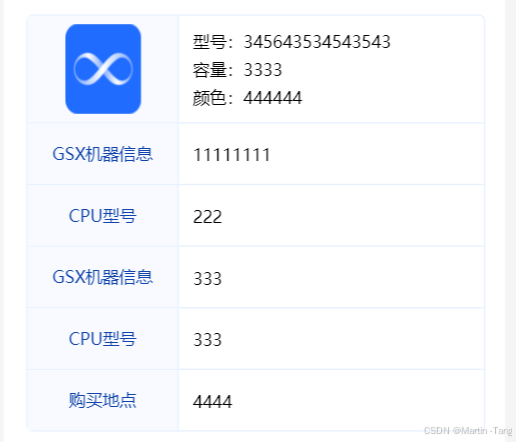
javascript
<template>
	<view class="custom-table">
		<view class="tb-cx">查询示例,仅供预览</view>
		<view class="table-body">
			<view v-for="(row, rowIndex) in tableData" :key="rowIndex" class="table-row">
				<view v-for="(col, colIndex) in row" :key="colIndex" :class="colIndex === 0?'table-cell':''"
					:style="getCellStyle(rowIndex, colIndex)" @click="handleCellClick(rowIndex, colIndex)">
					<!-- 支持自定义内容插槽 -->
					<view class="tb-bg" v-if="rowIndex === 0 && colIndex === 0">
						<image class="tb-img" src="/static/logo.png"></image>
					</view>
					<view class="tb-txt" v-if="rowIndex === 0 && colIndex === 1">
						<view class="txt-line">型号:345643534543543</view>
						<view class="txt-line">容量:3333</view>
						<view class="txt-line">颜色:444444</view>
					</view>

					<view class="tb-header" v-if="rowIndex === 1 && colIndex === 0">
						GSX机器信息
					</view>
					<view class="tb-txt" v-if="rowIndex === 1 && colIndex === 1">
						<view class="txt-line">11111111</view>
					</view>

					<view class="tb-header" v-if="rowIndex === 2 && colIndex === 0">
						CPU型号
					</view>
					<view class="tb-txt" v-if="rowIndex === 2 && colIndex === 1">
						<view class="txt-line">222</view>
					</view>

					<view class="tb-header" v-if="rowIndex === 3 && colIndex === 0">
						GSX机器信息
					</view>
					<view class="tb-txt" v-if="rowIndex === 3 && colIndex === 1">
						<view class="txt-line">333</view>
					</view>

					<view class="tb-header" v-if="rowIndex === 4 && colIndex === 0">
						CPU型号
					</view>
					<view class="tb-txt" v-if="rowIndex === 4 && colIndex === 1">
						<view class="txt-line">333</view>
					</view>

					<view class="tb-header" v-if="rowIndex === 5 && colIndex === 0">
						购买地点
					</view>
					<view class="tb-txt" v-if="rowIndex === 5 && colIndex === 1">
						<view class="txt-line">4444</view>
					</view>
				</view>
			</view>
		</view>
		<view class="tb-tips">部分产品可能无法提供型号号码或购买地点信息。无法提供型号号码的情况多见于最新款设备,而无法提供购买地点的情况多见于 MacBook 和 Mac,敬请谅解</view>
	</view>
</template>

<script lang="ts" setup>
	import { computed, ref } from 'vue'

	const data = ref([
		['', ''],
		['', ''],
		['', ''],
		['', ''],
		['', ''],
		['', '']
	])
	const cellStyles = ref({})
	const tableData = computed(() => {
		const datas = [data.value]
		while (datas.length < 6) {
			datas.push(['', ''])
		}
		return datas.slice(0, 6).map(row => {
			if (row.length < 2) {
				return [...row, ...new Array(2 - row.length).fill('')]
			}
			return row.slice(0, 2)
		})
	})
	const getCellStyle = (rowIndex, colIndex) => {
		const style = {
			...cellStyles.value
		}
		// 可以通过 props 传入更多动态样式
		if (cellStyles.value[rowIndex] && cellStyles.value[rowIndex][colIndex]) {
			Object.assign(style, cellStyles.value[rowIndex][colIndex])
		}
		return style
	}

	const handleCellClick = (rowIndex, colIndex) => {

	}
</script>

<style scoped lang="scss">
	.custom-table {
		width: calc(100% - 124rpx);
		background-color: #fff;
		border-radius: 20rpx;
		overflow: hidden;
		margin: auto;
		padding: 32rpx;
		margin-top: 20rpx;


		/* 表格主体 */
		.table-body {
			width: 100%;
			border: 1rpx solid #E9F1FF;
			border-radius: 10rpx;
			text-align: left;
		}

		.table-row {
			display: flex;
			border-bottom: 1px solid #E9F1FF;
			align-items: center;
			text-align: left;
		}

		.table-row:last-child {
			border-bottom: none;
		}

		.table-cell {
			width: 206rpx;
			font-size: 14rpx;
			color: #666;
			border-right: 1rpx solid #E9F1FF;
			min-height: 44rpx;
			word-break: break-all;


			.tb-img {
				width: 104rpx;
				height: 124rpx;
				margin: auto;
			}

			.tb-bg {
				padding: 12rpx 8rpx;
				background-color: #F8FAFF;

			}

			.tb-header {
				height: 60rpx;
				padding: 12rpx 8rpx;
				background-color: #F8FAFF;
				color: var(--Primary-Blue-900, #1044AA);
				font-family: "Source Han Sans CN";
				font-size: 24rpx;
				font-style: normal;
				font-weight: 400;
				text-align: center;
				line-height: 60rpx;
			}
		}

		.table-cell:last-child {
			border-right: none;
		}

		.tb-txt {
			width: 100%;
			color: #000;
			font-family: "Source Han Sans CN";
			font-size: 24rpx;
			font-style: normal;
			font-weight: 400;

			.txt-line {
				line-height: 40rpx;
				/* 28.8px */
				margin-left: 20rpx;
			}

		}

		.tb-tips{
			color: var(--Grey-400, #A4A7AE);
			font-family: "Source Han Sans CN";
			font-size: 22rpx;
			font-style: normal;
			font-weight: 400;
			margin-top: 20rpx;
		}

		.tb-cx{
			color: var(--Grey-400, #A4A7AE);
			font-family: "Source Han Sans CN";
			font-size: 24rpx;
			font-style: normal;
			font-weight: 400;
			margin-bottom: 20rpx;
			text-align: center;
		}
	}
</style>