下面直接给你一套2026 最新、可复制即用的 VSCode Shell 环境配置(Windows /macOS/ Linux 都覆盖),包括:默认 Shell 切换、自定义 profiles、环境变量、登录 / 交互模式、常见坑。
一、打开 settings.json(必须)
快捷键:
- Windows:Ctrl + , → 右上角 { } 图标
- macOS:Cmd + , → 右上角 { } 或命令面板:Ctrl+Shift+P → Preferences: Open Settings (JSON)
二、Windows 配置(Git Bash / PowerShell / WSL)
1)推荐:Git Bash 作为默认
json
{
  // 定义 profiles
  "terminal.integrated.profiles.windows": {
    "Git Bash": {
      "path": "D:\\Program Files\\Git\\bin\\bash.exe", // 改成你的 Git 安装路径
      "args": ["--login", "-i"], // 登录模式 + 交互模式(加载 ~/.bashrc)
      "icon": "terminal-bash"
    },
    "PowerShell": {
      "source": "PowerShell",
      "args": ["-NoLogo"]
    },
    "WSL": {
      "path": "wsl.exe",
      "args": ["-d", "Ubuntu"] // 你的发行版
    }
  },
  // 设置默认
  "terminal.integrated.defaultProfile.windows": "Git Bash",

  // 全局环境变量(可选)
  "terminal.integrated.env.windows": {
    "PATH": "${env:PATH};${workspaceFolder}/node_modules/.bin",
    "NODE_ENV": "development"
  }
}- path 要真实存在(常见:
C:\Program Files\Git\bin\bash.exe) - --login :加载
~/.bash_profile - -i :交互模式,加载
~/.bashrc(解决 conda/nvm 不生效)
2)旧版写法(已废弃,不要用)
json
// ❶ 老版本(2020 前)已失效
"terminal.integrated.shell.windows": "C:\\Git\\bin\\bash.exe"
三、macOS / Linux 配置(zsh /bash)
1)zsh(推荐,加载 .zshrc)
json
{
  "terminal.integrated.profiles.osx": {
    "zsh": {
      "path": "/bin/zsh",
      "args": ["-l", "-i"] // 登录+交互
    },
    "bash": {
      "path": "/bin/bash",
      "args": ["-l"]
    }
  },
  "terminal.integrated.defaultProfile.osx": "zsh",

  "terminal.integrated.env.osx": {
    "PATH": "${env:PATH}:${HOME}/.local/bin"
  }
}- -l :登录 shell → 读
.zprofile/.bash_profile - -i :交互 → 读
.zshrc/.bashrc(关键!)
2)Linux 把 osx 换成 linux 即可。
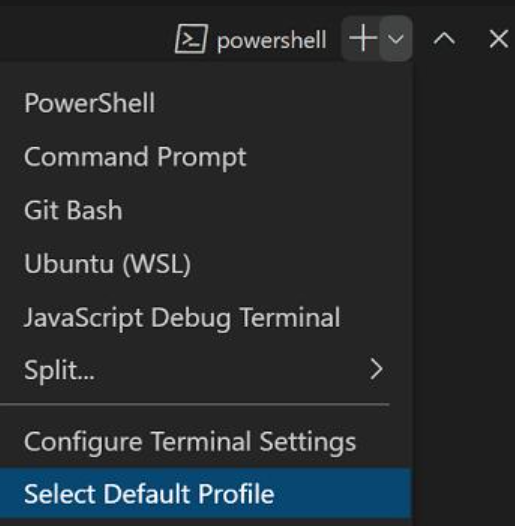
四、快速切换默认 Shell(不用写 JSON)
1.打开终端 → 右上角 ▼ → Select Default Profile
打开终端 → 右上角 ▼ → 选择默认配置文件
2.选:Git Bash / PowerShell /zsh/ WSL...
3.关闭所有终端 → 重开 才生效
五、常见问题 & 解决
1)~/.bashrc/ ~/.zshrc 不生效
- 原因:VSCode 默认非登录、非交互 shell,不加载 rc 文件
- 解决:在
args加 -l -i(如上配置)
2)Git Bash 中文乱码
json
"terminal.integrated.profiles.windows": {
  "Git Bash": {
    "path": "D:\\Program Files\\Git\\bin\\bash.exe",
    "args": ["--login", "-i"],
    "env": {
      "LANG": "zh_CN.UTF-8",
      "LC_ALL": "zh_CN.UTF-8"
    }
  }
}
3)终端启动失败 / 路径错误
- 检查 path 是否绝对路径 + 存在
- Windows 路径用 \ 或 /
- 不要混用
windows/osx/linux字段
六、验证是否生效
新终端里执行:
bash
运行
# macOS/Linux
echo $SHELL
cat ~/.zshrc # 看是否加载

# Windows Git Bash
echo $0