HTML实现DOCX文档版题库图文考试系统(修订)
支持保留DOCX文档版题库的复杂样式:加粗、斜体、颜色等排版属性。
适用场景
教师/培训师制作图文并茂的选择题试卷,通过浏览器快速进行课堂练习或自我测试,无需搭建任何平台。
运行截图与使用说明****
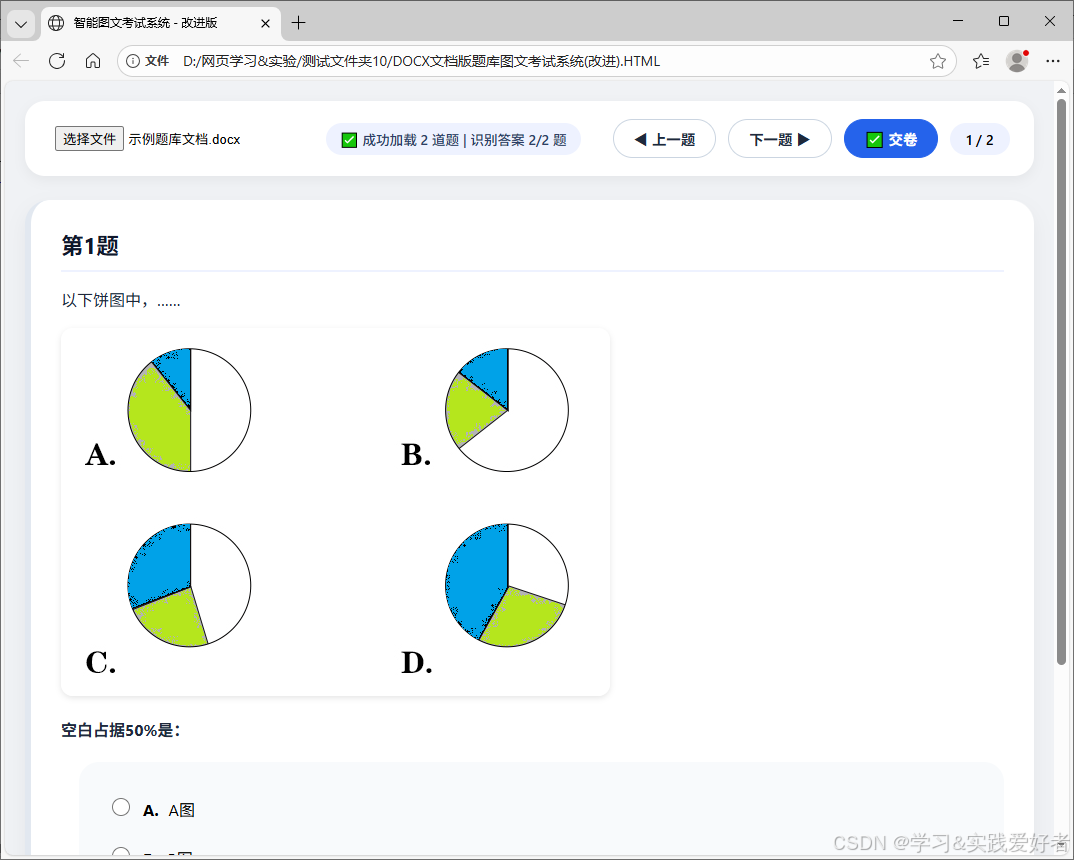
使用说明:
1.准备 DOCX 文件题库,格式要求:
· 每道题以 "第x题"(支持空格)开头,如"第1题"、"第2题"。
· 选项行以 #A. 或 #B. 开头(可识别最多 26 个字母)。 如:
#A. 这是选项A
#B. 这是选项B
#C. 这是选项C
#D. 这是选项D
· 题干和选项中的图片会被自动提取并显示在原位置。
注意,题目分界("第x题")和选项标记(#A.)必须严格标记。
2.配置答案:在每道题 选项的的后面 设置答案行 格式为 答案 选项字符。
3.打开 HTML → 选择文件 → 开始答题 → 点击上一题/下一题切换 → 点击 交卷 查看分数和对错。
测试用 DOCX 文件题库 示例
我这里内容如下:
第1题
以下饼图中,......
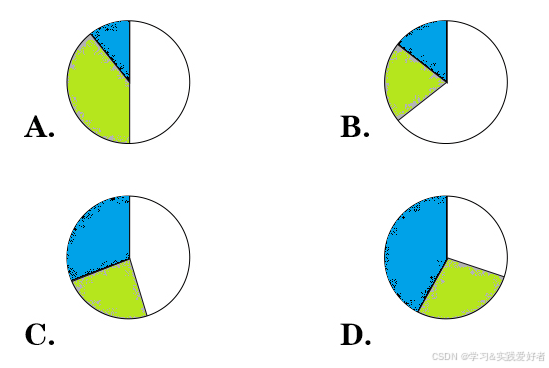
空白占据50%是:
#A.A图
#B. B图
#C. C图
#D. D图
答案: A
第2题
这是一个表格 示例题!
这是表格
|-------------|-------------|-------------|
| | 特点1 | 特点1 |
| 项目1 | 合格 | 不合格 |
| 项目2 | 符合要求 | 需要改进 |
| 项目3 | 不标准 | 标准 |
比较好的项目是:
#A. 项目1
#B. 项目2
#C. 项目3
答案: B
源码
(改进版)
html
<!DOCTYPE html>
<html lang="zh-CN">
<head>
<meta charset="UTF-8">
<title>智能图文考试系统 - 改进版</title>
<script src="https://unpkg.com/jszip/dist/jszip.min.js"></script>
<style>
* {
box-sizing: border-box;
}
body {
font-family: 'Segoe UI', Roboto, 'Helvetica Neue', sans-serif;
margin: 0;
background: #f0f2f5;
padding: 20px;
}
#app {
max-width: 1200px;
margin: 0 auto;
}
#toolbar {
background: white;
padding: 18px 24px;
border-radius: 20px;
box-shadow: 0 4px 12px rgba(0,0,0,0.05);
margin-bottom: 24px;
display: flex;
flex-wrap: wrap;
align-items: center;
gap: 16px;
}
.file-area {
display: flex;
align-items: center;
gap: 12px;
flex-wrap: wrap;
}
#status {
color: #2c3e66;
background: #eef2ff;
padding: 6px 14px;
border-radius: 30px;
font-size: 0.85rem;
font-weight: 500;
}
.nav-buttons {
display: flex;
gap: 12px;
margin-left: auto;
align-items: center;
}
button {
background: white;
border: 1px solid #cbd5e1;
padding: 8px 20px;
border-radius: 40px;
font-weight: 600;
cursor: pointer;
transition: all 0.2s ease;
font-size: 0.9rem;
color: #1e293b;
}
button:hover:not(:disabled) {
background: #f1f5f9;
border-color: #94a3b8;
transform: translateY(-1px);
}
button:active {
transform: translateY(1px);
}
#submitBtn {
background: #2563eb;
border-color: #2563eb;
color: white;
}
#submitBtn:hover:not(:disabled) {
background: #1d4ed8;
}
.question-card {
background: white;
border-radius: 24px;
padding: 28px 30px;
margin-bottom: 28px;
box-shadow: 0 8px 20px rgba(0,0,0,0.05);
transition: all 0.2s;
border-left: 6px solid #e2e8f0;
}
.question-card.correct {
border-left-color: #10b981;
background: #f0fdf9;
}
.question-card.incorrect {
border-left-color: #ef4444;
background: #fef2f2;
}
.question-card.unanswered {
border-left-color: #f59e0b;
background: #fffbeb;
}
.question-title {
font-size: 1.4rem;
font-weight: 700;
margin-bottom: 16px;
color: #0f172a;
border-bottom: 2px solid #eef2ff;
padding-bottom: 10px;
}
.question-body {
margin: 16px 0;
line-height: 1.5;
color: #1e293b;
}
/* 样式由内联 style 控制,这里只做基础重置 */
.options {
margin: 20px 0 12px 18px;
background: #f8fafc;
padding: 16px 20px;
border-radius: 20px;
}
.options label {
display: flex;
align-items: baseline;
gap: 10px;
margin: 12px 0;
cursor: pointer;
font-size: 1rem;
padding: 6px 8px;
border-radius: 16px;
transition: background 0.1s;
}
.options label:hover {
background: #eef2ff;
}
.options input[type="radio"] {
width: 18px;
height: 18px;
margin-top: 2px;
accent-color: #2563eb;
}
.feedback {
margin-top: 18px;
padding: 12px 18px;
border-radius: 18px;
font-weight: 600;
background: #ffffffd9;
border-left: 4px solid;
}
.result-summary {
background: linear-gradient(135deg, #1e293b 0%, #0f172a 100%);
color: white;
padding: 20px 28px;
border-radius: 32px;
margin: 20px 0;
font-size: 1.25rem;
font-weight: 600;
display: flex;
justify-content: space-between;
align-items: center;
box-shadow: 0 10px 25px -5px rgba(0,0,0,0.1);
}
#scoreDisplay {
display: none;
}
.table-wrapper {
overflow-x: auto;
margin: 20px 0;
border-radius: 16px;
border: 1px solid #e2e8f0;
}
.exam-table {
width: 100%;
border-collapse: collapse;
background: white;
font-size: 0.95rem;
}
.exam-table td, .exam-table th {
border: 1px solid #cbd5e1;
padding: 10px 12px;
vertical-align: top;
background-color: white;
}
.exam-table th {
background-color: #f8fafc;
font-weight: 600;
}
img {
max-width: 100%;
border-radius: 12px;
box-shadow: 0 2px 6px rgba(0,0,0,0.1);
margin: 12px 0;
}
#questionIndex {
font-weight: 600;
background: #eef2ff;
padding: 6px 16px;
border-radius: 40px;
font-size: 0.9rem;
}
@media (max-width: 700px) {
.question-card { padding: 20px; }
#toolbar { flex-direction: column; align-items: stretch; }
.nav-buttons { margin-left: 0; justify-content: center; }
}
</style>
</head>
<body>
<div id="app">
<div id="toolbar">
<div class="file-area">
<input type="file" id="fileInput" accept=".docx" style="padding: 6px;">
<span id="status">📄 请上传 .docx 试卷</span>
</div>
<div class="nav-buttons">
<button id="prevBtn" disabled>◀ 上一题</button>
<button id="nextBtn" disabled>下一题 ▶</button>
<button id="submitBtn" style="display:none;">✅ 交卷</button>
<span id="questionIndex"></span>
</div>
</div>
<div id="exam-container"></div>
<div id="scoreDisplay"></div>
</div>
<script>
const fileInput = document.getElementById('fileInput');
const statusSpan = document.getElementById('status');
const container = document.getElementById('exam-container');
const prevBtn = document.getElementById('prevBtn');
const nextBtn = document.getElementById('nextBtn');
const submitBtn = document.getElementById('submitBtn');
const questionIndexSpan = document.getElementById('questionIndex');
const scoreDisplayDiv = document.getElementById('scoreDisplay');
let questions = [];
let userAnswers = {};
let currentQuestion = 0;
let examSubmitted = false;
let imageMap = {};
const NS = {
w: 'http://schemas.openxmlformats.org/wordprocessingml/2006/main',
r: 'http://schemas.openxmlformats.org/officeDocument/2006/relationships',
wp: 'http://schemas.openxmlformats.org/drawingml/2006/wordprocessingDrawing',
a: 'http://schemas.openxmlformats.org/drawingml/2006/main',
pic: 'http://schemas.openxmlformats.org/drawingml/2006/picture'
};
function getElementPlainText(elem) {
const texts = elem.getElementsByTagNameNS(NS.w, 't');
return Array.from(texts).map(t => t.textContent).join('');
}
// 将 w:rPr 转换为内联 CSS 样式字符串
function getInlineStyleFromRPr(rPr) {
if (!rPr) return '';
const styles = [];
// 加粗 <w:b/>
if (rPr.getElementsByTagNameNS(NS.w, 'b').length > 0) styles.push('font-weight:bold');
// 斜体 <w:i/>
if (rPr.getElementsByTagNameNS(NS.w, 'i').length > 0) styles.push('font-style:italic');
// 下划线 <w:u/> (一般有值即代表下划线)
const uNode = rPr.getElementsByTagNameNS(NS.w, 'u')[0];
if (uNode) styles.push('text-decoration:underline');
// 删除线 <w:strike/>
if (rPr.getElementsByTagNameNS(NS.w, 'strike').length > 0) styles.push('text-decoration:line-through');
// 颜色 <w:color w:val="FF0000"/>
const colorNode = rPr.getElementsByTagNameNS(NS.w, 'color')[0];
if (colorNode) {
let colorVal = colorNode.getAttribute('w:val');
if (colorVal && colorVal !== 'auto') {
if (!colorVal.startsWith('#')) colorVal = '#' + colorVal;
styles.push(`color:${colorVal}`);
}
}
// 高亮背景 <w:highlight w:val="yellow"/>
const highlightNode = rPr.getElementsByTagNameNS(NS.w, 'highlight')[0];
if (highlightNode) {
let highVal = highlightNode.getAttribute('w:val');
if (highVal) {
// 常见高亮色转CSS背景色
const highlightMap = { yellow: '#ffff00', green: '#00ff00', cyan: '#00ffff', magenta: '#ff00ff', blue: '#0000ff', red: '#ff0000', darkBlue: '#00008b', darkCyan: '#008b8b', darkGreen: '#006400', darkMagenta: '#8b008b', darkRed: '#8b0000', darkYellow: '#808000' };
const bgColor = highlightMap[highVal] || '#ffff00';
styles.push(`background-color:${bgColor}`);
}
}
// 字体大小 <w:sz w:val="半磅值"/> (1/2 point)
const szNode = rPr.getElementsByTagNameNS(NS.w, 'sz')[0];
if (szNode) {
let szVal = szNode.getAttribute('w:val');
if (szVal) {
let pt = parseInt(szVal, 10) / 2;
styles.push(`font-size:${pt}pt`);
}
}
return styles.join(';');
}
// 增强版 run 转 HTML (完整支持样式、图片、换行)
function runToHtml(run) {
// 图片处理
const drawings = run.getElementsByTagNameNS(NS.w, 'drawing');
if (drawings.length > 0) {
const blip = drawings[0].getElementsByTagNameNS(NS.a, 'blip')[0];
if (blip) {
const embed = blip.getAttributeNS(NS.r, 'embed');
if (embed && imageMap[embed]) {
return `<img src="${imageMap[embed]}" alt="图片" style="max-width:100%; border-radius:12px; margin:8px 0;">`;
}
}
}
// 获取文本内容
let textContent = '';
const textNodes = run.getElementsByTagNameNS(NS.w, 't');
for (let tNode of textNodes) {
textContent += tNode.textContent;
}
// 处理换行 <w:br/>
const breaks = run.getElementsByTagNameNS(NS.w, 'br');
if (breaks.length > 0 && textContent === '') {
textContent = '<br>';
} else if (breaks.length > 0) {
textContent += '<br>';
}
if (!textContent && textContent !== '<br>') return '';
// 获取样式
const rPr = run.getElementsByTagNameNS(NS.w, 'rPr')[0];
const inlineStyle = getInlineStyleFromRPr(rPr);
if (textContent === '<br>') return '<br>';
if (inlineStyle) {
return `<span style="${inlineStyle}">${textContent}</span>`;
}
return textContent;
}
// 段落转 HTML(保持段落内 run 的顺序,不额外加 p 标签,由外部控制)
function paragraphToHtml(paragraphElem) {
let html = '';
const runs = paragraphElem.getElementsByTagNameNS(NS.w, 'r');
for (let run of runs) {
html += runToHtml(run);
}
// 如果段落只有图片(无 run 内容但有 drawing 直接子级)
if (html.trim() === '') {
const drawings = paragraphElem.getElementsByTagNameNS(NS.w, 'drawing');
for (let draw of drawings) {
const blip = draw.getElementsByTagNameNS(NS.a, 'blip')[0];
if (blip) {
const embed = blip.getAttributeNS(NS.r, 'embed');
if (embed && imageMap[embed]) {
html += `<img src="${imageMap[embed]}" style="max-width:100%; border-radius:12px;">`;
}
}
}
}
return html;
}
// 单元格内容提取(保留内部段落样式及嵌套表格)
function extractCellHtml(cell) {
let innerHtml = '';
const paragraphs = cell.getElementsByTagNameNS(NS.w, 'p');
for (let p of paragraphs) {
const paraHtml = paragraphToHtml(p);
if (paraHtml.trim()) {
innerHtml += `<div style="margin:4px 0;">${paraHtml}</div>`;
}
}
// 处理嵌套表格
const nestedTables = cell.getElementsByTagNameNS(NS.w, 'tbl');
for (let tbl of nestedTables) {
innerHtml += tableToHtml(tbl);
}
if (innerHtml === '') innerHtml = ' ';
return innerHtml;
}
// 表格转 HTML(支持合并单元格)
function tableToHtml(tableElem) {
const rows = tableElem.getElementsByTagNameNS(NS.w, 'tr');
if (!rows.length) return '';
const rowData = [];
const vMergeMap = {}; // 记录已被垂直合并占用的格子
for (let rowIdx = 0; rowIdx < rows.length; rowIdx++) {
const row = rows[rowIdx];
const cells = row.getElementsByTagNameNS(NS.w, 'tc');
let colIdx = 0;
while (vMergeMap[`${rowIdx},${colIdx}`]) {
colIdx++;
}
const rowCells = [];
for (let cell of cells) {
const cellHtml = extractCellHtml(cell);
let colspan = 1;
let rowspan = 1;
const tcPr = cell.getElementsByTagNameNS(NS.w, 'tcPr')[0];
if (tcPr) {
const gridSpan = tcPr.getElementsByTagNameNS(NS.w, 'gridSpan')[0];
if (gridSpan) {
const spanVal = gridSpan.getAttribute('w:val');
if (spanVal) colspan = parseInt(spanVal, 10) || 1;
}
const vMerge = tcPr.getElementsByTagNameNS(NS.w, 'vMerge')[0];
if (vMerge) {
const val = vMerge.getAttribute('w:val');
if (val === 'restart') {
let mergeCount = 1;
for (let nextRow = rowIdx+1; nextRow < rows.length; nextRow++) {
const nextCells = rows[nextRow].getElementsByTagNameNS(NS.w, 'tc');
if (nextCells.length > colIdx) {
const nextTcPr = nextCells[colIdx].getElementsByTagNameNS(NS.w, 'tcPr')[0];
if (nextTcPr) {
const nextVMerge = nextTcPr.getElementsByTagNameNS(NS.w, 'vMerge')[0];
if (nextVMerge && !nextVMerge.getAttribute('w:val')) {
mergeCount++;
vMergeMap[`${nextRow},${colIdx}`] = true;
continue;
}
}
}
break;
}
rowspan = mergeCount;
} else {
continue; // 被合并单元格跳过
}
}
}
rowCells.push({ html: cellHtml, colspan, rowspan, colIdx });
for (let i = 0; i < colspan; i++) {
vMergeMap[`${rowIdx},${colIdx + i}`] = true;
}
colIdx += colspan;
}
rowData.push(rowCells);
}
let html = '<div class="table-wrapper"><table class="exam-table">';
for (let i = 0; i < rowData.length; i++) {
html += '<tr>';
let colPos = 0;
for (let cell of rowData[i]) {
while (colPos < cell.colIdx) {
html += '<td style="border:1px solid #cbd5e1; padding:8px;"> </td>';
colPos++;
}
const colspanAttr = cell.colspan > 1 ? ` colspan="${cell.colspan}"` : '';
const rowspanAttr = cell.rowspan > 1 ? ` rowspan="${cell.rowspan}"` : '';
html += `<td${colspanAttr}${rowspanAttr} style="border:1px solid #cbd5e1; padding:10px 12px; vertical-align:top;">${cell.html}</td>`;
colPos += cell.colspan;
}
html += '</tr>';
}
html += '</table></div>';
return html;
}
// 提取答案行(单独一行 "答案 X")
function extractAnswerFromParagraph(paragraphElem) {
const rawText = getElementPlainText(paragraphElem).trim();
const regex = /答案\s*[::]?\s*([A-Z]+)/i;
const match = rawText.match(regex);
if (match) {
let answerStr = match[1].toUpperCase();
if (answerStr.length > 1) answerStr = answerStr.charAt(0);
return answerStr;
}
return null;
}
// 解析题目(保留样式、表格)
async function parseQuestionsWithStyle(xmlDoc) {
const body = xmlDoc.getElementsByTagNameNS(NS.w, 'body')[0];
const children = body.children;
const questionRegex = /^第\s*\d+\s*[题卷]/;
let currentQ = null;
const result = [];
for (let elem of children) {
if (elem.tagName === 'w:p') {
const text = getElementPlainText(elem).trim();
if (questionRegex.test(text)) {
if (currentQ) result.push(currentQ);
currentQ = {
title: text,
htmlBody: '',
options: [],
correctAnswer: null
};
continue;
}
if (currentQ) {
const answer = extractAnswerFromParagraph(elem);
if (answer) {
currentQ.correctAnswer = answer;
continue;
}
const optionMatch = text.match(/^#([A-Z])\.\s*(.*)/);
if (optionMatch) {
currentQ.options.push({
label: optionMatch[1],
text: optionMatch[2] || ''
});
} else {
const paraHtml = paragraphToHtml(elem);
if (paraHtml.trim() !== '') {
currentQ.htmlBody += `<p style="margin:0.5em 0; line-height:1.5;">${paraHtml}</p>`;
}
}
}
} else if (elem.tagName === 'w:tbl' && currentQ) {
currentQ.htmlBody += tableToHtml(elem);
}
}
if (currentQ) result.push(currentQ);
return result;
}
async function loadImages(zip) {
const relsFile = zip.file('word/_rels/document.xml.rels');
if (!relsFile) return;
const relsXml = await relsFile.async('string');
const relsDoc = new DOMParser().parseFromString(relsXml, 'text/xml');
const relationships = relsDoc.getElementsByTagNameNS('*', 'Relationship');
for (let rel of relationships) {
const id = rel.getAttribute('Id');
const target = rel.getAttribute('Target');
const type = rel.getAttribute('Type');
if (type && type.includes('image')) {
let imgPath = 'word/' + target;
const imgFile = zip.file(imgPath);
if (imgFile) {
const blob = await imgFile.async('blob');
const dataUrl = await new Promise((resolve) => {
const reader = new FileReader();
reader.onload = () => resolve(reader.result);
reader.readAsDataURL(blob);
});
imageMap[id] = dataUrl;
}
}
}
}
function resetState() {
questions = [];
userAnswers = {};
currentQuestion = 0;
examSubmitted = false;
imageMap = {};
container.innerHTML = '';
scoreDisplayDiv.style.display = 'none';
scoreDisplayDiv.innerHTML = '';
submitBtn.style.display = 'none';
prevBtn.disabled = true;
nextBtn.disabled = true;
questionIndexSpan.textContent = '';
statusSpan.textContent = '📄 请上传 .docx 试卷';
}
function showQuestion(index) {
if (examSubmitted) {
renderAllQuestions();
return;
}
if (!questions.length) return;
if (index < 0) index = 0;
if (index >= questions.length) index = questions.length - 1;
currentQuestion = index;
const q = questions[currentQuestion];
const chosen = userAnswers[currentQuestion] || null;
let optionsHtml = '';
if (q.options.length) {
optionsHtml = '<div class="options">';
q.options.forEach(opt => {
const checked = (chosen === opt.label) ? 'checked' : '';
optionsHtml += `
<label>
<input type="radio" name="singleQ" value="${opt.label}" ${checked}
onchange="window.selectAnswer(${currentQuestion}, '${opt.label}')">
<strong>${opt.label}.</strong> ${opt.text}
</label>`;
});
optionsHtml += '</div>';
} else {
optionsHtml = '<div class="options" style="color:#6c757d;">⚠️ 未识别选项(请检查格式 #A. 内容)</div>';
}
container.innerHTML = `
<div class="question-card">
<div class="question-title">${escapeHtml(q.title)}</div>
<div class="question-body">${q.htmlBody || ''}</div>
${optionsHtml}
</div>
`;
questionIndexSpan.textContent = `${currentQuestion + 1} / ${questions.length}`;
prevBtn.disabled = (currentQuestion === 0);
nextBtn.disabled = (currentQuestion === questions.length - 1);
}
function renderAllQuestions() {
container.innerHTML = '';
questions.forEach((q, idx) => {
const card = document.createElement('div');
card.className = 'question-card';
const chosen = userAnswers[idx];
const correctAns = q.correctAnswer;
if (examSubmitted && correctAns) {
const isCorrect = (chosen === correctAns);
if (isCorrect) card.classList.add('correct');
else if (chosen) card.classList.add('incorrect');
else card.classList.add('unanswered');
} else if (examSubmitted && !correctAns) {
card.classList.add('unanswered');
}
let optionsHtml = '<div class="options">';
if (q.options.length) {
q.options.forEach(opt => {
const checked = (chosen === opt.label) ? 'checked' : '';
const disabledAttr = examSubmitted ? 'disabled' : '';
optionsHtml += `
<label>
<input type="radio" name="q${idx}" value="${opt.label}" ${checked} ${disabledAttr}>
<strong>${opt.label}.</strong> ${opt.text}
</label>`;
});
} else {
optionsHtml += '<span>⚠️ 未识别选项</span>';
}
optionsHtml += '</div>';
let feedbackHtml = '';
if (examSubmitted) {
if (correctAns) {
if (chosen === correctAns) feedbackHtml = `<div class="feedback" style="color:#10b981; border-left-color:#10b981;">✔ 回答正确</div>`;
else if (chosen) feedbackHtml = `<div class="feedback" style="color:#dc2626; border-left-color:#dc2626;">✘ 错误,正确答案是 ${correctAns}</div>`;
else feedbackHtml = `<div class="feedback" style="color:#f59e0b; border-left-color:#f59e0b;">⚠ 未作答,正确答案是 ${correctAns}</div>`;
} else {
feedbackHtml = `<div class="feedback" style="color:#6c757d;">❗ 文档中未设置"答案 X"行,无法评分</div>`;
}
}
card.innerHTML = `
<div class="question-title">${escapeHtml(q.title)}</div>
<div class="question-body">${q.htmlBody || ''}</div>
${optionsHtml}
${feedbackHtml}
`;
container.appendChild(card);
});
questionIndexSpan.textContent = `共 ${questions.length} 题`;
prevBtn.disabled = true;
nextBtn.disabled = true;
}
function escapeHtml(str) {
if (!str) return '';
return str.replace(/[&<>]/g, function(m) {
if (m === '&') return '&';
if (m === '<') return '<';
if (m === '>') return '>';
return m;
});
}
window.selectAnswer = function(qIndex, label) {
if (examSubmitted) return;
userAnswers[qIndex] = label;
};
function submitExam() {
if (examSubmitted) return;
let unansweredCount = 0;
for (let i = 0; i < questions.length; i++) {
if (!userAnswers[i]) unansweredCount++;
}
if (unansweredCount > 0) {
if (!confirm(`还有 ${unansweredCount} 道题未作答,确定交卷吗?`)) return;
}
examSubmitted = true;
submitBtn.disabled = true;
let score = 0;
let validScoreCount = 0;
for (let i = 0; i < questions.length; i++) {
const correct = questions[i].correctAnswer;
if (correct) {
validScoreCount++;
if (userAnswers[i] === correct) score++;
}
}
const totalValid = validScoreCount || questions.length;
const percent = totalValid > 0 ? Math.round((score / totalValid) * 100) : 0;
scoreDisplayDiv.style.display = 'block';
scoreDisplayDiv.innerHTML = `
<div class="result-summary">
<span>📊 得分:${score} / ${totalValid} 题(有效题目 ${totalValid})</span>
<span>🎯 正确率 ${percent}%</span>
</div>
`;
renderAllQuestions();
}
fileInput.addEventListener('change', async (e) => {
const file = e.target.files[0];
if (!file) return;
resetState();
statusSpan.textContent = '⏳ 解析文档中,保留样式与表格...';
try {
const arrayBuffer = await file.arrayBuffer();
const zip = await JSZip.loadAsync(arrayBuffer);
await loadImages(zip);
const documentXml = await zip.file('word/document.xml').async('string');
const parser = new DOMParser();
const xmlDoc = parser.parseFromString(documentXml, 'text/xml');
questions = await parseQuestionsWithStyle(xmlDoc);
if (!questions.length) {
statusSpan.textContent = '❌ 未检测到以"第X题"开头的题目,请检查格式';
return;
}
let answerDetectedCount = questions.filter(q => q.correctAnswer).length;
userAnswers = {};
questions.forEach((_, idx) => userAnswers[idx] = null);
statusSpan.innerHTML = `✅ 成功加载 ${questions.length} 道题 | 识别答案 ${answerDetectedCount}/${questions.length} 题 `;
if (answerDetectedCount < questions.length) {
statusSpan.innerHTML += ` ⚠️ 部分题目无答案,请在对应题后添加"答案 A"行`;
}
submitBtn.style.display = 'inline-block';
submitBtn.disabled = false;
prevBtn.disabled = false;
nextBtn.disabled = false;
examSubmitted = false;
showQuestion(0);
} catch (err) {
console.error(err);
statusSpan.textContent = '❌ 解析失败: ' + err.message;
}
});
submitBtn.addEventListener('click', submitExam);
prevBtn.addEventListener('click', () => showQuestion(currentQuestion - 1));
nextBtn.addEventListener('click', () => showQuestion(currentQuestion + 1));
</script>
</body>
</html>局限与改进方向
单次考试,无数据持久化:刷新页面或重新选择文件会清空所有答案,适合随堂测验或练习,不适合需要存档的正式考试。
添加倒计时器:可设置考试总时长,时间到自动交卷。
题型支持:目前仅支持单选题,可扩展判断题(对/错)、多选题(复选框),通过不同的选项标记区分(如 #A. 为单选,#A 为多选)。