TipTap 表格内嵌富文本编辑器
一、概述
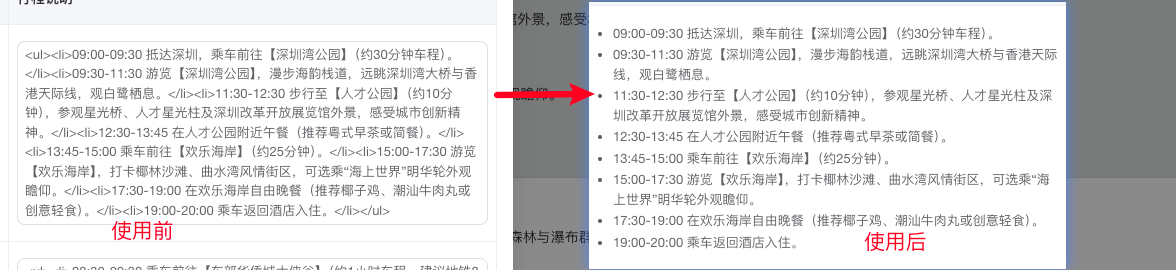
在编辑场景中,AI 生成的行程回答包含 Markdown 表格,其中「行程说明」列的数据是以 HTML <ul><li> 标签包裹的纯文本。原有方案使用 el-input type="textarea" 编辑该列内容,用户看到的是原始 HTML 标签(如 <li>09:00-10:00 游览故宫</li>),无法直观看到带圆点的列表样式,编辑体验差。
本方案在保持原有 el-table 表格框架不变的前提下,仅将「行程说明」列(col3)替换为基于 TipTap 的轻量级富文本编辑器,实现所见即所得的列表编辑。
二、技术栈
| 技术/库 | 版本 | 用途 |
|---|---|---|
| Vue 3 | ^3.2.0 | 框架 |
| Element Plus | ^2.3.0 | 表格、弹窗、按钮等 UI 组件 |
| TipTap (@tiptap/vue-3) | latest | 富文本编辑器核心 |
| @tiptap/starter-kit | latest | TipTap 基础扩展包(段落、文本、加粗、斜体、列表) |
| @tiptap/extension-table | latest | 表格扩展(含 TableRow/TableCell/TableHeader) |
TipTap StarterKit 包含的扩展
StarterKit 是一个预设包,集成了常用扩展,无需逐个安装:
Document/Paragraph/Text--- 文档基础结构Bold/Italic--- 行内加粗、斜体BulletList/OrderedList/ListItem--- 无序/有序列表History--- 撤销/重做
三、文件清单
| 文件路径 | 说明 |
|---|---|
src/common/htmlToTipTapConverter.js |
HTML ↔ TipTap JSON 双向转换器 |
src/components/TipTapCellEditor/index.vue |
轻量级 TipTap 单元格编辑器组件 |
src/views/journey/components/ModifyDialog.vue |
行程表格编辑弹窗(主入口) |
四、核心实现
4.1 HTML → TipTap JSON 转换器
文件: src/common/htmlToTipTapConverter.js
使用浏览器原生 DOMParser 解析 HTML,递归遍历 DOM 节点树,映射为 TipTap 的 ProseMirror JSON 结构:
<ul>                    →  { type: 'bulletList', content: [...] }
  <li>文本</li>          →    { type: 'listItem', content: [{ type: 'paragraph', content: [{ type: 'text', text: '文本' }] }] }
<ol>                    →  { type: 'orderedList', content: [...] }
<strong>粗体</strong>    →  { type: 'text', text: '粗体', marks: [{ type: 'bold' }] }
<em>斜体</em>           →  { type: 'text', text: '斜体', marks: [{ type: 'italic' }] }
核心函数:
| 函数 | 输入 | 输出 | 说明 |
|---|---|---|---|
htmlToTipTapJson(html) |
HTML 字符串 | TipTap JSON | 将 HTML 解析为结构化 JSON |
tipTapJsonToHtml(json) |
TipTap JSON | HTML 字符串 | 将 JSON 序列化回 HTML |
4.2 TipTap 单元格编辑器组件
文件: src/components/TipTapCellEditor/index.vue
一个精简的 TipTap 编辑器,仅加载必要的扩展:
js
import { useEditor, EditorContent } from '@tiptap/vue-3';
import StarterKit from '@tiptap/starter-kit';

const editor = useEditor({
  extensions: [
    StarterKit.configure({
      heading: false,
      blockquote: false,
      codeBlock: false,
      horizontalRule: false,
      hardBreak: false,
      dropcursor: false,
      gapcursor: false
    })
  ],
  content: htmlToTipTapJson(props.modelValue),
  onUpdate: ({ editor: ed }) => {
    const html = tipTapJsonToHtml(ed.getJSON());
    emit('update:modelValue', html);
  }
});
特性:
- 使用
editorProps.attributes.class设置tiptap-cell类名,确保:deep(.tiptap-cell)CSS 选择器正确匹配 - 双向绑定:外部 HTML 变化时自动同步到编辑器,编辑器内容变化时输出 HTML
- 无需工具栏,用户通过快捷键操作列表(Shift+Cmd+8 无序列表、Shift+Cmd+7 有序列表)
4.3 ModifyDialog 中的集成
文件: src/views/journey/components/ModifyDialog.vue
在 el-table-column 的模板中,对 col3(行程说明列)做条件渲染:
vue
<template #default="{ row }">
  <!-- col3: 行程说明 → 使用 TipTap 富文本编辑器 -->
  <div v-if="colIndex === 3" class="cell-editor-wrapper">
    <TipTapCellEditor v-model="row[`col${colIndex}`]" />
  </div>

  <!-- col0-2: 日期/城市/景点 → 保持原有 el-input -->
  <el-input v-else v-model="row[`col${colIndex}`]" ... />

  <!-- col2: 景点参考按钮 -->
  <el-button v-if="colIndex === 2" @click="handleOpenReference(row)">
    景点参考
  </el-button>
</template>
「景点参考」功能保持不变:
- 点击按钮从
row.col1(城市列)提取城市信息 - 弹窗选择景点后,将结果写入
row.col2(景点列) - 通过
rebuildMarkdown()将表格数据重新组装为 Markdown 格式,调用updateChatMessage接口保存
五、数据流
AI 回复(Markdown 表格)
    │
    ▼
┌─────────────────────────────────────────────────────────────┐
│  ModifyDialog.vue                                           │
│  ┌─────────────────────────────────────────────────────┐    │
│  │ parseTables() --- 解析 Markdown 表格为 tableData      │    │
│  │ tableData.rows[].col3 = "<ul><li>...</li></ul>"      │    │
│  └─────────────────────────────────────────────────────┘    │
│                         │                                   │
│                         ▼                                   │
│  ┌─────────────────────────────────────────────────────┐    │
│  │ col0-2: el-input textarea(纯文本编辑)              │    │
│  │ col3: TipTapCellEditor(富文本编辑)                 │    │
│  └─────────────────────────────────────────────────────┘    │
│                         │                                   │
│                         ▼                                   │
│  ┌─────────────────────────────────────────────────────┐    │
│  │ TipTapCellEditor                                    │    │
│  │  htmlToTipTapJson() → TipTap JSON → 渲染 WYSIWYG    │    │
│  │  用户编辑(回车新增列表项、退格删除列表项)          │    │
│  │  onUpdate → tipTapJsonToHtml() → HTML 字符串        │    │
│  └─────────────────────────────────────────────────────┘    │
│                         │                                   │
│                         ▼                                   │
│  ┌─────────────────────────────────────────────────────┐    │
│  │ tableData.rows[].col3 = 新 HTML                      │    │
│  │ rebuildMarkdown() → Markdown 字符串                 │    │
│  └─────────────────────────────────────────────────────┘    │
└─────────────────────────────────────────────────────────────┘
    │
    ▼
updateChatMessage({ recordId, content: markdown })
六、使用效果
编辑前(el-input textarea)
用户看到的原始 HTML 文本:
<ul><li>09:00-09:30 抵达深圳,乘车前往【深圳湾公园】</li><li>09:30-11:30 游览【深圳湾公园】,漫步海韵栈道...</li></ul>编辑后(TipTapCellEditor)
用户看到的是带圆点的无序列表,可直接编辑:
- 09:00-09:30 抵达深圳,乘车前往深圳湾公园
- 09:30-11:30 游览深圳湾公园,漫步海韵栈道...
支持的操作:
- 回车 --- 在当前列表项下方新增一个列表项
- 退格(空项时) --- 退出列表,变为普通段落
- Tab --- 列表项缩进(嵌套子列表)
- Shift+Tab --- 列表项提升层级
- Cmd/Ctrl+B --- 加粗选中文字
- Cmd/Ctrl+I --- 斜体选中文字
保存后
编辑器输出的 HTML 与输入格式保持一致:
html
<ul>
  <li>09:00-09:30 抵达深圳,乘车前往<strong>深圳湾公园</strong></li>
  <li>09:30-11:30 游览<strong>深圳湾公园</strong>,漫步海韵栈道...</li>
</ul>
rebuildMarkdown() 将表格重新组装为 Markdown 格式,通过 updateChatMessage 接口保存到后端。
七、样式说明
编辑器的列表样式通过 :deep(.tiptap-cell) 穿透作用域设置:
scss
:deep(.tiptap-cell) {
  ul { list-style-type: disc; padding-left: 18px; }
  ol { list-style-type: decimal; padding-left: 18px; }
  li { margin: 2px 0; line-height: 1.5; }
  strong { font-weight: 600; }
  em { font-style: italic; }
}
八、未来扩展
| 扩展方向 | 方案 |
|---|---|
| 为 col3 添加工具栏 | 在 TipTapCellEditor 中增加 BubbleMenu 或固定工具栏,提供加粗/斜体/列表切换按钮 |
| 全表格使用 TipTap | 将整个 el-table 替换为 TipTap Table 扩展,支持表格内嵌套表格、合并单元格等 |
| 支持更多 HTML 标签 | 在 htmlToTipTapConverter.js 中扩展 domNodeToTipTap,支持 <h1-h6>、<blockquote>、<img> 等 |
| Markdown 表格编辑 | 复用 tiptapMarkdownConverter.js,将 Markdown 表格整体转为 TipTap 文档进行编辑 |
十、使用
组件
html
<TipTapCellEditor
  v-model="row[`col${colIndex}`]"
 />
组件使用
html
<template>
  <div class="tiptap-cell-editor">
    <editor-content :editor="editor" class="editor-content" />
  </div>
</template>

<script setup>
import { watch, onBeforeUnmount } from 'vue';
import { useEditor, EditorContent } from '@tiptap/vue-3';
import StarterKit from '@tiptap/starter-kit';
import { htmlToTipTapJson, tipTapJsonToHtml } from '@/common/htmlToTipTapConverter.js';

const props = defineProps({
  modelValue: {
    type: String,
    default: ''
  }
});

const emit = defineEmits(['update:modelValue']);

const editor = useEditor({
  extensions: [
    StarterKit.configure({
      heading: false,
      blockquote: false,
      codeBlock: false,
      horizontalRule: false,
      hardBreak: false,
      dropcursor: false,
      gapcursor: false
    })
  ],
  editorProps: {
    attributes: {
      class: 'tiptap-cell',
    },
  },
  content: htmlToTipTapJson(props.modelValue),
  onUpdate: ({ editor: ed }) => {
    const html = tipTapJsonToHtml(ed.getJSON());
    emit('update:modelValue', html);
  }
});

// 监听外部值变化
watch(() => props.modelValue, (newVal) => {
  if (!editor.value) return;
  const currentHtml = tipTapJsonToHtml(editor.value.getJSON());
  if (newVal !== currentHtml) {
    editor.value.commands.setContent(htmlToTipTapJson(newVal), false);
  }
});

onBeforeUnmount(() => {
  if (editor.value) {
    editor.value.destroy();
  }
});
</script>

<style lang="scss" scoped>
.tiptap-cell-editor {
  min-height: 60px;
}

.editor-content {
  :deep(.tiptap-cell) {
    outline: none;
    min-height: 60px;
    font-size: 13px;
    line-height: 1.6;

    p {
      margin: 0 0 4px 0;
    }

    ul, ol {
      margin: 0;
      padding-left: 18px;
    }

    ul {
      list-style-type: disc;
    }

    ol {
      list-style-type: decimal;
    }

    li {
      margin: 2px 0;
      line-height: 1.5;
    }

    li > p {
      margin: 0;
    }

    strong {
      font-weight: 600;
    }

    em {
      font-style: italic;
    }
  }
}
</style>
htmlToTipTapConverter.js 包
js
/**
 * HTML 与 TipTap JSON 双向转换器
 * 用于表格单元格内 HTML 列表内容的编辑
 */

/**
 * 将 HTML 字符串解析为 TipTap JSON 文档
 * @param {string} html - HTML 字符串
 * @returns {object} TipTap JSON 文档对象
 */
export function htmlToTipTapJson(html) {
  if (!html || !html.trim()) {
    return { type: 'doc', content: [{ type: 'paragraph', content: [{ type: 'text', text: '' }] }] };
  }

  const parser = new DOMParser();
  const doc = parser.parseFromString(`<div>${html}</div>`, 'text/html');
  const root = doc.body.firstChild;

  const content = [];
  if (root) {
    root.childNodes.forEach(node => {
      const nodes = domNodeToTipTap(node);
      if (nodes.length > 0) content.push(...nodes);
    });
  }

  if (content.length === 0) {
    return { type: 'doc', content: [{ type: 'paragraph', content: [{ type: 'text', text: '' }] }] };
  }

  return { type: 'doc', content };
}

/**
 * 将 DOM 节点转换为 TipTap 节点数组
 * @param {Node} node - DOM 节点
 * @returns {Array} TipTap 节点数组
 */
function domNodeToTipTap(node) {
  if (node.nodeType === Node.TEXT_NODE) {
    const text = node.textContent;
    if (text && text.trim()) {
      return [{ type: 'paragraph', content: [{ type: 'text', text }] }];
    }
    return [];
  }

  if (node.nodeType !== Node.ELEMENT_NODE) return [];

  const tag = node.tagName.toLowerCase();

  switch (tag) {
    case 'ul': {
      const items = [];
      node.childNodes.forEach(child => {
        if (child.nodeType === Node.ELEMENT_NODE && child.tagName.toLowerCase() === 'li') {
          items.push({
            type: 'listItem',
            content: [{ type: 'paragraph', content: extractTextWithMarks(child) }]
          });
        }
      });
      return items.length > 0 ? [{ type: 'bulletList', content: items }] : [];
    }

    case 'ol': {
      const items = [];
      node.childNodes.forEach(child => {
        if (child.nodeType === Node.ELEMENT_NODE && child.tagName.toLowerCase() === 'li') {
          items.push({
            type: 'listItem',
            content: [{ type: 'paragraph', content: extractTextWithMarks(child) }]
          });
        }
      });
      return items.length > 0 ? [{ type: 'orderedList', content: items }] : [];
    }

    case 'li': {
      return [{ type: 'paragraph', content: extractTextWithMarks(node) }];
    }

    case 'p': {
      return [{ type: 'paragraph', content: extractTextWithMarks(node) }];
    }

    case 'strong':
    case 'b':
    case 'em':
    case 'i': {
      return [{ type: 'paragraph', content: extractTextWithMarks(node) }];
    }

    default: {
      const result = [];
      node.childNodes.forEach(child => {
        const nodes = domNodeToTipTap(child);
        result.push(...nodes);
      });
      return result;
    }
  }
}

/**
 * 从 DOM 元素中提取带行内标记的文本节点
 * @param {Element} element - DOM 元素
 * @returns {Array} TipTap text 节点数组
 */
function extractTextWithMarks(element) {
  const result = [];

  function traverse(node) {
    if (node.nodeType === Node.TEXT_NODE) {
      const text = node.textContent;
      if (text) result.push({ type: 'text', text });
      return;
    }

    if (node.nodeType !== Node.ELEMENT_NODE) return;

    const tag = node.tagName.toLowerCase();
    const marks = [];
    if (tag === 'strong' || tag === 'b') marks.push({ type: 'bold' });
    if (tag === 'em' || tag === 'i') marks.push({ type: 'italic' });

    if (marks.length > 0) {
      const text = node.textContent;
      if (text) result.push({ type: 'text', text, marks });
    } else {
      node.childNodes.forEach(traverse);
    }
  }

  element.childNodes.forEach(traverse);

  if (result.length === 0) {
    return [{ type: 'text', text: '' }];
  }

  return result;
}

/**
 * 将 TipTap JSON 序列化为 HTML 字符串
 * @param {object} tiptapJson - TipTap JSON 文档对象
 * @returns {string} HTML 字符串
 */
export function tipTapJsonToHtml(tiptapJson) {
  if (!tiptapJson || !tiptapJson.content) return '';

  const parts = [];
  for (const node of tiptapJson.content) {
    const html = serializeNodeToHtml(node);
    if (html) parts.push(html);
  }

  return parts.join('');
}

/**
 * 序列化单个 TipTap 节点为 HTML
 * @param {object} node - TipTap 节点
 * @returns {string} HTML 字符串
 */
function serializeNodeToHtml(node) {
  if (!node) return '';

  switch (node.type) {
    case 'doc': {
      return node.content ? node.content.map(c => serializeNodeToHtml(c)).join('') : '';
    }

    case 'paragraph': {
      const inner = node.content ? node.content.map(c => serializeTextToHtml(c)).join('') : '';
      return inner;
    }

    case 'bulletList': {
      const items = node.content ? node.content.map(item => {
        const text = item.content ? item.content.map(c => serializeNodeToHtml(c)).join('') : '';
        return `<li>${text}</li>`;
      }).join('') : '';
      return items ? `<ul>${items}</ul>` : '';
    }

    case 'orderedList': {
      const items = node.content ? node.content.map(item => {
        const text = item.content ? item.content.map(c => serializeNodeToHtml(c)).join('') : '';
        return `<li>${text}</li>`;
      }).join('') : '';
      return items ? `<ol>${items}</ol>` : '';
    }

    case 'listItem': {
      const inner = node.content ? node.content.map(c => serializeNodeToHtml(c)).join('') : '';
      return inner;
    }

    case 'text': {
      return serializeTextToHtml(node);
    }

    default: {
      if (node.content) {
        return node.content.map(c => serializeNodeToHtml(c)).join('');
      }
      return '';
    }
  }
}

/**
 * 序列化 text 节点为 HTML
 * @param {object} node - TipTap text 节点
 * @returns {string} HTML 字符串
 */
function serializeTextToHtml(node) {
  if (node.type !== 'text') return '';
  let text = node.text || '';
  if (node.marks) {
    node.marks.forEach(mark => {
      if (mark.type === 'bold') text = `<strong>${text}</strong>`;
      if (mark.type === 'italic') text = `<em>${text}</em>`;
    });
  }
  return text;
}