git简单操作

简易的命令行入门教程:

Git 全局设置:

复制代码
git config --global user.name "wangzhenlin"
git config --global user.email "6544974+wangzhenlin_123@user.noreply.gitee.com"

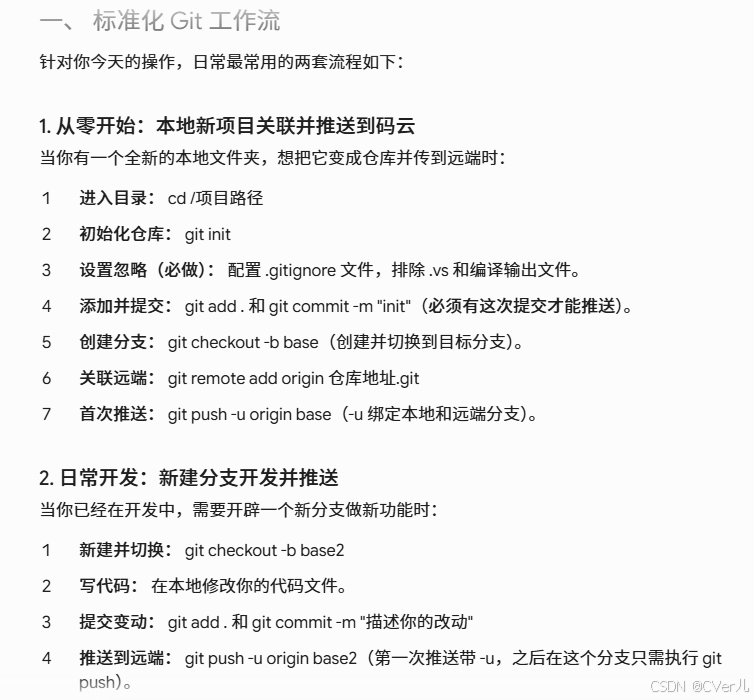
创建 git 仓库:

复制代码
mkdir test
cd test
git init 
touch README.md
git add README.md
git commit -m "first commit"
git remote add origin https://gitee.com/wangzhenlin_123/test.git
git push -u origin "master"

已有仓库?

复制代码
cd existing_git_repo
git remote add origin https://gitee.com/wangzhenlin_123/test.git
git push -u origin "master"
相关推荐
A_Lonely_Cat21 小时前
记一次 GitHub 幽灵协作者大清洗:强制重写 Git 历史与穿透 CDN 缓存实践
git·github
和你看星星3 天前
Git rerere:让重复冲突只解决一次
git
嘻嘻仙人7 天前
Ubuntu中 git上传自己的项目和二次上传一般流程
git·github
Patrick_Wilson7 天前
Squash Merge 的血缘陷阱:为什么删掉的代码又活了过来
前端·git·程序员
沉浸学习的匿名网友7 天前
什么是 .gitignore?为什么每个 Git 项目几乎都离不开它?
前端·git
深海鱼在掘金8 天前
Git 完全指南 —— 第3章:理解工作区、暂存区、版本库三个核心
git
江华森8 天前
Git 基础筑基:从原理到团队协作的全栈实战
git
JakeJiang8 天前
Git 必备命令指南:从日常高频到项目开发实战
git
叫我少年9 天前
Windows 中安装 git
git
深海鱼在掘金14 天前
Git 完全指南 —— 第1章:Git 概览与版本控制演进
git