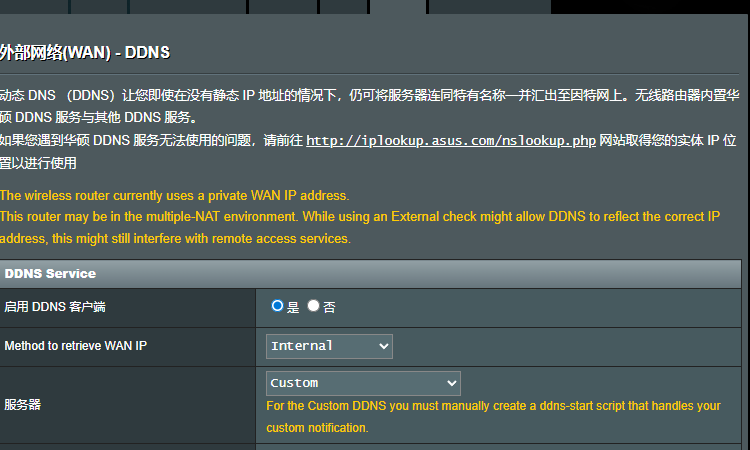
黄色的字:
For the Custom DDNS you must manually create a ddns-start script that handles your custom notification.
对于自定义 DDNS,您必须手动创建一个 ddns-start 脚本,以处理您的自定义通知
创建自定义脚本(关键步骤)
使用 SSH 登录路由器,执行以下命令创建 /jffs/scripts/ddns-start 脚本:
bash
vi /jffs/scripts/ddns-start按 i 进入编辑模式,粘贴以下内容(替换 API_TOKEN、ZONE_ID、RECORD_NAME):
bash
#!/bin/sh
# CloudFlare IPv6 DDNS 脚本 for Merlin 386.5_2
API_TOKEN="你的API_Token"
ZONE_ID="你的Zone_ID"
RECORD_NAME="ipv6域名"   # 与你主机名称一致

# 获取当前公网 IPv6(从 ppp0 接口)
CURRENT_IPV6=$(ifconfig ppp0 | grep 'inet6' | grep -v 'fe80' | awk '{print $3}' | awk -F'/' '{print $1}')

if [ -z "$CURRENT_IPV6" ]; then
    logger -t "ddns" "无法获取 IPv6 地址"
    /sbin/ddns_custom_updated 0
    exit 1
fi

logger -t "ddns" "当前 IPv6: $CURRENT_IPV6"

# 获取现有 AAAA 记录 ID 和内容
RESPONSE=$(curl -s -X GET "https://api.cloudflare.com/client/v4/zones/${ZONE_ID}/dns_records?type=AAAA&name=${RECORD_NAME}" \
    -H "Authorization: Bearer ${API_TOKEN}" \
    -H "Content-Type: application/json")

RECORD_ID=$(echo "$RESPONSE" | grep -o '"id":"[^"]*"' | head -1 | cut -d':' -f2 | tr -d '"')
CLOUDFLARE_IPV6=$(echo "$RESPONSE" | grep -o '"content":"[^"]*"' | head -1 | cut -d':' -f2 | tr -d '"')

if [ "$CURRENT_IPV6" != "$CLOUDFLARE_IPV6" ]; then
    UPDATE=$(curl -s -X PUT "https://api.cloudflare.com/client/v4/zones/${ZONE_ID}/dns_records/${RECORD_ID}" \
        -H "Authorization: Bearer ${API_TOKEN}" \
        -H "Content-Type: application/json" \
        --data "{\"type\":\"AAAA\",\"name\":\"${RECORD_NAME}\",\"content\":\"${CURRENT_IPV6}\",\"ttl\":120,\"proxied\":false}")
    if echo "$UPDATE" | grep -q '"success":true'; then
        logger -t "ddns" "Cloudflare IPv6 更新成功"
        /sbin/ddns_custom_updated 1
        exit 0
    else
        logger -t "ddns" "更新失败: $UPDATE"
        /sbin/ddns_custom_updated 0
        exit 1
    fi
else
    logger -t "ddns" "IP 未变化,无需更新"
    /sbin/ddns_custom_updated 1
    exit 0
fi
保存退出:按 Esc,输入 :wq。
然后赋予执行权限:
bash
chmod +x /jffs/scripts/ddns-start3. 应用并测试
-
回到路由器 Web 界面,点击 "应用本页面设置"。
-
稍等几十秒,查看 DDNS 状态是否显示"更新成功"。
-
或者通过 SSH 查看日志:
bash
logread | grep ddns
4. 确保 Cloudflare 端已创建 AAAA 记录
登录 Cloudflare 后台,为"ipv6域名" 手动添加一条 AAAA 记录 ,值可以临时填 ::1(脚本会自动更新为正确 IPv6)。