前言
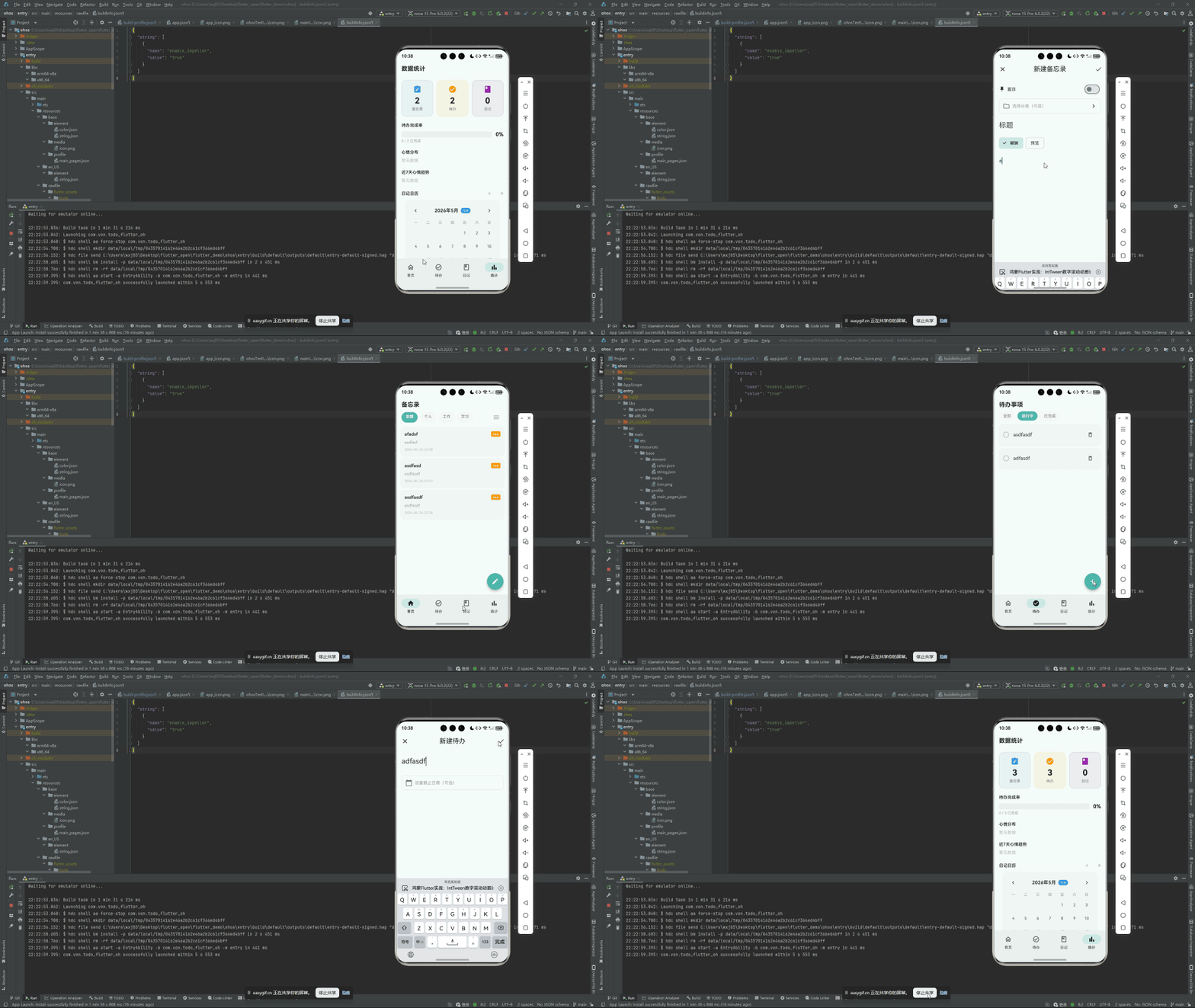
统计看板是很多应用的标配。备忘录数量、待办完成率、日记篇数------这些数字如果只是静态文本,看板就失去了"看"的意义。让数字从旧值平滑滚到新值,这种微交互能给用户强烈的"数据在变化"的感知。
Flutter 的 Tween 动画系统为这个需求提供了天然的支持。IntTween 可以在两个整数之间插值,配合 AnimationController 驱动,就能实现从 0 滚动到 100 的效果------而且全程只靠 Flutter 内置能力,零第三方依赖。
本文将拆解鸿蒙 Flutter 备忘录应用中统计看板的数字滚动动画实现。
项目仓库:todo_flutter_harmony
Tween 基础
Tween 是 Flutter 动画系统的核心概念,它在两个值之间做线性插值:
dart
final tween = Tween<double>(begin: 0.0, end: 100.0);当 AnimationController 的值从 0.0 变化到 1.0 时,tween 会输出从 0.0 到 100.0 之间的连续值。
对于整数动画,Flutter 提供了特化版本:
dart
final intTween = IntTween(begin: 0, end: 100);IntTween 的 transform 方法会将插值结果四舍五入为整数。
实现 AnimatedCount 组件
dart
class AnimatedCount extends StatefulWidget {
  final int value;
  final TextStyle? style;
  final Duration duration;

  const AnimatedCount({
    super.key,
    required this.value,
    this.style,
    this.duration = const Duration(milliseconds: 600),
  });

  @override
  State<AnimatedCount> createState() => _AnimatedCountState();
}
State 层实现
dart
class _AnimatedCountState extends State<AnimatedCount>
    with SingleTickerProviderStateMixin {
  late AnimationController _controller;
  late Animation<int> _animation;
  int _previousValue = 0;

  @override
  void initState() {
    super.initState();
    _previousValue = widget.value;

    _controller = AnimationController(
      duration: widget.duration,
      vsync: this,
    );

    _animation = IntTween(
      begin: 0,
      end: widget.value,
    ).animate(CurvedAnimation(
      parent: _controller,
      curve: Curves.easeOut,
    ));

    _animation.addListener(() {
      setState(() {});  // 每帧重建,显示最新数值
    });

    _controller.forward();
  }
处理数值变化
当外部数据更新时(比如新增了一条备忘录),widget.value 会从 10 变成 11,此时需要重新触发滚动动画:
dart
  @override
  void didUpdateWidget(AnimatedCount oldWidget) {
    super.didUpdateWidget(oldWidget);
    if (oldWidget.value != widget.value) {
      _previousValue = oldWidget.value;

      // 重新创建 Tween:从旧值滚动到新值
      _animation = IntTween(
        begin: _previousValue,
        end: widget.value,
      ).animate(CurvedAnimation(
        parent: _controller,
        curve: Curves.easeOut,
      ));

      _animation.addListener(() {
        setState(() {});
      });

      _controller.forward(from: 0);
    }
  }
didUpdateWidget 是 Flutter 生命周期中专门用于响应父组件参数变化的钩子。在这里检测到 value 变化后,重新创建 IntTween 并重置动画,实现"从旧值滚到新值"的流畅过渡。
构建视图
dart
  @override
  Widget build(BuildContext context) {
    return Text(
      '${_animation.value}',
      style: widget.style ?? const TextStyle(
        fontSize: 32,
        fontWeight: FontWeight.bold,
      ),
    );
  }

  @override
  void dispose() {
    _controller.dispose();
    super.dispose();
  }
}
完整使用示例
在统计页中,AnimatedCount 用法极简:
dart
class StatsPage extends StatelessWidget {
  @override
  Widget build(BuildContext context) {
    return Consumer<MemoProvider>(
      builder: (context, memoProvider, _) {
        return AnimatedCount(
          value: memoProvider.memos.length,
          style: const TextStyle(
            fontSize: 48,
            fontWeight: FontWeight.w800,
            color: Color(0xFF4DB6AC),
          ),
        );
      },
    );
  }
}当用户新增一条备忘录,memoProvider.memos.length 从 10 变成 11,didUpdateWidget 检测到变化,AnimatedCount 自动触发 10 → 11 的滚动动画。
统计看板的完整布局
将多个 AnimatedCount 组合到统计看板中:
dart
Widget _buildStatsGrid(
  MemoProvider memoProvider,
  TodoProvider todoProvider,
  DiaryProvider diaryProvider,
) {
  return GridView.count(
    crossAxisCount: 3,
    shrinkWrap: true,
    physics: const NeverScrollableScrollPhysics(),
    children: [
      _buildStatCard(
        label: '备忘录',
        icon: Icons.note_alt_outlined,
        child: AnimatedCount(value: memoProvider.memos.length),
      ),
      _buildStatCard(
        label: '待办事项',
        icon: Icons.checklist_outlined,
        child: AnimatedCount(value: todoProvider.todos.length),
      ),
      _buildStatCard(
        label: '日记',
        icon: Icons.book_outlined,
        child: AnimatedCount(value: diaryProvider.diaries.length),
      ),
    ],
  );
}

Widget _buildStatCard({
  required String label,
  required IconData icon,
  required Widget child,
}) {
  return Card(
    elevation: 1,
    shape: RoundedRectangleBorder(borderRadius: BorderRadius.circular(16)),
    child: Padding(
      padding: const EdgeInsets.all(16),
      child: Column(
        mainAxisAlignment: MainAxisAlignment.center,
        children: [
          Icon(icon, color: const Color(0xFF4DB6AC), size: 28),
          const SizedBox(height: 8),
          child,
          const SizedBox(height: 4),
          Text(label, style: TextStyle(
            color: Colors.grey.shade600,
            fontSize: 13,
          )),
        ],
      ),
    ),
  );
}
进阶:待办完成率 + 进度条
待办事项的统计不只是数量,更有价值的指标是完成率。结合 AnimatedCount 和 LinearProgressIndicator:
dart
Widget _buildCompletionStats(TodoProvider todoProvider) {
  final total = todoProvider.todos.length;
  final completed = todoProvider.todos.where((t) => t.isCompleted).length;
  final rate = total > 0 ? completed / total : 0.0;

  return Card(
    elevation: 1,
    shape: RoundedRectangleBorder(borderRadius: BorderRadius.circular(16)),
    child: Padding(
      padding: const EdgeInsets.all(20),
      child: Column(
        crossAxisAlignment: CrossAxisAlignment.start,
        children: [
          Row(
            mainAxisAlignment: MainAxisAlignment.spaceBetween,
            children: [
              const Text('完成率', style: TextStyle(
                fontSize: 16,
                fontWeight: FontWeight.w600,
              )),
              Row(
                children: [
                  AnimatedCount(
                    value: completed,
                    style: const TextStyle(
                      fontSize: 20,
                      fontWeight: FontWeight.bold,
                      color: Color(0xFF4DB6AC),
                    ),
                  ),
                  Text(
                    ' / $total',
                    style: TextStyle(
                      fontSize: 20,
                      color: Colors.grey.shade500,
                    ),
                  ),
                ],
              ),
            ],
          ),
          const SizedBox(height: 12),
          ClipRRect(
            borderRadius: BorderRadius.circular(4),
            child: AnimatedContainer(
              duration: const Duration(milliseconds: 600),
              curve: Curves.easeOut,
              child: LinearProgressIndicator(
                value: rate,
                backgroundColor: Colors.grey.shade200,
                valueColor: const AlwaysStoppedAnimation<Color>(
                  Color(0xFF4DB6AC),
                ),
                minHeight: 8,
              ),
            ),
          ),
          const SizedBox(height: 8),
          Text(
            '已完成 ${(rate * 100).toStringAsFixed(0)}%',
            style: TextStyle(
              fontSize: 13,
              color: Colors.grey.shade500,
            ),
          ),
        ],
      ),
    ),
  );
}
注意事项
1. 不要用 Timer 替代 AnimationController
有些初学者会用 Timer.periodic 手动递增一个 _currentValue 变量来模拟动画:
dart
// 不推荐
Timer.periodic(Duration(milliseconds: 16), (timer) {
  setState(() {
    _currentValue++;
    if (_currentValue >= targetValue) timer.cancel();
  });
});
这个方案有两个问题:(1) 与屏幕刷新率不同步,可能会跳帧或重复渲染;(2) 需要手动管理 Timer 的生命周期。AnimationController 与 Vsync 绑定,每帧精确更新一次,且自动随 widget dispose 释放。
2. dispose 时清理 listener
dart
@override
void dispose() {
  _animation.removeListener(_onAnimationTick);  // 显式移除
  _controller.dispose();
  super.dispose();
}
显式移除 listener 是最佳实践,避免在 controller 被 dispose 后 listener 仍持有引用。
3. 大数据量下的性能
AnimatedCount 每帧调用 setState,在 600ms 内大约触发 36 次重建(60fps × 0.6s)。如果 AnimatedCount 是较大 widget 树的一部分,可以考虑用 AnimatedBuilder 将其隔离为独立的重建边界。
鸿蒙兼容性
整个动画完全依赖 Flutter 的 AnimationController + IntTween,运行在 Dart VM 层。不涉及任何原生平台渲染 API,在 Android、iOS、鸿蒙 OHOS 上行为完全一致。
总结
IntTween 数字滚动动画的实现可以用一句话概括:
IntTween(begin: oldValue, end: newValue)定义插值范围AnimationController.forward(from: 0)驱动动画didUpdateWidget检测数据变化并重新触发动画
不到 70 行代码,为整个统计看板注入了流畅的数字滚动体验。
完整项目代码见:todo_flutter_harmony