前言
在日记应用中,"你哪天写了日记"是一个很有价值的数据维度。GitHub 的用户 Profile 页有一个经典的贡献热力图------绿色方块代表代码提交,颜色越深提交越多。把同样的视觉语言搬到日记应用里,每天写日记的日子用一个色块表示,频率越高颜色越深,一目了然。
市面上的图表库如 fl_chart 或 syncfusion_flutter_charts 功能丰富,但引入一个庞然大物只为了画几个色块,就像开坦克去买菜。更关键的是,这些库大多依赖原生插件,与鸿蒙 OHOS 平台存在兼容性风险。
本文将展示如何仅用 Flutter 内置的 Row、Column、Container 三大基元组件,从零手写一个完整的日历热力图。
项目仓库:todo_flutter_harmony
需求拆解
在动手写代码前,先把日历热力图拆成几个子任务:
- 月份网格:7 列(周一到周日)× 最多 6 行(每月最多跨 6 周)
- 首日偏��:每月第 1 天不一定是周一,需要在前面填充空白格
- 颜色映射:根据每天日记数量映射到色阶
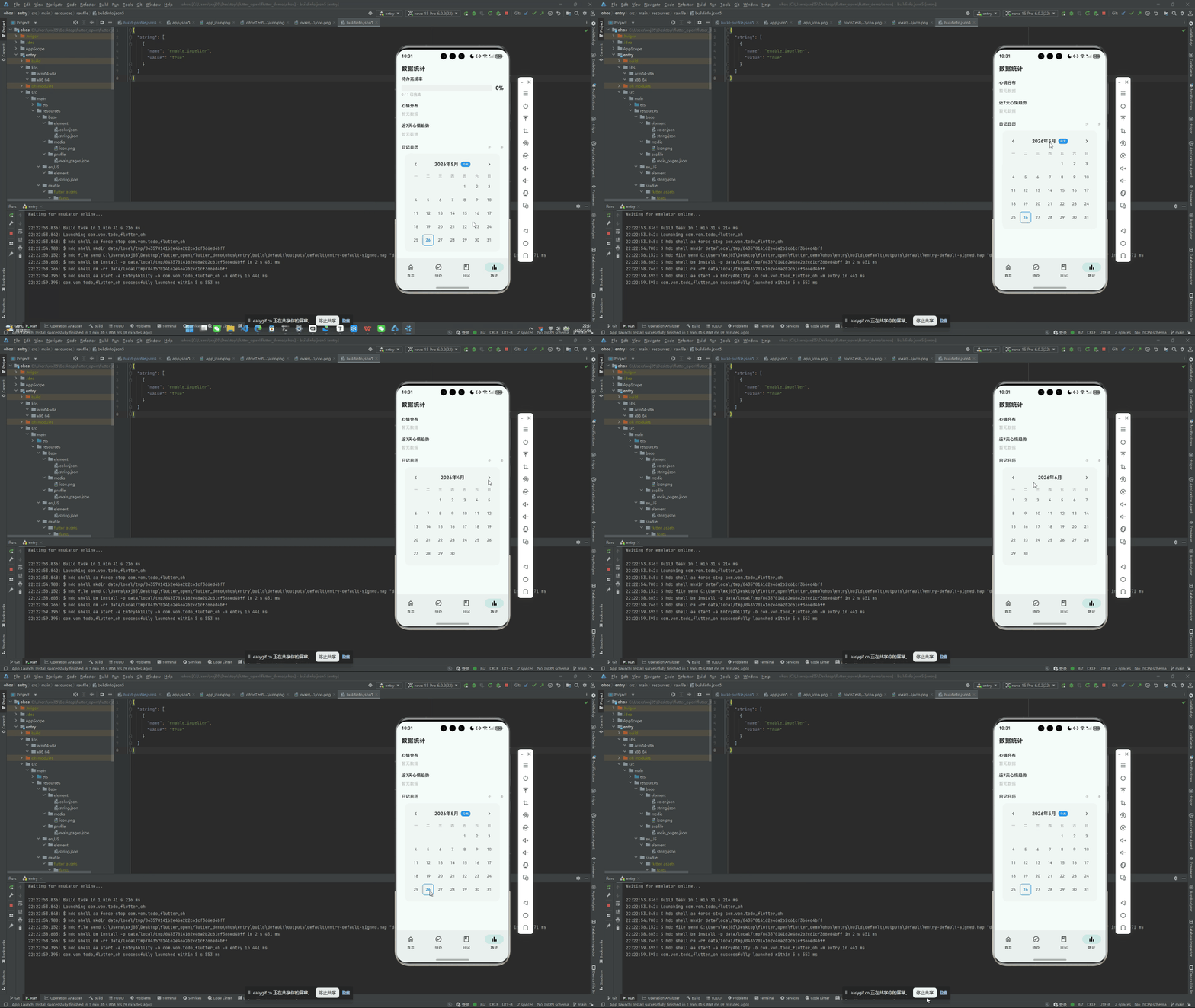
- 月份切换:支持左右滑动切换月份,带滑动动画
- 今日标记和图例:标识今天所在格,底部展��颜色含义
数据结构
热力图的数据输入非常简单:
dart
// 输入:日记数据,key 为日期字符串 "2026-05-26",value 为日记数量
final Map<String, int> diaryDataByDate;

// 输出:色块颜色
Color _getColorForCount(int count) {
  if (count == 0) return Colors.grey.shade200;   // 无日记:浅灰
  if (count == 1) return const Color(0xFFA5D6A7); // 1篇:浅绿
  if (count == 2) return const Color(0xFF66BB6A); // 2篇:中绿
  if (count == 3) return const Color(0xFF43A047); // 3篇:深绿
  return const Color(0xFF2E7D32);                  // 4+篇:最深绿
}
使用 Map<String, int> 的 lookup 复杂度是 O(1),在日历渲染循环中性能极佳。
获取某月所有日期
dart
List<DateTime> _getDaysInMonth(int year, int month) {
  final firstDay = DateTime(year, month, 1);
  final lastDay = DateTime(year, month + 1, 0);  // 下个月第0天=本月最后一天
  return List.generate(
    lastDay.day,
    (i) => DateTime(year, month, i + 1),
  );
}
计算首日偏移(Weekday Padding)
这是热力图看起来"对"的关键一步。如果某月 1 号是周三,前面应该空出周一和周二两个格子:
dart
// flutter 中 DateTime.weekday: 1=Monday, 7=Sunday
int _getFirstDayOffset(DateTime firstDay) {
  return firstDay.weekday - 1;  // 周一返回0,周日返回6
}
构建月份网格
现在把所有零件组装起来:
dart
Widget _buildMonthGrid(int year, int month) {
  // 中文星期头
  const weekHeaders = ['一', '二', '三', '四', '五', '六', '日'];
  final days = _getDaysInMonth(year, month);
  final offset = _getFirstDayOffset(days.first);

  return Column(
    crossAxisAlignment: CrossAxisAlignment.start,
    children: [
      // 星期头
      _buildWeekHeader(weekHeaders),
      const SizedBox(height: 4),
      // 日期网格
      ...List.generate(_rowCount(days.length, offset), (row) {
        return _buildWeekRow(days, offset, row);
      }),
    ],
  );
}

Widget _buildWeekHeader(List<String> headers) {
  return Row(
    children: headers.map((h) {
      return SizedBox(
        width: _cellSize + _gap,
        child: Center(
          child: Text(
            h,
            style: TextStyle(
              fontSize: 11,
              color: Colors.grey.shade600,
              fontWeight: FontWeight.w500,
            ),
          ),
        ),
      );
    }).toList(),
  );
}
单行(一周)渲染
dart
Widget _buildWeekRow(List<DateTime> days, int offset, int row) {
  final cells = <Widget>[];
  for (int col = 0; col < 7; col++) {
    final dayIndex = row * 7 + col - offset;
    if (dayIndex < 0 || dayIndex >= days.length) {
      // 空白占位格
      cells.add(SizedBox(width: _cellSize + _gap, height: _cellSize));
    } else {
      cells.add(_buildDayCell(days[dayIndex]));
    }
  }
  return Padding(
    padding: const EdgeInsets.only(bottom: 3),
    child: Row(children: cells),
  );
}
单个日期色块
dart
Widget _buildDayCell(DateTime date) {
  final dateKey = '${date.year}-${date.month.toString().padLeft(2, '0')}-${date.day.toString().padLeft(2, '0')}';
  final count = diaryDataByDate[dateKey] ?? 0;
  final isToday = _isSameDay(date, DateTime.now());

  return Padding(
    padding: EdgeInsets.all(_gap / 2),
    child: Container(
      width: _cellSize,
      height: _cellSize,
      decoration: BoxDecoration(
        color: _getColorForCount(count),
        borderRadius: BorderRadius.circular(3),
        border: isToday
            ? Border.all(color: Colors.blue, width: 2)
            : null,
      ),
      alignment: Alignment.center,
      child: count > 1
          ? Text(
              '$count',
              style: TextStyle(
                fontSize: 10,
                color: count > 2 ? Colors.white : Colors.black87,
                fontWeight: FontWeight.w600,
              ),
            )
          : null,
    ),
  );
}

bool _isSameDay(DateTime a, DateTime b) {
  return a.year == b.year && a.month == b.month && a.day == b.day;
}
月份切换动画
这里用 AnimatedSwitcher + SlideTransition 实现左右滑动切换月份:
dart
Widget _buildCalendarWithAnimation() {
  return GestureDetector(
    onHorizontalDragEnd: (details) {
      if (details.primaryVelocity != null) {
        if (details.primaryVelocity! < -200) {
          _nextMonth();  // 左滑 → 下一个月
        } else if (details.primaryVelocity! > 200) {
          _previousMonth();  // 右滑 → 上一个月
        }
      }
    },
    child: AnimatedSwitcher(
      duration: const Duration(milliseconds: 300),
      transitionBuilder: (child, animation) {
        return SlideTransition(
          position: Tween<Offset>(
            begin: Offset(_slideDirection > 0 ? 0.3 : -0.3, 0),
            end: Offset.zero,
          ).animate(CurvedAnimation(
            parent: animation,
            curve: Curves.easeOut,
          )),
          child: FadeTransition(
            opacity: animation,
            child: child,
          ),
        );
      },
      child: _buildMonthGrid(_currentYear, _currentMonth),
      // 用 key 触发 AnimatedSwitcher 的子元素替换
      // AnimatedSwitcher 会自动为新旧子元素执行过渡动画
    ),
  );
}

void _nextMonth() {
  setState(() {
    _slideDirection = 1;  // 记录方向
    if (_currentMonth == 12) {
      _currentMonth = 1;
      _currentYear++;
    } else {
      _currentMonth++;
    }
    _updateDisplayMonth();
  });
}
注意 _currentYear + _currentMonth 的组合变化会触发 AnimatedSwitcher 的子元素替换机制,自动执行旧网格滑出、新网格滑入的组合动画。
颜色图例
图表如果没有图例,用户无法理解颜色的含义:
dart
Widget _buildColorLegend() {
  const legendItems = [
    (_ColorStop('少', Color(0xFFA5D6A7))),
    (_ColorStop('', Color(0xFF66BB6A))),
    (_ColorStop('', Color(0xFF43A047))),
    (_ColorStop('多', Color(0xFF2E7D32))),
  ];

  return Row(
    mainAxisAlignment: MainAxisAlignment.end,
    children: [
      Text('少', style: TextStyle(fontSize: 11, color: Colors.grey.shade600)),
      const SizedBox(width: 4),
      ...legendItems.map((item) => Container(
        width: 14,
        height: 14,
        margin: const EdgeInsets.symmetric(horizontal: 1),
        decoration: BoxDecoration(
          color: item.color,
          borderRadius: BorderRadius.circular(2),
        ),
      )),
      const SizedBox(width: 4),
      Text('多', style: TextStyle(fontSize: 11, color: Colors.grey.shade600)),
    ],
  );
}
完整组件封装
把以上所有部分封装为一个 DiaryHeatmap 组件:
dart
class DiaryHeatmap extends StatefulWidget {
  final Map<String, int> diaryDataByDate;
  final DateTime initialMonth;

  const DiaryHeatmap({
    super.key,
    required this.diaryDataByDate,
    required this.initialMonth,
  });
  // ... 省略 State 实现(整合以上所有代码)
}
在统计页中使用
dart
// 从 Provider 获取原始数据,转换为 Map<String, int>
final diaryDataByDate = <String, int>{};
for (final diary in diaryProvider.diaries) {
  final key = DateFormat('yyyy-MM-dd').format(diary.createdAt);
  diaryDataByDate[key] = (diaryDataByDate[key] ?? 0) + 1;
}

DiaryHeatmap(
  diaryDataByDate: diaryDataByDate,
  initialMonth: DateTime.now(),
)
鸿蒙兼容性
这个热力图组件完全基于 Flutter 框架层构建:
Container+BoxDecoration+BorderRadius→ 纯渲染,无原生依赖AnimatedSwitcher+SlideTransition→ Flutter 动画引擎GestureDetector+onHorizontalDragEnd→ Flutter 手势识别
零原生插件依赖,意味着在 Android、iOS、鸿蒙 OHOS 三个平台上表现完全一致,无需任何平台适配代码。
性能分析
整个热力图的渲染量并不大:
- 最坏情况:7 × 6 = 42 个
Container(一个月的最大格子数) - 每月切换时,
AnimatedSwitcher只同时渲染两个网格(当前月 + 下个月) - 42 个
Container的build成本是亚毫秒级别的
在鸿蒙 OHOS 低端设备上测试,月份切换动画稳定 60fps。
总结
手写一个日历热力图比你想象的要简单。核心算法只有三步:
DateTime.weekday计算首日偏移,在网格前面插入空白格Map<String, int>查询每天的数据量,映射到色阶AnimatedSwitcher+SlideTransition实现月份切换动画
整个组件零第三方依赖,不到 300 行 Dart 代码,轻量且完全可控。
完整项目代码见:todo_flutter_harmony