使用xlsx.js读取Excel中的日期有两种方式:
XLSX.read(file, { type: 'binary' })
XLSX.read(file, { type: 'binary', cellDates: true })
第一种方式得到的是一个 1900-01-01 00:00:00 开始的序列号。

export function formatExcelDate(excelSerialDate) {
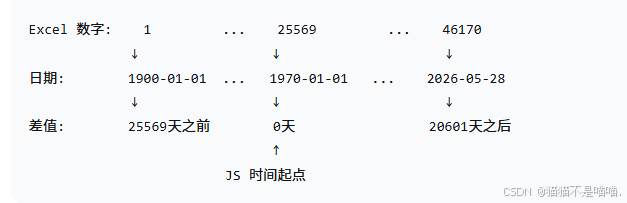
  //  25569 是 1970-01-01 对应的 Excel 序列号, Excel 时间起点:1900-01-01 00:00:00 , JS 时间起点:1970-01-01 00:00:00
  // 86400 * 1000 = 一天的毫秒数
  // console.log(new Date(Math.round((excelSerialDate - 25569) * 86400 * 1000)))
  return new Date(Math.round((excelSerialDate - 25569) * 86400 * 1000));
}
1. 为什么需要 excelSerialDate - 25569
excelSerialDate - 25569 目的是得到1970年1月1日至被计算的日期(excelSerialDate)相差了多少天。
2. 25569 表示1900-01-01 到 1970-01-01 有多少天,如何计算的
70年 × 365天 = 25550 天
加上闰年(1904,1908,...,1968)共 17 天
加上 Excel 闰年 bug(1900被误认为闰年)1 天
加上第1天从1开始而不是0的偏移 1 天
总计:25550 + 17 + 1 + 1 = 25569 天
3. Math.round 的作用
由于JS 使用 IEE 754 双精度浮点数表示数字,有些乘法会产生不准确的结果。
例如: 0.1 + 0.2 = 0.30000000000000004
为了解决精度问题,所以使用 Math.round 四舍五入。
4. 为什么需要转成 JS Date
JS Date 使用毫秒时间戳,所以使用
excelSerialDate - 25569计算出从 JS 时间起点(1970-01-01)到目标日期的天数,然后乘以一天的毫秒数就得到了 JS 时间戳。
测试
// 使用示例
const excelDate = 46170;
const jsDate = excelDateToJSDate(excelDate);
console.log(jsDate); // 2026-05-28T00:00:00.000Z
第二种方式得到是一个Date类型的数据
