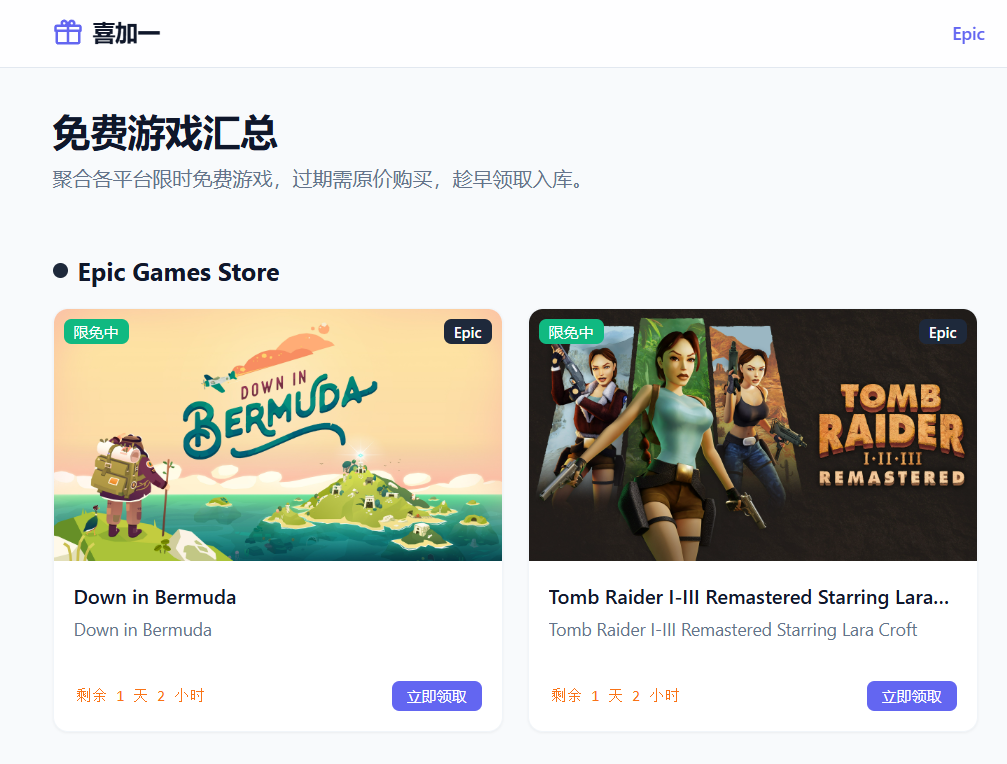
系列第一篇:项目起步,解决"数据从哪来"和"怎么渲染成静态页"两个核心问题。先上个效果图
为什么做这个
Epic Games Store 每周四晚 23 点会放一批免费游戏,Steam 也有不定期赠送。手动追踪的问题:
- 得同时盯好几个网站
- 稍不注意就过了截止时间
- 没有统一入口看"当前有什么、即将有什么"
目标:用 Nuxt 3 搭一个纯静态聚合站,GitHub Actions 自动更新数据,GitHub Pages 免费部署,零服务器成本。
技术选型:
- Nuxt 3 --- 静态生成(SSG)模式,构建时预渲染所有页面
- TypeScript --- 类型安全
- Tailwind CSS --- 快速写样式
- 数据层 --- 构建时就把 JSON 内联进 bundle,不需要运行时请求
Epic Games Store API
具体原理参考《【喜加一】Epic Games免费游戏促销API完全解析:自动获取每周喜加一https://blog.csdn.net/ShyanZh/article/details/161400425》
Epic 有一个无需鉴权的促销 API:
bash
https://store-site-backend-static.ak.epicgames.com/freeGamesPromotions?locale=zh-CN&country=CN&allowCountries=CN直接 fetch 就能拿到数据,不需要任何 API Key。
返回数据长什么样
响应结构很深,核心路径是:
bash
json
  └── data
       └── Catalog
            └── searchStore
                 └── elements[]   ← 这里是游戏列表
每个游戏对象里有两个促销字段:
json
{
  "title": "Down in Bermuda",
  "promotions": {
    "promotionalOffers": [    // ← 当前正在免费
      { "promotionalOffers": [{ "startDate": "...", "endDate": "...", "discountSetting": { "discountPercentage": 0 } }] }
    ],
    "upcomingPromotionalOffers": [  // ← 即将免费
      { "promotionalOffers": [{ "startDate": "...", "endDate": "..." }] }
    ]
  }
}
discountPercentage === 0 表示折扣 100%,即完全免费。
抓取脚本:fetch-epic.mjs
完整实现:
js
// scripts/fetch-epic.mjs
import fs from 'node:fs/promises'
import path from 'node:path'

const API = 'https://store-site-backend-static.ak.epicgames.com/freeGamesPromotions?locale=zh-CN&country=CN&allowCountries=CN'
const DATA_DIR = path.resolve('data')
const GAMES_FILE  = path.join(DATA_DIR, 'games.json')
const HISTORY_FILE = path.join(DATA_DIR, 'history.json')解析图片:Epic 每个游戏有多张图,按优先级取宽图:
js
function pickImage(keyImages = []) {
  const order = ['OfferImageWide', 'DieselStoreFrontWide', 'VaultClosed', 'Thumbnail', 'OfferImageTall']
  for (const type of order) {
    const hit = keyImages.find(i => i.type === type)
    if (hit?.url) return hit.url
  }
  return keyImages[0]?.url || ''
}
解析 slug:slug 用于生成详情页 URL。Epic 的 slug 藏在多个字段里,需要按优先级取:
js
function pickSlug(item) {
  const mapping = item.catalogNs?.mappings?.find(m => m.pageType === 'productHome')
  return (
    mapping?.pageSlug                              // 最优先,productHome 类型的 mapping
    || item.catalogNs?.mappings?.[0]?.pageSlug    // 退而求其次,第一个 mapping
    || item.productSlug?.replace(/\/home$/, '')   // 兼容旧格式(去掉 /home 后缀)
    || item.urlSlug                               // 再退一步
    || item.id                                    // 保底用 id
  )
}核心解析函数:
js
function parse(item) {
  const promo    = item.promotions?.promotionalOffers?.[0]?.promotionalOffers?.[0]
  const upcoming = item.promotions?.upcomingPromotionalOffers?.[0]?.promotionalOffers?.[0]
  const offer = promo || upcoming

  if (!offer) return null
  if (offer.discountSetting?.discountPercentage !== 0) return null  // 必须 100% 折扣

  const slug = pickSlug(item)
  return {
    id: item.id,
    title: item.title,
    description: (item.description || '').trim(),
    image: pickImage(item.keyImages),
    originalPrice: item.price?.totalPrice?.fmtPrice?.originalPrice || '',
    startDate: offer.startDate,
    endDate: offer.endDate,
    slug,
    url: `https://store.epicgames.com/p/${slug}`,
    isCurrent: !!promo,    // promo 有值 = 当前免费;only upcoming 有值 = 即将免费
    seller: item.seller?.name || '',
    fetchedAt: new Date().toISOString(),
  }
}
历史记录合并 :已经免费过的游戏追加到 history.json,不重复添加:
js
async function main() {
  const res = await fetch(API, {
    headers: { 'User-Agent': 'free-games-hub/1.0 (+https://github.com)' },
  })
  const json = await res.json()
  const elements = json?.data?.Catalog?.searchStore?.elements || []
  const games = elements.map(parse).filter(Boolean)

  // 读取已有历史,合并新数据
  const history = await readJson(HISTORY_FILE, [])
  const histIds = new Set(history.map(g => g.id))
  for (const g of games) {
    if (g.isCurrent && !histIds.has(g.id)) {
      history.push({
        id: g.id, title: g.title, image: g.image,
        originalPrice: g.originalPrice,
        startDate: g.startDate, endDate: g.endDate,
        slug: g.slug, url: g.url,
      })
    }
  }

  await fs.writeFile(GAMES_FILE, JSON.stringify(games, null, 2) + '\n')
  await fs.writeFile(HISTORY_FILE, JSON.stringify(history, null, 2) + '\n')
}
运行方式:
bash
node scripts/fetch-epic.mjs
# OK: current=2, upcoming=2, history=47
项目目录结构
bash
epic-free-games/
├── data/
│   ├── games.json       ← 当前 + 即将免费游戏
│   ├── history.json     ← 历史归档
│   └── game-details.json← 游戏详情(截图、配置等)
├── scripts/
│   └── fetch-epic.mjs  ← 抓取脚本
├── composables/
│   └── useGames.ts      ← 数据管理
├── pages/
│   ├── index.vue        ← 首页
│   ├── upcoming.vue     ← 即将免费
│   ├── history.vue      ← 历史归档
│   └── game/[slug].vue  ← 游戏详情
└── nuxt.config.ts
useGames Composable:统一管理数据
不在每个页面直接 import JSON,而是统一放在 composable 里:
ts
// composables/useGames.ts
import gamesData   from '~/data/games.json'
import historyData from '~/data/history.json'
import steamGamesData from '~/data/steam-games.json'

export interface Game {
  id: string
  title: string
  description: string
  image: string
  originalPrice: string
  startDate: string
  endDate: string
  slug: string
  url: string
  isCurrent: boolean
  seller: string
  fetchedAt: string
  platform?: 'Epic' | 'Steam'
}

export const useGames = () => {
  const epicGames  = gamesData as Game[]
  const steamGames = steamGamesData as Game[]
  const games      = [...epicGames, ...steamGames]
  const history    = historyData as HistoryGame[]

  return {
    current:      games.filter(g => g.isCurrent),
    upcoming:     games.filter(g => !g.isCurrent),
    currentEpic:  epicGames.filter(g => g.isCurrent),
    currentSteam: steamGames.filter(g => g.isCurrent),
    history:      [...history].sort((a, b) =>
      new Date(b.endDate).getTime() - new Date(a.endDate).getTime()
    ),
    all: games,
    findBySlug: (slug: string) => games.find(g => g.slug === slug),
  }
}
为什么这样做 :Nuxt 3 会在构建时把 import xxx from '~/data/xxx.json' 直接内联进 JS bundle。页面加载不需要任何 API 请求,数据直接从 bundle 里读,速度极快。
首页用法:
vue
<!-- pages/index.vue -->
<script setup lang="ts">
const { currentEpic, currentSteam, upcoming } = useGames()
</script>

<template>
  <div v-if="currentEpic.length" class="grid grid-cols-1 sm:grid-cols-2 lg:grid-cols-3 gap-5">
    <GameCard v-for="g in currentEpic" :key="g.id" :game="{ ...g, platform: 'Epic' }" />
  </div>
  <div v-else class="text-center text-slate-500">本周 Epic 暂无免费游戏</div>
</template>
Nuxt 3 静态生成:关键配置
nuxt.config.ts 里最重要的部分:
ts
export default defineNuxtConfig({
  nitro: {
    prerender: {
      crawlLinks: false,
      routes: ['/', '/upcoming', '/history', '/tutorial', '/steam'],
      failOnError: false,
    },
  },
})
为什么要 crawlLinks: false
这是踩过坑之后加的配置。
默认情况下(crawlLinks: true),Nitro 预渲染时会:
- 渲染已知路由
- 扫描渲染出的 HTML,找所有
<a href>链接 - 把发现的新链接加入队列,递归渲染
问题出在动态路由 pages/game/[slug].vue。模板文件对应的"路由"是 /game/[](没有 slug 的空路由),Nitro 在某些版本里会把这个路由模板也加入渲染队列。渲染 /game/[] 时,页面里有这样的代码:
ts
const game = findBySlug(route.params.slug as string)
if (!game) {
  throw createError({ statusCode: 404, fatal: true })
}
空 slug 找不到游戏,直接抛 404/500,构建失败。
解决方案 :关闭爬虫,手动列出需要预渲染的路由。动态路由 /game/:slug 不预渲染,由客户端按需加载。
failOnError: false
预渲染某个路由失败时,不中断整个构建。对于外部数据可能偶尔为空的情况,这是个保底开关。
routes 列表
只预渲染静态页面,动态的游戏详情页(/game/:slug)留给客户端渲染------因为游戏列表是动态的,构建时无法穷举所有 slug。
GitHub Actions 自动更新数据
每周四定时跑脚本,自动提交新数据:
yaml
# .github/workflows/fetch.yml
on:
  schedule:
    - cron: '0 15 * * 4'  # UTC 15:00 = 北京时间 23:00,周四

jobs:
  fetch:
    runs-on: ubuntu-latest
    steps:
      - uses: actions/checkout@v4
      - uses: actions/setup-node@v4
        with: { node-version: '20' }
      - run: npm ci
      - run: node scripts/fetch-epic.mjs
      - run: |
          git config user.name "github-actions[bot]"
          git config user.email "github-actions[bot]@users.noreply.github.com"
          git add data/
          git diff --staged --quiet || git commit -m "chore(data): refresh epic free games [$(date -u +%Y-%m-%dT%H:%MZ)]"
          git push
本地开发
bash
# 安装依赖
npm install

# 先抓一次数据
node scripts/fetch-epic.mjs

# 启动开发服务器
npm run dev

# 构建静态站点
npm run generate
# 输出在 .output/public/
小结
MVP 阶段解决了两件事:
- 数据从哪来 :Epic 官方促销 API →
fetch-epic.mjs解析 → JSON 文件 - 怎么展示 :Nuxt 3
nuxt generate预渲染 → 纯静态 HTML,零服务器
关键决策:
- 关闭
crawlLinks,避免动态路由/game/[]触发 500 importJSON 文件,数据内联进 bundle,不需要运行时请求useGamescomposable,统一管理数据,页面按需解构取用
下一篇:添加游戏详情页、深色模式主题切换、以及 SEO 优化。