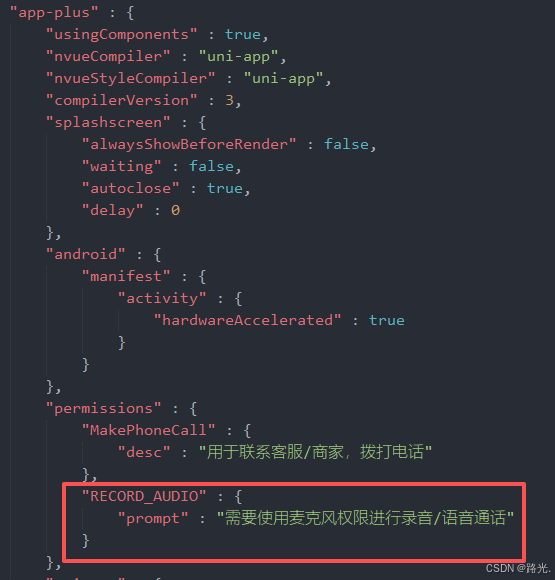
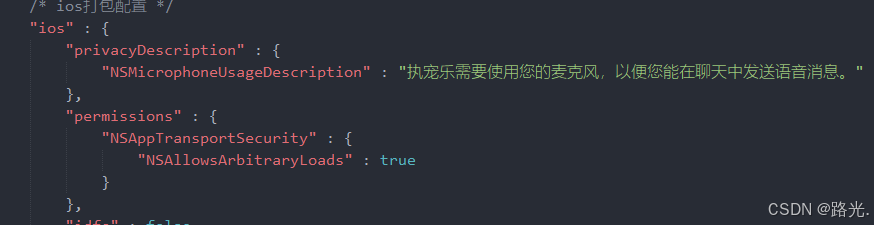
html
<template>
  <view class="container">
    <!-- 1. WebView 组件 -->
    <!-- 使用 @load 监听 H5 加载完成的瞬间 -->
    <web-view
      v-if="urlPath"
      :src="urlPath"
      @load="onWebViewLoad"
    ></web-view>

    <!-- 2. 自定义加载过渡页 -->
    <!-- 当 showLoading 为 true 时,遮盖整个屏幕 -->
    <view v-if="showLoading" class="loading-mask">
      <view class="loading-content">
        <!-- 这里可以换成你自己的 Logo 图片 -->
        <image class="logo" src="loading.png" mode="aspectFit"></image>
        <view class="spinner"></view>
        <text class="loading-text">正在连接 AI 医生...</text>
      </view>
    </view>
  </view>
</template>

<script>
import { getUserInfo } from '@/api/user.js';

export default {
  data() {
    return {
      urlPath: '',
      showLoading: true, // 控制过渡页显示
      systemPermissionReady: false,
    }
  },
  async onShow() {
    // 每次进入页面,先展示加载状态(如果 URL 即将改变)
    // 处理权限
    // #ifdef APP-PLUS
    if (plus.os.name === 'Android' && !this.systemPermissionReady) {
      const granted = await this.checkAndRequestAndroidPermission();
      this.systemPermissionReady = granted;
    }
    // #endif

    this.fetchUserInfo();
  },
  methods: {
    // 申请权限逻辑
    checkAndRequestAndroidPermission() {
      return new Promise((resolve) => {
        plus.android.requestPermissions(['android.permission.RECORD_AUDIO'], (e) => {
          resolve(e.granted.length > 0);
        }, () => resolve(false));
      });
    },

    fetchUserInfo() {
      // 不使用 uni.showLoading 弹窗,改用我们自己的全屏遮罩
      getUserInfo().then(res => {
        const { nickname, avatar, uid } = res.data;
        const safeAvatar = encodeURIComponent(avatar || '');
        const safeNickname = encodeURIComponent(nickname || '');
        const safeUid = encodeURIComponent(uid || '');

        const newUrl = `H5网页地址,适配移动端`;

        if (this.urlPath !== newUrl) {
          this.showLoading = true; // URL 变了,需要重新加载
          this.urlPath = newUrl;

          // #ifdef APP-PLUS
          this.$nextTick(() => {
            this.grantWebviewPermission();
          });
          // #endif
        } else {
          // 如果 URL 没变(比如只是从后台切回来),直接关闭加载层
          this.showLoading = false;
        }
      }).catch(() => {
        this.showLoading = false;
      });
    },

    // 当 WebView 内部的 HTML 加载完成时触发
    onWebViewLoad() {
      console.log("H5 页面渲染完成");
      // 延迟 300ms 关闭,给 H5 内部脚本执行留一点缓冲,避免视觉闪烁
      setTimeout(() => {
        this.showLoading = false;
      }, 300);
    },

    grantWebviewPermission() {
      let retryCount = 0;
      const timer = setInterval(() => {
        const pages = getCurrentPages();
        const page = pages[pages.length - 1];
        if (!page) return;

        const currentWebview = page.$getAppWebview();
        const children = currentWebview.children();

        if (children && children.length > 0) {
          clearInterval(timer);
          const wv = children[0];

          if (plus.os.name === 'Android') {
            const realWebView = wv.nativeInstanceObject();
            if (realWebView) {
              const settings = realWebView.getSettings();
              settings.setDomStorageEnabled(true);
              settings.setMediaPlaybackRequiresUserGesture(false);

              const WebChromeClient = plus.android.importClass('android.webkit.WebChromeClient');
              const customClient = plus.android.implements('android.webkit.WebChromeClient', {
                "onPermissionRequest": function(request) {
                  request.grant(request.getResources());
                }
              });
              realWebView.setWebChromeClient(customClient);
            }
          }
        }
        if (retryCount++ > 20) clearInterval(timer);
      }, 200);
    }
  }
}
</script>

<style scoped>
.container {
  width: 100vw;
  height: 100vh;
  background-color: #FFFFFF;
}

/* 过渡遮罩层样式 */
.loading-mask {
  position: fixed;
  left: 0;
  top: 0;
  width: 100vw;
  height: 100vh;
  background-color: #FFFFFF; /* 建议使用和 App 主色调一致的背景 */
  z-index: 999; /* 确保在最上层 */
  display: flex;
  justify-content: center;
  align-items: center;
}

.loading-content {
  display: flex;
  flex-direction: column;
  align-items: center;
}

.logo {
  width: 160rpx;
  height: 160rpx;
  margin-bottom: 40rpx;
  border-radius: 20rpx;
}

.loading-text {
  font-size: 28rpx;
  color: #666666;
  margin-top: 20rpx;
}

/* 简单的转圈动画 */
.spinner {
  width: 50rpx;
  height: 50rpx;
  border: 4rpx solid #f3f3f3;
  border-top: 4rpx solid #5555ff; /* 这里换成你的主题色 */
  border-radius: 50%;
  animation: spin 1s linear infinite;
}

@keyframes spin {
  0% { transform: rotate(0deg); }
  100% { transform: rotate(360deg); }
}
</style>
代码逻辑
1.如果是安卓的app手机,则检查是否赋予麦克风权限,没有赋予则会自动拉取麦克风权限授权,并强制将麦克风权限注入H5网页
2.ios的app是在证书层面配置授予手机麦克风权限,是默认就有的
3.小程序端是默认打通了麦克风权限,不需要配置,另外还需要在manifest中配置相应的麦克风权限
html/* 应用发布信息 */ "distribute" : { /* android打包配置 */ "android" : { "permissions" : [ "<uses-permission android:name=\"android.permission.RECORD_AUDIO\"/>", "<uses-permission android:name=\"android.permission.MODIFY_AUDIO_SETTINGS\"/>" ],配置完manifest.json文件之后,安卓的apk需要重新打包,使用麦克风功能只能在,安装包中使用,无法在自定义调试基座中使用