在使用 vxe-table 导出 Excel(xlsx)文件时,如果表格包含数据分组(行分组),默认导出的文件会保持收拢状态。通过配置可以实现在导出的 Excel 中自动展开所有分组层级。另外,如果单元格中需要导出图片,则必须确保图片 URL 是有效且允许跨域访问的,否则图片无法导出。
安装导出插件
vxe-table 默认不包含 Excel 导出功能,需要显式安装并注册官方导出插件(基于 ExcelJS)。
shell
npm install @vxe-ui/plugin-export-xlsx exceljs
javascript
import { VxeUI } from 'vxe-table'

import VxeUIPluginExportXLSX from '@vxe-ui/plugin-export-xlsx'
import ExcelJS from 'exceljs'

VxeUI.use(VxeUIPluginExportXLSX, {
  ExcelJS
})
注意:如果未注册此插件,exportData 和工具栏导出按钮将无法正常工作。
实现方式
-
- 自动展开分组层级
- 全局配置:在 gridOptions.exportConfig 中设置 isRowGroupAllExpanded: true,所有通过工具栏"导出"按钮触发的操作都会默认展开分组。
- 动态导出:通过编程方式调用 exportData 时,可以在参数中传入 isRowGroupAllExpanded: true,按需控制本次导出是否展开分组。
-
- 图片导出条件
- 图片 URL 必须可访问且返回有效的图片格式(如 PNG、JPEG、GIF)。
- 目标图片服务器必须支持跨域请求(CORS),否则 vxe-table 无法读取图片内容并写入 Excel 文件。
- 如果图片是第三方 URL 且无法控制跨域策略,可考虑:
- 使用后端代理将图片转为 Base64 再传递给表格。
- 将图片预加载为本地 DataURL 再导出(需要额外处理)。
代码
通过 export-config.isRowGroupAllExpanded 设置默认是否自动展开分层级
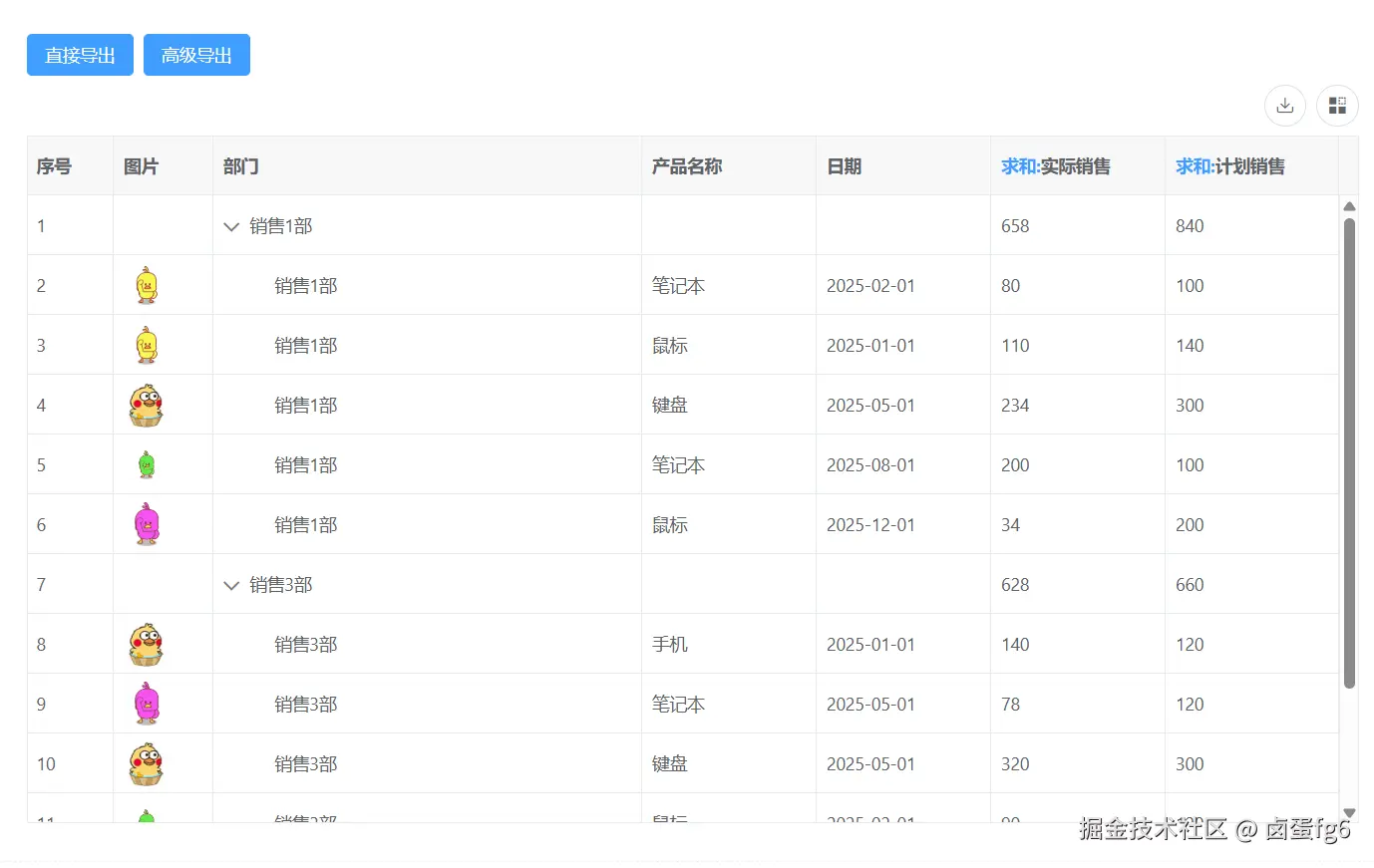
html
<template>
  <div>
    <vxe-button status="primary" @click="exportEvent">直接导出</vxe-button>
    <vxe-button status="primary" @click="openEvent">高级导出</vxe-button>
    <vxe-grid ref="gridRef" v-bind="gridOptions"></vxe-grid>
  </div>
</template>

<script setup>
import { ref, reactive } from 'vue'

const gridRef = ref()

const imgUrlCellRender = reactive({
  name: 'VxeImage',
  props: {
    width: 36,
    height: 36
  }
})

const gridOptions = reactive({
  height: 600,
  border: true,
  showOverflow: true,
  aggregateConfig: {
    groupFields: ['department'] // 设置分组字段
  },
  exportConfig: {
    type: 'xlsx'
    // isRowGroupAllExpanded: true // 默认展开所有分组层级
  },
  columnConfig: {
    resizable: true
  },
  customConfig: {
    allowGroup: true,
    allowValues: true
  },
  toolbarConfig: {
    custom: true,
    export: true
  },
  columns: [
    { type: 'seq', width: 70 },
    { field: 'imgUrl', title: '图片', width: 80, cellRender: imgUrlCellRender },
    { field: 'department', title: '部门', minWidth: 200, rowGroupNode: true },
    { field: 'name', title: '产品名称', width: 140 },
    { field: 'date', title: '日期', width: 140 },
    { field: 'actualAmount', title: '实际销售', width: 140, aggFunc: 'sum' },
    { field: 'plannedAmount', title: '计划销售', width: 140, aggFunc: 'sum' }
  ],
  data: [
    { id: 10001, name: '笔记本', department: '销售1部', actualAmount: 80, plannedAmount: 100, date: '2025-02-01', imgUrl: 'https://vxeui.com/resource/img/bq673.gif' },
    { id: 10002, name: '手机', department: '销售3部', actualAmount: 140, plannedAmount: 120, date: '2025-01-01', imgUrl: 'https://vxeui.com/resource/img/546.gif' },
    { id: 10003, name: '键盘', department: '销售2部', actualAmount: 220, plannedAmount: 200, date: '2025-05-01', imgUrl: 'https://vxeui.com/resource/img/bq987.gif' },
    { id: 10004, name: '鼠标', department: '销售1部', actualAmount: 110, plannedAmount: 140, date: '2025-01-01', imgUrl: 'https://vxeui.com/resource/img/673.gif' },
    { id: 10005, name: '笔记本', department: '销售2部', actualAmount: 40, plannedAmount: 90, date: '2025-01-01', imgUrl: 'https://vxeui.com/resource/img/bq673.gif' },
    { id: 10006, name: '鼠标', department: '销售4部', actualAmount: 40, plannedAmount: 120, date: '2025-03-01', imgUrl: 'https://vxeui.com/resource/img/bq673.gif' },
    { id: 10007, name: '键盘', department: '销售1部', actualAmount: 234, plannedAmount: 300, date: '2025-05-01', imgUrl: 'https://vxeui.com/resource/img/546.gif' },
    { id: 10008, name: '手机', department: '销售4部', actualAmount: 146, plannedAmount: 240, date: '2025-11-01', imgUrl: 'https://vxeui.com/resource/img/bq987.gif' },
    { id: 10009, name: '笔记本', department: '销售3部', actualAmount: 78, plannedAmount: 120, date: '2025-05-01', imgUrl: 'https://vxeui.com/resource/img/bq423.gif' },
    { id: 10010, name: '笔记本', department: '销售4部', actualAmount: 100, plannedAmount: 130, date: '2025-03-01', imgUrl: 'https://vxeui.com/resource/img/673.gif' },
    { id: 10011, name: '手机', department: '销售2部', actualAmount: 146, plannedAmount: 150, date: '2025-03-01', imgUrl: 'https://vxeui.com/resource/img/bq987.gif' },
    { id: 10012, name: '键盘', department: '销售4部', actualAmount: 130, plannedAmount: 130, date: '2025-10-01', imgUrl: 'https://vxeui.com/resource/img/bq423.gif' },
    { id: 10013, name: '手机', department: '销售2部', actualAmount: 140, plannedAmount: 80, date: '2025-02-01', imgUrl: 'https://vxeui.com/resource/img/673.gif' },
    { id: 10014, name: '笔记本', department: '销售1部', actualAmount: 200, plannedAmount: 100, date: '2025-08-01', imgUrl: 'https://vxeui.com/resource/img/bq987.gif' },
    { id: 10015, name: '键盘', department: '销售3部', actualAmount: 320, plannedAmount: 300, date: '2025-05-01', imgUrl: 'https://vxeui.com/resource/img/546.gif' },
    { id: 10016, name: '笔记本', department: '销售4部', actualAmount: 380, plannedAmount: 400, date: '2025-10-01', imgUrl: 'https://vxeui.com/resource/img/bq987.gif' },
    { id: 10017, name: '鼠标', department: '销售1部', actualAmount: 34, plannedAmount: 200, date: '2025-12-01', imgUrl: 'https://vxeui.com/resource/img/bq423.gif' },
    { id: 10018, name: '键盘', department: '销售4部', actualAmount: 100, plannedAmount: 150, date: '2025-10-01', imgUrl: 'https://vxeui.com/resource/img/bq673.gif' },
    { id: 10019, name: '鼠标', department: '销售3部', actualAmount: 90, plannedAmount: 120, date: '2025-02-01', imgUrl: 'https://vxeui.com/resource/img/bq987.gif' },
    { id: 10020, name: '手机', department: '销售2部', actualAmount: 40, plannedAmount: 50, date: '2025-03-01', imgUrl: 'https://vxeui.com/resource/img/546.gif' }
  ]
})

const exportEvent = () => {
  const $grid = gridRef.value
  if ($grid) {
    $grid.exportData({
      isRowGroupAllExpanded: true
    })
  }
}

const openEvent = () => {
  const $grid = gridRef.value
  if ($grid) {
    $grid.openExport()
  }
}
</script>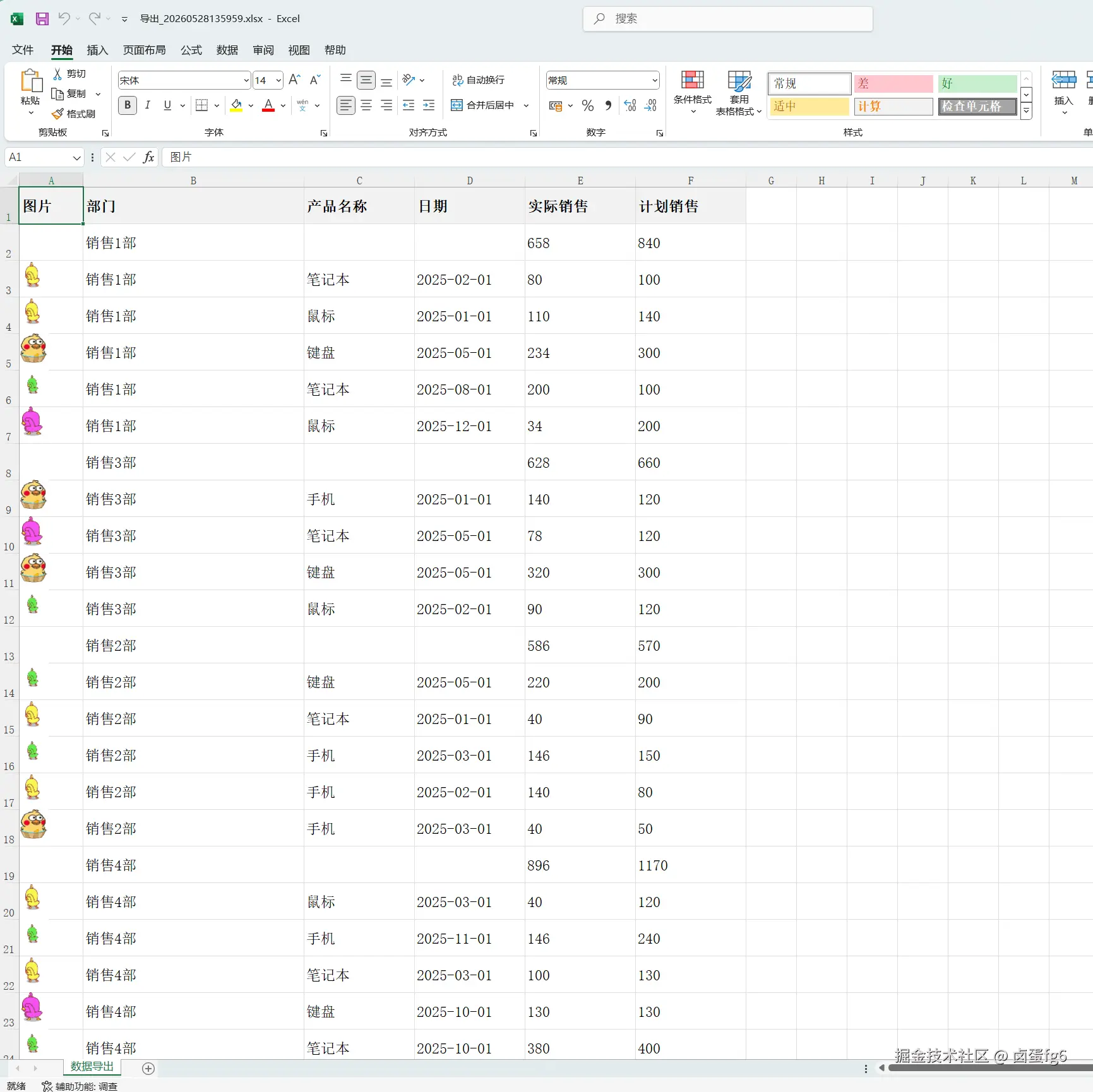
说明
| 注意点 | 说明 |
|---|---|
| 分组字段一致性 | 设置 rowGroupNode: true 的列必须与 aggregateConfig.groupFields 中的字段名称完全一致。 |
| 导出性能 | 当数据量较大且分组嵌套层级较深时,展开所有分组会导致导出的 Excel 行数激增,可能影响性能和文件大小。 |
| 图片跨域配置 | 确保图片服务器返回 Access-Control-Allow-Origin: * 或指定域名,否则导出后图片单元格为空。 |
| Excel 文件格式限制 | ExcelJS 写入图片时会保持原始宽高比,但建议图片尺寸适中,避免单元格过高。 |
| 插件依赖 | 必须安装 @vxe-ui/plugin-export-xlsx 和 exceljs,并在项目中正确注册,否则导出功能不可用。 |