物联网 基于netty核心实战-心跳保活机制
简述
心跳保活是MQTT连接的生命线------它并不是连接瞬间发起的,而是在整个长连接期间持续运行的后台守护机制
源码(netty-sample-05-idle)
https://gitee.com/kcnf-iot/iot-sample/tree/master/netty/netty-sample-05
为什么需要心跳保活机制
MQTT 协议运行在 TCP/IP 之上,当网络连接长时间没有数据交互时,可能会被防火墙或中间网络设备断开,导致连接"假死"。心跳机制可以让客户端定期发送 PINGREQ 心跳包,服务端回复 PINGRESP,双方以此确认对方仍然存活
| 角色 | 职责 | 保活周期 |
|---|---|---|
| 客户端 | 发送 PINGREQ 请求 | KeepAlive(如 60 秒),即客户端每 KeepAlive 秒主动发一次 PINGREQ |
| 服务端 | 响应 PINGRESP | 接收客户端任何报文(PUBLISH/PINGREQ等),若 1.5 倍 KeepAlive 内无任何报文则断开连接 |
双端超时机制的区别
- 客户端按 KeepAlive 间隔主动发送 PINGREQ;若发送 PINGREQ 后一段时间内未收到 PINGRESP,则断开。
- 服务端计算"从客户端收到的最近一次任何报文"(不限于 PINGREQ)至今的时间,若超过 1.5 倍 KeepAlive 则断开。
说明:KeepAlive 参数由客户端在 CONNECT 报文可变头中指定,服务端据此计算两种超时阈值
源码
server
package com.jysemel.iot;

import io.netty.bootstrap.ServerBootstrap;
import io.netty.channel.ChannelFuture;
import io.netty.channel.ChannelOption;
import io.netty.channel.EventLoopGroup;
import io.netty.channel.nio.NioEventLoopGroup;
import io.netty.channel.socket.nio.NioServerSocketChannel;

public class MqttServer {
    private static final int PORT = 1883;
    private static final long DEFAULT_KEEP_ALIVE_SECONDS = 30;

    public static void main(String[] args) throws Exception {
        EventLoopGroup bossGroup = new NioEventLoopGroup(1);
        EventLoopGroup workerGroup = new NioEventLoopGroup();

        try {
            ServerBootstrap bootstrap = new ServerBootstrap();
            bootstrap.group(bossGroup, workerGroup)
                    .channel(NioServerSocketChannel.class)
                    .option(ChannelOption.SO_BACKLOG, 128)
                    .childOption(ChannelOption.SO_KEEPALIVE, true)
                    .childHandler(new MqttServerInitializer(DEFAULT_KEEP_ALIVE_SECONDS));

            ChannelFuture future = bootstrap.bind(PORT).sync();

            System.out.println("╔════════════════════════════════════════╗");
            System.out.println("║   MQTT 心跳保活服务端已启动           ║");
            System.out.println("║   监听端口: " + String.format("%-22d", PORT) + "║");
            System.out.println("║   默认KeepAlive: " + String.format("%-16d", DEFAULT_KEEP_ALIVE_SECONDS) + "║");
            System.out.println("╚════════════════════════════════════════╝");

            future.channel().closeFuture().sync();
        } finally {
            workerGroup.shutdownGracefully();
            bossGroup.shutdownGracefully();
            System.out.println("MQTT 服务端已关闭");
        }
    }
}
client
package com.jysemel.iot;

import com.jysemel.iot.handler.MqttHeartbeatClientHandler;
import io.netty.bootstrap.Bootstrap;
import io.netty.channel.ChannelFuture;
import io.netty.channel.ChannelInitializer;
import io.netty.channel.ChannelPipeline;
import io.netty.channel.EventLoopGroup;
import io.netty.channel.nio.NioEventLoopGroup;
import io.netty.channel.socket.SocketChannel;
import io.netty.channel.socket.nio.NioSocketChannel;
import io.netty.handler.codec.mqtt.MqttDecoder;
import io.netty.handler.codec.mqtt.MqttEncoder;
import io.netty.handler.timeout.IdleStateHandler;

import java.util.concurrent.TimeUnit;

public class MqttHeartbeatClient {
    private static final String HOST = "127.0.0.1";
    private static final int PORT = 1883;
    private static final int KEEP_ALIVE_SECONDS = 10;

    public static void main(String[] args) throws Exception {
        EventLoopGroup group = new NioEventLoopGroup();

        try {
            Bootstrap bootstrap = new Bootstrap();
            bootstrap.group(group)
                    .channel(NioSocketChannel.class)
                    .handler(new ChannelInitializer<SocketChannel>() {
                        @Override
                        protected void initChannel(SocketChannel ch) {
                            ChannelPipeline pipeline = ch.pipeline();

                            pipeline.addLast("mqttDecoder", new MqttDecoder(65536));
                            pipeline.addLast("mqttEncoder", MqttEncoder.INSTANCE);

                            pipeline.addLast("idleStateHandler",
                                    new IdleStateHandler(0, KEEP_ALIVE_SECONDS, 0, TimeUnit.SECONDS));

                            pipeline.addLast("clientHandler", new MqttHeartbeatClientHandler(KEEP_ALIVE_SECONDS));
                        }
                    });

            ChannelFuture future = bootstrap.connect(HOST, PORT).sync();

            System.out.println("╔════════════════════════════════════════╗");
            System.out.println("║   MQTT 心跳客户端已启动               ║");
            System.out.println("║   服务器: " + String.format("%-22s", HOST + ":" + PORT) + "║");
            System.out.println("║   KeepAlive: " + String.format("%-19d", KEEP_ALIVE_SECONDS) + "║");
            System.out.println("║   说明: 每" + KEEP_ALIVE_SECONDS + "秒发送一次PINGREQ              ║");
            System.out.println("╚════════════════════════════════════════╝");

            future.channel().closeFuture().sync();
        } finally {
            group.shutdownGracefully();
            System.out.println("MQTT 客户端已关闭");
        }
    }
}
消息类型标记
private void handlePingReq(ChannelHandlerContext ctx) {
    System.out.println(">>> 收到 PINGREQ,回复 PINGRESP");

    MqttFixedHeader pingRespHeader = new MqttFixedHeader(
            MqttMessageType.PINGRESP, false, MqttQoS.AT_MOST_ONCE, false, 0);
    ctx.writeAndFlush(new MqttMessage(pingRespHeader));
}

if (event.state() == IdleState.WRITER_IDLE && isConnected) {
    pingCount++;
    System.out.println(">>> [" + pingCount + "] 写空闲超时,发送 PINGREQ");

    MqttFixedHeader pingReqHeader = new MqttFixedHeader(
            MqttMessageType.PINGREQ, false, MqttQoS.AT_MOST_ONCE, false, 0);
    ctx.writeAndFlush(new MqttMessage(pingReqHeader));
}
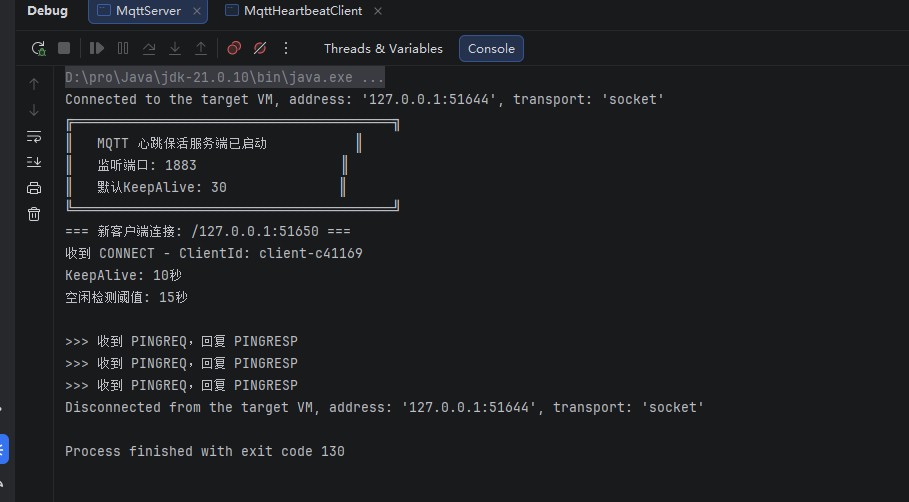
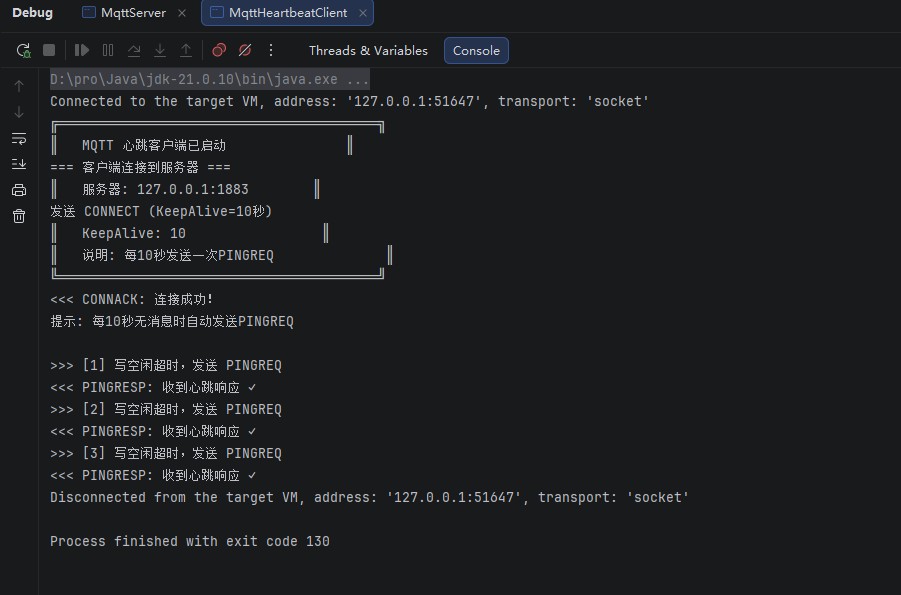
验证结果