前言
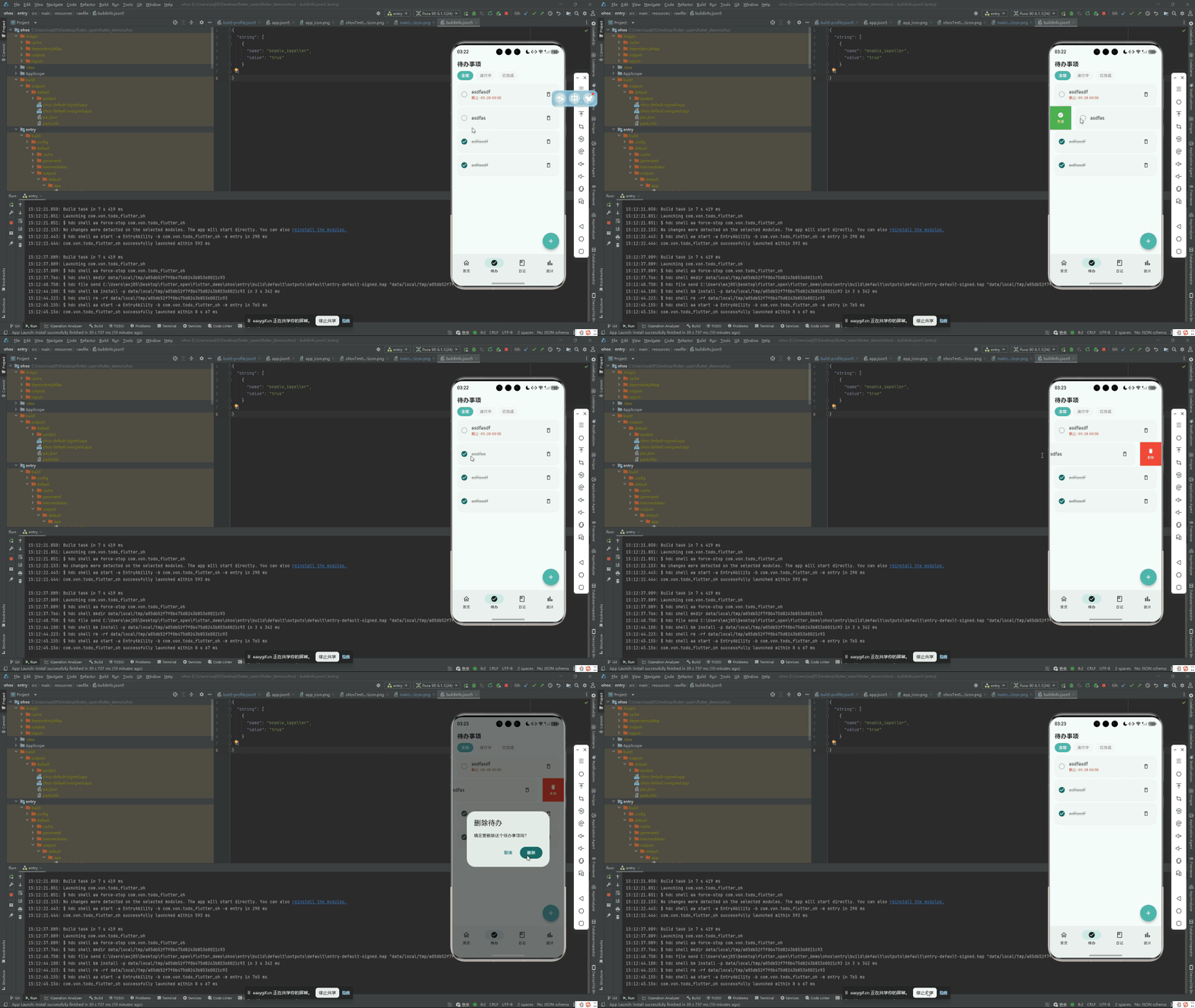
待办列表的典型场景是:用户有 20 条待办,其中 5 条已经完成了。他需要能在"全部待办"和"未完成"和"已完成"三种视图之间快速切换。这是 GTD 方法论中"聚焦当下"的核心需求------已完成的条目不应干扰未完成事项的浏览。
鸿蒙 Flutter 备忘录的待办模块实现了一个简洁的三态筛选器:All / Active / Completed。本文将拆解从枚举定义、UI 切换、到 Provider 数据过滤的完整链路。
项目仓库:todo_flutter_harmony
筛选枚举
dart
enum TodoFilter {
  all,       // 全部
  active,    // 进行中(未完成)
  completed, // 已完成
}
枚举比字符串更安全------编译器会检查 switch 的完整性,IDE 也能提供自动补全。
模型定义
dart
class Todo {
  final int? id;
  final String title;
  final String? note;
  final bool isCompleted;
  final DateTime? dueDate;
  final DateTime createdAt;

  const Todo({
    this.id,
    required this.title,
    this.note,
    this.isCompleted = false,
    this.dueDate,
    required this.createdAt,
  });

  // 是否已过期
  bool get isOverdue {
    if (isCompleted) return false;
    if (dueDate == null) return false;
    return DateTime.now().isAfter(dueDate!);
  }

  Map<String, dynamic> toMap() => {
    'id': id,
    'title': title,
    'note': note,
    'isCompleted': isCompleted ? 1 : 0,  // SQLite 兼容性
    'dueDate': dueDate?.millisecondsSinceEpoch,
    'createdAt': createdAt.millisecondsSinceEpoch,
  };

  factory Todo.fromMap(Map<String, dynamic> map) => Todo(
    id: map['id'],
    title: map['title'] ?? '',
    note: map['note'],
    isCompleted: (map['isCompleted'] ?? 0) == 1,
    dueDate: map['dueDate'] != null
        ? DateTime.fromMillisecondsSinceEpoch(map['dueDate'])
        : null,
    createdAt: DateTime.fromMillisecondsSinceEpoch(map['createdAt']),
  );
}
TodoProvider:筛选逻辑
dart
class TodoProvider extends ChangeNotifier {
  List<Todo> _todos = [];
  TodoFilter _filter = TodoFilter.all;

  List<Todo> get todos => _todos;
  TodoFilter get filter => _filter;

  List<Todo> get filteredTodos {
    switch (_filter) {
      case TodoFilter.all:
        return List.unmodifiable(_todos);
      case TodoFilter.active:
        return _todos.where((t) => !t.isCompleted).toList();
      case TodoFilter.completed:
        return _todos.where((t) => t.isCompleted).toList();
    }
  }

  // 各状态的数量
  int get totalCount => _todos.length;
  int get activeCount => _todos.where((t) => !t.isCompleted).length;
  int get completedCount => _todos.where((t) => t.isCompleted).length;

  void setFilter(TodoFilter newFilter) {
    _filter = newFilter;
    notifyListeners();
  }

  void loadTodos() async {
    _todos = await DatabaseHelper.instance.getAllTodos();
    _todos.sort((a, b) => b.createdAt.compareTo(a.createdAt));
    notifyListeners();
  }

  Future<void> toggleTodo(int id) async {
    final todo = _todos.firstWhere((t) => t.id == id);
    final updated = todo.copyWith(isCompleted: !todo.isCompleted);
    await DatabaseHelper.instance.updateTodo(updated);
    await loadTodos();
  }

  Future<void> addTodo(Todo todo) async {
    await DatabaseHelper.instance.insertTodo(todo);
    await loadTodos();
  }

  Future<void> deleteTodo(int id) async {
    await DatabaseHelper.instance.deleteTodo(id);
    await loadTodos();
  }
}
UI:筛选切换器
使用 Material 3 的 SegmentedButton 构建三态切换:
dart
class TodoFilterBar extends StatelessWidget {
  const TodoFilterBar({super.key});

  @override
  Widget build(BuildContext context) {
    return Consumer<TodoProvider>(
      builder: (context, provider, _) {
        return Padding(
          padding: const EdgeInsets.symmetric(horizontal: 16, vertical: 8),
          child: SegmentedButton<TodoFilter>(
            segments: [
              ButtonSegment<TodoFilter>(
                value: TodoFilter.all,
                label: Text('全部 (${provider.totalCount})'),
                icon: const Icon(Icons.list, size: 18),
              ),
              ButtonSegment<TodoFilter>(
                value: TodoFilter.active,
                label: Text('进行中 (${provider.activeCount})'),
                icon: Icon(Icons.radio_button_unchecked, size: 18,
                    color: Colors.orange.shade600),
              ),
              ButtonSegment<TodoFilter>(
                value: TodoFilter.completed,
                label: Text('已完成 (${provider.completedCount})'),
                icon: Icon(Icons.check_circle_outline, size: 18,
                    color: Colors.green.shade600),
              ),
            ],
            selected: {provider.filter},
            onSelectionChanged: (selected) {
              provider.setFilter(selected.first);
            },
            style: ButtonStyle(
              visualDensity: VisualDensity.compact,
            ),
          ),
        );
      },
    );
  }
}
关键细节:每个筛选项的 label 都带了实时数量------"全部 (15)"、"进行中 (10)"、"已完成 (5)"。这给用户在点击前就提供了信息参考。
待办列表页
dart
class TodoListPage extends StatelessWidget {
  @override
  Widget build(BuildContext context) {
    return Column(
      children: [
        TodoFilterBar(),
        const Divider(height: 1),
        Expanded(
          child: Consumer<TodoProvider>(
            builder: (context, provider, _) {
              final todos = provider.filteredTodos;

              if (todos.isEmpty) {
                return _buildEmptyState(provider.filter);
              }

              return ListView.builder(
                itemCount: todos.length,
                itemBuilder: (context, index) {
                  return AnimatedListItem(
                    delay: index * 50,
                    child: _buildTodoItem(todos[index], provider),
                  );
                },
              );
            },
          ),
        ),
      ],
    );
  }

  Widget _buildEmptyState(TodoFilter filter) {
    String message;
    IconData icon;

    switch (filter) {
      case TodoFilter.all:
        message = '暂无待办事项';
        icon = Icons.inbox_outlined;
        break;
      case TodoFilter.active:
        message = '所有待办已完成!';
        icon = Icons.celebration_outlined;
        break;
      case TodoFilter.completed:
        message = '暂无已完成事项';
        icon = Icons.checklist_outlined;
        break;
    }

    return Center(
      child: Column(
        mainAxisSize: MainAxisSize.min,
        children: [
          Icon(icon, size: 72, color: Colors.grey.shade300),
          const SizedBox(height: 12),
          Text(message, style: TextStyle(
            fontSize: 16, color: Colors.grey.shade500,
          )),
        ],
      ),
    );
  }
}
三种筛选状态各有不同的空状态提示------"进行中"为空时显示庆祝图标,比千篇一律的"暂无数据"友好得多。
待办卡片
dart
Widget _buildTodoItem(Todo todo, TodoProvider provider) {
  return SlideActionTile(
    leftActions: [
      SlideAction(
        label: '删除',
        icon: Icons.delete_outline,
        color: Colors.red,
        onTap: () => provider.deleteTodo(todo.id!),
      ),
    ],
    rightActions: [
      SlideAction(
        label: todo.isCompleted ? '撤销' : '完成',
        icon: todo.isCompleted ? Icons.undo : Icons.check,
        color: todo.isCompleted ? Colors.orange : Colors.green,
        onTap: () => provider.toggleTodo(todo.id!),
      ),
    ],
    child: Card(
      elevation: 1,
      shape: RoundedRectangleBorder(borderRadius: BorderRadius.circular(12)),
      child: Padding(
        padding: const EdgeInsets.all(14),
        child: Row(
          children: [
            // 完成状态复选框
            GestureDetector(
              onTap: () => provider.toggleTodo(todo.id!),
              child: Icon(
                todo.isCompleted
                    ? Icons.check_circle
                    : Icons.radio_button_unchecked,
                color: todo.isCompleted
                    ? const Color(0xFF4DB6AC)
                    : Colors.grey.shade400,
                size: 24,
              ),
            ),
            const SizedBox(width: 12),
            // 标题和备注
            Expanded(
              child: Column(
                crossAxisAlignment: CrossAxisAlignment.start,
                children: [
                  Text(
                    todo.title,
                    style: TextStyle(
                      fontSize: 16,
                      fontWeight: FontWeight.w500,
                      decoration: todo.isCompleted
                          ? TextDecoration.lineThrough
                          : null,
                      color: todo.isCompleted
                          ? Colors.grey.shade500
                          : Colors.black87,
                    ),
                  ),
                  if (todo.dueDate != null) ...[
                    const SizedBox(height: 4),
                    Row(
                      children: [
                        Icon(Icons.calendar_today, size: 13,
                            color: todo.isOverdue ? Colors.red : Colors.grey),
                        const SizedBox(width: 4),
                        Text(
                          DateFormat('MM-dd').format(todo.dueDate!),
                          style: TextStyle(
                            fontSize: 12,
                            color: todo.isOverdue ? Colors.red : Colors.grey,
                            fontWeight: todo.isOverdue
                                ? FontWeight.w600
                                : FontWeight.normal,
                          ),
                        ),
                      ],
                    ),
                  ],
                ],
              ),
            ),
          ],
        ),
      ),
    ),
  );
}
视觉细节:
- 已完成的待办:标题加删除线 + 变灰
- 过期的待办:截止日期变红色加粗
- 点击圆圈图标即可切换完成状态
鸿蒙兼容性
三态筛选器完全在 Flutter 层实现:
SegmentedButton:Material 3 组件TodoFilter枚举 +filteredTodosgetter:纯 Dart 逻辑- Provider 响应式更新:Flutter 框架层
零原生依赖,鸿蒙 OHOS 上直接可用。
总结
待办事项三态筛选器的实现可以浓缩为:
- 数据层 :
TodoFilter枚举定义三种状态,filteredTodosgetter 用where()做内存过滤 - UI 层 :Material 3
SegmentedButton三段式切换,带实时数量统计 - 交互层:空状态按筛选类型差异化展示,复选框 + 删除线区分完成态
整个筛选逻辑的核心只有 10 行代码,却让待办列表的可用性上升了一个台阶。
完整项目代码见:todo_flutter_harmony