前言
几十条备忘录中找一条特定的记录,靠滚动列表是不够的。搜索功能是信息管理类应用的标配,而 Flutter Material 组件库内置了一套完整的搜索交互框架------SearchDelegate。
SearchDelegate 是什么?它是一个可以直接跳转到的"搜索页面",自带搜索输入框、返回按钮、清除按钮,以及搜索建议和搜索结果的两个显示区域。开发者只需继承它并实现 4 个方法,就能获得一整套搜索体验。
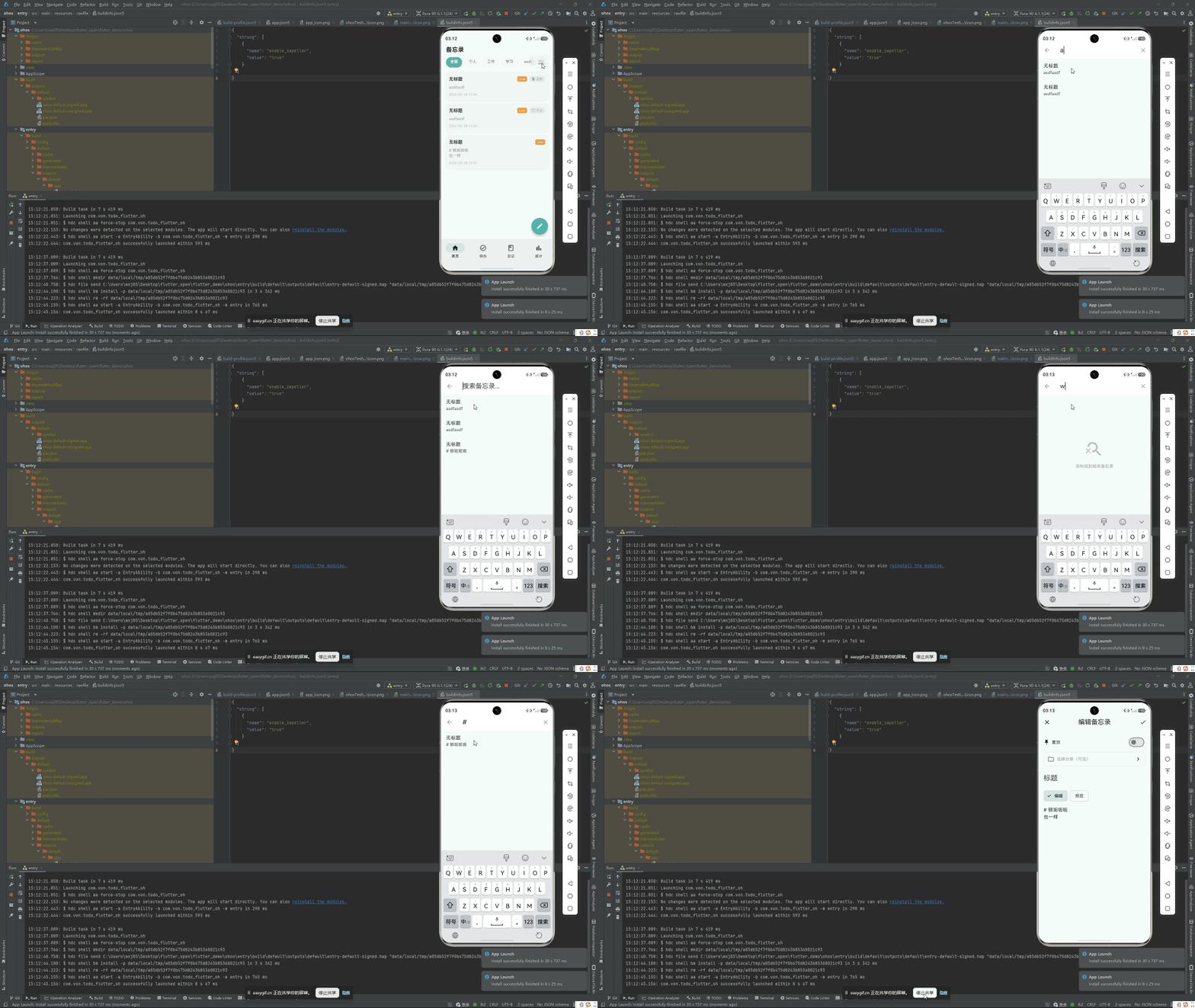
鸿蒙 Flutter 备忘录应用使用 SearchDelegate 实现了备忘录的标题+内容全文搜索,支持中文搜索和实时结果更新。
项目仓库:todo_flutter_harmony
SearchDelegate 生命周期
当用户点击搜索按钮,调用 showSearch 后:
dart
showSearch(context: context, delegate: MemoSearchDelegate());Flutter 会执行以下流程:
- 顶部出现搜索输入框(带有返回箭头和清除按钮)
- 键盘自动弹出,输入框获得焦点
- 每当用户输入字符 →
buildSuggestions被调用 - 用户点击搜索/按回车 →
buildResults被调用 - 用户点击返回 → delegate 被关闭
必须实现的 4 个方法
dart
class MemoSearchDelegate extends SearchDelegate<String> {
  // 泛型参数 String 表示搜索结果返回值的类型

  @override
  String get searchFieldLabel => '搜索备忘录...';

  // 1. 搜索框左侧的动作按钮(返回/汉堡菜单)
  @override
  List<Widget> buildActions(BuildContext context) { ... }

  // 2. 搜索框左侧的返回按钮
  @override
  Widget? buildLeading(BuildContext context) { ... }

  // 3. 用户输入过程中的搜索建议
  @override
  Widget buildSuggestions(BuildContext context) { ... }

  // 4. 用户提交搜索后的搜索结果
  @override
  Widget buildResults(BuildContext context) { ... }
}
完整实现
buildLeading:返回按钮
dart
@override
Widget? buildLeading(BuildContext context) {
  return IconButton(
    icon: const Icon(Icons.arrow_back),
    onPressed: () {
      if (query.isEmpty) {
        close(context, '');  // 无输入内容,直接关闭
      } else {
        query = '';          // 有输入内容,先清空再显示建议
        showSuggestions(context);
      }
    },
  );
}
这个小细节很重要:如果用户已经有输入内容,点返回应该先清空搜索词(相当于"撤销搜索"),再点一次才是关闭搜索页。
buildActions:清除按钮
dart
@override
List<Widget> buildActions(BuildContext context) {
  if (query.isEmpty) return [];

  return [
    IconButton(
      icon: const Icon(Icons.clear),
      onPressed: () {
        query = '';
        showSuggestions(context);
      },
    ),
  ];
}
当 query 为空时不显示任何按钮,保持搜索框右侧干净。
buildSuggestions:输入过程中的建议
dart
@override
Widget buildSuggestions(BuildContext context) {
  final provider = context.read<MemoProvider>();

  // 实时过滤
  final suggestions = query.isEmpty
      ? provider.memos  // 空查询显示全部
      : provider.memos.where((memo) {
          final q = query.toLowerCase();
          return memo.title.toLowerCase().contains(q) ||
                 memo.content.toLowerCase().contains(q);
        }).toList();

  if (suggestions.isEmpty && query.isNotEmpty) {
    return Center(
      child: Column(
        mainAxisSize: MainAxisSize.min,
        children: [
          Icon(Icons.search_off, size: 64, color: Colors.grey.shade300),
          const SizedBox(height: 12),
          Text(
            '未找到 "$query" 相关备忘录',
            style: TextStyle(color: Colors.grey.shade500),
          ),
        ],
      ),
    );
  }

  return ListView.builder(
    itemCount: suggestions.length,
    itemBuilder: (context, index) {
      final memo = suggestions[index];
      return ListTile(
        leading: Icon(
          memo.isPinned ? Icons.push_pin : Icons.note_outlined,
          color: const Color(0xFF4DB6AC),
        ),
        title: _buildHighlightedText(memo.title, query),
        subtitle: _buildHighlightedText(
          memo.content.length > 80
              ? '${memo.content.substring(0, 80)}...'
              : memo.content,
          query,
        ),
        trailing: Text(
          _formatDate(memo.createdAt),
          style: TextStyle(fontSize: 12, color: Colors.grey.shade400),
        ),
        onTap: () {
          close(context, '');  // 关闭搜索,返回结果
          Navigator.pushNamed(context, '/memo/edit', arguments: memo.id);
        },
      );
    },
  );
}
buildResults:提交后的搜索结果
大部分场景中,buildResults 和 buildSuggestions 的内容是一样的------用户每输入一个字都实时过滤,不需要等到"提交"才显示结果。所以可以直接复用:
dart
@override
Widget buildResults(BuildContext context) {
  return buildSuggestions(context);
}
搜索关键词高亮
搜索结果中高亮显示匹配的关键词,让用户一眼看到为什么这条结果被匹配:
dart
Widget _buildHighlightedText(String text, String query) {
  if (query.isEmpty) return Text(text);

  final lowerText = text.toLowerCase();
  final lowerQuery = query.toLowerCase();
  final startIndex = lowerText.indexOf(lowerQuery);

  if (startIndex == -1) return Text(text);

  final endIndex = startIndex + query.length;

  return RichText(
    maxLines: 2,
    overflow: TextOverflow.ellipsis,
    text: TextSpan(
      style: DefaultTextStyle.of(context).style,
      children: [
        if (startIndex > 0)
          TextSpan(text: text.substring(0, startIndex)),
        TextSpan(
          text: text.substring(startIndex, endIndex),
          style: TextStyle(
            backgroundColor: const Color(0xFF4DB6AC).withOpacity(0.3),
            fontWeight: FontWeight.bold,
            color: const Color(0xFF00796B),
          ),
        ),
        if (endIndex < text.length)
          TextSpan(text: text.substring(endIndex)),
      ],
    ),
  );
}
在 AppBar 中触发搜索
在备忘录列表页的 AppBar 中添加搜索图标:
dart
AppBar(
  title: const Text('备忘录'),
  actions: [
    IconButton(
      icon: const Icon(Icons.search),
      onPressed: () {
        showSearch(
          context: context,
          delegate: MemoSearchDelegate(),
        );
      },
    ),
    // 更多操作...
  ],
)
showSearch 是 Flutter Material 库提供的全局方法,它会:
- 在当前页面之上覆蓋一个新路由
- 渲染 SearchDelegate 定义的搜索界面
- 关闭时返回 delegate 中
close(context, result)的 result 值
搜索历史记录
搜索体验的进阶功能------保存用户的搜索历史,下次打开搜索时优先展示:
dart
class SearchHistory {
  static const _key = 'search_history';
  static const _maxItems = 10;

  static Future<List<String>> getHistory() async {
    final prefs = await SharedPreferences.getInstance();
    return prefs.getStringList(_key) ?? [];
  }

  static Future<void> addSearch(String query) async {
    if (query.trim().isEmpty) return;
    final prefs = await SharedPreferences.getInstance();
    final history = await getHistory();
    history.remove(query);     // 去重
    history.insert(0, query);  // 最新搜索排第一
    if (history.length > _maxItems) {
      history.removeLast();    // 最多保留 10 条
    }
    await prefs.setStringList(_key, history);
  }

  static Future<void> clearHistory() async {
    final prefs = await SharedPreferences.getInstance();
    await prefs.remove(_key);
  }
}
在 buildSuggestions 中,当 query 为空时显示搜索历史:
dart
@override
Widget buildSuggestions(BuildContext context) {
  if (query.isEmpty) {
    return _buildSearchHistory();
  }
  // ... 实时搜索逻辑
}

Widget _buildSearchHistory() {
  return FutureBuilder<List<String>>(
    future: SearchHistory.getHistory(),
    builder: (context, snapshot) {
      final history = snapshot.data ?? [];
      if (history.isEmpty) {
        return Center(
          child: Text('输入关键词搜索', style: TextStyle(color: Colors.grey.shade400)),
        );
      }
      return Column(
        crossAxisAlignment: CrossAxisAlignment.start,
        children: [
          Padding(
            padding: const EdgeInsets.all(16),
            child: Row(
              mainAxisAlignment: MainAxisAlignment.spaceBetween,
              children: [
                const Text('搜索历史', style: TextStyle(fontWeight: FontWeight.w600)),
                GestureDetector(
                  onTap: () => SearchHistory.clearHistory(),
                  child: Text('清空', style: TextStyle(color: Colors.grey.shade500, fontSize: 13)),
                ),
              ],
            ),
          ),
          ...history.map((term) => ListTile(
            leading: const Icon(Icons.history, size: 20),
            title: Text(term),
            onTap: () {
              query = term;
              showResults(context);
            },
          )),
        ],
      );
    },
  );
}
鸿蒙兼容性
SearchDelegate 是 Flutter Material 库的内置类,完全在框架层实现。所有搜索交互(输入框弹出、键盘唤起、页面转场动画)都由 Flutter 引擎管理,不依赖原生平台搜索组件。在鸿蒙 OHOS 上的表现与 Android/iOS 一致。
SharedPreferences 用于存储搜索历史------在鸿蒙上它底层使用的是 OHOS 的 preferences API(通过 shared_preferences 包适配),需要注意检查 shared_preferences 是否对鸿蒙有良好支持。如果不确定,可以改用项目自带的 JSON 文件存储方案。
总结
Flutter SearchDelegate 为我们处理了搜索体验中最复杂的部分(键盘管理、页面转场、输入焦点),开发者只需专注于数据和 UI:
- buildLeading / buildActions:定义搜索框左右两侧的按钮
- buildSuggestions:处理输入过程中的实时结果
- buildResults:处理提交后的最终结果
- 关键词高亮 :
RichText+TextSpan组合实现匹配文本的高亮标记
整个搜索体验大约 150 行代码,却提供了媲美原生应用的搜索交互。
完整项目代码见:todo_flutter_harmony