目录
[三、AgentScope Java 基本介绍](#三、AgentScope Java 基本介绍)
[3.1 AgentScope Java 是什么 ?](#3.1 AgentScope Java 是什么 ?)
[3.2 AgentScope Java 核心能力](#3.2 AgentScope Java 核心能力)
[3.3 AgentScope Java 核心范式:ReAct](#3.3 AgentScope Java 核心范式:ReAct)
[3.4 AgentScope Java 的应用场景](#3.4 AgentScope Java 的应用场景)
[3.5 AgentScope Java 核心优势与差异化亮点](#3.5 AgentScope Java 核心优势与差异化亮点)
[3.6 AgentScope Java与其他同类产品对比](#3.6 AgentScope Java与其他同类产品对比)
[四、SpringBoot 整合AgentScope Java 过程](#四、SpringBoot 整合AgentScope Java 过程)
[4.1 前置准备](#4.1 前置准备)
[4.2 搭建一个SpringBoot工程](#4.2 搭建一个SpringBoot工程)
[4.3 代码整合完整过程](#4.3 代码整合完整过程)
[4.3.1 添加配置文件](#4.3.1 添加配置文件)
[4.3.2 添加核心配置类](#4.3.2 添加核心配置类)
[4.3.3 添加自定义业务实现](#4.3.3 添加自定义业务实现)
[4.3.4 增加2个自定义工具](#4.3.4 增加2个自定义工具)
[4.3.5 增加一个测试接口](#4.3.5 增加一个测试接口)
[4.4 效果测试](#4.4 效果测试)
一、前言
随着大模型能力成熟,智能体(Agent)正从实验性原型快速走向生产级应用。在客服自动化、运维诊断、数据查询、业务流程编排等场景中,Agent 通过调用工具、规划任务、与用户多轮交互,展现出显著的生产力价值。为适配特定业务需求,开发者普遍基于开源大语言模型(LLM),采用监督微调(SFT)、强化微调(RFT)等技术对 Agent 进行定制化优化,在推理成本、响应延迟与任务成功率之间寻求最佳平衡。
然而,模型一旦部署上线,其能力便趋于静态。若无法持续从真实用户交互中学习,Agent 很难适应业务变化、工具演进或用户行为漂移,长期效果将逐渐退化。
二、Java开发者为什么要关注AgentScope?
随着大模型技术的广泛使用,智能代理(Agent)已从概念走向实操,成为连接大模型与业务系统的核心载体,而且在众多的业务中落地。
作为Java开发者,我们常年深耕企业级应用、微服务架构开发,难免会遇到这样一些问题:
-
想快速集成大模型能力,却被繁琐的API调用、多Agent协同逻辑、上下文管理搞得焦头烂额;
-
好不容易实现基础功能,又面临扩展性差、可维护性低、与现有Java生态(Spring Boot、MyBatis等)适配困难的问题。
AgentScope的出现,恰好为Java开发者解决了这些痛点。它是一款轻量级、高可扩展的智能代理开发框架,不仅支持多大模型适配(OpenAI、阿里云通义千问、百度文心一言等),更提供了简洁的Java API,完美兼容Java生态,让我们无需深耕大模型底层逻辑,就能快速开发出高可用、可扩展的智能代理应用。
三、AgentScope Java 基本介绍
3.1 AgentScope Java 是什么 ?
AgentScope Java是阿里巴巴开源的面向企业级智能体开发的Java框架,让Java开发者能轻松构建生产级AI应用。框架采用领先的ReAct范式,使大模型具备自主推理与规划能力,同时提供完善的运行时控制机制,确保自主性与可控性的平衡。依托Java生态优势,框架深度集成企业现有技术栈,支持一键部署至云平台,配备可视化调试、A/B测试和强化学习等完整工具链,助力开发者打造稳定可靠、持续进化的智能体应用。官方文档:http://doc.agentscope.io/
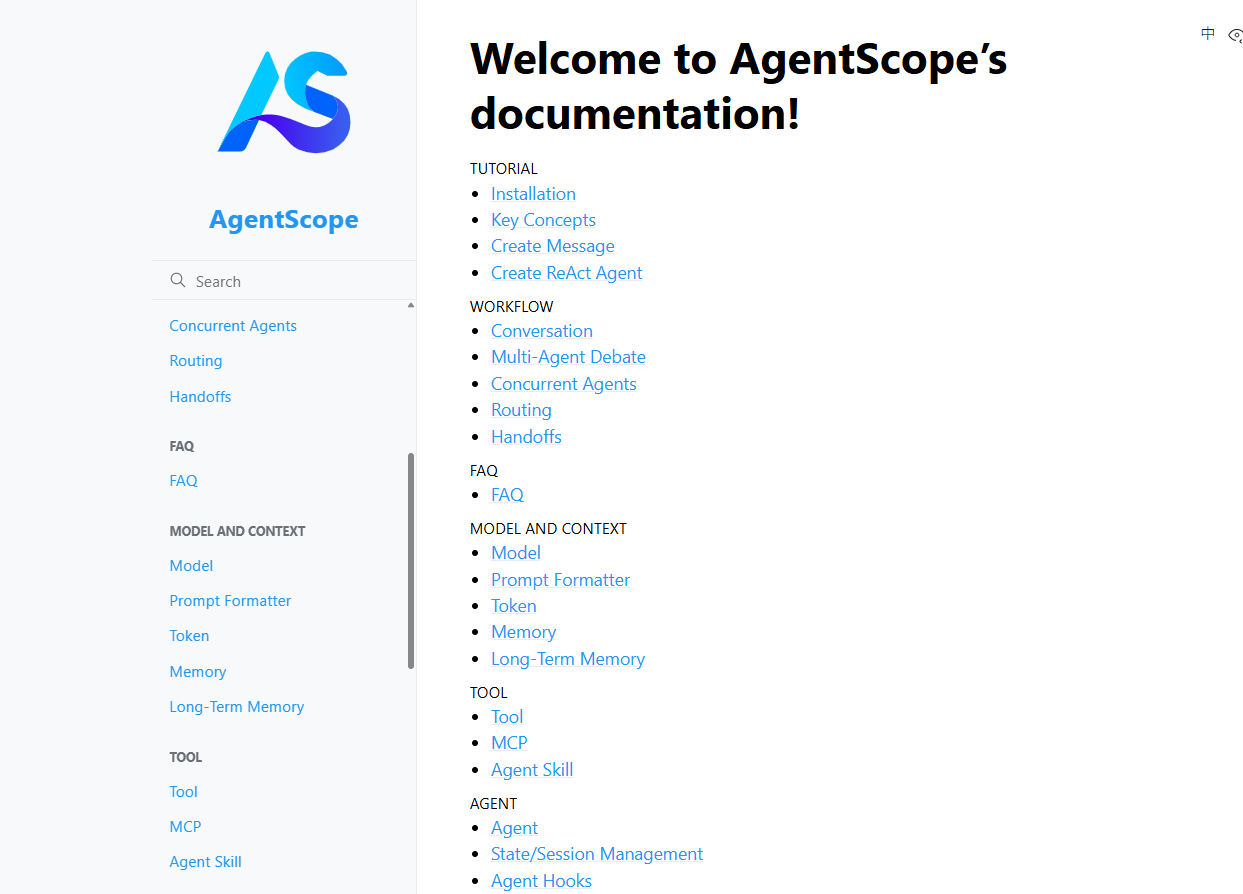
AgentScope Java的项目地址
3.2 AgentScope Java 核心能力
AgentScope Java核心目标是解决在生产环境中落地AI Agent的技术难题,提供一套覆盖"开发、部署、调优"全生命周期的解决方案,主要具备下面的能力:
-
ReAct 智能体 范式:赋予大模型自主推理与动态规划能力,使其根据任务需求灵活调用工具完成复杂目标。
-
实时介入控制:支持安全中断、实时打断和灵活定制,让开发者在Agent运行全程保持可控,避免资源浪费。
-
高效工具体系:提供标准化注册接口、结构化工具组和元工具动态管理,统一处理同步异步调用并支持并行执行。
-
结构化输出保障:通过内置工具确保LLM输出严格遵循预定义JSON格式,自动校正错误并直接映射为Java对象。
-
企业级安全 沙箱:为代码执行提供高度隔离的受控环境,内置GUI、文件系统和移动端等多平台沙箱支持。
-
上下文工程优化:集成RAG检索增强生成与多租户记忆管理,支持私有化部署和语义搜索,实现越用越智能的体验。
-
无缝协议集成:通过MCP协议零改动集成现有HTTP业务系统,借助A2A协议实现分布式多Agent像微服务一样协作。
-
高性能异步架构:基于Project Reactor实现非阻塞执行,联合GraalVM实现200毫秒冷启动,适配Serverless弹性场景。
-
全链路可观测性:深度集成OpenTelemetry实现端到端追踪,配合Studio可视化平台提供实时调试与监控能力。
-
数据飞轮生态:通过A/B测试、奖励模型评估和强化学习训练形成闭环,持续采集线上数据优化模型能力。
3.3 AgentScope Java 核心范式:ReAct
在其众多的能力中,AgentScope Java的核心是ReAct(Reasoning + Acting)范式,这让它区别于传统僵化的工作流,让Agent真正"会思考、能动手",具体来说:
-
工作原理:它会进入一个"思考-行动"的循环。例如,当你问"北京的天气如何?",Agent会先推理出需要调用天气查询工具,然后行动去执行这个工具,最后根据返回的结果生成最终答案。
-
实时可控:框架支持在Agent运行过程中进行实时介入,比如安全地暂停或终止任务,这大大增强了对复杂应用的控制力。
-
结构化输出:它提供了内置工具,能确保模型输出严格遵循预定义的JSON等格式,告别了繁琐的提示词调试。
它和工作流(Workflow)模式有什么区别?我用下面这张图来说明:
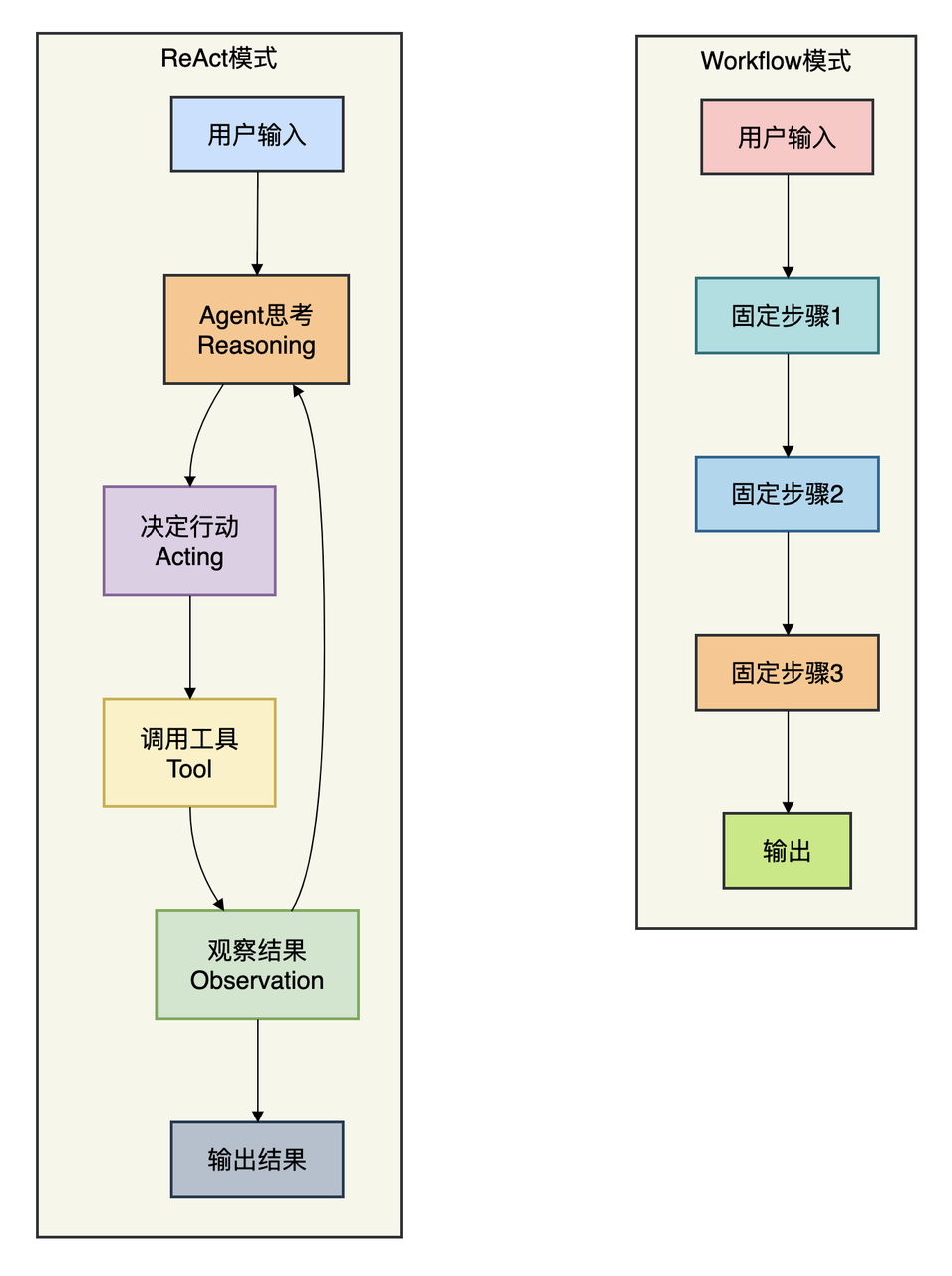
Workflow模式下,开发者需要提前把每一步写死------先查数据库、再调API、最后组装返回。这就像给AI戴上"镣铐",当业务逻辑变复杂时,维护成本激增,而且无法享受大模型持续进化带来的能力提升。
ReAct模式则把控制权交给大模型。Agent会像人一样"思考-行动-观察",循环推进直到完成任务。这种模式能处理完全未知的复杂场景,AgentScope Java把这个范式做到了企业级可用。
3.4 AgentScope Java 的应用场景
在下面的场景中可以考虑使用AgentScope Java
-
智能客服与营销:框架支持构建7×24小时在线的智能客服Agent,结合RAG知识库实现精准问答,提供个性化推荐与主动营销服务,提升客户转化率。
-
金融风控与投研:支持开发实时风控Agent监控交易异常,在安全沙箱中执行量化策略回测,确保数据隔离与合规。
-
政务与公共服务:打造政策咨询Agent对接私有化知识库,通过A2A协议联动不同部门Agent实现跨系统业务协同,提升政务服务效率。
-
企业智能办公:创建会议助理Agent自动安排日程、生成纪要,构建数据分析Agent调用BI工具生成可视化报告。
3.5 AgentScope Java 核心优势与差异化亮点
归纳起来,AgentScope Java的核心优势在于其对 "Java生态"、"企业生产"和"持续优化" 三大命题的深度回应:
-
Java原生,真正的"全家桶"式集成:
- 它不是Python框架的简陋封装,而是为Java开发者量身打造。它提供了Spring Boot Starter,可以零障碍地融入现有Spring Cloud微服务体系。同时,它支持MCP(模型上下文协议),这意味着你现有的任何HTTP业务系统,都无需修改代码,通过简单配置就能被Agent当作"工具"调用,极大地降低了集成的门槛和风险 。
-
安全与性能,为生产 环境 而生:
-
安全:提供了三层安全沙箱(如文件沙箱、网络沙箱),能将Agent调用的危险代码(如执行系统命令、操作文件)限制在隔离环境中,有效防止恶意操作或意外事故。这对于向外部用户开放Agent能力至关重要 。
-
性能:架构设计轻量且全链路异步,并且与JVM团队合作适配了GraalVM原生镜像技术,可以实现200毫秒内的冷启动。这使得Agent能够适配Serverless架构,实现毫秒级的弹性伸缩,从容应对流量洪峰 。
-
-
构建数据飞轮,实现"自进化":
-
这是AgentScope Java最前沿的差异化价值。它打通了从开发、调试、A/B测试到在线训练的完整闭环。
-
可视化:通过AgentScope Studio可以清晰地看到Agent的内部思考("Thought")和行动("Action")链条,极大地简化了调试过程 。
-
可观测与实验:结合Higress AI网关,可以对不同版本的Agent进行精细化的A/B测试和全链路性能追踪。
-
自进化:最终,通过Trinity-RFT插件,你可以利用线上的真实交互数据对模型进行在线强化学习。这让Agent的效果提升从"人工提需求-开发-上线"的漫长周期,变成了一个自动化的"数据采集-训练-部署"闭环 。
-
-
3.6 AgentScope Java与其他同类产品对比
为了让你更清晰地定位,我们选取了Java生态中最主要的竞争者进行对比。综合多份评测报告来看,目前Java AI Agent框架领域尚未出现"一家独大"的局面,各有侧重 。
|--------|--------------------------------|------------------------------------------|------------------------------|
| 维度 | AgentScope Java | Spring AI Alibaba | LangChain4j |
| 核心理念 | Agentic(智能体优先) 最大化发挥LLM的自主决策能力 | Workflow(工作流编排) 侧重于确定性的流程控制与集成 | 工具箱(Toolbox) 提供最全面的功能组件,灵活组合 |
| 开发范式 | ReAct、多智能体协作、消息驱动 | Graph、有向无环图(DAG)、函数式编排 | 链式调用、AiServices、灵活自由 |
| 易用性 | 中等,概念新颖,但对Spring开发者友好 | 高,对Spring开发者几乎零学习成本 | 中等偏低,功能强大但API较庞大,配置稍繁琐 |
| 企业集成 | 强,原生支持MCP/A2A协议、Nacos、安全沙箱 | 极强,无缝集成Spring Security、Actuator、Cloud全家桶 | 较强,但多为独立组件,企业级治理需自行集成 |
| 模型生态 | 支持主流模型,深度集成阿里云百炼平台 | 通过Spring AI,支持OpenAI、Ollama等 | 最强,支持30+ LLM和20+向量数据库 |
| 独特优势 | 安全沙箱、在线训练、自进化能力 | Spring生态的完美结合,企业级治理能力即开即用 | 社区最活跃、功能最全面、集成选择最多 |
| 最佳场景 | 需要高安全性、持续自我进化的复杂智能应用 | 基于现有Spring Boot技术栈,需要快速、稳定集成AI能力的企业级应用 | 需要与多种模型、向量库集 |
技术选型总结
-
选AgentScope Java:如果你的核心诉求是构建一个能处理复杂、开放性问题,并且对安全性和数据隔离有极高要求,同时期望应用能从真实交互中持续学习、越用越聪明,那么AgentScope Java是目前企业级Java生态中最具前瞻性的选择。它尤其适合金融、政务等领域的智能化转型。
-
选Spring AI Alibaba:如果你的团队深度绑定Spring技术栈,首要目标是低风险、高效率地将AI能力嵌入现有的业务系统,并且流程相对确定(如审批流、数据查询),那么Spring AI Alibaba是当前最稳妥、开发效率最高的选择 。
-
选LangChain4j:如果你的项目需要集成非常多样的模型和外部工具(比如同时用OpenAI和本地模型,同时接多个向量数据库),或者你的团队更倾向于一个灵活、强大、社区驱动的技术工具箱,而不是一个完整的框架,LangChain4j会给你最大的自由度 。
四、SpringBoot 整合AgentScope Java 过程
4.1 前置准备
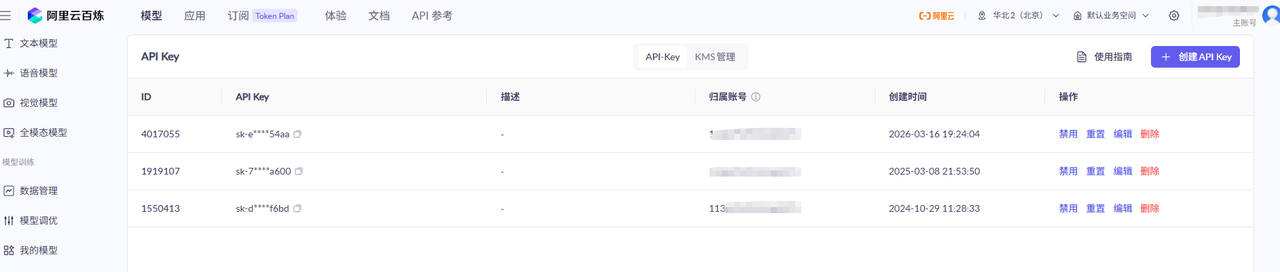
开通阿里云百炼账号,入口:https://bailian.console.aliyun.com/,进入自己的APIKEY 界面,提前创建一个apikey,后面在项目配置文件中使用
4.2 搭建一个SpringBoot工程
本次核心技术栈,
-
Springboot ,3.2.5
-
Java 17
-
agentscope 1.0.12
4.3 代码整合完整过程
4.3.1 添加配置文件
在工程中添加application.yml配置文件,配置信息如下:
bash
server:
  port: 8088

spring:
  application:
    name: agentscope-java
  # Force servlet mode when agentscope pulls in reactor/webflux transitively
  main:
    web-application-type: reactive

agentscope:
  # -----------------------------------------------------------------------
  # DashScope (Alibaba Qwen) --- fill in your API key
  # Get it from: https://dashscope.aliyun.com/
  # -----------------------------------------------------------------------
  dashscope:
    api-key: 你的百炼apikey

  # -----------------------------------------------------------------------
  # OpenAI-compatible providers --- fill in the key you actually use.
  # DeepSeek example: baseUrl=https://api.deepseek.com, model=deepseek-chat
  # OpenAI example:   baseUrl=https://api.openai.com, model=gpt-4o
  # -----------------------------------------------------------------------
  openai:
    api-key: ${OPENAI_API_KEY:your-openai-api-key-here}
    base-url: ${OPENAI_BASE_URL:https://api.openai.com}
    model-name: ${OPENAI_MODEL:gpt-4o-mini}

  # Agent session persistence directory (JsonSession)
  session:
    storage-path: ./sessions

  # AG-UI endpoint (optional, for front-end streaming integration)
  agui:
    path-prefix: /agui
    cors-enabled: true
    server-side-memory: true

logging:
  level:
    io.agentscope: DEBUG
    com.example.agentscope: DEBUG
建议使用环境变量注入敏感信息,避免硬编码:
bash
export DASHSCOPE_API_KEY="your-dashscope-api-key"4.3.2 添加核心配置类
添加一个核心的配置类,它的主要作用是使用 Spring Boot 的依赖注入机制来创建和管理 AI 模型、工具包和智能体(Agent)的 Bean。完整代码如下:
java
package com.example.agentscope.config;

import com.example.agentscope.tools.CalculatorTools;
import com.example.agentscope.tools.WeatherTools;
import io.agentscope.core.ReActAgent;
import io.agentscope.core.memory.InMemoryMemory;
import io.agentscope.core.model.DashScopeChatModel;
import io.agentscope.core.model.Model;
import io.agentscope.core.model.OpenAIChatModel;
import io.agentscope.core.tool.Toolkit;
import lombok.extern.slf4j.Slf4j;
import org.springframework.beans.factory.annotation.Value;
import org.springframework.boot.autoconfigure.condition.ConditionalOnProperty;
import org.springframework.context.annotation.Bean;
import org.springframework.context.annotation.Configuration;
import org.springframework.context.annotation.Primary;

/**
 * Spring bean configuration for AgentScope models and agents.
 *
 * <p>Supports two model providers out of the box:
 * <ul>
 *   <li>DashScope (Alibaba Qwen) --- active by default when DASHSCOPE_API_KEY is set</li>
 *   <li>OpenAI-compatible (OpenAI, DeepSeek, ...) --- activated via agentscope.openai.* properties</li>
 * </ul>
 *
 * <p>Fill in the API key(s) in application.yml or via environment variables.
 */
@Slf4j
@Configuration
public class AgentConfig {

    // -----------------------------------------------------------------------
    // Model beans
    // -----------------------------------------------------------------------

    /**
     * DashScope chat model --- primary model when DASHSCOPE_API_KEY is provided.
     */
    @Bean
    @Primary
    @ConditionalOnProperty(name = "agentscope.dashscope.api-key", matchIfMissing = false)
    public Model dashScopeChatModel(
            @Value("${agentscope.dashscope.api-key}") String apiKey) {
        log.info("Initializing DashScope chat model");
        return DashScopeChatModel.builder()
                .apiKey(apiKey)
                .modelName("qwen-plus")   // change to qwen-max / qwen3-max as needed
                .build();
    }

    /**
     * OpenAI-compatible chat model --- activated when agentscope.openai.api-key is set.
     * Works with OpenAI, DeepSeek, Moonshot, SiliconFlow, etc.
     */
    @Bean("openAIChatModel")
    @ConditionalOnProperty(name = "agentscope.openai.api-key", matchIfMissing = false)
    public Model openAIChatModel(
            @Value("${agentscope.openai.api-key}")   String apiKey,
            @Value("${agentscope.openai.base-url}")  String baseUrl,
            @Value("${agentscope.openai.model-name}") String modelName) {
        log.info("Initializing OpenAI-compatible chat model: baseUrl={}, model={}", baseUrl, modelName);
        return OpenAIChatModel.builder()
                .apiKey(apiKey)
                .baseUrl(baseUrl)
                .modelName(modelName)
                .build();
    }

    // -----------------------------------------------------------------------
    // Toolkit beans
    // -----------------------------------------------------------------------

    /** Toolkit containing only weather tools. */
    @Bean("weatherToolkit")
    public Toolkit weatherToolkit(WeatherTools weatherTools) {
        Toolkit toolkit = new Toolkit();
        toolkit.registerTool(weatherTools);
        return toolkit;
    }

    /** Toolkit containing both weather and calculator tools. */
    @Bean("fullToolkit")
    public Toolkit fullToolkit(WeatherTools weatherTools, CalculatorTools calculatorTools) {
        Toolkit toolkit = new Toolkit();
        toolkit.registerTool(weatherTools);
        toolkit.registerTool(calculatorTools);
        return toolkit;
    }

    // -----------------------------------------------------------------------
    // Agent beans
    // -----------------------------------------------------------------------

    /**
     * General-purpose assistant --- no tools, stateless (no memory).
     * Suitable for single-turn Q&A.
     */
    @Bean("generalAgent")
    public ReActAgent generalAgent(Model dashScopeChatModel) {
        return ReActAgent.builder()
                .name("GeneralAssistant")
                .model(dashScopeChatModel)
                .sysPrompt("You are a helpful, concise and friendly AI assistant. "
                         + "Answer questions clearly and accurately.")
                .build();
    }

    /**
     * Weather-aware agent --- has access to weather tools.
     * Stateless; each call is independent.
     */
    @Bean("weatherAgent")
    public ReActAgent weatherAgent(
            Model dashScopeChatModel,
            @org.springframework.beans.factory.annotation.Qualifier("weatherToolkit") Toolkit weatherToolkit) {
        return ReActAgent.builder()
                .name("WeatherAssistant")
                .model(dashScopeChatModel)
                .sysPrompt("You are a professional weather assistant. "
                         + "Always use the weather tools to fetch real data before answering.")
                .toolkit(weatherToolkit)
                .build();
    }

    /**
     * Full-capability agent --- weather + calculator tools, with in-memory conversation history.
     * The InMemoryMemory persists across multiple .call() invocations on the same bean instance.
     */
    @Bean("fullAgent")
    public ReActAgent fullAgent(
            Model dashScopeChatModel,
            @org.springframework.beans.factory.annotation.Qualifier("fullToolkit") Toolkit fullToolkit) {
        return ReActAgent.builder()
                .name("FullAssistant")
                .model(dashScopeChatModel)
                .sysPrompt("You are a capable AI assistant with access to weather and calculation tools. "
                         + "Use tools whenever precise data is needed.")
                .toolkit(fullToolkit)
                .memory(new InMemoryMemory())
                .build();
    }

    /**
     * Pipeline agent A --- data collection / research role.
     * Used in multi-agent sequential/parallel pipelines.
     */
    @Bean("collectorAgent")
    public ReActAgent collectorAgent(Model dashScopeChatModel) {
        return ReActAgent.builder()
                .name("DataCollector")
                .model(dashScopeChatModel)
                .sysPrompt("You are a research assistant. Collect and summarize key facts about the given topic. "
                         + "Be thorough but concise.")
                .memory(new InMemoryMemory())
                .build();
    }

    /**
     * Pipeline agent B --- analysis role.
     * Used in multi-agent sequential pipelines after the collector.
     */
    @Bean("analyzerAgent")
    public ReActAgent analyzerAgent(Model dashScopeChatModel) {
        return ReActAgent.builder()
                .name("DataAnalyzer")
                .model(dashScopeChatModel)
                .sysPrompt("You are an expert analyst. Given the collected information, "
                         + "perform in-depth analysis, identify patterns and provide insights.")
                .memory(new InMemoryMemory())
                .build();
    }

    /**
     * Pipeline agent C --- report generation role.
     * Used as the final stage in sequential pipelines.
     */
    @Bean("reporterAgent")
    public ReActAgent reporterAgent(Model dashScopeChatModel) {
        return ReActAgent.builder()
                .name("ReportGenerator")
                .model(dashScopeChatModel)
                .sysPrompt("You are a professional report writer. "
                         + "Given the analysis, produce a structured, well-written report.")
                .memory(new InMemoryMemory())
                .build();
    }
}
具体来说,这个自定义的配置类负责以下三个方面:
-
配置大语言模型 (Model Configuration)
-
它定义了应用使用哪个 AI 模型提供商。目前支持两种模式,通过 application.yml 中的配置自动切换:
-
DashScope (阿里云通义千问):默认主模型 (@Primary),当配置了 DASHSCOPE_API_KEY 时激活。
-
OpenAI-compatible:兼容 OpenAI 接口的模型(如 DeepSeek, Moonshot 等),当配置了 agentscope.openai.api-key 时激活。
-
-
-
配置工具包 (Toolkit Configuration)
-
它将 Java 编写的工具类注册为 AgentScope 可以调用的工具集:
-
weatherToolkit:包含天气查询相关的工具。
-
fullToolkit:包含天气查询 + 计算器工具的完整集合
-
-
-
定义智能体角色 (Agent Beans Definition)
它创建了不同角色的 ReActAgent 实例,每个 Agent 都有特定的系统提示词(SysPrompt)、模型和工具权限:
|----------|----------------|---------------------|----------|----------|
| Agent 名称 | Bean 名称 | 职责描述 | 是否拥有工具 | 是否有记忆 |
| 通用助手 | generalAgent | 简单的问答助手,无特殊能力。 | ❌ | ❌ |
| 天气助手 | weatherAgent | 专门处理天气相关的问题。 | ✅ (天气工具) | ❌ |
| 全能助手 | fullAgent | 具备天气和计算能力,支持多轮对话。 | ✅ (全套工具) | ✅ (内存记忆) |
| 数据收集员 | collectorAgent | 在多 Agent 协作中负责搜集信息。 | ❌ | ✅ |
| 数据分析员 | analyzerAgent | 负责对收集到的信息进行深度分析。 | ❌ | ✅ |
| 报告生成员 | reporterAgent | 负责将分析结果整理成结构化报告。 | ❌ | ✅ |
总结:
简单来说,AgentConfig.java 就像是一个**"工厂"**,它决定了你的 AI 应用:
-
大脑是谁(用哪个模型)。
-
手里有什么工具(能查天气还是能算数)。
-
有多少个员工(不同的 Agent 扮演不同的角色,有的负责聊天,有的负责写报告)。
-
这样在 AgentService.java 或 Controller 中,你只需要通过 @Qualifier 注入这些现成的 Agent 就可以直接使用了。
4.3.3 添加自定义业务实现
该类定义了接口层调用的常用的方法,参考下面的完整代码
java
package com.example.agentscope.service;

import io.agentscope.core.ReActAgent;
import io.agentscope.core.message.Msg;
import io.agentscope.core.pipeline.FanoutPipeline;
import io.agentscope.core.pipeline.SequentialPipeline;
import io.agentscope.core.session.JsonSession;
import io.agentscope.core.session.Session;
import lombok.extern.slf4j.Slf4j;
import org.springframework.beans.factory.annotation.Qualifier;
import org.springframework.beans.factory.annotation.Value;
import org.springframework.stereotype.Service;
import reactor.core.publisher.Mono;

import java.nio.file.Path;

/**
 * Service layer that wraps AgentScope agent interactions.
 *
 * <p>All public methods return reactive types (Mono / Flux) so callers can choose
 * to block or subscribe as needed.
 *
 * <p>Constructor injection is written manually to ensure {@link Qualifier}
 * annotations survive the Spring dependency-resolution process correctly.
 */
@Slf4j
@Service
public class AgentService {

    private final ReActAgent generalAgent;
    private final ReActAgent weatherAgent;
    private final ReActAgent fullAgent;
    private final ReActAgent collectorAgent;
    private final ReActAgent analyzerAgent;
    private final ReActAgent reporterAgent;

    @Value("${agentscope.session.storage-path:./sessions}")
    private String sessionStoragePath;

    public AgentService(
            @Qualifier("generalAgent")   ReActAgent generalAgent,
            @Qualifier("weatherAgent")   ReActAgent weatherAgent,
            @Qualifier("fullAgent")      ReActAgent fullAgent,
            @Qualifier("collectorAgent") ReActAgent collectorAgent,
            @Qualifier("analyzerAgent")  ReActAgent analyzerAgent,
            @Qualifier("reporterAgent")  ReActAgent reporterAgent) {
        this.generalAgent   = generalAgent;
        this.weatherAgent   = weatherAgent;
        this.fullAgent      = fullAgent;
        this.collectorAgent = collectorAgent;
        this.analyzerAgent  = analyzerAgent;
        this.reporterAgent  = reporterAgent;
    }

    // -----------------------------------------------------------------------
    // Single-agent chat
    // -----------------------------------------------------------------------

    /**
     * Simple stateless chat with the general assistant.
     */
    public Mono<String> chat(String userMessage) {
        log.debug("AgentService.chat: {}", userMessage);
        Msg input = Msg.builder()
                .name("user")
                .textContent(userMessage)
                .build();
        return generalAgent.call(input)
                .map(Msg::getTextContent)
                .doOnError(e -> log.error("Chat error", e));
    }

    /**
     * Weather-aware chat --- the agent will invoke weather tools automatically.
     */
    public Mono<String> weatherChat(String userMessage) {
        log.debug("AgentService.weatherChat: {}", userMessage);
        Msg input = Msg.builder()
                .name("user")
                .textContent(userMessage)
                .build();
        return weatherAgent.call(input)
                .map(Msg::getTextContent)
                .doOnError(e -> log.error("WeatherChat error", e));
    }

    /**
     * Full-capability chat --- weather + calculator tools, with in-memory conversation history.
     */
    public Mono<String> fullChat(String userMessage) {
        log.debug("AgentService.fullChat: {}", userMessage);
        Msg input = Msg.builder()
                .name("user")
                .textContent(userMessage)
                .build();
        return fullAgent.call(input)
                .map(Msg::getTextContent)
                .doOnError(e -> log.error("FullChat error", e));
    }

    // -----------------------------------------------------------------------
    // Session-aware chat (persistent conversation history via JsonSession)
    // -----------------------------------------------------------------------

    /**
     * Multi-turn chat that persists the conversation to disk under {@code sessionId}.
     *
     * <p>Flow: load previous session → call agent → save updated session.
     */
    public Mono<String> sessionChat(String sessionId, String userMessage) {
        log.debug("AgentService.sessionChat sessionId={}: {}", sessionId, userMessage);

        Session session = new JsonSession(Path.of(sessionStoragePath));

        try {
            fullAgent.loadIfExists(session, sessionId);
        } catch (Exception e) {
            log.warn("Could not load session {}: {}", sessionId, e.getMessage());
        }

        Msg input = Msg.builder()
                .name("user")
                .textContent(userMessage)
                .build();

        return fullAgent.call(input)
                .map(response -> {
                    try {
                        fullAgent.saveTo(session, sessionId);
                    } catch (Exception e) {
                        log.warn("Could not save session {}: {}", sessionId, e.getMessage());
                    }
                    return response.getTextContent();
                })
                .doOnError(e -> log.error("SessionChat error", e));
    }

    // -----------------------------------------------------------------------
    // Multi-agent pipelines
    // -----------------------------------------------------------------------

    /**
     * Sequential pipeline: Collector → Analyzer → Reporter.
     * Each agent receives the previous agent's output as its input.
     * Uses {@link SequentialPipeline} whose {@code execute()} returns {@code Mono<Msg>}.
     */
    public Mono<String> runSequentialPipeline(String topic) {
        log.debug("AgentService.runSequentialPipeline topic={}", topic);
        Msg input = Msg.builder()
                .name("user")
                .textContent(topic)
                .build();

        return SequentialPipeline.builder()
                .addAgent(collectorAgent)
                .addAgent(analyzerAgent)
                .addAgent(reporterAgent)
                .build()
                .execute(input)
                .map(Msg::getTextContent)
                .doOnError(e -> log.error("Sequential pipeline error", e));
    }

    /**
     * Parallel (fanout) pipeline: Collector, Analyzer, and Reporter all receive the same input
     * concurrently. {@link FanoutPipeline#execute} returns {@code Mono<List<Msg>>} --- one element
     * per agent --- which we merge into a single labelled string.
     */
    public Mono<String> runParallelPipeline(String topic) {
        log.debug("AgentService.runParallelPipeline topic={}", topic);
        Msg input = Msg.builder()
                .name("user")
                .textContent(topic)
                .build();

        return FanoutPipeline.builder()
                .addAgent(collectorAgent)
                .addAgent(analyzerAgent)
                .addAgent(reporterAgent)
                .build()
                .execute(input)
                .map(msgs -> {
                    String[] labels = {"[DataCollector]", "[DataAnalyzer]", "[ReportGenerator]"};
                    StringBuilder sb = new StringBuilder();
                    for (int i = 0; i < msgs.size(); i++) {
                        sb.append(i < labels.length ? labels[i] : "[Agent-" + i + "]")
                          .append("\n")
                          .append(msgs.get(i).getTextContent())
                          .append("\n\n");
                    }
                    return sb.toString().trim();
                })
                .doOnError(e -> log.error("Parallel pipeline error", e));
    }
}
AgentService.java 是 AgentScope 应用的业务逻辑层(Service Layer),它充当了控制器(Controller)与底层 AI 智能体(Agents)之间的桥梁。它的主要作用可以概括为以下几点:
它将复杂的 AgentScope API 调用封装成简单的 Java 方法。控制器不需要知道如何构建 Msg 对象或如何处理 Flux/Mono 响应式流,只需要调用 AgentService 的方法即可。
封装 Agent 交互逻辑
- 它将复杂的 AgentScope API 调用封装成简单的 Java 方法。控制器不需要知道如何构建 Msg 对象或如何处理 Flux/Mono 响应式流,只需要调用 AgentService 的方法即可。
提供多种对话模式
-
该类提供了不同场景下的聊天接口:
-
基础聊天 (chat):使用通用助手进行简单的单轮问答。
-
工具增强聊天 (weatherChat, fullChat):调用具备特定工具(如天气查询、计算器)的 Agent,并能自动处理工具调用逻辑。
-
会话状态管理 (sessionChat):支持多轮对话。它通过 JsonSession 将聊天记录持久化到磁盘,使得 Agent 能够"记住"之前的对话内容,实现连续的交流体验。
-
实现多 智能体 协作 (Multi-Agent Pipelines)
这是该类的核心亮点,它定义了两种多 Agent 协作的工作流:
-
串行流水线 (runSequentialPipeline):
-
流程:Collector (收集) → Analyzer (分析) → Reporter (报告)。
-
作用:前一个 Agent 的输出作为后一个 Agent 的输入,适合需要深度处理和逐步推导的复杂任务。
-
-
并行流水线 (runParallelPipeline):
-
流程:同时向 Collector、Analyzer 和 Reporter 发送请求。
-
作用:利用 Pipelines.fanout 并发执行,最后将三个不同角色的回复汇总在一起,适合需要从多个角度快速获取信息的场景。
-
响应式编程 支持
所有方法都返回 Project Reactor 的类型(Mono<String>):
-
非阻塞:提高了系统在高并发下的性能。
-
灵活性:调用者(如 Controller)可以选择异步订阅,也可以直接 .block() 同步获取结果。
总结
如果把 AgentConfig 比作**"招聘中心和装备库"(负责创建 Agent 并分发工具),那么 AgentService 就是"项目经理"**。它负责根据用户的需求(是简单聊天、查天气、还是写深度报告),调度合适的 Agent 员工去完成任务,并把最终结果整理好返回给用户。
4.3.4 增加2个自定义工具
接下来增加2个自定义的Tool,tool在其中的作用就不再过多解释了,这里增加一个用于计算的工具和一个天气查询的工具,实际业务中可以根据需求进行扩展
CalculatorTools 完整代码:
java
package com.example.agentscope.tools;

import io.agentscope.core.tool.Tool;
import io.agentscope.core.tool.ToolParam;
import lombok.extern.slf4j.Slf4j;
import org.springframework.stereotype.Component;

/**
 * Basic arithmetic tools exposed to the agent for precise calculations.
 */
@Slf4j
@Component
public class CalculatorTools {

    @Tool(name = "calculate",
          description = "Perform basic arithmetic: add, subtract, multiply, divide. "
                      + "Use this tool for any numerical calculation instead of estimating.")
    public String calculate(
            @ToolParam(name = "expression",
                       description = "A simple arithmetic expression, e.g. '(3 + 4) * 2' or '100 / 5'")
            String expression) {
        log.debug("CalculatorTools.calculate called with expression={}", expression);
        try {
            double result = evaluateSimple(expression);
            return String.format("Result of [%s] = %s", expression, formatResult(result));
        } catch (Exception e) {
            return "Error evaluating expression: " + e.getMessage();
        }
    }

    @Tool(name = "power",
          description = "Compute base raised to the exponent (base^exponent).")
    public String power(
            @ToolParam(name = "base",     description = "The base number") double base,
            @ToolParam(name = "exponent", description = "The exponent")    double exponent) {
        double result = Math.pow(base, exponent);
        return String.format("%s ^ %s = %s", base, exponent, formatResult(result));
    }

    @Tool(name = "sqrt",
          description = "Compute the square root of a non-negative number.")
    public String sqrt(
            @ToolParam(name = "number", description = "Non-negative number") double number) {
        if (number < 0) {
            return "Error: cannot compute square root of a negative number.";
        }
        return String.format("sqrt(%s) = %s", number, formatResult(Math.sqrt(number)));
    }

    // -----------------------------------------------------------------------
    // Minimal recursive-descent parser --- supports +, -, *, /, parentheses
    // -----------------------------------------------------------------------

    private double evaluateSimple(String expr) {
        return new ExprParser(expr.replaceAll("\\s+", "")).parse();
    }

    private String formatResult(double value) {
        return (value == Math.floor(value) && !Double.isInfinite(value))
                ? String.valueOf((long) value)
                : String.valueOf(value);
    }

    private static class ExprParser {
        private final String input;
        private int pos = 0;

        ExprParser(String input) { this.input = input; }

        double parse() { double v = addSub(); if (pos < input.length()) throw new IllegalArgumentException("Unexpected: " + input.charAt(pos)); return v; }

        double addSub() {
            double v = mulDiv();
            while (pos < input.length() && (input.charAt(pos) == '+' || input.charAt(pos) == '-')) {
                char op = input.charAt(pos++);
                v = op == '+' ? v + mulDiv() : v - mulDiv();
            }
            return v;
        }

        double mulDiv() {
            double v = unary();
            while (pos < input.length() && (input.charAt(pos) == '*' || input.charAt(pos) == '/')) {
                char op = input.charAt(pos++);
                double rhs = unary();
                if (op == '/' && rhs == 0) throw new ArithmeticException("Division by zero");
                v = op == '*' ? v * rhs : v / rhs;
            }
            return v;
        }

        double unary() {
            if (pos < input.length() && input.charAt(pos) == '-') { pos++; return -atom(); }
            if (pos < input.length() && input.charAt(pos) == '+') { pos++; }
            return atom();
        }

        double atom() {
            if (pos < input.length() && input.charAt(pos) == '(') {
                pos++;
                double v = addSub();
                if (pos >= input.length() || input.charAt(pos) != ')') throw new IllegalArgumentException("Missing ')'");
                pos++;
                return v;
            }
            int start = pos;
            if (pos < input.length() && (Character.isDigit(input.charAt(pos)) || input.charAt(pos) == '.')) {
                while (pos < input.length() && (Character.isDigit(input.charAt(pos)) || input.charAt(pos) == '.')) pos++;
                return Double.parseDouble(input.substring(start, pos));
            }
            throw new IllegalArgumentException("Unexpected character: " + (pos < input.length() ? input.charAt(pos) : "EOF"));
        }
    }
}
WeatherTools 完整代码:
java
package com.example.agentscope.tools;

import io.agentscope.core.tool.Tool;
import io.agentscope.core.tool.ToolParam;
import lombok.extern.slf4j.Slf4j;
import org.springframework.stereotype.Component;

import java.util.Map;
import java.util.Random;

/**
 * Mock weather tool --- replace getWeatherFromApi() with a real HTTP call in production.
 */
@Slf4j
@Component
public class WeatherTools {

    private static final Map<String, String> MOCK_WEATHER = Map.of(
            "beijing",   "Beijing: Sunny, 28°C, Humidity 45%",
            "shanghai",  "Shanghai: Cloudy, 24°C, Humidity 70%",
            "guangzhou", "Guangzhou: Rainy, 26°C, Humidity 85%",
            "shenzhen",  "Shenzhen: Partly cloudy, 27°C, Humidity 75%",
            "hangzhou",  "Hangzhou: Sunny, 25°C, Humidity 55%"
    );

    @Tool(name = "get_current_weather",
          description = "Get the current weather for a specified city. Returns temperature, conditions and humidity.")
    public String getCurrentWeather(
            @ToolParam(name = "city", description = "City name (e.g. Beijing, Shanghai)") String city) {
        log.debug("WeatherTools.getCurrentWeather called with city={}", city);
        String result = MOCK_WEATHER.get(city.toLowerCase());
        if (result == null) {
            // Generic fallback for unknown cities
            int temp = 15 + new Random().nextInt(20);
            result = String.format("%s: Partly cloudy, %d°C, Humidity 60%%", city, temp);
        }
        return result;
    }

    @Tool(name = "get_weather_forecast",
          description = "Get a 3-day weather forecast for a specified city.")
    public String getWeatherForecast(
            @ToolParam(name = "city",        description = "City name") String city,
            @ToolParam(name = "days",        description = "Number of forecast days (1-7), default 3") int days) {
        log.debug("WeatherTools.getWeatherForecast called with city={}, days={}", city, days);
        int safeDays = Math.max(1, Math.min(days, 7));
        StringBuilder sb = new StringBuilder(city).append(" ").append(safeDays).append("-day forecast:\n");
        String[] conditions = {"Sunny", "Cloudy", "Rainy", "Partly cloudy", "Overcast"};
        Random rnd = new Random();
        for (int i = 1; i <= safeDays; i++) {
            int high = 18 + rnd.nextInt(15);
            int low  = high - 5 - rnd.nextInt(5);
            sb.append(String.format("Day %d: %s, High %d°C / Low %d°C%n",
                    i, conditions[rnd.nextInt(conditions.length)], high, low));
        }
        return sb.toString().trim();
    }
}
4.3.5 增加一个测试接口
为了方便看效果增加一个接口类,并添加几个常用的接口,完整代码如下:
java
package com.example.agentscope.controller;

import com.example.agentscope.dto.*;
import com.example.agentscope.service.AgentService;
import lombok.RequiredArgsConstructor;
import lombok.extern.slf4j.Slf4j;
import org.springframework.http.MediaType;
import org.springframework.web.bind.annotation.*;
import reactor.core.publisher.Mono;

/**
 * REST API for interacting with AgentScope agents.
 *
 * <p>All endpoints accept JSON and return JSON.
 * Streaming endpoints produce text/event-stream (SSE).
 *
 * <pre>
 * Quick test with curl (after starting the server on port 8080):
 *
 *   # 1. Simple chat
 *   curl -s -X POST http://localhost:8080/api/agent/chat \
 *        -H "Content-Type: application/json" \
 *        -d '{"message":"Hello, who are you?"}'
 *
 *   # 2. Weather query
 *   curl -s -X POST http://localhost:8080/api/agent/weather \
 *        -H "Content-Type: application/json" \
 *        -d '{"message":"What is the weather like in Beijing today?"}'
 *
 *   # 3. Session chat (multi-turn)
 *   curl -s -X POST http://localhost:8080/api/agent/session/chat \
 *        -H "Content-Type: application/json" \
 *        -d '{"message":"My name is Alice.","sessionId":"session-001"}'
 *
 *   curl -s -X POST http://localhost:8080/api/agent/session/chat \
 *        -H "Content-Type: application/json" \
 *        -d '{"message":"What is my name?","sessionId":"session-001"}'
 *
 *   # 4. Sequential multi-agent pipeline
 *   curl -s -X POST http://localhost:8080/api/agent/pipeline/sequential \
 *        -H "Content-Type: application/json" \
 *        -d '{"topic":"Artificial Intelligence in healthcare"}'
 *
 *   # 5. Parallel multi-agent pipeline
 *   curl -s -X POST http://localhost:8080/api/agent/pipeline/parallel \
 *        -H "Content-Type: application/json" \
 *        -d '{"topic":"Electric vehicles market trends"}'
 * </pre>
 */
@Slf4j
@RestController
@RequestMapping("/api/agent")
@RequiredArgsConstructor
public class AgentController {

    private final AgentService agentService;

    // -----------------------------------------------------------------------
    // Single-agent endpoints
    // -----------------------------------------------------------------------

    /**
     * POST /api/agent/chat
     * General-purpose stateless chat.
     */
    @PostMapping("/chat")
    public Mono<ChatResponse> chat(@RequestBody ChatRequest request) {
        log.info("POST /api/agent/chat message={}", request.getMessage());
        return agentService.chat(request.getMessage())
                .map(reply -> ChatResponse.ok("GeneralAssistant", reply))
                .onErrorResume(e -> Mono.just(ChatResponse.error(e.getMessage())));
    }

    /**
     * POST /api/agent/weather
     * Chat with an agent that has weather tool access.
     */
    @PostMapping("/weather")
    public Mono<ChatResponse> weatherChat(@RequestBody ChatRequest request) {
        log.info("POST /api/agent/weather message={}", request.getMessage());
        return agentService.weatherChat(request.getMessage())
                .map(reply -> ChatResponse.ok("WeatherAssistant", reply))
                .onErrorResume(e -> Mono.just(ChatResponse.error(e.getMessage())));
    }

    /**
     * POST /api/agent/full
     * Chat with the full-capability agent (weather + calculator, with memory).
     */
    @PostMapping("/full")
    public Mono<ChatResponse> fullChat(@RequestBody ChatRequest request) {
        log.info("POST /api/agent/full message={}", request.getMessage());
        return agentService.fullChat(request.getMessage())
                .map(reply -> ChatResponse.ok("FullAssistant", reply))
                .onErrorResume(e -> Mono.just(ChatResponse.error(e.getMessage())));
    }

    // -----------------------------------------------------------------------
    // Session-aware chat
    // -----------------------------------------------------------------------

    /**
     * POST /api/agent/session/chat
     * Multi-turn conversation --- conversation history is persisted per sessionId.
     * Send the same sessionId in subsequent requests to continue the conversation.
     */
    @PostMapping("/session/chat")
    public Mono<ChatResponse> sessionChat(@RequestBody ChatRequest request) {
        String sessionId = request.getSessionId() != null
                ? request.getSessionId()
                : "default-session";
        log.info("POST /api/agent/session/chat sessionId={}, message={}", sessionId, request.getMessage());
        return agentService.sessionChat(sessionId, request.getMessage())
                .map(reply -> ChatResponse.ok("FullAssistant", reply, sessionId))
                .onErrorResume(e -> Mono.just(ChatResponse.error(e.getMessage())));
    }

    // -----------------------------------------------------------------------
    // Multi-agent pipeline endpoints
    // -----------------------------------------------------------------------

    /**
     * POST /api/agent/pipeline/sequential
     * Runs a 3-agent sequential pipeline: DataCollector → DataAnalyzer → ReportGenerator.
     * Each agent enriches the output of the previous one.
     */
    @PostMapping("/pipeline/sequential")
    public Mono<PipelineResponse> sequentialPipeline(@RequestBody PipelineRequest request) {
        log.info("POST /api/agent/pipeline/sequential topic={}", request.getTopic());
        return agentService.runSequentialPipeline(request.getTopic())
                .map(result -> PipelineResponse.ok("sequential", request.getTopic(), result))
                .onErrorResume(e -> Mono.just(PipelineResponse.error("sequential", e.getMessage())));
    }

    /**
     * POST /api/agent/pipeline/parallel
     * Runs DataCollector, DataAnalyzer, and ReportGenerator in parallel on the same input.
     * Returns all three agents' outputs merged together.
     */
    @PostMapping("/pipeline/parallel")
    public Mono<PipelineResponse> parallelPipeline(@RequestBody PipelineRequest request) {
        log.info("POST /api/agent/pipeline/parallel topic={}", request.getTopic());
        return agentService.runParallelPipeline(request.getTopic())
                .map(result -> PipelineResponse.ok("parallel", request.getTopic(), result))
                .onErrorResume(e -> Mono.just(PipelineResponse.error("parallel", e.getMessage())));
    }

    // -----------------------------------------------------------------------
    // Health check
    // -----------------------------------------------------------------------

    /**
     * GET /api/agent/health
     * Simple health probe --- verifies that the Spring context started correctly.
     */
    @GetMapping(value = "/health", produces = MediaType.APPLICATION_JSON_VALUE)
    public Mono<String> health() {
        return Mono.just("{\"status\":\"UP\",\"framework\":\"AgentScope-Java\",\"version\":\"1.0.12\"}");
    }
}
也可以使用下面的单元测试代码
java
package com.example.agentscope;

import com.example.agentscope.dto.ChatRequest;
import com.example.agentscope.dto.ChatResponse;
import com.example.agentscope.dto.PipelineRequest;
import com.example.agentscope.dto.PipelineResponse;
import com.example.agentscope.service.AgentService;
import org.junit.jupiter.api.DisplayName;
import org.junit.jupiter.api.Test;
import org.springframework.beans.factory.annotation.Autowired;
import org.springframework.boot.test.autoconfigure.web.reactive.AutoConfigureWebTestClient;
import org.springframework.boot.test.context.SpringBootTest;
import org.springframework.boot.test.mock.mockito.MockBean;
import org.springframework.http.MediaType;
import org.springframework.test.web.reactive.server.WebTestClient;
import reactor.core.publisher.Mono;

import static org.assertj.core.api.Assertions.assertThat;
import static org.mockito.ArgumentMatchers.anyString;
import static org.mockito.Mockito.when;

/**
 * Integration tests for AgentController using mocked AgentService.
 *
 * <p>These tests verify HTTP routing, request/response mapping and error handling
 * without making real LLM API calls.
 */
@SpringBootTest(webEnvironment = SpringBootTest.WebEnvironment.RANDOM_PORT)
@AutoConfigureWebTestClient
class AgentControllerTest {

    @Autowired
    private WebTestClient webTestClient;

    @MockBean
    private AgentService agentService;

    // -----------------------------------------------------------------------
    // Health check
    // -----------------------------------------------------------------------

    @Test
    @DisplayName("GET /api/agent/health should return UP status")
    void healthCheck() {
        webTestClient.get()
                .uri("/api/agent/health")
                .exchange()
                .expectStatus().isOk()
                .expectBody(String.class)
                .value(body -> assertThat(body).contains("UP"));
    }

    // -----------------------------------------------------------------------
    // Simple chat
    // -----------------------------------------------------------------------

    @Test
    @DisplayName("POST /api/agent/chat should return agent reply")
    void chatSuccess() {
        when(agentService.chat(anyString()))
                .thenReturn(Mono.just("Hello! I am GeneralAssistant, your AI helper."));

        ChatRequest request = new ChatRequest();
        request.setMessage("Hello, who are you?");

        webTestClient.post()
                .uri("/api/agent/chat")
                .contentType(MediaType.APPLICATION_JSON)
                .bodyValue(request)
                .exchange()
                .expectStatus().isOk()
                .expectBody(ChatResponse.class)
                .value(response -> {
                    assertThat(response.isSuccess()).isTrue();
                    assertThat(response.getReply()).isNotBlank();
                    assertThat(response.getAgentName()).isEqualTo("GeneralAssistant");
                });
    }

    @Test
    @DisplayName("POST /api/agent/chat should return error response when service fails")
    void chatServiceError() {
        when(agentService.chat(anyString()))
                .thenReturn(Mono.error(new RuntimeException("LLM API unavailable")));

        ChatRequest request = new ChatRequest();
        request.setMessage("Hello");

        webTestClient.post()
                .uri("/api/agent/chat")
                .contentType(MediaType.APPLICATION_JSON)
                .bodyValue(request)
                .exchange()
                .expectStatus().isOk()
                .expectBody(ChatResponse.class)
                .value(response -> {
                    assertThat(response.isSuccess()).isFalse();
                    assertThat(response.getErrorMessage()).contains("LLM API unavailable");
                });
    }

    // -----------------------------------------------------------------------
    // Weather chat
    // -----------------------------------------------------------------------

    @Test
    @DisplayName("POST /api/agent/weather should return weather information")
    void weatherChatSuccess() {
        when(agentService.weatherChat(anyString()))
                .thenReturn(Mono.just("Beijing: Sunny, 28°C, Humidity 45%"));

        ChatRequest request = new ChatRequest();
        request.setMessage("What is the weather in Beijing?");

        webTestClient.post()
                .uri("/api/agent/weather")
                .contentType(MediaType.APPLICATION_JSON)
                .bodyValue(request)
                .exchange()
                .expectStatus().isOk()
                .expectBody(ChatResponse.class)
                .value(response -> {
                    assertThat(response.isSuccess()).isTrue();
                    assertThat(response.getAgentName()).isEqualTo("WeatherAssistant");
                    assertThat(response.getReply()).contains("Beijing");
                });
    }

    // -----------------------------------------------------------------------
    // Session chat
    // -----------------------------------------------------------------------

    @Test
    @DisplayName("POST /api/agent/session/chat should echo back session ID")
    void sessionChatEchoesSessionId() {
        when(agentService.sessionChat(anyString(), anyString()))
                .thenReturn(Mono.just("Nice to meet you, Alice!"));

        ChatRequest request = new ChatRequest();
        request.setMessage("My name is Alice.");
        request.setSessionId("test-session-001");

        webTestClient.post()
                .uri("/api/agent/session/chat")
                .contentType(MediaType.APPLICATION_JSON)
                .bodyValue(request)
                .exchange()
                .expectStatus().isOk()
                .expectBody(ChatResponse.class)
                .value(response -> {
                    assertThat(response.isSuccess()).isTrue();
                    assertThat(response.getSessionId()).isEqualTo("test-session-001");
                });
    }

    @Test
    @DisplayName("POST /api/agent/session/chat should use 'default-session' when sessionId is null")
    void sessionChatDefaultSession() {
        when(agentService.sessionChat(anyString(), anyString()))
                .thenReturn(Mono.just("Hello!"));

        ChatRequest request = new ChatRequest();
        request.setMessage("Hello");
        // sessionId intentionally null

        webTestClient.post()
                .uri("/api/agent/session/chat")
                .contentType(MediaType.APPLICATION_JSON)
                .bodyValue(request)
                .exchange()
                .expectStatus().isOk()
                .expectBody(ChatResponse.class)
                .value(response -> {
                    assertThat(response.isSuccess()).isTrue();
                    assertThat(response.getSessionId()).isEqualTo("default-session");
                });
    }

    // -----------------------------------------------------------------------
    // Sequential pipeline
    // -----------------------------------------------------------------------

    @Test
    @DisplayName("POST /api/agent/pipeline/sequential should return pipeline result")
    void sequentialPipelineSuccess() {
        when(agentService.runSequentialPipeline(anyString()))
                .thenReturn(Mono.just("Comprehensive AI in healthcare report generated."));

        PipelineRequest request = new PipelineRequest();
        request.setTopic("AI in healthcare");

        webTestClient.post()
                .uri("/api/agent/pipeline/sequential")
                .contentType(MediaType.APPLICATION_JSON)
                .bodyValue(request)
                .exchange()
                .expectStatus().isOk()
                .expectBody(PipelineResponse.class)
                .value(response -> {
                    assertThat(response.isSuccess()).isTrue();
                    assertThat(response.getPipelineType()).isEqualTo("sequential");
                    assertThat(response.getTopic()).isEqualTo("AI in healthcare");
                    assertThat(response.getResult()).isNotBlank();
                });
    }

    @Test
    @DisplayName("POST /api/agent/pipeline/sequential should return error on failure")
    void sequentialPipelineError() {
        when(agentService.runSequentialPipeline(anyString()))
                .thenReturn(Mono.error(new RuntimeException("Pipeline timeout")));

        PipelineRequest request = new PipelineRequest();
        request.setTopic("Irrelevant");

        webTestClient.post()
                .uri("/api/agent/pipeline/sequential")
                .contentType(MediaType.APPLICATION_JSON)
                .bodyValue(request)
                .exchange()
                .expectStatus().isOk()
                .expectBody(PipelineResponse.class)
                .value(response -> {
                    assertThat(response.isSuccess()).isFalse();
                    assertThat(response.getErrorMessage()).contains("Pipeline timeout");
                });
    }

    // -----------------------------------------------------------------------
    // Parallel pipeline
    // -----------------------------------------------------------------------

    @Test
    @DisplayName("POST /api/agent/pipeline/parallel should return merged result")
    void parallelPipelineSuccess() {
        when(agentService.runParallelPipeline(anyString()))
                .thenReturn(Mono.just("[DataCollector]\nEV facts...\n\n[DataAnalyzer]\nTrend analysis...\n\n[ReportGenerator]\nSummary..."));

        PipelineRequest request = new PipelineRequest();
        request.setTopic("Electric vehicles");

        webTestClient.post()
                .uri("/api/agent/pipeline/parallel")
                .contentType(MediaType.APPLICATION_JSON)
                .bodyValue(request)
                .exchange()
                .expectStatus().isOk()
                .expectBody(PipelineResponse.class)
                .value(response -> {
                    assertThat(response.isSuccess()).isTrue();
                    assertThat(response.getPipelineType()).isEqualTo("parallel");
                    assertThat(response.getResult()).isNotBlank();
                });
    }
}
4.4 效果测试
基本对话测试
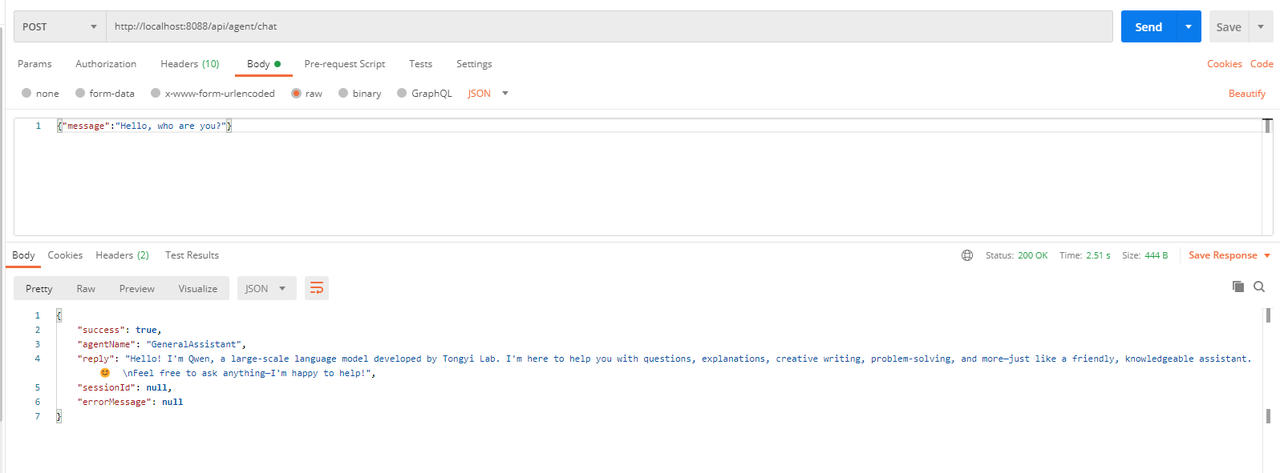
询问天气
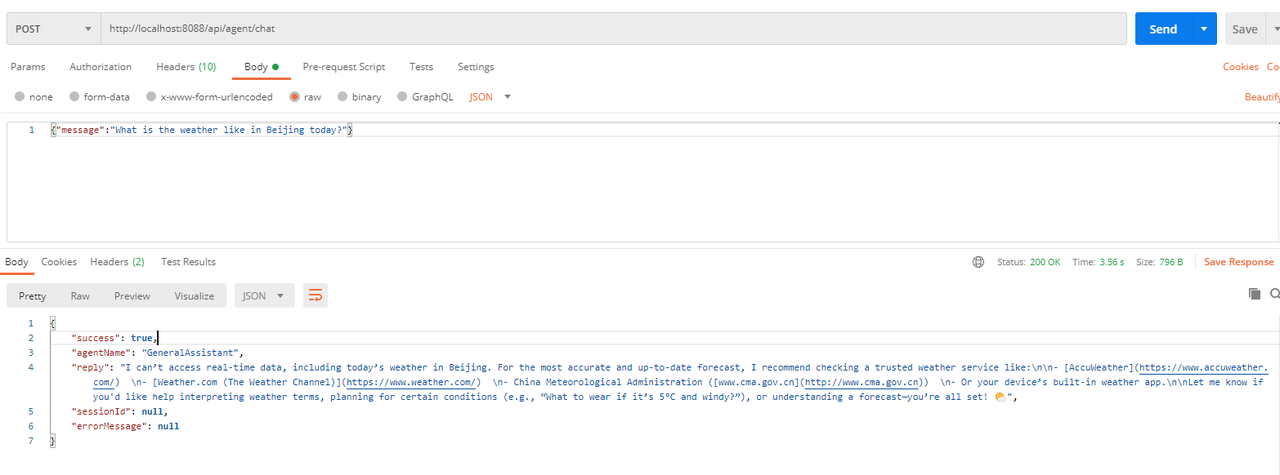
其他的测试用例有兴趣的同学可以继续验证。
五、写在文末
本文通过较大的篇幅详细介绍了AgentScope Java的使用,并且通过案例详细演示了具体的使用,基于此还可以扩展出更多的使用场景,希望对看到的同学有用,本篇到此结束,感谢观看。