大家好,我是鸿蒙Jack。本期以我的《时光旅记》APP 为例,聊一下我怎么把 Share Kit 里的 HarmonyShare 能力接进来,让用户通过"碰一碰"和"一抓一放"的 AI 隔空传送,把照片、旅行计划链接、海拔打卡图这些内容快速传到附近设备。
这个能力的产品感很强。以前分享一张旅行照片,用户通常要点分享按钮、等面板弹出、再选择设备或应用。现在在支持的场景里,用户只要进入内容页,设备轻贴一下,或者对着附近设备做一个"抓取再释放"的手势,就能完成跨设备分享。对《时光旅记》这种以照片和旅行内容为核心的应用来说,这个体验很贴合。
我在《时光旅记》里的使用场景
《时光旅记》里有两类内容特别适合跨设备快速分享。
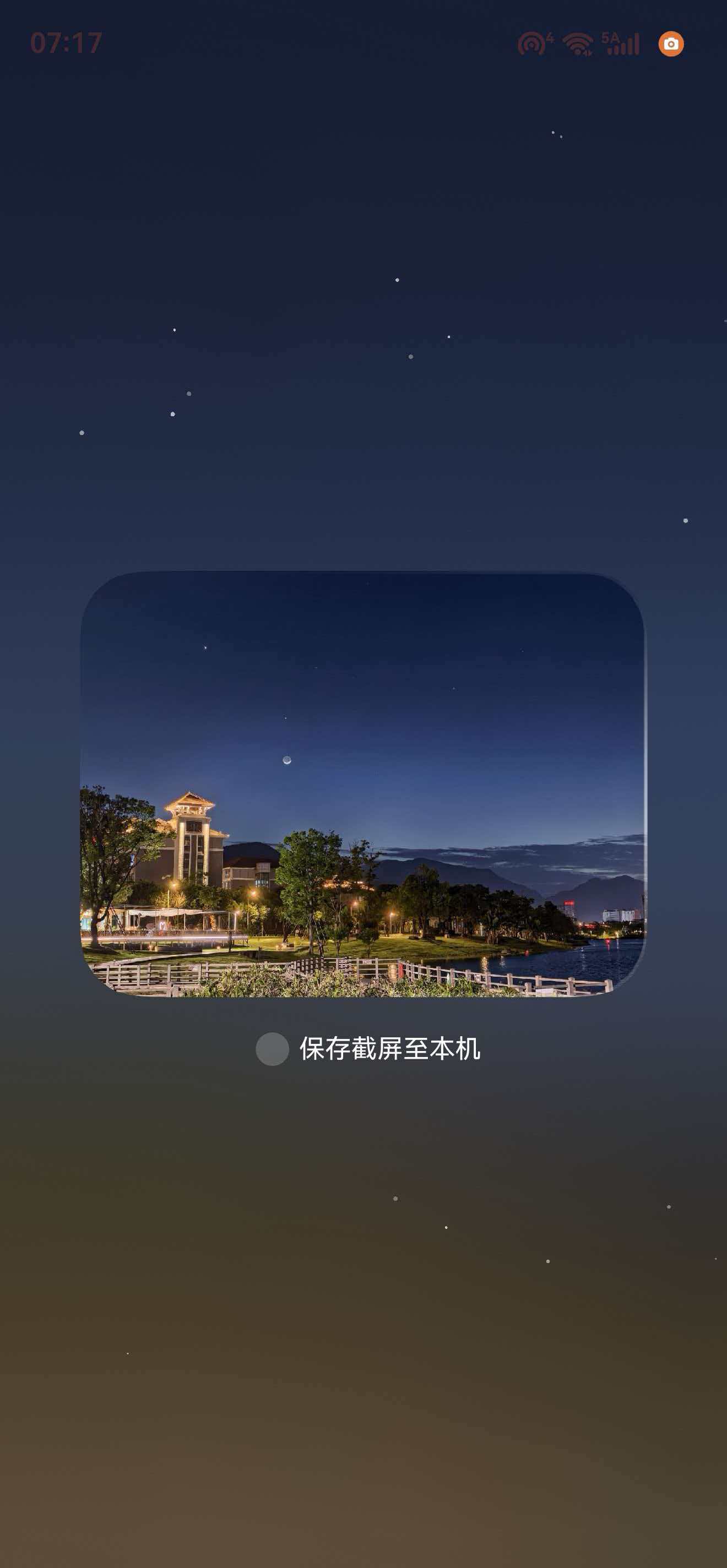
第一类是"当下正在看的内容"。比如用户打开一个瞬间详情页,当前照片就是最明确的分享对象;打开海拔打卡页,屏幕上的打卡卡片就是分享对象;打开图片工厂,当前编辑结果就是分享对象。这种场景不需要再让用户选一次文件,页面自己知道应该分享什么。
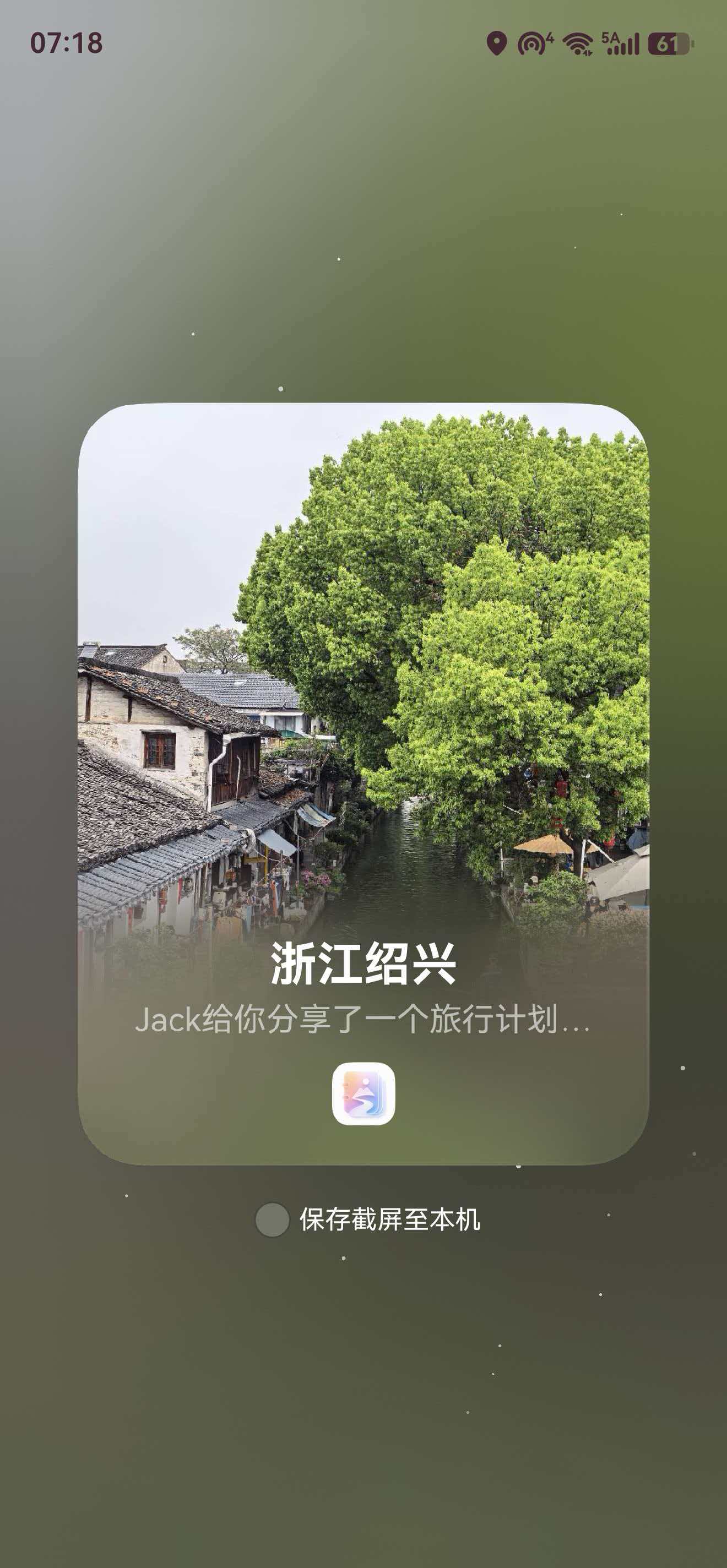
第二类是"可跳转的内容"。比如旅行计划详情页,分享出去的不是一张本地图片,而是一条 App Linking 链接。对方设备收到后,如果装了《时光旅记》,可以直接回到旅行计划;没装应用时,也能通过网页或应用市场链路继续承接。
我没有在每个页面里重新写一遍 harmonyShare.on('knockShare') 和 harmonyShare.on('gesturesShare')。页面只负责提供一个 getShareData() 回调,真正的监听注册、窗口 ID 获取、旧监听清理、owner 防串页,都放进 XHarmonyShareKit。
碰一碰和 AI 隔空传送的关系
这两个能力都在 @kit.ShareKit 里,最终都走 systemShare.SharedData。
knockShare 是设备轻贴触发。用户进入可分享页面后,系统识别到碰一碰事件,应用收到 SharableTarget,然后调用 target.share(shareData)。
gesturesShare 是隔空传送触发。用户通过"一抓一放"手势完成中近距离跨设备传送,应用同样收到 SharableTarget,也同样调用 target.share(shareData)。
所以我把它们看成两个触发入口,后面的数据构造完全复用。
#mermaid-svg-fkKzxUYTT1qezGjd{font-family:"trebuchet ms",verdana,arial,sans-serif;font-size:16px;fill:#333;}@keyframes edge-animation-frame{from{stroke-dashoffset:0;}}@keyframes dash{to{stroke-dashoffset:0;}}#mermaid-svg-fkKzxUYTT1qezGjd .edge-animation-slow{stroke-dasharray:9,5!important;stroke-dashoffset:900;animation:dash 50s linear infinite;stroke-linecap:round;}#mermaid-svg-fkKzxUYTT1qezGjd .edge-animation-fast{stroke-dasharray:9,5!important;stroke-dashoffset:900;animation:dash 20s linear infinite;stroke-linecap:round;}#mermaid-svg-fkKzxUYTT1qezGjd .error-icon{fill:#552222;}#mermaid-svg-fkKzxUYTT1qezGjd .error-text{fill:#552222;stroke:#552222;}#mermaid-svg-fkKzxUYTT1qezGjd .edge-thickness-normal{stroke-width:1px;}#mermaid-svg-fkKzxUYTT1qezGjd .edge-thickness-thick{stroke-width:3.5px;}#mermaid-svg-fkKzxUYTT1qezGjd .edge-pattern-solid{stroke-dasharray:0;}#mermaid-svg-fkKzxUYTT1qezGjd .edge-thickness-invisible{stroke-width:0;fill:none;}#mermaid-svg-fkKzxUYTT1qezGjd .edge-pattern-dashed{stroke-dasharray:3;}#mermaid-svg-fkKzxUYTT1qezGjd .edge-pattern-dotted{stroke-dasharray:2;}#mermaid-svg-fkKzxUYTT1qezGjd .marker{fill:#333333;stroke:#333333;}#mermaid-svg-fkKzxUYTT1qezGjd .marker.cross{stroke:#333333;}#mermaid-svg-fkKzxUYTT1qezGjd svg{font-family:"trebuchet ms",verdana,arial,sans-serif;font-size:16px;}#mermaid-svg-fkKzxUYTT1qezGjd p{margin:0;}#mermaid-svg-fkKzxUYTT1qezGjd .label{font-family:"trebuchet ms",verdana,arial,sans-serif;color:#333;}#mermaid-svg-fkKzxUYTT1qezGjd .cluster-label text{fill:#333;}#mermaid-svg-fkKzxUYTT1qezGjd .cluster-label span{color:#333;}#mermaid-svg-fkKzxUYTT1qezGjd .cluster-label span p{background-color:transparent;}#mermaid-svg-fkKzxUYTT1qezGjd .label text,#mermaid-svg-fkKzxUYTT1qezGjd span{fill:#333;color:#333;}#mermaid-svg-fkKzxUYTT1qezGjd .node rect,#mermaid-svg-fkKzxUYTT1qezGjd .node circle,#mermaid-svg-fkKzxUYTT1qezGjd .node ellipse,#mermaid-svg-fkKzxUYTT1qezGjd .node polygon,#mermaid-svg-fkKzxUYTT1qezGjd .node path{fill:#ECECFF;stroke:#9370DB;stroke-width:1px;}#mermaid-svg-fkKzxUYTT1qezGjd .rough-node .label text,#mermaid-svg-fkKzxUYTT1qezGjd .node .label text,#mermaid-svg-fkKzxUYTT1qezGjd .image-shape .label,#mermaid-svg-fkKzxUYTT1qezGjd .icon-shape .label{text-anchor:middle;}#mermaid-svg-fkKzxUYTT1qezGjd .node .katex path{fill:#000;stroke:#000;stroke-width:1px;}#mermaid-svg-fkKzxUYTT1qezGjd .rough-node .label,#mermaid-svg-fkKzxUYTT1qezGjd .node .label,#mermaid-svg-fkKzxUYTT1qezGjd .image-shape .label,#mermaid-svg-fkKzxUYTT1qezGjd .icon-shape .label{text-align:center;}#mermaid-svg-fkKzxUYTT1qezGjd .node.clickable{cursor:pointer;}#mermaid-svg-fkKzxUYTT1qezGjd .root .anchor path{fill:#333333!important;stroke-width:0;stroke:#333333;}#mermaid-svg-fkKzxUYTT1qezGjd .arrowheadPath{fill:#333333;}#mermaid-svg-fkKzxUYTT1qezGjd .edgePath .path{stroke:#333333;stroke-width:2.0px;}#mermaid-svg-fkKzxUYTT1qezGjd .flowchart-link{stroke:#333333;fill:none;}#mermaid-svg-fkKzxUYTT1qezGjd .edgeLabel{background-color:rgba(232,232,232, 0.8);text-align:center;}#mermaid-svg-fkKzxUYTT1qezGjd .edgeLabel p{background-color:rgba(232,232,232, 0.8);}#mermaid-svg-fkKzxUYTT1qezGjd .edgeLabel rect{opacity:0.5;background-color:rgba(232,232,232, 0.8);fill:rgba(232,232,232, 0.8);}#mermaid-svg-fkKzxUYTT1qezGjd .labelBkg{background-color:rgba(232, 232, 232, 0.5);}#mermaid-svg-fkKzxUYTT1qezGjd .cluster rect{fill:#ffffde;stroke:#aaaa33;stroke-width:1px;}#mermaid-svg-fkKzxUYTT1qezGjd .cluster text{fill:#333;}#mermaid-svg-fkKzxUYTT1qezGjd .cluster span{color:#333;}#mermaid-svg-fkKzxUYTT1qezGjd div.mermaidTooltip{position:absolute;text-align:center;max-width:200px;padding:2px;font-family:"trebuchet ms",verdana,arial,sans-serif;font-size:12px;background:hsl(80, 100%, 96.2745098039%);border:1px solid #aaaa33;border-radius:2px;pointer-events:none;z-index:100;}#mermaid-svg-fkKzxUYTT1qezGjd .flowchartTitleText{text-anchor:middle;font-size:18px;fill:#333;}#mermaid-svg-fkKzxUYTT1qezGjd rect.text{fill:none;stroke-width:0;}#mermaid-svg-fkKzxUYTT1qezGjd .icon-shape,#mermaid-svg-fkKzxUYTT1qezGjd .image-shape{background-color:rgba(232,232,232, 0.8);text-align:center;}#mermaid-svg-fkKzxUYTT1qezGjd .icon-shape p,#mermaid-svg-fkKzxUYTT1qezGjd .image-shape p{background-color:rgba(232,232,232, 0.8);padding:2px;}#mermaid-svg-fkKzxUYTT1qezGjd .icon-shape .label rect,#mermaid-svg-fkKzxUYTT1qezGjd .image-shape .label rect{opacity:0.5;background-color:rgba(232,232,232, 0.8);fill:rgba(232,232,232, 0.8);}#mermaid-svg-fkKzxUYTT1qezGjd .label-icon{display:inline-block;height:1em;overflow:visible;vertical-align:-0.125em;}#mermaid-svg-fkKzxUYTT1qezGjd .node .label-icon path{fill:currentColor;stroke:revert;stroke-width:revert;}#mermaid-svg-fkKzxUYTT1qezGjd :root{--mermaid-font-family:"trebuchet ms",verdana,arial,sans-serif;} 瞬间照片/本地文件
旅行计划
海拔打卡/图片工厂
用户进入可分享页面
页面生成 shareOwnerId
XHarmonyShareKit.registerKnockShare
XHarmonyShareKit.registerGesturesShare
harmonyShare.on knockShare
window.getLastWindow 获取窗口 ID
harmonyShare.on gesturesShare
触发 SharableTarget
页面 getShareData
分享内容类型
createShareDataFromFilePath / Uri
createHyperlinkShareData
buildImageShareDataFromPixelMap
target.share SharedData
系统完成跨设备分享
页面生命周期对应的时序如下:
ShareUtil SharableTarget harmonyShare ArkUI Window XHarmonyShareKit 可分享页面 ShareUtil SharableTarget harmonyShare ArkUI Window XHarmonyShareKit 可分享页面 #mermaid-svg-luqR0UQsgzz1BYJD{font-family:"trebuchet ms",verdana,arial,sans-serif;font-size:16px;fill:#333;}@keyframes edge-animation-frame{from{stroke-dashoffset:0;}}@keyframes dash{to{stroke-dashoffset:0;}}#mermaid-svg-luqR0UQsgzz1BYJD .edge-animation-slow{stroke-dasharray:9,5!important;stroke-dashoffset:900;animation:dash 50s linear infinite;stroke-linecap:round;}#mermaid-svg-luqR0UQsgzz1BYJD .edge-animation-fast{stroke-dasharray:9,5!important;stroke-dashoffset:900;animation:dash 20s linear infinite;stroke-linecap:round;}#mermaid-svg-luqR0UQsgzz1BYJD .error-icon{fill:#552222;}#mermaid-svg-luqR0UQsgzz1BYJD .error-text{fill:#552222;stroke:#552222;}#mermaid-svg-luqR0UQsgzz1BYJD .edge-thickness-normal{stroke-width:1px;}#mermaid-svg-luqR0UQsgzz1BYJD .edge-thickness-thick{stroke-width:3.5px;}#mermaid-svg-luqR0UQsgzz1BYJD .edge-pattern-solid{stroke-dasharray:0;}#mermaid-svg-luqR0UQsgzz1BYJD .edge-thickness-invisible{stroke-width:0;fill:none;}#mermaid-svg-luqR0UQsgzz1BYJD .edge-pattern-dashed{stroke-dasharray:3;}#mermaid-svg-luqR0UQsgzz1BYJD .edge-pattern-dotted{stroke-dasharray:2;}#mermaid-svg-luqR0UQsgzz1BYJD .marker{fill:#333333;stroke:#333333;}#mermaid-svg-luqR0UQsgzz1BYJD .marker.cross{stroke:#333333;}#mermaid-svg-luqR0UQsgzz1BYJD svg{font-family:"trebuchet ms",verdana,arial,sans-serif;font-size:16px;}#mermaid-svg-luqR0UQsgzz1BYJD p{margin:0;}#mermaid-svg-luqR0UQsgzz1BYJD .actor{stroke:hsl(259.6261682243, 59.7765363128%, 87.9019607843%);fill:#ECECFF;}#mermaid-svg-luqR0UQsgzz1BYJD text.actor>tspan{fill:black;stroke:none;}#mermaid-svg-luqR0UQsgzz1BYJD .actor-line{stroke:hsl(259.6261682243, 59.7765363128%, 87.9019607843%);}#mermaid-svg-luqR0UQsgzz1BYJD .innerArc{stroke-width:1.5;stroke-dasharray:none;}#mermaid-svg-luqR0UQsgzz1BYJD .messageLine0{stroke-width:1.5;stroke-dasharray:none;stroke:#333;}#mermaid-svg-luqR0UQsgzz1BYJD .messageLine1{stroke-width:1.5;stroke-dasharray:2,2;stroke:#333;}#mermaid-svg-luqR0UQsgzz1BYJD #arrowhead path{fill:#333;stroke:#333;}#mermaid-svg-luqR0UQsgzz1BYJD .sequenceNumber{fill:white;}#mermaid-svg-luqR0UQsgzz1BYJD #sequencenumber{fill:#333;}#mermaid-svg-luqR0UQsgzz1BYJD #crosshead path{fill:#333;stroke:#333;}#mermaid-svg-luqR0UQsgzz1BYJD .messageText{fill:#333;stroke:none;}#mermaid-svg-luqR0UQsgzz1BYJD .labelBox{stroke:hsl(259.6261682243, 59.7765363128%, 87.9019607843%);fill:#ECECFF;}#mermaid-svg-luqR0UQsgzz1BYJD .labelText,#mermaid-svg-luqR0UQsgzz1BYJD .labelText>tspan{fill:black;stroke:none;}#mermaid-svg-luqR0UQsgzz1BYJD .loopText,#mermaid-svg-luqR0UQsgzz1BYJD .loopText>tspan{fill:black;stroke:none;}#mermaid-svg-luqR0UQsgzz1BYJD .loopLine{stroke-width:2px;stroke-dasharray:2,2;stroke:hsl(259.6261682243, 59.7765363128%, 87.9019607843%);fill:hsl(259.6261682243, 59.7765363128%, 87.9019607843%);}#mermaid-svg-luqR0UQsgzz1BYJD .note{stroke:#aaaa33;fill:#fff5ad;}#mermaid-svg-luqR0UQsgzz1BYJD .noteText,#mermaid-svg-luqR0UQsgzz1BYJD .noteText>tspan{fill:black;stroke:none;}#mermaid-svg-luqR0UQsgzz1BYJD .activation0{fill:#f4f4f4;stroke:#666;}#mermaid-svg-luqR0UQsgzz1BYJD .activation1{fill:#f4f4f4;stroke:#666;}#mermaid-svg-luqR0UQsgzz1BYJD .activation2{fill:#f4f4f4;stroke:#666;}#mermaid-svg-luqR0UQsgzz1BYJD .actorPopupMenu{position:absolute;}#mermaid-svg-luqR0UQsgzz1BYJD .actorPopupMenuPanel{position:absolute;fill:#ECECFF;box-shadow:0px 8px 16px 0px rgba(0,0,0,0.2);filter:drop-shadow(3px 5px 2px rgb(0 0 0 / 0.4));}#mermaid-svg-luqR0UQsgzz1BYJD .actor-man line{stroke:hsl(259.6261682243, 59.7765363128%, 87.9019607843%);fill:#ECECFF;}#mermaid-svg-luqR0UQsgzz1BYJD .actor-man circle,#mermaid-svg-luqR0UQsgzz1BYJD line{stroke:hsl(259.6261682243, 59.7765363128%, 87.9019607843%);fill:#ECECFF;stroke-width:2px;}#mermaid-svg-luqR0UQsgzz1BYJD :root{--mermaid-font-family:"trebuchet ms",verdana,arial,sans-serif;} registerKnockShare(ownerId, getShareData)off('knockShare')on('knockShare', callback)registerGesturesShare(ownerId, uiContext, getShareData)getLastWindow(hostContext)windowIdoff('gesturesShare', { windowId })on('gesturesShare', { windowId }, callback)用户碰一碰或一抓一放getShareData()构造 SharedDatasystemShare.SharedDatashare(shareData)aboutToDisappear / onBackPressoff('knockShare')off('gesturesShare', { windowId })
为什么我做 ownerId 防串页
HarmonyShare 是事件监听型能力。页面 A 注册了分享监听,页面 B 又注册了一次,如果不处理好旧监听,就容易出现"明明在 B 页,分享出去的是 A 页内容"的问题。
所以我在每个页面创建一个唯一 shareOwnerId,注册时记录当前 owner 和 binding version。回调触发时再检查一遍:如果 version 或 owner 不匹配,直接丢弃这次回调。页面退出时也带着 owner 注销,避免误注销别的页面刚注册好的监听。
项目里的 owner 生成类似这样:
ts
function buildMomentDetailShareOwnerId(): string {
  return 'moment-detail-page-' + Date.now().toString() + '-' + Math.floor(Math.random() * 1000000).toString();
}
这个设计看起来小,但它解决的是跨页面能力最常见的问题:监听生命周期不是跟着 UI 自动走的,必须自己把边界守住。
SharedData 怎么构造
Share Kit 真正发送的是 systemShare.SharedData。我在《时光旅记》里主要用了三种构造方式。
瞬间照片这种已有本地路径或 URI 的内容,直接根据文件扩展名推断 UTD:
ts
return ShareUtil.createShareDataFromFilePath(
  currentItem.localPath,
  shareTitle,
  '来自时光印记的瞬间照片'
);
旅行计划这种内容,走链接分享。这里 utd 要是 general.hyperlink,也就是 utd.UniformDataType.HYPERLINK:
ts
return ShareUtil.createHyperlinkShareData(
  this.currentShareLink,
  this.getPlanShareTitle(),
  this.getPlanShareDescription(),
  thumbnailUri
);
海拔打卡、图片工厂、创意工坊这种屏幕上实时合成出来的内容,我先用 componentSnapshot.getSync() 拿到 PixelMap,再打包成 PNG 写入分享缓存目录,最后生成文件型 SharedData:
ts
let pixelMap = componentSnapshot.getSync(ALTITUDE_SHARE_CANVAS_ID);
try {
  return await ShareUtil.buildImageShareDataFromPixelMap(
    this.getUIContext(),
    pixelMap,
    'altitude_checkin_share.png',
    '我的海拔打卡',
    '快来看看我的当前海拔!'
  );
} finally {
  pixelMap.release();
}
这里的 finally 不能省。PixelMap 是图像资源,分享构造成功或失败都应该释放。
完整代码
下面这份代码按《时光旅记》当前实现整理,包含 HarmonyShare 封装、分享数据工具,以及几个典型业务页的接入方式。实际页面里还有大量业务 UI,这里只保留和碰一碰、AI 隔空传送相关的主链路。
ShareUtil.ets
ts
import { common } from '@kit.AbilityKit';
import { uniformTypeDescriptor as utd } from '@kit.ArkData';
import { fileIo as fs, fileUri } from '@kit.CoreFileKit';
import { image } from '@kit.ImageKit';
import { systemShare } from '@kit.ShareKit';
import { ImageProcessingUtil } from '../../utils/ImageProcessingUtil';

const SHARE_CACHE_DIRECTORY: string = 'time-imprint/share-cache';

export class ShareUtil {
  static getUtdTypeByExtension(extension: string): string {
    let normalizedExtension: string = ShareUtil.normalizeExtension(extension);
    let belongsTo: string = ShareUtil.getUtdCategoryByExtension(normalizedExtension);
    try {
      return utd.getUniformDataTypeByFilenameExtension(normalizedExtension, belongsTo);
    } catch (_error) {
      return belongsTo;
    }
  }

  static createShareDataFromFilePath(
    filePath: string,
    title: string,
    description: string = '分享图片'
  ): systemShare.SharedData {
    return ShareUtil.createShareDataFromUri(
      fileUri.getUriFromPath(filePath),
      filePath,
      title,
      description
    );
  }

  static createShareDataFromUri(
    uriValue: string,
    fileNameOrPath: string,
    title: string,
    description: string = '分享图片'
  ): systemShare.SharedData {
    return new systemShare.SharedData({
      utd: ShareUtil.getUtdTypeByExtension(ShareUtil.extractExtension(fileNameOrPath)),
      uri: uriValue,
      title: title,
      description: description
    });
  }

  static createHyperlinkShareData(
    link: string,
    title: string,
    description: string = '分享链接',
    thumbnailUri: string = ''
  ): systemShare.SharedData {
    let record: systemShare.SharedRecord = {
      utd: utd.UniformDataType.HYPERLINK,
      content: link,
      title: title,
      description: description
    };
    if (thumbnailUri.trim().length > 0) {
      record.thumbnailUri = thumbnailUri;
    }
    return new systemShare.SharedData(record);
  }

  static async buildImageShareDataFromPixelMap(
    uiContext: UIContext,
    pixelMap: image.PixelMap,
    fileName: string,
    title: string,
    description: string = '分享图片',
    format: string = 'image/png',
    quality: number = 100
  ): Promise<systemShare.SharedData> {
    let filePath: string = await ShareUtil.savePixelMapToShareFile(
      uiContext.getHostContext() as common.UIAbilityContext,
      pixelMap,
      fileName,
      format,
      quality
    );
    return ShareUtil.createShareDataFromFilePath(filePath, title, description);
  }

  static async savePixelMapToShareFile(
    context: common.UIAbilityContext,
    pixelMap: image.PixelMap,
    fileName: string,
    format: string = 'image/png',
    quality: number = 100
  ): Promise<string> {
    let buffer: ArrayBuffer = await ImageProcessingUtil.packPixelMap(pixelMap, format, quality);
    let extension: string = format.indexOf('png') >= 0 ? 'png' : 'jpg';
    return await ShareUtil.writeBufferToShareFile(context, buffer, fileName, extension);
  }

  static async writeBufferToShareFile(
    context: common.UIAbilityContext,
    buffer: ArrayBuffer,
    fileName: string,
    fallbackExtension: string = 'png'
  ): Promise<string> {
    let shareDirectory: string = await ShareUtil.ensureShareCacheDirectory(context);
    let shareFilePath: string = shareDirectory + '/' + ShareUtil.buildShareFileName(fileName, fallbackExtension);
    await ImageProcessingUtil.writeBufferToFile(shareFilePath, buffer);
    return shareFilePath;
  }

  static async ensureShareCacheDirectory(context: common.UIAbilityContext): Promise<string> {
    return await ShareUtil.ensureShareDirectory(context);
  }

  static async showSharePanel(
    uiContext: UIContext,
    shareData: systemShare.SharedData,
    anchor?: string
  ): Promise<void> {
    let context = uiContext.getHostContext() as common.UIAbilityContext;
    let controller: systemShare.ShareController = new systemShare.ShareController(shareData);
    let previewMode: systemShare.SharePreviewMode = systemShare.SharePreviewMode.DETAIL;
    let records: Array<systemShare.SharedRecord> = shareData.getRecords();
    if (records.length > 0 && records[0].utd === utd.UniformDataType.HYPERLINK) {
      previewMode = systemShare.SharePreviewMode.DEFAULT;
    }
    let options: systemShare.ShareControllerOptions = {
      selectionMode: systemShare.SelectionMode.SINGLE,
      previewMode: previewMode
    };
    if (anchor !== undefined && anchor.length > 0) {
      options.anchor = anchor;
    }
    await controller.show(context, options);
  }

  private static async ensureShareDirectory(context: common.UIAbilityContext): Promise<string> {
    let shareDirectory: string = context.filesDir + '/' + SHARE_CACHE_DIRECTORY;
    if (!fs.accessSync(shareDirectory)) {
      await fs.mkdir(shareDirectory, true);
    }
    return shareDirectory;
  }

  private static buildShareFileName(fileName: string, fallbackExtension: string): string {
    let sanitizedName: string = ShareUtil.sanitizeFileName(fileName);
    let dotIndex: number = sanitizedName.lastIndexOf('.');
    let baseName: string = sanitizedName;
    let extension: string = ShareUtil.normalizeExtension(fallbackExtension).substring(1);
    if (dotIndex > 0 && dotIndex < sanitizedName.length - 1) {
      baseName = sanitizedName.substring(0, dotIndex);
      extension = ShareUtil.normalizeExtension(sanitizedName.substring(dotIndex + 1)).substring(1);
    }
    if (baseName.length === 0) {
      baseName = 'shared_image';
    }
    return baseName + '_' + Date.now().toString() + '.' + extension;
  }

  private static sanitizeFileName(fileName: string): string {
    return fileName.trim().replace(/[\\/:*?"<>|]/g, '_');
  }

  private static extractExtension(fileNameOrPath: string): string {
    let dotIndex: number = fileNameOrPath.lastIndexOf('.');
    if (dotIndex < 0 || dotIndex >= fileNameOrPath.length - 1) {
      return '.png';
    }
    return fileNameOrPath.substring(dotIndex);
  }

  private static normalizeExtension(extension: string): string {
    let normalizedValue: string = extension.trim().toLowerCase();
    if (normalizedValue.length === 0) {
      return '.png';
    }
    if (!normalizedValue.startsWith('.')) {
      return '.' + normalizedValue;
    }
    return normalizedValue;
  }

  private static getUtdCategoryByExtension(extension: string): string {
    if (['.png', '.jpg', '.jpeg', '.gif', '.heic', '.bmp', '.webp'].indexOf(extension) >= 0) {
      return utd.UniformDataType.IMAGE;
    }
    if (['.mp4', '.mov', '.m4v', '.avi'].indexOf(extension) >= 0) {
      return utd.UniformDataType.VIDEO;
    }
    return utd.UniformDataType.FILE;
  }
}
XHarmonyShareKit.ets
ts
import { BusinessError } from '@kit.BasicServicesKit';
import { harmonyShare, systemShare } from '@kit.ShareKit';
import { window } from '@kit.ArkUI';
import { ShareUtil } from './ShareUtil';

export class XHarmonyShareKit {
  private static knockShareOwnerId: string = '';
  private static gesturesShareOwnerId: string = '';
  private static knockShareBindingVersion: number = 0;
  private static gesturesShareBindingVersion: number = 0;

  static registerKnockShare(ownerId: string, getShareData: () => Promise<systemShare.SharedData>): void {
    const normalizedOwnerId: string = ownerId.trim();
    if (normalizedOwnerId.length === 0) {
      console.warn('[XHarmonyShare] registerKnockShare skipped: empty ownerId');
      return;
    }
    const bindingVersion: number = ++XHarmonyShareKit.knockShareBindingVersion;
    XHarmonyShareKit.knockShareOwnerId = normalizedOwnerId;
    try {
      try {
        harmonyShare.off('knockShare');
      } catch (_error) {
      }
      harmonyShare.on('knockShare', async (sharableTarget: harmonyShare.SharableTarget) => {
        if (XHarmonyShareKit.knockShareBindingVersion !== bindingVersion ||
          XHarmonyShareKit.knockShareOwnerId !== normalizedOwnerId) {
          return;
        }
        try {
          const shareData: systemShare.SharedData = await getShareData();
          sharableTarget.share(shareData);
          console.info('[XHarmonyShare] 碰一碰分享成功');
        } catch (error) {
          console.error('[XHarmonyShare] 碰一碰分享失败:', error);
        }
      });
      console.info('[XHarmonyShare] 碰一碰分享监听已注册 owner=' + normalizedOwnerId);
    } catch (error) {
      let err = error as BusinessError;
      console.error('[XHarmonyShare] 注册碰一碰分享失败, code:', err.code, 'message:', err.message);
    }
  }

  static registerGesturesShare(
    ownerId: string,
    uiContext: UIContext,
    getShareData: () => Promise<systemShare.SharedData>
  ): void {
    if (!canIUse('SystemCapability.Collaboration.HarmonyShare')) {
      console.warn('[XHarmonyShare] 当前设备不支持手势分享功能');
      return;
    }
    const normalizedOwnerId: string = ownerId.trim();
    if (normalizedOwnerId.length === 0) {
      console.warn('[XHarmonyShare] registerGesturesShare skipped: empty ownerId');
      return;
    }
    const bindingVersion: number = ++XHarmonyShareKit.gesturesShareBindingVersion;
    XHarmonyShareKit.gesturesShareOwnerId = normalizedOwnerId;

    try {
      window.getLastWindow(uiContext.getHostContext()).then((data) => {
        if (XHarmonyShareKit.gesturesShareBindingVersion !== bindingVersion ||
          XHarmonyShareKit.gesturesShareOwnerId !== normalizedOwnerId) {
          return;
        }
        try {
          const mainWindowID: number = data.getWindowProperties().id;
          try {
            harmonyShare.off('gesturesShare', { windowId: mainWindowID });
          } catch (_error) {
          }
          harmonyShare.on('gesturesShare', { windowId: mainWindowID }, async (target: harmonyShare.SharableTarget) => {
            if (XHarmonyShareKit.gesturesShareBindingVersion !== bindingVersion ||
              XHarmonyShareKit.gesturesShareOwnerId !== normalizedOwnerId) {
              return;
            }
            try {
              const shareData: systemShare.SharedData = await getShareData();
              target.share(shareData);
              console.info('[XHarmonyShare] 手势分享成功');
            } catch (error) {
              console.error('[XHarmonyShare] 手势分享失败:', error);
            }
          });
          console.info('[XHarmonyShare] 手势分享监听已注册 owner=' + normalizedOwnerId);
        } catch (err) {
          let error = err as BusinessError;
          console.error('[XHarmonyShare] 获取窗口属性失败, code:', error.code, 'message:', error.message);
        }
      }).catch((error: BusinessError) => {
        console.error('[XHarmonyShare] 获取窗口失败, code:', error.code, 'message:', error.message);
      });
    } catch (error) {
      let err = error as BusinessError;
      console.error('[XHarmonyShare] 注册手势分享失败, code:', err.code, 'message:', err.message);
    }
  }

  static unregisterKnockShare(ownerId?: string): void {
    const normalizedOwnerId: string = ownerId !== undefined ? ownerId.trim() : '';
    if (normalizedOwnerId.length > 0 && XHarmonyShareKit.knockShareOwnerId !== normalizedOwnerId) {
      console.info(
        '[XHarmonyShare] 跳过注销碰一碰分享,owner不匹配 current=' +
        XHarmonyShareKit.knockShareOwnerId + ' request=' + normalizedOwnerId
      );
      return;
    }
    XHarmonyShareKit.knockShareBindingVersion = XHarmonyShareKit.knockShareBindingVersion + 1;
    XHarmonyShareKit.knockShareOwnerId = '';
    try {
      harmonyShare.off('knockShare');
      console.info('[XHarmonyShare] 碰一碰分享监听已注销');
    } catch (error) {
      let err = error as BusinessError;
      console.error('[XHarmonyShare] 注销碰一碰分享失败, code:', err.code, 'message:', err.message);
    }
  }

  static unregisterGesturesShare(ownerId: string, uiContext: UIContext): void {
    if (!canIUse('SystemCapability.Collaboration.HarmonyShare')) {
      return;
    }
    const normalizedOwnerId: string = ownerId.trim();
    if (normalizedOwnerId.length > 0 && XHarmonyShareKit.gesturesShareOwnerId !== normalizedOwnerId) {
      console.info(
        '[XHarmonyShare] 跳过注销手势分享,owner不匹配 current=' +
        XHarmonyShareKit.gesturesShareOwnerId + ' request=' + normalizedOwnerId
      );
      return;
    }
    const unregisterVersion: number = XHarmonyShareKit.gesturesShareBindingVersion + 1;
    XHarmonyShareKit.gesturesShareBindingVersion = unregisterVersion;
    XHarmonyShareKit.gesturesShareOwnerId = '';

    try {
      window.getLastWindow(uiContext.getHostContext()).then((data) => {
        if (XHarmonyShareKit.gesturesShareBindingVersion !== unregisterVersion ||
          XHarmonyShareKit.gesturesShareOwnerId.length > 0) {
          return;
        }
        try {
          const mainWindowID: number = data.getWindowProperties().id;
          harmonyShare.off('gesturesShare', { windowId: mainWindowID });
          console.info('[XHarmonyShare] 手势分享监听已注销');
        } catch (err) {
          let error = err as BusinessError;
          console.error('[XHarmonyShare] 注销手势分享失败, code:', error.code, 'message:', error.message);
        }
      }).catch((error: BusinessError) => {
        console.error('[XHarmonyShare] 获取窗口失败, code:', error.code, 'message:', error.message);
      });
    } catch (error) {
      let err = error as BusinessError;
      console.error('[XHarmonyShare] 注销手势分享失败, code:', err.code, 'message:', err.message);
    }
  }

  static createShareData(sandboxFilePath: string, title: string, description?: string): systemShare.SharedData {
    console.info('[XHarmonyShare] 分享文件路径:', sandboxFilePath);
    return ShareUtil.createShareDataFromFilePath(sandboxFilePath, title, description || '分享图片');
  }
}
index.ets
ts
export * from './XHarmonyShareKit';
export * from './ShareUtil';
瞬间照片分享接入
ts
import { systemShare } from '@kit.ShareKit';
import { ShareUtil, XHarmonyShareKit } from '../../kit/harmonyshare';

function buildMomentDetailShareOwnerId(): string {
  return 'moment-detail-page-' + Date.now().toString() + '-' + Math.floor(Math.random() * 1000000).toString();
}

@Component
export struct MomentDetailShareDemo {
  @State imageUri: string = '';
  imageIndex: number = 0;
  imageUris: Array<string> = [];
  imagePaths: Array<string> = [];
  momentTitle: string = '旅行瞬间';
  private readonly shareOwnerId: string = buildMomentDetailShareOwnerId();

  aboutToAppear(): void {
    this.unregisterShareCapabilities();
    XHarmonyShareKit.registerKnockShare(this.shareOwnerId, () => this.buildCurrentMomentShareData());
    XHarmonyShareKit.registerGesturesShare(
      this.shareOwnerId,
      this.getUIContext(),
      () => this.buildCurrentMomentShareData()
    );
  }

  aboutToDisappear(): void {
    this.unregisterShareCapabilities();
  }

  build(): void {
    Column({ space: 12 }) {
      Image(this.imageUri)
        .width('100%')
        .height(320)
        .objectFit(ImageFit.Cover)

      Button('系统分享')
        .onClick(() => {
          void this.shareCurrentMomentPhoto();
        })
    }
    .padding(16)
  }

  private unregisterShareCapabilities(): void {
    XHarmonyShareKit.unregisterKnockShare(this.shareOwnerId);
    XHarmonyShareKit.unregisterGesturesShare(this.shareOwnerId, this.getUIContext());
  }

  private async buildCurrentMomentShareData(): Promise<systemShare.SharedData> {
    let safeIndex: number = Math.max(0, Math.min(this.imageIndex, this.imageUris.length - 1));
    let shareTitle: string = this.momentTitle.length > 0 ? this.momentTitle : '瞬间照片';
    let localPath: string = safeIndex < this.imagePaths.length ? this.imagePaths[safeIndex] : '';
    if (localPath.length > 0) {
      return ShareUtil.createShareDataFromFilePath(
        localPath,
        shareTitle,
        '来自时光印记的瞬间照片'
      );
    }
    let uri: string = safeIndex < this.imageUris.length ? this.imageUris[safeIndex] : this.imageUri;
    if (uri.length > 0) {
      return ShareUtil.createShareDataFromUri(
        uri,
        uri,
        shareTitle,
        '来自时光印记的瞬间照片'
      );
    }
    throw new Error('current moment photo uri missing');
  }

  private async shareCurrentMomentPhoto(): Promise<void> {
    try {
      let shareData: systemShare.SharedData = await this.buildCurrentMomentShareData();
      await ShareUtil.showSharePanel(this.getUIContext(), shareData);
    } catch (_error) {
      this.getUIContext().getPromptAction().showToast({ message: '当前图片暂时无法分享' });
    }
  }
}
旅行计划链接分享接入
ts
import { systemShare } from '@kit.ShareKit';
import { ShareUtil, XHarmonyShareKit } from '../../kit/harmonyshare';

function buildTravelPlanDetailShareOwnerId(): string {
  return 'travel-plan-detail-page-' + Date.now().toString() + '-' + Math.floor(Math.random() * 1000000).toString();
}

@Component
export struct TravelPlanLinkShareDemo {
  @State currentShareLink: string = '';
  @State planTitle: string = '五一杭州旅行';
  @State planDescription: string = '行程、清单、票据和预算都在这里';
  @State thumbnailUri: string = '';
  private readonly shareOwnerId: string = buildTravelPlanDetailShareOwnerId();

  aboutToAppear(): void {
    this.unregisterShareCapabilities();
    XHarmonyShareKit.registerKnockShare(this.shareOwnerId, () => this.buildTravelPlanShareData());
    XHarmonyShareKit.registerGesturesShare(
      this.shareOwnerId,
      this.getUIContext(),
      () => this.buildTravelPlanShareData()
    );
  }

  aboutToDisappear(): void {
    this.unregisterShareCapabilities();
  }

  build(): void {
    Column({ space: 12 }) {
      Text(this.planTitle)
        .fontSize(22)
        .fontWeight(FontWeight.Bold)

      Button('分享旅行计划')
        .onClick(() => {
          void this.shareTravelPlanLink();
        })
    }
    .padding(16)
  }

  private unregisterShareCapabilities(): void {
    XHarmonyShareKit.unregisterKnockShare(this.shareOwnerId);
    XHarmonyShareKit.unregisterGesturesShare(this.shareOwnerId, this.getUIContext());
  }

  private hasActiveShareLink(): boolean {
    return this.currentShareLink.trim().length > 0;
  }

  private async buildTravelPlanShareData(): Promise<systemShare.SharedData> {
    if (!this.hasActiveShareLink()) {
      throw new Error('分享链接暂未就绪,请先点击分享按钮生成链接');
    }
    return ShareUtil.createHyperlinkShareData(
      this.currentShareLink,
      this.planTitle,
      this.planDescription,
      this.thumbnailUri
    );
  }

  private async shareTravelPlanLink(): Promise<void> {
    if (!this.hasActiveShareLink()) {
      this.getUIContext().getPromptAction().showToast({ message: '请先生成有效的分享链接' });
      return;
    }
    try {
      let shareData: systemShare.SharedData = await this.buildTravelPlanShareData();
      await ShareUtil.showSharePanel(this.getUIContext(), shareData);
    } catch (_error) {
      this.getUIContext().getPromptAction().showToast({ message: '暂时无法打开分享面板' });
    }
  }
}
海拔打卡卡片分享接入
ts
import { componentSnapshot } from '@kit.ArkUI';
import { systemShare } from '@kit.ShareKit';
import { ShareUtil, XHarmonyShareKit } from '../../kit/harmonyshare';

const ALTITUDE_SHARE_CANVAS_ID: string = 'altitudeShareCanvas';

function buildAltitudeShareOwnerId(): string {
  return 'altitude-checkin-page-' + Date.now().toString() + '-' + Math.floor(Math.random() * 1000000).toString();
}

@Component
export struct AltitudeShareDemo {
  @State altitude: number = 0;
  @State locationName: string = '定位中';
  private readonly shareOwnerId: string = buildAltitudeShareOwnerId();

  aboutToAppear(): void {
    this.unregisterShareCapabilities();
    XHarmonyShareKit.registerKnockShare(this.shareOwnerId, () => this.buildAltitudeShareData());
    XHarmonyShareKit.registerGesturesShare(
      this.shareOwnerId,
      this.getUIContext(),
      () => this.buildAltitudeShareData()
    );
  }

  aboutToDisappear(): void {
    this.unregisterShareCapabilities();
  }

  build(): void {
    Column({ space: 16 }) {
      Column({ space: 8 }) {
        Text(this.locationName)
          .fontSize(16)
        Text(`${this.altitude.toFixed(1)} m`)
          .fontSize(34)
          .fontWeight(FontWeight.Bold)
      }
      .id(ALTITUDE_SHARE_CANVAS_ID)
      .width('100%')
      .padding(24)
      .backgroundColor('#F3F4F6')
      .borderRadius(18)

      Button('分享打卡图')
        .onClick(() => {
          void this.shareAltitudeCard();
        })
    }
    .padding(16)
  }

  private unregisterShareCapabilities(): void {
    XHarmonyShareKit.unregisterKnockShare(this.shareOwnerId);
    XHarmonyShareKit.unregisterGesturesShare(this.shareOwnerId, this.getUIContext());
  }

  private async buildAltitudeShareData(): Promise<systemShare.SharedData> {
    let pixelMap = componentSnapshot.getSync(ALTITUDE_SHARE_CANVAS_ID);
    try {
      return await ShareUtil.buildImageShareDataFromPixelMap(
        this.getUIContext(),
        pixelMap,
        'altitude_checkin_share.png',
        '我的海拔打卡',
        '快来看看我的当前海拔!'
      );
    } finally {
      pixelMap.release();
    }
  }

  private async shareAltitudeCard(): Promise<void> {
    try {
      let shareData: systemShare.SharedData = await this.buildAltitudeShareData();
      await ShareUtil.showSharePanel(this.getUIContext(), shareData);
    } catch (_error) {
      this.getUIContext().getPromptAction().showToast({ message: '当前打卡图暂时无法分享' });
    }
  }
}
接入时我会注意的几个点
gesturesShare 最好先用 canIUse('SystemCapability.Collaboration.HarmonyShare') 判断能力。不是所有设备都支持 AI 隔空传送,能力不可用时不要影响页面正常分享。
碰一碰和隔空传送触发后,要尽快构造并调用 target.share(shareData)。如果分享内容依赖网络下载,建议先分享核心数据,复杂预览图可以后补;否则用户会看到等待或失败。
页面退出、返回、应用退后台时要注销监听。官方文档也强调离开可分享页面要 off('gesturesShare')。我在项目里至少保证 aboutToDisappear() 和自定义返回逻辑都会调用 unregisterShareCapabilities()。
如果当前页面没有可分享内容,不要静默失败。当前代码里大多是 throw new Error(...) 后记录日志;如果要把体验继续打磨,可以在碰一碰场景里使用 sharableTarget.clarifyNonShare() 告诉用户"请在有照片或已生成分享链接后再试"。
临时分享文件要放在应用沙箱的分享缓存目录。比如海拔打卡、图片工厂这类由 PixelMap 生成的图片,我会写到 filesDir/time-imprint/share-cache,避免污染业务原始文件。
小结
这次接入后,《时光旅记》的分享链路变得更自然了。用户在看照片,就分享当前照片;在看旅行计划,就传旅行计划链接;在海拔打卡或图片创作页,就传当前生成的卡片或成片。
对开发来说,关键不是把 harmonyShare.on() 写出来,而是把"当前页面到底有什么可分享内容"抽成稳定的 getShareData()。碰一碰、AI 隔空传送、系统分享面板都复用这份数据,页面就不会被三套分享逻辑拖乱。