把大文件切成多个小块,用 Hash 标识唯一文件,服务端持久化已上传的切片,中断后只传缺失部分,最后合并成完整文件。
目录
-
- [1. 为什么需要断点续传?](#1. 为什么需要断点续传?)
- [2. 核心概念](#2. 核心概念)
- [3. 完整流程(6 步)](#3. 完整流程(6 步))
-
- [Step 1:选择文件并计算 Hash](#Step 1:选择文件并计算 Hash)
- [Step 2:创建切片](#Step 2:创建切片)
- [Step 3:查询已上传切片(断点续传关键)](#Step 3:查询已上传切片(断点续传关键))
- [Step 4:并发上传剩余切片](#Step 4:并发上传剩余切片)
- [Step 5:合并所有切片](#Step 5:合并所有切片)
- [Step 6:文件管理](#Step 6:文件管理)
- 4、断点续传的关键机制要
- 5、一个前后端的简单demo
- 6、那下载呢,下载如果网络不好可不可以断点续传呢,完全可以,而且更简单!
1. 为什么需要断点续传?
大文件一次性上传容易遇到:
网络中断 → 整文件重传,浪费流量和时间
超时失败 → 大请求更容易失败
内存压力 → 浏览器/服务端难以一次处理超大文件
解决方案:分片 + 记录进度 + 按需续传。
2. 核心概念
| 概念 | 说明 | Demo 中的实现 |
|---|---|---|
| 文件 Hash | 文件唯一标识,用于识别「是不是同一个文件」 | SparkMD5 分块计算 |
| 切片 (Chunk) | 把文件按固定大小(如 2MB)切成多块 | createChunks() |
| 切片索引 | 每块的序号 0, 1, 2... | 上传时带 index |
| 已上传记录 | 服务端保存哪些切片已到位 | tmp/{hash}/{index} |
| 断点续传 | 只上传缺失的切片 | 对比 uploadedIndexes |
| 合并 | 所有切片到齐后按序拼接 | /merge 接口 |
3. 完整流程(6 步)
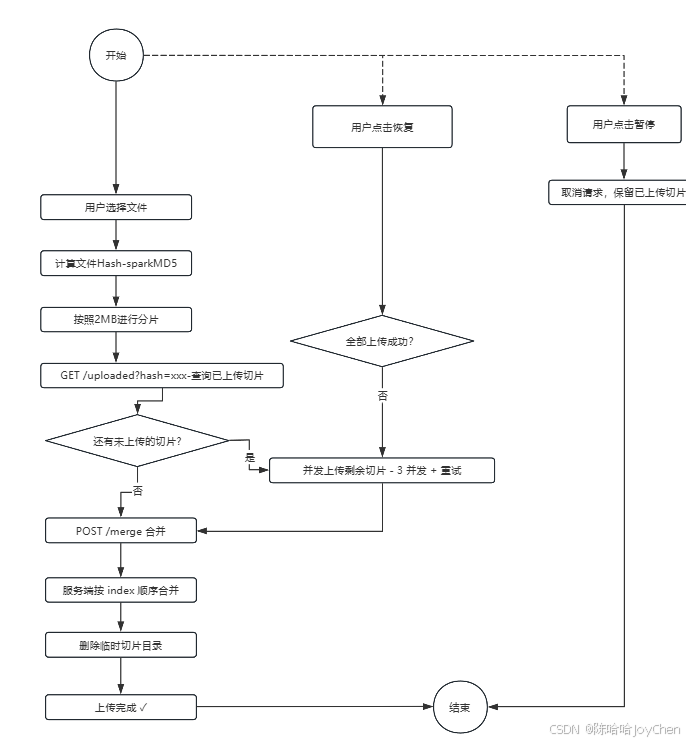
选文件 → 算 Hash → 切片 → 查已上传 → 传剩余切片 → 合并
Step 1:选择文件并计算 Hash
- 操作:用户选择文件,前端使用 SparkMD5 库对文件进行分块读取并计算 MD5 值。
- 目的:生成文件的唯一 Hash,作为该文件的"身份证"。同一文件无论何时上传,其 Hash 值相同。
Step 2:创建切片
- 操作 :按预设的
CHUNK_SIZE(例如 2MB)将文件切分成多个 Blob 数据块。 - 切片信息 :每个切片包含
chunk(Blob 数据)、hash(文件标识)、index(切片序号)、totalChunks(切片总数)。
Step 3:查询已上传切片(断点续传关键)
- 操作 :前端发起
GET /uploaded?hash=xxx请求。 - 服务端 :扫描
tmp/{hash}/目录,返回已成功上传的切片索引列表。 - 前端逻辑 :对比所有切片,计算出
remainingChunks(未上传的切片列表)。
Step 4:并发上传剩余切片
- 并发控制 :启动 3 个并发 Worker 同时上传
remainingChunks。 - 可靠性:每个切片上传附带重试机制(最多3次)和指数退避策略,以应对网络波动。
- 交互性 :
- 支持暂停:取消所有进行中的 axios 请求。
- 支持恢复 :重新获取
remainingChunks并继续上传。
Step 5:合并所有切片
- 操作 :所有切片上传完成后,前端请求
POST /merge。 - 服务端 :按
index顺序读取所有切片,流式合并写入最终文件。 - 清理 :合并成功后,删除临时目录
tmp/{hash}/。
Step 6:文件管理
- 功能:提供已上传文件的列表查看,以及临时文件夹(未完成上传的文件)的查看与清理功能。
#mermaid-svg-UpzSCRt0UM1Ioslf{font-family:"trebuchet ms",verdana,arial,sans-serif;font-size:16px;fill:#333;}@keyframes edge-animation-frame{from{stroke-dashoffset:0;}}@keyframes dash{to{stroke-dashoffset:0;}}#mermaid-svg-UpzSCRt0UM1Ioslf .edge-animation-slow{stroke-dasharray:9,5!important;stroke-dashoffset:900;animation:dash 50s linear infinite;stroke-linecap:round;}#mermaid-svg-UpzSCRt0UM1Ioslf .edge-animation-fast{stroke-dasharray:9,5!important;stroke-dashoffset:900;animation:dash 20s linear infinite;stroke-linecap:round;}#mermaid-svg-UpzSCRt0UM1Ioslf .error-icon{fill:#552222;}#mermaid-svg-UpzSCRt0UM1Ioslf .error-text{fill:#552222;stroke:#552222;}#mermaid-svg-UpzSCRt0UM1Ioslf .edge-thickness-normal{stroke-width:1px;}#mermaid-svg-UpzSCRt0UM1Ioslf .edge-thickness-thick{stroke-width:3.5px;}#mermaid-svg-UpzSCRt0UM1Ioslf .edge-pattern-solid{stroke-dasharray:0;}#mermaid-svg-UpzSCRt0UM1Ioslf .edge-thickness-invisible{stroke-width:0;fill:none;}#mermaid-svg-UpzSCRt0UM1Ioslf .edge-pattern-dashed{stroke-dasharray:3;}#mermaid-svg-UpzSCRt0UM1Ioslf .edge-pattern-dotted{stroke-dasharray:2;}#mermaid-svg-UpzSCRt0UM1Ioslf .marker{fill:#333333;stroke:#333333;}#mermaid-svg-UpzSCRt0UM1Ioslf .marker.cross{stroke:#333333;}#mermaid-svg-UpzSCRt0UM1Ioslf svg{font-family:"trebuchet ms",verdana,arial,sans-serif;font-size:16px;}#mermaid-svg-UpzSCRt0UM1Ioslf p{margin:0;}#mermaid-svg-UpzSCRt0UM1Ioslf .label{font-family:"trebuchet ms",verdana,arial,sans-serif;color:#333;}#mermaid-svg-UpzSCRt0UM1Ioslf .cluster-label text{fill:#333;}#mermaid-svg-UpzSCRt0UM1Ioslf .cluster-label span{color:#333;}#mermaid-svg-UpzSCRt0UM1Ioslf .cluster-label span p{background-color:transparent;}#mermaid-svg-UpzSCRt0UM1Ioslf .label text,#mermaid-svg-UpzSCRt0UM1Ioslf span{fill:#333;color:#333;}#mermaid-svg-UpzSCRt0UM1Ioslf .node rect,#mermaid-svg-UpzSCRt0UM1Ioslf .node circle,#mermaid-svg-UpzSCRt0UM1Ioslf .node ellipse,#mermaid-svg-UpzSCRt0UM1Ioslf .node polygon,#mermaid-svg-UpzSCRt0UM1Ioslf .node path{fill:#ECECFF;stroke:#9370DB;stroke-width:1px;}#mermaid-svg-UpzSCRt0UM1Ioslf .rough-node .label text,#mermaid-svg-UpzSCRt0UM1Ioslf .node .label text,#mermaid-svg-UpzSCRt0UM1Ioslf .image-shape .label,#mermaid-svg-UpzSCRt0UM1Ioslf .icon-shape .label{text-anchor:middle;}#mermaid-svg-UpzSCRt0UM1Ioslf .node .katex path{fill:#000;stroke:#000;stroke-width:1px;}#mermaid-svg-UpzSCRt0UM1Ioslf .rough-node .label,#mermaid-svg-UpzSCRt0UM1Ioslf .node .label,#mermaid-svg-UpzSCRt0UM1Ioslf .image-shape .label,#mermaid-svg-UpzSCRt0UM1Ioslf .icon-shape .label{text-align:center;}#mermaid-svg-UpzSCRt0UM1Ioslf .node.clickable{cursor:pointer;}#mermaid-svg-UpzSCRt0UM1Ioslf .root .anchor path{fill:#333333!important;stroke-width:0;stroke:#333333;}#mermaid-svg-UpzSCRt0UM1Ioslf .arrowheadPath{fill:#333333;}#mermaid-svg-UpzSCRt0UM1Ioslf .edgePath .path{stroke:#333333;stroke-width:2.0px;}#mermaid-svg-UpzSCRt0UM1Ioslf .flowchart-link{stroke:#333333;fill:none;}#mermaid-svg-UpzSCRt0UM1Ioslf .edgeLabel{background-color:rgba(232,232,232, 0.8);text-align:center;}#mermaid-svg-UpzSCRt0UM1Ioslf .edgeLabel p{background-color:rgba(232,232,232, 0.8);}#mermaid-svg-UpzSCRt0UM1Ioslf .edgeLabel rect{opacity:0.5;background-color:rgba(232,232,232, 0.8);fill:rgba(232,232,232, 0.8);}#mermaid-svg-UpzSCRt0UM1Ioslf .labelBkg{background-color:rgba(232, 232, 232, 0.5);}#mermaid-svg-UpzSCRt0UM1Ioslf .cluster rect{fill:#ffffde;stroke:#aaaa33;stroke-width:1px;}#mermaid-svg-UpzSCRt0UM1Ioslf .cluster text{fill:#333;}#mermaid-svg-UpzSCRt0UM1Ioslf .cluster span{color:#333;}#mermaid-svg-UpzSCRt0UM1Ioslf div.mermaidTooltip{position:absolute;text-align:center;max-width:200px;padding:2px;font-family:"trebuchet ms",verdana,arial,sans-serif;font-size:12px;background:hsl(80, 100%, 96.2745098039%);border:1px solid #aaaa33;border-radius:2px;pointer-events:none;z-index:100;}#mermaid-svg-UpzSCRt0UM1Ioslf .flowchartTitleText{text-anchor:middle;font-size:18px;fill:#333;}#mermaid-svg-UpzSCRt0UM1Ioslf rect.text{fill:none;stroke-width:0;}#mermaid-svg-UpzSCRt0UM1Ioslf .icon-shape,#mermaid-svg-UpzSCRt0UM1Ioslf .image-shape{background-color:rgba(232,232,232, 0.8);text-align:center;}#mermaid-svg-UpzSCRt0UM1Ioslf .icon-shape p,#mermaid-svg-UpzSCRt0UM1Ioslf .image-shape p{background-color:rgba(232,232,232, 0.8);padding:2px;}#mermaid-svg-UpzSCRt0UM1Ioslf .icon-shape .label rect,#mermaid-svg-UpzSCRt0UM1Ioslf .image-shape .label rect{opacity:0.5;background-color:rgba(232,232,232, 0.8);fill:rgba(232,232,232, 0.8);}#mermaid-svg-UpzSCRt0UM1Ioslf .label-icon{display:inline-block;height:1em;overflow:visible;vertical-align:-0.125em;}#mermaid-svg-UpzSCRt0UM1Ioslf .node .label-icon path{fill:currentColor;stroke:revert;stroke-width:revert;}#mermaid-svg-UpzSCRt0UM1Ioslf :root{--mermaid-font-family:"trebuchet ms",verdana,arial,sans-serif;} 是
否
是
否
📁 用户选择文件
🔢 Step 1: 计算文件 Hash
(SparkMD5)
✂️ Step 2: 创建切片
(CHUNK_SIZE = 2MB)
❓ Step 3: 查询已上传切片
(GET /uploaded)
是否有未上传切片?
⚡ Step 4: 并发上传剩余切片
(3 Worker + 重试)
🔄 上传完成?
🧩 Step 5: 合并切片
(POST /merge)
🗂️ Step 6: 文件管理
(列表与清理)
🎉 上传成功!
4、断点续传的关键机制要
(1)Hash 唯一性:同一文件 Hash 不变,可识别「续传的是同一个文件」
(2)切片持久化:每片独立保存,不依赖内存
(3)幂等上传:同一 index 可重复上传(覆盖),不影响结果
(4)合并校验:合并前检查 chunks.length === totalChunks
一句话总结
大文件断点续传 = 分片上传 + Hash 标识 + 服务端记录进度 + 只传缺失片 + 最后合并
中断后再次上传同一文件时,通过 Hash 查到已上传切片,跳过它们,只传剩余部分,从而节省时间和带宽。
demo流程图
5、一个前后端的简单demo
前端index.html
bash
<!DOCTYPE html>
<html lang="zh-CN">
<head>
<meta charset="UTF-8" />
<meta name="viewport" content="width=device-width, initial-scale=1.0" />
<title>大文件断点续传</title>
<style>
* { box-sizing: border-box; }
body {
margin: 0;
font-family: -apple-system, BlinkMacSystemFont, "Segoe UI", Roboto, "PingFang SC", "Microsoft YaHei", sans-serif;
background: #f5f7fb;
color: #1f2937;
}
.page {
max-width: 960px;
margin: 0 auto;
padding: 32px 20px 48px;
}
h1 {
margin: 0 0 8px;
font-size: 28px;
}
.desc {
margin: 0 0 24px;
color: #6b7280;
line-height: 1.6;
}
.panel {
background: #fff;
border-radius: 12px;
padding: 20px;
box-shadow: 0 8px 24px rgba(15, 23, 42, 0.06);
margin-bottom: 20px;
}
.toolbar {
display: flex;
flex-wrap: wrap;
gap: 12px;
align-items: center;
}
.toolbar input[type="file"] { display: none; }
.btn {
border: none;
border-radius: 8px;
padding: 10px 16px;
font-size: 14px;
cursor: pointer;
transition: opacity 0.2s;
}
.btn:disabled {
opacity: 0.5;
cursor: not-allowed;
}
.btn-primary { background: #2563eb; color: #fff; }
.btn-secondary { background: #e5e7eb; color: #111827; }
.btn-warning { background: #f59e0b; color: #fff; }
.btn-success { background: #059669; color: #fff; }
.hint {
margin-top: 12px;
font-size: 13px;
color: #6b7280;
}
.file-list { margin-top: 16px; }
.file-item {
border: 1px solid #e5e7eb;
border-radius: 10px;
padding: 14px;
margin-bottom: 12px;
background: #fafafa;
}
.file-head {
display: flex;
justify-content: space-between;
gap: 12px;
align-items: center;
margin-bottom: 10px;
}
.file-name {
font-weight: 600;
word-break: break-all;
}
.file-meta {
font-size: 12px;
color: #6b7280;
margin-top: 4px;
}
.status {
font-size: 13px;
padding: 4px 10px;
border-radius: 999px;
white-space: nowrap;
}
.status.pending { background: #e5e7eb; color: #374151; }
.status.hashing { background: #dbeafe; color: #1d4ed8; }
.status.uploading { background: #dcfce7; color: #166534; }
.status.paused { background: #fef3c7; color: #92400e; }
.status.merging { background: #ede9fe; color: #6d28d9; }
.status.done { background: #d1fae5; color: #065f46; }
.status.error { background: #fee2e2; color: #991b1b; }
progress {
width: 100%;
height: 10px;
}
.progress-text {
margin-top: 6px;
font-size: 12px;
color: #6b7280;
}
.actions {
display: flex;
gap: 8px;
margin-top: 10px;
flex-wrap: wrap;
}
table {
width: 100%;
border-collapse: collapse;
}
th, td {
border-bottom: 1px solid #e5e7eb;
padding: 10px 8px;
text-align: left;
font-size: 14px;
}
th { color: #6b7280; font-weight: 600; }
a { color: #2563eb; text-decoration: none; }
.empty {
text-align: center;
color: #9ca3af;
padding: 24px 0;
}
</style>
</head>
<body>
<div class="page">
<h1>大文件断点续传</h1>
<p class="desc">
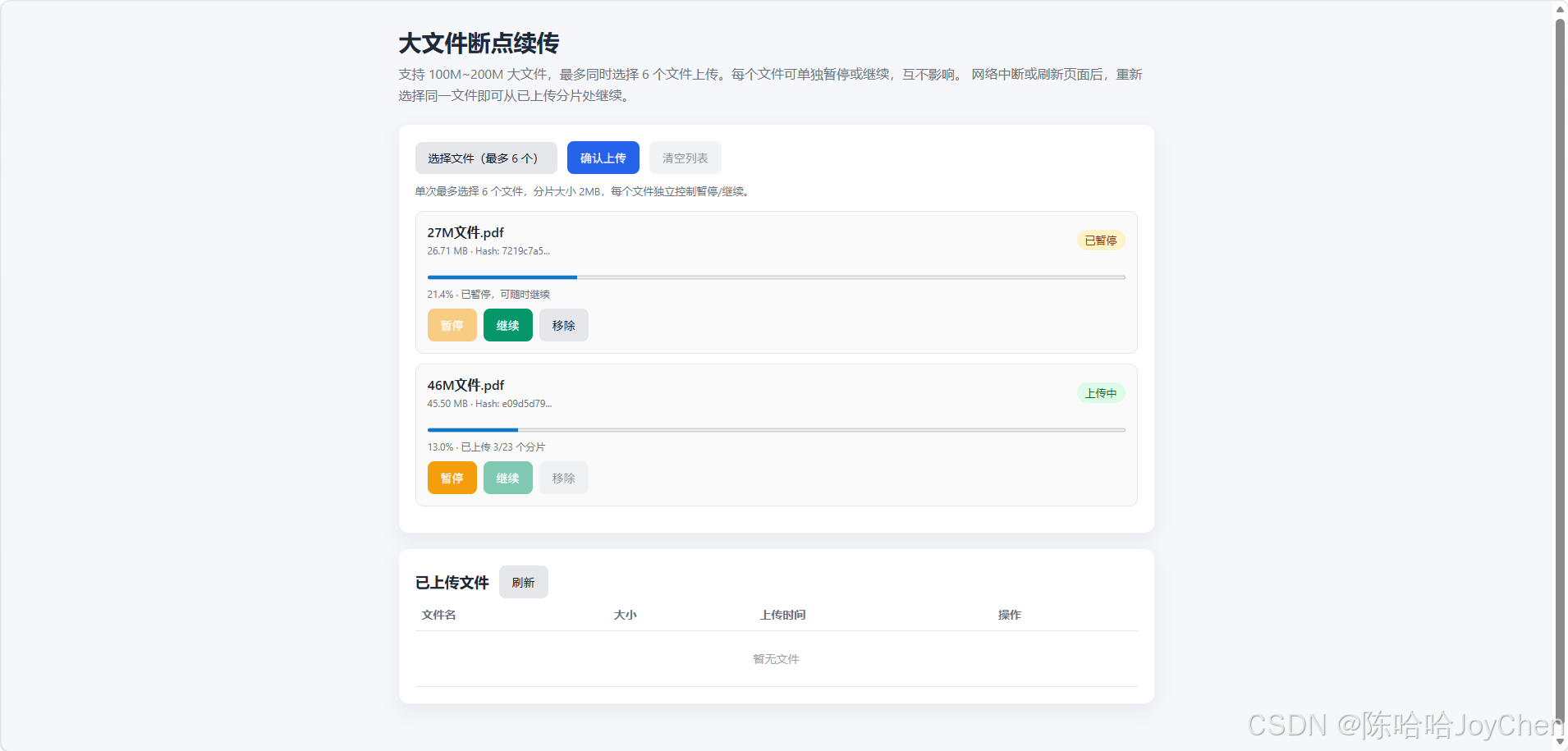
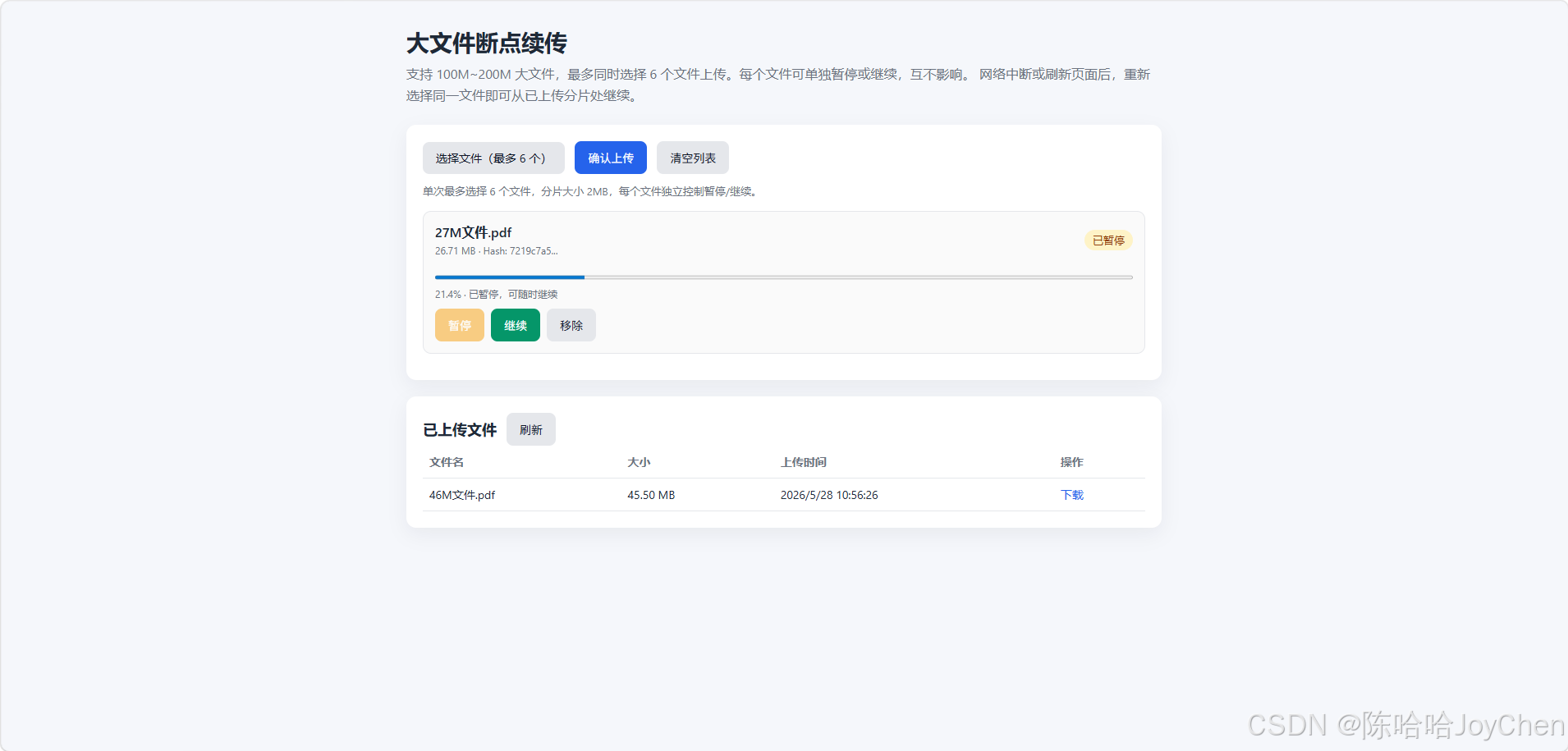
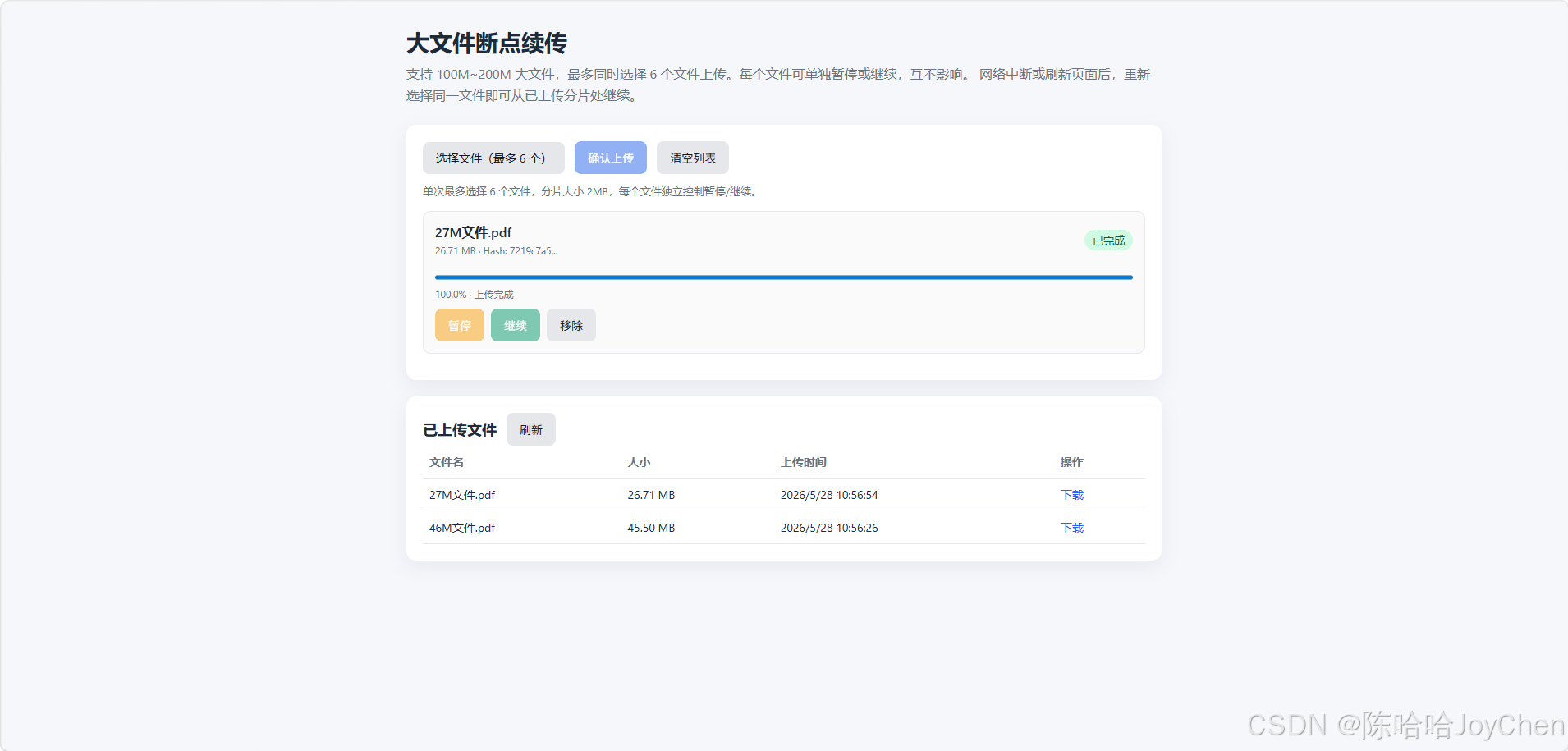
支持 100M~200M 大文件,最多同时选择 6 个文件上传。每个文件可单独暂停或继续,互不影响。
网络中断或刷新页面后,重新选择同一文件即可从已上传分片处继续。
</p>
<div class="panel">
<div class="toolbar">
<label class="btn btn-secondary" for="fileInput">选择文件(最多 6 个)</label>
<input id="fileInput" type="file" multiple />
<button id="startBtn" class="btn btn-primary" disabled>确认上传</button>
<button id="clearBtn" class="btn btn-secondary" disabled>清空列表</button>
</div>
<div class="hint">单次最多选择 6 个文件,分片大小 2MB,每个文件独立控制暂停/继续。</div>
<div id="uploadList" class="file-list"></div>
</div>
<div class="panel">
<div class="toolbar">
<h2 style="margin: 0; font-size: 18px;">已上传文件</h2>
<button id="refreshBtn" class="btn btn-secondary">刷新</button>
</div>
<table>
<thead>
<tr>
<th>文件名</th>
<th>大小</th>
<th>上传时间</th>
<th>操作</th>
</tr>
</thead>
<tbody id="serverFileList">
<tr><td colspan="4" class="empty">暂无文件</td></tr>
</tbody>
</table>
</div>
</div>
<script src="https://cdn.jsdelivr.net/npm/spark-md5@3.0.2/spark-md5.min.js"></script>
<script>
const API_BASE = 'http://localhost:3011/api';
const CHUNK_SIZE = 2 * 1024 * 1024;
const MAX_FILES = 6;
const CHUNK_CONCURRENCY = 3;
const MAX_RETRIES = 3;
const STATUS_TEXT = {
pending: '待上传',
hashing: '计算 Hash',
uploading: '上传中',
paused: '已暂停',
merging: '合并中',
done: '已完成',
error: '失败',
};
const fileInput = document.getElementById('fileInput');
const startBtn = document.getElementById('startBtn');
const clearBtn = document.getElementById('clearBtn');
const uploadList = document.getElementById('uploadList');
const serverFileList = document.getElementById('serverFileList');
const refreshBtn = document.getElementById('refreshBtn');
/** @type {Map<string, UploadTask>} */
const tasks = new Map();
class UploadTask {
constructor(file) {
this.id = `${file.name}_${file.size}_${file.lastModified}`;
this.file = file;
this.hash = '';
this.chunks = [];
this.uploaded = new Set();
this.status = 'pending';
this.progress = 0;
this.message = '';
this.isPaused = false;
this.activeControllers = new Set();
this.element = null;
}
render() {
if (!this.element) {
this.element = document.createElement('div');
this.element.className = 'file-item';
this.element.dataset.id = this.id;
uploadList.appendChild(this.element);
}
const canPause = this.status === 'uploading' || this.status === 'hashing';
const canResume = this.status === 'paused' || this.status === 'error';
const canRemove = ['pending', 'paused', 'done', 'error'].includes(this.status);
this.element.innerHTML = `
<div class="file-head">
<div>
<div class="file-name">${escapeHtml(this.file.name)}</div>
<div class="file-meta">${formatSize(this.file.size)}${this.hash ? ` · Hash: ${this.hash.slice(0, 8)}...` : ''}</div>
</div>
<span class="status ${this.status}">${STATUS_TEXT[this.status] || this.status}</span>
</div>
<progress max="100" value="${this.progress}"></progress>
<div class="progress-text">${this.progress.toFixed(1)}%${this.message ? ` · ${escapeHtml(this.message)}` : ''}</div>
<div class="actions">
<button class="btn btn-warning pause-btn" ${canPause ? '' : 'disabled'}>暂停</button>
<button class="btn btn-success resume-btn" ${canResume ? '' : 'disabled'}>继续</button>
<button class="btn btn-secondary remove-btn" ${canRemove ? '' : 'disabled'}>移除</button>
</div>
`;
this.element.querySelector('.pause-btn').onclick = () => this.pause();
this.element.querySelector('.resume-btn').onclick = () => this.resume();
this.element.querySelector('.remove-btn').onclick = () => removeTask(this.id);
}
update(status, extra = {}) {
if (status) this.status = status;
if (extra.progress !== undefined) this.progress = extra.progress;
if (extra.message !== undefined) this.message = extra.message;
this.render();
updateToolbar();
}
pause() {
if (!['uploading', 'hashing'].includes(this.status)) return;
this.isPaused = true;
this.activeControllers.forEach((controller) => controller.abort());
this.activeControllers.clear();
this.update('paused', { message: '已暂停,可随时继续' });
}
async resume() {
if (!['paused', 'error', 'pending'].includes(this.status)) return;
this.isPaused = false;
await this.start();
}
async start() {
try {
this.isPaused = false;
this.update('hashing', { message: '正在计算文件指纹' });
if (!this.hash) {
this.hash = await calculateHash(this.file, () => this.isPaused);
if (this.isPaused) return;
}
this.chunks = createChunks(this.file, this.hash);
const uploadedRes = await fetch(`${API_BASE}/upload/uploaded?hash=${this.hash}`);
const uploadedData = await uploadedRes.json();
uploadedData.uploaded.forEach((index) => this.uploaded.add(index));
this.updateProgress();
const remaining = this.chunks.filter((item) => !this.uploaded.has(item.index));
if (remaining.length === 0) {
await this.merge();
return;
}
this.update('uploading', { message: `剩余 ${remaining.length} 个分片` });
await this.uploadChunks(remaining);
if (!this.isPaused && this.status !== 'error') {
await this.merge();
}
} catch (err) {
if (err.name === 'AbortError') return;
this.update('error', { message: err.message || '上传失败' });
}
}
updateProgress() {
const percent = this.chunks.length
? (this.uploaded.size / this.chunks.length) * 100
: 0;
this.progress = percent;
this.render();
}
async uploadChunks(queue) {
const items = queue.map((chunk) => ({ ...chunk, retries: 0 }));
let pointer = 0;
const worker = async () => {
while (pointer < items.length && !this.isPaused) {
const current = pointer++;
const chunkItem = items[current];
const ok = await this.uploadOne(chunkItem);
if (ok) {
this.uploaded.add(chunkItem.index);
this.updateProgress();
this.message = `已上传 ${this.uploaded.size}/${this.chunks.length} 个分片`;
this.render();
}
}
};
await Promise.all(Array.from({ length: CHUNK_CONCURRENCY }, worker));
}
async uploadOne(chunkItem) {
const { chunk, hash, index, totalChunks } = chunkItem;
const formData = new FormData();
formData.append('chunk', chunk);
formData.append('hash', hash);
formData.append('index', index);
formData.append('totalChunks', totalChunks);
for (let attempt = 0; attempt <= MAX_RETRIES; attempt++) {
if (this.isPaused) return false;
const controller = new AbortController();
this.activeControllers.add(controller);
try {
const res = await fetch(`${API_BASE}/upload/chunk`, {
method: 'POST',
body: formData,
signal: controller.signal,
});
this.activeControllers.delete(controller);
if (!res.ok) {
const data = await res.json().catch(() => ({}));
throw new Error(data.error || `分片 ${index} 上传失败`);
}
return true;
} catch (err) {
this.activeControllers.delete(controller);
if (err.name === 'AbortError' || this.isPaused) return false;
if (attempt === MAX_RETRIES) {
this.update('error', { message: `分片 ${index} 上传失败` });
return false;
}
await sleep(Math.pow(2, attempt + 1) * 1000);
}
}
return false;
}
async merge() {
this.update('merging', { message: '正在合并文件' });
const res = await fetch(`${API_BASE}/upload/merge`, {
method: 'POST',
headers: { 'Content-Type': 'application/json' },
body: JSON.stringify({
hash: this.hash,
totalChunks: this.chunks.length,
filename: this.file.name,
}),
});
const data = await res.json();
if (!res.ok) throw new Error(data.error || '合并失败');
this.update('done', { progress: 100, message: '上传完成' });
refreshServerFiles();
}
}
function escapeHtml(text) {
return String(text)
.replace(/&/g, '&')
.replace(/</g, '<')
.replace(/>/g, '>')
.replace(/"/g, '"');
}
function formatSize(size) {
if (size < 1024) return `${size} B`;
if (size < 1024 * 1024) return `${(size / 1024).toFixed(2)} KB`;
if (size < 1024 * 1024 * 1024) return `${(size / (1024 * 1024)).toFixed(2)} MB`;
return `${(size / (1024 * 1024 * 1024)).toFixed(2)} GB`;
}
function sleep(ms) {
return new Promise((resolve) => setTimeout(resolve, ms));
}
function calculateHash(file, shouldStop) {
return new Promise((resolve, reject) => {
const chunkSize = 2 * 1024 * 1024;
const total = Math.ceil(file.size / chunkSize);
let current = 0;
const spark = new SparkMD5.ArrayBuffer();
const reader = new FileReader();
reader.onload = (e) => {
if (shouldStop && shouldStop()) return;
spark.append(e.target.result);
current += 1;
if (current < total) {
loadNext();
} else {
resolve(spark.end());
}
};
reader.onerror = () => reject(new Error('Hash 计算失败'));
function loadNext() {
if (shouldStop && shouldStop()) return;
const start = current * chunkSize;
const end = Math.min(start + chunkSize, file.size);
reader.readAsArrayBuffer(file.slice(start, end));
}
loadNext();
});
}
function createChunks(file, hash) {
const total = Math.ceil(file.size / CHUNK_SIZE);
const list = [];
for (let i = 0; i < total; i++) {
const start = i * CHUNK_SIZE;
const end = Math.min(start + CHUNK_SIZE, file.size);
list.push({
chunk: file.slice(start, end),
hash,
index: i,
totalChunks: total,
});
}
return list;
}
function updateToolbar() {
const hasTasks = tasks.size > 0;
const hasPending = [...tasks.values()].some((task) => ['pending', 'paused', 'error'].includes(task.status));
const allFinished = hasTasks && [...tasks.values()].every((task) => ['done', 'error'].includes(task.status));
startBtn.disabled = !hasPending;
clearBtn.disabled = !hasTasks || [...tasks.values()].some((task) => ['uploading', 'hashing', 'merging'].includes(task.status));
fileInput.disabled = tasks.size >= MAX_FILES && !allFinished;
}
function removeTask(id) {
const task = tasks.get(id);
if (!task) return;
if (['uploading', 'hashing', 'merging'].includes(task.status)) return;
task.element?.remove();
tasks.delete(id);
if (tasks.size === 0) uploadList.innerHTML = '';
updateToolbar();
}
fileInput.addEventListener('change', (event) => {
const selected = Array.from(event.target.files || []);
if (!selected.length) return;
const available = MAX_FILES - tasks.size;
if (available <= 0) {
alert('最多只能同时处理 6 个文件');
fileInput.value = '';
return;
}
const filesToAdd = selected.slice(0, available);
if (selected.length > available) {
alert(`最多还能添加 ${available} 个文件,已自动截取前 ${available} 个`);
}
filesToAdd.forEach((file) => {
const task = new UploadTask(file);
tasks.set(task.id, task);
task.render();
});
fileInput.value = '';
updateToolbar();
});
startBtn.addEventListener('click', async () => {
const pendingTasks = [...tasks.values()].filter((task) => ['pending', 'paused', 'error'].includes(task.status));
await Promise.all(pendingTasks.map((task) => task.start()));
});
clearBtn.addEventListener('click', () => {
const busy = [...tasks.values()].some((task) => ['uploading', 'hashing', 'merging'].includes(task.status));
if (busy) {
alert('仍有文件正在上传,请先暂停后再清空');
return;
}
tasks.clear();
uploadList.innerHTML = '';
updateToolbar();
});
async function refreshServerFiles() {
try {
const res = await fetch(`${API_BASE}/files`);
const files = await res.json();
if (!files.length) {
serverFileList.innerHTML = '<tr><td colspan="4" class="empty">暂无文件</td></tr>';
return;
}
serverFileList.innerHTML = files
.map((file) => {
const time = new Date(file.mtime).toLocaleString();
const url = `${API_BASE}/download/${encodeURIComponent(file.name)}`;
return `
<tr>
<td>${escapeHtml(file.name)}</td>
<td>${formatSize(file.size)}</td>
<td>${time}</td>
<td><a href="${url}" target="_blank">下载</a></td>
</tr>
`;
})
.join('');
} catch (err) {
serverFileList.innerHTML = `<tr><td colspan="4" class="empty">加载失败:${escapeHtml(err.message)}</td></tr>`;
}
}
refreshBtn.addEventListener('click', refreshServerFiles);
refreshServerFiles();
</script>
</body>
</html>后端node-express,require的库自行引入
bash
const express = require('express');
const multer = require('multer');
const fs = require('fs-extra');
const path = require('path');
const cors = require('cors');

const app = express();
const PORT = 3011;
const UPLOAD_DIR = path.resolve(__dirname, 'uploads');
const CHUNK_DIR = path.resolve(__dirname, 'chunks');

fs.ensureDirSync(UPLOAD_DIR);
fs.ensureDirSync(CHUNK_DIR);

app.use(cors());
app.use(express.json());
app.use(express.urlencoded({ extended: true }));
app.use(express.static(__dirname));

const upload = multer({ storage: multer.memoryStorage(), limits: { fileSize: 10 * 1024 * 1024 } });

// 上传单个分片
app.post('/api/upload/chunk', upload.single('chunk'), async (req, res) => {
  try {
    const { hash, index } = req.body;
    const chunk = req.file;

    if (!hash || index === undefined || !chunk) {
      return res.status(400).json({ error: '缺少 hash、index 或 chunk' });
    }

    const dir = path.join(CHUNK_DIR, hash);
    await fs.ensureDir(dir);
    await fs.writeFile(path.join(dir, String(index)), chunk.buffer);

    res.json({ message: '分片上传成功', index: Number(index) });
  } catch (err) {
    res.status(500).json({ error: err.message });
  }
});

// 查询已上传的分片
app.get('/api/upload/uploaded', async (req, res) => {
  try {
    const { hash } = req.query;
    if (!hash) {
      return res.status(400).json({ error: '缺少 hash' });
    }

    const dir = path.join(CHUNK_DIR, hash);
    if (!(await fs.pathExists(dir))) {
      return res.json({ uploaded: [] });
    }

    const files = await fs.readdir(dir);
    const uploaded = files.map((name) => Number(name)).filter((n) => !Number.isNaN(n)).sort((a, b) => a - b);
    res.json({ uploaded });
  } catch (err) {
    res.status(500).json({ error: err.message });
  }
});

// 合并分片
app.post('/api/upload/merge', async (req, res) => {
  const { hash, totalChunks, filename } = req.body;

  if (!hash || !totalChunks || !filename) {
    return res.status(400).json({ error: '缺少 hash、totalChunks 或 filename' });
  }

  const safeName = path.basename(filename);
  const chunkDir = path.join(CHUNK_DIR, hash);
  const outputPath = path.join(UPLOAD_DIR, safeName);

  try {
    if (!(await fs.pathExists(chunkDir))) {
      return res.status(400).json({ error: '分片目录不存在' });
    }

    const chunkNames = await fs.readdir(chunkDir);
    if (chunkNames.length !== Number(totalChunks)) {
      return res.status(400).json({
        error: `分片数量不匹配,期望 ${totalChunks},实际 ${chunkNames.length}`,
      });
    }

    chunkNames.sort((a, b) => Number(a) - Number(b));

    const writeStream = fs.createWriteStream(outputPath);
    for (const name of chunkNames) {
      const data = await fs.readFile(path.join(chunkDir, name));
      if (!writeStream.write(data)) {
        await new Promise((resolve) => writeStream.once('drain', resolve));
      }
      await fs.remove(path.join(chunkDir, name));
    }

    writeStream.end();
    await new Promise((resolve, reject) => {
      writeStream.on('finish', resolve);
      writeStream.on('error', reject);
    });

    await fs.remove(chunkDir);
    res.json({ message: '文件合并成功', filename: safeName });
  } catch (err) {
    await fs.remove(outputPath).catch(() => {});
    res.status(500).json({ error: err.message });
  }
});

// 已上传文件列表
app.get('/api/files', async (req, res) => {
  try {
    const items = await fs.readdir(UPLOAD_DIR);
    const files = [];

    for (const name of items) {
      const fullPath = path.join(UPLOAD_DIR, name);
      const stat = await fs.stat(fullPath);
      if (stat.isFile()) {
        files.push({ name, size: stat.size, mtime: stat.mtime });
      }
    }

    res.json(files);
  } catch (err) {
    res.status(500).json({ error: err.message });
  }
});

// 下载文件
app.get('/api/download/:filename', async (req, res) => {
  const safeName = path.basename(req.params.filename);
  const filepath = path.join(UPLOAD_DIR, safeName);

  try {
    if (await fs.pathExists(filepath)) {
      res.download(filepath);
    } else {
      res.status(404).send('文件不存在');
    }
  } catch (err) {
    res.status(500).send(err.message);
  }
});

// 删除未完成的分片任务
app.delete('/api/upload/chunks/:hash', async (req, res) => {
  const dir = path.join(CHUNK_DIR, req.params.hash);
  try {
    if (await fs.pathExists(dir)) {
      await fs.remove(dir);
      res.json({ message: '已删除' });
    } else {
      res.status(404).json({ error: '分片目录不存在' });
    }
  } catch (err) {
    res.status(500).json({ error: err.message });
  }
});

app.listen(PORT, () => {
  console.log(`断点续传服务已启动: http://localhost:${PORT}`);
  console.log(`打开页面: http://localhost:${PORT}/index.html`);
});
对于100MB、200MB大小的文件其实上传还是很快的,网络一般不会很差,如果要测试就修改浏览器的网速,那什么情况可能会用到大文件上传这种,而且也有些可以直接使用的库
比如:
✅ 视频相关系统(99% 要用):短视频后台、在线教育(老师传视频)、直播素材上传
媒体 / 影视公司
✅ 企业网盘、云盘:钉钉、企业微信、私有云盘,没有断点续传根本没法用。
✅ 工程 / 设计 / 制造业:CAD 图纸、3D 模型、超大设计文件、BIM 模型
✅ 医疗系统:CT、X 光 影像(DICOM 文件非常大)
✅ 大数据 / AI 平台:数据集上传、模型文件
✅ 备份 / 日志系统:服务器备份包、系统日志
✅ 政府 / 事业单位系统:网络差、文件大、必须稳定。
6、那下载呢,下载如果网络不好可不可以断点续传呢,完全可以,而且更简单!
断点下载 = 下载中途断了、关了、断网了,下次继续从断掉的位置下,不用从头来。
比如:
下 10GB 文件,下到 90% 断网,普通下载 → 从头下,断点下载 → 从 90% 继续
断点下载不是前端库实现的,而是 HTTP 协议原生支持。
只要后端返回一个响应头:
Accept-Ranges: bytes
Nginx / Apache / Java / Python / Node.js
只要开启文件流式传输 + Accept-Ranges 头,默认就支持断点下载。
几乎所有云存储(阿里云 OSS、腾讯云 COS、七牛)全都默认支持断点下载。
没有什么特殊情况前端不需要管,除非要做一个网页内的下载管理器(带暂停、继续、进度条)