目录
[一. gradle中配置了什么](#一. gradle中配置了什么)
[二. 源码代码映射实现](#二. 源码代码映射实现)
[1. 核心入口:parseXml(...)](#1. 核心入口:parseXml(...))
[2. 布局类型判断:parseOriginalXml(...)](#2. 布局类型判断:parseOriginalXml(...))
[3. 解析 节点:parseData(...)](#3. 解析 节点:parseData(...))
[4. 最核心的方法:parseExpressions(...)](#4. 最核心的方法:parseExpressions(...))
[4.1 两类目标元素](#4.1 两类目标元素)
[4.2 为每个元素创建 BindingTargetBundle](#4.2 为每个元素创建 BindingTargetBundle)
[4.3 解析属性中的表达式](#4.3 解析属性中的表达式)
[5. XML 清洗:stripFile(...)](#5. XML 清洗:stripFile(...))
[三. 如何实现在同步时就编译代码的](#三. 如何实现在同步时就编译代码的)
[四. 总结](#四. 总结)
一. gradle中配置了什么
首先,我们想使用ViewBinding,要在gradle中配置值viewBinding { enabled = true },所以我们先从此处入手。点击viewBinding,我们进入了一个类:
Kotlin
/*
 * Copyright (C) 2019 The Android Open Source Project
 *
 * Licensed under the Apache License, Version 2.0 (the "License");
 * you may not use this file except in compliance with the License.
 * You may obtain a copy of the License at
 *
 *      http://www.apache.org/licenses/LICENSE-2.0
 *
 * Unless required by applicable law or agreed to in writing, software
 * distributed under the License is distributed on an "AS IS" BASIS,
 * WITHOUT WARRANTIES OR CONDITIONS OF ANY KIND, either express or implied.
 * See the License for the specific language governing permissions and
 * limitations under the License.
 */

package com.android.build.gradle.internal.dsl

import com.android.build.api.dsl.BuildFeatures
import com.android.build.api.dsl.ViewBinding
import com.android.build.gradle.api.ViewBindingOptions
import com.android.build.gradle.internal.services.DslServices
import com.android.build.gradle.options.BooleanOption
import java.util.function.Supplier
import javax.inject.Inject

/** DSL object for configuring view binding options.  */
abstract class ViewBindingOptionsImpl @Inject constructor(
    private val features: Supplier<BuildFeatures>,
    private val dslServices: DslServices
) : ViewBindingOptions, ViewBinding {

    override var enable: Boolean
        get() {
            val bool = features.get().viewBinding
            if (bool != null) {
                return bool
            }
            return dslServices.projectOptions[BooleanOption.BUILD_FEATURE_VIEWBINDING]
        }
        set(value) {
            features.get().viewBinding = value
        }

    /** Whether to enable view binding.  */
    override var isEnabled: Boolean
        get() = enable
        set(value) {
            enable = value
        }
}
可以看见它只是保存了DSL的值到类中,映射的代码不在此处。
二. 源码代码映射实现
这映射代码的位置很难找(作者技术还不够),最后是通过网上搜索,知道代码位置是在android/platform/frameworks/data-binding 中。克隆下面仓库到本地,即可查看源码:https://android.googlesource.com/platform/frameworks/data-binding/ https://android.googlesource.com/platform/frameworks/data-binding/附,克隆命令:
bash
git clone -c http.proxy=http://127.0.0.1:端口 \
            -c https.proxy=http://127.0.0.1:端口 \
            https://android.googlesource.com/platform/frameworks/data-binding
转换类在这个位置:
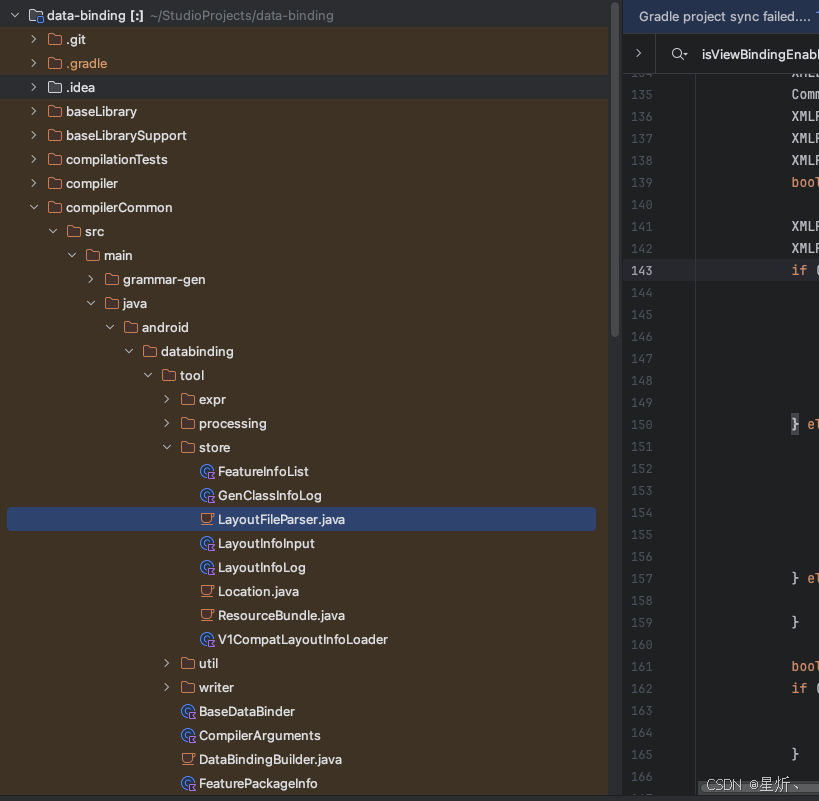
java
    private static ResourceBundle.LayoutFileBundle parseOriginalXml(
            @NonNull final RelativizableFile originalFile, @NonNull final String pkg,
            @NonNull final String encoding, boolean isViewBindingEnabled,
            boolean isDataBindingEnabled)
            throws IOException {
        File original = originalFile.getAbsoluteFile();
        try {
            Scope.enter(new FileScopeProvider() {
                @Override
                public String provideScopeFilePath() {
                    return original.getAbsolutePath();
                }
            });
            final String xmlNoExtension = ParserHelper.stripExtension(original.getName());
            FileInputStream fin = new FileInputStream(original);
            InputStreamReader reader = new InputStreamReader(fin, encoding);
            ANTLRInputStream inputStream = new ANTLRInputStream(reader);
            XMLLexer lexer = new XMLLexer(inputStream);
            CommonTokenStream tokenStream = new CommonTokenStream(lexer);
            XMLParser parser = new XMLParser(tokenStream);
            XMLParser.DocumentContext expr = parser.document();
            XMLParser.ElementContext root = expr.element();
            boolean isBindingData = "layout".equals(root.elmName.getText());

            XMLParser.ElementContext data;
            XMLParser.ElementContext rootView;
            if (isBindingData) {
                if (!isDataBindingEnabled) {
                    L.e(ErrorMessages.FOUND_LAYOUT_BUT_NOT_ENABLED);
                    return null;
                }
                data = getDataNode(root);
                rootView = getViewNode(original, root);
            } else if (isViewBindingEnabled) {
                if ("true".equalsIgnoreCase(attributeMap(root).get("tools:viewBindingIgnore"))) {
                    L.d("Ignoring %s for view binding", originalFile);
                    return null;
                }
                data = null;
                rootView = root;
            } else {
                return null;
            }

            boolean isMerge = "merge".equals(rootView.elmName.getText());
            if (isBindingData && isMerge && !filter(rootView, "include").isEmpty()) {
                L.e(ErrorMessages.INCLUDE_INSIDE_MERGE);
                return null;
            }

            String rootViewType = getViewName(rootView);
            String rootViewId = attributeMap(rootView).get("android:id");
            ResourceBundle.LayoutFileBundle bundle =
                new ResourceBundle.LayoutFileBundle(
                    originalFile, xmlNoExtension, original.getParentFile().getName(), pkg,
                    isMerge, isBindingData, rootViewType, rootViewId);

            final String newTag = original.getParentFile().getName() + '/' + xmlNoExtension;
            parseData(original, data, bundle);
            parseExpressions(newTag, rootView, isMerge, bundle);

            return bundle;
        } finally {
            Scope.exit();
        }
}这个类处理的是编译期逻辑 (不是运行期),Gradle 构建时会调用它。它的输入是你的
res/layout/xxx.xml,输出是两样东西:
一个清洗后的 XML 文件 (去掉了
@{...}表达式,变成普通布局)一个 LayoutFileBundle 对象 (记录了所有需要绑定的视图、表达式、变量等信息,后续用来生成
XXXBinding.java代码)
1. 核心入口:parseXml(...)
java
public static ResourceBundle.LayoutFileBundle parseXml(...)这是主入口,做三件事:
| 步骤 | 方法 | 作用 |
|---|---|---|
| 1 | findEncoding() |
检测 XML 文件编码(防止中文乱码) |
| 2 | stripFile() |
清洗 XML :把 @{...} 等表达式剥离,输出到 build/ 目录 |
| 3 | parseOriginalXml() |
解析原始 XML ,提取 binding 信息,返回 LayoutFileBundle |
2. 布局类型判断:parseOriginalXml(...)
这个方法决定你的 XML 到底是 Data Binding 还是 View Binding:
java
boolean isBindingData = "layout".equals(root.elmName.getText());| 根节点 | 类型 | 处理逻辑 |
|---|---|---|
<layout> |
Data Binding | 必须开启 isDataBindingEnabled,解析 <data> 节点和内部视图 |
| 普通视图根节点 | View Binding | 必须开启 isViewBindingEnabled,且没有 tools:viewBindingIgnore="true" |
| 其他 | 不处理 | 直接返回 null |
如果是 Data Binding,还会检查 <merge> 标签里不能有 <include>(代码里有这个限制)。
3. 解析 <data> 节点:parseData(...)
如果是 Data Binding 布局,根节点是 <layout>,它的第一个子节点通常是 <data>:
XML
<<layout>
    <data>
        <import type="java.util.List"/>
        <variable name="user" type="com.example.User"/>
    </data>
    ...
</layout>
这个方法遍历
<data>内部:
<import>:记录类型别名,比如type="java.util.List",后续代码生成时用来 import
<variable>:记录变量名和类型,比如name="user",type="com.example.User"
class属性:自定义生成的 Binding 类名(默认是布局名转驼峰)
4. 最核心的方法:parseExpressions(...)
它遍历 XML 树,找出所有需要生成绑定代码的视图,分为两类:
4.1 两类目标元素
java
List<ElementContext> bindingElements;        // 需要生成绑定字段的
List<ElementContext> otherElementsWithIds;  // 只有 id,没有表达式的
bindingElements包括:
根视图本身
<merge>标签的直接子视图带有
@{...}或@={...}表达式的视图包含
<include>子标签的视图
<include>标签本身
otherElementsWithIds:
- 其他只带了
android:id但没有绑定表达式的普通视图(View Binding 也需要这些)
4.2 为每个元素创建 BindingTargetBundle
遍历 bindingElements,为每个元素创建绑定目标:
java
bundle.createBindingTarget(id, viewName, true, tag, originalTag, ...);特殊处理:
<include>:读取layout="@layout/xxx",提取被包含的布局名
<fragment>:不支持数据绑定表达式,直接跳过普通视图 :生成一个唯一 tag(如
binding_0),后续生成的 Java 代码会用这个 tag 去findViewWithTag
4.3 解析属性中的表达式
遍历该元素的所有属性,找 @{...} 和 @={...}:
java
final boolean isOneWay = value.startsWith("@{");   // 单向绑定
final boolean isTwoWay = value.startsWith("@={");  // 双向绑定
提取花括号内的表达式内容,记录到 BindingTargetBundle 中。后续代码生成器会根据这些表达式生成 setXxx() 或 addOnPropertyChangedCallback() 等代码。
5. XML 清洗:stripFile(...)
为什么需要清洗?因为 Android 系统运行时不认识 @{...} 这种语法,如果直接把带表达式的 XML 打包进 APK,运行时会报错。
java
private static void stripFile(...) {
    // 1. 用 XPath 判断是否有 <layout> 根节点
    boolean changed = isBindingLayout(doc, xPath);

    // 2. 如果有,调用 XmlEditor.strip() 把 @{...} 等全部删掉
    if (changed) {
        stripBindingTags(xml, out, binderId, encoding);
    } else {
        // 没有表达式就直接复制
        FileUtils.copyFile(xml, out);
    }
}
清洗后的 XML 就是普通的、合法的 Android 布局文件,会被打包进 APK。
6.几个辅助工具方法
| 方法 | 作用 |
|---|---|
findEncoding() |
用 UniversalDetector 检测文件编码,默认 UTF-8 |
attributeMap() |
把 XML 属性转成 Map<String, String>,方便读取 |
escapeQuotes() |
去掉属性值前后的引号,并做 XML 转义还原 |
getViewName() |
处理特殊标签:view 标签读 class 属性;include/fragment 返回 android.view.View |
filter() / filterNot() |
按标签名筛选子元素 |
三. 如何实现在同步时就编译代码的
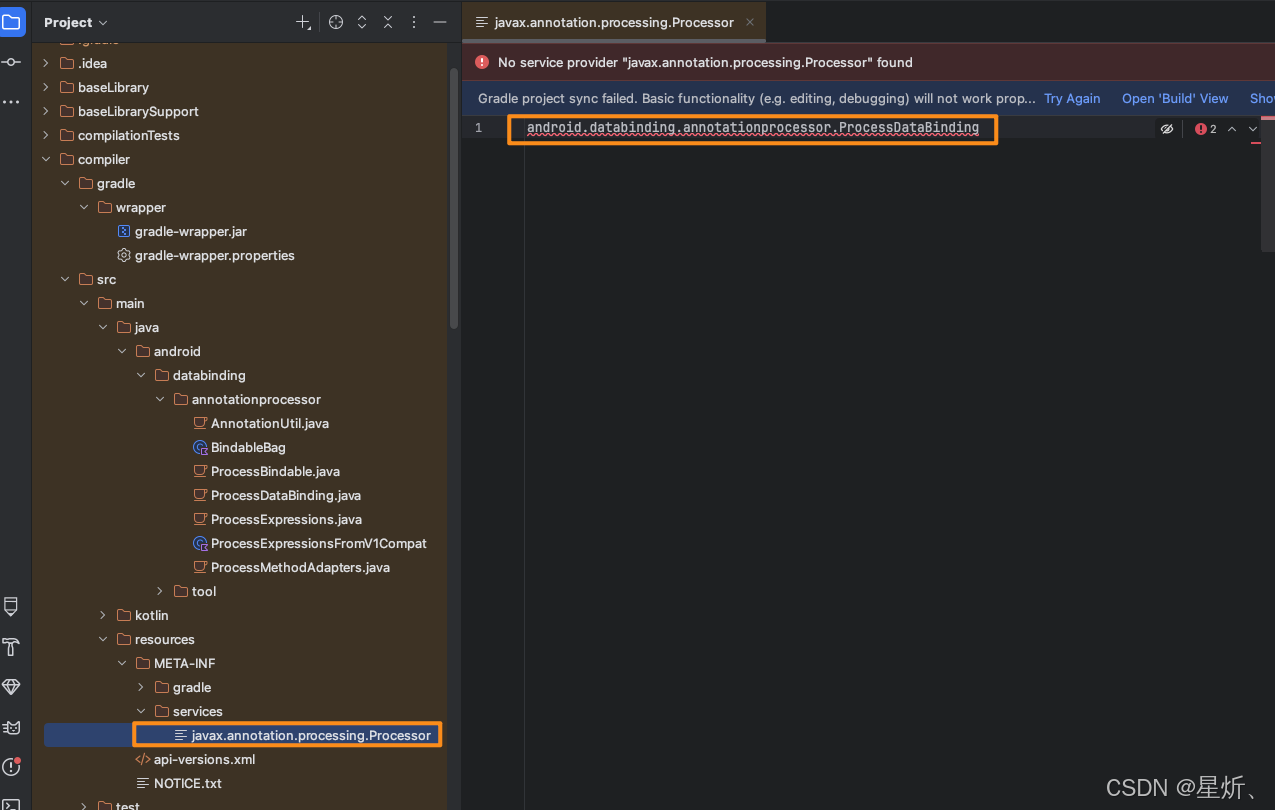
这个代码是我们在同步时就进行执行的,这个实现的逻辑是什么呢?下面我们来看它具体的实现:
执行: ./gradlew assembleDebug
javac扫描 classpath 中的 JAR
发现META-INF/services/javax.annotation.processing.Processor(下图是这个类的位置)
找到这个类并示例化
加载并实例化该类
四. 总结
你的 XML 布局文件
│
▼
parseXml()
├── 1. findEncoding() ──► 检测编码
├── 2. stripFile() ─────► 清洗 XML(去掉 @{...})──► 输出到 build/intermediates/...
└── 3. parseOriginalXml()
├── 判断类型:DataBinding / ViewBinding / 不处理
├── parseData() ─────► 提取 <import> / <variable>
└── parseExpressions()
├── 收集 bindingElements(有表达式、include、根视图等)
├── 收集 otherElementsWithIds(只带 id 的)
└── 为每个元素创建 BindingTargetBundle(记录 id、tag、表达式)
│
▼
返回 LayoutFileBundle
│
▼
后续代码生成器用它生成 XXXBinding.java