目录
[六、string IO流](#六、string IO流)
一、IO继承家族类
- C++语言不直接处理输入输出,而是通过一族定义在标准库中的类型在处理IO。这些类型支持从设备中读取数据和向设备中写入数据的IO操作,设备可以是文件、控制台窗口等。
- 到目前为止,我们已经使用过的IO类型和对象都是操纵char数据的,默认情况下这些对象都是关联到用户的控制台窗口。但是实际中IO类不仅仅是从控制台窗口控制输入输出 ,还支持文件和string类的IO操作。其次IO类型使用模板实现的,还支持对wchar_t数据的输入输出。
- 通过下图1-1和1-2可以看到C++ IO类型设计的是一个继承家族,通过继承家族类解决控制台/文件/string的IO操作。
- Reference - C++ Reference
- 输入/输出库 - cppreference.com
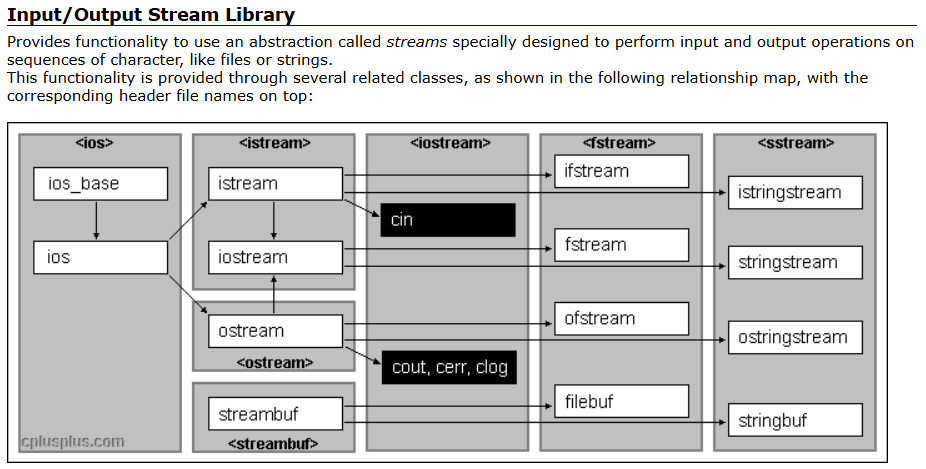 图1-1
图1-1 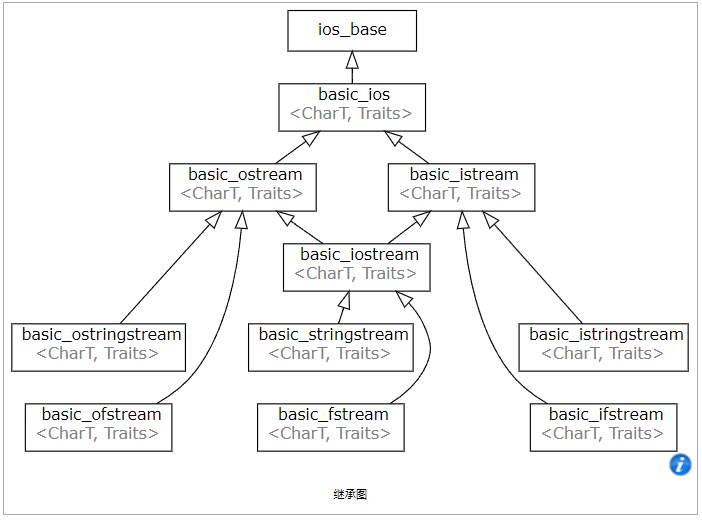 图1-2
图1-2
二、IO流状态
- IO操作的过程中,可能会发生各种错误,IO流对象中给了四种状态标识错误,可以参考下图2-1和2-2进行理解。goodbit表示流没有错误/eofbit表示流到达文件结束/failbit表示lO操作失败了/badbit表示流崩溃了出现了系统级错误。
- 一个常见的lO流错误是cin>>i,i是一个int类型的对象,如果我们在控制台输入一个字符,cin对象的failbit状态位就会被设置,cin就进入错误状态,一个流一旦发生错误,后续的lO操作都会失败,我们可以调用cin.clear()函数来恢复cin的状态为goodbit。
- badbit表示系统级错误,如不可恢复的读写错误,通常情况下,badbit一旦被设置了,流就无法再使用了。
- failbit表示一个逻辑错误,如期望读取一个整形,但是却读取到一个字符,failbit被设置了,流是可以恢复的,恢复以后可以继续使用。
- 如果到达文件结束位置eofbit和failbit都会被置位。如果想再次读取当前文件,可以恢复一下流的状态,同时重置一个文件指针位置。
- goodbit表示流未发生错误。
- 也可以用setstate和rdstate两个函数来控制流状态,eofbit/failbit/badbit/goodbit是ios_base基类中定义的静态成员变量,可以直接使用的,并且是他们是可以组合的位运算值,具体使用细节可以参考文档。

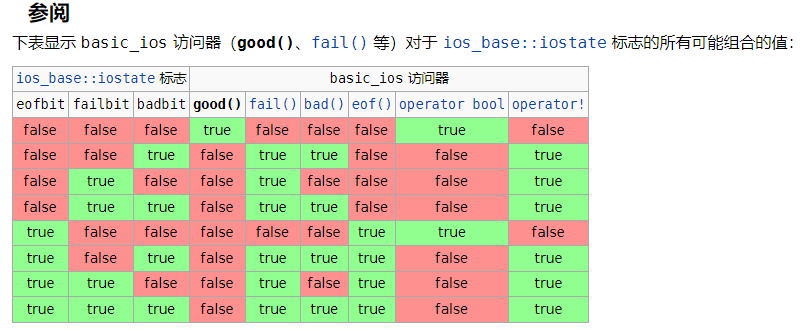
1:cin对象可以调用good(),eof(),fail()和bad()函数来查看这几个状态,如下所示:
cpp#include<iostream> using namespace std; int main() { cout << cin.good() << endl; cout << cin.eof() << endl; cout << cin.fail() << endl; cout << cin.bad() << endl; return 0; }2:如果我们cin>>i,i是一个整型,而我们输入了一个字符,此时cin就会读取失败,cin就进入了一个错误状态,流状态就会标记成failbit,代码如下所示:
cpp#include<iostream> using namespace std; int main() { int i; cin >> i; cout << cin.good() << endl; cout << cin.eof() << endl; cout << cin.fail() << endl; cout << cin.bad() << endl; return 0; }3:一个流一旦发生错误,后续的io操作都会失败,如下所示:
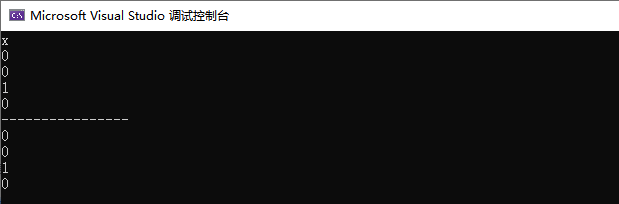
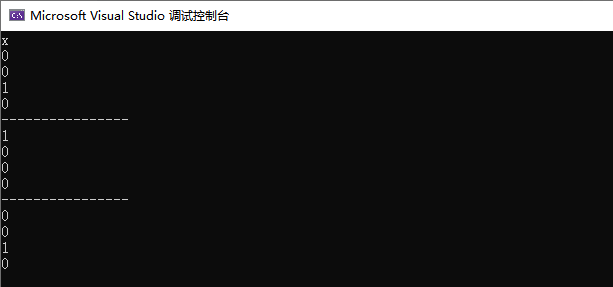
cpp#include<iostream> using namespace std; int main() { int i; cin >> i; cout << cin.good() << endl; cout << cin.eof() << endl; cout << cin.fail() << endl; cout << cin.bad() << endl; int j; cin >> j; cout << cin.good() << endl; cout << cin.eof() << endl; cout << cin.fail() << endl; cout << cin.bad() << endl; return 0; }运行如下所示:
我们输入了一个x,i读取失败,此时io流进入错误状态,下面的j也会读取失败,所以一个流一旦发生错误,后续的lO操作都会失败,我们可以调用cin.clear()函数来恢复cin的状态为goodbit。
4:调用cin.clear()函数来恢复cin的状态为goodbit,代码如下所示:
cpp#include<iostream> using namespace std; int main() { int i; cin >> i; cout << cin.good() << endl; cout << cin.eof() << endl; cout << cin.fail() << endl; cout << cin.bad() << endl; cout << "----------------" << endl; cin.clear(); cout << cin.good() << endl; cout << cin.eof() << endl; cout << cin.fail() << endl; cout << cin.bad() << endl; cout << "----------------" << endl; int j; cin >> j; cout << cin.good() << endl; cout << cin.eof() << endl; cout << cin.fail() << endl; cout << cin.bad() << endl; return 0; }运行如下所示:
虽然我们使用clear函数来恢复io流的状态为goodbit,但是此时cin>>j,还是会失败,这是为什么呢?这是因为我们输入的x没有被读走,当cin>>i时回发生流错误,我们使用clear函数来恢复io流的状态为goodbit,下一次读取还是会读取到字符x,与j的类型不符,所以又发生了错误,我们可以是有peek函数来窥探缓冲区的字符是什么,如果与要输入的类型不匹配,就使用一个变量读走他,如果一样就不管。
5:调用cin.peek()函数来窥探输入的数据与类型是否符合,peek只是窥探缓冲区的字符是什么,不会读走,字符还是在缓冲区。代码如下所示:
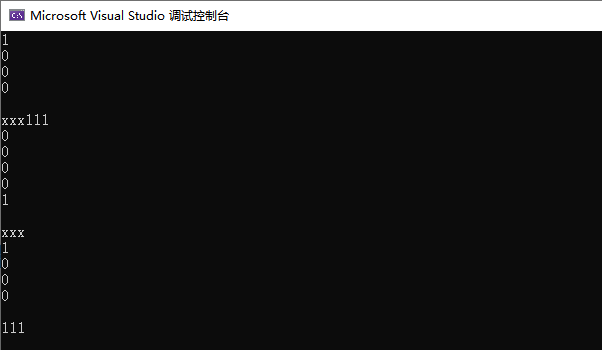
cpp#include<iostream> using namespace std; int main() { cout << cin.good() << endl; cout << cin.eof() << endl; cout << cin.bad() << endl; cout << cin.fail() << endl << endl; int i = 0; // 输入⼀个字符或多个字符,cin读取失败,流状态被标记为failbit cin >> i; cout << i << endl; cout << cin.good() << endl; cout << cin.eof() << endl; cout << cin.bad() << endl; cout << cin.fail() << endl << endl; if (cin.fail()) { // clear可以恢复流状态位goodbit cin.clear(); // 我们还要把缓冲区中的多个字符都读出来,读到数字停下来,否则再去cin>>i还是会失败 char ch = cin.peek(); while (!(ch >= '0' && ch <= '9')) { ch = cin.get(); cout << ch; ch = cin.peek(); } cout << endl; } cout << cin.good() << endl; cout << cin.eof() << endl; cout << cin.bad() << endl; cout << cin.fail() << endl << endl; cin >> i; cout << i << endl; return 0; }运行如下所示:
首先我们输入"xxx111",cin>>i,之后与i的类型不符合,cin就会进入错误状态,然后进入条件判读语句,使用clear()回复为goodbit状态,此时缓冲区的xxx还没有被读走,我们使用peek函数来窥探缓冲区的字符,如果不是数字字符就读走,然后继续窥探,如果是数字字符就结束循环,此时cin>>i就能读到正确的整数。


三、管理输出缓冲区
- 任何输出流都管理着一个缓冲区,用来保存程序写的数据。如果我们执行os<<"helloworld";字符串可能立即输出,也可能被操作系统保存在缓冲区中,随后再输出。**有了缓冲区机制,操作系统就可能将多个输出操作组合成为一个单一的系统级写操作。**因为设备的写操作通常是很耗时的,允许操作系统将多个输出操作组合为单一的设备写操作肯可能带来很大的性能提升。
- 会触发缓冲区刷新,将数据真正的写到输出设备或文件的原因有很多,如:**<1>程序正常结束;<2>缓冲区满了;<3>输出了操纵符endl或flush会立即刷新缓冲区<4>我们使用了操纵符unitbuf设置流的内部状态,来清空缓冲区,cerr就设置了unitbuf,所以cerr输出都是立即刷新的。<5>一个输出流关联到另一个流时,当这个流读写时,输出流会立即刷新缓冲区。**例如默认情况下cerr和cin都被关联到cout,所以读cin或写cerr时,都会导致cout缓冲区会被立即刷新。
- tie可以支持跟其他流绑定和解绑,具体参考文档ios::tie - C++ Reference
1:程序正常结束会刷新缓冲区
2:缓冲区满了会刷新缓冲区
3:输出了操纵符endl或flush会立即刷新缓冲区,代码如下所示:
cpp#include<iostream> using namespace std; void func(ostream& os) { os << "hello world"; os << "hello zx"; //hello world和hello zx是否输出不确定 system("pause"); //遇到了endl,hello world和hello zx一定刷新缓冲区输出了 os << endl; os << "hello cat"; system("pause"); os << endl; } int main() { func(cout); return 0; }运行后发现cout没有体现缓冲区的效果,我们使用文件试一下,代码如下所示:
cpp#include<iostream> #include<fstream> using namespace std; void func(ostream& os) { os << "hello world"; os << "hello zx"; //hello world和hello zx是否输出不确定 system("pause"); //遇到了endl,hello world和hello zx一定刷新缓冲区输出了 os << endl; os << "hello cat"; system("pause"); os << endl; } int main() { ofstream ofs("text.txt"); func(ofs); return 0; }运行代码如下所示:
在我们输入任意键之前,text.txt是没有任何字符的,如下所示:
我们输入任意键之后:
text.txt文件内容如下:
此时helloworld和hello zx都在缓冲区,遇到了endl之后,就会将缓冲区里面的内容输入到文件,hello cat也是一样的,它也是在缓冲区的,然后后面遇到了endl,也会将它刷新到缓冲区。
4:我们使用了操纵符unitbuf设置流的内部状态,来清空缓冲区,cerr就设置了unitbuf,所以cerr输出都是立即刷新的。代码如下所示:
cpp#include<iostream> #include<fstream> using namespace std; void func(ostream& os) { os << "hello world"; os << "hello zx"; os << "hello cat"; system("pause"); } int main() { ofstream ofs("text.txt"); // unitbuf设置后,ofs每次写都直接刷新 ofs << unitbuf; func(ofs); return 0; }unitbuf设置后,ofs每次写都直接刷新,上面的代码没有结束,也没有endl,都会直接刷新到文件里面,如下所示:
5:一个输出流关联到另一个流时,当这个流读写时,输出流会立即刷新缓冲区。
默认情况下,cin和cout是默认绑定在一起的,就是说cin读数据之前一定会将输出缓冲区的内容全部刷新出去。为什么要设计成这样呢?请看如下代码:
int n;
cout<<"请输入需要的个数:>";
cin>>n;
"请输入需要的个数:>"这个是在缓冲区的,我们出入n之前,如果不把"请输入需要的个数:>"从缓冲区刷新出来,就不知道输入什么东西了。
cpp#include<iostream> #include<fstream> using namespace std; void func(ostream& os) { os << "hello world\n"; os << "hello zx\n"; int i; cin >> i; os << "hello cat\n"; system("pause"); } int main() { ofstream ofs("text.txt"); //cin绑定到ofs,cin进⾏读时,会刷新ofs的缓冲区 cin.tie(&ofs); func(ofs); return 0; }如果将cin和ofs进行绑定,我们在cin>>i时会刷新ofs缓冲区,此时文件里面就有"hello world\n"和"hello zx\n"了。
解绑:cin.tie(nullptr);
cpp#include<iostream> using namespace std; int main() { //在io需求比较高的地方,如部分大量输入的竞赛题中,加上以下几行代码可以提高C++IO效率 //并且建议用'\n'替代endl,因为endl会刷新缓冲区 //关闭标准C++流是否与标准C流在每次输入/输出操作后同步。 ios_base::sync_with_stdio(false); // 关闭同步后,以下程序可能顺序为b a c // std::cout << "a\n"; // std::printf("b\n"); // std::cout << "c\n"; // 解绑cin和cout关联绑定的其他流 cin.tie(nullptr); cout.tie(nullptr); return 0; }








四、标准IO流
- C++标准lO流前面已经使用得比较多了,C++标准lO流默认是关联到控制台窗口的。cin是istream类型全局对象,cout/cerr/clog是ostream类型的全局对象,内置类型这两个类都直接进行了重载实现,所以可以直接使用,自定义类型就需要我们自己重载<<和>>运算符。
- ostream和istream是不支持拷贝的,只支持移动(外部不能使用,因为是保护成员)。
- istream的cin对象支持转换为bool值,进行条件逻辑判断,一旦被设置了badbit或failbit标志位,就返回false,如果是goodbit就返回true。
- ostream和istream还有不少其他接口,实践中相对用得比较少,需要时大家查查文档。
cpp
#include<iostream>
#include<fstream>
#include<string>
using namespace std;
int main()
{
	int i = 0, j = 1;
	//持续的输入,要结束需要输入Ctrl+z换行,Ctr1+z用于告诉程序输入已经完成,类似于在文件末尾添加一个标记。
	//istream& operator>>(int i),>>运算符重载的返回值是istream对象,istream对象可以调用operator bool转换为bool值
	//本质在底层是将cin的eofbit和failbit标志位设置了,cin调用operatorbool函数语法逻辑上实现转换为bool值
	while (cin >> i >> j)
	{
		cout << i << ":" << j << endl;
	}
	cout << cin.good() << endl;
	cout << cin.eof() << endl;
	cout << cin.bad() << endl;
	cout << cin.fail() << endl << endl;
	// 流一旦发生错误就不能再用了,清理重置一下再能使用
	cin.clear();
	string s;
	while (cin >> s)
	{
		cout << s << endl;
	}
}
五、文件IO流(重点)
- ofstream是输出文件流,也就是写文件的流 ,ofstream是ostream的派生类;ifstream是输入文件流,也就是读文件的流,ifstream是istream的派生类;fstream是ifstream和ofstream的派生类,既可以读也可以写。
- <fstream> - C++ Reference
- 输入/输出库 - cppreference.com
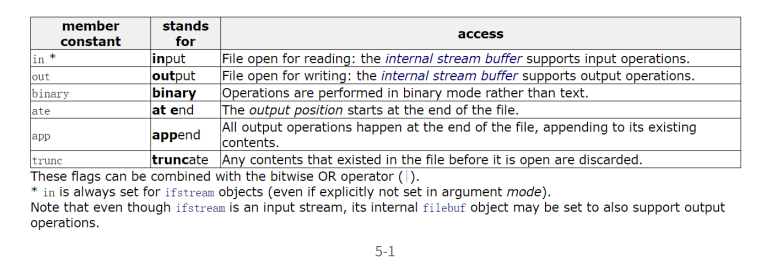
- 文件流对象可以在构造时打开文件,也可以调用open函数打开文件,打开文件的mode有5-1图中的几种。
- in为读打开;
- out为写打开;
- binary以二进制模式打开;
- ate打开后立即寻位到流结尾;
- app每次写入前寻位到流结尾;
- trunc在打开时舍弃流的内容;
- 这些值是ios_base中定义的成员变量继承下来的,并且他们也是组合的独立二进制位值,需要组合时,可以或到一起。他们之间的区别,具体参考下面的代码演示。
- 文件流打开后如果需要可以主动调用close函数关闭,也可以不关闭,因为流对象析构函数中会关闭。
- 文件流打开文件失败或读写失败,也会使用lo流状态标记,我们调用operator bool或operator!判断即可。
- ifstream文件流的读数据主要可以使用get/read/>>重载 ,ofstream文件流写数据主要可以使用put/write/<<重载,具体主要参考下面代码的演示。
- 相比c语言文件读写的接口,C++fstream流功能更强大方便,使用<<和>>进行文件读写很方便,尤其是针对自定义类型对象的读写。
使用如下所示:
cpp
#include<iostream>
#include<fstream>
#include<string>
using namespace std;
int main()
{
	ofstream ofs("test.txt");
	// 字符和字符串的写
	ofs.put('x');
	ofs.write("hello\nworld", 11);
	// 使⽤<<进⾏写
	ofs << "22222222" << endl;
	int x = 111;
	double y = 1.11;
	ofs << x << endl;
	ofs << y << endl;
	ofs.close();

	// app和ate都是尾部追加,不同的是app不能移动⽂件指针,永远是在⽂件尾写
	// ate可以移动⽂件指针,写到其他位置
	ofs.open("test.txt", ios_base::out | ios_base::app);
	ofs << "1111111" << endl;
	ofs.seekp(0, ios_base::beg);
	ofs << x << " " << y << endl;
	ofs.close();

	ofs.open("test.txt", ios_base::out | ios_base::out | ios_base::ate);  //使用ios_base::out|ios_base::ate会清掉文件内容,所以加上in
	ofs << "1111111" << endl;
	ofs.seekp(0, ios_base::beg);
	ofs << x << " " << y << endl;
	ofs.close();

	// out和 out|trunc都会先把数据清掉,再写数据(官⽅⽂档也明确是这样写的)
	// https://en.cppreference.com/w/cpp/io/basic_filebuf/open
	// 那么trunc存在的意义是什么呢?out|trunc更明确的表达了⽂件中有内容时要清除掉内容
	// 对于代码维护者和阅读者来说能清晰地理解这个⾏为,在⼀些复杂的⽂件系统环境或不同的
	// C++⽂件流实现库中,out⾏为不完全等同于截断内容的情况(虽然当前主流实现基本⼀致),
	// out|trunc更明确的表要清除内容的行为
	ofs.open("test.txt", ios_base::out);
	//ofs.open("test.txt", ios_base::out | ios_base::trunc);
	ofs << "xxxx";
	ofs.close();
	return 0;
}
使用二进制打开拷贝文件:
cpp
#include<iostream>
#include<fstream>
#include<string>
using namespace std;
int main()
{
	// 实现⼀个图⽚⽂件的复制,需要⽤⼆进制⽅式打开读写,第⼀个参数可以给⽂件的绝对路径
	ifstream ifs("C:\\Users\\admin\\Desktop\\images\\11.png",ios_base::in | ios_base::binary);
	ofstream ofs("C:\\Users\\admin\\Desktop\\images\\11copy.png",ios_base::out | ios_base::binary);
	int n = 0;
	while (ifs && ofs)
	{
		char ch = ifs.get();
		ofs << ch;
		++n;
	}
	cout << n << endl;
	return 0;
}
面向对象方式读取文件,代码如下:
cpp
#include<iostream>
#include<fstream>
#include<string>
using namespace std;
class Date
{
	friend ostream& operator << (ostream& out, const Date& d);
	friend istream& operator >> (istream& in, Date& d);
public:
	Date(int year = 1, int month = 1, int day = 1)
		:_year(year)
		, _month(month)
		, _day(day)
	{
	}
private:
	int _year;
	int _month;
	int _day;
};
istream& operator >> (istream& in, Date& d)
{
	in >> d._year >> d._month >> d._day;
	return in;
}
ostream& operator << (ostream& out, const Date& d)
{
	out << d._year << " " << d._month << " " << d._day << endl;
	return out;
}

struct ServerInfo
{
	// ⼆进制读写时,这⾥不能⽤string,否则写到⽂件中的是string中指向字符数组的指针
	// 若string对象析构后再去⽂件中读取string对象,string中读到是⼀个野指针。
	char _address[32];
	//string _address;
	int _port;
	Date _date;
};


struct ConfigManager
{
public:
	ConfigManager(const char* filename)
		:_filename(filename)
	{}
	// ⼆进制写
	// // 内存中怎么存,囫囵吞枣,就怎么直接写出去
	void WriteBin(const ServerInfo& info)
	{
		ofstream ofs(_filename, ios_base::out | ios_base::binary);
		ofs.write((const char*)&info, sizeof(info));
	}
	// ⼆进制读
	// 将⽂件中的内容直接囫囵吞枣,直接读到内存中
	void ReadBin(ServerInfo& info)
	{
		ifstream ifs(_filename, ios_base::in | ios_base::binary);
		ifs.read((char*)&info, sizeof(info));
	}

	void WriteText(const ServerInfo& info)
	{
		ofstream ofs(_filename);
		ofs << info._address << " " << info._port << " " << info._date;
	}
	void ReadText(ServerInfo& info)
	{
		ifstream ifs(_filename);
		ifs >> info._address >> info._port >> info._date;
	}
private:
	string _filename; // 配置⽂件
};

void WriteBin()
{
	ServerInfo winfo = { "192.0.0.1111111111111111111111", 80, { 2025, 1, 10 }};
	// ⼆进制读写
	ConfigManager cf_bin("test.bin");
	cf_bin.WriteBin(winfo);
}
void ReadBin()
{
	// ⼆进制读写
	ConfigManager cf_bin("test.bin");
	ServerInfo rbinfo;
	cf_bin.ReadBin(rbinfo);
	cout << rbinfo._address << " " << rbinfo._port << " " << rbinfo._date <<endl;
}
void WriteText()
{
	ServerInfo winfo = { "192.0.0.1", 80, { 2025, 1, 10 } };

	// ⽂本读写
	ConfigManager cf_text("test.txt");
	cf_text.WriteText(winfo);
}
void ReadText()
{
	ConfigManager cf_text("test.txt");
	ServerInfo rtinfo;
	cf_text.ReadText(rtinfo);
	cout << rtinfo._address << " " << rtinfo._port << " " << rtinfo._date <<endl;
}
int main()
{
	WriteBin();
	ReadBin();

	WriteText();
	ReadText();
	return 0;
}
六、string IO流
它的特点是我们可以把一系列的东西转换成一个串,存到一个string对象里面。
- ostringstream是string的的写入流,ostringstream是ostream的派生类;istringstream是string的读出流,istringstream是istream的派生类;stringstream是ostringstream和istringstream的派生类,既可以读也可以写。这里使用stringstream会很方便。
- stringstream系列底层维护了一个string类型的对象用来保存结果,使用方法跟上面的文件流类似,只是数据读写交互的都是底层的string对象。
- stringstream最常用的方式还是使用<<和>>重载,进行数据和string之间的IO转换。string流使用str函数获取底层的string对象,或者写入底层的string对象,具体细节参考下面代码理解。
cpp
#include<iostream>
#include<sstream>
#include<string>
using namespace std;
class Date
{
	friend ostream& operator << (ostream& out, const Date& d);
	friend istream& operator >> (istream& in, Date& d);
public:
	Date(int year = 1, int month = 1, int day = 1)
		:_year(year)
		, _month(month)
		, _day(day)
	{
	}
private:
	int _year;
	int _month;
	int _day;
};
istream& operator >> (istream& in, Date& d)
{
	in >> d._year >> d._month >> d._day;
	return in;
}
ostream& operator << (ostream& out, const Date& d)
{
	out << d._year << " " << d._month << " " << d._day << endl;
	return out;
}
int main()
{
	int i = 123;
	Date d = { 2025, 4, 10 };
	ostringstream oss;
	oss << i << endl;
	oss << d << endl;
	string s = oss.str();
	cout << s << endl;

	//stringstream iss(s);

	//stringstream iss;
	//iss.str("100 2025 9 9");
	istringstream iss("100 2025 9 9");
	int j;
	Date x;
	iss >> j >> x;
	cout << j << endl;
	cout << x << endl;
	int a = 1234;
	int b = 5678;
	string str;
	// 将⼀个整形变量转化为字符串,存储到string类对象中
	stringstream ss;
	ss << a << " " << b;
	ss >> str;
	cout << str << endl;
	cout << ss.fail() << endl;
	cout << ss.bad() << endl;
	// 注意多次转换时,必须使⽤clear将上次转换状态清空掉
	// stringstreams在转换结尾时(即最后⼀个转换后),会将其内部状态设置为badbit和failbit
	// 因此下⼀次转换是必须调⽤clear()将状态重置为goodbit才可以转换
	// // 但是clear()不会将stringstreams底层字符串清空掉,str给⼀个空串可以清掉底层的字符串
	ss.clear();
	ss.str("");
	double dd = 12.34;
	ss << dd;
	ss >> str;
	cout << str << endl;
	return 0;
}
序列化和反序列化:将一系列对象转换为字符串,然后再将字符串转换为对象
cpp
#include<iostream>
#include<sstream>
#include<string>
using namespace std;
class Date
{
	friend ostream& operator << (ostream& out, const Date& d);
	friend istream& operator >> (istream& in, Date& d);
public:
	Date(int year = 1, int month = 1, int day = 1)
		:_year(year)
		, _month(month)
		, _day(day)
	{
	}
private:
	int _year;
	int _month;
	int _day;
};
istream& operator >> (istream& in, Date& d)
{
	in >> d._year >> d._month >> d._day;
	return in;
}
ostream& operator << (ostream& out, const Date& d)
{
	out << d._year << " " << d._month << " " << d._day << endl;
	return out;
}
struct ChatInfo
{
	string _name; // 名字
	int _id; // id
	Date _date; // 时间
	string _msg; // 聊天信息
};
int main()
{
	// 结构信息序列化为字符串
	ChatInfo winfo = { "张三", 135246, { 2022, 4, 10 }, "晚上一起看电影吧" };
	ostringstream oss;
	oss << winfo._name << " " << winfo._id << " " << winfo._date << " " <<winfo._msg;
	string str = oss.str();
	cout << str << endl << endl;
	// 我们通过⽹络这个字符串发送给对象,实际开发中,信息相对更复杂,
	// ⼀般会选⽤Json、xml等⽅式进⾏更好的⽀持
	// 字符串解析成结构信息
	ChatInfo rInfo;
	istringstream iss(str);
	iss >> rInfo._name >> rInfo._id >> rInfo._date >> rInfo._msg;
	cout << "-------------------------------------------------------" << endl;
	cout << "姓名:" << rInfo._name << "(" << rInfo._id << ") ";
	cout << rInfo._date << endl;
	cout << rInfo._name << ":>" << rInfo._msg << endl;
	cout << "-------------------------------------------------------" << endl;
	return 0;
}