目录
- [LangGraph 协调者-工作者模式完全解析:从零构建一个智能报告生成系统](#LangGraph 协调者-工作者模式完全解析:从零构建一个智能报告生成系统)
-
- 一、这个系统是做什么的?
- 二、整体流程图
- 三、核心概念:协调者-工作者模式
-
- [3.1 和普通并行化的区别](#3.1 和普通并行化的区别)
- [3.2 生活例子](#3.2 生活例子)
- 四、状态定义(State)
-
- [4.1 字段说明](#4.1 字段说明)
- [4.2 重要:`operator.add` 的作用](#4.2 重要:
operator.add的作用)
- 五、节点详解
-
- [5.1 节点1:`orchestrator`(协调者)](#5.1 节点1:
orchestrator(协调者)) - [5.2 分配函数:`assign_workers`(关键!)(边)](#5.2 分配函数:
assign_workers(关键!)(边)) -
- [重点:`Send` 是什么?](#重点:
Send是什么?)
- [重点:`Send` 是什么?](#重点:
- [5.3 节点2:`llm_call`(工作者)](#5.3 节点2:
llm_call(工作者)) - [5.4 节点3:`synthesizer`(合成器)](#5.4 节点3:
synthesizer(合成器))
- [5.1 节点1:`orchestrator`(协调者)](#5.1 节点1:
- 六、图的构建(核心难点)
-
- [6.1 完整代码](#6.1 完整代码)
- [6.2 关键:`add_conditional_edges` 的两种用法](#6.2 关键:
add_conditional_edges的两种用法)
- 七、执行过程详解
- 八、完整可运行代码
- 九、总结
LangGraph 协调者-工作者模式完全解析:从零构建一个智能报告生成系统
一、这个系统是做什么的?
一句话:输入一个主题,自动生成一份完整的报告。
比如你输入"中国近代史",系统会自动:
- 分析主题,决定报告分几个章节
- 为每个章节分配一个写作任务
- 多个"员工"同时写作不同章节
- 把所有章节拼成完整报告
二、整体流程图
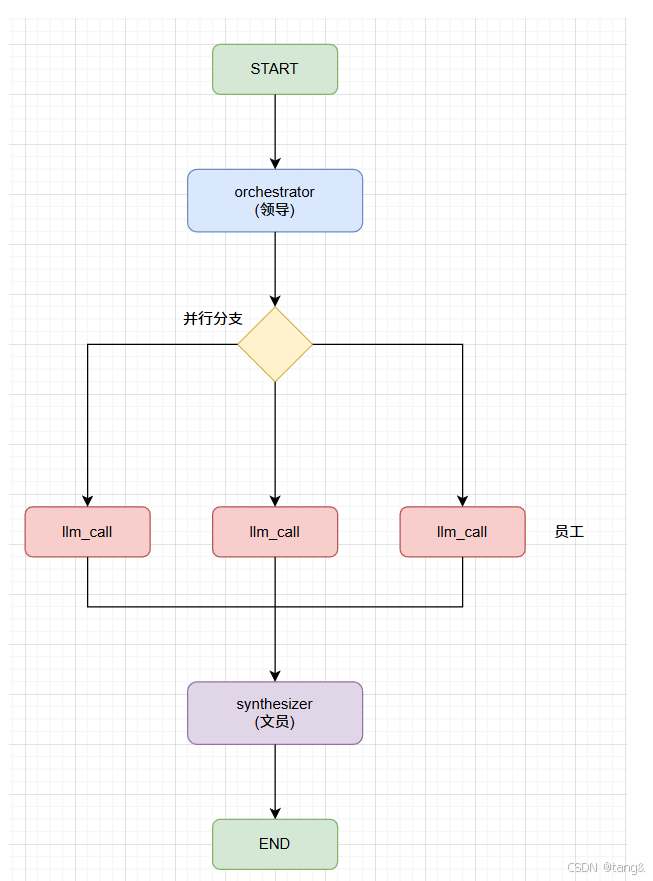
用户输入: {"topic": "中国近代史"}
                │
                ▼
┌─────────────────────────────────────────────────────────────┐
│ 节点1: orchestrator(协调者/领导)                           │
│                                                             │
│ 作用:分析主题,制定章节计划                                  │
│ 输入:{"topic": "中国近代史"}                                │
│ 输出:{"sections": [章1, 章2, 章3]}                         │
│                                                             │
│ 内部逻辑:调用 LLM,强制输出固定格式的章节列表                 │
└─────────────────────────────────────────────────────────────┘
                │
                ▼
┌─────────────────────────────────────────────────────────────┐
│ 函数: assign_workers(分配任务)(边)                             │
│                                                             │
│ 作用:为每个章节创建一个 Send 对象                           │
│ 输入:{"sections": [章1, 章2, 章3]}                         │
│ 输出:[Send("llm_call", {"section": 章1}),                  │
│        Send("llm_call", {"section": 章2}),                  │
│        Send("llm_call", {"section": 章3})]                  │
└─────────────────────────────────────────────────────────────┘
                │
                │ 动态创建 3 条边
                │
    ┌───────────┼───────────┐
    │           │           │
    ▼           ▼           ▼
┌────────┐ ┌────────┐ ┌────────┐
│ 节点2  │ │ 节点2  │ │ 节点2  │
│llm_call│ │llm_call│ │llm_call│
│ (员工) │ │ (员工) │ │ (员工) │
│        │ │        │ │        │
│ 写章1  │ │ 写章2  │ │ 写章3  │
└───┬────┘ └───┬────┘ └───┬────┘
    │          │          │
    └──────────┼──────────┘
               ▼
┌─────────────────────────────────────────────────────────────┐
│ 节点3: synthesizer(合成器/文员)                            │
│                                                             │
│ 作用:把所有章节拼成完整报告                                  │
│ 输入:{"completed_sections": ["章1内容", "章2内容", ...]}    │
│ 输出:{"final_report": "章1内容\n---\n章2内容\n---\n..."}    │
└─────────────────────────────────────────────────────────────┘
                │
                ▼
            输出报告
三、核心概念:协调者-工作者模式
3.1 和普通并行化的区别
| 对比 | 普通并行化 | 协调者-工作者模式 |
|---|---|---|
| 任务数量 | 设计时就固定 | 运行时动态决定 |
| 任务内容 | 预先知道 | 协调者分析后才知道 |
| 代码中的体现 | add_edge 写死 |
Send 动态创建 |
3.2 生活例子
| 角色 | 类比 | 代码中的节点 |
|---|---|---|
| 协调者 | 领导:决定写哪几章 | orchestrator |
| 工作者 | 员工:每人写一章 | llm_call |
| 合成器 | 文员:把章拼成书 | synthesizer |
关键:领导可能决定写3章,也可能写5章。员工数量取决于领导的决定。
四、状态定义(State)
python
class State(TypedDict):
    topic: str                                    # 用户输入的主题
    sections: list                                # 协调者生成的章节列表
    completed_sections: Annotated[List, operator.add]  # 员工写好的内容
    final_report: str                             # 最终报告
4.1 字段说明
| 字段 | 类型 | 作用 | 谁写入 |
|---|---|---|---|
topic |
str |
用户输入的主题 | 调用者 |
sections |
list |
章节计划 | orchestrator |
completed_sections |
list |
员工写好的内容 | llm_call(多个) |
final_report |
str |
最终报告 | synthesizer |
4.2 重要:operator.add 的作用
python
completed_sections: Annotated[List, operator.add]没有 operator.add |
有 operator.add |
|---|---|
| 后返回的结果覆盖前面的 | 所有结果追加到列表 |
| 只有一个员工的结果 | 所有员工的结果都在列表里 |
如果不加这个,多个员工同时交稿,只有最后一个会被保留。
五、节点详解
5.1 节点1:orchestrator(协调者)
python
def orchestrator(state: State):
    response = planner.invoke(
        f"为主题'{state['topic']}'制定报告大纲,包含3个章节"
    )
return {"sections": response.sections}| 项目 | 说明 |
|---|---|
| 输入 | {"topic": "中国近代史"} |
| 输出 | {"sections": [Section对象, Section对象, ...]} |
| 作用 | 分析主题,制定章节计划 |
5.2 分配函数:assign_workers(关键!)(边)
python
def assign_workers(state: State):
    worker_tasks = []
    for section in state["sections"]:
        worker_tasks.append(
            Send("llm_call", {"section": section})
        )
return worker_tasks| 项目 | 说明 |
|---|---|
| 输入 | {"sections": [章1, 章2, 章3]} |
| 输出 | [Send(...), Send(...), Send(...)] |
| 作用 | 为每个章节创建一个工作者任务 |
重点:Send 是什么?
python
Send("llm_call", {"section": section})| 参数 | 含义 |
|---|---|
| 第一个参数 | 目标节点的名字 |
| 第二个参数 | 传给该节点的 state |
Send 的作用:动态创建一条边,并携带数据给目标节点。
注意:
llm_call收到的state只有Send传递的{"section": ...}。
5.3 节点2:llm_call(工作者)
python
def llm_call(state: dict):
    section = state["section"]
    result = model.invoke(
        f"编写报告章节: {section.name}, 内容要求: {section.description}"
    )
return {"completed_sections": [result.content]}| 项目 | 说明 |
|---|---|
| 输入 | {"section": 章1}(来自 Send) |
| 输出 | {"completed_sections": ["章1内容"]} |
| 作用 | 写一个章节的内容 |
5.4 节点3:synthesizer(合成器)
python
def synthesizer(state: State):
    completed_sections = state["completed_sections"]
    final_report = "\n\n---\n\n".join(completed_sections)
return {"final_report": final_report}| 项目 | 说明 |
|---|---|
| 输入 | {"completed_sections": ["章1内容", "章2内容", ...]} |
| 输出 | {"final_report": "章1内容\n---\n章2内容\n---\n..."} |
| 作用 | 把所有章节拼成完整报告 |
"\n\n---\n\n".join(completed_sections):把列表里的多个字符串,用 \n\n---\n\n 作为分隔符,拼接成一个字符串。
六、图的构建(核心难点)
6.1 完整代码
python
builder = StateGraph(State)

# 添加节点
builder.add_node("orchestrator", orchestrator)
builder.add_node("llm_call", llm_call)
builder.add_node("synthesizer", synthesizer)

# 边1:开始 → 协调者
builder.add_edge(START, "orchestrator")

# 边2:条件边(关键!)
builder.add_conditional_edges(
    "orchestrator",
    assign_workers,
    ["llm_call"]  # 用于类型检查,声明可能去的节点。实际去多少次、每次带什么数据,由 `assign_workers` 返回的 `Send` 列表决定。
)

# 边3:工作者 → 合成器
builder.add_edge("llm_call", "synthesizer")
builder.add_edge("synthesizer", END)
6.2 关键:add_conditional_edges 的两种用法
| 普通用法 | 本代码的用法 |
|---|---|
| 路由函数返回一个节点名 | assign_workers 返回多个 Send 对象 |
| 只去一个节点 | 可以去多个节点(同一个节点多次) |
| 不能携带数据 | 每个 Send 可以携带不同数据 |
python
# 普通用法
def route(state):
    if state["type"] == "A":
        return "node_A"
    else:
        return "node_B"

builder.add_conditional_edges("node", route, ["node_A", "node_B"])

# 本代码的用法(动态创建多个)
def assign_workers(state):
    return [Send("llm_call", {"section": s}) for s in state["sections"]]

builder.add_conditional_edges("orchestrator", assign_workers, ["llm_call"])
七、执行过程详解
第1步:用户输入
python
result = workflow.invoke({"topic": "中国近代史"})第2步:orchestrator 执行
python
# 输入
state = {"topic": "中国近代史"}

# 调用 LLM,生成3个章节
response = planner.invoke("为主题'中国近代史'制定报告大纲,包含3个章节")

# response 是 Sections 对象
# response.sections = [章1, 章2, 章3]

# 返回
return {"sections": response.sections}第3步:assign_workers 执行
python
# 输入
state = {"topic": "中国近代史", "sections": [章1, 章2, 章3]}

# 为每个章节创建 Send
return [
    Send("llm_call", {"section": 章1}),
    Send("llm_call", {"section": 章2}),
    Send("llm_call", {"section": 章3})
]第4步:llm_call 执行(3次并行)
python
# 第一次调用
state = {"section": 章1}
# 写第一章内容
return {"completed_sections": ["第一章内容..."]}

# 第二次调用
state = {"section": 章2}
return {"completed_sections": ["第二章内容..."]}

# 第三次调用
state = {"section": 章3}
return {"completed_sections": ["第三章内容..."]}
由于 completed_sections 使用了 operator.add,三个结果自动合并成:
python
{"completed_sections": ["第一章内容...", "第二章内容...", "第三章内容..."]}第5步:synthesizer 执行
python
# 输入
state = {"completed_sections": ["第一章内容...", "第二章内容...", "第三章内容..."]}

# 拼接
final_report = "第一章内容...\n\n---\n\n第二章内容...\n\n---\n\n第三章内容..."

# 返回
return {"final_report": final_report}
第6步:输出
python
print(result["final_report"])
# 输出完整的报告
八、完整可运行代码
python
from typing import Annotated, List, TypedDict
import operator
from langchain.chat_models import init_chat_model
from langgraph.constants import START, END
from langgraph.graph import StateGraph
from langgraph.types import Send
from pydantic import BaseModel

# ============================================================
# 1. 定义状态
# ============================================================
class State(TypedDict):
    topic: str
    sections: list
    completed_sections: Annotated[List, operator.add]
    final_report: str

# ============================================================
# 2. 定义结构化输出
# ============================================================
class Section(BaseModel):
    name: str
    description: str

class Sections(BaseModel):
    sections: List[Section]

# ============================================================
# 3. 创建模型
# ============================================================
model = init_chat_model("gpt-4o-mini")     # 普通模型,用于生成内容
planner = model.with_structured_output(Sections)  # 结构化模型,用于生成大纲

# ============================================================
# 4. 协调者节点
# ============================================================
def orchestrator(state: State):
    response = planner.invoke(
        f"为主题'{state['topic']}'制定报告大纲,包含3个章节"
    )
    return {"sections": response.sections}

# ============================================================
# 5. 工作者节点
# ============================================================
def llm_call(state: dict):
    section = state["section"]
    result = model.invoke(
        f"编写报告章节: {section.name}, 内容要求: {section.description}"
    )
    return {"completed_sections": [result.content]}

# ============================================================
# 6. 合成器节点
# ============================================================
def synthesizer(state: State):
    completed_sections = state["completed_sections"]
    final_report = "\n\n---\n\n".join(completed_sections)
    return {"final_report": final_report}

# ============================================================
# 7. 任务分配函数
# ============================================================
def assign_workers(state: State):
    worker_tasks = []
    for section in state["sections"]:
        worker_tasks.append(
            Send("llm_call", {"section": section})
        )
    return worker_tasks

# ============================================================
# 8. 构建图
# ============================================================
builder = StateGraph(State)

builder.add_node("orchestrator", orchestrator)
builder.add_node("llm_call", llm_call)
builder.add_node("synthesizer", synthesizer)

builder.add_edge(START, "orchestrator")

builder.add_conditional_edges(
    "orchestrator",
    assign_workers,
    ["llm_call"]
)

builder.add_edge("llm_call", "synthesizer")
builder.add_edge("synthesizer", END)

workflow = builder.compile()

# ============================================================
# 9. 运行
# ============================================================
if __name__ == "__main__":
    result = workflow.invoke({"topic": "中国近代史"})
    print("\n" + "="*50)
    print("最终报告:")
    print("="*50)
    print(result["final_report"])
九、总结
| 概念 | 解释 |
|---|---|
| 协调者-工作者模式 | 领导动态分配任务,员工并行执行 |
Send |
动态创建边,可以携带不同数据 |
operator.add |
让多个结果自动合并到列表 |
with_structured_output |
强制 LLM 输出固定格式 |
add_conditional_edges |
可以返回 Send 列表,动态创建多条边 |
工作者的 state |
不是全局状态,只是 Send 传递的数据 |
一句话总结:协调者动态决定任务数量,Send 动态创建边并携带数据,工作者并行执行,结果自动合并,最终合成完整报告。