效果图
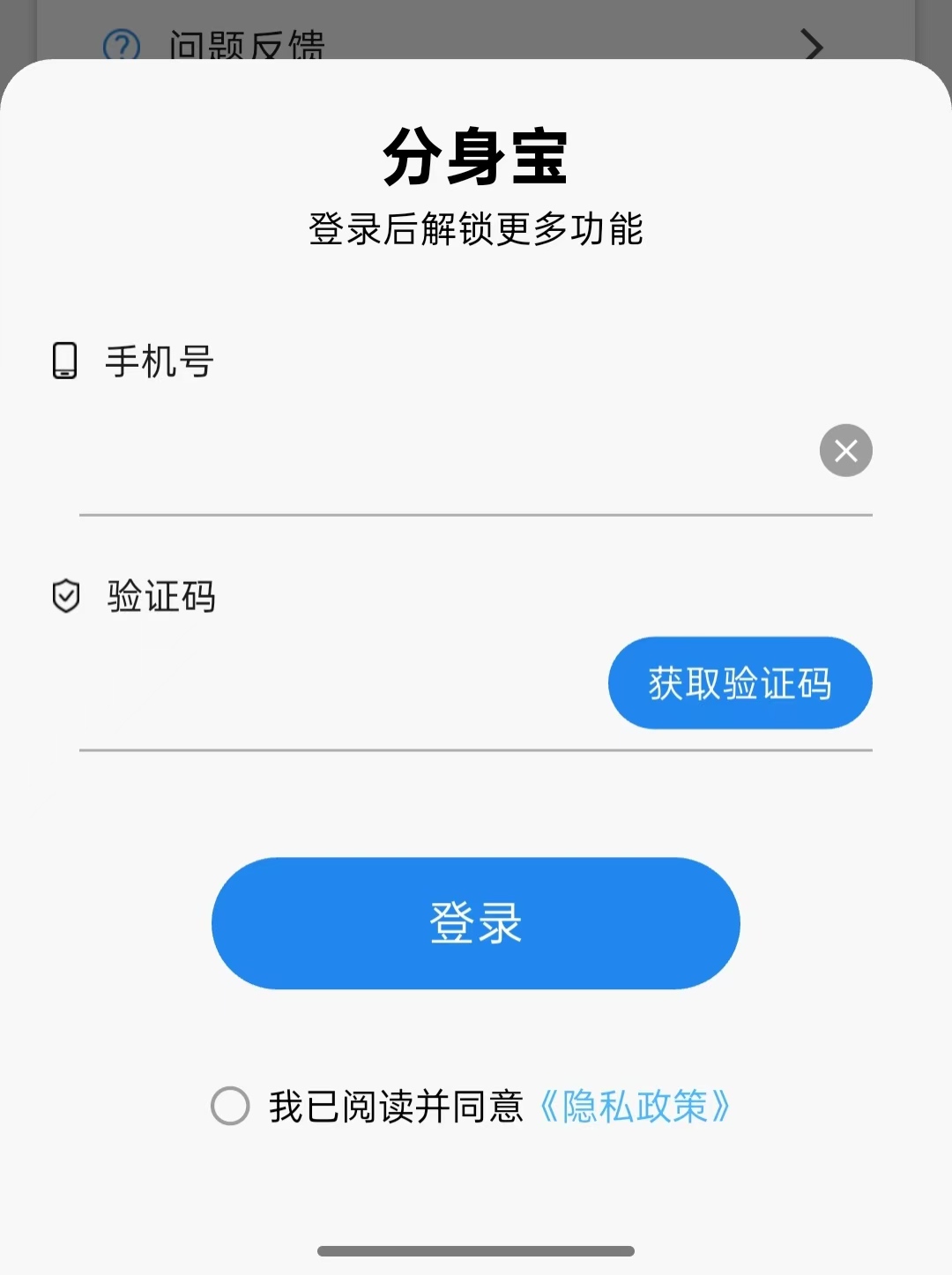
登录功能的4层架构
┌─────────────────────────────────────────────────────────┐
│                    1️⃣ UI 层 (LoginDialog)               │
│  - 显示输入框、按钮                                      │
│  - 收集用户输入的手机号和验证码                          │
│  - 显示加载动画、倒计时                                  │
└─────────────────────────────────────────────────────────┘
                              ↓ 传递数据
┌─────────────────────────────────────────────────────────┐
│                  2️⃣ 逻辑控制层 (State)                   │
│  - 验证手机号格式                                        │
│  - 控制按钮防重复点击                                    │
│  - 管理倒计时                                            │
│  - 调用下一层获取数据                                    │
└─────────────────────────────────────────────────────────┘
                              ↓ 请求数据
┌─────────────────────────────────────────────────────────┐
│                  3️⃣ 网络层 (PetHttp)                    │
│  - 发送验证码请求到服务器                                │
│  - 发送登录请求到服务器                                  │
│  - 接收服务器返回的用户数据                              │
└─────────────────────────────────────────────────────────┘
                              ↓ 保存数据
┌─────────────────────────────────────────────────────────┐
│                   4️⃣ 缓存层 (Caches)                    │
│  - 保存用户信息到本地                                    │
│  - 保存手机号                                            │
│  - 保存token过期时间                                     │
└─────────────────────────────────────────────────────────┘
具体涉及的类为4个类:UI类,数据结构类,HTTP访问类,存储类。由于我的逻辑层和UI类是耦合在一起的,这边就没有单独的逻辑类
登录流程
Dart
1. 用户点击"登录"按钮
   ↓
2. UI层拿到手机号和验证码
   ↓
3. 逻辑层调用:PetHttp.loginWithPhone(手机号, 验证码)
   ↓
4. 网络层发请求到服务器:POST /api/v1/auth/login
   ↓
5. 服务器返回:{access_token: "xxx", user_id: "xxx"}
   ↓
6. 网络层包装成 UserData 对象返回
   ↓
7. 逻辑层拿到 UserData,调用:Caches.caches.saveUserData(userData)
   ↓
8. 缓存层保存到手机本地(SharedPreferences)
   ↓
9. 逻辑层通知UI层:登录成功,关闭弹窗
要点:
使用双token认证机制:
Dart
┌─────────────────────────────────────────────────────────────┐
│                     双Token机制                              │
├─────────────────────────────────────────────────────────────┤
│                                                             │
│   Access Token(访问令牌)     Refresh Token(刷新令牌)     │
│   ├─ 有效期短(如2小时)        ├─ 有效期长(如30天)         │
│   ├─ 用于访问API资源            ├─ 只用于换取新的Access Token │
│   └─ 放在请求头中携带            └─ 保存在本地(更安全)       │
│                                                             │
└─────────────────────────────────────────────────────────────┘
使用双token的时间线
Dart
时间线:登录 ──────→ 2小时后 ──────→ 继续使用 ──────→ 30天后
         │              │                │              │
         ▼              ▼                ▼              ▼
    获得双Token    Access过期       刷新成功       Refresh过期
                  │                              │
                  ▼                              ▼
              用Refresh                      需要重新登录
              换新Access
正则表达式(需要更详细的学习)
当然这里面还有更复杂的东西,比如_request请求服务器方法的实现,和处理服务器返回的数据的泛型类,理解起来就更难。这里先不做解释,等后期再看看怎么写。
代码实例
数据结构类
Dart
import 'dart:convert';
import 'package:code/sdk/chat_item.dart';
import '../http/message_list_model.dart';


class UserData {

  String userId = "";
  String? accessToken;//主token
  int? expiresIn; //主token过期时间
  String? phone;
  String? refreshToken; //刷新token
  int? refreshExpiresIn;//刷新token的过期时间


  bool get isLogin {
    if(accessToken == null || accessToken!.isEmpty) {
      return false;
    }else{
      return true;
    }
  }

  List<MessageListModel>? sessions; //会话列表

  List<BaseItem>? lastChatHistory;//最新一次的聊天记录
  String? currentSessionId;//当前会话ID

  // 无参构造函数
  UserData();

  UserData.from(Map<String, dynamic> map) {
    userId = map["user_id"] ?? "";
    accessToken = map["access_token"];
    expiresIn = map["expires_in"];
    phone = map["phone"];
    refreshToken = map["refresh_token"] ?? "";
    refreshExpiresIn = map["refresh_expires_in"] ?? "";

    // 读取缓存的聊天记录
    if (map["last_chat_history"] != null) {
      final List<dynamic> list = map["last_chat_history"];
      final List<BaseItem> history = [];

      for (var item in list) {
        if (item is Map<String, dynamic>) {
          final type = item['type'];
          if (type == 'chat') {
            history.add(ChatItemModel.fromJson(item));
          } else if (type == 'recording') {
            history.add(RecordingItemModel.fromJson(item));
          }
        }
      }

      lastChatHistory = history;
    }

    currentSessionId = map["current_session_id"];
  }

  //保存会话列表
  void setSessions(List<MessageListModel> sessionsList) {
    sessions = sessionsList;
  }

  //添加会话列表
  void addSessions(List<MessageListModel> newSessions) {
    if (sessions == null) {
      sessions = [];
    }
    sessions!.addAll(newSessions);
  }

  //保存聊天记录
  void setChatHistory(List<BaseItem> history, String sessionId) {
    lastChatHistory = history;
    currentSessionId = sessionId;
  }

  //清空聊天记录
  void clearChatHistory() {
    lastChatHistory = null;
    currentSessionId = null;
  }


  Map<String,dynamic> toMap() {
    final map =  <String, dynamic>{
      "user_id":userId,
    };

    if(accessToken != null) {
      map["access_token"] = accessToken!;
    }

    if(expiresIn != null) {
      map["expires_in"] = expiresIn!;
    }

    if(phone != null) {
      map["phone"] = phone!;
    }

    if(refreshToken != null) {
      map["refresh_token"] = refreshToken!;
    }

    if(refreshExpiresIn != null) {
      map["refresh_expires_in"] = refreshExpiresIn!;
    }


    // 保存聊天记录到缓存
    if (lastChatHistory != null && lastChatHistory!.isNotEmpty) {
      map["last_chat_history"] = lastChatHistory!.map((e) => e.toJson()).toList();
    }
    if (currentSessionId != null) {
      map["current_session_id"] = currentSessionId!;
    }

    return map;
  }


  @override
  String toString() {
    return jsonEncode(toMap());
  }


  //用来更新某个属性
  UserData copyWith({
    String? userId,
    String? accessToken,
    int? expiresIn,
    String? phone,
    String? refreshToken,
    int? refreshExpiresIn,
    List<MessageListModel>? sessions,
    List<BaseItem>? lastChatHistory,
    String? currentSessionId,
  }) {
    final newUser = UserData();
    newUser.userId = userId ?? this.userId;
    newUser.accessToken = accessToken ?? this.accessToken;
    newUser.expiresIn = expiresIn ?? this.expiresIn;
    newUser.phone = phone ?? this.phone;
    newUser.refreshToken = refreshToken ?? this.refreshToken;
    newUser.refreshExpiresIn = refreshExpiresIn ?? this.refreshExpiresIn;
    newUser.sessions = sessions ?? this.sessions;
    newUser.lastChatHistory = lastChatHistory ?? this.lastChatHistory;
    newUser.currentSessionId = currentSessionId ?? this.currentSessionId;
    return newUser;
  }

}
HTTP访问类
Dart
//=========================获取验证码==============================
  static Future<bool> getSmsCode(String phone) async  {

    final param = {"phone":phone};

    final rs = await _requestPost(_apiCheckCode, param);

    Log.d(rs.toString());

    if(rs.isSuccess()) {
      Log.d("获取验证码成功");
      return true;
    }

    Log.d("获取验证码失败,服务器返回的信息为$rs");
    return false;
  }


  //===========================验证码登录==========================
  static Future<UserData?> loginWithPhone(String phone,String code) async {

    final param = {"phone":phone,"code":code};

    final rs = await _requestPost(_apiLogin, param);

    if(rs.isSuccess()) {

      return UserData.from(rs.data);
    }
    return null;
  }


  //=================================刷新token=================================
  ///使用post
  static Future<bool> refreshToken(String refreshToken) async{

    Log.d("开始刷新token,refresh_token为$refreshToken");

    final param = {"refresh_token":refreshToken};
    final rs = await _requestPost(_apiRefreshToken, param,isLogin: true,isNeedToken: true);

    if(rs.isSuccess()){
      final newAccessToken = rs.data["access_token"];
      final newExpiresIn = rs.data["expires_in"];
      final newRefreshToken = rs.data["refresh_token"];
      final newRefreshExpiresIn = rs.data["refresh_expires_in"];

      //替换原有的token
      UserData? user = Caches.caches.getUserData();
      if(user != null){
        UserData updateUser = user.copyWith(accessToken: newAccessToken,expiresIn: newExpiresIn,refreshToken:newRefreshToken,refreshExpiresIn: newRefreshExpiresIn );
        Caches.caches.saveUserData(updateUser);
        return true;
      }else{
        Log.d("刷新token失败,未找到用户数据");
        return false;
      }
    }
    return false;
  }
存储类
Dart
  //取用户类
  UserData? getUserData() {

    if(_userData == null){
      final json = _sp.getString(_keyUserData);
      if(json == null) {
        return null;
      }

      final userdata = UserData.from(jsonDecode(json));
      _userData =  userdata;
    }

    return _userData;
  }

  //存用户数据类
  void saveUserData(UserData userdata) {
    _userData = userdata;
    final jsonStr = jsonEncode(userdata.toMap());
    _sp.setString(_keyUserData, jsonStr);
  }

  //删除用户类
  Future<void> deleteUserData() async{
    _userData = null;
    await _sp.remove(_keyUserData);
  }

  //存电话号码
  void saveNumber(String number){
    _sp.setString(_keyNumber, number);
  }

  //取电话号码
  String? getNumber(){
    return _sp.getString(_keyNumber);
  }
UI类
Dart
import 'dart:async';
import 'package:code/caches/user_data.dart';
import 'package:flutter/cupertino.dart';
import 'package:flutter/gestures.dart';
import 'package:flutter/material.dart';
import 'package:fluttertoast/fluttertoast.dart';
import 'package:code/caches/caches.dart';
import 'package:code/http/pet_http.dart';
import '../caches/console.dart';
import '../generated/l10n.dart';
import '../privacy_page.dart';


///登录弹窗

class LoginDialog extends StatefulWidget {
  // 登录成功后的回调
  final VoidCallback? onLoginSuccess;

  const LoginDialog({
    super.key,
    this.onLoginSuccess,
  });

  @override
  State<StatefulWidget> createState() => _LoginDialogState();

  /// 静态方法:显示底部登录弹窗
  static Future<void> show(
      BuildContext context, {
        VoidCallback? onLoginSuccess,
      })
  {
    return showModalBottomSheet(
      context: context,
      isScrollControlled: true, // 允许控制高度
      backgroundColor: Colors.transparent,
      builder: (context) => LoginDialog(
        onLoginSuccess: () {
          Navigator.of(context).pop(); // 关闭弹窗
          onLoginSuccess?.call();
        },
      ),
    );
  }
}

class _LoginDialogState extends State<LoginDialog> {


  final numberController = TextEditingController(); //手机号输入
  final codeController = TextEditingController(); //验证码输入
  final tapPolicy = TapGestureRecognizer(); //手势识别

  String? phoneError; //手机号错误信息
  String? phoneNumber; //存储的手机号

  DateTime? expireTime; //accessToken过期时间
  DateTime? refreshExpireTime; //refreshToken过期时间

  // 标志位
  var isBusy = false; //是否正在处理请求,防止重复点击
  var isRead = false; //是否已阅读隐私协议
  var _isLoading = false;//登录按钮加载状态

  // 倒计时
  Timer? timer;
  var count = 60;
  bool _isCounting = false;//正在倒计时

  //文本资源
  String sendCodeFail = "发送验证码出现错误";

  @override
  void initState() {
    super.initState();

    //从缓存中读取已保存的手机号,自动填充
    numberController.text = Caches.caches.getPhoneNumber();
    phoneNumber = numberController.text;
  }

  @override
  void dispose() {
    super.dispose();
    timer?.cancel();
    tapPolicy.dispose();
  }


  //===============================发送短信验证码===============================
  void onSendCode() async {
    //防重复点击
    if (isBusy) return;

    // 检查手机号合法
    final reg = RegExp(r'^1[3-9]\d{9}$');
    if (!reg.hasMatch(numberController.text)) {
      phoneError = S.current.validPhoneNumber;
      setState(() {});
      return;
    }

    // 隐私协议检查
    if (!isRead) {
      Fluttertoast.showToast(msg: S.current.readPrivacy);
      return;
    }

    //清除错误信息
    phoneError = null;
    setState(() {});

    //保存手机号到缓存
    Caches.caches.savePhoneNumber(numberController.text);
    phoneNumber = numberController.text;


    //调用接口发送验证码
    final rs = await PetHttp.getSmsCode(phoneNumber!);
    isBusy = false;

    if (rs) {
      if (mounted) startTimer(); //发送成功则开始倒计时
    } else {
      Fluttertoast.showToast(msg:sendCodeFail);
    }
  }

  //================================登录====================================
  void onLogin() async {

    //防重复点击/号码为空
    if (isBusy || phoneNumber == null) return;

    // 检查手机号合法
    final reg = RegExp(r'^1[3-9]\d{9}$');
    if (!reg.hasMatch(numberController.text)) {
      phoneError = S.current.validPhoneNumber;
      setState(() {
        Fluttertoast.showToast(msg: S.current.validPhoneNumber);
      });
      return;
    }

    isBusy = true;
    //获取手机号
    phoneNumber = numberController.text;

    setState(() {
      _isLoading = true;
    });

    Log.d("🔔login_dialog:电话号码为:$phoneNumber,验证码为:${codeController.text}");

    //调用登录API,检查验证码的正确性
    UserData? userdata = await PetHttp.loginWithPhone(phoneNumber!, codeController.text);

    //解除状态
    setState(() {
      isBusy = false;
      _isLoading = false;
    });


    if (userdata == null) { //登录失败
      Fluttertoast.showToast(msg: S.current.loginFailed);
    } else { //登录成功

      //保存用户基本信息
      Caches.caches.saveUserData(userdata); //存用户信息
      Caches.caches.saveNumber(userdata.phone!);//存电话号码

      //保存accessToken过期时间
      DateTime now = DateTime.now();
      //accessToken过期时间 = 当前时间 + 服务器返回的过期秒数
      expireTime = now.add(Duration(seconds: userdata.expiresIn!));
      Caches.caches.saveExpireTime(expireTime!);

      //保存refreshToken过期时间
      refreshExpireTime = now.add(Duration(seconds:userdata.refreshExpiresIn! ));
      Caches.caches.saveRefreshExpireTime(refreshExpireTime!);

      //回调通知父组件登录成功
      widget.onLoginSuccess?.call();

    }
  }


  //===============================验证码的倒计时===================================
  void startTimer() {
    count = 60; //倒计时初始值

    _isCounting = true; //设置标志位

    timer?.cancel();//清理旧定时器

    if (mounted) setState(() {});

    //创建周期性定时器
    timer = Timer.periodic(Duration(seconds: 1), (_) {

      if (mounted) {

        count--;
        if (count > 0) { //倒计时未结束
          setState(() {});
        } else { //倒计时结束
          timer?.cancel(); //停止定时器

          //重置参数
          setState(() {
            _isCounting = false;
            count = 60;
          });
        }

      }
    });
  }

  @override
  Widget build(BuildContext context) {
    return Container(
      decoration: const BoxDecoration(
        color: Color(0xFFF8F8F8),
        borderRadius: BorderRadius.only(
          topLeft: Radius.circular(20),
          topRight: Radius.circular(20),
        ),
      ),
      padding: EdgeInsets.only(
        bottom: MediaQuery.of(context).viewInsets.bottom, // 键盘弹出时自适应
      ),
      child: SingleChildScrollView(
        physics: const ClampingScrollPhysics(),
        child: Padding(
          padding: const EdgeInsets.all(20),
          child: Column(
            mainAxisSize: MainAxisSize.min,
            children: [

              // 标题
              _buildTitle(),

              const SizedBox(height: 30),

              // 手机号
              _buildPhoneNumber(),


              const SizedBox(height: 20),

              // 验证码
              _buildCode(),

              const SizedBox(height: 40),

              // 登录按钮
              _buildLoginButton(),

              const SizedBox(height: 20),

              // 隐私协议
              _buildPrivacyAgreement(),

              const SizedBox(height: 20),
            ],
          ),
        ),
      ),
    );
  }


  //===========================标题===========================
  Widget _buildTitle(){
    return Column(
      children: [

        Text(
          S.current.partBaby,
          style: const TextStyle(
            color: Colors.black,
            fontSize: 24,
            fontWeight: FontWeight.bold,
          ),
        ),
        Text(
          S.current.loginContext,
          style: const TextStyle(
            color: Colors.black,
            fontSize: 14,
          ),
        ),


      ],
    );
  }


  //===========================手机号===========================
  Widget _buildPhoneNumber(){
    return Column(
      children: [
        Row(
          children: [
            Image.asset("assets/images/phone_icon.png"),
            const SizedBox(width: 10),
            Text(S.current.number),
          ],
        ),

        // 手机号输入框
        Padding(
          padding: const EdgeInsets.only(left: 10, right: 10),
          child: Container(
            decoration: BoxDecoration(
              border: Border(
                bottom: BorderSide(
                  color: phoneError != null
                      ? Colors.red
                      : Colors.black.withOpacity(0.3),
                  width: 1,
                ),
              ),
            ),
            child: Row(
              spacing: 10,
              children: [
                Expanded(
                  child: TextField(
                    controller: numberController,
                    keyboardType: TextInputType.number,
                    decoration: InputDecoration(
                      errorText: phoneError,
                      border: InputBorder.none,
                      contentPadding: const EdgeInsets.symmetric(
                        horizontal: 10,
                        vertical: 12,
                      ),
                    ),
                    cursorColor: Colors.black.withOpacity(0.8),
                  ),
                ),
                GestureDetector(
                  onTap: () {
                    numberController.clear();
                  },
                  child: Container(
                    height: 20,
                    width: 20,
                    decoration: const BoxDecoration(
                      color: Colors.grey,
                      shape: BoxShape.circle,
                    ),
                    child: const Center(
                      child: Icon(
                        Icons.close,
                        color: Colors.white,
                        size: 15,
                      ),
                    ),
                  ),
                ),
              ],
            ),
          ),
        ),
      ],
    );
  }


  //===========================验证码===========================
  Widget _buildCode(){
    return Column(
      children: [
        Row(
          children: [
            Image.asset("assets/images/safe_icon.png"),
            const SizedBox(width: 10),
            Text(S.current.code),
          ],
        ),

        // 验证码输入框
        Padding(
          padding: const EdgeInsets.only(left: 10, right: 10),
          child: Container(
            decoration: BoxDecoration(
              border: Border(
                bottom: BorderSide(
                  color: Colors.black.withOpacity(0.3),
                  width: 1,
                ),
              ),
            ),
            child: Row(
              spacing: 10,
              children: [
                Expanded(
                  child: TextField(
                    controller: codeController,
                    keyboardType: TextInputType.phone,
                    decoration: const InputDecoration(
                      border: InputBorder.none,
                      enabledBorder: InputBorder.none,
                      focusedBorder: InputBorder.none,
                      errorBorder: InputBorder.none,
                      focusedErrorBorder: InputBorder.none,
                      contentPadding: EdgeInsets.symmetric(
                        horizontal: 10,
                        vertical: 12,
                      ),
                    ),
                    cursorColor: Colors.black.withOpacity(0.8),
                  ),
                ),
                GestureDetector(
                  onTap: () {
                    onSendCode();
                  },
                  child: Container(
                    height: 35,
                    width: 100,
                    margin: const EdgeInsets.only(bottom: 2),
                    decoration: BoxDecoration(
                      color: const Color(0xFF2187EF),
                      borderRadius: BorderRadius.circular(25),
                    ),
                    child: Center(
                      child: Text(
                        _isCounting? "$count 秒" : S.current.getCode,
                        style: const TextStyle(color: Colors.white),
                      ),
                    ),
                  ),
                ),
              ],
            ),
          ),
        ),

      ],
    );
  }


  //===========================登录按钮===========================
  Widget _buildLoginButton(){
    return Container(
      height: 50,
      width: 200,
      decoration: BoxDecoration(
        color: const Color(0xFF2187EF),
        borderRadius: BorderRadius.circular(25),
      ),
      child: Material(
        color: Colors.transparent,
        child: InkWell(
          borderRadius: BorderRadius.circular(25),
          onTap: _isLoading ? null : onLogin,//登录
          child: Center(
            child: _isLoading
                ? const SizedBox(
              width: 24,
              height: 24,
              child: CircularProgressIndicator(
                color: Colors.white,
                strokeWidth: 2,
              ),
            )
                : Text(
              S.current.login,
              style: const TextStyle(
                color: Colors.white,
                fontSize: 18,
              ),
            ),
          ),
        ),
      ),
    );
  }


  //===============================隐私协议===========================
  Widget _buildPrivacyAgreement(){
    return  TextButton(
      onPressed: () {
        setState(() {
          isRead = !isRead;
        });
      },
      child: Row(
        mainAxisAlignment: MainAxisAlignment.center,
        children: [
          isRead
              ? const Icon(Icons.check_circle, color: Color(0xFF4AB6FD))
              : const Icon(Icons.circle_outlined, color: Colors.grey),
          const SizedBox(width: 5),
          RichText(
            text: TextSpan(
              style: const TextStyle(color: Colors.black),
              text: S.current.hasRead,
              children: [
                TextSpan(
                  recognizer: tapPolicy
                    ..onTap = () {
                      Navigator.push(
                        context,
                        MaterialPageRoute(
                          builder: (builder) => const PrivacyPage(),
                        ),
                      );
                    },
                  text: S.current.privacyLogin,
                  style: const TextStyle(
                    color: Color(0xFF4AB6FD),
                  ),
                ),
              ],
            ),
          ),
        ],
      ),
    );
  }

}