Linux Wayland 手机远程输入方案
背景
在 Linux Wayland 环境下,GSConnect 等蓝牙键盘工具发送的是底层键盘扫描码,手机输入法和电脑输入法会互相打架,无法做到"手机打出什么字,电脑就输出什么字"。
本方案通过在电脑上搭建一个极简 Web 服务器,手机浏览器访问后自由使用手机输入法(拼音/语音/手写),点发送后文字自动粘贴到电脑当前光标位置。
核心原理:手机浏览器完成所有输入法运算,电脑只接收最终文本,通过剪贴板+模拟按键实现"立即上屏"。
环境要求
- Ubuntu 22.04+(Wayland,GNOME 桌面)
- Python 3(系统自带)
- 手机和电脑在同一局域网
安装依赖
bash
sudo apt install -y wl-clipboard ydotool- wl-clipboard :Wayland 剪贴板读写工具(
wl-copy/wl-paste) - ydotool :通过
/dev/uinput在内核层面注入键盘事件,绕过 Wayland 沙盒
安装后需要确保用户在 input 组中:
bash
sudo usermod -aG input $USER重新登录或重启生效。启动 ydotoold 守护进程:
bash
sudo systemctl enable --now ydotoold
# 或者用户级服务
systemctl --user enable --now ydotool
完整代码
代码已上传到 GitHub:https://github.com/shandianchengzi/remote_input_page
可以直接 clone:
bash
git clone https://github.com/shandianchengzi/remote_input_page.git
cd remote_input_page
也可以手动新建文件 remote_input.py,把下面的代码复制进去:
python
#!/usr/bin/env python3
"""Remote input server - use phone browser to type into PC."""

from http.server import BaseHTTPRequestHandler, HTTPServer
import subprocess
import time

HTML = """
<!DOCTYPE html>
<html>
<head>
    <meta name="viewport" content="width=device-width, initial-scale=1">
    <title>Remote Input</title>
    <style>
        * { box-sizing: border-box; margin: 0; padding: 0; }
        body { background: #121212; color: white; padding: 20px; font-family: -apple-system, sans-serif; }
        h2 { margin-bottom: 15px; font-weight: 400; color: #888; }
        textarea {
            width: 100%; height: 200px; font-size: 18px; padding: 12px;
            background: #1e1e1e; color: white; border: 1px solid #333;
            border-radius: 8px; resize: vertical;
        }
        button {
            width: 100%; height: 56px; font-size: 20px; margin-top: 12px;
            background: #2563eb; color: white; border: none;
            border-radius: 8px; cursor: pointer; transition: background 0.2s;
        }
        button:active { background: #1d4ed8; }
        #status { margin-top: 10px; color: #4ade80; font-size: 14px; min-height: 20px; }
    </style>
</head>
<body>
    <h2>Remote Input</h2>
    <textarea id="text" placeholder="Type here... (use phone IME freely)"></textarea>
    <button onclick="send()">Send to PC</button>
    <div id="status"></div>
    <script>
        let sending = false;
        function send() {
            if (sending) return;
            const t = document.getElementById('text');
            const s = document.getElementById('status');
            if (t.value.trim() === '') return;
            sending = true;
            fetch('/', { method: 'POST', body: t.value })
                .then(r => { s.textContent = 'Sent!'; t.value = ''; sending = false; setTimeout(() => s.textContent = '', 2000); })
                .catch(() => { s.textContent = 'Failed'; sending = false; });
        }
    </script>
</body>
</html>
"""


class Handler(BaseHTTPRequestHandler):
    def log_message(self, format, *args):
        print(f"[LOG] {format % args}")

    def do_GET(self):
        self.send_response(200)
        self.send_header("Content-type", "text/html; charset=utf-8")
        self.end_headers()
        self.wfile.write(HTML.encode("utf-8"))

    def do_POST(self):
        length = int(self.headers["Content-Length"])
        text = self.rfile.read(length).decode("utf-8")
        if text:
            import os
            env = os.environ.copy()
            env["DISPLAY"] = ":0"
            # 写入 CLIPBOARD(供 Ctrl+V 粘贴)
            subprocess.run(["wl-copy"], input=text.encode("utf-8"), env=env)
            # 写入 PRIMARY(供 Shift+Insert 粘贴)
            subprocess.run(["wl-copy", "-p"], input=text.encode("utf-8"), env=env)
            time.sleep(0.15)  # 等待剪贴板同步
            # ydotool 模拟 Shift+Insert
            subprocess.run(["ydotool", "key", "-d", "50",
                           "42:1", "110:1", "110:0", "42:0"], env=env)
        self.send_response(200)
        self.end_headers()


if __name__ == "__main__":
    server = HTTPServer(("0.0.0.0", 8080), Handler)
    # 替换为你电脑的实际局域网 IP
    print("Server running. Open http://<YOUR_IP>:8080 on your phone")
    server.serve_forever()
使用方法
1. 查看电脑局域网 IP
bash
ip -4 addr show | grep 'inet ' | grep -v '127.0.0.1' | awk '{print $2}' | cut -d/ -f12. 启动服务器
bash
python3 remote_input.py3. 手机访问
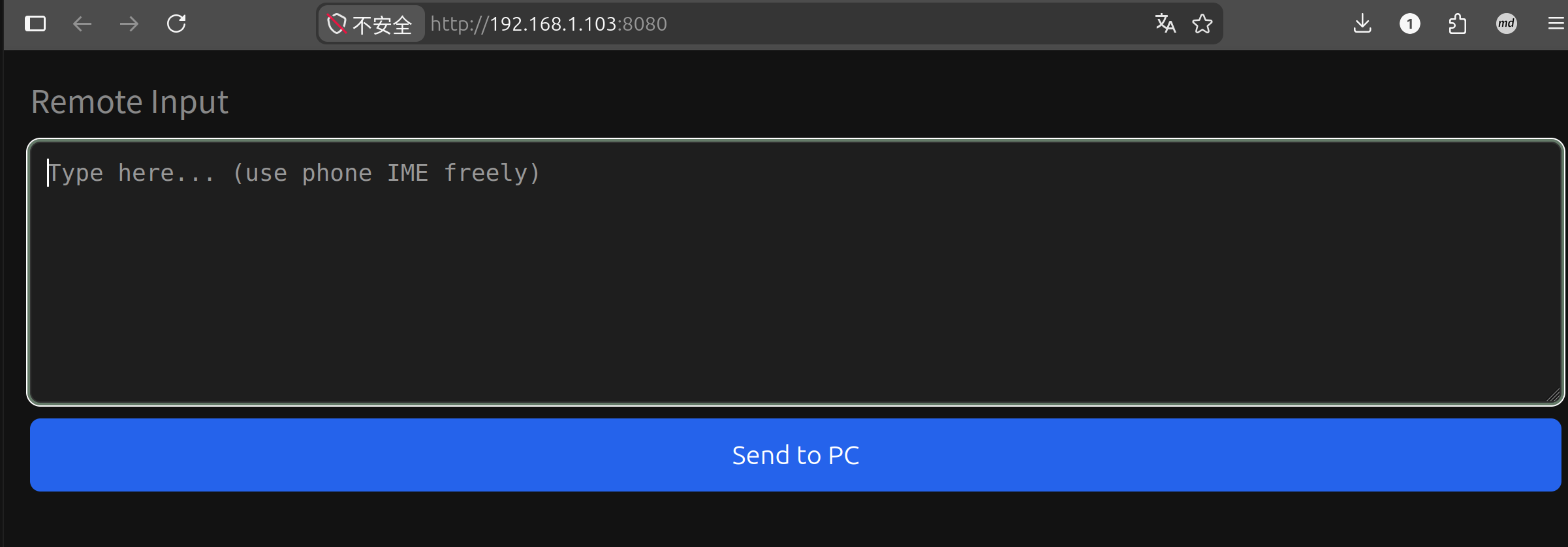
手机连同一 Wi-Fi,浏览器打开 http://<电脑IP>:8080,会看到一个黑色输入框。自由使用手机输入法输入文字,点击 "Send to PC" 即可粘贴到电脑当前光标位置。
关键技术细节
为什么不用 xdotool?
xdotool 通过 X11 协议注入按键,在 Wayland 下只能对 XWayland 应用生效。GNOME 原生应用(终端、文件管理器、Chrome Wayland 模式等)会直接拦截丢弃 xdotool 的事件。ydotool 通过 /dev/uinput 在内核层面注入,不受 Wayland 沙盒限制。
为什么不用 wtype?
wtype 依赖 Wayland 的 virtual keyboard protocol,GNOME (Mutter) 不支持该协议,直接报错退出。
为什么用 Shift+Insert 而不是 Ctrl+V?
Linux 终端中 Ctrl+V 被保留为终端控制信号(字面量输入),粘贴快捷键是 Ctrl+Shift+V。但浏览器中粘贴是 Ctrl+V。Shift+Insert 是 Linux 下的通用粘贴键,终端和浏览器都认。
为什么要同时写入 CLIPBOARD 和 PRIMARY?
Linux 有两个独立的剪贴板:
- CLIPBOARD:Ctrl+C/V 操作的常规剪贴板
- PRIMARY:鼠标选中即复制的主选择区,Shift+Insert 读取的就是这个
终端在处理 Shift+Insert 时会读 PRIMARY,浏览器则读 CLIPBOARD。只写一个会导致"终端粘出老内容,浏览器粘出新内容"的问题。wl-copy 默认写 CLIPBOARD,wl-copy -p 写 PRIMARY。
为什么 ydotool 需要 -d 50 延迟?
ydotool 通过 /dev/uinput 注入按键事件。如果按键事件之间没有间隔,系统输入状态机来不及同步"修饰键已按下"的状态,会导致按键被当作字面字符输出(比如出现 ^V 字面量)。-d 50 表示每个按键事件之间延迟 50ms。
常见问题
手机打不开网页
- 确认手机和电脑在同一 Wi-Fi
- 检查电脑防火墙是否放行 8080 端口:
sudo ufw allow 8080 - 确认服务器正在运行:
ss -tlnp | grep 8080
粘贴后没有反应
- 确认 ydotoold 正在运行:
systemctl --user status ydotool - 确认用户在 input 组:
id -nG $USER | grep input - 检查终端输出的
[LOG]日志
中文粘贴为空
- 检查
wl-copy是否正常:echo "测试" | wl-copy && wl-paste - 如果 wl-paste 输出为空,可能是 Wayland 剪贴板守护进程问题,尝试重启 GNOME Shell(Alt+F2 输入
r)
本账号所有文章均为原创,欢迎转载,请注明文章出处:https://shandianchengzi.blog.csdn.net/article/details/161542561。百度和各类采集站皆不可信,搜索请谨慎鉴别。技术类文章一般都有时效性,本人习惯不定期对自己的博文进行修正和更新,因此请访问出处以查看本文的最新版本。