TodoApp - 待办事项应用教程
项目介绍
项目背景
待办事项(Todo List)是每个开发者入门时必做的经典项目之一。它涵盖了现代应用开发中的许多核心概念:数据管理、用户交互、列表渲染、状态管理等。通过构建一个功能完善的待办事项应用,你将深入理解 HarmonyOS NEXT 中的数据驱动 UI 开发模式。
应用场景
待办事项应用在日常生活中有着广泛的应用场景:
- 个人任务管理:记录日常待办事项,如购物清单、学习计划等
- 项目管理:跟踪项目进度,分配任务
- 工作安排:管理工作任务,设置优先级
- 习惯养成:记录每日习惯,如运动、阅读等
功能特性
本待办事项应用实现了以下功能:
- 添加任务:用户可以输入新的待办事项
- 完成标记:点击复选框标记任务完成状态
- 删除任务:删除不需要的任务
- 筛选查看:按状态筛选(全部/进行中/已完成)
- 统计信息:显示任务总数和完成情况
- 清除功能:一键清除所有已完成任务
最终效果
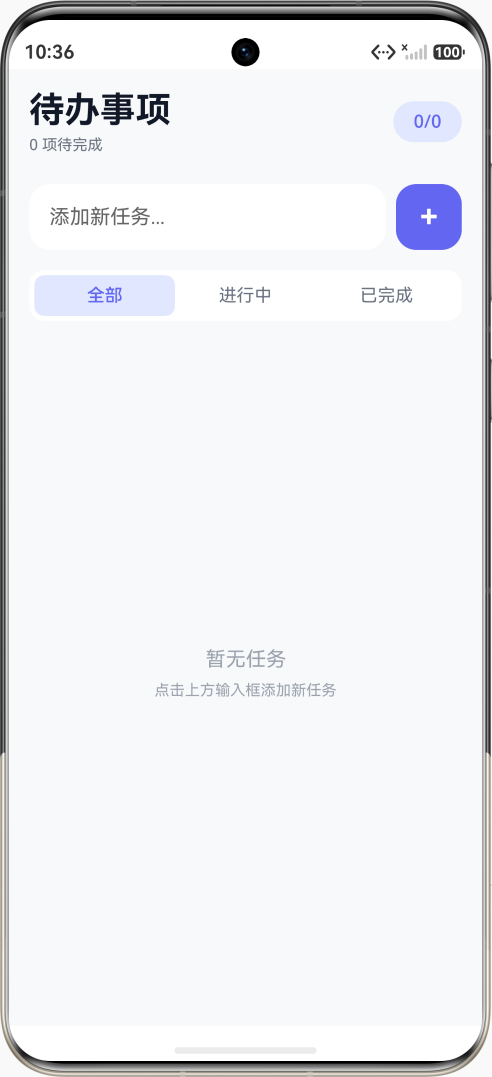
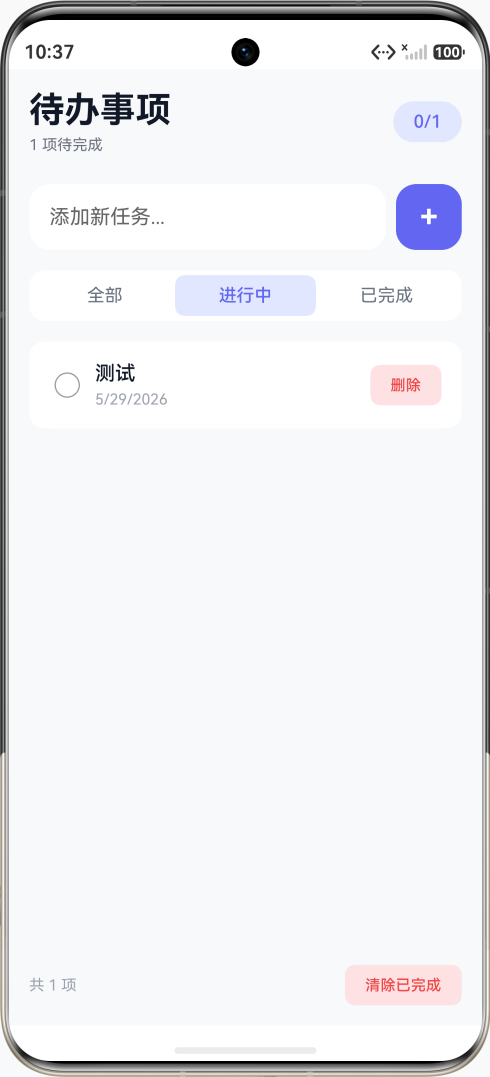
应用界面分为以下区域:
- 头部区域:显示标题和统计信息
- 输入区域:输入框和添加按钮
- 筛选标签:切换查看不同状态的任务
- 任务列表:显示任务列表,支持滑动
- 底部统计:显示任务统计信息
技术栈
- 开发框架:HarmonyOS NEXT API 23
- 编程语言:ArkTS
- UI 框架:ArkUI 声明式 UI
- 数据管理:@State 状态管理
- 列表渲染:ForEach 循环
开发环境准备
1. 创建项目
创建一个新的 HarmonyOS NEXT 项目:
方式一:使用 DevEco Studio 创建
- 打开 DevEco Studio
- 选择 "Create HarmonyOS Project"
- 选择 "Empty Ability" 模板
- 设置项目名称为 "TodoApp"
- 选择 API 版本为 23
方式二:复制模板项目
- 复制
project-template目录 - 重命名为 "TodoApp"
- 修改配置文件
2. 项目结构
TodoApp/
├── AppScope/                    # 应用全局配置
│   ├── app.json5               # 应用级配置
│   └── resources/              # 应用级资源
├── entry/                       # 主模块
│   └── src/main/
│       ├── ets/                # ArkTS 源代码
│       │   ├── entryability/   # UIAbility 入口
│       │   └── pages/          # 页面组件
│       └── resources/          # 资源文件
├── build-profile.json5         # 构建配置
└── oh-package.json5            # 依赖配置
知识点讲解
1. 接口定义 - interface 详解
在 ArkTS 中,使用 interface 定义数据结构的类型。接口是 TypeScript 中最重要的概念之一,它用于定义对象的形状。
基本语法:
typescript
interface 接口名 {
  属性名: 类型;
  属性名: 类型;
  // ...
}
待办事项接口定义:
typescript
// 定义待办事项的数据结构
interface TodoItem {
  id: number;        // 唯一标识,用于区分不同的任务
  text: string;      // 任务内容,用户输入的任务描述
  completed: boolean; // 是否完成,标记任务的完成状态
  createdAt: string;  // 创建时间,记录任务创建的时间
}
接口的使用:
typescript
// 创建符合接口的对象
const todo: TodoItem = {
  id: 1,
  text: '学习 HarmonyOS',
  completed: false,
  createdAt: '2024-01-01'
};

// 接口数组
const todos: TodoItem[] = [
  { id: 1, text: '任务1', completed: false, createdAt: '2024-01-01' },
  { id: 2, text: '任务2', completed: true, createdAt: '2024-01-02' }
];
可选属性:
typescript
interface TodoItem {
  id: number;
  text: string;
  completed: boolean;
  createdAt: string;
  priority?: number;  // 可选属性,使用 ? 标记
  tags?: string[];    // 可选属性
}
2. @State 数组状态详解
@State 可以管理数组类型的状态,当数组内容变化时 UI 自动更新。
数组状态定义:
typescript
@State todos: TodoItem[] = [];      // 待办事项数组
@State newTodoText: string = '';    // 新任务输入文本
@State nextId: number = 1;          // 下一个任务ID
@State filter: number = 0;          // 筛选条件:0-全部,1-进行中,2-已完成
数组操作方法:
typescript
// 1. 添加元素 - push()
this.todos.push({
  id: this.nextId++,
  text: '新任务',
  completed: false,
  createdAt: new Date().toLocaleDateString()
});

// 2. 删除元素 - filter()
this.todos = this.todos.filter(todo => todo.id !== targetId);

// 3. 修改元素 - 通过索引
const index = this.todos.findIndex(todo => todo.id === targetId);
if (index >= 0) {
  this.todos[index].completed = true;
}

// 4. 查找元素 - find()
const todo = this.todos.find(todo => todo.id === targetId);

// 5. 查找索引 - findIndex()
const index = this.todos.findIndex(todo => todo.id === targetId);

// 6. 遍历数组 - forEach()
this.todos.forEach(todo => {
  console.info(todo.text);
});

// 7. 映射数组 - map()
const texts = this.todos.map(todo => todo.text);

// 8. 过滤数组 - filter()
const completedTodos = this.todos.filter(todo => todo.completed);

// 9. 排序数组 - sort()
this.todos.sort((a, b) => a.id - b.id);
3. TextInput 组件 - 文本输入详解
TextInput 组件用于创建文本输入框,支持占位符、输入事件等。
基本用法:
typescript
TextInput({ placeholder: '请输入内容', text: this.inputText })
  .width('100%')
  .height(48)
  .fontSize(16)
  .backgroundColor('#FFFFFF')
  .borderRadius(8)
  .onChange((value: string) => {
    this.inputText = value;
  })
核心属性:
typescript
TextInput({
  placeholder: '占位符文本',  // 输入框为空时显示的提示文本
  text: this.inputText        // 绑定的文本变量
})
  .width('100%')              // 宽度
  .height(48)                 // 高度
  .fontSize(16)               // 字体大小
  .fontColor('#333333')       // 字体颜色
  .placeholderColor('#999999') // 占位符颜色
  .backgroundColor('#FFFFFF') // 背景颜色
  .borderRadius(8)            // 圆角
  .padding({ left: 12, right: 12 })  // 内边距
  .type(InputType.Normal)     // 输入类型
  .onChange((value: string) => {
    // 输入内容变化时触发
    this.inputText = value;
  })
  .onSubmit(() => {
    // 按下回车键时触发
    this.handleSubmit();
  })
输入类型:
typescript
// 普通文本
.type(InputType.Normal)

// 密码输入
.type(InputType.Password)

// 数字输入
.type(InputType.Number)

// 电话号码
.type(InputType.PhoneNumber)

// 邮箱
.type(InputType.Email)
事件处理:
typescript
TextInput({ text: this.inputText })
  .onChange((value: string) => {
    // 每次输入内容变化时触发
    console.info('输入内容:', value);
  })
  .onSubmit(() => {
    // 按下回车键时触发
    console.info('提交');
  })
  .onFocus(() => {
    // 获得焦点时触发
    console.info('获得焦点');
  })
  .onBlur(() => {
    // 失去焦点时触发
    console.info('失去焦点');
  })
4. Checkbox 组件 - 复选框详解
Checkbox 组件用于创建复选框,支持选中状态和状态变化事件。
基本用法:
typescript
Checkbox()
  .select(this.isChecked)
  .selectedColor('#6366F1')
  .onChange((value: boolean) => {
    this.isChecked = value;
  })
核心属性:
typescript
Checkbox()
  .select(this.isChecked)        // 选中状态
  .selectedColor('#6366F1')      // 选中时的颜色
  .unselectedColor('#D1D5DB')    // 未选中时的颜色
  .width(24)                     // 宽度
  .height(24)                    // 高度
  .onChange((value: boolean) => {
    // 状态变化时触发
    this.isChecked = value;
  })
在列表中的使用:
typescript
ForEach(this.todos, (todo: TodoItem) => {
  Row() {
    Checkbox()
      .select(todo.completed)
      .selectedColor('#6366F1')
      .onChange((value: boolean) => {
        // 更新任务完成状态
        const index = this.todos.findIndex(t => t.id === todo.id);
        if (index >= 0) {
          this.todos[index].completed = value;
        }
      })

    Text(todo.text)
      .fontSize(16)
      .margin({ left: 12 })
  }
})
5. List 组件 - 列表详解
List 组件用于创建可滚动的列表,适合展示大量数据。
基本用法:
typescript
List() {
  ListItem() {
    Text('列表项1')
  }
  ListItem() {
    Text('列表项2')
  }
}
.width('100%')
.layoutWeight(1)
核心属性:
typescript
List()
  .width('100%')              // 宽度
  .layoutWeight(1)            // 占据剩余空间
  .divider({                  // 分割线
    strokeWidth: 1,
    color: '#E5E7EB'
  })
  .edgeEffect(EdgeEffect.Spring)  // 边缘效果
  .scrollBar(BarState.On)     // 滚动条显示
  .cachedCount(10)            // 缓存数量
边缘效果:
typescript
// 弹性效果
.edgeEffect(EdgeEffect.Spring)

// 阴影效果
.edgeEffect(EdgeEffect.Fade)

// 无效果
.edgeEffect(EdgeEffect.None)
滚动条显示:
typescript
// 自动显示
.scrollBar(BarState.Auto)

// 始终显示
.scrollBar(BarState.On)

// 始终隐藏
.scrollBar(BarState.Off)
6. ListItem 组件 - 列表项详解
ListItem 是 List 的子组件,代表列表中的一项。
基本用法:
typescript
ListItem() {
  Row() {
    Text('列表项内容')
  }
  .width('100%')
  .padding(16)
  .backgroundColor('#FFFFFF')
}
.margin({ bottom: 8 })
点击事件:
typescript
ListItem() {
  Text('可点击的列表项')
}
.onClick(() => {
  console.info('列表项被点击');
})
滑动删除:
typescript
ListItem() {
  Text('可滑动删除')
}
.swipeAction({
  end: this.SwipeDeleteButton()
})

@Builder SwipeDeleteButton() {
  Button('删除')
    .width(80)
    .height('100%')
    .backgroundColor('#EF4444')
    .onClick(() => {
      // 删除操作
    })
}
7. ForEach 循环渲染详解
ForEach 用于遍历数组并渲染列表项。
基本语法:
typescript
ForEach(
  array,           // 数据数组
  itemGenerator,   // 渲染函数
  keyGenerator     // 键生成函数(可选,用于性能优化)
)
完整示例:
typescript
ForEach(
  this.todos,  // 数据数组
  (todo: TodoItem, index: number) => {  // 渲染函数
    ListItem() {
      Row() {
        Checkbox()
          .select(todo.completed)

        Text(todo.text)
          .fontSize(16)
      }
    }
    .margin({ bottom: 8 })
  },
  (todo: TodoItem) => todo.id.toString()  // 键生成函数
)
键生成函数的作用:
键生成函数用于为每个列表项生成唯一的标识符,帮助框架识别哪些项发生了变化,从而优化渲染性能。
typescript
// 使用唯一ID作为键
(todo: TodoItem) => todo.id.toString()

// 使用索引作为键(不推荐,性能较差)
(item: TodoItem, index: number) => index.toString()
8. TextDecorationType - 文本装饰详解
用于设置文本的装饰效果,如下划线、删除线等。
装饰类型:
typescript
// 无装饰
.decoration({ type: TextDecorationType.None })

// 下划线
.decoration({ type: TextDecorationType.Underline })

// 删除线
.decoration({ type: TextDecorationType.LineThrough })

// 上划线
.decoration({ type: TextDecorationType.Overline })
装饰样式:
typescript
// 实线
.decoration({
  type: TextDecorationType.Underline,
  style: TextDecorationStyle.Solid
})

// 虚线
.decoration({
  type: TextDecorationType.Underline,
  style: TextDecorationStyle.Dashed
})

// 点线
.decoration({
  type: TextDecorationType.Underline,
  style: TextDecorationStyle.Dotted
})
在待办事项中的应用:
typescript
Text(todo.text)
  .fontSize(16)
  .fontColor(todo.completed ? '#9CA3AF' : '#111827')
  .decoration({
    type: todo.completed ? TextDecorationType.LineThrough : TextDecorationType.None
  })
9. 条件渲染 - if 语句详解
在 ArkUI 中可以使用 if 语句进行条件渲染。
基本语法:
typescript
Column() {
  if (condition) {
    // 条件为真时显示
    Text('条件为真')
  } else {
    // 条件为假时显示
    Text('条件为假')
  }
}
复杂条件:
typescript
Column() {
  if (this.todos.length === 0) {
    // 没有任务时显示
    Text('暂无任务')
  } else if (this.todos.length < 5) {
    // 任务少于5个时显示
    List() { ... }
  } else {
    // 任务较多时显示
    List() { ... }
  }
}
条件渲染与数组过滤:
typescript
Column() {
  if (this.getFilteredTodos().length === 0) {
    // 没有符合条件的任务
    Text('没有任务')
  } else {
    // 显示任务列表
    List() {
      ForEach(this.getFilteredTodos(), (todo: TodoItem) => {
        ListItem() { ... }
      })
    }
  }
}
10. Blank 组件 - 空间填充详解
Blank 组件用于在 Row 或 Column 中填充剩余空间。
基本用法:
typescript
Row() {
  Text('左侧内容')
  Blank()  // 填充中间空间
  Text('右侧内容')
}
.width('100%')
多空白区域:
typescript
Row() {
  Text('左')
  Blank()  // 第一个空白
  Text('中')
  Blank()  // 第二个空白
  Text('右')
}
.width('100%')
设置最小宽度:
typescript
Row() {
  Text('左')
  Blank()
    .minWidth(20)  // 最小宽度
  Text('右')
}
.width('100%')
完整代码解析
数据结构定义
typescript
// 定义待办事项接口
interface TodoItem {
  id: number;         // 唯一标识
  text: string;       // 任务内容
  completed: boolean;  // 是否完成
  createdAt: string;   // 创建时间
}
页面组件定义
typescript
@Entry
@Component
struct Index {
  // 状态变量
  @State todos: TodoItem[] = [];      // 待办事项数组
  @State newTodoText: string = '';    // 新任务输入
  @State nextId: number = 1;          // 下一个ID
  @State filter: number = 0;          // 筛选条件

  build() {
    Column() {
      // 头部区域
      this.HeaderSection()

      // 输入区域
      this.InputSection()

      // 筛选标签
      this.FilterSection()

      // 任务列表
      this.TodoListSection()

      // 底部统计
      this.FooterSection()
    }
    .padding(16)
    .width('100%')
    .height('100%')
    .backgroundColor('#F8F9FA')
  }
}
头部区域
typescript
@Builder HeaderSection() {
  Row() {
    Column() {
      Text('待办事项')
        .fontSize(28)
        .fontWeight(FontWeight.Bold)
        .fontColor('#111827')

      Text(`${this.todos.filter(t => !t.completed).length} 项待完成`)
        .fontSize(12)
        .fontColor('#6B7280')
        .margin({ top: 4 })
    }
    .alignItems(HorizontalAlign.Start)

    Blank()

    // 统计徽章
    Text(`${this.todos.filter(t => t.completed).length}/${this.todos.length}`)
      .fontSize(14)
      .fontWeight(FontWeight.Medium)
      .fontColor('#6366F1')
      .padding({ left: 16, right: 16, top: 8, bottom: 8 })
      .backgroundColor('#E0E7FF')
      .borderRadius(999)
  }
  .width('100%')
  .padding({ bottom: 24 })
}
输入区域
typescript
@Builder InputSection() {
  Row() {
    TextInput({ placeholder: '添加新任务...', text: this.newTodoText })
      .layoutWeight(1)
      .height(52)
      .fontSize(16)
      .backgroundColor('#FFFFFF')
      .borderRadius(16)
      .onChange((value: string) => {
        this.newTodoText = value;
      })

    Button('+')
      .width(52)
      .height(52)
      .fontSize(24)
      .fontWeight(FontWeight.Bold)
      .backgroundColor('#6366F1')
      .fontColor('#FFFFFF')
      .borderRadius(16)
      .margin({ left: 8 })
      .onClick(() => {
        this.addTodo();
      })
  }
  .width('100%')
  .margin({ bottom: 16 })
}
筛选标签
typescript
@Builder FilterSection() {
  Row() {
    Text('全部')
      .fontSize(14)
      .fontWeight(this.filter === 0 ? FontWeight.Medium : FontWeight.Regular)
      .fontColor(this.filter === 0 ? '#6366F1' : '#6B7280')
      .padding({ left: 16, right: 16, top: 8, bottom: 8 })
      .backgroundColor(this.filter === 0 ? '#E0E7FF' : '#FFFFFF')
      .borderRadius(8)
      .layoutWeight(1)
      .textAlign(TextAlign.Center)
      .onClick(() => { this.filter = 0 })

    Text('进行中')
      .fontSize(14)
      .fontWeight(this.filter === 1 ? FontWeight.Medium : FontWeight.Regular)
      .fontColor(this.filter === 1 ? '#6366F1' : '#6B7280')
      .padding({ left: 16, right: 16, top: 8, bottom: 8 })
      .backgroundColor(this.filter === 1 ? '#E0E7FF' : '#FFFFFF')
      .borderRadius(8)
      .layoutWeight(1)
      .textAlign(TextAlign.Center)
      .onClick(() => { this.filter = 1 })

    Text('已完成')
      .fontSize(14)
      .fontWeight(this.filter === 2 ? FontWeight.Medium : FontWeight.Regular)
      .fontColor(this.filter === 2 ? '#6366F1' : '#6B7280')
      .padding({ left: 16, right: 16, top: 8, bottom: 8 })
      .backgroundColor(this.filter === 2 ? '#E0E7FF' : '#FFFFFF')
      .borderRadius(8)
      .layoutWeight(1)
      .textAlign(TextAlign.Center)
      .onClick(() => { this.filter = 2 })
  }
  .width('100%')
  .backgroundColor('#FFFFFF')
  .borderRadius(12)
  .padding(4)
  .margin({ bottom: 16 })
}
任务列表
typescript
@Builder TodoListSection() {
  if (this.getFilteredTodos().length === 0) {
    // 空状态
    Column() {
      Text(this.filter === 0 ? '暂无任务' : this.filter === 1 ? '没有进行中的任务' : '没有已完成的任务')
        .fontSize(16)
        .fontColor('#9CA3AF')
        .margin({ bottom: 8 })

      if (this.filter === 0) {
        Text('点击上方输入框添加新任务')
          .fontSize(12)
          .fontColor('#9CA3AF')
      }
    }
    .layoutWeight(1)
    .justifyContent(FlexAlign.Center)
  } else {
    // 任务列表
    List() {
      ForEach(this.getFilteredTodos(), (todo: TodoItem) => {
        ListItem() {
          this.TodoItemComponent(todo)
        }
        .margin({ bottom: 8 })
      }, (todo: TodoItem) => todo.id.toString())
    }
    .layoutWeight(1)
    .width('100%')
  }
}
任务项组件
typescript
@Builder TodoItemComponent(todo: TodoItem) {
  Row() {
    Checkbox()
      .select(todo.completed)
      .selectedColor('#6366F1')
      .onChange((value: boolean) => {
        const index = this.todos.findIndex(t => t.id === todo.id);
        if (index >= 0) {
          this.todos[index].completed = value;
        }
      })

    Column() {
      Text(todo.text)
        .fontSize(16)
        .fontWeight(todo.completed ? FontWeight.Regular : FontWeight.Medium)
        .fontColor(todo.completed ? '#9CA3AF' : '#111827')
        .decoration({
          type: todo.completed ? TextDecorationType.LineThrough : TextDecorationType.None
        })

      Text(todo.createdAt)
        .fontSize(12)
        .fontColor('#9CA3AF')
        .margin({ top: 4 })
    }
    .layoutWeight(1)
    .margin({ left: 8 })
    .alignItems(HorizontalAlign.Start)

    Button('删除')
      .height(32)
      .fontSize(12)
      .backgroundColor('#FEE2E2')
      .fontColor('#EF4444')
      .borderRadius(8)
      .onClick(() => {
        this.todos = this.todos.filter(t => t.id !== todo.id);
      })
  }
  .width('100%')
  .padding(16)
  .backgroundColor('#FFFFFF')
  .borderRadius(12)
}
底部统计
typescript
@Builder FooterSection() {
  if (this.todos.length > 0) {
    Row() {
      Text(`共 ${this.todos.length} 项`)
        .fontSize(12)
        .fontColor('#9CA3AF')

      Blank()

      Button('清除已完成')
        .fontSize(12)
        .height(32)
        .backgroundColor('#FEE2E2')
        .fontColor('#EF4444')
        .borderRadius(8)
        .onClick(() => {
          this.todos = this.todos.filter(t => !t.completed);
        })
    }
    .width('100%')
    .padding({ top: 16 })
  }
}
核心方法
typescript
// 添加新任务
addTodo(): void {
  if (this.newTodoText.trim()) {
    this.todos.push({
      id: this.nextId++,
      text: this.newTodoText.trim(),
      completed: false,
      createdAt: new Date().toLocaleDateString()
    });
    this.newTodoText = '';
  }
}

// 获取筛选后的任务
getFilteredTodos(): TodoItem[] {
  switch (this.filter) {
    case 1:
      return this.todos.filter(t => !t.completed);
    case 2:
      return this.todos.filter(t => t.completed);
    default:
      return this.todos;
  }
}
常见问题与解决方案
问题1:列表性能问题
问题描述:当任务数量很多时,列表滚动可能卡顿。
解决方案:
typescript
List() {
  ForEach(this.todos, ...)
}
.cachedCount(10)  // 增加缓存数量
问题2:输入框键盘遮挡
问题描述:在小屏幕设备上,键盘可能遮挡输入框。
解决方案:
typescript
Column() {
  // 输入区域
  this.InputSection()
}
.expandSafeArea([Keyboard])  // 扩展到键盘区域
问题3:数据持久化
问题描述:应用关闭后数据丢失。
解决方案:使用 Preferences 或数据库存储数据。
扩展学习
1. 添加更多功能
- 任务优先级
- 任务分类
- 提醒功能
- 数据同步
2. 优化用户体验
- 滑动删除
- 长按编辑
- 拖拽排序
- 动画效果
3. 数据持久化
- 使用 Preferences 存储简单数据
- 使用 RDB 存储复杂数据
- 使用分布式数据同步
总结
通过本教程,你学习了:
- interface - 接口定义数据结构
- @State 数组 - 管理数组类型的状态
- TextInput - 文本输入框组件
- Checkbox - 复选框组件
- List/ListItem - 列表组件
- ForEach - 循环渲染
- TextDecorationType - 文本装饰(删除线)
- 条件渲染 - if/else 语句
- 数组方法 - filter、findIndex、push、sort
- @Builder - 自定义构建函数
这些知识点构成了 HarmonyOS NEXT 中列表应用开发的基础,掌握它们后,你将能够构建更复杂的列表应用。