vue3项目整合Agora声网sdk实现RTC视频通话
vu3项目安装依赖
注意vue3项目的node版本要大于node22,这是声网sdk限制的
cmd
npm install agora-rtc-sdk-ng --saveweb视频通话弹窗示例
以下案例是一个点击el-button按钮后,打开一个视频通话弹窗的vue示例
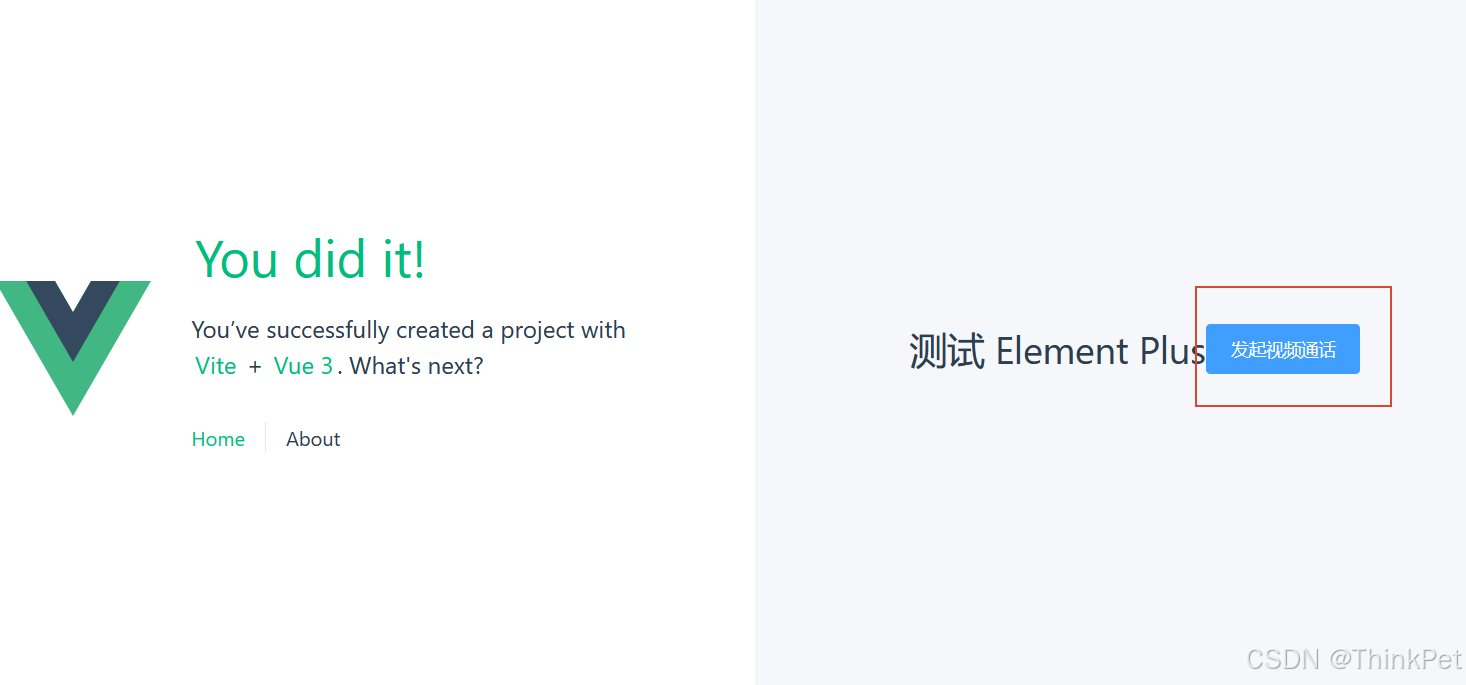
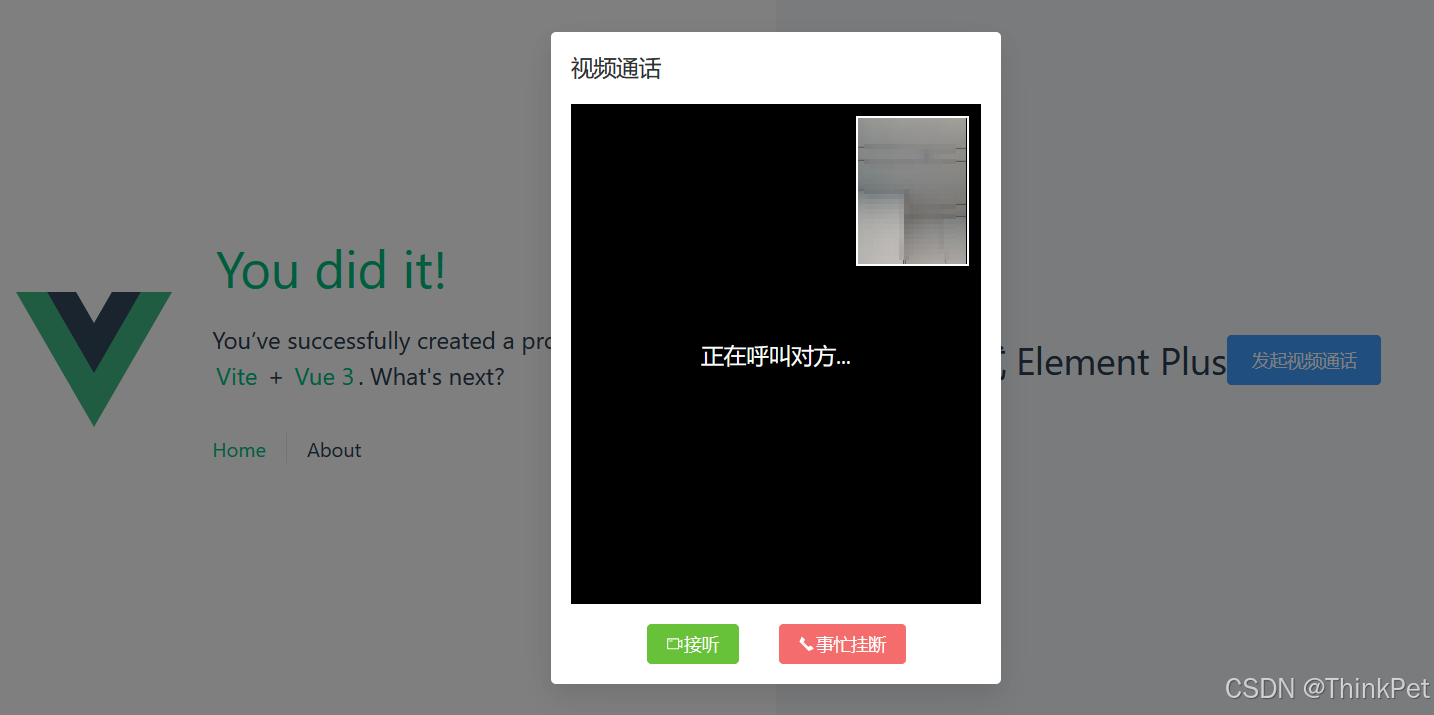
代码如下
html
<template>
  <div class="about-container">
    <h1>测试 Element Plus</h1>
    <!-- 1. 默认只展示一个触发按钮 -->
    <el-button type="primary" size="large" @click="startCallWorkflow">
      发起视频通话
    </el-button>

    <!-- 2. 视频通话弹窗 -->
    <el-dialog
      v-model="dialogVisible"
      title="视频通话"
      width="360px"
      :close-on-click-modal="false"
      :show-close="false"
      @close="handleDialogClose"
    >
      <!-- 顶部:通话时长 (仅在通话中显示) -->
      <div v-if="callStatus === 'connected'" class="call-timer">
        通话时长: {{ formattedTime }}
      </div>

      <!-- 视频区域 -->
      <div class="video-wrapper">
        <div id="video-container" class="video-container">
          <!-- 本地视频小窗 -->
          <div id="local-video" class="local-video-box"></div>
          <!-- 远端视频大窗 -->
          <div id="remote-video" class="remote-video-box"></div>
        </div>

        <!-- 状态提示文字 -->
        <div v-if="callStatus === 'calling'" class="status-overlay">
          正在呼叫对方...
        </div>
      </div>

      <!-- 底部操作按钮区 -->
      <template #footer>
        <div class="dialog-footer">
          <!-- 场景A: 呼叫中 -> 显示 [接听] 和 [挂断/忙] -->
          <!-- 注意:通常发起方不会看到"接听",这里假设你是接收方逻辑,或者模拟双向流程。
               如果是发起方,通常只有"取消呼叫"。
               根据题目要求:"弹窗展示...默认只有[接听]和[事忙挂断]",这通常是**被叫方**视角。
               为了演示完整,我保留这两个按钮,但实际业务中发起方和被叫方UI不同。
               这里我们简化为:点击主按钮后,进入"等待对方接听"或"模拟被叫"状态。
          -->

          <div v-if="callStatus === 'calling'" class="btn-group">
            <el-button type="success" @click="acceptCall">
              <el-icon><VideoCamera /></el-icon> 接听
            </el-button>
            <el-button type="danger" @click="rejectCall">
              <el-icon><PhoneFilled /></el-icon> 事忙挂断
            </el-button>
          </div>

          <!-- 场景B: 通话中 -> 显示 [中断通话] -->
          <div v-if="callStatus === 'connected'" class="btn-group">
            <el-button type="danger" size="large" circle @click="endCall">
              <el-icon><PhoneFilled /></el-icon>
            </el-button>
            <span class="hangup-text">中断通话</span>
          </div>
        </div>
      </template>
    </el-dialog>
  </div>
</template>

<script setup>
// 添加 computed 到导入列表中
import { ref, computed, onUnmounted, nextTick } from 'vue';
import AgoraRTC from 'agora-rtc-sdk-ng';
import { ElMessage } from 'element-plus';
import { VideoCamera, PhoneFilled } from '@element-plus/icons-vue';

// --- 声网配置 ---
const appId = '此处填写声网控制台中的应用的appId'; //由声网控制台签发-表示rtc应用名称对应的appId
const channel = '此处填写RTC的通道'; //两个人通话时必须处于同一个RTC通道
const token = '此处填写声网控制台签发的临时token有效期24小时(后期可以使用java/python等后端返回的生产token)';
const userId = 12345; //此处应填写进入通话的用户id ,比如张三李四通话时,张三用张三的uid ,李四用李四的uid
// --- 状态管理 ---
const dialogVisible = ref(false);
const callStatus = ref('idle'); // idle | calling | connected
if (process.env.NODE_ENV === 'development') {
  AgoraRTC.enableLogUpload();
  // 如果需要更详细的控制台日志,可以设置日志级别
  // AgoraRTC.setLogLevel(4); // 4 = DEBUG
}
const client = AgoraRTC.createClient({ mode: 'rtc', codec: 'vp8' });
const localTracks = { videoTrack: null, audioTrack: null };
const remoteUsers = ref([]);

// --- 计时器相关 ---
const timerInterval = ref(null);
const seconds = ref(0);

const formattedTime = computed(() => {
  const mins = Math.floor(seconds.value / 60).toString().padStart(2, '0');
  const secs = (seconds.value % 60).toString().padStart(2, '0');
  return `${mins}:${secs}`;
});

// --- 核心逻辑 ---


// 【重要修改】封装监听器绑定逻辑,确保只绑定一次
const setupClientListeners = () => {
  console.log('[RTC] 设置客户端监听器...');
  // 防止重复绑定
  client.removeAllListeners();

  client.on('user-published', async (user, mediaType) => {
    console.log('[RTC] 事件: user-published', { uid: user.uid, mediaType });
    try {
      await client.subscribe(user, mediaType);
      console.log('[RTC] 订阅成功', { uid: user.uid, mediaType });

      if (mediaType === 'video') {
        console.log('[RTC] 播放远端视频到 #remote-video');
        user.videoTrack.play('remote-video');
        if (!remoteUsers.value.find(u => u.uid === user.uid)) {
          remoteUsers.value.push(user);
        }
      }

      if (mediaType === 'audio') {
        console.log('[RTC] 播放远端音频');
        user.audioTrack.play();
      }
    } catch (error) {
      console.error('[RTC] 订阅或播放失败:', error);
    }
  });

  client.on('user-unpublished', (user, mediaType) => {
    console.log('[RTC] 事件: user-unpublished', { uid: user.uid, mediaType });
    if (mediaType === 'video') {
      // 注意:unpublished 时 track 可能已经不可用,直接清理引用
      remoteUsers.value = remoteUsers.value.filter(u => u.uid !== user.uid);
      console.log('[RTC] 远端视频停止,更新远程用户列表');
    }
    if (mediaType === 'audio') {
      console.log('[RTC] 远端音频停止');
    }
  });

  client.on('user-joined', (user) => {
    console.log('[RTC] 事件: user-joined', { uid: user.uid });
  });

  client.on('user-left', (user) => {
    console.log('[RTC] 事件: user-left', { uid: user.uid });
  });

  // 监听连接状态变化
  client.on('connection-state-change', (curState, prevState, reason) => {
    console.log('[RTC] 连接状态变更', { curState, prevState, reason });
  });
};

// 1. 点击主按钮:打开弹窗,进入"呼叫中"状态,并初始化本地流(但不发布,或者发布取决于业务逻辑)
// 这里为了模拟"接听"前的状态,我们先打开摄像头预览,但不加入频道,或者加入频道但不推流?
// 声网逻辑通常是:Join Channel -> Publish。
// 为了符合题目"点击接听后才正式通话",我们可以这样设计:
// 点击主按钮 -> 打开弹窗 -> 创建本地流并预览(本地能看到自己)-> 状态为 calling
// 点击接听 -> 真正 Join Channel 并发布流 -> 状态为 connected
const startCallWorkflow = async () => {
  console.log('[RTC] 开始呼叫流程...');
  dialogVisible.value = true;
  callStatus.value = 'calling';
  seconds.value = 0;

  try {
    console.log('[RTC] 请求摄像头和麦克风权限...');
    localTracks.videoTrack = await AgoraRTC.createCameraVideoTrack();
    localTracks.audioTrack = await AgoraRTC.createMicrophoneAudioTrack();
    console.log('[RTC] 本地轨道创建成功');

    await nextTick();
    console.log('[RTC] 本地视频预览到 #local-video');
    localTracks.videoTrack.play('local-video');

  } catch (error) {
    console.error('[RTC] 获取媒体设备失败:', error);
    ElMessage.error('无法访问摄像头或麦克风: ' + error.message);
    dialogVisible.value = false;
  }
};

// 2. 点击接听:加入频道,发布流,开始计时
const acceptCall = async () => {
  console.log('[RTC] 点击接听,准备加入频道...');
  try {
    ElMessage.info('正在连接...');

    // 1. 设置监听器
    setupClientListeners();

    // 2. 加入频道
    console.log('[RTC] 正在加入频道...', { appId, channel, userId });
    const uid = await client.join(appId, channel, token, userId);
    console.log('[RTC] 加入频道成功! 本地 UID:', uid);

    // 3. 发布本地流
    console.log('[RTC] 正在发布本地流...', { hasVideo: !!localTracks.videoTrack, hasAudio: !!localTracks.audioTrack });
    await client.publish(Object.values(localTracks).filter(t => t)); // 过滤掉可能的 null
    console.log('[RTC] 本地流发布成功');

    callStatus.value = 'connected';
    startTimer();

    ElMessage.success('已接通');
  } catch (error) {
    console.error('[RTC] 加入频道或发布流失败:', error);
    // 打印更详细的错误信息以便调试
    if (error.code) {
      console.error('[RTC] 错误代码:', error.code);
      console.error('[RTC] 错误消息:', error.message);
    }
    ElMessage.error('连接失败: ' + (error.message || '未知错误'));
    endCall();
  }
};

// 3. 点击事忙挂断/中断通话:清理资源
const rejectCall = () => {
  console.log('[RTC] 用户拒绝呼叫');
  endCall();
  ElMessage.info('已挂断');
};

const endCall = async () => {
  console.log('[RTC] 开始结束通话清理工作...');
  stopTimer();

  // 清理本地轨道
  for (const trackName in localTracks) {
    const track = localTracks[trackName];
    if (track) {
      console.log(`[RTC] 关闭本地轨道: ${trackName}`);
      track.stop();
      track.close();
    }
  }
  localTracks.videoTrack = null;
  localTracks.audioTrack = null;

  // 清理远端轨道
  console.log('[RTC] 清理远端用户轨道...', remoteUsers.value.length);
  remoteUsers.value.forEach(user => {
    if (user.videoTrack) {
      user.videoTrack.stop();
      user.videoTrack.close();
    }
    if (user.audioTrack) {
      user.audioTrack.stop();
      user.audioTrack.close();
    }
  });
  remoteUsers.value = [];

  // 离开频道
  if (client.connectionState === 'CONNECTED') {
    console.log('[RTC] 正在离开频道...');
    try {
      await client.leave();
      console.log('[RTC] 已离开频道');
    } catch (e) {
      console.error('[RTC] 离开频道时出错:', e);
    }
  } else {
    console.log('[RTC] 客户端未连接,无需离开频道');
  }

  // 移除监听器
  client.removeAllListeners();
  console.log('[RTC] 监听器已移除');

  callStatus.value = 'idle';
  dialogVisible.value = false;
  console.log('[RTC] 通话流程结束');
};

// 处理弹窗关闭(比如点击遮罩层,虽然设置了false,但以防万一)
const handleDialogClose = () => {
  console.log('[RTC] 弹窗关闭触发');
  endCall();
};

// --- 辅助函数 ---

// const handleUserPublished = async (user, mediaType) => {
//   await client.subscribe(user, mediaType);
//   if (mediaType === 'video') {
//     user.videoTrack.play('remote-video');
//     remoteUsers.value.push(user);
//   }
//   if (mediaType === 'audio') {
//     user.audioTrack.play();
//   }
// };

// const handleUserUnpublished = (user, mediaType) => {
//   if (mediaType === 'video') {
//     user.videoTrack.stop();
//     user.videoTrack.close();
//     remoteUsers.value = remoteUsers.value.filter(u => u.uid !== user.uid);
//   }
//   if (mediaType === 'audio') {
//     user.audioTrack.stop();
//     user.audioTrack.close();
//   }
// };

const startTimer = () => {
  stopTimer();
  timerInterval.value = setInterval(() => {
    seconds.value++;
  }, 1000);
};

const stopTimer = () => {
  if (timerInterval.value) {
    clearInterval(timerInterval.value);
    timerInterval.value = null;
  }
};

// 组件卸载时确保清理
onUnmounted(() => {
  console.log('[RTC] 组件卸载,强制清理');
  endCall();
});
</script>

<style scoped>
.about-container {
  display: flex;
  justify-content: center;
  align-items: center;
  height: 100vh;
  background-color: #f5f7fa;
}


.video-wrapper {
  position: relative;
  width: 100%;
  height: 400px; /* 固定高度供弹窗使用 */
  background-color: #000;
}

.video-container {
  position: relative;
  width: 100%;
  height: 100%;
}

/* 远端视频全屏 */
.remote-video-box {
  width: 100%;
  height: 100%;
  object-fit: cover;
}

/* 本地视频小窗 */
.local-video-box {
  position: absolute;
  top: 10px;
  right: 10px;
  width: 90px;
  height: 120px;
  border: 2px solid #fff;
  z-index: 10;
  background-color: #333;
  box-shadow: 0 2px 8px rgba(0,0,0,0.5);
}

.status-overlay {
  position: absolute;
  top: 50%;
  left: 50%;
  transform: translate(-50%, -50%);
  color: #fff;
  font-size: 18px;
  background-color: rgba(0, 0, 0, 0.5);
  padding: 10px 20px;
  border-radius: 4px;
  z-index: 5;
}

.call-timer {
  text-align: center;
  font-size: 16px;
  color: #409eff;
  margin-bottom: 10px;
  font-weight: bold;
}

.dialog-footer {
  display: flex;
  justify-content: center;
  align-items: center;
  flex-direction: column;
}

.btn-group {
  display: flex;
  gap: 20px;
  align-items: center;
}

.hangup-text {
  margin-top: 5px;
  font-size: 12px;
  color: #f56c6c;
}
</style>
注意事项
声网web视频通话,只支持localhost 或公网https访问 ,这是声网sdk限制的;
举例: 这个vue3项目部署到公网https服务器上 ;然后2个用户在浏览器访问这个https的前端页面地址后,才能正确初始化sdk,然后用户浏览器提示是否授权打开摄像头和麦克风,用户授权后才能正常打开视频通话界面,从而看到彼此的摄像头;
本地开发调试时,可以自己用localhost访问,让对方用https访问 (可以使用花生壳提前做好https穿透到本机vue3项目)来调试画面;没问题之后再发布生产环境比如阿里云配置域名和https就行;
画中画界面,需要自己前端代码绘制,如图,我是绘制的主画面显示对方摄像头,右上角的小框画面显示自己的摄像头;
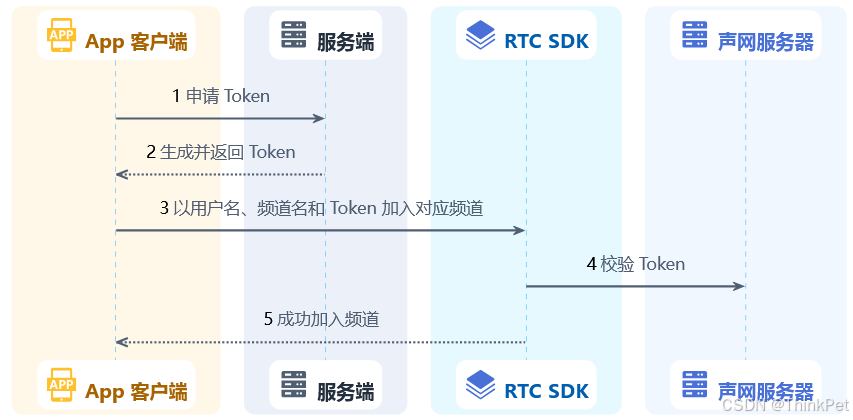
整个webRTC通话的流程如下,app客户端可以是WEB 或安卓apk 或IOS app;服务端是java/python等服务端(用于签发token) ;RTC-SDK是终端app集成的声网sdk ;
服务端签发token的示例如下
java示例代码 官方githug代码
java
package io.agora.sample;
import io.agora.media.RtcTokenBuilder2;
import io.agora.media.RtcTokenBuilder2.Role;

public class RtcTokenBuilder2Sample {
    // 获取环境变量 AGORA_APP_ID 的值。请确保你将该变量设为你在声网控制台获取的 App ID
    static String appId = System.getenv("AGORA_APP_ID");
    // 获取环境变量 AGORA_APP_CERTIFICATE 的值。请确保你将该变量设为你在声网控制台获取的 App 证书
    static String appCertificate = System.getenv("AGORA_APP_CERTIFICATE");
    // 将 channelName 替换为需要加入的频道名
    static String channelName = "channelName";
    // 填入你实际的用户 ID
    static int uid = 2082341273;
    // Token 的有效时间,单位秒
    static int tokenExpirationInSeconds = 3600;
    // 所有的权限的有效时间,单位秒,声网建议你将该参数和 Token 的有效时间设为一致
    static int privilegeExpirationInSeconds = 3600;

    public static void main(String[] args) {
        System.out.printf("App Id: %s\n", appId);
        System.out.printf("App Certificate: %s\n", appCertificate);
        if (appId == null || appId.isEmpty() || appCertificate == null || appCertificate.isEmpty()) {
            System.out.printf("Need to set environment variable AGORA_APP_ID and AGORA_APP_CERTIFICATE\n");
            return;
        }
        // 生成 Token
        RtcTokenBuilder2 token = new RtcTokenBuilder2();
        String result = token.buildTokenWithUid(appId, appCertificate, channelName, uid, Role.ROLE_PUBLISHER, tokenExpirationInSeconds, privilegeExpirationInSeconds);
        System.out.printf("Token with uid: %s\n", result);
    }
}
python示例代码 官方python3代码
python
import os
import sys

sys.path.insert(0, os.path.abspath(os.path.join(os.path.dirname(__file__), '..')))

from src.RtcTokenBuilder2 import *


def main():
    # 获取环境变量 AGORA_APP_ID 的值。请确保你将该变量设为你在声网控制台获取的 App ID
    app_id = os.environ.get("AGORA_APP_ID")
    # 获取环境变量 AGORA_APP_CERTIFICATE 的值。请确保你将该变量设为你在声网控制台获取的 App 证书
    app_certificate = os.environ.get("AGORA_APP_CERTIFICATE")
    # 将 channel_name 替换为需要加入的频道名
    channel_name = "channel_name"
    # 填入你实际的用户 ID
    uid = "uid"
    # Token 的有效时间,单位秒
    token_expiration_in_seconds = 3600
    # 所有的权限的有效时间,单位秒,声网建议你将该参数和 Token 的有效时间设为一致
    privilege_expiration_in_seconds = 3600

    print("App Id: %s" % app_id)
    print("App Certificate: %s" % app_certificate)
    if not app_id or not app_certificate:
        print("Need to set environment variable AGORA_APP_ID and AGORA_APP_CERTIFICATE")
        return

    # 生成 Token
    token = RtcTokenBuilder.build_token_with_uid(app_id, app_certificate, channel_name, uid, Role_Publisher,
                                                 token_expiration_in_seconds, privilege_expiration_in_seconds)
    print("Token with int uid: {}".format(token))


if __name__ == "__main__":
    main()
golang示例代码
go
package main

import (
    "fmt"
    "os"

    rtctokenbuilder "github.com/AgoraIO/Tools/DynamicKey/AgoraDynamicKey/go/src/rtctokenbuilder2"
)

func main() {
    // 获取环境变量 AGORA_APP_ID 的值。请确保你将该变量设为你在声网控制台获取的 App ID
    appId := os.Getenv("AGORA_APP_ID")
    // 获取环境变量 AGORA_APP_CERTIFICATE 的值。请确保你将该变量设为你在声网控制台获取的 App 证书
    appCertificate := os.Getenv("AGORA_APP_CERTIFICATE")
    // 将 channelName 替换为需要加入的频道名
    channelName := "channelName"
    // 填入你实际的用户 ID
    uid := uint32(uid)
    // Token 的有效时间,单位秒
    tokenExpirationInSeconds := uint32(3600)
    // 所有的权限的有效时间,单位秒,声网建议你将该参数和 Token 的有效时间设为一致
    privilegeExpirationInSeconds := uint32(3600)

    fmt.Println("App Id:", appId)
    fmt.Println("App Certificate:", appCertificate)
    if appId == "" || appCertificate == "" {
        fmt.Println("Need to set environment variable AGORA_APP_ID and AGORA_APP_CERTIFICATE")
        return
    }
    // 生成 Token
    result, err := rtctokenbuilder.BuildTokenWithUid(appId, appCertificate, channelName, uid, rtctokenbuilder.RolePublisher, tokenExpirationInSeconds, privilegeExpirationInSeconds)
    if err != nil {
        fmt.Println(err)
    } else {
        fmt.Printf("Token with int uid: %s\n", result)
    }
}
云录制
声网视频通话支持云录制,提供了rest接口、java sdk ,即要么前端录制,要么后端录制
云录制rest接口 (前端来录制)
需要前端调用3个接口
typescript
// 声网云端录制 - 前端直连 Agora API(需在 .env 中配置以下变量)
// VITE_AGORA_CUSTOMER_KEY=your_customer_key
// VITE_AGORA_CUSTOMER_SECRET=your_customer_secret

const AGORA_CUSTOMER_KEY = import.meta.env.VITE_AGORA_CUSTOMER_KEY || '';
const AGORA_CUSTOMER_SECRET = import.meta.env.VITE_AGORA_CUSTOMER_SECRET || '';
const AGORA_RECORDING_API = 'https://api.sd-rtn.com/v1/apps';

function getAgoraBasicAuth(): string {
  return 'Basic ' + btoa(AGORA_CUSTOMER_KEY + ':' + AGORA_CUSTOMER_SECRET);
}

/**
 * 声网云端录制 - 获取 resourceId
 * POST https://api.sd-rtn.com/v1/apps/{appid}/cloud_recording/acquire
 * 返回数据结构
 * {
  "cname": "录制的频道名。",
  "uid": "字符串内容为云端录制服务在 RTC 频道内使用的 UID,用于标识频道内的录制服务。",
  "resourceId": "云端录制资源 Resource ID。使用这个 Resource ID 可以开始一段云端录制。这个 Resource ID 的有效期为 5 分钟,超时需要重新请求。"
}
 */
export async function acquireCloudRecording(
  appId: string,  // 应用 ID
   channel: string,  //设置待录制的频道名
    token: string,  //用于鉴权的动态密钥(Token)。如果你的项目已启用 App 证书,则务必在该字段中传入你项目的动态密钥
    uid:string,  //字符串内容为云端录制服务在频道内使用的 UID,用于标识频道内的录制服务
     sn: string,  // 设备编码
     ymd: string, // yyyyMMDD 如20230705
     hms: string, // 时分秒 如 102133
  ): Promise<any> {
  const res = await fetch(`${AGORA_RECORDING_API}/${appId}/cloud_recording/acquire`, {
    method: 'POST',
    headers: {
      'Authorization': getAgoraBasicAuth(),
      'Content-Type': 'application/json',
    },
    body: JSON.stringify({
      cname: channel,
      uid: uid,
      clientRequest: {scene: 0, resourceExpiredHour: 24, startParameter: {
        token:token,
        recordingConfig: {
            channelType: 1,
            streamTypes: 2,
            audioProfile: 2,
            videoStreamType: 0,
            maxIdleTime: 30,
            transcodingConfig: {
              width: 640,
              height: 360,
              fps: 15,
              bitrate: 500,
              mixedVideoLayout: 0,
              backgroundColor: '#000000'
            },
            subscribeVideoUids: ['#allstream#'],
            subscribeAudioUids: ['#allstream#']
          },
          recordingFileConfig: {avFileType: ['hls', 'mp4']},
          storageConfig: { //需要配置录制到某个OSS云存储,这里以腾讯COS为例
            vendor: 3,  // 3: 腾讯云
            region: 3,  // 3: 广州
            bucket: '存储桶名称',
            accessKey: 'COS访问key',
            secretKey: 'COS访问密钥',
            fileNamePrefix: ['robot','OFFICE',sn,'SERVICE',ymd,hms],
          },
      }}
    }),
  });
  return res.json();
}

/**
 * 声网云端录制 - 开始录制
 * POST https://api.sd-rtn.com/v1/apps/{appid}/cloud_recording/resourceid/{resourceid}/mode/{mode}/start
 * 返回数据结构
 * {
  "cname": "录制的频道名。",
  "uid": "字符串内容为云端录制服务在 RTC 频道内使用的 UID,用于标识频道内的录制服务。",
  "resourceId": "云端录制资源 Resource ID。使用这个 Resource ID 可以开始一段云端录制。这个 Resource ID 的有效期为 5 分钟,超时需要重新请求。",
  "sid": "录制 ID。成功开始云端录制后,你会得到一个 Sid (录制 ID)。该 ID 是一次录制周期的唯一标识。"
}
 */
export async function startCloudRecording(
  appId: string, // 应用 ID
  resourceId: string, //通过 acquireCloudRecording 请求获取到的 Resource ID
  mode: string,  //录制模式:mix 合流录制
  sn: string,  // 设备编码
  ymd: string, // yyyyMMDD 如20230705
  hms: string, // 时分秒 如 102133
  channel: string, //录制服务所在频道的名称。需要和你在 acquireCloudRecording 请求中输入的 channel 相同
  token: string,  //用于鉴权的动态密钥(Token)。如果你的项目已启用 App 证书,则务必在该字段中传入你项目的动态密钥
  uid: number = 0,  //字符串内容为录制服务在 RTC 频道内使用的 UID,用于标识该录制服务,需要和你在 acquireCloudRecording 请求中输入的 uid 相同
): Promise<any> {
  const res = await fetch(
    `${AGORA_RECORDING_API}/${appId}/cloud_recording/resourceid/${resourceId}/mode/${mode}/start`,
    {
      method: 'POST',
      headers: {
        'Authorization': getAgoraBasicAuth(),
        'Content-Type': 'application/json',
      },
      body: JSON.stringify({
        cname: channel,
        uid: String(uid),
        clientRequest: {
          token:token,
          recordingConfig: {
            channelType: 1,
            streamTypes: 2,
            audioProfile: 2,
            videoStreamType: 0,
            maxIdleTime: 30,
            transcodingConfig: {
              width: 640,
              height: 360,
              fps: 15,
              bitrate: 500,
              mixedVideoLayout: 0,
              backgroundColor: '#000000'
            },
            subscribeVideoUids: ['#allstream#'],
            subscribeAudioUids: ['#allstream#']
          },
          recordingFileConfig: {avFileType: ['hls', 'mp4']},
          storageConfig: { //需要配置录制到某个OSS云存储,这里以腾讯COS为例
            vendor: 3,  // 3: 腾讯云
            region: 3,  // 3: 广州
            bucket: '存储桶名称',
            accessKey: 'COS访问key',
            secretKey: 'COS访问密钥',
            fileNamePrefix: ['robot','OFFICE',sn,'SERVICE',ymd,hms],
          },
        },
      }),
    },
  );
  return res.json();
}

/**
 * 声网云端录制 - 停止录制
 * 开始录制后,你可以调用 stop 方法离开频道,停止录制。录制停止后如需再次录制,必须再调用 acquire 方法请求一个新的 Resource ID
 * POST https://api.sd-rtn.com/v1/apps/{appid}/cloud_recording/resourceid/{resourceid}/sid/{sid}/mode/{mode}/stop
 * 返回数据结构
 *
{
    "cname": "device-00412345_channel",
    "resourceId": "QZW-Qc9EfWbTtlx7e7xq5bsPxh7gH7sevqyWDjF59OIuNTkVccEUq9w7YLfSUqsIpP0uf9H5QTpbuwFIJlJL9A2FbDol42ne3o-8g__pUGzkd3siZ9jLR34DfGMhdN0BOpHrYHIddjXej-uc3QrDK0H4VJgeVef4J4-HTrBKVzLA83K9T73nuWfY3hBDTyeCmzfbyq5xy7qm-U5fF-l_AE8V6PzB0W61f_GDchNr34ZJeOjXdeiQDXFesFGZyljyfM4-tDoMSwKc4wi7VaRD6Q",
    "serverResponse": {
        "fileList": [
            {
                "fileName": "robot/OFFICE/device-004/SERVICE/20260520/164833/175973946d407df68985a59a7c1ae3fc_device-00412345_channel.m3u8",
                "isPlayable": true,
                "mixedAllUser": true,
                "sliceStartTime": 1779266914981,
                "trackType": "audio_and_video",
                "uid": "0"
            },
            {
                "fileName": "robot/OFFICE/device-004/SERVICE/20260520/164833/175973946d407df68985a59a7c1ae3fc_device-00412345_channel_0.mp4",
                "isPlayable": true,
                "mixedAllUser": true,
                "sliceStartTime": 1779266914981,
                "trackType": "audio_and_video",
                "uid": "0"
            }
        ],
        "fileListMode": "json",
        "uploadingStatus": "uploaded"
    },
    "sid": "175973946d407df68985a59a7c1ae3fc",
    "uid": "18"
}

 */
export async function stopCloudRecording(
  appId: string,   // 应用 ID
  resourceId: string, //通过 acquireCloudRecording 请求获取到的 Resource ID
  sid: string,   //通过 startCloudRecording 获取的录制 ID
  mode: string,  //录制模式:mix 合流录制
  channel: string, //录制服务所在频道的名称。需要和你在 acquireCloudRecording 请求中输入的 channel 相同
  uid: string  //字符串内容为录制服务在 RTC 频道内使用的 UID,用于标识该录制服务,需要和你在 acquireCloudRecording 请求中输入的 uid 相同
): Promise<any> {
  const res = await fetch(
    `${AGORA_RECORDING_API}/${appId}/cloud_recording/resourceid/${resourceId}/sid/${sid}/mode/${mode}/stop`,
    {
      method: 'POST',
      headers: {
        'Authorization': getAgoraBasicAuth(),
        'Content-Type': 'application/json',
      },
      body: JSON.stringify({
        cname: channel,
        uid: uid,
        clientRequest: {async_stop: false}
      }),
    },
  );
  return res.json();
}
云录制java sdk (后端来录制)
xml
<dependencies>
    <dependency>
        <groupId>io.agora</groupId>
        <artifactId>agora-rest-client-core</artifactId>
        <version>0.5.0</version>
    </dependency>
</dependencies>
云录制java代码
java
public class Main {
    private static String appId = "<your appId>";

    private static String cname = "<your cname>";
    // 录制服务加入频道的用户 ID
    private static String uid = "<your uid>";
    // 客户 ID
    private static String username = "<the username of basic auth credential>";
    // 客户密钥
    private static String password = "<the password of basic auth credential>";

    private static String token = "<your token>";

    private static String accessKey = "<your accessKey>";

    private static String secretKey = "<your secretKey>";

    private static Integer region = 1; // <your region>

    private static String bucket = "<your bucket>";

    private static Integer vendor = 2; // <your vendor>

    public static void main(String[] args) throws Exception {

        Credential credential = new BasicAuthCredential(username, password);

        // Initialize CloudRecordingConfig
        CloudRecordingConfig config = CloudRecordingConfig.builder()
                .appId(appId)
                .credential(credential)
                // Specify the region where the server is located.
                // Optional values are CN, US, EU, AP, and the client will automatically
                // switch to use the best domain name according to the configured region
                .domainArea(DomainArea.CN)
                .build();

        // Initialize CloudRecordingClient
        CloudRecordingClient cloudRecordingClient = CloudRecordingClient.create(config);

        AcquireResourceRes acquireResourceRes;

        // Acquire resource
        try {
            acquireResourceRes = cloudRecordingClient
                    .mixScenario()
                    .acquire(cname, uid, AcquireMixRecordingResourceClientReq.builder().build())
                    .block();
        } catch (AgoraException e) {
            System.out.printf("agora error:%s", e.getMessage());
            return;
        } catch (Exception e) {
            System.out.printf("unknown error:%s", e.getMessage());
            return;
        }

        // Check if the response is null
        if (acquireResourceRes == null || acquireResourceRes.getResourceId() == null) {
            System.out.println("failed to get resource");
            return;
        }

        System.out.printf("resourceId:%s", acquireResourceRes.getResourceId());

        System.out.println("acquire resource success");

        // Define storage config
        StartResourceReq.StorageConfig storageConfig = StartResourceReq.StorageConfig.builder()
                .accessKey(accessKey)
                .secretKey(secretKey)
                .bucket(bucket)
                .vendor(vendor)
                .region(region)
                .build();

        // Define start resource request
        StartMixRecordingResourceClientReq startResourceReq = StartMixRecordingResourceClientReq.builder()
                .token(token)
                .recordingConfig(StartResourceReq.RecordingConfig.builder()
                        .channelType(1)
                        .build())
                .recordingFileConfig(StartResourceReq.RecordingFileConfig.builder()
                        .avFileType(Arrays.asList("hls", "mp4"))
                        .build())
                .storageConfig(storageConfig)
                .build();


        StartResourceRes startResourceRes;

        // Start resource
        try {
            startResourceRes = cloudRecordingClient
                    .mixScenario()
                    .start(cname, uid, acquireResourceRes.getResourceId(), startResourceReq)
                    .block();

        } catch (AgoraException e) {
            System.out.printf("agora error:%s", e.getMessage());
            return;
        } catch (Exception e) {
            System.out.printf("unknown error:%s", e.getMessage());
            return;
        }

        // Check if the response is null
        if (startResourceRes == null || startResourceRes.getSid() == null) {
            System.out.println("failed to start resource");
            return;
        }

        System.out.printf("sid:%s", startResourceRes.getSid());

        System.out.println("start resource success");

        Thread.sleep(3000);

        QueryMixHLSAndMP4RecordingResourceRes queryResourceRes;

        // Query resource
        try {
            queryResourceRes = cloudRecordingClient
                    .mixScenario()
                    .queryHLSAndMP4(startResourceRes.getResourceId(), startResourceRes.getSid())
                    .block();

        } catch (AgoraException e) {
            System.out.printf("agora error:%s", e.getMessage());
            return;
        } catch (Exception e) {
            System.out.printf("unknown error:%s", e.getMessage());
            return;
        }

        if (queryResourceRes == null || queryResourceRes.getServerResponse() == null) {
            System.out.println("failed to query resource");
            return;
        }

        System.out.println("query resource success");

        Thread.sleep(3000);

        StopResourceRes stopResourceRes;

        // Stop resource
        try {
            stopResourceRes = cloudRecordingClient
                    .mixScenario()
                    .stop(cname, uid, startResourceRes.getResourceId(), startResourceRes.getSid(), true)
                    .block();
        } catch (AgoraException e) {
            System.out.printf("agora error:%s", e.getMessage());
            return;
        } catch (Exception e) {
            System.out.printf("unknown error:%s", e.getMessage());
            return;
        }

        // Check if the response is null
        if (stopResourceRes == null || stopResourceRes.getSid() == null) {
            System.out.println("failed to stop resource");
        } else {
            System.out.println("stop resource success");
        }
    }
}