文章目录
- [1. MySQL程序简介](#1. MySQL程序简介)
- [2. mysqld - MySQL 服务器(介绍)](#2. mysqld - MySQL 服务器(介绍))
- [3. mysql - MySQL 命令行客户端](#3. mysql - MySQL 命令行客户端)
-
- [3.1 mysql 客户端简介](#3.1 mysql 客户端简介)
- [3.2 mysql 客户端选项](#3.2 mysql 客户端选项)
-
- [3.2.1 指定选项的方式](#3.2.1 指定选项的方式)
- [3.2.2 mysql 客户端命令常用选项](#3.2.2 mysql 客户端命令常用选项)
- [3.2.3 在命令行中使用选项](#3.2.3 在命令行中使用选项)
- [3.3 选项(配置)文件](#3.3 选项(配置)文件)
-
- [3.3.1 使用方法](#3.3.1 使用方法)
- [3.3.2 选项文件位置及加载顺序](#3.3.2 选项文件位置及加载顺序)
-
- [3.3.2.1 在 Windows 系统读取选项文件](#3.3.2.1 在 Windows 系统读取选项文件)
- [3.3.2.2 在 Unix 和 Linux 系统上读取的选项文件](#3.3.2.2 在 Unix 和 Linux 系统上读取的选项文件)
- [3.3.3 选项文件语法](#3.3.3 选项文件语法)
- [3.3.4 案例:设置客户端全局编码格式](#3.3.4 案例:设置客户端全局编码格式)
1. MySQL程序简介
MySQL安装完成通常会包含如下程序:
Linux系统程序一般在 /usr/bin目录下,可以通过命令查看:
mysql
root@iZuf68hz06p6s2809gl3i1Z:~# ll /usr/bin/mysql*
-rwxr-xr-x 1 root root 7878032 Mar 31  2025 /usr/bin/mysql*
-rwxr-xr-x 1 root root 7519248 Mar 31  2025 /usr/bin/mysqladmin*
-rwxr-xr-x 1 root root 7992592 Mar 31  2025 /usr/bin/mysqlbinlog*
-rwxr-xr-x 1 root root 7528208 Mar 31  2025 /usr/bin/mysqlcheck*
-rwxr-xr-x 1 root root 6617008 Mar 31  2025 /usr/bin/mysql_config_editor*
-rwxr-xr-x 1 root root   27399 Mar 31  2025 /usr/bin/mysqld_multi*
-rwxr-xr-x 1 root root   29137 Mar 31  2025 /usr/bin/mysqld_safe*
-rwxr-xr-x 1 root root 7603760 Mar 31  2025 /usr/bin/mysqldump*
-rwxr-xr-x 1 root root    7719 Mar 31  2025 /usr/bin/mysqldumpslow*
-rwxr-xr-x 1 root root 7515472 Mar 31  2025 /usr/bin/mysqlimport*
-rwxr-xr-x 1 root root 7594928 Mar 31  2025 /usr/bin/mysql_migrate_keyring*
-rwxr-xr-x 1 root root 8099152 Mar 31  2025 /usr/bin/mysqlpump*
-rwxr-xr-x 1 root root 7503440 Mar 31  2025 /usr/bin/mysql_secure_installation*
-rwxr-xr-x 1 root root 7514096 Mar 31  2025 /usr/bin/mysqlshow*
-rwxr-xr-x 1 root root 7533104 Mar 31  2025 /usr/bin/mysqlslap*
-rwxr-xr-x 1 root root 6639024 Mar 31  2025 /usr/bin/mysql_ssl_rsa_setup*
-rwxr-xr-x 1 root root 6535344 Mar 31  2025 /usr/bin/mysql_tzinfo_to_sql*
-rwxr-xr-x 1 root root 7615728 Mar 31  2025 /usr/bin/mysql_upgrade*
root@iZuf68hz06p6s2809gl3i1Z:~# ll /usr/sbin/mysql*
-rwxr-xr-x 1 root root 72960816 Mar 31  2025 /usr/sbin/mysqld*
root@iZuf68hz06p6s2809gl3i1Z:~# windows系统目录:你的安装路径\MySQL Server 8.0\bin\*.exe,可以通过命令查看:
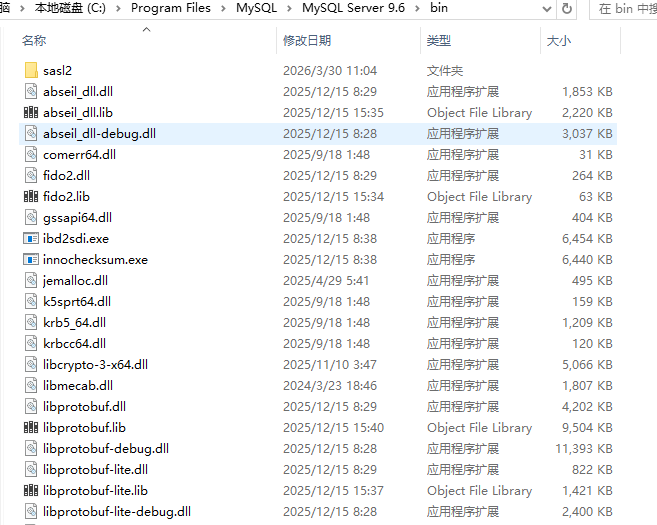
每个
MySQL程序都有许多不同的选项。大多数程序都提供一个--help选项,您可以使用该选项来获取程序不同选项的描述。例如:mysql --help,可以通过在命令行或配置文件中指定选项来覆盖MySQL程序的默认选项值
以下是常用的MySQL程序:
| 程序名 | 作用 |
|---|---|
mysqld |
MySQL的守护进程即 MySQL 服务器,要使用MySQL 服务器 mysqld必须正在运行状态。 这个是服务端工具,下面都是客户端工具。 |
mysql |
MySQL客户端程序,用于交互式输入 SQL 语句或以批处理模式从文件执行SQL的命令行工具 |
mysqlcheck |
用于检查、修复、分析和优化表的表维护客户端 |
mysqldump |
将 MySQL 数据库转储到 SQL、文本或 XML 文件中的客户端 |
mysqlimport |
将文本文件导入到表的客户端工具 |
mysqladmin |
执行管理操作的客户端,例如创建或删除数据库、重新加载授权表、将表刷新到磁盘以及 重新打开日志文件。Mysqladmin还可以用于从服务器检索版本、进程和状态信息。 |
mysqlshow |
显示数据库、表、列和索引信息的客户端 |
mysqldumpslow |
用于读取和汇总慢速查询日志内容的实用程序 |
mysqlbinlog |
从二进制日志中读取SQL语句的实用程序。mysqlbinlog 文件中包含的已执行SQL语句的 日志,可用于从崩溃中恢复数据。 |
mysqlslap |
客户端负载工具,模拟多个客户端同时访问MySQL服务器,并报告每个阶段的使用时间。 |
关于不同版本的具体的细节,可以查看官方文档。
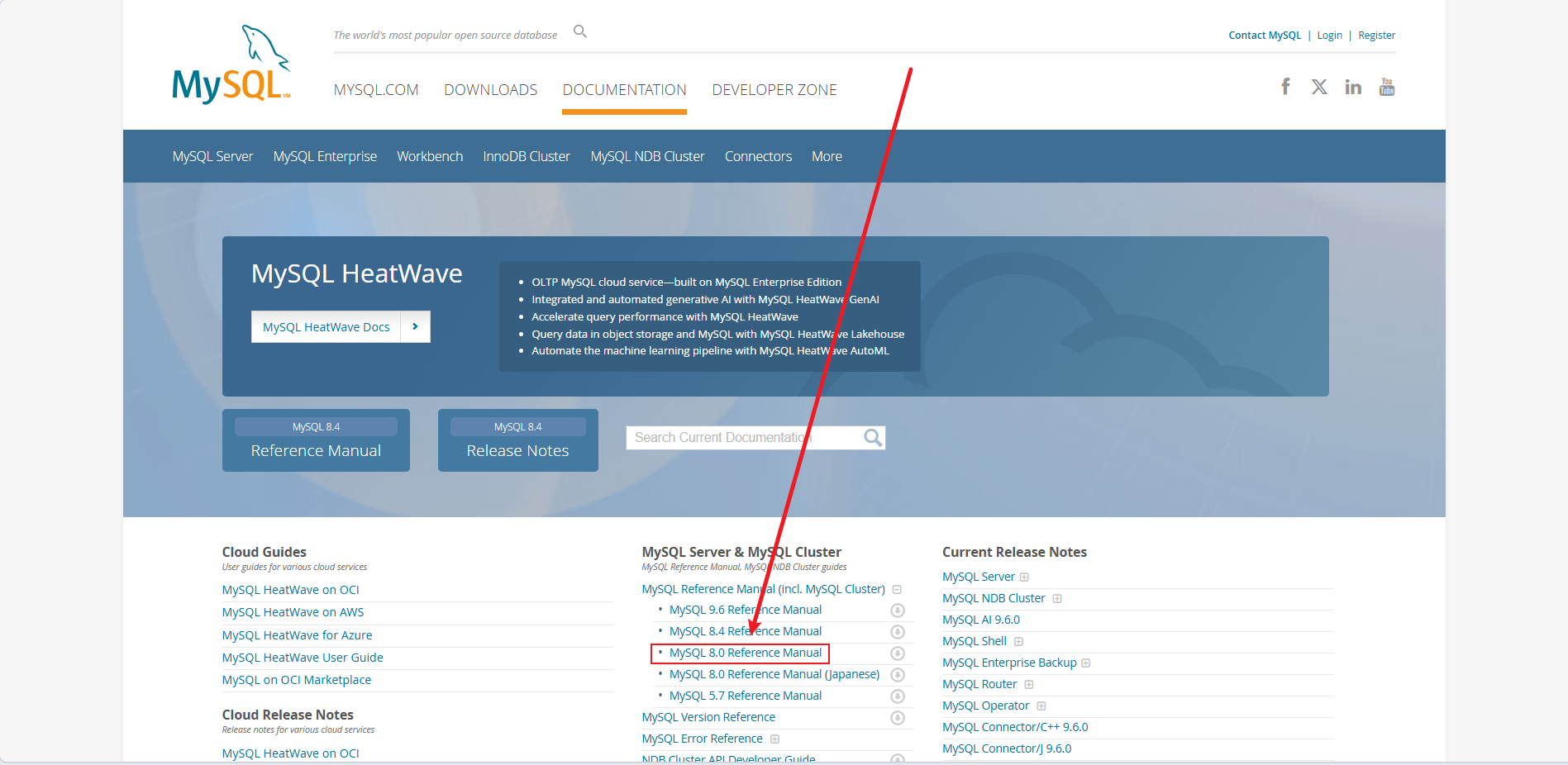
基本概览这边都有了
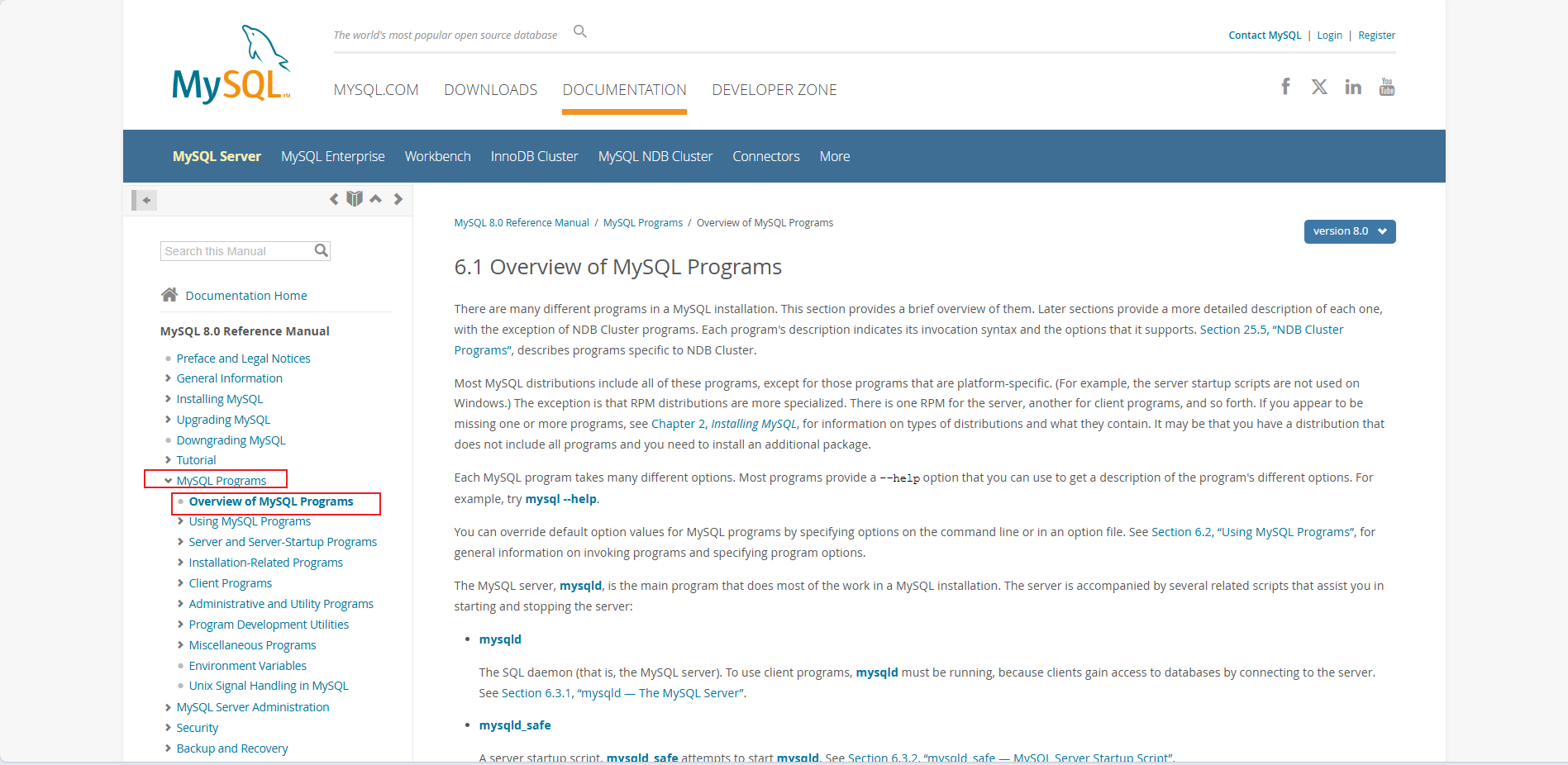
接下来我们分别介绍常用MySQL工具和使用。
2. mysqld - MySQL 服务器(介绍)
mysqld也被称为MySQL服务器,是一个多线程程序,对数据目录(可以认为是MySQL的主要工作目录)进行访问管理(包含数据库和表)。数据目录也是其他信息(如日志文件和状态文件)的默认存储位置。- 当
MySQL服务器启动时,会侦听指定的端口、处理来自客户端程序的网络连接,并管理不同客户端对数据库的访问
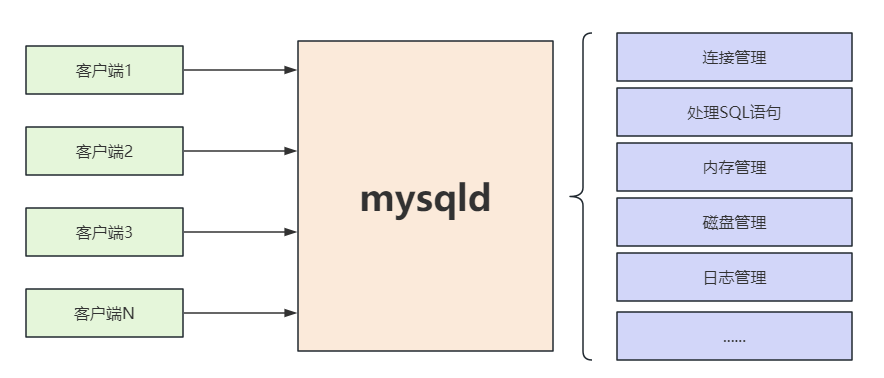
mysqld程序有许多选项可以在启动时指定 。运行以下命令查看完整的选项列表:
mysql
root@iZuf68hz06p6s2809gl3i1Z:~/108_class# mysqld --verbose --help有关 MySQL 服务器命令选项、系统变量和状态变量的完整描述,我们在服务器MySQL 服务器配置与管理专题中进行详细介绍。
3. mysql - MySQL 命令行客户端
3.1 mysql 客户端简介
mysql是一个简单的SQL shell, 可以输入命令和执行SQL语句,当执行SQL语句时,查询结果以ASCII表格式显示
mysql的基本使用非常简单,回顾一下连接数据库的方式,打开终端并输入以下命令:
mysql
# 连接MySQL服务器,长选项格式
mysql --user=user_name --password [db_name]
# 短选项格式
mysql -uuser_name -p [db_name]
# 输入密码
Enter password: your_password
例如:长选项格式
mysql
root@iZuf68hz06p6s2809gl3i1Z:~/108_class# mysql --user=root --password test_db
Enter password:
Reading table information for completion of table and column names
You can turn off this feature to get a quicker startup with -A

Welcome to the MySQL monitor.  Commands end with ; or \g.
Your MySQL connection id is 2677
Server version: 8.0.42 MySQL Community Server - GPL

Copyright (c) 2000, 2025, Oracle and/or its affiliates.

Oracle is a registered trademark of Oracle Corporation and/or its
affiliates. Other names may be trademarks of their respective
owners.

Type 'help;' or '\h' for help. Type '\c' to clear the current input statement.

mysql>
短选项格式
mysql
root@iZuf68hz06p6s2809gl3i1Z:~/108_class# mysql -uroot -p test_db
Enter password:
Reading table information for completion of table and column names
You can turn off this feature to get a quicker startup with -A

Welcome to the MySQL monitor.  Commands end with ; or \g.
Your MySQL connection id is 2678
Server version: 8.0.42 MySQL Community Server - GPL

Copyright (c) 2000, 2025, Oracle and/or its affiliates.

Oracle is a registered trademark of Oracle Corporation and/or its
affiliates. Other names may be trademarks of their respective
owners.

Type 'help;' or '\h' for help. Type '\c' to clear the current input statement.

mysql> 接下来我们详细介绍mysql 客户端的使用方法
3.2 mysql 客户端选项
3.2.1 指定选项的方式
- 在
mysql后面的命令行中列出选项- 在
mysql后面指定配置文件的路径,以便在程序启动时读取配置文件中的选项- 使用环境变量中的选项
我们重点介绍第一和第二种场景
3.2.2 mysql 客户端命令常用选项
| 选项--长格式 | 短格式 | 说明 |
|---|---|---|
--host |
-h |
--host=host_name , -hhost_name 连接到指定主机上的 MySQL 服务 |
--port |
-P |
--port=port_num , -Pport_num TCP/IP 连接使用的端口号 |
--user |
-u |
--user=user_name , -uuser_name 用于连接到MySQL 服务器的用户名 |
--password |
-p |
--password[=password] , -p[password] 用于连接到MySQL 服务器的密码。可选,如果没有给出, 会提示用户输入 |
--defaults-file |
--defaults-file=file_name 使用指定的选项文件。如果该文件不存在,则会发生错误。 |
|
--default-character-set |
--default-character-set=charset_name charset_name将作为客户端和当前连接的默认字符集,例: utf8mb4 |
|
--database |
-D |
--database=db_name , -Ddb_name 要使用的数据库 |
--compress |
-C |
--compress , -C 如果可能,压缩客户端和服务器之间传输的所有信息 |
--reconnect |
--reconnect 如果客户端与服务器的连接丢失,自动尝试重新连接 |
|
--quick |
-q |
--quick , -q 不缓存查询结果,收到一行打印一行,如果输出被挂起,可能会降低服务器速度 |
--protocol |
`--protocol={TCP | |
--delimiter |
--delimiter=str 设置SQL语句分隔符。默认值为分号 ( ; ) |
|
--execute |
-e |
--execute=statement , -estatement 执行指定的SQL语句并退出。 |
--version |
-V |
--version , -V 显示版本信息并退出。 |
--help |
-? |
--help , -? 显示帮助信息并退出。 |
如果选项的值中包含空格,那么值需要包含在双引号中。
3.2.3 在命令行中使用选项
命令行中指定选项遵循以下规则:
- 选项应在程序名之后给出
- 选项以单破折号"
-"或双破折号"--"号开头,-表示短格式,--表示长格式,例如:-?和--help都表示MySQL程序显示他的帮助消息
mysql
mysql -?
mysql --help
选项名称区分大小写。 -v 和 -V 都是合法的,但含义不同,它们分别是 --verbose 和 --version 选项的相应缩写形式
mysql
# 以下两个等价
mysqld --verbose --help
mysqld -v -?
# 以下两个等价
mysql --version
mysql -V
某些选项需要在后面指定一个值。
例如:-h 127.0.0.1 或 --host=127.0.0.1 表示向客户端程序指定 MySQL 服务器主机
mysql
mysql -h 127.0.0.1
msyql --host=127.0.0.1
对于带值的长格式选项,通常用 = 符号分隔选项名称和值。对于带值的短选项,选项值可以紧跟在选项之后,也可以用空格隔开。
例如:--host=127.0.0.1 、 -h127.0.0.1 和 -h 127.0.0.1 是等价的。
但是对于密码选项的短格式,如果要指定密码,选项与值之间不能有空格,如下所示:
mysql
mysql -ptest # test表示密码,但没有指定要访问的数据库
mysql -p test # test 表示指定了访问的数据库,但没有指定密码
在命令行中,第一个不带破折号
-的值被解析为要访问的数据库名,所以--database选项一般可以省略
- 在选项名称中,破折号 (
-) 和下划线 (_) 在大多数情况下可以互换使用,但前导破折号不能转为下划线。
- 例如:
--skip-grant-tables和--skip_grant_tables是等价的。- 对于采用数值的选项,该值可以带有后缀
K,M或G以指示乘数1024、1024^2或1024^3。
- 例如:以下命令告诉
mysqladmin对服务器执行1024次ping,每次ping之间休眠3秒
mysql
mysqladmin --count=1K --sleep=3 ping -uroot -p在命令行中包含空格的选项值必须用引号引起来。
例如:--execute (or -e ) 选项与mysql一起使用时,表示将一个或多个 SQL 语句发送给服务器执行并显示结果。
mysql
root@iZuf68hz06p6s2809gl3i1Z:~/108_class# mysql -u root -p -e "SELECT VERSION();SELECT NOW();"
Enter password:
+-----------+
| VERSION() |
+-----------+
| 8.0.42    |
+-----------+
+---------------------+
| NOW()               |
+---------------------+
| 2026-03-31 15:00:51 |
+---------------------+
root@iZuf68hz06p6s2809gl3i1Z:~/108_class#
3.3 选项(配置)文件
大多数
MySQL程序都可以从选项文件(配置文件)中读取启动选项。可以在选项文件中指定常用选项,这样就不用在每次运行程序时都在命令行中输入它们。大部分选项文件都是纯文本格式,可以使用任何文本编辑器创建。
3.3.1 使用方法
选项
--defaults-file可以指定要使用的选项文件,客户端程序会读取并应用选项文件中的相关配置
mysql
# Linux
mysql --defaults-file=/etc/mysql/my.cnf -uroot -p
# windows下
mysql "--defaults-file=C:\ProgramData\MySQL\MySQL Server 8.0\my.ini" -uroot -p
mysql
root@iZuf68hz06p6s2809gl3i1Z:/etc/mysql# ll
total 24
drwxr-xr-x  4 root root 4096 Apr 30  2025 ./
drwxr-xr-x 90 root root 4096 Dec 14 16:57 ../
drwxr-xr-x  2 root root 4096 Apr 30  2025 conf.d/
lrwxrwxrwx  1 root root   24 Apr 30  2025 my.cnf -> /etc/alternatives/my.cnf # 软连接
-rw-r--r--  1 root root 1498 Mar 31  2025 my.cnf.fallback
-rw-r--r--  1 root root 1526 Mar 31  2025 mysql.cnf # 最终文件
drwxr-xr-x  2 root root 4096 Apr 30  2025 mysql.conf.d/
root@iZuf68hz06p6s2809gl3i1Z:/etc/mysql# ll /etc/alternatives/my.cnf
lrwxrwxrwx 1 root root 20 Apr 30  2025 /etc/alternatives/my.cnf -> /etc/mysql/mysql.cnf # 软连接
/etc/mysql的my.cnf指向了/etc/alternatives/my.cnf,后者又指向了/etc/mysql/mysql.cnf,mysql.cnf就是最终文件。这个文件是默认的文件,以后配置客户端和服务端可以直接配置在这里,而不用区分文件。
mysql
root@iZuf68hz06p6s2809gl3i1Z:/etc/mysql# cd conf.d
root@iZuf68hz06p6s2809gl3i1Z:/etc/mysql/conf.d# ll
total 16
drwxr-xr-x 2 root root 4096 Apr 30  2025 ./
drwxr-xr-x 4 root root 4096 Apr 30  2025 ../
-rw-r--r-- 1 root root 1323 Mar 31  2025 mysql.cnf
-rw-r--r-- 1 root root   55 Aug  3  2016 mysqldump.cnf
root@iZuf68hz06p6s2809gl3i1Z:/etc/mysql/conf.d# cat mysql.cnf
# Copyright (c) 2015, 2025, Oracle and/or its affiliates.
#
# This program is free software; you can redistribute it and/or modify
# it under the terms of the GNU General Public License, version 2.0,
# as published by the Free Software Foundation.
#
# This program is designed to work with certain software (including
# but not limited to OpenSSL) that is licensed under separate terms,
# as designated in a particular file or component or in included license
# documentation.  The authors of MySQL hereby grant you an additional
# permission to link the program and your derivative works with the
# separately licensed software that they have either included with
# the program or referenced in the documentation.
#
# This program is distributed in the hope that it will be useful,
# but WITHOUT ANY WARRANTY; without even the implied warranty of
# MERCHANTABILITY or FITNESS FOR A PARTICULAR PURPOSE.  See the
# GNU General Public License, version 2.0, for more details.
#
# You should have received a copy of the GNU General Public License
# along with this program; if not, write to the Free Software
# Foundation, Inc., 51 Franklin St, Fifth Floor, Boston, MA 02110-1301  USA

#
# The MySQL  Client configuration file.
#
# For explanations see
# http://dev.mysql.com/doc/mysql/en/server-system-variables.html

[mysql]
root@iZuf68hz06p6s2809gl3i1Z:/etc/mysql/conf.d#
这个里面全是注释,啥都没有,不用管这个。这个是客户端的程序。
mysql
root@iZuf68hz06p6s2809gl3i1Z:/etc/mysql/mysql.conf.d# ll
total 12
drwxr-xr-x 2 root root 4096 Apr 30  2025 ./
drwxr-xr-x 4 root root 4096 Apr 30  2025 ../
-rw-r--r-- 1 root root 1463 Mar 31  2025 mysqld.cnf
root@iZuf68hz06p6s2809gl3i1Z:/etc/mysql/mysql.conf.d# cat mysqld.cnf
# Copyright (c) 2014, 2025, Oracle and/or its affiliates.
#
# This program is free software; you can redistribute it and/or modify
# it under the terms of the GNU General Public License, version 2.0,
# as published by the Free Software Foundation.
#
# This program is designed to work with certain software (including
# but not limited to OpenSSL) that is licensed under separate terms,
# as designated in a particular file or component or in included license
# documentation.  The authors of MySQL hereby grant you an additional
# permission to link the program and your derivative works with the
# separately licensed software that they have either included with
# the program or referenced in the documentation.
#
# This program is distributed in the hope that it will be useful,
# but WITHOUT ANY WARRANTY; without even the implied warranty of
# MERCHANTABILITY or FITNESS FOR A PARTICULAR PURPOSE.  See the
# GNU General Public License, version 2.0, for more details.
#
# You should have received a copy of the GNU General Public License
# along with this program; if not, write to the Free Software
# Foundation, Inc., 51 Franklin St, Fifth Floor, Boston, MA 02110-1301  USA

#
# The MySQL  Server configuration file.
#
# For explanations see
# http://dev.mysql.com/doc/mysql/en/server-system-variables.html

[mysqld]
pid-file	= /var/run/mysqld/mysqld.pid
socket		= /var/run/mysqld/mysqld.sock
datadir		= /var/lib/mysql
log-error	= /var/log/mysql/error.log
root@iZuf68hz06p6s2809gl3i1Z:/etc/mysql/mysql.conf.d#
这个是服务端的程序,里面配置了几个文件。
虽然这边把客户端和服务端做了区分,但一般不在这里配置,而是把所有的配置写在默认的配置文件中,便于维护和管理。
mysql
root@iZuf68hz06p6s2809gl3i1Z:/etc/mysql# tree
.
├── conf.d
│   ├── mysql.cnf
│   └── mysqldump.cnf
├── my.cnf -> /etc/alternatives/my.cnf
├── my.cnf.fallback
├── mysql.cnf
└── mysql.conf.d
    └── mysqld.cnf

2 directories, 6 files
root@iZuf68hz06p6s2809gl3i1Z:/etc/mysql#
3.3.2 选项文件位置及加载顺序
MySQL按以下表格中的顺序查找并读取选项文件。如果文件不存在则需要手动创建。读取顺序从上到下,后读取的文件中配置的选项优先级越高。
3.3.2.1 在 Windows 系统读取选项文件
下面这个表格,从上到下依次读取(查找顺序),最下面的优先级最高(优先级顺序)。
| 文件名 | 说明 |
|---|---|
%WINDIR%\my.ini , %WINDIR%\my.cnf |
全局 |
C:\my.ini , C:\my.cnf |
全局 |
BASEDIR\my.ini , BASEDIR\my.cnf |
全局(BASEDIR是MySQL的安装路径) |
defaults-extra-file |
如果存在其他选项文件可以通过 --defaults-extra-file 选项指定 |
%APPDATA%\MySQL\.mylogin.cnf |
登录路径选项(仅限客户端) |
DATADIR\mysqld-auto.cnf |
系统变量 (仅限服务器) |
%WINDIR% 表示 Windows 目录的位置,可以通过命令查看:
mysql
C:\Users\bit>echo %WINDIR%
# 以下是结果
C:\Windows
BASEDIR 表示 MySQL 的安装目录:
mysql
D:\Program Files\MySQL\MySQL Server 8.0%APPDATA% 表示应用程序数据的目录:
mysql
C:\Users\bit>echo %APPDATA%
# 以下是结果
C:\Users\bit\AppData\Roaming
DATADIR 代表MySQL数据目录:
mysql
C:\ProgramData\MySQL\MySQL Server 8.0注:使用
MySQL Installer安装MySQL成功后,my.ini默认在该目录下。
3.3.2.2 在 Unix 和 Linux 系统上读取的选项文件
对于两个配置文件中配置了相同的选项,那么优先级高的文件就覆盖掉优先级的文件中的选项。
| 文件名 | 说明 |
|---|---|
/etc/my.cnf |
全局 |
/etc/mysql/my.cnf |
全局(默认的) |
$MYSQL_HOME/my.cnf |
服务器特定选项(仅限服务器) |
defaults-extra-file |
所有的配置文件都会加载。 如果存在其他选项文件可以通过 --defaults-file选项,只使用指定的文件加载。 |
~/.my.cnf |
用户特定选项 |
~/.mylogin.cnf |
用户特定的登录路径选项(仅限客户端) |
DATADIR/mysqld-auto.cnf |
系统变量 (仅限服务器) |
~表示当前用户的主目录MYSQL_HOME是设置的环境变量路径DATADIR代表MySQL数据目录
mysqld-auto.cnf的优先级最高:For the server, one exception applies: The mysqld-auto.cnf option file in the data directory is processed last, so it takes precedence even over command-line options.
对于服务器而言,存在一个例外:数据目录中的
mysqld-auto.cnf选项文件是最后被处理的,因此它的优先级甚至高于命令行选项。
在Windows系统中配置文件的后缀名为.ini或.cnf在
Linux系统中配置文件的后缀名为.cnf
3.3.3 选项文件语法
运行
MySQL程序时在命令行上指定的任何长选项都可以在选项文件中指定,要获取选项列表可以使用如下命令
mysql
# 客户端程序
root@guangchen-vm:~# mysql --help
# 服务端程序
root@guangchen-vm:~# mysqld --verbose --help
- 选项文件中指定选项时,省略两个前导破折号,并且每一行表示一个选项
例如:
--quick和--host=127.0.0.1在选项文件中应表示成quick和host=127.0.0.1
选项文件:
mysql
quick
host=127.0.0.1
- 选项文件中的空行会被忽略。非空行可以采用以下任何形式:
#comment , ;comment
注释行以#或;开,注释可以从一行的中间开始[ group ]
设置选项的程序或组的名称,不区分大小写。如果选项组名称与程序名称相同,则组中的选项专门应用于该程序,例如,[mysqld]和[mysql]组分别适用于mysqld服务端程序和mysql客户端程序opt_name
相当于命令行上的选项名(类似于上面的quick)opt_name = value
选项名对应的值(类似于上面host=127.0.0.1),可以使用转义序列\b , \t , \n , \r , \\和\s来表示退格符、制表符、换行符、回车符、反斜杠、空格字符
注意:
选项名称和值中的前导和尾随空格会自动删除
在
Windows系统中设置路径应该使用转义字符
mysql
basedir="C:\\Program Files\\MySQL\\MySQL Server 8.0"
# 或
basedir="C:/Program Files/MySQL/MySQL Server 8.0"
选项文件中的空行会被忽略。非空行可以采用以下任何形式:
[client]
MySQL发行版中所有客户端程序都会读取并应用这个组下的选项(除了mysqld),在这个组下可以指定适用于所有客户端程序的通用选项。
[客户端程序名]节点的优先级要高于[client]例如:配置用户名和密码(但要确保只有自己才可以访问这个文件以防止密码泄漏)客户端的都可以写进去。
mysql
root@iZuf68hz06p6s2809gl3i1Z:/etc/mysql# vim mysql.cnf
# 在当前用户的home目录下创建.my.cnf或者进入mysql.cnf,并在[client]写入公共配置
# 这里主要设置用了主机、端口、用户名、密码
[client]
host=127.0.0.1
port=3306
user=root
password=123456
# 输完后回车
# 然后直接运行mysql,不用输入用户名密码可以直接成功登录
root@iZuf68hz06p6s2809gl3i1Z:/etc/mysql# mysql
Welcome to the MySQL monitor.  Commands end with ; or \g.
Your MySQL connection id is 2682
Server version: 8.0.42 MySQL Community Server - GPL

Copyright (c) 2000, 2025, Oracle and/or its affiliates.

Oracle is a registered trademark of Oracle Corporation and/or its
affiliates. Other names may be trademarks of their respective
owners.

Type 'help;' or '\h' for help. Type '\c' to clear the current input statement.

mysql>
- 选项文件中的空行会被忽略。非空行可以采用以下任何形式:
6. 可以通过[客户端程序名]的形式为不同的客户端程序指定选项,例如[mysql],当运行mysql程序时会读取并应用该组下的配置,如果选项名与[client]重复,[client]中的选项将会被覆盖
设置文件:
mysql
root@iZuf68hz06p6s2809gl3i1Z:/etc/mysql# vim mysql.cnf
[client]
host=127.0.0.1
port=3306
user=root
password=123456
# 设置为必须输入密码
[mysql]
password # 这个会把上面[client]的password=123456密码覆盖,导致使用MySQL连接数据库服务器的时候就会强制要求输入密码
mysql
root@iZuf68hz06p6s2809gl3i1Z:~# mysql
Enter password: # 强制要求登录时输入密码
Welcome to the MySQL monitor. Commands end with ; or \g.
Your MySQL connection id is 11
Server version: 8.0.34 MySQL Community Server - GPL
Copyright (c) 2000, 2023, Oracle and/or its affiliates.
Oracle is a registered trademark of Oracle Corporation and/or its
affiliates. Other names may be trademarks of their respective
owners.
Type 'help;' or '\h' for help. Type '\c' to clear the current input
statement.
mysql>
选项文件中的空行会被忽略。非空行可以采用以下任何形式:
为特定
MySQL版本设置选项可以使用[mysqld-5.7]、[mysqld-8.0]的组名在选项文件中使用
!include指令来包含其他选项文件。例如:
!include /home/mydir/myopt.cnf在选项文件中使用
!includedir指令来搜索指定目录中的其他选项文件。例如:
!include /home/mydir,但不保证目录中选项文件的读取顺序在
Windows中请确保在配置文件的最后一行加一个换行符,否则该行将被忽略
注意:
!includedir在Unix和Linux操作系统中会搜索指定目录下任何以.cnf为后缀的文件。在
Windows中,会搜索指定目录下任何以.ini或.cnf为后缀的文件只会读取包含文件中当前客户端的组配置,例如当前运行的是
mysql程序,那么只会读取[mysql]组中的选项配置。一般来说不在配置文件里面写服务器密码,一个是被黑客入侵很危险,另一个就是可以被别人看到。
3.3.4 案例:设置客户端全局编码格式
在Linux下编辑全局配置文件默认位置 /etc/mysql/my.cnf ,初始内容如下:
mysql
root@iZuf68hz06p6s2809gl3i1Z:~# vim /etc/mysql/my.cnf
# Copyright (c) 2015, 2023, Oracle and/or its affiliates.
#
# ... 省略
#
# The MySQL Server configuration file.
#
# For explanations see
# http://dev.mysql.com/doc/mysql/en/server-system-variables.html
# * IMPORTANT: Additional settings that can override those from this file!
# The files must end with '.cnf', otherwise they'll be ignored.
#
!includedir /etc/mysql/conf.d/
!includedir /etc/mysql/mysql.conf.d/
# 以下区域可以根据需要进行配置在已有内容下方输入相应的配置,我们要为客户端设置全局的编码格式为utf8mb4, 那么在 [client] 节点下指定相应的选项即可
mysql
[client] # 所有客户端程序者会读取这个节点下的配置信息
default-character-set=utf8mb4 # 指定编码格式为utf8mb4