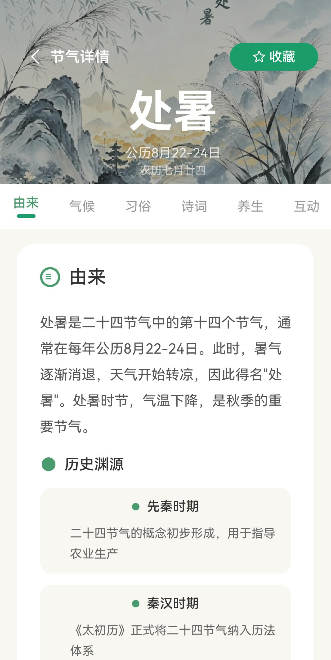
引言
节气详情页是"节气通"应用的核心页面之一,展示单个节气的详细信息。这篇文章将带你实现详情页的完整布局,包括:
- 顶部大图展示区
- 节气基本信息卡片
- 气候特点介绍
- 物候现象展示
- 传统习俗介绍
通过本文,你将掌握HarmonyOS中复杂页面布局的实现技巧,以及如何优雅地展示结构化数据。
学习目标
完成本文后,你将能够:
- ✅ 实现复杂的页面布局结构
- ✅ 处理路由参数传递
- ✅ 实现图片瀑布流展示
- ✅ 使用自定义组件展示数据
- ✅ 处理空状态和加载状态
需求分析
功能模块设计
| 模块 | 功能描述 | 技术要点 |
|---|---|---|
| 顶部区域 | 大图背景+节气名称 | Stack布局、渐变遮罩 |
| 基本信息 | 日期、季节、重要程度 | Row布局、标签展示 |
| 气候特点 | 气候描述文字 | Text组件、段落样式 |
| 物候现象 | 三候图片和描述 | Grid布局、图片卡片 |
| 传统习俗 | 习俗列表展示 | List布局、自定义组件 |
设计思路
页面结构设计
┌─────────────────────────────────┐
│         顶部大图区域            │
│  ┌───────────────────────────┐  │
│  │   节气名称               │  │
│  │   阳历日期               │  │
│  └───────────────────────────┘  │
├─────────────────────────────────┤
│         基本信息卡片            │
│  ┌─────┬─────┬─────┬─────┐    │
│  │ 季节 │ 重要度 │ 标签1 │ 标签2│  │
│  └─────┴─────┴─────┴─────┘    │
├─────────────────────────────────┤
│         气候特点                │
│  ┌───────────────────────────┐  │
│  │ 描述文字...               │  │
│  └───────────────────────────┘  │
├─────────────────────────────────┤
│         物候现象               │
│  ┌─────────┬─────────┬─────────│
│  │ 候1     │ 候2     │ 候3     │
│  │ 图片    │ 图片    │ 图片    │
│  │ 描述    │ 描述    │ 描述    │
│  └─────────┴─────────┴─────────│
├─────────────────────────────────┤
│         传统习俗               │
│  ┌───────────────────────────┐  │
│  │ 习俗1                     │  │
│  │ 习俗2                     │  │
│  │ 习俗3                     │  │
│  └───────────────────────────┘  │
└─────────────────────────────────┘
关键决策
决策1: 使用Scroll包裹整个页面
- 原因:内容较长,需要滚动浏览
- 优势:用户体验更好,适配各种屏幕
决策2: 拆分组件
- 原因:页面结构复杂,需要模块化
- 优势:代码清晰,便于维护
核心实现
步骤1: 页面初始化与数据加载
完整代码
typescript
// pages/Detail.ets

import router from '@ohos.router';
import { holidays } from '../mock/HolidayMockData';
import type { Holiday } from '../models/HolidayModel';

@Entry
@Component
struct Detail {
  // 节气数据
  @State holiday: Holiday | null = null;
  @State isLoading: boolean = true;

  // 节气ID(从路由参数获取)
  private holidayId: string = '';

  /**
   * 页面加载时执行
   */
  aboutToAppear() {
    this.loadHolidayData();
  }

  /**
   * 加载节气数据
   */
  loadHolidayData(): void {
    try {
      // 获取路由参数
      const params = router.getParams() as Record<string, string>;
      this.holidayId = params?.holidayId || '';

      console.info('[Detail] 加载节气数据: ' + this.holidayId);

      // 查找对应节气
      const holiday = holidays.find((h: Holiday) => h.id === this.holidayId);

      if (holiday) {
        this.holiday = holiday;
      } else {
        // 默认显示第一个节气
        this.holiday = holidays[0];
      }

      this.isLoading = false;
    } catch (error) {
      console.error('[Detail] 加载数据失败: ' + JSON.stringify(error));
      this.isLoading = false;
    }
  }

  /**
   * 构建UI
   */
  build() {
    if (this.isLoading) {
      // 加载中状态
      Column() {
        LoadingProgress()
          .width(40)
          .height(40)

        Text('加载中...')
          .fontSize(14)
          .fontColor('#999999')
          .margin({ top: 16 })
      }
      .width('100%')
      .height('100%')
      .justifyContent(FlexAlign.Center)
    } else if (!this.holiday) {
      // 数据为空状态
      Column() {
        Image($r('app.media.ic_empty'))
          .width(80)
          .height(80)
          .opacity(0.5)

        Text('暂无数据')
          .fontSize(14)
          .fontColor('#999999')
          .margin({ top: 16 })

        Button('返回首页')
          .width(120)
          .height(40)
          .backgroundColor('#4A9B6D')
          .fontColor('#FFFFFF')
          .borderRadius(20)
          .margin({ top: 24 })
          .onClick(() => {
            try {
              router.back();
            } catch (error) {
              console.error('路由返回失败: ' + JSON.stringify(error));
            }
          })
      }
      .width('100%')
      .height('100%')
      .justifyContent(FlexAlign.Center)
    } else {
      // 正常内容
      this.buildContent();
    }
  }

  /**
   * 构建内容区域
   */
  @Builder
  buildContent(): void {
    Scroll() {
      Column({ space: 16 }) {
        // 1. 顶部大图区域
        this.buildHeader()

        // 2. 基本信息卡片
        this.buildInfoCard()

        // 3. 气候特点
        this.buildClimateSection()

        // 4. 物候现象
        this.buildPhenomenaSection()

        // 5. 传统习俗
        this.buildCustomsSection()
      }
      .padding({ bottom: 100 })  // 避免被TabBar遮挡
    }
    .width('100%')
    .height('100%')
    .backgroundColor('#F8F7F2')
  }
}
代码解析
1. 路由参数获取
typescript
const params = router.getParams() as Record<string, string>;
this.holidayId = params?.holidayId || '';原理:
- 通过router.getParams()获取路由传递的参数
- 使用类型断言转换为Record<string, string>
- 设置默认值避免空值错误
2. 数据查找
typescript
const holiday = holidays.find((h: Holiday) => h.id === this.holidayId);注意事项:
- 从Mock数据中查找对应节气
- 如果未找到,使用第一个节气作为默认值
步骤2: 顶部大图区域
typescript
/**
 * 构建顶部区域
 */
@Builder
buildHeader(): void {
  Stack({ alignContent: Alignment.BottomStart }) {
    // 背景图
    Image('rawfile://bg/holidays/' + this.holiday!.id + '.png')
      .width('100%')
      .height(280)
      .objectFit(ImageFit.Cover)

    // 渐变遮罩
    Row()
      .width('100%')
      .height(280)
      .linearGradient({
        angle: 180,
        colors: [
          ['#00000000', 0.2],
          ['#000000CC', 1]
        ]
      })

    // 内容
    Column({ space: 8 }) {
      // 返回按钮
      Row() {
        Image($r('app.media.ic_back'))
          .width(24)
          .height(24)
          .fillColor('#FFFFFF')
      }
      .width(44)
      .height(44)
      .backgroundColor('rgba(255, 255, 255, 0.2)')
      .borderRadius(22)
      .justifyContent(FlexAlign.Center)
      .onClick(() => {
        try {
          router.back();
        } catch (error) {
          console.error('返回失败: ' + JSON.stringify(error));
        }
      })
      .margin({ bottom: 16 })

      // 节气名称
      Text(this.holiday!.name)
        .fontSize(40)
        .fontWeight(FontWeight.Bold)
        .fontColor('#FFFFFF')

      // 阳历日期
      Text(this.holiday!.solarDate)
        .fontSize(16)
        .fontColor('#FFFFFF')
        .opacity(0.9)

      // 农历日期
      Text(this.holiday!.lunarDate)
        .fontSize(14)
        .fontColor('#FFFFFF')
        .opacity(0.7)
    }
    .padding(24)
    .width('100%')
  }
  .width('100%')
}设计要点:
- Stack布局实现多层叠加
- 渐变遮罩增强文字可读性
- 返回按钮使用半透明背景
- 标题层级分明(名称>阳历>农历)
步骤3: 基本信息卡片
typescript
/**
 * 构建基本信息卡片
 */
@Builder
buildInfoCard(): void {
  Card() {
    Row({ space: 16 }) {
      // 季节标签
      Column({ space: 4 }) {
        Image(this.getSeasonIcon())
          .width(32)
          .height(32)

        Text(this.getSeasonText())
          .fontSize(12)
          .fontColor('#333333')
      }
      .width('25%')
      .alignItems(HorizontalAlign.Center)

      // 重要程度
      Column({ space: 4 }) {
        Image($r('app.media.ic_star'))
          .width(32)
          .height(32)
          .fillColor('#FFB300')

        Text('重要程度')
          .fontSize(12)
          .fontColor('#333333')

        Row({ space: 2 }) {
          ForEach(Array(5), (_, index) => {
            Image($r('app.media.ic_star'))
              .width(16)
              .height(16)
              .fillColor(index < this.holiday!.importance ? '#FFB300' : '#EEEEEE')
          })
        }
      }
      .width('25%')
      .alignItems(HorizontalAlign.Center)

      // 标签列表
      Column({ space: 8 }) {
        Text('相关标签')
          .fontSize(12)
          .fontColor('#333333')

        Wrap({ spacing: 8 }) {
          ForEach(this.holiday!.tags || [], (tag: string) => {
            Text(tag)
              .fontSize(11)
              .fontColor('#4A9B6D')
              .padding({ left: 8, right: 8, top: 4, bottom: 4 })
              .backgroundColor('#E8F5E9')
              .borderRadius(12)
          })
        }
      }
      .width('50%')
    }
    .padding(16)
  }
  .width('92%')
  .margin({ left: '4%', right: '4%' })
}

/**
 * 获取季节图标
 */
getSeasonIcon(): Resource {
  const icons: Record<string, Resource> = {
    spring: $r('app.media.ic_spring'),
    summer: $r('app.media.ic_summer'),
    autumn: $r('app.media.ic_autumn'),
    winter: $r('app.media.ic_winter')
  };
  return icons[this.holiday!.season] || $r('app.media.ic_default');
}

/**
 * 获取季节文字
 */
getSeasonText(): string {
  const seasons: Record<string, string> = {
    spring: '春季',
    summer: '夏季',
    autumn: '秋季',
    winter: '冬季'
  };
  return seasons[this.holiday!.season] || '未知';
}设计要点:
- 使用Card组件实现卡片效果
- 三栏布局展示不同信息
- Wrap组件处理标签自动换行
- 星级评分动态展示
步骤4: 气候特点区域
typescript
/**
 * 构建气候特点区域
 */
@Builder
buildClimateSection(): void {
  Card() {
    Column({ space: 12 }) {
      // 标题
      Row({ space: 8 }) {
        Image($r('app.media.ic_weather'))
          .width(20)
          .height(20)
          .fillColor('#4A9B6D')

        Text('气候特点')
          .fontSize(18)
          .fontWeight(FontWeight.Bold)
          .fontColor('#333333')
      }

      // 内容
      Text(this.holiday!.climate)
        .fontSize(14)
        .fontColor('#666666')
        .lineHeight(24)
        .textAlign(TextAlign.Start)
    }
    .padding(16)
  }
  .width('92%')
  .margin({ left: '4%', right: '4%' })
}设计要点:
- 标题使用图标+文字组合
- 正文使用合适的行高
- 左对齐提高可读性
步骤5: 物候现象区域
typescript
/**
 * 构建物候现象区域
 */
@Builder
buildPhenomenaSection(): void {
  Card() {
    Column({ space: 16 }) {
      // 标题
      Row({ space: 8 }) {
        Image($r('app.media.ic_phenomenon'))
          .width(20)
          .height(20)
          .fillColor('#4A9B6D')

        Text('物候现象')
          .fontSize(18)
          .fontWeight(FontWeight.Bold)
          .fontColor('#333333')
      }

      // 三候展示
      Grid() {
        ForEach(this.holiday!.phenomena || [], (phenomenon: PhenomenonItem, index: number) => {
          GridItem() {
            Column({ space: 8 }) {
              // 序号
              Stack({ alignContent: Alignment.Center }) {
                Circle()
                  .width(28)
                  .height(28)
                  .fillColor('#4A9B6D')

                Text((index + 1).toString())
                  .fontSize(12)
                  .fontColor('#FFFFFF')
                  .fontWeight(FontWeight.Bold)
              }
              .alignSelf(ItemAlign.Center)

              // 图片
              Image('rawfile://phenomena/' + phenomenon.image)
                .width(80)
                .height(80)
                .borderRadius(8)
                .objectFit(ImageFit.Cover)

              // 名称
              Text(phenomenon.name)
                .fontSize(13)
                .fontWeight(FontWeight.Medium)
                .fontColor('#333333')

              // 描述
              Text(phenomenon.desc)
                .fontSize(12)
                .fontColor('#666666')
                .maxLines(2)
                .textOverflow({ overflow: TextOverflow.Ellipsis })
                .textAlign(TextAlign.Center)
            }
            .width('100%')
            .padding(8)
            .backgroundColor('#F8F7F2')
            .borderRadius(12)
          }
        }, (phenomenon: PhenomenonItem) => phenomenon.name)
      }
      .columnsTemplate('1fr 1fr 1fr')
      .rowsGap(12)
      .columnsGap(12)
    }
    .padding(16)
  }
  .width('92%')
  .margin({ left: '4%', right: '4%' })
}设计要点:
- Grid布局实现三列展示
- 每个候包含序号、图片、名称、描述
- 序号使用圆形背景突出显示
- 图片使用固定尺寸保证布局整齐
步骤6: 传统习俗区域
typescript
/**
 * 构建传统习俗区域
 */
@Builder
buildCustomsSection(): void {
  Card() {
    Column({ space: 16 }) {
      // 标题
      Row({ space: 8 }) {
        Image($r('app.media.ic_custom'))
          .width(20)
          .height(20)
          .fillColor('#4A9B6D')

        Text('传统习俗')
          .fontSize(18)
          .fontWeight(FontWeight.Bold)
          .fontColor('#333333')
      }

      // 习俗列表
      Column({ space: 12 }) {
        ForEach(this.holiday!.customs || [], (custom: CustomItem) => {
          this.buildCustomItem(custom)
        }, (custom: CustomItem) => custom.name)
      }
    }
    .padding(16)
  }
  .width('92%')
  .margin({ left: '4%', right: '4%' })
}

/**
 * 构建单个习俗项
 */
@Builder
buildCustomItem(custom: CustomItem): void {
  Row({ space: 12 }) {
    // 图片
    Image('rawfile://customs/' + custom.image)
      .width(80)
      .height(60)
      .borderRadius(8)
      .objectFit(ImageFit.Cover)

    // 内容
    Column({ space: 4 }) {
      Text(custom.name)
        .fontSize(15)
        .fontWeight(FontWeight.Medium)
        .fontColor('#333333')

      Text(custom.desc)
        .fontSize(13)
        .fontColor('#666666')
        .maxLines(2)
        .textOverflow({ overflow: TextOverflow.Ellipsis })
    }
    .flexGrow(1)
  }
  .width('100%')
}设计要点:
- Row布局实现图文并排
- 图片固定尺寸,文字自适应
- 描述文字限制行数避免过长
常见问题与解决方案
问题1: 路由参数获取失败
现象 :
holidayId为空,页面显示默认数据。
原因:
- 参数传递格式错误
- 参数名称不匹配
解决方案:
typescript
// 跳转时正确传递参数
router.pushUrl({
  url: 'pages/Detail',
  params: { holidayId: 'lichun' }
});

// 获取参数时使用正确的键名
const params = router.getParams() as Record<string, string>;
this.holidayId = params?.holidayId || '';
问题2: 图片路径错误
现象 :
图片显示为占位符或报错。
原因:
- rawfile路径格式错误
- 文件不存在
解决方案:
typescript
// ✅ 正确路径格式
Image('rawfile://bg/holidays/lichun.png')

// ✅ 使用base64或资源引用
Image($r('app.media.lichun'))

// ✅ 添加错误处理
Image(imagePath)
  .onError(() => {
    console.error('图片加载失败: ' + imagePath);
  })
问题3: 页面底部被遮挡
现象 :
页面底部内容被TabBar遮挡。
解决方案:
typescript
Scroll() {
  Column() {
    // 内容
  }
  .padding({ bottom: 100 })  // 添加底部内边距
}
问题4: 列表渲染性能差
现象 :
习俗列表过长时滚动卡顿。
解决方案:
typescript
// 使用LazyForEach替代ForEach
Column({ space: 12 }) {
  LazyForEach(this.holiday!.customs, (custom) => {
    this.buildCustomItem(custom)
  }, (custom) => custom.name)
}
本章小结
核心知识点
本文详细讲解了节气详情页的实现:
1. 页面结构
- Scroll包裹整个页面
- 多个Card组件展示不同模块
- 合理的间距和内边距
2. 数据加载
- 从路由参数获取holidayId
- 根据ID查找对应节气数据
- 处理加载状态和空状态
3. 布局技巧
- Stack实现多层叠加效果
- Grid实现三列网格布局
- Row/Column灵活组合
4. 组件拆分
- 使用@Builder封装重复逻辑
- 每个区域独立构建
- 代码结构清晰
最佳实践总结
✅ 页面结构
typescript
Scroll() {
  Column({ space: 16 }) {
    // 各个模块
  }
  .padding({ bottom: 100 })
}
✅ 数据加载
typescript
aboutToAppear() {
  const params = router.getParams();
  this.holidayId = params?.holidayId || '';
  this.holiday = holidays.find(h => h.id === this.holidayId);
}
✅ Card布局
typescript
Card() {
  Column({ space: 12 }) {
    // 内容
  }
  .padding(16)
}
.width('92%')
.margin({ left: '4%', right: '4%' })
下一步预告
详情页上半部分已经完成!在下一篇文章中,我们将继续实现:
- 节气诗词展示
- 节气食谱推荐
- 养生建议
- 相关文章推荐
相关链接
- 项目源码 : Atomgit仓库