鸿蒙原生 Todo 应用开发实战
本文记录从零开始开发一个鸿蒙原生 Todo 应用的完整过程,包含技术选型、核心功能实现、踩坑经验和性能优化。适合有一定前端基础、想入门鸿蒙开发的开发者。
一、为什么选择鸿蒙原生开发?
1.1 市场机遇
- 鸿蒙生态爆发:HarmonyOS NEXT 发布后,原生应用需求激增
- 开发工具成熟:DevEco Studio 3.x+ 已非常稳定
- 性能优势:原生 ArkTS + ArkUI 比跨平台框架性能更好
1.2 技术栈选择
| 技术 | 选择 | 理由 |
|---|---|---|
| 语言 | ArkTS | 鸿蒙原生 TypeScript 方言,类型安全 |
| UI 框架 | ArkUI | 声明式 UI,类似 Flutter/SwiftUI |
| 状态管理 | AppStorage + @State | 官方推荐,简单易用 |
| 持久化 | Preferences | 轻量级 KV 存储,适合 Todo 数据 |
| 工程化 | hvigor | 鸿蒙官方构建工具 |
二、项目初始化
2.1 创建项目
打开 DevEco Studio → New Project → Empty Ability → 配置:
json5
// AppScope/app.json5
{
  "app": {
    "bundleName": "com.example.harmonytodo",
    "vendor": "example",
    "versionCode": 1000000,
    "versionName": "1.0.0",
    "icon": "$media:app_icon",
    "label": "$string:app_name",
    "compatibleSdkVersion": "5.0.0",  // 根据模拟器调整
    "releaseType": "Release"
  }
}
2.2 项目结构
harmony-todo/
├── AppScope/               # 应用级配置
│   ├── app.json5          # 应用清单
│   └── resources/         # 全局资源
├── entry/                  # 主模块
│   ├── src/main/ets/      # ArkTS 源码
│   │   ├── entryability/  # 入口 Ability
│   │   ├── pages/         # 页面
│   │   ├── model/         # 数据模型
│   │   └── utils/         # 工具函数
│   ├── resources/         # 模块资源
│   └── module.json5       # 模块配置
├── build-profile.json5     # 构建配置
└── oh-package.json5       # 依赖管理
三、核心功能实现
3.1 数据模型设计
typescript
// entry/src/main/ets/model/TodoItem.ets
export class TodoItem {
  id: string;              // 唯一标识
  title: string;           // 标题
  completed: boolean;      // 是否完成
  createdAt: number;       // 创建时间
  priority: Priority;      // 优先级
  category?: string;       // 分类(可选)

  constructor(title: string, priority: Priority = Priority.MEDIUM) {
    this.id = Date.now().toString();
    this.title = title;
    this.completed = false;
    this.createdAt = Date.now();
    this.priority = priority;
  }
}

export enum Priority {
  LOW = 'low',
  MEDIUM = 'medium',
  HIGH = 'high'
}
3.2 主页面 UI
typescript
// entry/src/main/ets/pages/Index.ets
import { TodoItem, Priority } from '../model/TodoItem';
import { TodoStore } from '../store/TodoStore';

@Entry
@Component
struct Index {
  @State todoList: TodoItem[] = [];
  @State newTodo: string = '';
  @State filter: FilterType = FilterType.ALL;

  private todoStore: TodoStore = new TodoStore();

  async aboutToAppear() {
    // 从本地存储加载数据
    this.todoList = await this.todoStore.loadTodos();
  }

  build() {
    Column() {
      // 顶部标题
      Text('Harmony Todo')
        .fontSize(32)
        .fontWeight(FontWeight.Bold)
        .margin({ top: 20, bottom: 20 })

      // 输入框 + 添加按钮
      Row() {
        TextInput({ placeholder: '添加新任务...', text: this.newTodo })
          .width('70%')
          .onChange((value: string) => {
            this.newTodo = value;
          })

        Button('添加')
          .onClick(() => {
            this.addTodo();
          })
      }
      .margin({ bottom: 20 })

      // 筛选栏
      Row() {
        ForEach([
          FilterType.ALL,
          FilterType.ACTIVE,
          FilterType.COMPLETED
        ], (filter: FilterType) => {
          Button(filter)
            .type(this.filter === filter ? ButtonType.Capsule : ButtonType.Normal)
            .onClick(() => {
              this.filter = filter;
            })
            .margin({ right: 10 })
        })
      }
      .margin({ bottom: 20 })

      // Todo 列表
      List() {
        ForEach(this.getFilteredTodos(), (todo: TodoItem) => {
          ListItem() {
            TodoItemComponent({ todo: todo, onToggle: () => {
              this.toggleTodo(todo.id);
            }, onDelete: () => {
              this.deleteTodo(todo.id);
            } })
          }
        }, (todo: TodoItem) => todo.id)
      }
      .layoutWeight(1)

      // 统计信息
      Text(`共 ${this.todoList.length} 项,${this.getCompletedCount()} 项已完成`)
        .fontSize(14)
        .fontColor('#999')
        .margin({ bottom: 20 })
    }
    .width('100%')
    .height('100%')
    .padding(20)
  }

  // 添加 Todo
  private addTodo() {
    if (this.newTodo.trim() === '') return;

    const todo = new TodoItem(this.newTodo);
    this.todoList = [todo, ...this.todoList];
    this.newTodo = '';
    this.saveTodos();
  }

  // 切换完成状态
  private toggleTodo(id: string) {
    this.todoList = this.todoList.map(todo => {
      if (todo.id === id) {
        return { ...todo, completed: !todo.completed };
      }
      return todo;
    });
    this.saveTodos();
  }

  // 删除 Todo
  private deleteTodo(id: string) {
    this.todoList = this.todoList.filter(todo => todo.id !== id);
    this.saveTodos();
  }

  // 获取筛选后的列表
  private getFilteredTodos(): TodoItem[] {
    switch (this.filter) {
      case FilterType.ACTIVE:
        return this.todoList.filter(todo => !todo.completed);
      case FilterType.COMPLETED:
        return this.todoList.filter(todo => todo.completed);
      default:
        return this.todoList;
    }
  }

  // 获取完成数量
  private getCompletedCount(): number {
    return this.todoList.filter(todo => todo.completed).length;
  }

  // 保存到本地
  private async saveTodos() {
    await this.todoStore.saveTodos(this.todoList);
  }
}

// Todo 列表项组件
@Component
struct TodoItemComponent {
  @Prop todo: TodoItem;
  onToggle: () => void;
  onDelete: () => void;

  build() {
    Row() {
      // 复选框
      Checkbox({ name: this.todo.id })
        .select(this.todo.completed)
        .onChange(() => {
          this.onToggle();
        })

      // 标题
      Text(this.todo.title)
        .fontSize(18)
        .decoration({ type: this.todo.completed ? TextDecorationType.LineThrough : TextDecorationType.None })
        .fontColor(this.todo.completed ? '#999' : '#000')
        .layoutWeight(1)
        .margin({ left: 10 })

      // 删除按钮
      Button('删除')
        .type(ButtonType.Circle)
        .width(30)
        .height(30)
        .backgroundColor('#ff0000')
        .onClick(() => {
          this.onDelete();
        })
    }
    .padding(10)
    .borderRadius(8)
    .backgroundColor(this.todo.completed ? '#f5f5f5' : '#fff')
    .margin({ bottom: 10 })
  }
}

// 筛选类型
enum FilterType {
  ALL = '全部',
  ACTIVE = '未完成',
  COMPLETED = '已完成'
}
3.3 数据持久化
typescript
// entry/src/main/ets/store/TodoStore.ets
import { TodoItem } from '../model/TodoItem';
import preferences from '@ohos.data.preferences';

const PREFERENCES_NAME = 'harmony_todo';
const KEY_TODOS = 'todos';

export class TodoStore {
  private pref: preferences.Preferences | null = null;

  // 初始化 Preferences
  private async initPreferences(): Promise<preferences.Preferences> {
    if (this.pref) return this.pref;

    this.pref = await preferences.getPreferences(getContext(this), PREFERENCES_NAME);
    return this.pref;
  }

  // 保存 Todo 列表
  async saveTodos(todoList: TodoItem[]): Promise<void> {
    try {
      const pref = await this.initPreferences();
      const jsonStr = JSON.stringify(todoList);
      await pref.put(KEY_TODOS, jsonStr);
      await pref.flush();  // 立即写入磁盘
    } catch (error) {
      console.error('Failed to save todos:', error);
    }
  }

  // 加载 Todo 列表
  async loadTodos(): Promise<TodoItem[]> {
    try {
      const pref = await this.initPreferences();
      const jsonStr = await pref.get(KEY_TODOS, '');
      if (jsonStr === '') return [];
      return JSON.parse(jsonStr as string) as TodoItem[];
    } catch (error) {
      console.error('Failed to load todos:', error);
      return [];
    }
  }

  // 清除所有数据
  async clearTodos(): Promise<void> {
    try {
      const pref = await this.initPreferences();
      await pref.delete(KEY_TODOS);
      await pref.flush();
    } catch (error) {
      console.error('Failed to clear todos:', error);
    }
  }
}
四、进阶功能
4.1 添加优先级和分类
typescript
// 在 TodoItem 组件中添加优先级指示器
Row() {
  // 优先级圆点
  Circle()
    .width(10)
    .height(10)
    .fill(this.getPriorityColor(this.todo.priority))
    .margin({ right: 10 })

  // ... 其他 UI
}

private getPriorityColor(priority: Priority): ResourceColor {
  switch (priority) {
    case Priority.HIGH:
      return '#ff0000';  // 红色
    case Priority.MEDIUM:
      return '#ff9900';  // 橙色
    case Priority.LOW:
      return '#00cc00';  // 绿色
    default:
      return '#999';
  }
}
4.2 添加截止日期
typescript
// 扩展 TodoItem 模型
export class TodoItem {
  // ... 其他字段
  dueDate?: number;  // 截止日期(时间戳)

  // 检查是否过期
  isOverdue(): boolean {
    if (!this.dueDate) return false;
    return Date.now() > this.dueDate && !this.completed;
  }
}
4.3 动画效果
typescript
// 添加删除动画
@State animationScale: number = 1;

private deleteWithAnimation(id: string) {
  // 缩放动画
  this.animationScale = 0;
  animateTo({
    duration: 300,
    curve: Curve.EaseInOut,
    onFinish: () => {
      this.deleteTodo(id);
      this.animationScale = 1;
    }
  }, () => {
    this.animationScale = 0;
  });
}
五、踩坑经验
5.1 SDK 版本不匹配
问题 :compatibleSdkVersion 与模拟器 API 版本不匹配
解决:
- 检查模拟器 API 版本(Device Manager)
- 修改
build-profile.json5中的compatibleSdkVersion - 常见对应:API 23 = 6.0.1, API 24 = 6.1.1
5.2 状态管理陷阱
问题 :@State 装饰器不生效
原因:直接修改数组/对象不会触发 UI 更新
正确做法:
typescript
// ❌ 错误
this.todoList[0].completed = true;

// ✅ 正确
this.todoList = this.todoList.map(todo => {
  if (todo.id === id) {
    return { ...todo, completed: !todo.completed };
  }
  return todo;
});
5.3 异步操作最佳实践
问题 :await 在 @Entry 组件中直接使用导致 UI 卡顿
解决 :使用 TaskPool 或 Worker 处理耗时操作
typescript
import taskpool from '@ohos.taskpool';

@Concurrent
function heavyComputation(data: string): string {
  // 耗时操作
  return result;
}

async function processData(data: string): Promise<string> {
  const task = new taskpool.Task(heavyComputation, data);
  return await taskpool.execute(task);
}
六、性能优化
6.1 列表性能优化
typescript
// 使用 LazyForEach 替代 ForEach(大数据量)
LazyForEach(this.todoList, (todo: TodoItem) => {
  ListItem() {
    TodoItemComponent({ todo: todo })
  }
}, (todo: TodoItem) => todo.id)
6.2 图片资源优化
- 使用 SVG 替代 PNG(矢量图适配不同屏幕)
- 图片放在
resources/base/media/目录 - 使用
$r('app.media.icon')引用资源
6.3 包体积优化
json5
// build-profile.json5
{
  "app": {
    "products": [
      {
        "name": "default",
        "buildOption": {
          "minify": true,          // 启用混淆
          "compressNativeLibs": true  // 压缩 Native 库
        }
      }
    ]
  }
}
七、测试与上架
7.1 单元测试
typescript
// entry/src/test/ExampleTest.ets
import { describe, it, expect } from '@ohos/hypium';
import { TodoItem } from '../src/main/ets/model/TodoItem';

export default function exampleTest() {
  describe('TodoItem Test', () => {
    it('should create todo item', () => {
      const todo = new TodoItem('Test Todo');
      expect(todo.title).assertEqual('Test Todo');
      expect(todo.completed).assertEqual(false);
    });
  });
}
7.2 上架准备
-
签名配置:Build → Generate Key and CSR
-
隐私政策 :在
AppScope/resources/base/profile/中添加privacy_policy.txt -
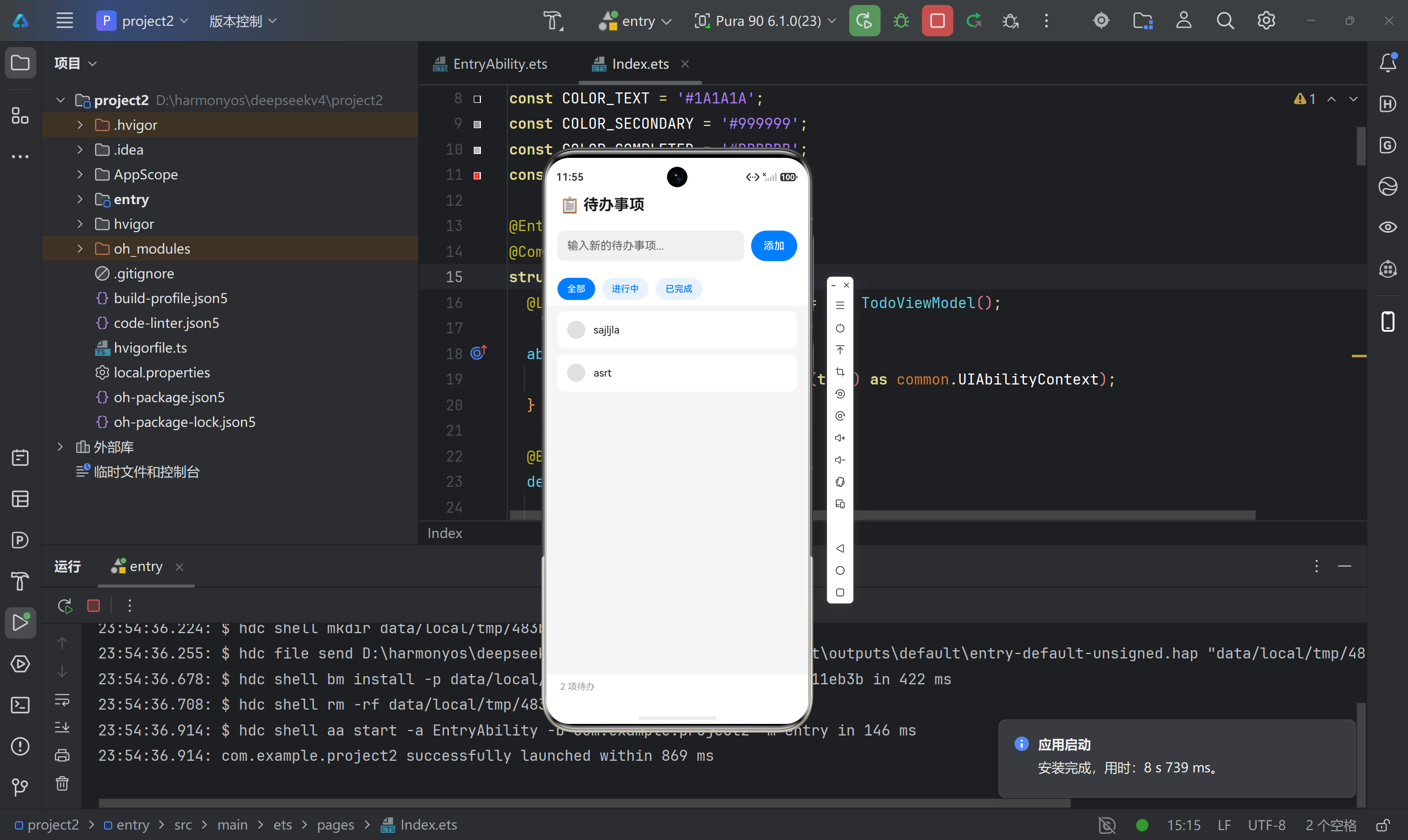
截图准备 :提供 1080x2160 的手机截图
-
提交审核 :登录 AppGallery Connect
八、总结与展望
8.1 项目收获
- ✅ 掌握 ArkTS + ArkUI 声明式开发
- ✅ 理解鸿蒙应用生命周期和状态管理
- ✅ 熟悉 DevEco Studio 开发和调试流程
- ✅ 实践数据持久化和性能优化
8.2 下一步计划
- 添加云端同步(AppGallery Connect Cloud DB)
- 支持多设备协同(分布式能力)
- 适配平板和智能手表
- 接入华为账号和推送服务
九、参考资料
如果觉得这篇文章对你有帮助,欢迎 Star ⭐️ 和 Fork 🍴!
版权声明:本文为原创文章,未经允许不得转载。