引言
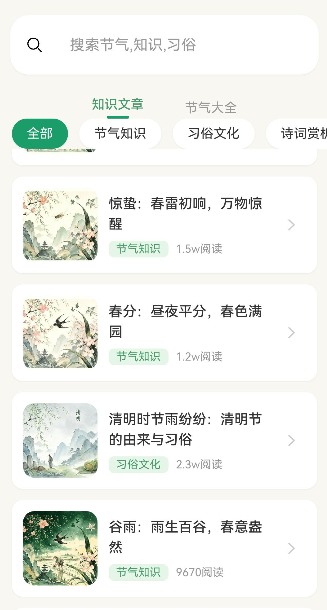
知识百科页是"节气通"应用中重要的内容展示页面,为用户提供系统的节气知识浏览体验。本文将实现:
- 搜索功能
- 分类浏览
- 标签筛选
- 文章列表展示
- 下拉刷新
通过本文,你将掌握如何构建一个功能完善的内容浏览页面。
学习目标
完成本文后,你将能够:
- ✅ 实现搜索功能
- ✅ 构建分类筛选系统
- ✅ 实现标签筛选
- ✅ 创建文章列表
- ✅ 添加下拉刷新功能
需求分析
功能模块设计
| 模块 | 功能描述 | 技术要点 |
|---|---|---|
| 搜索栏 | 关键词搜索 | TextInput、搜索图标 |
| 分类导航 | 按分类浏览 | Scroll横向滚动、标签切换 |
| 标签筛选 | 按标签筛选内容 | Wrap布局、多选筛选 |
| 文章列表 | 展示文章卡片 | List布局、卡片组件 |
| 下拉刷新 | 刷新列表数据 | Refresh组件 |
核心实现
步骤1: 页面结构设计
完整代码
typescript
// pages/Encyclopedia.ets

import router from '@ohos.router';
import { articles } from '../mock/ArticleMockData';
import type { Article } from '../models/ArticleModel';

@Entry
@Component
struct Encyclopedia {
  // 搜索关键词
  @State searchKeyword: string = '';

  // 当前分类
  @State currentCategory: string = '全部';

  // 当前选中的标签
  @State selectedTags: string[] = [];

  // 文章列表
  @State articleList: Article[] = [];

  // 分类列表
  private categories: string[] = ['全部', '节气知识', '传统习俗', '诗词文化', '养生保健', '饮食食谱'];

  // 标签列表
  private tags: string[] = ['春季', '夏季', '秋季', '冬季', '农事', '饮食', '养生', '诗词'];

  /**
   * 页面加载时执行
   */
  aboutToAppear() {
    this.loadArticles();
  }

  /**
   * 加载文章数据
   */
  loadArticles(): void {
    // 过滤文章
    let filtered = articles;

    // 按关键词搜索
    if (this.searchKeyword.trim()) {
      const keyword = this.searchKeyword.toLowerCase();
      filtered = filtered.filter((article: Article) =>
        article.title.toLowerCase().includes(keyword) ||
        article.description.toLowerCase().includes(keyword)
      );
    }

    // 按分类筛选
    if (this.currentCategory !== '全部') {
      filtered = filtered.filter((article: Article) =>
        article.category === this.currentCategory
      );
    }

    // 按标签筛选
    if (this.selectedTags.length > 0) {
      filtered = filtered.filter((article: Article) =>
        article.tags?.some((tag: string) => this.selectedTags.includes(tag))
      );
    }

    this.articleList = filtered;
  }

  /**
   * 构建UI
   */
  build() {
    Column({ space: 0 }) {
      // 1. 搜索栏
      this.buildSearchBar()

      // 2. 分类导航
      this.buildCategoryNav()

      // 3. 标签筛选
      this.buildTagFilter()

      // 4. 文章列表
      this.buildArticleList()
    }
    .width('100%')
    .height('100%')
    .backgroundColor('#F8F7F2')
  }
}
代码解析
1. 状态管理
- searchKeyword: 搜索关键词
- currentCategory: 当前选中的分类
- selectedTags: 选中的标签数组
- articleList: 过滤后的文章列表
2. 数据过滤逻辑
- 按关键词搜索
- 按分类筛选
- 按标签筛选(多选)
步骤2: 搜索栏实现
typescript
/**
 * 构建搜索栏
 */
@Builder
buildSearchBar(): void {
  Row({ space: 12 }) {
    // 搜索图标
    Image($r('app.media.ic_search'))
      .width(20)
      .height(20)
      .fillColor('#999999')

    // 搜索输入框
    TextInput({ placeholder: '搜索节气知识...' })
      .width('100%')
      .height(40)
      .backgroundColor('#FFFFFF')
      .borderRadius(20)
      .padding({ left: 12 })
      .onChange((value: string) => {
        this.searchKeyword = value;
      })
      .onSubmit(() => {
        this.loadArticles();
      })

    // 清除按钮
    if (this.searchKeyword) {
      Image($r('app.media.ic_clear'))
        .width(18)
        .height(18)
        .fillColor('#999999')
        .onClick(() => {
          this.searchKeyword = '';
          this.loadArticles();
        })
    }
  }
  .width('92%')
  .height(40)
  .backgroundColor('#FFFFFF')
  .borderRadius(20)
  .padding({ left: 16, right: 12 })
  .margin({ top: 16, left: '4%', right: '4%' })
}设计要点:
- 圆角搜索框设计
- 实时显示清除按钮
- 支持回车键搜索
步骤3: 分类导航
typescript
/**
 * 构建分类导航
 */
@Builder
buildCategoryNav(): void {
  Scroll() {
    Row({ space: 16 }) {
      ForEach(this.categories, (category: string) => {
        Text(category)
          .fontSize(14)
          .fontColor(this.currentCategory === category ? '#FFFFFF' : '#666666')
          .fontWeight(this.currentCategory === category ? FontWeight.Bold : FontWeight.Normal)
          .padding({ left: 16, right: 16, top: 8, bottom: 8 })
          .backgroundColor(this.currentCategory === category ? '#4A9B6D' : '#FFFFFF')
          .borderRadius(20)
          .onClick(() => {
            this.currentCategory = category;
            this.loadArticles();
          })
      })
    }
    .padding({ left: 16, right: 16 })
  }
  .scrollable(ScrollDirection.Horizontal)
  .scrollBar(BarState.Off)
  .width('100%')
  .height(48)
  .margin({ top: 12 })
}设计要点:
- 横向滚动导航
- 选中状态高亮显示
- 圆角标签样式
步骤4: 标签筛选
typescript
/**
 * 构建标签筛选
 */
@Builder
buildTagFilter(): void {
  Column({ space: 8 }) {
    // 标题
    Row({ space: 8 }) {
      Image($r('app.media.ic_tag'))
        .width(16)
        .height(16)
        .fillColor('#999999')

      Text('筛选标签')
        .fontSize(14)
        .fontColor('#666666')

      if (this.selectedTags.length > 0) {
        Text('已选 ' + this.selectedTags.length + ' 个')
          .fontSize(12)
          .fontColor('#4A9B6D')
      }
    }

    // 标签列表
    Wrap({ spacing: 12 }) {
      ForEach(this.tags, (tag: string) => {
        const isSelected = this.selectedTags.includes(tag);

        Text(tag)
          .fontSize(13)
          .fontColor(isSelected ? '#FFFFFF' : '#666666')
          .padding({ left: 12, right: 12, top: 6, bottom: 6 })
          .backgroundColor(isSelected ? '#4A9B6D' : '#FFFFFF')
          .borderRadius(16)
          .border({ width: isSelected ? 0 : 1, color: '#EEEEEE' })
          .onClick(() => {
            this.toggleTag(tag);
          })
      })
    }
  }
  .width('92%')
  .padding(12)
  .backgroundColor('#FFFFFF')
  .borderRadius(12)
  .margin({ left: '4%', right: '4%', top: 12 })
}

/**
 * 切换标签选中状态
 */
toggleTag(tag: string): void {
  const index = this.selectedTags.indexOf(tag);

  if (index > -1) {
    // 取消选中
    this.selectedTags.splice(index, 1);
  } else {
    // 添加选中
    this.selectedTags.push(tag);
  }

  this.loadArticles();
}设计要点:
- Wrap布局自动换行
- 支持多选标签
- 显示已选标签数量
步骤5: 文章列表
typescript
/**
 * 构建文章列表
 */
@Builder
buildArticleList(): void {
  Refresh({ refreshing: false, offset: 120, onRefresh: () => {
    this.onRefresh();
  } }) {
    if (this.articleList.length === 0) {
      // 空状态
      Column({ space: 16 }) {
        Image($r('app.media.ic_empty'))
          .width(80)
          .height(80)
          .opacity(0.5)

        Text('暂无相关内容')
          .fontSize(14)
          .fontColor('#999999')

        Button('清除筛选')
          .width(120)
          .height(40)
          .backgroundColor('#4A9B6D')
          .fontColor('#FFFFFF')
          .borderRadius(20)
          .onClick(() => {
            this.resetFilters();
          })
      }
      .width('100%')
      .padding(40)
    } else {
      // 文章列表
      List({ space: 12 }) {
        ForEach(this.articleList, (article: Article) => {
          ListItem() {
            this.buildArticleCard(article)
          }
          .width('100%')
        }, (article: Article) => article.id)
      }
      .width('100%')
      .padding({ left: '4%', right: '4%', top: 16, bottom: 100 })
    }
  }
  .width('100%')
  .flexGrow(1)
}

/**
 * 构建文章卡片
 */
@Builder
buildArticleCard(article: Article): void {
  Row({ space: 12 }) {
    // 封面图
    Image('rawfile://articles/' + article.coverImage)
      .width(120)
      .height(80)
      .borderRadius(8)
      .objectFit(ImageFit.Cover)

    // 内容
    Column({ space: 8 }) {
      // 标题
      Text(article.title)
        .fontSize(15)
        .fontWeight(FontWeight.Medium)
        .fontColor('#333333')
        .maxLines(2)
        .textOverflow({ overflow: TextOverflow.Ellipsis })

      // 描述
      Text(article.description)
        .fontSize(13)
        .fontColor('#666666')
        .maxLines(2)
        .textOverflow({ overflow: TextOverflow.Ellipsis })

      // 底部信息
      Row({ space: 12 }) {
        Text(article.category)
          .fontSize(11)
          .fontColor('#4A9B6D')
          .padding({ left: 6, right: 6, top: 2, bottom: 2 })
          .backgroundColor('#E8F5E9')
          .borderRadius(4)

        Row({ space: 4 }) {
          Image($r('app.media.ic_eye'))
            .width(14)
            .height(14)
            .fillColor('#999999')

          Text(article.viewCount.toString())
            .fontSize(12)
            .fontColor('#999999')
        }

        Text(article.publishTime)
          .fontSize(12)
          .fontColor('#999999')
      }
    }
    .flexGrow(1)
  }
  .width('100%')
  .padding(12)
  .backgroundColor('#FFFFFF')
  .borderRadius(12)
  .onClick(() => {
    try {
      router.pushUrl({
        url: 'pages/ArticleDetail',
        params: { articleId: article.id }
      });
    } catch (error) {
      console.error('路由跳转失败: ' + JSON.stringify(error));
    }
  })
}

/**
 * 下拉刷新
 */
onRefresh(): void {
  setTimeout(() => {
    this.loadArticles();
  }, 1000);
}

/**
 * 重置筛选条件
 */
resetFilters(): void {
  this.searchKeyword = '';
  this.currentCategory = '全部';
  this.selectedTags = [];
  this.loadArticles();
}设计要点:
- Refresh组件实现下拉刷新
- 空状态处理
- 文章卡片左图右文布局
- 显示分类标签、阅读量、发布时间
常见问题与解决方案
问题1: 标签筛选不生效
现象 :
选择标签后文章列表没有变化。
原因:
- 过滤逻辑错误
- 标签匹配方式不正确
解决方案:
typescript
// ✅ 正确:使用some方法匹配任意标签
filtered = filtered.filter((article: Article) =>
  article.tags?.some((tag: string) => this.selectedTags.includes(tag))
);
问题2: 下拉刷新不显示
现象 :
下拉时没有刷新动画。
原因:
- Refresh组件使用方式错误
- 需要配合Scroll或List
解决方案:
typescript
Refresh({ refreshing: false, onRefresh: () => {
  // 刷新逻辑
} }) {
  List() {
    // 列表内容
  }
}
问题3: 搜索性能差
现象 :
搜索时页面卡顿。
解决方案:
typescript
// 优化:使用防抖
private searchDebounce: number | null = null;

onSearchChange(value: string): void {
  if (this.searchDebounce) {
    clearTimeout(this.searchDebounce);
  }

  this.searchDebounce = setTimeout(() => {
    this.searchKeyword = value;
    this.loadArticles();
  }, 300) as unknown as number;
}
本章小结
核心知识点
本文完成了知识百科页的实现:
1. 搜索功能
- 实时搜索输入
- 清除按钮
- 回车键提交
2. 分类导航
- 横向滚动
- 选中状态高亮
- 点击切换
3. 标签筛选
- 支持多选
- Wrap布局自动换行
- 显示已选数量
4. 文章列表
- List布局
- 卡片组件
- 空状态处理
5. 下拉刷新
- Refresh组件
- 刷新动画
最佳实践总结
✅ 搜索栏
typescript
Row() {
  Image(icon).width(20).height(20)
  TextInput({ placeholder: '搜索...' })
  Image(clearIcon).onClick(() => { this.keyword = '' })
}
✅ 分类导航
typescript
Scroll() {
  Row({ space: 16 }) {
    ForEach(categories, (cat) => {
      Text(cat)
        .backgroundColor(selected === cat ? '#4A9B6D' : '#FFF')
        .onClick(() => { this.selected = cat })
    })
  }
}
.scrollable(ScrollDirection.Horizontal)
✅ 标签筛选
typescript
Wrap({ spacing: 12 }) {
  ForEach(tags, (tag) => {
    const isSelected = selectedTags.includes(tag);
    Text(tag)
      .backgroundColor(isSelected ? '#4A9B6D' : '#FFF')
      .onClick(() => { /* 切换选中状态 */ })
  })
}
下一步预告
知识百科页已经完成!在下一篇文章中,我们将学习:
- 测验功能开发
- 题目展示
- 倒计时功能
- 答题结果统计
相关链接
- 项目源码 : Atomgit仓库