1、创建项目目录:
npm create vue@latest calculator-app2、Done. Now run(接下来,就运行以下命令):
cd calculator-app
npm install
npm run dev
这样,vue的整体环境就已经搭好,接下来就改页面代码,实现计算器功能。
3、以下代码就是计算器的代码,直接替换 src/App.vue 的内容:
<template>
  <div class="calculator-app">
    <div class="calculator">
      <!-- 显示屏 -->
      <div class="display">
        <div class="expression" v-if="expression">{{ expression }}</div>
        <div class="current">{{ currentValue || '0' }}</div>
      </div>

      <!-- 按钮区域 -->
      <div class="buttons">
        <!-- 第一行 -->
        <button @click="clear" class="btn function">AC</button>
        <button @click="toggleSign" class="btn function">+/-</button>
        <button @click="percentage" class="btn function">%</button>
        <button @click="setOperator('÷')" class="btn operator">÷</button>

        <!-- 数字按钮 -->
        <button @click="appendNumber('7')" class="btn number">7</button>
        <button @click="appendNumber('8')" class="btn number">8</button>
        <button @click="appendNumber('9')" class="btn number">9</button>
        <button @click="setOperator('×')" class="btn operator">×</button>

        <button @click="appendNumber('4')" class="btn number">4</button>
        <button @click="appendNumber('5')" class="btn number">5</button>
        <button @click="appendNumber('6')" class="btn number">6</button>
        <button @click="setOperator('-')" class="btn operator">-</button>

        <button @click="appendNumber('1')" class="btn number">1</button>
        <button @click="appendNumber('2')" class="btn number">2</button>
        <button @click="appendNumber('3')" class="btn number">3</button>
        <button @click="setOperator('+')" class="btn operator">+</button>

        <!-- 最后一行 -->
        <button @click="appendNumber('0')" class="btn number zero">0</button>
        <button @click="appendDot" class="btn number">.</button>
        <button @click="calculate" class="btn equals">=</button>
      </div>
    </div>
  </div>
</template>

<script setup>
import { ref } from 'vue'

// 当前显示的值
const currentValue = ref('')
// 表达式(显示在顶部小字)
const expression = ref('')
// 当前选中的运算符
const currentOperator = ref(null)
// 第一个操作数
const firstOperand = ref(null)
// 是否等待输入第二个操作数
const waitForSecondOperand = ref(false)

// 添加数字
const appendNumber = (number) => {
  if (waitForSecondOperand.value) {
    currentValue.value = number
    waitForSecondOperand.value = false
  } else {
    // 防止多个0开头
    if (currentValue.value === '0' && number === '0') return
    // 如果当前是0且输入非0,替换0
    if (currentValue.value === '0' && number !== '.') {
      currentValue.value = number
    } else {
      currentValue.value += number
    }
  }
  updateExpression()
}

// 添加小数点
const appendDot = () => {
  if (waitForSecondOperand.value) {
    currentValue.value = '0.'
    waitForSecondOperand.value = false
    updateExpression()
    return
  }

  // 避免重复添加小数点
  if (!currentValue.value.includes('.')) {
    if (currentValue.value === '') {
      currentValue.value = '0.'
    } else {
      currentValue.value += '.'
    }
  }
  updateExpression()
}

// 设置运算符
const setOperator = (operator) => {
  // 如果已经有运算等待,先计算结果
  if (currentOperator.value && !waitForSecondOperand.value) {
    calculate()
  }

  firstOperand.value = parseFloat(currentValue.value)
  currentOperator.value = operator
  waitForSecondOperand.value = true

  updateExpression()
}

// 执行计算
const calculate = () => {
  if (!currentOperator.value || waitForSecondOperand.value) return

  const secondOperand = parseFloat(currentValue.value)
  let result = 0

  switch (currentOperator.value) {
    case '+':
      result = firstOperand.value + secondOperand
      break
    case '-':
      result = firstOperand.value - secondOperand
      break
    case '×':
      result = firstOperand.value * secondOperand
      break
    case '÷':
      if (secondOperand === 0) {
        alert('除数不能为0!')
        clear()
        return
      }
      result = firstOperand.value / secondOperand
      break
    default:
      return
  }

  // 处理浮点数精度问题
  result = Math.round(result * 1000000) / 1000000

  currentValue.value = String(result)
  currentOperator.value = null
  waitForSecondOperand.value = true
  firstOperand.value = null

  // 更新表达式显示
  expression.value = ''
}

// 清空所有
const clear = () => {
  currentValue.value = ''
  expression.value = ''
  currentOperator.value = null
  firstOperand.value = null
  waitForSecondOperand.value = false
}

// 正负号切换
const toggleSign = () => {
  if (currentValue.value) {
    currentValue.value = String(parseFloat(currentValue.value) * -1)
    updateExpression()
  }
}

// 百分比
const percentage = () => {
  if (currentValue.value) {
    currentValue.value = String(parseFloat(currentValue.value) / 100)
    updateExpression()
  }
}

// 更新表达式显示
const updateExpression = () => {
  if (firstOperand.value !== null && currentOperator.value && waitForSecondOperand.value) {
    expression.value = `${firstOperand.value} ${currentOperator.value}`
  } else if (currentOperator.value && !waitForSecondOperand.value) {
    expression.value = `${firstOperand.value} ${currentOperator.value} ${currentValue.value}`
  } else {
    expression.value = ''
  }
}
</script>

<style scoped>
* {
  margin: 0;
  padding: 0;
  box-sizing: border-box;
}

.calculator-app {
  min-height: 100vh;
  background: linear-gradient(135deg, #667eea 0%, #764ba2 100%);
  display: flex;
  justify-content: center;
  align-items: center;
  font-family: -apple-system, BlinkMacSystemFont, 'Segoe UI', Roboto, sans-serif;
}

.calculator {
  background: #1a1a2e;
  border-radius: 30px;
  padding: 25px;
  box-shadow: 0 20px 60px rgba(0, 0, 0, 0.3);
  width: 100%;
  max-width: 400px;
  margin: 20px;
}

/* 显示屏 */
.display {
  background: #0f0f1a;
  border-radius: 20px;
  padding: 20px;
  margin-bottom: 20px;
  text-align: right;
  min-height: 120px;
  display: flex;
  flex-direction: column;
  justify-content: space-between;
  word-wrap: break-word;
  word-break: break-all;
}

.expression {
  color: #888;
  font-size: 16px;
  min-height: 24px;
  margin-bottom: 10px;
}

.current {
  color: white;
  font-size: 48px;
  font-weight: 300;
  overflow-x: auto;
}

/* 按钮网格 */
.buttons {
  display: grid;
  grid-template-columns: repeat(4, 1fr);
  gap: 12px;
}

.btn {
  padding: 20px;
  font-size: 24px;
  border: none;
  border-radius: 15px;
  cursor: pointer;
  transition: all 0.2s;
  font-weight: 500;
}

.btn:hover {
  transform: translateY(-2px);
  filter: brightness(0.95);
}

.btn:active {
  transform: translateY(0);
}

/* 数字按钮 */
.number {
  background: #2a2a3e;
  color: white;
}

.number:hover {
  background: #3a3a5e;
}

/* 运算符 */
.operator {
  background: #ff6b6b;
  color: white;
  font-size: 28px;
}

.operator:hover {
  background: #ff5252;
}

/* 功能按钮(AC, +/-, %) */
.function {
  background: #4a4a6e;
  color: white;
  font-size: 20px;
}

/* 等号按钮 */
.equals {
  background: #4ecdc4;
  color: white;
  font-size: 28px;
  grid-column: span 1;
}

.equals:hover {
  background: #45b7b1;
}

/* 0 按钮占两列 */
.zero {
  grid-column: span 2;
}

/* 响应式设计 */
@media (max-width: 480px) {
  .calculator {
    padding: 15px;
  }

  .btn {
    padding: 15px;
    font-size: 20px;
  }

  .current {
    font-size: 36px;
  }
}
</style>
效果图:
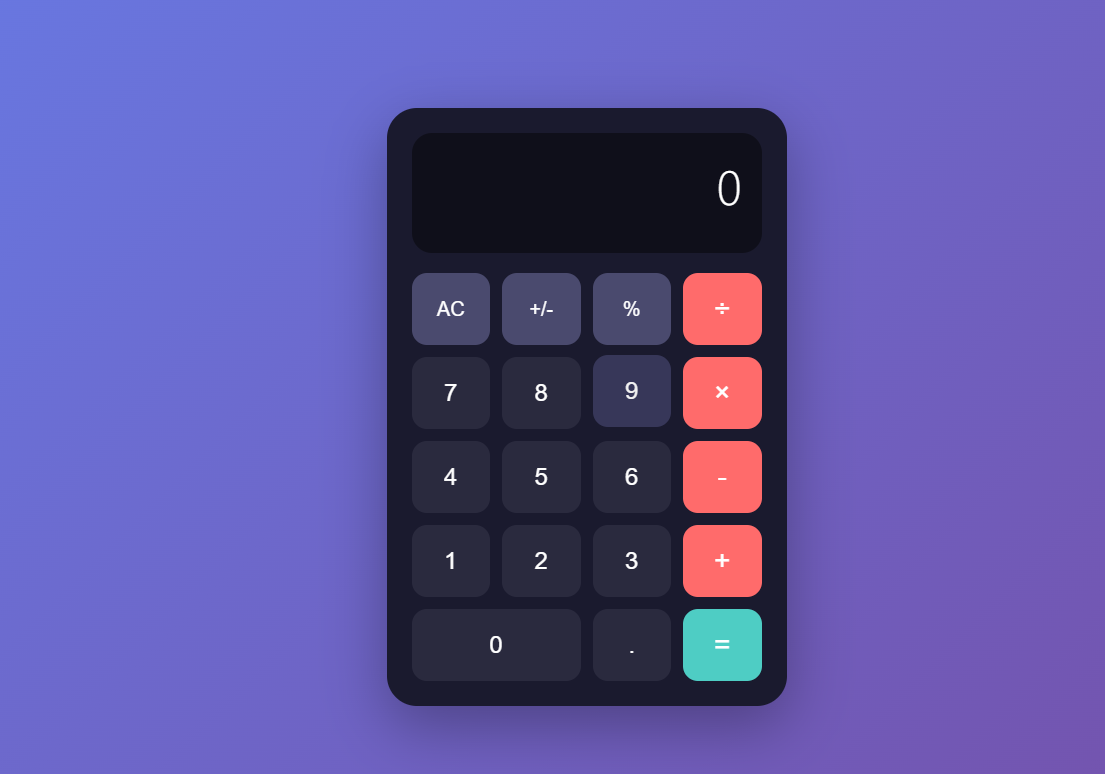
🎯 核心功能说明
1. 基本运算
-
加法、减法、乘法、除法
-
支持小数运算
-
自动处理浮点数精度
2. 特殊功能
-
AC:全部清除 -
+/-:正负号切换 -
%:百分比转换 -
连续运算(例如:1 + 2 + 3 =)
3. 用户体验
-
输入防错(不能多个0开头、不能重复小数点)
-
除零保护
-
表达式显示(顶部显示当前运算)
-
响应式布局
📚 代码学习要点
<script setup>
// 1. 响应式数据
const currentValue = ref('')        // 当前显示值
const expression = ref('')           // 表达式
const waitForSecondOperand = ref(false)  // 等待第二个操作数

// 2. 方法组织
const appendNumber = (number) => { }     // 添加数字
const setOperator = (operator) => { }    // 设置运算符
const calculate = () => { }               // 执行计算

// 3. 业务逻辑
// - 状态管理(何时输入第一个/第二个操作数)
// - 精度处理
// - 边界情况处理
</script>
🚀 进阶功能(可选)
完成基础版本后,可以添加:
1. 键盘支持
<script setup>
import { onMounted, onUnmounted } from 'vue'

const handleKeyPress = (e) => {
  if (e.key >= '0' && e.key <= '9') appendNumber(e.key)
  if (e.key === '.') appendDot()
  if (e.key === '+' || e.key === '-' || e.key === '*' || e.key === '/') {
    const op = { '*': '×', '/': '÷' }[e.key] || e.key
    setOperator(op)
  }
  if (e.key === 'Enter' || e.key === '=') calculate()
  if (e.key === 'Escape') clear()
  if (e.key === '%') percentage()
}

onMounted(() => {
  window.addEventListener('keydown', handleKeyPress)
})

onUnmounted(() => {
  window.removeEventListener('keydown', handleKeyPress)
})
</script>
试试看,是不是可以用键盘敲数字了。