MySQL组成和常用工具
mysql基于C/S模式提供服务,主要有客户端程序和服务端程序组成,另外还有一些管理工具
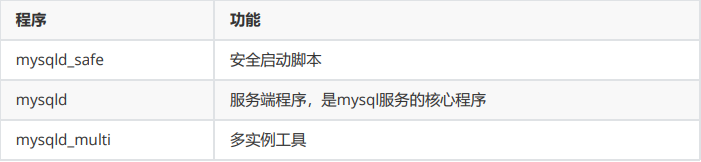
服务端主要组成
客户端主要组成
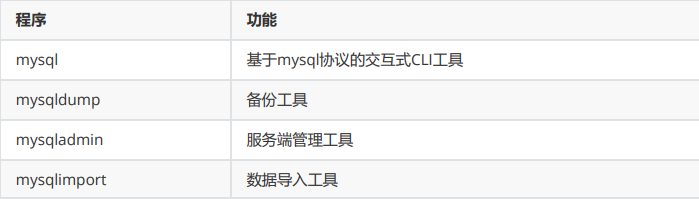
MyISAM存储引擎的管理工具

配置文件
不同版本配置文件略有不同
bash
[root@mysql ~ 17:13:16]# cat /etc/my.cnf
#
# This group is read both both by the client and the server
# use it for options that affect everything
#
[client-server]

#
# include all files from the config directory
#
!includedir /etc/my.cnf.d

[root@mysql ~ 17:13:27]# tree /etc/my.cnf.d
/etc/my.cnf.d
├── client.cnf   #客户端配置
├── mysql-default-authentication-plugin.cnf
└── mysql-server.cnf  #服务器端配置

0 directories, 3 files

[root@localhost ~]# mysql --help | grep my.cnf
							order of preference, my.cnf, $MYSQL_TCP_PORT,
/etc/my.cnf /etc/mysql/my.cnf ~/.my.cnf  ##生效顺序
MySQL 命令类型
MySQL中的命令分为两类,分别是客户端命令 和服务端命令
客户端命令在本地执行。服务端命令发送到服务端执行,再返回执行结果到客户端上
查看命令
查看所有客户端命令
bash
mysql> ?

For information about MySQL products and services, visit:
   http://www.mysql.com/
For developer information, including the MySQL Reference Manual, visit:
   http://dev.mysql.com/
To buy MySQL Enterprise support, training, or other products, visit:
   https://shop.mysql.com/

List of all MySQL commands:
Note that all text commands must be first on line and end with ';'
?         (\?) Synonym for `help'.
clear     (\c) Clear the current input statement.
connect   (\r) Reconnect to the server. Optional arguments are db and host.
。。。。。。。
。。。。。。。略
。。。。。。。
status    (\s) Get status information from the server.
resetconnection(\x) Clean session context.
query_attributes Sets string parameters (name1 value1 name2 value2 ...) for the next query to pick up.

For server side help, type 'help contents'
查看所有服务端命令
bash
mysql> help contents
You asked for help about help category: "Contents"
For more information, type 'help <item>', where <item> is one of the following
categories:
   Account Management
   Administration
   Components
   Compound Statements
   Contents
   Data Definition
   Data Manipulation
   Data Types
   Functions
   Geographic Features
   Help Metadata
   Language Structure
   Loadable Functions
   Plugins
   Prepared Statements
   Replication Statements
   Storage Engines
   Table Maintenance
   Transactions
   Utility
##查看服务端命令具体项
mysql> help Data Definition
You asked for help about help category: "Data Definition"
For more information, type 'help <item>', where <item> is one of the following
topics:
   ALTER DATABASE
   ALTER EVENT
   ALTER FUNCTION
   ALTER INSTANCE
   ALTER LOGFILE GROUP
......
   DROP SERVER
   DROP SPATIAL REFERENCE SYSTEM
   DROP TABLE
   DROP TABLESPACE
   DROP TRIGGER
   DROP VIEW
   FOREIGN KEY
   RENAME TABLE
   TRUNCATE TABLE
MySQL客户端使用
MySQL客户端常用选项
bash
[root@localhost ~]# mysql --help
Usage: mysql [OPTIONS] [database]
#常用选项
-V|--version #显示客户端版本
-u|--user=name #指定远程连接用户名
-p|--password[=name] #指定密码,默认为空
-h|--host=host #指定服务端主机
-P|--port=port #指定端口,默认3306
-S|--socket=name #指定连接时使用的socket文件,该文件在服务端启动后生成
-D|--database=db #指定数据库
-H|--html #以html格式输出
-X|--xml #以xml格式输出
-t|--table #以table格式输出,默认项
-E|--vertical #垂直显示执行结果
-v|--verbose #显示详细信息,配合-t选项
-C|--compress #启用压缩
-G|--named-commands #启用长命令
-e|--execute=sql #执行完就退出,非交互式运行
-prompt=name #修改命令提示符
--line-numbers #输出行号
--print-defaults #打印参数列表,放在最前面
--connect-timeout=N #连接超时时长,单位S
--max-allowed-packet=N #一次查交互发送或反回数据的大小,默认16MB,最大值为1GB,最小值为4096字节
范例:
bash
#免密登录
[root@localhost ~]# mysql -uroot -pHuawei@123
mysql> alter user root@localhost identified by ''; #将mysql root账号密码设置为空
mysql> quit    #退出mysql
#显示版本
[root@localhost ~]# mysql -V
mysql Ver 8.0.26 for Linux on x86_64 (Source distribution)
#指定用户名,主机,端口
[root@localhost ~]# mysql -uroot -h127.0.0.1 -P3306
Welcome to the MySQL monitor. Commands end with ; or \g.
Your MySQL connection id is 22
Server version: 8.0.26 Source distribution
Copyright (c) 2000, 2021, Oracle and/or its affiliates.
Oracle is a registered trademark of Oracle Corporation and/or its
affiliates. Other names may be trademarks of their respective
owners.

Type 'help;' or '\h' for help. Type '\c' to clear the current input statement.

mysql>
#使用主机名
[root@localhost ~]# mysql --user=root --host=localhost --port=3306
Welcome to the MySQL monitor. Commands end with ; or \g.
Your MySQL connection id is 23
Server version: 8.0.26 Source distribution
Copyright (c) 2000, 2021, Oracle and/or its affiliates.
Oracle is a registered trademark of Oracle Corporation and/or its
affiliates. Other names may be trademarks of their respective
owners.

Type 'help;' or '\h' for help. Type '\c' to clear the current input statement.

mysql>

#默认使用root连接,密码为空
[root@localhost ~]# mysql
Welcome to the MySQL monitor. Commands end with ; or \g.
Your MySQL connection id is 24
Server version: 8.0.26 Source distribution
Copyright (c) 2000, 2021, Oracle and/or its affiliates.
Oracle is a registered trademark of Oracle Corporation and/or its
affiliates. Other names may be trademarks of their respective
owners.
Type 'help;' or '\h' for help. Type '\c' to clear the current input statement.
#打印参数列表,并不连接服务端,--print-defaults要放在第一个
[root@localhost ~]# mysql --print-defaults -uroot -hlocalhost --connect-timeout=2
mysql would have been started with the following arguments:
-uroot -hlocalhost --connect-timeout=2
#以html格式显示输出
[root@localhost ~]# mysql -H
Welcome to the MySQL monitor. Commands end with ; or \g.
Your MySQL connection id is 25
Server version: 8.0.26 Source distribution
Copyright (c) 2000, 2021, Oracle and/or its affiliates.
Oracle is a registered trademark of Oracle Corporation and/or its
affiliates. Other names may be trademarks of their respective
owners.
Type 'help;' or '\h' for help. Type '\c' to clear the current input statement.
mysql> select version();
<TABLE BORDER=1><TR><TH>version()</TH></TR><TR><TD>8.0.26</TD></TR></TABLE>1 row
in set (0.00 sec)
执行完退出,非交互式执行
bash
#环境准备
[root@localhost ~]# vim /root/test.sql
show databases;
#执行客户端命令
[root@localhost ~]# mysql -e "source /root/test.sql"
+--------------------+
| Database |
+--------------------+
| information_schema |
| mysql |
| performance_schema |
| sys |
+--------------------+
#管道执行
[root@localhost ~]# cat test.sql | mysql
Database
information_schema
mysql
performance_schema
sys
#标准输入重定向执行
[root@localhost ~]# mysql -uroot < test.sql
Database
information_schema
mysql
performance_schema
sys
#以table格式输出
[root@localhost ~]# mysql -e "show databases;"
+--------------------+
| Database |
+--------------------+
| information_schema |
| mysql |
| performance_schema |
| sys |
+--------------------+
#垂直显示
[root@localhost ~]# mysql -e "show databases;" -E
*************************** 1. row ***************************
Database: information_schema
*************************** 2. row ***************************
Database: mysql
*************************** 3. row ***************************
Database: performance_schema
*************************** 4. row ***************************
Database: sys
修改提示符
bash
[root@localhost ~]# mysql --prompt=[test]
Welcome to the MySQL monitor. Commands end with ; or \g.
Your MySQL connection id is 37
Server version: 8.0.26 Source distribution
Copyright (c) 2000, 2021, Oracle and/or its affiliates.
Oracle is a registered trademark of Oracle Corporation and/or its
affiliates. Other names may be trademarks of their respective
owners.
Type 'help;' or '\h' for help. Type '\c' to clear the current input statement.
[test]    ##这里的mysql > 变成了 [test]
MySQL客户端常用命令
bash
mysql> ?
For information about MySQL products and services, visit:
http://www.mysql.com/
For developer information, including the MySQL Reference Manual, visit:
http://dev.mysql.com/
To buy MySQL Enterprise support, training, or other products, visit:
https://shop.mysql.com/
List of all MySQL commands:
Note that all text commands must be first on line and end with ';'
? (\?) Synonym for `help'.
clear (\c) Clear the current input statement.
connect (\r) Reconnect to the server. Optional arguments are db and host.
delimiter (\d) Set statement delimiter.
edit (\e) Edit command with $EDITOR.
ego (\G) Send command to mysql server, display result vertically.
exit (\q) Exit mysql. Same as quit.
go (\g) Send command to mysql server.
help (\h) Display this help.
nopager (\n) Disable pager, print to stdout.
notee (\t) Don't write into outfile.
pager (\P) Set PAGER [to_pager]. Print the query results via PAGER.
print (\p) Print current command.
prompt (\R) Change your mysql prompt.
quit (\q) Quit mysql.
rehash (\#) Rebuild completion hash.
source (\.) Execute an SQL script file. Takes a file name as an argument.
status (\s) Get status information from the server.
system (\!) Execute a system shell command.
tee (\T) Set outfile [to_outfile]. Append everything into given outfile.
use (\u) Use another database. Takes database name as argument.
charset (\C) Switch to another charset. Might be needed for processing binlog
with multi-byte charsets.
warnings (\W) Show warnings after every statement.
nowarning (\w) Don't show warnings after every statement.
resetconnection(\x) Clean session context.
query_attributes Sets string parameters (name1 value1 name2 value2 ...) for the
next query to pick up.
For server side help, type 'help contents'
显示当前数据库
bash
#显示当前数据库
mysql> \s
--------------
mysql Ver 8.0.26 for Linux on x86_64 (Source distribution)
Connection id: 8 #连接ID
Current database: #当前使用的数据库
Current user: root@localhost #连接使用的用户名
SSL: Not in use #是否使用ssl
Current pager: stdout
Using outfile: ''
Using delimiter: ;
Server version: 8.0.26 Source distribution #版本
Protocol version: 10 #协议版本
Connection: Localhost via UNIX socket
Server characterset: utf8mb4 #服务器编码
Db characterset: utf8mb4 #数据库编码
Client characterset: utf8mb4 #客户端编码
Conn. characterset: utf8mb4
UNIX socket: /var/lib/mysql/mysql.sock #连接使用的socket文件
Binary data as: Hexadecimal
Uptime: 28 min 46 sec #服务器运行时长
Threads: 2 Questions: 6 Slow queries: 0 Opens: 117 Flush tables: 3 Open
tables: 36 Queries per second avg: 0.003
切换数据库
bash
mysql> use mysql;
Reading table information for completion of table and column names
You can turn off this feature to get a quicker startup with -A

Database changed
调用系统命令
bash
mysql> \! hostname   #查看宿主机主机名,!号后面有空格
localhost.localdomain

mysql> \! clear    #清屏
修改提示符
bash
mysql> prompt [\h--\D]
PROMPT set to '[\h--\D]'
[localhost--Mon Sep 15 22:09:09 2025]
[localhost--Mon Sep 15 22:10:01 2025]\R abcd >
PROMPT set to 'abcd'
abcd >
abcd >
执行SQL脚本
bash
[root@localhost ~]# vim test.sql
show databases;
mysql> \. /root/test.sql
+--------------------+
| Database |
+--------------------+
| information_schema |
| mysql |
| performance_schema |
| sys |
+--------------------+
4 rows in set (0.00 sec)
重连
bash
[root@localhost ~]# mysql
Welcome to the MySQL monitor. Commands end with ; or \g.
Your MySQL connection id is 19
Server version: 8.0.26 Source distribution
Copyright (c) 2000, 2021, Oracle and/or its affiliates.
Oracle is a registered trademark of Oracle Corporation and/or its
affiliates. Other names may be trademarks of their respective
owners.
Type 'help;' or '\h' for help. Type '\c' to clear the current input statement.
mysql> \r
Connection id: 20
Current database: *** NONE ***
mysql> use mysql
Reading table information for completion of table and column names
You can turn off this feature to get a quicker startup with -A
Database changed
mysql> \r
Connection id: 21
Current database: mysql
往文件中保存输出结果
bash
mysql> tee db.txt      #设置写到文件db.txt
Logging to file 'db.txt'
mysql> select version();     #执行SQL语句
+-----------+
| version() |
+-----------+
| 8.0.26 |
+-----------+
1 row in set (0.00 sec)
mysql> \t     #设置不写文件
Outfile disabled.
mysql> show databases;     #执行SQL语句
+--------------------+
| Database |
+--------------------+
| information_schema |
| mysql |
| performance_schema |
| sys |
+--------------------+
4 rows in set (0.00 sec)
mysql> quit #退出
Bye
[root@localhost ~]# cat db.txt    #只记录了\t之前的命令
mysql> select version();
+-----------+
| version() |
+-----------+
| 8.0.26 |
+-----------+
1 row in set (0.00 sec)
mysql> \t
自定义
bash
#两条查询语句,默认用;分隔
mysql> select version();show databases;
+-----------+
| version() |
+-----------+
| 8.0.26 |
+-----------+
1 row in set (0.00 sec)
+--------------------+
| Database |
+--------------------+
| information_schema |
| mysql |
| performance_schema |
| sys |
+--------------------+
4 rows in set (0.01 sec)

#设置$分隔
mysql> \d $
mysql> select version()$show databases$
+-----------+
| version() |
+-----------+
| 8.0.26 |
+-----------+
1 row in set (0.01 sec)
+--------------------+
| Database |
+--------------------+
| information_schema |
| mysql |
| performance_schema |
| sys |
+--------------------+
4 rows in set (0.00 sec)
发送语句到服务端
bash
mysql> select version();
+-----------+
| version() |
+-----------+
| 8.0.26 |
+-----------+
1 row in set (0.01 sec)
mysql> select version()\g
+-----------+
| version() |
+-----------+
| 8.0.26 |
+-----------+
1 row in set (0.00 sec)
mysql> select version()\G
*************************** 1. row ***************************
version(): 8.0.26
1 row in set (0.00 sec)
#开启长命令格式
[root@localhost ~]# mysql --named-commands
Welcome to the MySQL monitor. Commands end with ; or \g.
Your MySQL connection id is 26
Server version: 8.0.26 Source distribution
Copyright (c) 2000, 2021, Oracle and/or its affiliates.
Oracle is a registered trademark of Oracle Corporation and/or its
affiliates. Other names may be trademarks of their respective
owners.
Type 'help;' or '\h' for help. Type '\c' to clear the current input statement.
mysql> select version() #这里要断句
-> go
+-----------+
| version() |
+-----------+
| 8.0.26 |
+-----------+
1 row in set (0.00 sec)
mysql> select version() #这里要断句
-> ego
*************************** 1. row ***************************
version(): 8.0.26
1 row in set (0.00 sec)
只输出不执行
bash
mysql> select version()\p
--------------
select version()
--------------

->
mysqladmin工具
mysqladmin也是用于管理mysql服务的本地工具
显示版本信息
bash
#客户端版本
[root@localhost ~]# mysqladmin -V
mysqladmin Ver 8.0.26 for Linux on x86_64 (Source distribution)
#客户端和服务端版本信息
[root@localhost ~]# mysqladmin version
mysqladmin Ver 8.0.26 for Linux on x86_64 (Source distribution)
Copyright (c) 2000, 2021, Oracle and/or its affiliates.
Oracle is a registered trademark of Oracle Corporation and/or its
affiliates. Other names may be trademarks of their respective
owners.
Server version 8.0.26
Protocol version 10
Connection Localhost via UNIX socket
UNIX socket /var/lib/mysql/mysql.sock
Uptime: 1 hour 44 min 34 sec
Threads: 4 Questions: 189 Slow queries: 0 Opens: 287 Flush tables: 3 Open
tables: 206 Queries per second avg: 0.030
显示状态信息
bash
[root@localhost ~]# mysqladmin status
Uptime: 6352 Threads: 4 Questions: 191 Slow queries: 0 Opens: 287 Flush
tables: 3 Open tables: 206 Queries per second avg: 0.030
设置连接超时
bash
[root@localhost ~]# mysqladmin -h1.2.3.4 --connect-timeout=2 ping
mysqladmin: connect to server at '1.2.3.4' failed
error: 'Can't connect to MySQL server on '1.2.3.4:3306' (110)'
Check that mysqld is running on 1.2.3.4 and that the port is 3306.
You can check this by doing 'telnet 1.2.3.4 3306'
[root@localhost ~]# echo $?
1

#静默退出,不输出错误信息
[root@localhost ~]# mysqladmin -h1.2.3.4 --connect-timeout=2 -s ping
[root@localhost ~]# echo $?
1
持续执行
bash
#每秒执行一次ping命令,一直执行下去
[root@localhost ~]# mysqladmin -i 1 ping
mysqld is alive
mysqld is alive
mysqld is alive
......

#每秒执行一次ping命令,总共执行3次
[root@localhost ~]# mysqladmin -i 1 -c 3 ping
mysqld is alive
mysqld is alive
mysqld is alive
关闭服务
bash
#mysqladmin只能关闭服务,不能启动服务
[root@localhost ~]# mysqladmin shutdown
[root@localhost ~]# mysqladmin ping
mysqladmin: connect to server at 'localhost' failed
error: 'Can't connect to local MySQL server through socket
'/var/lib/mysql/mysql.sock' (2)'
Check that mysqld is running and that the socket: '/var/lib/mysql/mysql.sock'
exists!

[root@localhost ~]# echo $?
1

[root@localhost ~]# systemctl start mysqld
创建数据库和删除数据库
bash
#创建
[root@localhost ~]# mysqladmin create mysqladmin-db1
[root@localhost ~]# mysqladmin create mysqladmin-db2
[root@localhost ~]# mysql -e 'show databases'
+--------------------+
| Database |
+--------------------+
| information_schema |
| mysql |
| mysqladmin-db1 |
| mysqladmin-db2 |
| performance_schema |
| sys |
+--------------------+

#删除
[root@localhost ~]# mysqladmin drop mysqladmin-db1
Dropping the database is potentially a very bad thing to do.
Any data stored in the database will be destroyed.
Do you really want to drop the 'mysqladmin-db1' database [y/N] y   #回答y确认
Database "mysqladmin-db1" dropped
[root@localhost ~]# mysqladmin -f drop mysqladmin-db2  #强制删除,不需要确认
Database "mysqladmin-db2" dropped
[root@localhost ~]# mysql -e 'show databases' #验证mysqladmin-db1和mysqladmindb2已经删除
+--------------------+
| Database |
+--------------------+
| information_schema |
| mysql |
| performance_schema |
| sys |
+--------------------+
修改连接密码
bash
#旧密码为空,root用户,localhost主机连接
[root@localhost ~]# mysqladmin password 123456 #设置密码为123456
mysqladmin: [Warning] Using a password on the command line interface can be
insecure.
Warning: Since password will be sent to server in plain text, use ssl connection
to ensure password safety.
[root@localhost ~]# mysqladmin ping   #不使用密码不行
mysqladmin: connect to server at 'localhost' failed
error: 'Access denied for user 'root'@'localhost' (using password: NO)'
[root@localhost ~]# mysqladmin -uroot -hlocalhost -p123456 ping #使用密码
123456
mysqladmin: [Warning] Using a password on the command line interface can be
insecure.
mysqld is alive
#用旧密码修改新密码
[root@localhost ~]# mysqladmin -uroot -p123456 -hlocalhost password abcde
#更改密码为abcde
mysqladmin: [Warning] Using a password on the command line interface can be
insecure.
Warning: Since password will be sent to server in plain text, use ssl connection
to ensure password safety.
[root@localhost ~]# mysqladmin -uroot -p123456 -hlocalhost ping #使用原密码测试不行
mysqladmin: [Warning] Using a password on the command line interface can be
insecure.
mysqladmin: connect to server at 'localhost' failed
error: 'Access denied for user 'root'@'localhost' (using password: YES)'
[root@localhost ~]# mysqladmin -uroot -pabcde -hlocalhost ping #使用新密码测试
mysqladmin: [Warning] Using a password on the command line interface can be
insecure.
mysqld is alive