HarmonyOS NEXT 实战:从零开发一个专业秒表应用
本文详细记录了使用 HarmonyOS NEXT 开发一个功能完善的秒表应用的完整过程,涵盖 UI 设计、状态管理、计时逻辑、列表渲染等核心知识点,适合初学者入门实战参考。
一、项目背景
秒表是手机上常见的工具应用,功能看似简单,但要做得流畅、专业,需要处理不少细节:精确计时、计次记录、最佳/最慢圈标记、UI 状态切换等。本文将带领大家从零开始,使用 HarmonyOS NEXT 和 ArkTS 开发一个功能完善的秒表应用,最终实现:
- ✅ 开始/暂停/重置计时
- ✅ 计次记录(单圈时间 + 累计时间)
- ✅ 自动标记最快圈(🏆)和最慢圈(🐢)
- ✅ 运行状态实时显示
- ✅ 精美的 UI 设计(Material 风格)
二、开发环境
-
DevEco Studio: 5.0.3.403
-
HarmonyOS SDK: API 23
-
设备类型: Phone
-
项目模型: Stage 模型
三、项目结构
MyApplication/
├── AppScope/
│   ├── app.json5                    # 应用全局配置
│   └── resources/base/media/        # 应用图标资源
├── entry/
│   ├── src/main/
│   │   ├── ets/
│   │   │   ├── entryability/
│   │   │   │   └── EntryAbility.ets # 应用入口
│   │   │   └── pages/
│   │   │       └── Index.ets        # 主页面(核心代码)
│   │   ├── resources/
│   │   │   └── base/
│   │   │       ├── element/
│   │   │       │   └── string.json  # 字符串资源
│   │   │       └── media/           # 图片资源
│   │   └── module.json5             # 模块配置
│   ├── build-profile.json5          # 构建配置
│   └── oh-package.json5             # 依赖配置
├── build-profile.json5              # 项目构建配置
└── hvigorfile.ts                    # 构建脚本
四、核心功能实现
4.1 数据模型设计
首先定义计次记录的数据结构:
typescript
interface LapRecord {
  lapNumber: number    // 圈数
  lapTime: string      // 单圈时间(格式化字符串)
  totalTime: string    // 累计时间(格式化字符串)
}
4.2 状态变量定义
使用 @State 装饰器定义响应式状态变量:
typescript
@Entry
@Component
struct Index {
  @State displayTime: string = '00:00.00'  // 显示时间
  @State isRunning: boolean = false        // 是否运行中
  @State lapCount: number = 0              // 计次次数
  @State laps: LapRecord[] = []            // 计次记录数组
  @State bestLapIndex: number = -1         // 最快圈索引
  @State worstLapIndex: number = -1        // 最慢圈索引

  // 私有变量(不需要响应式)
  private startTime: number = 0            // 本次启动的时间戳
  private elapsedBeforePause: number = 0   // 暂停前已累计的毫秒数
  private lastLapTime: number = 0          // 上次计次时的累计时间
  private timerId: number = -1             // 定时器 ID
}设计思路:
elapsedBeforePause记录暂停前的时间,支持多次暂停/继续lastLapTime用于计算单圈时间(当前累计时间 - 上次计次时间)bestLapIndex/worstLapIndex用于标记最快/最慢圈
4.3 时间格式化
将毫秒数格式化为 MM:SS.cs 格式(分:秒.厘秒):
typescript
formatTime(ms: number): string {
  const totalCs = Math.floor(ms / 10)           // 总厘秒数
  const minutes = Math.floor(totalCs / 6000)    // 分钟
  const seconds = Math.floor((totalCs % 6000) / 100)  // 秒
  const centiseconds = totalCs % 100            // 厘秒
  return `${this.pad(minutes)}:${this.pad(seconds)}.${this.pad(centiseconds)}`
}

pad(n: number): string {
  return n < 10 ? '0' + n : '' + n
}
4.4 计时控制逻辑
开始计时
typescript
start(): void {
  if (this.isRunning) return
  this.startTime = Date.now()
  this.isRunning = true
  this.lastLapTime = this.elapsedBeforePause  // 记录计次基准

  this.timerId = setInterval(() => {
    const now = Date.now()
    const elapsed = this.elapsedBeforePause + (now - this.startTime)
    this.displayTime = this.formatTime(elapsed)
  }, 20)  // 每 20ms 更新一次
}要点:
- 使用
setInterval实现定时刷新,20ms 的刷新率足够流畅 elapsedBeforePause + (now - startTime)实现累计计时
停止计时
typescript
stop(): void {
  if (!this.isRunning) return
  clearInterval(this.timerId)
  this.elapsedBeforePause += Date.now() - this.startTime
  this.isRunning = false
}要点:
- 清除定时器
- 将本次运行时间累加到
elapsedBeforePause
重置
typescript
reset(): void {
  clearInterval(this.timerId)
  this.isRunning = false
  this.displayTime = '00:00.00'
  this.elapsedBeforePause = 0
  this.lastLapTime = 0
  this.lapCount = 0
  this.laps = []
  this.bestLapIndex = -1
  this.worstLapIndex = -1
}
4.5 计次功能
typescript
lap(): void {
  if (!this.isRunning) return
  const now = Date.now()
  const totalElapsed = this.elapsedBeforePause + (now - this.startTime)
  const thisLapMs = totalElapsed - this.lastLapTime  // 单圈时间
  this.lastLapTime = totalElapsed

  this.lapCount++
  const record: LapRecord = {
    lapNumber: this.lapCount,
    lapTime: this.formatTime(thisLapMs),
    totalTime: this.formatTime(totalElapsed)
  }
  this.laps = [record, ...this.laps]  // 新记录插入到数组头部

  this.updateBestWorst()  // 更新最快/最慢圈
}
4.6 最佳/最慢圈计算
typescript
updateBestWorst(): void {
  let bestIdx = 0
  let worstIdx = 0
  const lapTimes = this.laps.map(l => this.parseMs(l.lapTime))

  for (let i = 1; i < lapTimes.length; i++) {
    if (lapTimes[i] < lapTimes[bestIdx]) bestIdx = i
    if (lapTimes[i] > lapTimes[worstIdx]) worstIdx = i
  }
  this.bestLapIndex = bestIdx
  this.worstLapIndex = worstIdx
}

parseMs(time: string): number {
  const parts = time.split(/[:.]/)
  const m = parseInt(parts[0]) * 60000
  const s = parseInt(parts[1]) * 1000
  const cs = parseInt(parts[2]) * 10
  return m + s + cs
}
五、UI 界面设计
5.1 整体布局
采用 Column + Scroll 结构,支持内容滚动:
typescript
build() {
  Column() {
    Scroll() {
      Column() {
        // 标题
        // 时间显示
        // 控制按钮
        // 计次列表
      }
      .width('100%')
      .alignItems(HorizontalAlign.Center)
    }
    .width('100%')
    .height('100%')
  }
  .width('100%')
  .height('100%')
  .backgroundColor('#ECEFF1')  // Material Grey 50
}
5.2 时间显示区
使用 Stack 层叠布局,实现圆形表盘效果:
typescript
Stack() {
  // 背景圆
  Circle()
    .width(240)
    .height(240)
    .fill('#ECEFF1')

  // 内圈(带阴影)
  Circle()
    .width(210)
    .height(210)
    .fill(Color.White)
    .shadow({ radius: 6, color: '#33000000', offsetY: 3 })

  // 时间文字
  Column() {
    Text(this.displayTime)
      .fontSize(46)
      .fontWeight(FontWeight.Bold)
      .fontColor('#263238')
      .fontFamily('Courier New')  // 等宽字体

    // 运行状态指示
    if (this.isRunning) {
      Row() {
        Circle()
          .width(8)
          .height(8)
          .fill('#F44336')
          .margin({ right: 6 })
        Text('计时中')
          .fontSize(13)
          .fontColor('#F44336')
      }
      .margin({ top: 4 })
    } else if (this.elapsedBeforePause > 0) {
      Text('已暂停')
        .fontSize(13)
        .fontColor('#FF9800')
        .margin({ top: 4 })
    }
  }
  .alignItems(HorizontalAlign.Center)
}
.width(240)
.height(240)
.margin({ top: 20 })
5.3 控制按钮组
三个按钮水平排列:计次、开始/停止、重置
typescript
Row() {
  // 计次按钮
  Button('⏱ 计次')
    .width(90)
    .height(44)
    .backgroundColor('#78909C')
    .borderRadius(22)
    .fontSize(15)
    .onClick(() => this.lap())

  // 开始/停止按钮
  Button(this.isRunning ? '⏹ 停止' : '▶ 开始')
    .width(130)
    .height(52)
    .backgroundColor(this.isRunning ? '#F44336' : '#4CAF50')
    .borderRadius(26)
    .fontSize(17)
    .fontWeight(FontWeight.Bold)
    .margin({ left: 16, right: 16 })
    .onClick(() => {
      if (this.isRunning) {
        this.stop()
      } else {
        this.start()
      }
    })

  // 重置按钮
  Button('↺ 重置')
    .width(90)
    .height(44)
    .backgroundColor('#78909C')
    .borderRadius(22)
    .fontSize(15)
    .onClick(() => this.reset())
}
.margin({ top: 24 })设计亮点:
- 开始/停止按钮使用不同颜色(绿色/红色)
- 按钮文字动态切换
- 圆角按钮配合圆形表盘,风格统一
5.4 计次列表
使用 ForEach 渲染列表,支持最快/最慢圈标记:
typescript
if (this.laps.length > 0) {
  Column() {
    // 标题
    Row() {
      Text(`计次记录 (${this.laps.length})`)
        .fontSize(16)
        .fontWeight(FontWeight.Medium)
        .fontColor('#37474F')
    }
    .width('100%')
    .padding({ bottom: 8 })

    // 表头
    Row() {
      Text('圈数')
        .fontSize(12)
        .fontColor('#999')
        .width(60)
      Text('单圈时间')
        .fontSize(12)
        .fontColor('#999')
        .width(100)
      Text('总时间')
        .fontSize(12)
        .fontColor('#999')
        .width(100)
    }
    .width('100%')
    .padding({ left: 8, right: 8, bottom: 4 })

    // 列表项
    ForEach(this.laps, (lap: LapRecord, index: number) => {
      Row() {
        Row() {
          // 最快圈标记
          if (index === this.bestLapIndex && this.laps.length > 1) {
            Text('🏆')
              .fontSize(14)
              .margin({ right: 2 })
          }
          // 最慢圈标记
          else if (index === this.worstLapIndex && this.laps.length > 1) {
            Text('🐢')
              .fontSize(14)
              .margin({ right: 2 })
          }
          Text(`第 ${lap.lapNumber} 圈`)
            .fontSize(14)
            .fontColor('#37474F')
        }
        .width(60)

        Text(lap.lapTime)
          .fontSize(15)
          .fontWeight(FontWeight.Bold)
          .fontColor('#1976D2')
          .width(100)

        Text(lap.totalTime)
          .fontSize(14)
          .fontColor('#666')
          .width(100)
      }
      .width('100%')
      .padding({ left: 8, right: 8, top: 8, bottom: 8 })
      .backgroundColor(index % 2 === 0 ? '#FFFFFF' : '#FAFAFA')
      .borderRadius(6)
      .margin({ bottom: 2 })
    }, (lap: LapRecord, index: number) => lap.lapNumber.toString() + index)
  }
  .width('100%')
  .padding(16)
  .backgroundColor(Color.White)
  .borderRadius(12)
  .shadow({ radius: 4, color: '#1A000000', offsetY: 2 })
  .margin({ top: 24, left: 16, right: 16, bottom: 40 })
}
5.5 空状态提示
无计次记录时显示引导文字:
typescript
else {
  Column() {
    Text('👆')
      .fontSize(36)
    Text('点击「开始」启动计时\n点击「计次」记录单圈时间')
      .fontSize(14)
      .fontColor('#BDBDBD')
      .textAlign(TextAlign.Center)
      .margin({ top: 8 })
      .lineHeight(22)
  }
  .margin({ top: 40, bottom: 40 })
}
六、生命周期管理
在组件销毁时清理定时器,避免内存泄漏:
typescript
aboutToDisappear(): void {
  if (this.timerId !== -1) {
    clearInterval(this.timerId)
  }
}
七、完整代码
Index.ets
typescript
interface LapRecord {
  lapNumber: number
  lapTime: string
  totalTime: string
}

@Entry
@Component
struct Index {
  @State displayTime: string = '00:00.00'
  @State isRunning: boolean = false
  @State lapCount: number = 0
  @State laps: LapRecord[] = []
  @State bestLapIndex: number = -1
  @State worstLapIndex: number = -1

  private startTime: number = 0
  private elapsedBeforePause: number = 0
  private lastLapTime: number = 0
  private timerId: number = -1

  formatTime(ms: number): string {
    const totalCs = Math.floor(ms / 10)
    const minutes = Math.floor(totalCs / 6000)
    const seconds = Math.floor((totalCs % 6000) / 100)
    const centiseconds = totalCs % 100
    return `${this.pad(minutes)}:${this.pad(seconds)}.${this.pad(centiseconds)}`
  }

  pad(n: number): string {
    return n < 10 ? '0' + n : '' + n
  }

  start(): void {
    if (this.isRunning) return
    this.startTime = Date.now()
    this.isRunning = true
    this.lastLapTime = this.elapsedBeforePause

    this.timerId = setInterval(() => {
      const now = Date.now()
      const elapsed = this.elapsedBeforePause + (now - this.startTime)
      this.displayTime = this.formatTime(elapsed)
    }, 20)
  }

  stop(): void {
    if (!this.isRunning) return
    clearInterval(this.timerId)
    this.elapsedBeforePause += Date.now() - this.startTime
    this.isRunning = false
  }

  reset(): void {
    clearInterval(this.timerId)
    this.isRunning = false
    this.displayTime = '00:00.00'
    this.elapsedBeforePause = 0
    this.lastLapTime = 0
    this.lapCount = 0
    this.laps = []
    this.bestLapIndex = -1
    this.worstLapIndex = -1
  }

  lap(): void {
    if (!this.isRunning) return
    const now = Date.now()
    const totalElapsed = this.elapsedBeforePause + (now - this.startTime)
    const thisLapMs = totalElapsed - this.lastLapTime
    this.lastLapTime = totalElapsed

    this.lapCount++
    const record: LapRecord = {
      lapNumber: this.lapCount,
      lapTime: this.formatTime(thisLapMs),
      totalTime: this.formatTime(totalElapsed)
    }
    this.laps = [record, ...this.laps]
    this.updateBestWorst()
  }

  updateBestWorst(): void {
    let bestIdx = 0
    let worstIdx = 0
    const lapTimes = this.laps.map(l => this.parseMs(l.lapTime))

    for (let i = 1; i < lapTimes.length; i++) {
      if (lapTimes[i] < lapTimes[bestIdx]) bestIdx = i
      if (lapTimes[i] > lapTimes[worstIdx]) worstIdx = i
    }
    this.bestLapIndex = bestIdx
    this.worstLapIndex = worstIdx
  }

  parseMs(time: string): number {
    const parts = time.split(/[:.]/)
    const m = parseInt(parts[0]) * 60000
    const s = parseInt(parts[1]) * 1000
    const cs = parseInt(parts[2]) * 10
    return m + s + cs
  }

  aboutToDisappear(): void {
    if (this.timerId !== -1) {
      clearInterval(this.timerId)
    }
  }

  build() {
    Column() {
      Scroll() {
        Column() {
          Text('⏱ 秒表')
            .fontSize(26)
            .fontWeight(FontWeight.Bold)
            .fontColor('#37474F')
            .margin({ top: 36 })

          Stack() {
            Circle()
              .width(240)
              .height(240)
              .fill('#ECEFF1')

            Circle()
              .width(210)
              .height(210)
              .fill(Color.White)
              .shadow({ radius: 6, color: '#33000000', offsetY: 3 })

            Column() {
              Text(this.displayTime)
                .fontSize(46)
                .fontWeight(FontWeight.Bold)
                .fontColor('#263238')
                .fontFamily('Courier New')

              if (this.isRunning) {
                Row() {
                  Circle()
                    .width(8)
                    .height(8)
                    .fill('#F44336')
                    .margin({ right: 6 })
                  Text('计时中')
                    .fontSize(13)
                    .fontColor('#F44336')
                }
                .margin({ top: 4 })
              } else if (this.elapsedBeforePause > 0) {
                Text('已暂停')
                  .fontSize(13)
                  .fontColor('#FF9800')
                  .margin({ top: 4 })
              }
            }
            .alignItems(HorizontalAlign.Center)
          }
          .width(240)
          .height(240)
          .margin({ top: 20 })

          Row() {
            Button('⏱ 计次')
              .width(90)
              .height(44)
              .backgroundColor('#78909C')
              .borderRadius(22)
              .fontSize(15)
              .onClick(() => this.lap())

            Button(this.isRunning ? '⏹ 停止' : '▶ 开始')
              .width(130)
              .height(52)
              .backgroundColor(this.isRunning ? '#F44336' : '#4CAF50')
              .borderRadius(26)
              .fontSize(17)
              .fontWeight(FontWeight.Bold)
              .margin({ left: 16, right: 16 })
              .onClick(() => {
                if (this.isRunning) {
                  this.stop()
                } else {
                  this.start()
                }
              })

            Button('↺ 重置')
              .width(90)
              .height(44)
              .backgroundColor('#78909C')
              .borderRadius(22)
              .fontSize(15)
              .onClick(() => this.reset())
          }
          .margin({ top: 24 })

          if (this.laps.length > 0) {
            Column() {
              Row() {
                Text(`计次记录 (${this.laps.length})`)
                  .fontSize(16)
                  .fontWeight(FontWeight.Medium)
                  .fontColor('#37474F')
              }
              .width('100%')
              .padding({ bottom: 8 })

              Row() {
                Text('圈数')
                  .fontSize(12)
                  .fontColor('#999')
                  .width(60)
                Text('单圈时间')
                  .fontSize(12)
                  .fontColor('#999')
                  .width(100)
                Text('总时间')
                  .fontSize(12)
                  .fontColor('#999')
                  .width(100)
              }
              .width('100%')
              .padding({ left: 8, right: 8, bottom: 4 })

              ForEach(this.laps, (lap: LapRecord, index: number) => {
                Row() {
                  Row() {
                    if (index === this.bestLapIndex && this.laps.length > 1) {
                      Text('🏆')
                        .fontSize(14)
                        .margin({ right: 2 })
                    } else if (index === this.worstLapIndex && this.laps.length > 1) {
                      Text('🐢')
                        .fontSize(14)
                        .margin({ right: 2 })
                    }
                    Text(`第 ${lap.lapNumber} 圈`)
                      .fontSize(14)
                      .fontColor('#37474F')
                  }
                  .width(60)

                  Text(lap.lapTime)
                    .fontSize(15)
                    .fontWeight(FontWeight.Bold)
                    .fontColor('#1976D2')
                    .width(100)

                  Text(lap.totalTime)
                    .fontSize(14)
                    .fontColor('#666')
                    .width(100)
                }
                .width('100%')
                .padding({ left: 8, right: 8, top: 8, bottom: 8 })
                .backgroundColor(index % 2 === 0 ? '#FFFFFF' : '#FAFAFA')
                .borderRadius(6)
                .margin({ bottom: 2 })
              }, (lap: LapRecord, index: number) => lap.lapNumber.toString() + index)
            }
            .width('100%')
            .padding(16)
            .backgroundColor(Color.White)
            .borderRadius(12)
            .shadow({ radius: 4, color: '#1A000000', offsetY: 2 })
            .margin({ top: 24, left: 16, right: 16, bottom: 40 })
          } else {
            Column() {
              Text('👆')
                .fontSize(36)
              Text('点击「开始」启动计时\n点击「计次」记录单圈时间')
                .fontSize(14)
                .fontColor('#BDBDBD')
                .textAlign(TextAlign.Center)
                .margin({ top: 8 })
                .lineHeight(22)
            }
            .margin({ top: 40, bottom: 40 })
          }
        }
        .width('100%')
        .alignItems(HorizontalAlign.Center)
      }
      .width('100%')
      .height('100%')
    }
    .width('100%')
    .height('100%')
    .backgroundColor('#ECEFF1')
  }
}
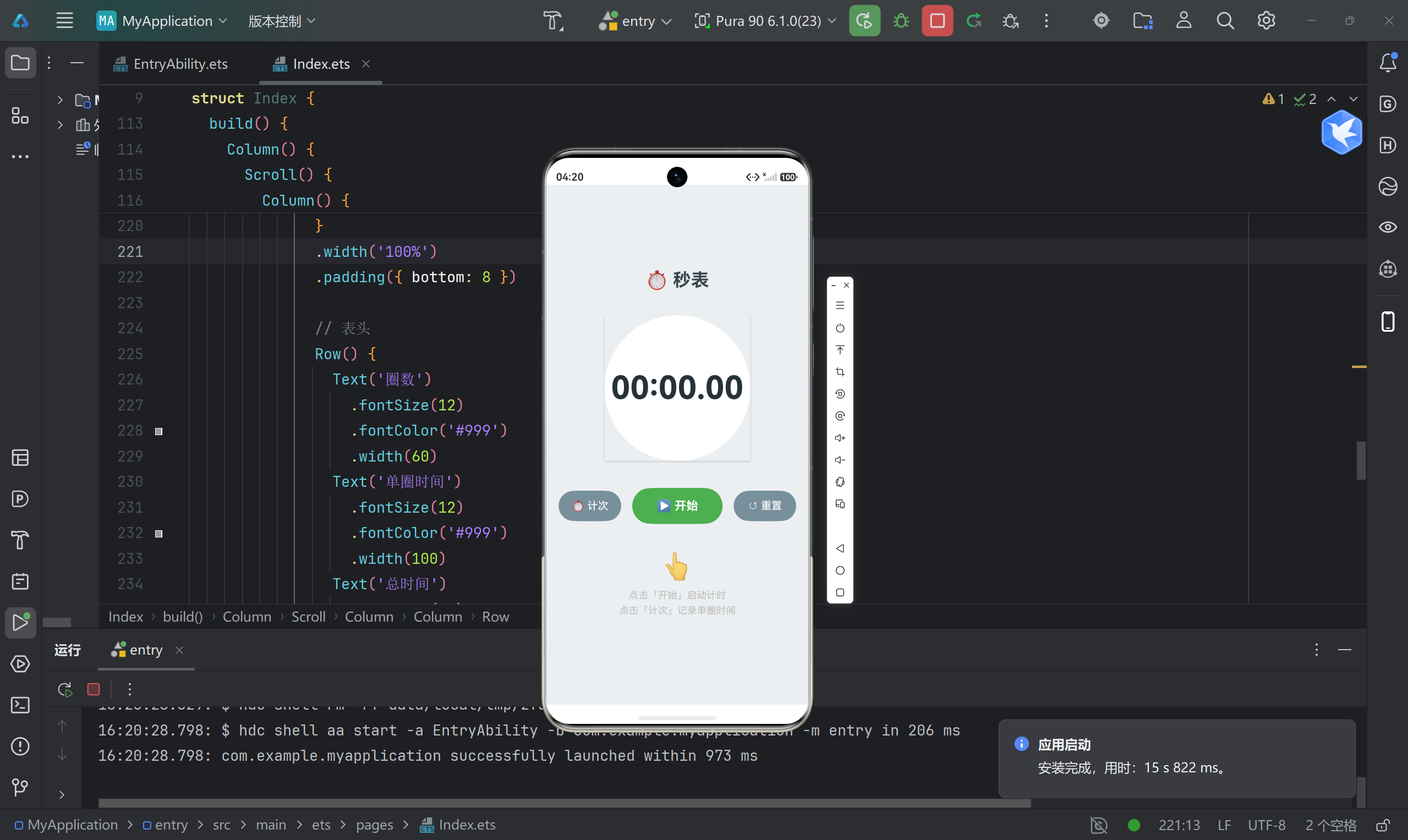
八、运行效果
九、踩坑记录
9.1 ForEach 键值唯一性
问题 :ForEach 的键生成函数返回重复值,导致列表渲染异常。
解决 :使用 lap.lapNumber.toString() + index 组合键,确保唯一性。
typescript
ForEach(this.laps, (lap: LapRecord, index: number) => {
  // ...
}, (lap: LapRecord, index: number) => lap.lapNumber.toString() + index)
9.2 定时器清理
问题:组件销毁时未清理定时器,可能导致内存泄漏。
解决 :在 aboutToDisappear 生命周期中清理:
typescript
aboutToDisappear(): void {
  if (this.timerId !== -1) {
    clearInterval(this.timerId)
  }
}
9.3 暂停后继续计时
问题 :简单使用 Date.now() 计时,暂停后继续会丢失之前的时间。
解决 :使用 elapsedBeforePause 变量累计暂停前的时间:
typescript
const elapsed = this.elapsedBeforePause + (now - this.startTime)9.4 单圈时间计算
问题:计次时需要计算单圈时间,而非累计时间。
解决 :记录 lastLapTime,单圈时间 = 当前累计时间 - 上次计次时间:
typescript
const thisLapMs = totalElapsed - this.lastLapTime十、总结与扩展
10.1 项目亮点
- 精确计时:使用 20ms 刷新率,时间显示精确到厘秒
- 状态管理 :通过
@State装饰器实现响应式 UI - 智能标记:自动识别最快/最慢圈
- Material 风格:圆形表盘、阴影效果、颜色搭配
- 代码规范:接口定义清晰、函数职责单一、注释完善
10.2 可扩展功能
- 数据持久化(保存计次记录)
- 分享功能(导出计次数据)
- 多主题切换(深色模式)
- 振动反馈(计次时振动提醒)
- 圈数统计图表
10.3 学习收获
通过本项目,我们掌握了:
- ArkTS 语法基础(接口、装饰器、生命周期)
- 状态管理(
@State、响应式更新) - 定时器使用(
setInterval、clearInterval) - 列表渲染(
ForEach、键值管理) - UI 布局(
Column、Row、Stack、Scroll) - 样式设计(圆角、阴影、颜色、字体)
十一、参考资料
包名 :
com.example.myapplication目标 SDK:API 23(HarmonyOS 6.1.1)
如果这篇文章对你有帮助,欢迎点赞、收藏、评论!有任何问题也可以留言讨论~ 🚀