关于 PowerShell 核心 API 的系统性科普
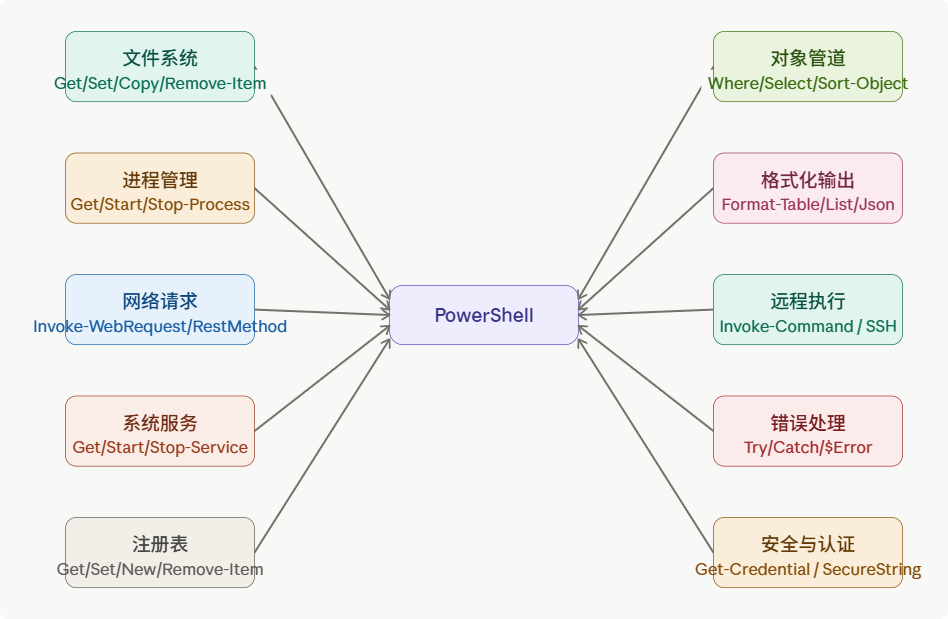
一、文件系统操作
PowerShell 将文件系统抽象为 Provider ,所有路径操作通过统一的 *-Item 系列 cmdlet 完成。
powershell
# 列出目录(支持通配符)
Get-ChildItem -Path "C:\logs\*" -Filter "*.log" -Recurse

# 创建、复制、移动、删除
New-Item -ItemType File -Path ".\report.txt"
Copy-Item ".\src\*" -Destination ".\backup\" -Recurse
Move-Item ".\old.txt" -Destination ".\archive\old.txt"
Remove-Item ".\temp\*" -Force -Recurse

# 读写文件内容
$content = Get-Content ".\config.json" -Raw
Set-Content ".\output.txt" -Value "Hello"
Add-Content ".\log.txt" -Value (Get-Date)

# 测试路径存在性(常用于脚本判断)
if (Test-Path ".\data.csv") { Write-Host "文件存在" }场景:日志归档、批量重命名、配置文件读写、自动化备份脚本。
二、进程管理
powershell
# 查看进程(按 CPU 排序)
Get-Process | Sort-Object CPU -Descending | Select-Object -First 10

# 启动外部程序(等待完成)
$proc = Start-Process "notepad.exe" -PassThru
$proc.WaitForExit()

# 按名称终止进程
Stop-Process -Name "chrome" -Force

# 获取进程的完整路径和 PID
Get-Process "explorer" | Select-Object Id, Path, CPU, WorkingSet场景:监控高 CPU 占用进程并自动报警、启动/关闭批量服务。
三、对象管道(Pipeline)
这是 PowerShell 与传统 Shell 最核心的区别------管道传递对象,而非文本。
powershell
# Where-Object:过滤
Get-Service | Where-Object { $_.Status -eq "Running" }

# Select-Object:选取属性 / 取前N条
Get-Process | Select-Object Name, CPU, Id | Select-Object -First 5

# Sort-Object:排序
Get-ChildItem | Sort-Object Length -Descending

# ForEach-Object:逐个处理
1..10 | ForEach-Object { $_ * $_ }

# Group-Object:分组统计
Get-Process | Group-Object Company | Sort-Object Count -Descending

# Measure-Object:统计数值
Get-ChildItem -Recurse | Measure-Object -Property Length -Sum场景:统计目录总大小、按公司分组进程、筛选特定状态服务。
四、网络请求
powershell
# 发送 GET 请求(返回 HTML/响应对象)
$resp = Invoke-WebRequest "https://example.com"
$resp.StatusCode

# REST API 调用(自动解析 JSON)
$data = Invoke-RestMethod "https://api.github.com/repos/PowerShell/PowerShell"
$data.stargazers_count

# POST 请求(带 JSON Body)
$body = @{ name="test"; value=42 } | ConvertTo-Json
Invoke-RestMethod -Uri "https://api.example.com/items" `
    -Method POST -Body $body -ContentType "application/json"

# 下载文件
Invoke-WebRequest "https://example.com/file.zip" -OutFile ".\file.zip"场景:调用第三方 API、自动下载更新包、Webhook 推送通知。
五、系统服务管理
powershell
# 查看所有服务(只看已停止的)
Get-Service | Where-Object { $_.Status -eq "Stopped" }

# 启动 / 停止 / 重启服务
Start-Service -Name "Spooler"
Stop-Service  -Name "Spooler" -Force
Restart-Service -Name "W32Time"

# 设置服务启动类型
Set-Service -Name "Themes" -StartupType Disabled

# 等待服务达到指定状态
(Get-Service "wuauserv").WaitForStatus("Running", "00:00:30")场景:服务器维护脚本、定期重启服务防内存泄漏、批量检查服务健康状态。
六、格式化与输出
powershell
# 表格输出
Get-Process | Format-Table Name, CPU, Id -AutoSize

# 列表输出(适合详情)
Get-Service "wuauserv" | Format-List *

# 转换为 JSON / CSV / XML
Get-Process | ConvertTo-Json | Out-File "procs.json"
Get-Process | Export-Csv "procs.csv" -NoTypeInformation
Get-Process | Export-Clixml "procs.xml"

# 导入回对象
$procs = Import-Csv "procs.csv"
$procs = Import-Clixml "procs.xml"

# Out-GridView:弹出可视化筛选窗口(Windows 专属)
Get-Process | Out-GridView -PassThru | Stop-Process场景:生成运维报告、与其他系统交换数据、交互式进程管理。
七、错误处理
powershell
# Try/Catch/Finally
try {
    $result = Invoke-RestMethod "https://api.example.com/data"
} catch [System.Net.WebException] {
    Write-Error "网络异常:$($_.Exception.Message)"
} catch {
    Write-Error "未知错误:$_"
} finally {
    Write-Host "清理完毕"
}

# 终止性错误控制(-ErrorAction)
Get-Item ".\不存在的文件" -ErrorAction SilentlyContinue
Get-Item ".\关键文件"    -ErrorAction Stop

# 查看错误历史
$Error[0]          # 最近一次错误
$Error | Select-Object -First 5

# $ErrorActionPreference:全局默认行为
$ErrorActionPreference = "Stop"场景:生产脚本容错、批处理中跳过单个失败项继续执行、记录错误日志。
八、远程执行
powershell
# 在单台远程机器执行命令
Invoke-Command -ComputerName "Server01" -ScriptBlock {
    Get-Service | Where-Object { $_.Status -eq "Stopped" }
}

# 并行在多台机器执行
$servers = "Server01","Server02","Server03"
Invoke-Command -ComputerName $servers -ScriptBlock { hostname }

# 建立持久会话(避免重复认证)
$session = New-PSSession -ComputerName "Server01"
Invoke-Command -Session $session -ScriptBlock { Get-Process }
Remove-PSSession $session

# SSH 远程(跨平台,PowerShell 7+)
Invoke-Command -HostName "ubuntu-box" -UserName "admin" -ScriptBlock { uname -a }场景:批量服务器巡检、远程部署应用、跨机房并行执行维护任务。
九、安全与认证
powershell
# 弹出凭据输入框
$cred = Get-Credential

# 在脚本中构造凭据(不明文存密码)
$password = ConvertTo-SecureString "MyPass" -AsPlainText -Force
$cred = New-Object PSCredential("domain\user", $password)

# 加密字符串存文件(当前用户/机器绑定)
$secureStr = Read-Host "输入密码" -AsSecureString
$secureStr | ConvertFrom-SecureString | Out-File ".\enc_pass.txt"

# 读回解密
$enc = Get-Content ".\enc_pass.txt"
$secure = $enc | ConvertTo-SecureString

# 执行策略管理
Get-ExecutionPolicy
Set-ExecutionPolicy RemoteSigned -Scope CurrentUser场景:自动化登录远程服务、安全存储 API Token、企业 GPO 脚本签名管理。
十、注册表操作
powershell
# 注册表路径以 HKLM: / HKCU: 开头
Get-ItemProperty "HKCU:\Software\Microsoft\Windows\CurrentVersion\Run"

# 新建键值
New-Item -Path "HKCU:\Software\MyApp" -Force
Set-ItemProperty -Path "HKCU:\Software\MyApp" -Name "Version" -Value "1.0"

# 读取单个值
(Get-ItemProperty "HKCU:\Software\MyApp").Version

# 删除键值 / 整个键
Remove-ItemProperty -Path "HKCU:\Software\MyApp" -Name "Version"
Remove-Item "HKCU:\Software\MyApp" -Recurse场景:安装程序写入启动项、读取系统配置、软件版本检测。
十一、计划任务
powershell
# 创建每天早 8 点执行的任务
$action  = New-ScheduledTaskAction -Execute "pwsh.exe" -Argument "-File C:\scripts\backup.ps1"
$trigger = New-ScheduledTaskTrigger -Daily -At "08:00"
Register-ScheduledTask -TaskName "DailyBackup" -Action $action -Trigger $trigger

# 查询 / 启动 / 删除
Get-ScheduledTask -TaskName "DailyBackup"
Start-ScheduledTask -TaskName "DailyBackup"
Unregister-ScheduledTask -TaskName "DailyBackup" -Confirm:$false
十二、事件日志
powershell
# 查看系统日志中最近 20 条错误
Get-EventLog -LogName System -EntryType Error -Newest 20

# PowerShell 7+ 推荐用 Get-WinEvent(更快更强)
Get-WinEvent -FilterHashtable @{
    LogName   = "Application"
    Level     = 2          # 2=Error
    StartTime = (Get-Date).AddHours(-24)
} | Select-Object TimeCreated, Message

# 写入自定义事件
Write-EventLog -LogName Application -Source "MyApp" -EventId 1001 -Message "脚本执行完毕"
速查总结
| 领域 | 核心 cmdlet |
|---|---|
| 文件系统 | Get/Set/Copy/Move/Remove-Item, Get/Set-Content |
| 进程 | Get/Start/Stop-Process |
| 服务 | Get/Start/Stop/Restart-Service |
| 管道处理 | Where/Select/Sort/Group/ForEach-Object |
| 网络 | Invoke-WebRequest, Invoke-RestMethod |
| 序列化 | ConvertTo/From-Json, Export/Import-Csv |
| 远程 | Invoke-Command, New/Remove-PSSession |
| 安全 | Get-Credential, ConvertTo-SecureString |
| 注册表 | Get/Set/New/Remove-Item (HKLM:/HKCU:) |
| 错误处理 | Try/Catch, $ErrorActionPreference |
| 计划任务 | Register/Get/Start/Unregister-ScheduledTask |
| 事件日志 | Get-EventLog, Get-WinEvent |
PowerShell 的设计哲学是一切皆对象------不论你在操作文件、进程还是远程机器,返回的都是结构化对象,可以直接用管道继续处理,这也是它在自动化运维领域远超传统 cmd/bash 的核心优势。