欢迎加入开源鸿蒙PC社区:
atomgit仓库地址: https://gitcode.com/m0_66062719/kuangchanfenbu
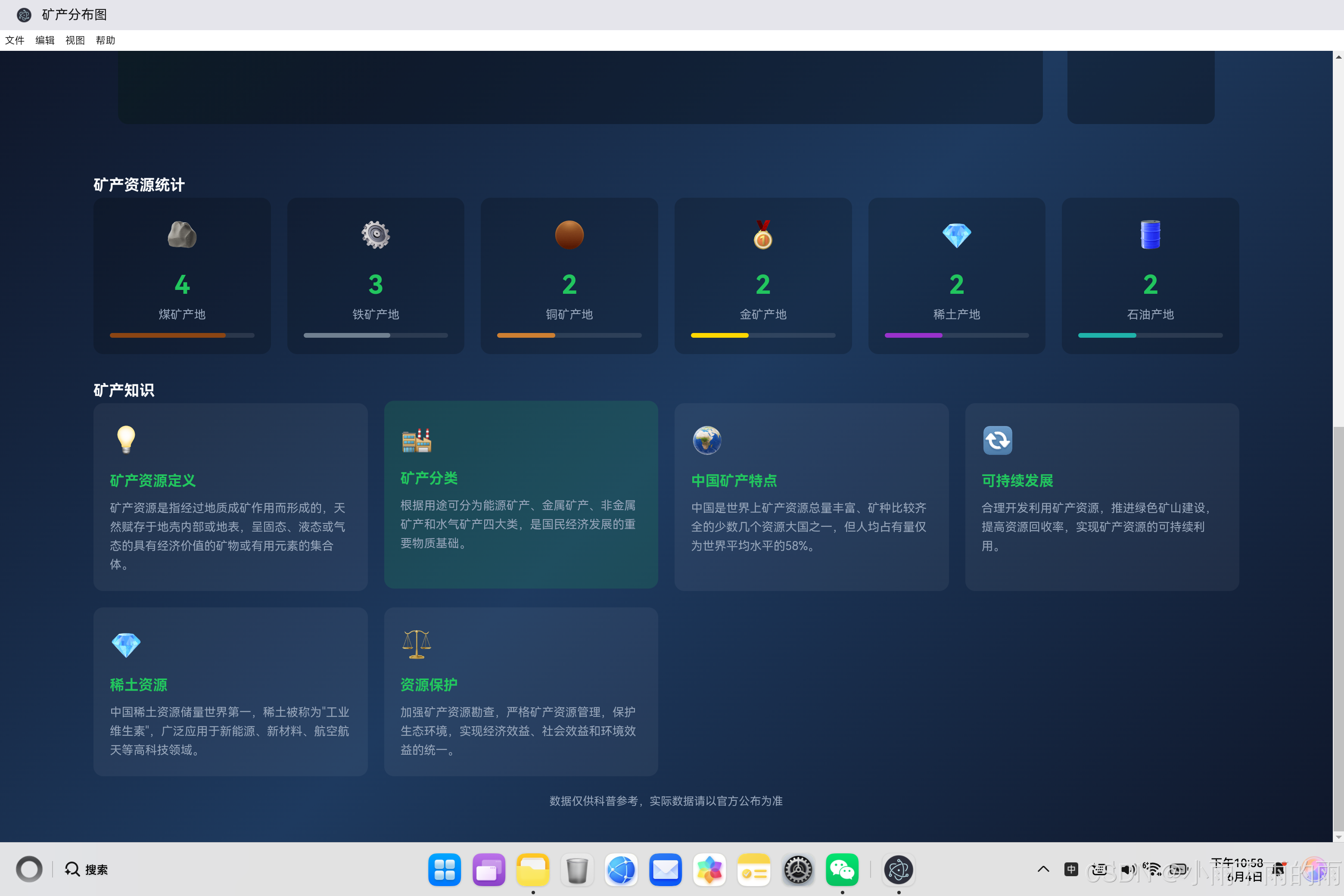
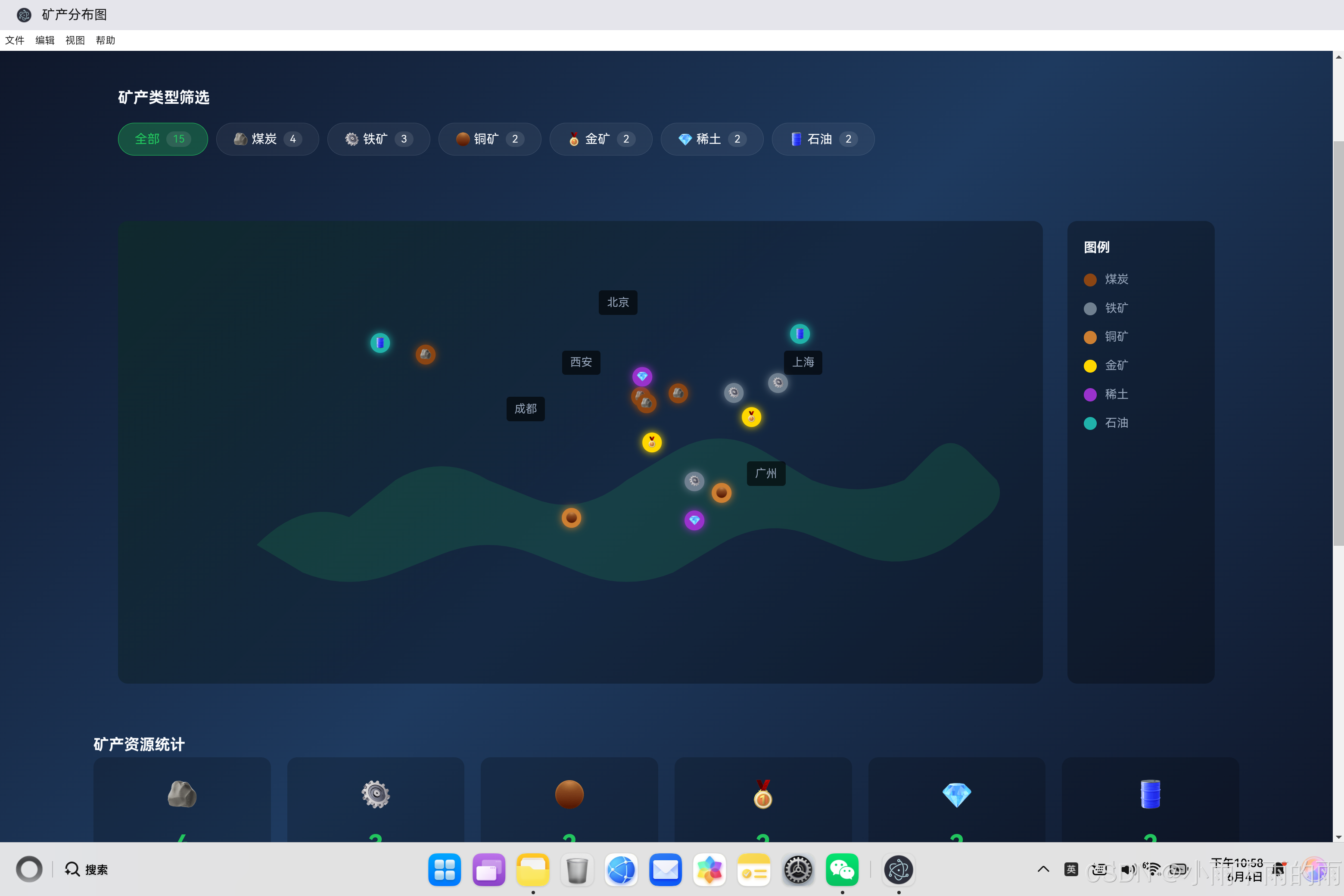
一、项目概述与设计理念
1.1 应用背景
中国是世界上矿产资源总量丰富、矿种比较齐全的少数几个资源大国之一。矿产资源是国民经济发展的重要物质基础,了解矿产资源的分布情况对于资源开发、环境保护和经济规划具有重要意义。
本应用通过可视化方式展示中国主要矿产资源的分布情况,帮助用户直观了解各类矿产的分布特点。
┌─────────────────────────────────────────────────────┐
│  用户需求分析                                        │
│  ├─ 直观展示中国矿产资源分布                        │
│  ├─ 支持按类型筛选查看                              │
│  ├─ 提供矿产详细信息                                │
│  ├─ 展示统计数据                                    │
│  └─ 科普矿产知识                                    │
└─────────────────────────────────────────────────────┘
1.2 技术选型
| 技术方案 | 优势 | 适用场景 |
|---|---|---|
| HTML5/CSS3 | 快速开发,样式丰富 | 页面布局和样式 |
| JavaScript ES6+ | 现代语法,计算能力强 | 交互逻辑和坐标计算 |
| CSS动画 | GPU加速,效果流畅 | 标记点脉冲动画 |
1.3 功能模块划分
┌─────────────────────────────────────────────────────┐
│              矿产分布图功能模块                      │
├─────────────────────────────────────────────────────┤
│  ⛏️ 地图展示  │  🔍 类型筛选  │  📊 统计图表    │
│  📋 详情面板  │  📚 科普知识                          │
└─────────────────────────────────────────────────────┘
二、核心代码实现详解
2.1 矿产数据结构设计
javascript
// 矿产数据(中国主要矿产分布)
const minerals = [
    {
        id: 1,
        name: '山西大同煤矿',
        type: 'coal',
        lat: 39.97,
        lng: 113.38,
        reserves: 270,
        unit: '亿吨',
        province: '山西省',
        features: '中国最大的优质动力煤基地'
    },
    {
        id: 2,
        name: '内蒙古鄂尔多斯煤矿',
        type: 'coal',
        lat: 39.62,
        lng: 109.78,
        reserves: 160,
        unit: '亿吨',
        province: '内蒙古自治区',
        features: '特大型煤矿,煤炭资源量巨大'
    },
    // ...更多矿产数据
];

// 矿产类型配置
const mineralTypes = {
    coal: {
        name: '煤炭',
        color: '#8B4513',
        icon: '🪨',
        description: '重要的能源矿产'
    },
    iron: {
        name: '铁矿',
        color: '#708090',
        icon: '⚙️',
        description: '钢铁工业的基础原料'
    },
    copper: {
        name: '铜矿',
        color: '#CD7F32',
        icon: '🟤',
        description: '重要的有色金属'
    },
    gold: {
        name: '金矿',
        color: '#FFD700',
        icon: '🥇',
        description: '贵金属'
    },
    'rare-earth': {
        name: '稀土',
        color: '#9932CC',
        icon: '💎',
        description: '战略资源'
    },
    oil: {
        name: '石油',
        color: '#20B2AA',
        icon: '🛢️',
        description: '重要能源'
    }
};数据结构说明:
矿产数据包含以下字段:
├─ id: 唯一标识
├─ name: 矿产名称
├─ type: 矿产类型(coal/iron/copper/gold/rare-earth/oil)
├─ lat: 纬度
├─ lng: 经度
├─ reserves: 储量
├─ unit: 储量单位
├─ province: 所在省份
└─ features: 矿产特点描述
2.2 地图坐标映射算法
将经纬度坐标转换为屏幕坐标是地图可视化的核心技术:
javascript
// 经度转换为X坐标百分比
function mapLngToX(lng) {
    // 中国经度范围约73°E - 135°E
    const minLng = 73;
    const maxLng = 135;
    const range = maxLng - minLng;
    // 映射到15% - 85%的范围
    return 15 + ((lng - minLng) / range) * 70;
}

// 纬度转换为Y坐标百分比
function mapLatToY(lat) {
    // 中国纬度范围约18°N - 54°N
    const minLat = 18;
    const maxLat = 54;
    const range = maxLat - minLat;
    // 映射到10% - 80%的范围,注意纬度越高Y坐标越小
    return 80 - ((lat - minLat) / range) * 70;
}坐标映射原理:
地理坐标到屏幕坐标的转换:
┌─────────────────────────────────────────────────────┐
│                                                     │
│  中国地理范围:                                      │
│  ├─ 经度:73°E ~ 135°E                             │
│  └─ 纬度:18°N ~ 54°N                             │
│                                                     │
│  屏幕坐标映射:                                      │
│  ├─ X轴:73°→15%, 135°→85%                        │
│  └─ Y轴:18°→80%, 54°→10%                        │
│                                                     │
│  数学公式:                                          │
│  X = 15 + ((lng - 73) / 62) * 70                   │
│  Y = 80 - ((lat - 18) / 36) * 70                   │
│                                                     │
└─────────────────────────────────────────────────────┘
2.3 矿产标记点渲染
动态生成矿产标记点并添加交互功能:
javascript
// 创建矿产标记
function createMineralMarker(mineral) {
    const marker = document.createElement('div');
    marker.className = `mineral-marker ${mineral.type}`;

    // 将经纬度转换为百分比位置
    const x = mapLngToX(mineral.lng);
    const y = mapLatToY(mineral.lat);

    marker.style.left = `${x}%`;
    marker.style.top = `${y}%`;

    // 设置图标
    marker.textContent = mineralTypes[mineral.type].icon;

    // 添加点击事件
    marker.onclick = () => showMineralDetail(mineral);

    // 添加提示
    marker.title = `${mineral.name} - ${mineral.province}`;

    return marker;
}标记点样式:
css
.mineral-marker {
    position: absolute;
    width: 24px;
    height: 24px;
    border-radius: 50%;
    cursor: pointer;
    display: flex;
    align-items: center;
    justify-content: center;
    font-size: 12px;
    box-shadow: 0 0 10px currentColor;
    transform: translate(-50%, -50%);
    transition: all 0.3s ease;
}

.mineral-marker:hover {
    transform: translate(-50%, -50%) scale(1.3);
    z-index: 10;
}

.mineral-marker::after {
    content: '';
    position: absolute;
    width: 100%;
    height: 100%;
    border-radius: 50%;
    animation: pulse 2s infinite;
}

@keyframes pulse {
    0% {
        transform: scale(1);
        opacity: 0.5;
    }
    100% {
        transform: scale(2);
        opacity: 0;
    }
}脉冲动画效果:
脉冲动画原理:
┌─────────────────────────────────────────────────────┐
│                                                     │
│  使用CSS ::after伪元素创建脉冲效果                    │
│  animation: pulse 2s infinite                       │
│                                                     │
│  动画过程:                                          │
│  ├─ 0%: scale(1), opacity(0.5)                    │
│  ├─ 50%: scale(1.5), opacity(0.25)               │
│  └─ 100%: scale(2), opacity(0)                    │
│                                                     │
└─────────────────────────────────────────────────────┘
2.4 类型筛选功能
实现交互式筛选各类矿产:
javascript
// 全局变量
let currentFilter = 'all';

// 筛选矿产
function filterMinerals(type) {
    currentFilter = type;

    // 更新筛选标签状态
    document.querySelectorAll('.filter-tag').forEach(tag => {
        tag.classList.remove('active');
    });
    document.querySelector(`[data-type="${type}"]`).classList.add('active');

    // 重新渲染标记
    renderMineralMarkers();
}

// 渲染矿产标记
function renderMineralMarkers() {
    const container = document.getElementById('mineralMarkers');
    container.innerHTML = '';

    // 根据筛选条件过滤矿产
    const filteredMinerals = currentFilter === 'all'
        ? minerals
        : minerals.filter(m => m.type === currentFilter);

    filteredMinerals.forEach(mineral => {
        const marker = createMineralMarker(mineral);
        container.appendChild(marker);
    });
}筛选逻辑流程:
筛选流程:
┌─────────────────────────────────────────────────────┐
│                                                     │
│  用户点击筛选标签                                     │
│       │                                             │
│       ▼                                             │
│  更新currentFilter变量                                │
│       │                                             │
│       ▼                                             │
│  更新标签样式(active状态)                            │
│       │                                             │
│       ▼                                             │
│  过滤矿产数据                                         │
│       │                                             │
│       ▼                                             │
│  重新渲染标记点                                       │
│                                                     │
└─────────────────────────────────────────────────────┘
三、详情面板实现
3.1 显示详情
javascript
// 显示矿产详情
function showMineralDetail(mineral) {
    const section = document.getElementById('detailSection');

    // 更新详情内容
    document.getElementById('detailName').textContent = mineral.name;
    document.getElementById('detailType').textContent = mineralTypes[mineral.type].name;
    document.getElementById('detailReserves').textContent = `${mineral.reserves} ${mineral.unit}`;
    document.getElementById('detailProvince').textContent = mineral.province;
    document.getElementById('detailFeatures').textContent = mineral.features;

    // 显示详情面板
    section.classList.add('active');
}

// 关闭详情面板
function closeDetail() {
    const section = document.getElementById('detailSection');
    section.classList.remove('active');
}
3.2 详情面板样式
css
.detail-card {
    background: rgba(34, 197, 94, 0.1);
    border: 1px solid var(--primary);
    border-radius: var(--radius);
    overflow: hidden;
}

.detail-header {
    display: flex;
    justify-content: space-between;
    align-items: center;
    padding: 20px;
    background: rgba(34, 197, 94, 0.2);
}

.detail-content {
    padding: 20px;
}

.detail-item {
    display: flex;
    justify-content: space-between;
    padding: 12px 0;
    border-bottom: 1px solid var(--border-color);
}
四、统计图表实现
4.1 统计数据
javascript
// 统计数据
const statistics = {
    totalMinerals: minerals.length,
    typesCount: Object.keys(mineralTypes).length,
    byType: {
        coal: minerals.filter(m => m.type === 'coal').length,
        iron: minerals.filter(m => m.type === 'iron').length,
        copper: minerals.filter(m => m.type === 'copper').length,
        gold: minerals.filter(m => m.type === 'gold').length,
        'rare-earth': minerals.filter(m => m.type === 'rare-earth').length,
        oil: minerals.filter(m => m.type === 'oil').length
    }
};
4.2 统计卡片样式
css
.stats-grid {
    display: grid;
    grid-template-columns: repeat(auto-fit, minmax(180px, 1fr));
    gap: 20px;
}

.stat-card {
    background: rgba(0, 0, 0, 0.2);
    border-radius: var(--radius);
    padding: 20px;
    text-align: center;
}

.stat-value {
    font-size: 2rem;
    font-weight: 700;
    color: var(--primary);
}

.stat-bar {
    height: 6px;
    background: rgba(255, 255, 255, 0.1);
    border-radius: 3px;
    overflow: hidden;
}

.stat-fill {
    height: 100%;
    border-radius: 3px;
    transition: width 0.5s ease;
}
五、视觉效果设计
5.1 地图背景
css
.china-map {
    position: absolute;
    top: 0;
    left: 0;
    width: 100%;
    height: 100%;
    background:
        linear-gradient(135deg, rgba(34, 197, 94, 0.1) 0%, transparent 50%),
        url("data:image/svg+xml,%3Csvg xmlns='http://www.w3.org/2000/svg' viewBox='0 0 1000 500'%3E%3Cpath fill='rgba(34,197,94,0.15)' d='M150,350 Q200,300 250,320 L300,280 Q350,250 400,280 L450,300 Q500,320 550,280 L600,250 Q650,220 700,250 L750,280 Q800,300 850,280 L880,250 Q900,230 920,250 L950,280 Q960,300 940,320 L900,350 Q850,380 800,360 L750,340 Q700,320 650,350 L600,380 Q550,400 500,380 L450,360 Q400,340 350,360 L300,380 Q250,400 200,380 L150,350 Z'/%3E%3C/svg%3E");
    background-size: cover;
    background-position: center;
}
5.2 矿产类型颜色
css
.mineral-marker.coal {
    background: #8B4513;
    color: #8B4513;
}

.mineral-marker.iron {
    background: #708090;
    color: #708090;
}

.mineral-marker.copper {
    background: #CD7F32;
    color: #CD7F32;
}

.mineral-marker.gold {
    background: #FFD700;
    color: #FFD700;
}

.mineral-marker.rare-earth {
    background: #9932CC;
    color: #9932CC;
}

.mineral-marker.oil {
    background: #20B2AA;
    color: #20B2AA;
}
六、技术亮点与创新
6.1 坐标映射算法
技术亮点:
┌─────────────────────────────────────────────────────┐
│  1. 精准的地理坐标转换                              │
│  2. 自适应地图边界                                  │
│  3. 百分比定位确保响应式适配                        │
│  4. 考虑纬度方向反转(北在上,南在下)               │
└─────────────────────────────────────────────────────┘
6.2 动态渲染技术
技术亮点:
┌─────────────────────────────────────────────────────┐
│  1. 动态生成DOM元素                                 │
│  2. 脉冲动画增强视觉吸引力                          │
│  3. 悬停效果提升交互体验                            │
│  4. 实时筛选更新                                   │
└─────────────────────────────────────────────────────┘
6.3 响应式设计
技术亮点:
┌─────────────────────────────────────────────────────┐
│  1. 百分比布局适配不同屏幕                          │
│  2. 网格布局自动调整                               │
│  3. 移动端优化                                     │
│  4. 图例自适应排列                                 │
└─────────────────────────────────────────────────────┘
七、总结与展望
7.1 项目成果
| 功能模块 | 状态 | 核心特性 |
|---|---|---|
| 地图展示 | ✅ | 坐标映射、标记渲染、脉冲动画 |
| 类型筛选 | ✅ | 6种矿产类型、交互式筛选 |
| 详情面板 | ✅ | 矿产信息展示、关闭功能 |
| 统计图表 | ✅ | 数量统计、进度条展示 |
| 科普知识 | ✅ | 6条知识卡片 |
7.2 未来规划
- 更多矿产数据:添加更多地区和类型的矿产数据
- 3D地图效果:使用WebGL实现3D地图
- 数据可视化:添加更丰富的统计图表
- 交互增强:添加缩放、拖拽功能
- 数据导入:支持导入外部矿产数据
7.3 技术价值
矿产分布图展示了如何利用Web技术实现地理信息可视化应用,为开发者提供了以下参考:
- 坐标映射算法:地理坐标到屏幕坐标的转换
- 动态DOM操作:动态生成和管理标记点
- CSS动画:脉冲动画和过渡效果
- 响应式布局:适配不同屏幕尺寸
通过本项目的实践,开发者可以快速掌握地理信息可视化应用开发的核心技术,为构建更多优秀应用奠定基础。