在大模型应用开发中,AI Agent 凭借其工具调用、自主决策能力成为核心方向。本文将详细讲解如何基于 SpringBoot 集成 Spring AI 生态,结合 spring-ai-agent-utils 实现 Skills 能力的加载与调用,快速搭建具备工具调用能力的 AI 应用。
一、技术栈与环境准备
1. 核心依赖版本
-
JDK:17(SpringBoot 3.x 推荐版本)
-
SpringBoot:3.5.7
-
Spring AI:1.1.5
-
spring-ai-agent-utils:0.7.0(AI Agent 工具能力扩展)
-
构建工具:Maven
2. Maven 工程配置
首先完成 pom.xml 核心配置,引入 SpringBoot 基础依赖、Spring AI OpenAI 适配包、Agent 工具包等:
<?xml version="1.0" encoding="UTF-8"?>
<project xmlns="http://maven.apache.org/POM/4.0.0"
xmlns:xsi="http://www.w3.org/2001/XMLSchema-instance"
xsi:schemaLocation="http://maven.apache.org/POM/4.0.0 http://maven.apache.org/xsd/maven-4.0.0.xsd">
<modelVersion>4.0.0</modelVersion>
<groupId>org.dromara</groupId>
<artifactId>Zh-Fc</artifactId>
<version>${reversion}</version>
<properties>
<reversion>1.0.0</reversion>
<maven.compiler.source>17</maven.compiler.source>
<maven.compiler.target>17</maven.compiler.target>
<flatten-maven-plugin.version>1.3.0</flatten-maven-plugin.version>
<project.build.sourceEncoding>UTF-8</project.build.sourceEncoding>
<maven-compiler-plugin.version>3.14.0</maven-compiler-plugin.version>
<maven-surefire-plugin.version>3.5.3</maven-surefire-plugin.version>
<maven.build.timestamp.format>yyyy-MM-dd-HH-mm-ss-SSS</maven.build.timestamp.format>
<spring-boot-starter.version>3.5.7</spring-boot-starter.version>
<spring-ai.version>1.1.5</spring-ai.version>
<jacoco.version>0.8.12</jacoco.version>
</properties>
<!-- 引入 Spring AI BOM 统一版本管理 -->
<dependencyManagement>
<dependencies>
<dependency>
<groupId>org.springframework.ai</groupId>
<artifactId>spring-ai-bom</artifactId>
<version>${spring-ai.version}</version>
<type>pom</type>
<scope>import</scope>
</dependency>
</dependencies>
</dependencyManagement>
<dependencies>
<!-- SpringBoot 核心依赖 -->
<dependency>
<groupId>org.springframework.boot</groupId>
<artifactId>spring-boot-starter-web</artifactId>
<version>${spring-boot-starter.version}</version>
</dependency>
<dependency>
<groupId>org.springframework.boot</groupId>
<artifactId>spring-boot-starter</artifactId>
<version>${spring-boot-starter.version}</version>
</dependency>
<!-- Spring AI OpenAI 适配(支持第三方兼容 OpenAI 接口的大模型) -->
<dependency>
<groupId>org.springframework.ai</groupId>
<artifactId>spring-ai-starter-model-openai</artifactId>
</dependency>
<!-- AI Agent 工具扩展:加载 Skills 能力 -->
<dependency>
<groupId>org.springaicommunity</groupId>
<artifactId>spring-ai-agent-utils</artifactId>
<version>0.7.0</version>
</dependency>
<!-- 简化开发:Lombok -->
<dependency>
<groupId>org.projectlombok</groupId>
<artifactId>lombok</artifactId>
<version>1.18.40</version>
<scope>provided</scope>
</dependency>
<!-- 测试依赖 -->
<dependency>
<groupId>org.springframework.boot</groupId>
<artifactId>spring-boot-starter-test</artifactId>
<version>${spring-boot-starter.version}</version>
<scope>test</scope>
</dependency>
</dependencies>
<!-- Spring 里程碑仓库(Spring AI 部分依赖需从此获取) -->
<repositories>
<repository>
<id>spring-milestones</id>
<name>Spring Milestones</name>
<url>https://repo.spring.io/milestone</url>
<snapshots>
<enabled>false</enabled>
</snapshots>
</repository>
</repositories>
<!-- 多环境配置:dev/test/prod -->
<profiles>
<profile>
<id>dev</id>
<activation>
<activeByDefault>true</activeByDefault>
</activation>
<properties>
<profiles.active>dev</profiles.active>
</properties>
</profile>
<profile>
<id>test</id>
<properties>
<profiles.active>test</profiles.active>
</properties>
</profile>
<profile>
<id>prod</id>
<properties>
<profiles.active>prod</profiles.active>
</properties>
</profile>
</profiles>
<build>
<!-- 自定义最终包名:项目名-版本-时间-环境 -->
<finalName>${project.artifactId}-${reversion}-${maven.build.timestamp}-${profiles.active}</finalName>
<!-- 开启资源文件过滤:支持配置文件中 @变量@ 替换 -->
<resources>
<resource>
<directory>src/main/resources</directory>
<filtering>true</filtering>
</resource>
</resources>
<plugins>
<!-- JDK 编译插件 -->
<plugin>
<groupId>org.apache.maven.plugins</groupId>
<artifactId>maven-compiler-plugin</artifactId>
<version>${maven-compiler-plugin.version}</version>
<configuration>
<source>${maven.compiler.source}</source>
<target>${maven.compiler.target}</target>
<encoding>${project.build.sourceEncoding}</encoding>
</configuration>
</plugin>
<!-- 单元测试插件 -->
<plugin>
<groupId>org.apache.maven.plugins</groupId>
<artifactId>maven-surefire-plugin</artifactId>
<version>${maven-surefire-plugin.version}</version>
<configuration>
<argLine>@{argLine} -Dfile.encoding=UTF-8</argLine>
<groups>${profiles.active}</groups>
<excludedGroups>exclude</excludedGroups>
</configuration>
</plugin>
<!-- 代码覆盖率插件 -->
<plugin>
<groupId>org.jacoco</groupId>
<artifactId>jacoco-maven-plugin</artifactId>
<version>${jacoco.version}</version>
<executions>
<execution>
<id>prepare-agent</id>
<goals>
<goal>prepare-agent</goal>
</goals>
</execution>
<execution>
<id>report</id>
<phase>test</phase>
<goals>
<goal>report</goal>
</goals>
</execution>
</executions>
</plugin>
<!-- 版本号扁平化插件 -->
<plugin>
<groupId>org.codehaus.mojo</groupId>
<artifactId>flatten-maven-plugin</artifactId>
<version>${flatten-maven-plugin.version}</version>
<configuration>
<updatePomFile>true</updatePomFile>
<flattenMode>resolveCiFriendliesOnly</flattenMode>
</configuration>
<executions>
<execution>
<id>flatten</id>
<phase>process-resources</phase>
<goals>
<goal>flatten</goal>
</goals>
</execution>
<execution>
<id>flatten.clean</id>
<phase>clean</phase>
<goals>
<goal>clean</goal>
</goals>
</execution>
</executions>
</plugin>
</plugins>
</build>
</project>二、核心配置文件
在 src/main/resources/application.yml 中配置服务端口、多环境、AI 模型及 Agent 工具核心参数:
server:
port: 8888 # 服务端口
spring:
application:
name: Zh-Fc # 应用名称
profiles:
active: @profiles.active@ # 多环境占位符(由Maven profiles替换)
# AI Agent 核心配置
ai:
openai:
# 大模型API密钥(建议通过环境变量注入,避免硬编码)
api_key:
# 兼容OpenAI接口的大模型服务地址(示例:深度求索)
base-url: https://api.deepseek.com/anthropic
# 模型名称
model: deepseek-v4-flash
# 温度系数:越低越精准,越高越有创造性
temperature: 0.2
# 读取超时时间
read-timeout: 30000
# spring-ai-agent-utils 配置
agent-utils:
# Skills 根目录(支持classpath:/file:前缀)
skills-root: classpath:skills关键说明:
-
api_key:建议通过环境变量SPRING_AI_OPENAI_API_KEY或自定义环境变量注入,生产环境禁止硬编码; -
base-url:支持任意兼容 OpenAI 接口的大模型服务(如深度求索、智谱、阿里云通义等); -
skills-root:指定 Skills 能力文件的根目录,默认加载classpath:skills下的所有技能定义。
三、Skills 能力加载配置
1. 配置属性绑定
创建 AgentUtilsProperties 类,绑定 spring.ai.openai.agent-utils 前缀的配置:
package org.dromara.zhfc.common;
import lombok.Data;
import org.springframework.boot.context.properties.ConfigurationProperties;
import org.springframework.stereotype.Component;
@Data
@Component
@ConfigurationProperties(prefix = "spring.ai.openai.agent-utils")
public class AgentUtilsProperties {
// Skills根目录,默认值:classpath:skills
private String skillsRoot = "classpath:skills";
}2. Skills 工具加载核心配置
创建 AgentUtilsConfiguration 类,实现 Skills 目录的加载与校验,构建 AI Agent 工具回调:
package org.dromara.zhfc.common;
import lombok.extern.slf4j.Slf4j;
import org.springaicommunity.agent.tools.SkillsTool;
import org.springframework.ai.tool.ToolCallback;
import org.springframework.context.annotation.Bean;
import org.springframework.context.annotation.Configuration;
import org.springframework.core.io.Resource;
import org.springframework.core.io.ResourceLoader;
/**
* Spring AI Agent 工具配置:加载Skills能力
*/
@Configuration
@Slf4j
public class AgentUtilsConfiguration {
private final ResourceLoader resourceLoader;
private final AgentUtilsProperties agentUtilsProperties;
// 构造器注入资源加载器和配置属性
public AgentUtilsConfiguration(
ResourceLoader resourceLoader, AgentUtilsProperties agentUtilsProperties
) {
this.resourceLoader = resourceLoader;
this.agentUtilsProperties = agentUtilsProperties;
}
/**
* 构建Skills工具回调Bean
*/
@Bean("zhFcSkillsToolCallback")
public ToolCallback zhFcSkillsToolCallback() {
// 获取配置的Skills根目录
String configuredSkillsRoot = agentUtilsProperties.getSkillsRoot();
// 标准化路径(处理斜杠、通配符、后缀等)
String normalizedSkillsRoot = normalizeSkillsRoot(configuredSkillsRoot);
// 加载Skills目录资源
Resource skillsRootResource = resourceLoader.getResource(normalizedSkillsRoot);
// 校验目录是否存在
if (!skillsRootResource.exists()) {
throw new IllegalStateException("未找到 skills 根目录,请检查配置: " + normalizedSkillsRoot);
}
log.info("AgentUtils SkillsTool 已启用,skillsRoot={}, configured={}", normalizedSkillsRoot, configuredSkillsRoot);
// 构建Skills工具回调
return SkillsTool.builder()
.addSkillsResource(skillsRootResource)
.build();
}
/**
* 标准化Skills根目录路径
*/
private String normalizeSkillsRoot(String raw) {
if (raw == null || raw.isBlank()) {
return "classpath:skills";
}
String normalized = raw.trim();
// 统一路径分隔符为/
normalized = normalized.replace('\\', '/');
// 移除末尾的/SKILL.md(兼容特殊配置)
if (normalized.endsWith("/SKILL.md")) {
normalized = normalized.substring(0, normalized.length() - "/SKILL.md".length());
}
// 移除通配符(避免路径错误)
int wildcardIndex = normalized.indexOf('*');
if (wildcardIndex >= 0) {
normalized = normalized.substring(0, wildcardIndex);
}
// 移除末尾的/
while (normalized.endsWith("/")) {
normalized = normalized.substring(0, normalized.length() - 1);
}
// 兜底默认值
return normalized.isBlank() ? "classpath:skills" : normalized;
}
}核心逻辑:
-
标准化路径:兼容不同格式的路径配置(如反斜杠、通配符、多余后缀等);
-
资源校验:确保配置的 Skills 目录存在,避免运行时异常;
-
构建
ToolCallback:将 Skills 目录注册为 AI Agent 的工具回调,使大模型能调用该目录下的技能。
四、构建 AI ChatClient
1.创建 BuildChatClient 类,整合 OpenAI 客户端、模型配置、Skills 工具,构建可调用工具的 ChatClient:
package org.dromara.zhfc.ai;
import io.micrometer.observation.ObservationRegistry;
import org.dromara.zhfc.common.AiProperties;
import org.springframework.ai.chat.client.ChatClient;
import org.springframework.ai.model.tool.ToolCallingManager;
import org.springframework.ai.openai.OpenAiChatModel;
import org.springframework.ai.openai.OpenAiChatOptions;
import org.springframework.ai.openai.api.OpenAiApi;
import org.springframework.ai.tool.ToolCallback;
import org.springframework.beans.factory.annotation.Qualifier;
import org.springframework.context.annotation.Bean;
import org.springframework.context.annotation.Configuration;
import org.springframework.http.client.SimpleClientHttpRequestFactory;
import org.springframework.web.client.RestClient;
/**
* 构建具备工具调用能力的 OpenAI ChatClient
*/
@Configuration
public class BuildChatClient {
@Bean
public ChatClient chatClient(
AiProperties aiProperties,
@Qualifier("zhFcSkillsToolCallback") ToolCallback toolCallbacks
) {
// 1. 自定义RestClient:设置连接/读取超时
SimpleClientHttpRequestFactory requestFactory = new SimpleClientHttpRequestFactory();
requestFactory.setConnectTimeout(aiProperties.getConnectTimeout());
requestFactory.setReadTimeout(aiProperties.getReadTimeout());
RestClient.Builder restClientBuilder = RestClient.builder()
.requestFactory(requestFactory);
// 2. 构建OpenAI API客户端(适配第三方大模型)
OpenAiApi openAiApi = OpenAiApi.builder()
.baseUrl(aiProperties.getBaseUrl())
.apiKey(aiProperties.getApiKey())
.restClientBuilder(restClientBuilder)
.build();
// 3. 配置模型参数(模型名称、温度等)
OpenAiChatOptions options = OpenAiChatOptions.builder()
.model(aiProperties.getModel())
.temperature(aiProperties.getTemperature())
.build();
// 4. 构建OpenAiChatModel:绑定API和模型配置
OpenAiChatModel chatModel = OpenAiChatModel.builder()
.openAiApi(openAiApi)
.defaultOptions(options)
.toolCallingManager(ToolCallingManager.builder().build()) // 启用工具调用
.observationRegistry(ObservationRegistry.NOOP)
.build();
// 5. 构建ChatClient并注册Skills工具回调
ChatClient.Builder builder = ChatClient.builder(chatModel);
if (toolCallbacks != null) {
builder.defaultToolCallbacks(toolCallbacks); // 绑定Skills工具
}
return builder.build();
}
}关键说明:
-
AiProperties:需自行实现,绑定spring.ai.openai前缀的配置(apiKey、baseUrl、model 等); -
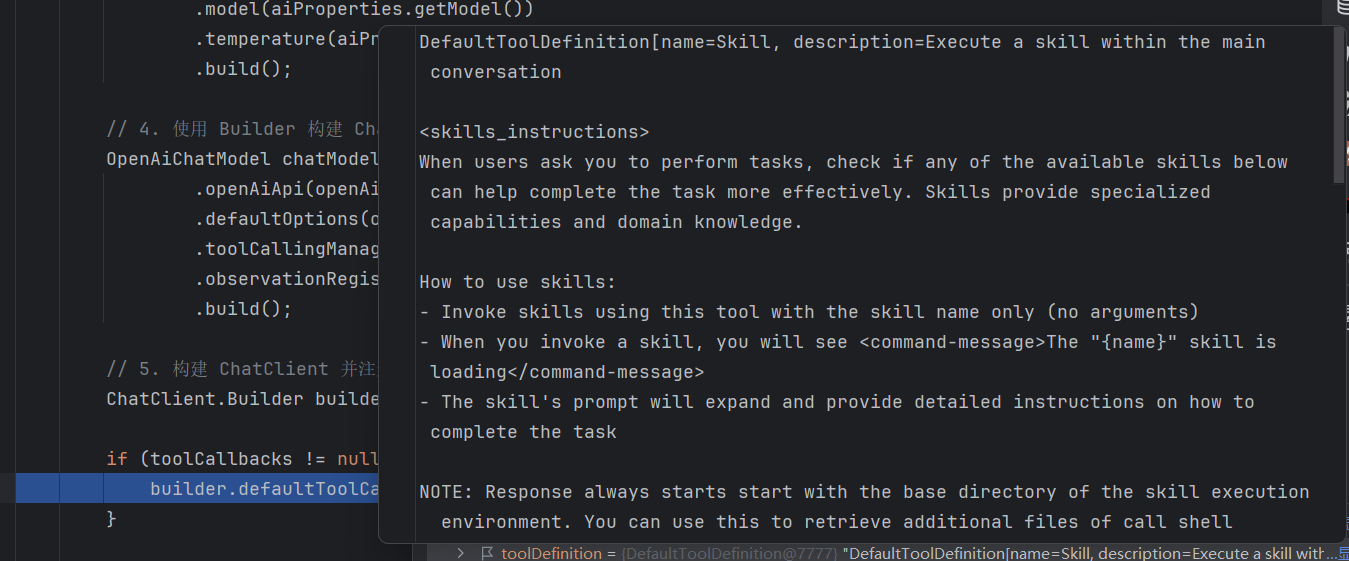
ToolCallingManager:启用工具调用能力,是 AI Agent 调用 Skills 的核心; -
defaultToolCallbacks:将加载的 Skills 工具注册到 ChatClient,使大模型能自动触发技能调用。
注入效果
五、核心流程与扩展
1. Skills 目录规范
skills-root 配置的目录下需遵循 spring-ai-agent-utils 的规范,放置技能定义文件(如 *.md 或 *.yml),每个文件定义一个技能的描述、入参、执行逻辑等。
2. 核心流程
-
项目启动时,
AgentUtilsConfiguration加载并校验 Skills 目录; -
BuildChatClient构建 ChatClient 并绑定 Skills 工具回调; -
业务代码中注入
ChatClient,调用大模型时,大模型会根据用户提问自动匹配并调用 Skills 中的能力; -
工具调用结果返回给大模型,最终生成整合工具结果的回答。
3. 扩展建议
-
多环境适配:通过 Maven profiles 实现 dev/test/prod 环境的配置隔离;
-
密钥安全:生产环境通过环境变量、配置中心(如 Nacos/Apollo)注入 API 密钥;
-
技能扩展 :在
skills目录下新增技能文件,无需修改代码即可扩展 AI Agent 能力; -
超时与重试:可在 RestClient 中增加重试逻辑,提升大模型调用的稳定性;
-
监控与日志:增加日志打印和监控指标,跟踪工具调用成功率、响应时间等。
六、总结
本文基于 SpringBoot 3.x + Spring AI 1.1.5 实现了 AI Agent 能力的核心搭建,重点解决了 Skills 能力的加载、大模型客户端的构建、工具调用的整合等关键问题。通过该方案,开发者可快速搭建具备自主工具调用能力的 AI 应用,且支持灵活扩展 Skills 能力,适配不同的业务场景。
核心优势:
-
配置化:通过 YAML 配置即可调整大模型、Skills 目录等核心参数;
-
可扩展:新增技能无需修改代码,仅需在 Skills 目录下新增文件;
-
标准化:遵循 Spring AI 生态规范,兼容所有支持 OpenAI 接口的大模型;
-
工程化:集成多环境、代码覆盖率、版本扁平化等工程化最佳实践