Tauri 2 实现窗口圆角方案(跨平台)
核心思路:
transparent: true+shadow: false去掉原生窗口边框和阴影,用 CSS 实现圆角和阴影效果。
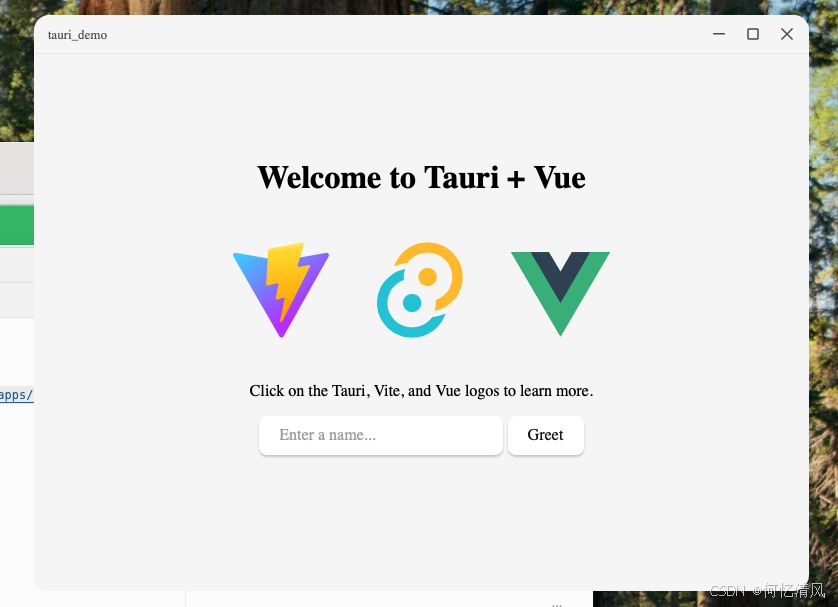
概述
Tauri 2 默认窗口是矩形的,没有原生圆角 API。本方案通过以下三步实现圆角:
- 去掉原生窗口装饰 :
decorations: false+shadow: false+transparent: true - WebView 背景透明:Rust 端设置 WebView 背景色为全透明
- CSS 模拟圆角和阴影 :前端用
border-radius+overflow: hidden+ 伪元素box-shadow
需要修改的文件(共 6 个)
项目根目录/
├── index.html                          # 1. 页面根元素透明
├── src/
│   └── App.vue                         # 2. 圆角容器 + 自定义标题栏 + 拖拽 + CSS阴影
└── src-tauri/
    ├── Cargo.toml                      # 3. 启用 macos-private-api feature
    ├── tauri.conf.json                 # 4. 窗口透明 + 去装饰 + 去阴影
    ├── capabilities/default.json       # 5. 权限配置
    └── src/lib.rs                      # 6. WebView 背景透明
文件 1:index.html --- 页面根元素透明
html
<!doctype html>
<html lang="en">
  <head>
    <meta charset="UTF-8" />
    <link rel="icon" type="image/svg+xml" href="/vite.svg" />
    <meta name="viewport" content="width=device-width, initial-scale=1.0" />
    <title>Tauri + Vue 3 App</title>
    <style>
      html, body {
        margin: 0;
        padding: 0;
        background: transparent;
        overflow: hidden;
      }
    </style>
  </head>
  <body>
    <div id="app"></div>
    <script type="module" src="/src/main.js"></script>
  </body>
</html>
要点 :html 和 body 的 background 必须设为 transparent,overflow: hidden 防止出现滚动条。
文件 2:src/App.vue --- 圆角容器 + 自定义标题栏 + 拖拽 + CSS阴影
vue
<script setup>
import { ref } from "vue";
import { invoke } from "@tauri-apps/api/core";
import { getCurrentWindow } from "@tauri-apps/api/window";

const greetMsg = ref("");
const name = ref("");

const appWindow = getCurrentWindow();

async function greet() {
  greetMsg.value = await invoke("greet", { name: name.value });
}

// 窗口控制按钮
function minimize() {
  appWindow.minimize();
}

function toggleMaximize() {
  appWindow.toggleMaximize();
}

function closeWindow() {
  appWindow.close();
}

// 拖拽窗口(配合 data-tauri-drag-region 属性双重保障)
function startDrag(e) {
  if (e.button === 0) {
    appWindow.startDragging();
  }
}
</script>

<template>
  <div class="app-wrapper">
    <!-- 自定义标题栏:双重拖拽机制 -->
    <div class="titlebar" data-tauri-drag-region @mousedown="startDrag">
      <div class="titlebar-title" data-tauri-drag-region>tauri_demo</div>
      <div class="titlebar-controls">
        <button class="titlebar-btn minimize" @click="minimize">
          <svg width="12" height="12" viewBox="0 0 12 12">
            <rect y="5" width="12" height="1.5" fill="currentColor" rx="0.5" />
          </svg>
        </button>
        <button class="titlebar-btn maximize" @click="toggleMaximize">
          <svg width="12" height="12" viewBox="0 0 12 12">
            <rect x="1" y="1" width="10" height="10" fill="none"
              stroke="currentColor" stroke-width="1.5" rx="1" />
          </svg>
        </button>
        <button class="titlebar-btn close" @click="closeWindow">
          <svg width="12" height="12" viewBox="0 0 12 12">
            <path d="M1 1L11 11M11 1L1 11"
              stroke="currentColor" stroke-width="1.5" stroke-linecap="round" />
          </svg>
        </button>
      </div>
    </div>

    <!-- 主内容区 -->
    <main class="container">
      <h1>Welcome to Tauri + Vue</h1>

      <div class="row">
        <a href="https://vite.dev" target="_blank">
          <img src="/vite.svg" class="logo vite" alt="Vite logo" />
        </a>
        <a href="https://tauri.app" target="_blank">
          <img src="/tauri.svg" class="logo tauri" alt="Tauri logo" />
        </a>
        <a href="https://vuejs.org/" target="_blank">
          <img src="./assets/vue.svg" class="logo vue" alt="Vue logo" />
        </a>
      </div>
      <p>Click on the Tauri, Vite, and Vue logos to learn more.</p>

      <form class="row" @submit.prevent="greet">
        <input id="greet-input" v-model="name" placeholder="Enter a name..." />
        <button type="submit">Greet</button>
      </form>
      <p>{{ greetMsg }}</p>
    </main>
  </div>
</template>

<style scoped>
/* ==================== 圆角容器 + CSS模拟窗口阴影 ==================== */
.app-wrapper {
  height: 100vh;
  display: flex;
  flex-direction: column;
  border-radius: 16px;
  overflow: hidden;
  background-color: #f6f6f6;
  position: relative;
}

/*
 * 用 ::after 伪元素模拟窗口阴影
 * 不能直接在 .app-wrapper 上加 box-shadow,
 * 因为 shadow: false 去掉系统阴影后,CSS 阴影在圆角外也会可见,
 * 导致亮色桌面下出现灰色矩形边框。
 * 伪元素 + border-radius: inherit + overflow: hidden 可以确保阴影不超出圆角。
 */
.app-wrapper::after {
  content: "";
  position: absolute;
  inset: 0;
  border-radius: inherit;
  box-shadow: 0 8px 32px rgba(0, 0, 0, 0.22), 0 2px 8px rgba(0, 0, 0, 0.14);
  pointer-events: none;
  z-index: -1;
}

/* ==================== 自定义标题栏 ==================== */
.titlebar {
  height: 38px;
  display: flex;
  align-items: center;
  justify-content: space-between;
  padding: 0 8px 0 14px;
  background-color: #f6f6f6;
  user-select: none;
  -webkit-user-select: none;
  border-bottom: 1px solid rgba(0, 0, 0, 0.06);
}

.titlebar-title {
  font-size: 13px;
  font-weight: 500;
  color: #555;
}

.titlebar-controls {
  display: flex;
  align-items: center;
  gap: 6px;
}

.titlebar-btn {
  width: 28px;
  height: 28px;
  border: none;
  background: transparent;
  border-radius: 6px;
  display: flex;
  align-items: center;
  justify-content: center;
  cursor: pointer;
  color: #555;
  transition: background-color 0.15s, color 0.15s;
  padding: 0;
  box-shadow: none;
}

.titlebar-btn:hover {
  background-color: rgba(0, 0, 0, 0.08);
}

.titlebar-btn.close:hover {
  background-color: #e81123;
  color: #fff;
}

/* ==================== 主内容区 ==================== */
.container {
  flex: 1;
  display: flex;
  flex-direction: column;
  justify-content: center;
  align-items: center;
  text-align: center;
  padding: 0 20px 20px;
  overflow-y: auto;
}

.logo {
  height: 6em;
  padding: 1.5em;
  will-change: filter;
  transition: 0.75s;
}

.logo.vite:hover { filter: drop-shadow(0 0 2em #747bff); }
.logo.tauri:hover { filter: drop-shadow(0 0 2em #24c8db); }
.logo.vue:hover { filter: drop-shadow(0 0 2em #249b73); }

.row {
  display: flex;
  justify-content: center;
}

a {
  font-weight: 500;
  color: #646cff;
  text-decoration: inherit;
}

a:hover { color: #535bf2; }

h1 { text-align: center; }

input,
button {
  border-radius: 8px;
  border: 1px solid transparent;
  padding: 0.6em 1.2em;
  font-size: 1em;
  font-weight: 500;
  font-family: inherit;
  color: #0f0f0f;
  background-color: #ffffff;
  transition: border-color 0.25s;
  box-shadow: 0 2px 2px rgba(0, 0, 0, 0.2);
  outline: none;
}

button { cursor: pointer; }
button:hover { border-color: #396cd8; }
button:active { border-color: #396cd8; background-color: #e8e8e8; }

#greet-input { margin-right: 5px; }

/* ==================== 深色模式 ==================== */
@media (prefers-color-scheme: dark) {
  .app-wrapper {
    background-color: #2f2f2f;
    border-color: rgba(255, 255, 255, 0.08);
  }

  .titlebar {
    background-color: #1e1e1e;
    border-bottom-color: rgba(255, 255, 255, 0.06);
  }

  .titlebar-title { color: #aaa; }
  .titlebar-btn { color: #aaa; }
  .titlebar-btn:hover { background-color: rgba(255, 255, 255, 0.1); }

  a:hover { color: #24c8db; }

  input,
  button {
    color: #ffffff;
    background-color: #0f0f0f98;
  }

  button:active {
    background-color: #0f0f0f69;
  }
}
</style>
文件 3:src-tauri/Cargo.toml --- 启用 macOS 私有 API
toml
[package]
name = "tauri_demo"
version = "0.1.0"
description = "A Tauri App"
authors = ["you"]
edition = "2021"

[lib]
name = "tauri_demo_lib"
crate-type = ["staticlib", "cdylib", "rlib"]

[build-dependencies]
tauri-build = { version = "2", features = [] }

[dependencies]
tauri = { version = "2", features = ["macos-private-api"] }
tauri-plugin-opener = "2"
serde = { version = "1", features = ["derive"] }
serde_json = "1"
关键 :features = ["macos-private-api"] 是 macOS 透明窗口的前提条件。此 feature 对 Windows/Linux 无影响。
文件 4:src-tauri/tauri.conf.json --- 窗口配置
json
{
  "$schema": "https://schema.tauri.app/config/2",
  "productName": "tauri_demo",
  "version": "0.1.0",
  "identifier": "io.github.hyqf98",
  "build": {
    "beforeDevCommand": "pnpm dev",
    "devUrl": "http://localhost:1420",
    "beforeBuildCommand": "pnpm build",
    "frontendDist": "../dist"
  },
  "app": {
    "macOSPrivateApi": true,
    "windows": [
      {
        "title": "tauri_demo",
        "width": 800,
        "height": 600,
        "transparent": true,
        "decorations": false,
        "shadow": false
      }
    ],
    "security": {
      "csp": null
    }
  },
  "bundle": {
    "active": true,
    "targets": "all",
    "icon": [
      "icons/32x32.png",
      "icons/128x128.png",
      "icons/128x128@2x.png",
      "icons/icon.icns",
      "icons/icon.ico"
    ]
  }
}
关键配置说明:
| 配置项 | 值 | 作用 |
|---|---|---|
macOSPrivateApi |
true |
macOS 启用私有 API 实现窗口透明 |
transparent |
true |
窗口背景透明 |
decorations |
false |
移除系统标题栏 |
shadow |
false |
移除系统阴影(消除白色/灰色矩形边框的关键) |
shadow: false是关键。系统窗口阴影会在圆角外产生矩形边框,去掉后用 CSS 伪元素来模拟阴影效果。
文件 5:src-tauri/capabilities/default.json --- 权限配置
json
{
  "$schema": "../gen/schemas/desktop-schema.json",
  "identifier": "default",
  "description": "Capability for the main window",
  "windows": ["main"],
  "permissions": [
    "core:default",
    "core:window:allow-start-dragging",
    "core:webview:allow-set-webview-background-color",
    "opener:default"
  ]
}| 权限 | 作用 |
|---|---|
core:default |
基础权限 |
core:window:allow-start-dragging |
允许 JS API 拖拽窗口 |
core:webview:allow-set-webview-background-color |
允许设置 WebView 背景色 |
文件 6:src-tauri/src/lib.rs --- WebView 背景透明
rust
use tauri::Manager;
use tauri::webview::Color;

#[tauri::command]
fn greet(name: &str) -> String {
    format!("Hello, {}! You've been greeted from Rust!", name)
}

#[cfg_attr(mobile, tauri::mobile_entry_point)]
pub fn run() {
    tauri::Builder::default()
        .plugin(tauri_plugin_opener::init())
        .invoke_handler(tauri::generate_handler![greet])
        .setup(|app| {
            // 将 WebView 底层背景色设为全透明(RGBA: 0,0,0,0)
            // WebView 默认有不透明白色背景,这行代码将其移除
            if let Some(webview) = app.get_webview_window("main") {
                let _ = webview.set_background_color(Some(Color(0, 0, 0, 0)));
            }
            Ok(())
        })
        .run(tauri::generate_context!())
        .expect("error while running tauri application");
}要点:
use tauri::webview::Color;---Color类型在tauri::webview模块下,不是tauri::ColorColor(0, 0, 0, 0)--- RGBA 全透明色,不是Color(255, 255, 255, 0)
CSS 阴影实现原理
css
.app-wrapper {
  border-radius: 16px;
  overflow: hidden;
  box-shadow: 0 8px 32px rgba(0, 0, 0, 0.22);
}
/* 阴影会超出圆角范围,在亮色桌面下显示灰色矩形边框 */
.app-wrapper {
  border-radius: 16px;
  overflow: hidden;
  position: relative;
}

.app-wrapper::after {
  content: "";
  position: absolute;
  inset: 0;
  border-radius: inherit;           /* 继承圆角 */
  box-shadow: 0 8px 32px rgba(0, 0, 0, 0.22), 0 2px 8px rgba(0, 0, 0, 0.14);
  pointer-events: none;             /* 不影响交互 */
  z-index: -1;                      /* 在内容下方 */
}