目录
[1.Model 层:实体映射类](#1.Model 层:实体映射类)
[User.cs 用户实体](#User.cs 用户实体)
[Product.cs 商品实体](#Product.cs 商品实体)
[2.IDAL 接口层:抽象规范](#2.IDAL 接口层:抽象规范)
[IBase 泛型基接口(公共 CRUD 规范)](#IBase 泛型基接口(公共 CRUD 规范))
[IUser.cs 用户业务接口(继承基接口,无独有方法)](#IUser.cs 用户业务接口(继承基接口,无独有方法))
[IProduct.cs 商品业务接口(继承基接口 + 分页独有方法)](#IProduct.cs 商品业务接口(继承基接口 + 分页独有方法))
[3.DAL 数据访问层:接口具体实现](#3.DAL 数据访问层:接口具体实现)
[UseDAL.cs 用户数据实现(List 模拟数据库)](#UseDAL.cs 用户数据实现(List 模拟数据库))
[ProductDAL.cs 商品数据实现](#ProductDAL.cs 商品数据实现)
[4.UI 层:控制台菜单交互](#4.UI 层:控制台菜单交互)
前言
分层架构是后端项目最基础的设计方案,把项目拆分成UI 表现层、Model 实体层、IDAL 抽象接口层、DAL 数据访问层,实现高内聚、松耦合,便于团队协作、后期迭代维护;整套方案用控制台项目演示,配套实体、接口、数据存取、菜单交互完整代码。
一、分层架构整体介绍
各层级职责
- **UI 层(表现层,控制台 / Winform/WPF)**负责页面交互、接收用户输入、展示数据,不直接操作数据与 SQL,只调用 DAL 提供的方法。
- **Model 实体层(类库)**数据库表映射实体类,封装属性,用来承载数据,在各层之间传递数据。
- IDAL 接口层(抽象层,类库) 抽取数据层通用 CRUD 为泛型基接口
IBase<T>,各业务接口继承基接口,定义业务独有方法;用于解耦,规范 DAL 方法签名。 - DAL 数据访问层(类库) 实现 IDAL 对应的接口,完成数据增删改查,本案例用内存
List模拟数据库存储。
分层架构优点
- 项目拆分为多个独立类库项目,方便源码管理;
- 高内聚、松耦合,修改某一层不影响其他层;
- 便于团队分工开发(前端写 UI、后端写 DAL、建模写 Model);
- 后期更换数据源(内存→MySQL→SQLServer)只改动 DAL,UI 代码无需修改。
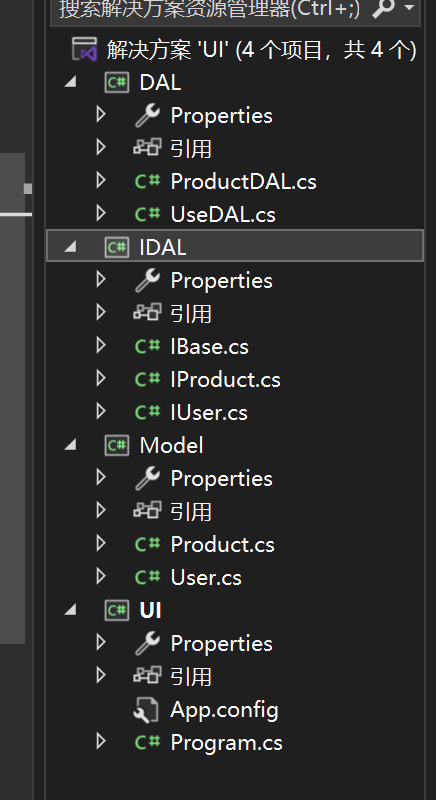
项目解决方案结构
cs
解决方案
├─ UI(控制台应用,启动项目)
├─ Model(类库:User、Product实体)
├─ IDAL(类库:IBase<T>、IUser、IProduct)
└─ DAL(类库:UseDAL、ProductDAL,实现IDAL接口)
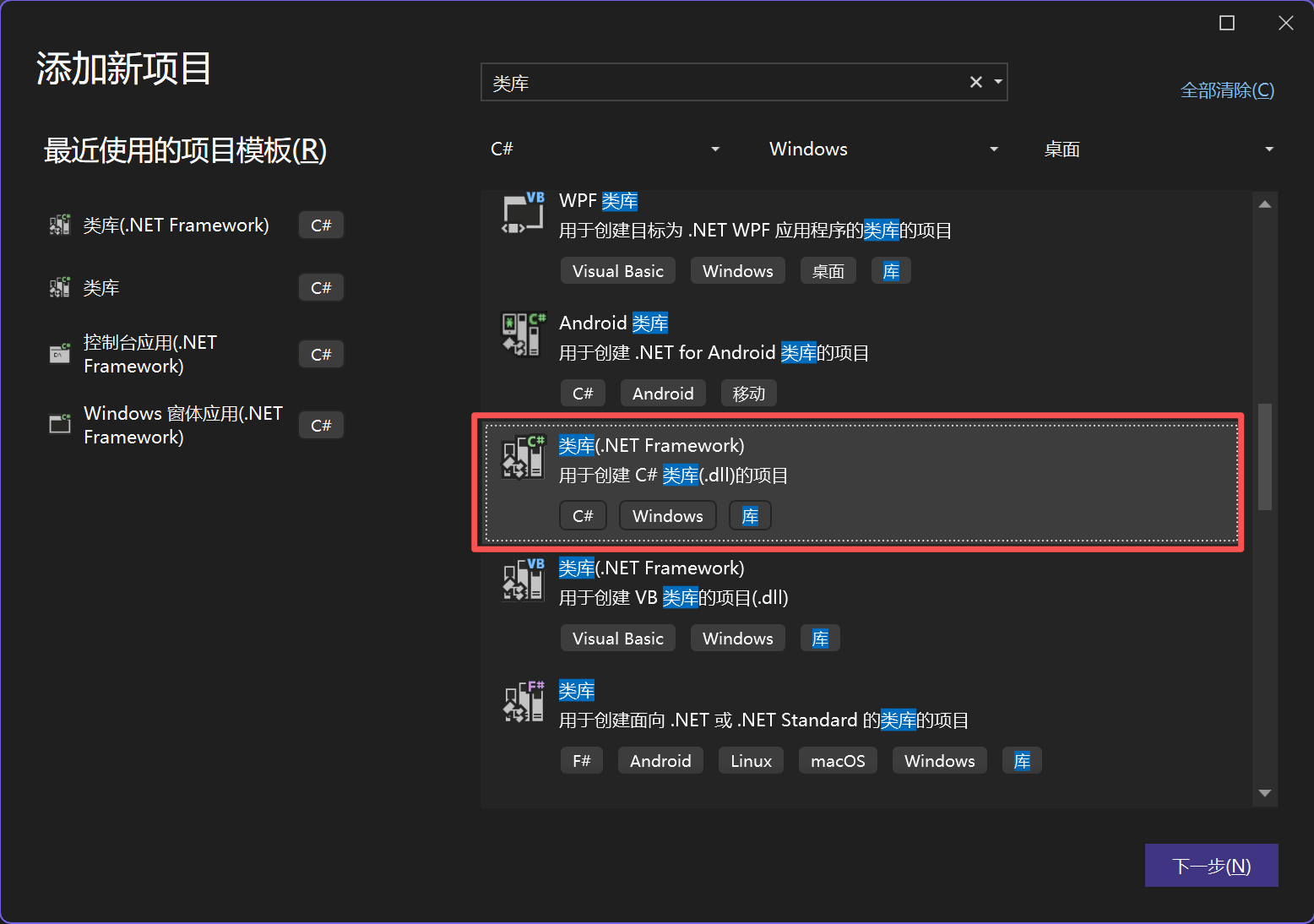
类库:不能单独运行,被其他项目引用调用。
右键解决方法添加库文件
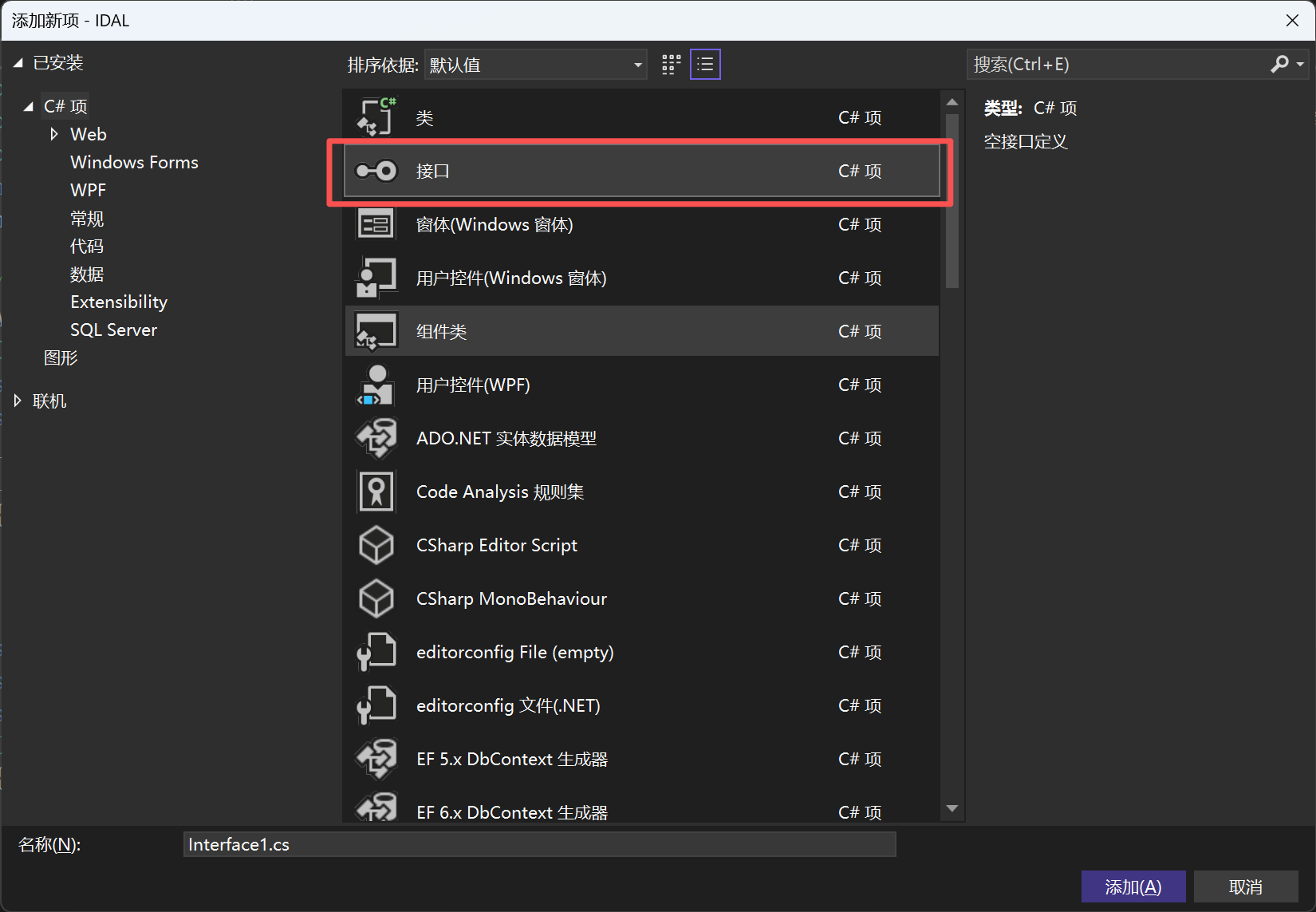
在库文件中可以添加接口
二、分层代码实现
1.Model 层:实体映射类
User.cs 用户实体
cs
namespace Model
{
    public class User
    {
        public string Id { get; set; }
        public string Account { get; set; }
        public string Password { get; set; }
        //重写ToString,控制台直接打印详情
        public override string ToString()
        {
            return $"编号:{Id},账号:{Account},密码:{Password}";
        }
    }
}
Product.cs 商品实体
cs
namespace Model
{
    public class Product
    {
        public string Id { get; set; }
        public string ProductName { get; set; }
        public float Price { get; set; }
        public override string ToString()
        {
            return $"商品编号:{Id},商品名称:{ProductName},价格:{Price}";
        }
    }
}
2.IDAL 接口层:抽象规范
IBase<T> 泛型基接口(公共 CRUD 规范)
cs
using Model;
namespace IDAL
{
    /// <summary>所有数据操作通用接口:增删改查</summary>
    public interface IBase<T>
    {
        bool Add(T model);
        bool Update(T model);
        bool Delete(T model);
        T GetModel(T model);
    }
}
IUser.cs 用户业务接口(继承基接口,无独有方法)
cs
using Model;
namespace IDAL
{
    public interface IUser : IBase<User>
    {
        //用户独有扩展方法写在此处
    }
}
IProduct.cs 商品业务接口(继承基接口 + 分页独有方法)
cs
using Model;
namespace IDAL
{
    public interface IProduct : IBase<Product>
    {
        int GetPage();//商品独有分页方法
    }
}
3.DAL 数据访问层:接口具体实现
UseDAL.cs 用户数据实现(List 模拟数据库)
cs
using IDAL;
using Model;
using System.Collections.Generic;
namespace DAL
{
    public class UseDAL : IUser
    {
        //静态集合充当内存数据库
        public static List<User> Users = new List<User>();

        public bool Add(User model)
        {
            Users.Add(model);
            return true;
        }

        public bool Delete(User model)
        {
            int idx = Users.FindIndex(v => v.Id == model.Id);
            if (idx == -1) return false;
            Users.RemoveAt(idx);
            return true;
        }

        public User GetModel(User model)
        {
            return Users.Find(v => v.Id == model.Id);
        }

        public bool Update(User model)
        {
            int idx = Users.FindIndex(v => v.Id == model.Id);
            Users[idx] = model;
            return true;
        }
    }
}
ProductDAL.cs 商品数据实现
cs
using IDAL;
using Model;
namespace DAL
{
    public class ProductDAL : IProduct
    {
        public bool Add(Product model)
        {
            throw new NotImplementedException();
        }
        public bool Delete(Product model)
        {
            throw new NotImplementedException();
        }
        public Product GetModel(Product model)
        {
            throw new NotImplementedException();
        }
        public int GetPage()
        {
            throw new NotImplementedException();
        }
        public bool Update(Product model)
        {
            throw new NotImplementedException();
        }
    }
}
4.UI 层:控制台菜单交互
cs
using DAL;
using Model;
using System;
namespace UI
{
    internal class Program
    {
        static UseDAL useDal = new UseDAL();
        static ProductDAL productDal = new ProductDAL();
        static void Main(string[] args)
        {
        Top:
            Console.ForegroundColor = ConsoleColor.Red;
            Console.WriteLine("请选择功能\n 1 添加用户 2 修改用户  3 删除用户 4 查询用户 5  添加产品 6 修改产品 7 删除产品 8 查找产品");
            Console.ForegroundColor = ConsoleColor.White;
            string num = Console.ReadLine();
            if (num == "1")
            {
            Add:
                Console.WriteLine("请输入要添加的用户信息,格式:ID,Account,Password,输入exit返回主菜单");
                string info = Console.ReadLine();
                if (info == "exit") goto Top;
                string[] arr = info.Split(',');
                if (arr.Length != 3)
                {
                    Console.WriteLine("格式错误,重新输入");
                    goto Add;
                }
                User user = new User { Id = arr[0], Account = arr[1], Password = arr[2] };
                //校验ID、账号重复
                if (UseDAL.Users.Find(v => v.Id == user.Id) != null)
                {
                    Console.WriteLine("ID重复"); goto Add;
                }
                if (UseDAL.Users.Find(v => v.Account == user.Account) != null)
                {
                    Console.WriteLine("账号重复"); goto Add;
                }
                useDal.Add(user);
                Console.WriteLine("===全部用户===");
                UseDAL.Users.ForEach(u => Console.WriteLine(u));
                goto Add;
            }
            //2/3/4/5...功能可自行扩展完善
        }
    }
}
三、总结
- IDAL 做抽象、DAL 做实现,依托泛型基接口精简重复 CRUD 代码;
- Model 充当数据载体,在 UI 与 DAL 之间传递参数;
- UI 只依赖 DAL 实例,业务与数据存取隔离,后续更换数据库只改动 DAL 层;
- 分层核心:面向接口编程、解耦、易扩展、易维护。