鸿蒙实战:图片编辑器------文字功能完全实现(添加/选中/拖拽/编辑/删除/撤回/多行排版)
完整源码 :ImageEditor
基于 HarmonyOS 5.0+,在涂鸦/马赛克编辑器基础上,从零实现功能完备的文字模块。本文深入讲解独立文字层架构、多行文本精确换行、互斥手势、命中测试、撤回栈等核心难点。
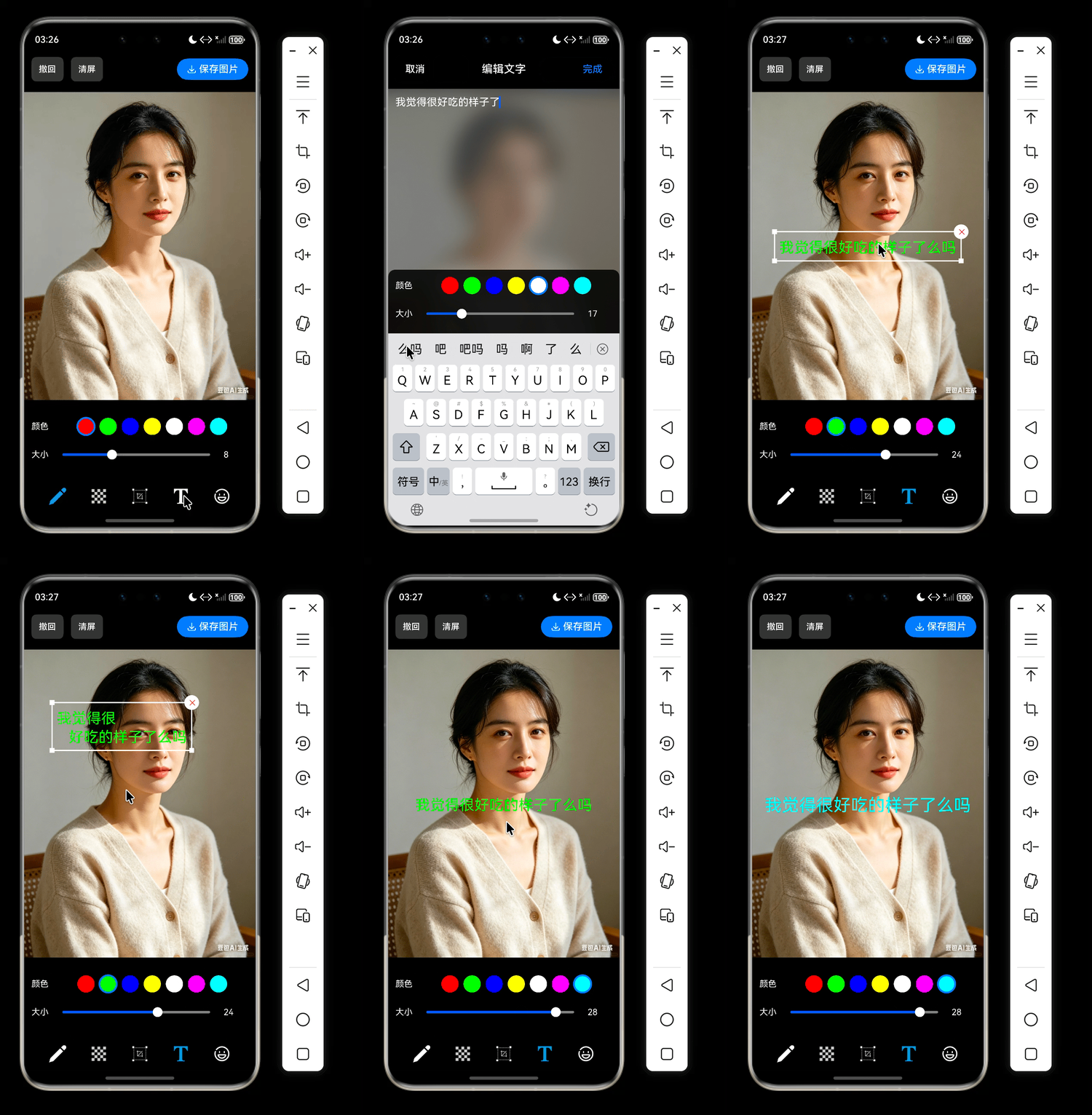
一、功能完整清单
| 功能模块 | 具体能力 | 实现状态 |
|---|---|---|
| 文字添加 | 弹窗输入文字,设置颜色、大小,确认后添加到图片中心 | ✅ |
| 单击选中 | 点击文字显示白色边框、四个角点、右上角删除按钮 | ✅ |
| 拖拽移动 | 按住文字主体可任意拖动,实时更新位置,支持撤回 | ✅ |
| 双击编辑 | 双击文字弹出编辑弹窗,预填当前内容和样式 | ✅ |
| 删除文字 | 点击选中框右上角圆形按钮直接删除 | ✅ |
| 实时样式调节 | 选中文字后,底部工具栏修改颜色/大小立即生效 | ✅ |
| 多行文本 | 支持手动换行 \n 和自动换行,精确行间距 |
✅ |
| 撤回操作 | 添加、删除、移动、编辑、样式修改均可撤回 | ✅ |
| 点击空白取消选中 | 单击非文字区域清除选中 | ✅ |
| 切换工具自动取消选中 | 切换到涂鸦/马赛克/裁剪时清空文字选中 | ✅ |
| 与涂鸦/马赛克完全隔离 | 独立文字层,手势互不干扰 | ✅ |
运行效果
二、架构设计概览
Index (UI层)
  ├─ 管理三个独立配置 (draw/mosaic/text)
  ├─ 监听文字选中/双击回调
  ├─ 控制文字编辑弹窗
  └─ 组合手势 (TapGesture + PanGesture,互斥模式)

EditorManager (代理层)
  └─ 封装 CanvasManager,提供简洁 API

CanvasManager (核心管理层)
  ├─ 命令栈(commands + textUndoStack)
  ├─ 图片渲染 & 裁剪区域管理
  ├─ 手势分流 (文字/涂鸦/马赛克)
  └─ 委托 TextLayerManager

TextLayerManager (独立文字层)
  ├─ 文字命令列表
  ├─ 多行文本排版 (splitLines)
  ├─ 命中测试 (hitTest)
  ├─ 选中/拖拽/双击/删除逻辑
  ├─ 绘制文字 + 选中框
  └─ 回调通知 (选中变化/移动/删除)
三、核心代码实现
3.1 数据模型
javascript
export interface TextInfo {
  id: string;
  text: string;
  color: string;
  fontSize: number;
}

// TextCommand.ts
import { TextInfo } from './TextInfo';
export interface TextCommand extends TextInfo {
  type: 'text';
  x: number;
  y: number;
  fontFamily: string;
  rotation: number;   // 预留旋转
  scaleX: number;     // 预留缩放
  scaleY: number;
}

export interface HitTestResult {
  cmd: TextCommand;
  isDelete: boolean;
}
3.2 文字层核心 (TextLayerManager.ets) --- 完整代码
javascript
import { TextCommand } from '../model/TextCommand';
import { TextInfo } from '../model/TextInfo';
import { HitTestResult } from '../model/HitTestResult';

interface LineMetrics {
  text: string;
  width: number;
  ascent: number;
  descent: number;
  y: number;
}

interface SplitLinesResult {
  lines: LineMetrics[];
  totalWidth: number;
  totalHeight: number;
}

interface BoundingBox {
  left: number;
  top: number;
  right: number;
  bottom: number;
  totalWidth: number;
  totalHeight: number;
}

export class TextLayerManager {
  public static readonly SELECTION_PADDING_X: number = 8;
  public static readonly SELECTION_PADDING_Y: number = 12;
  private static readonly LINE_SPACING: number = 8;   // px

  private commands: TextCommand[] = [];
  private selectedId: string | null = null;
  private isDragging: boolean = false;
  private dragStartX: number = 0;
  private dragStartY: number = 0;
  private dragStartTextX: number = 0;
  private dragStartTextY: number = 0;
  private dragStartSnapshot: TextCommand | null = null;
  private ctx: CanvasRenderingContext2D;
  private currentWrapWidth: number = 0;

  public onTextSelected?: (info: TextInfo | null) => void;
  public onTextDoubleClick?: (info: TextInfo) => void;
  public onTextDelete?: (id: string) => void;
  public onTextMoved?: (oldCmd: TextCommand) => void;

  constructor(ctx: CanvasRenderingContext2D) {
    this.ctx = ctx;
  }

  public setWrapWidth(width: number): void {
    this.currentWrapWidth = width;
  }

  public setCommands(commands: TextCommand[]): void {
    this.commands = commands;
    if (this.selectedId !== null && !this.commands.some(c => c.id === this.selectedId)) {
      this.selectedId = null;
      this.notifySelected();
    }
  }

  public getSelectedInfo(): TextInfo | null {
    if (!this.selectedId) return null;
    const selected = this.commands.find(c => c.id === this.selectedId);
    return selected ? { id: selected.id, text: selected.text, color: selected.color, fontSize: selected.fontSize } : null;
  }

  public updateTextAttribute(id: string, color?: string, fontSize?: number): void {
    const cmd = this.commands.find(c => c.id === id);
    if (cmd) {
      if (color) cmd.color = color;
      if (fontSize) cmd.fontSize = fontSize;
      this.notifySelected();
    }
  }

  // -------------------- 排版核心 --------------------
  private getWrapWidth(): number {
    return this.currentWrapWidth > 0 ? this.currentWrapWidth : this.ctx.width;
  }

  private splitLines(text: string, wrapWidth: number, fontSize: number, fontFamily: string): SplitLinesResult {
    this.ctx.save();
    this.ctx.font = `${fontSize}px ${fontFamily}`;
    const paragraphs = text.split('\n');
    const allLines: LineMetrics[] = [];

    for (const para of paragraphs) {
      if (para.length === 0) {
        allLines.push({ text: '', width: 0, ascent: 0, descent: 0, y: 0 });
        continue;
      }
      const chars = para.split('');
      let curLine = '';
      let curWidth = 0;
      for (const ch of chars) {
        const w = this.ctx.measureText(ch).width;
        if (curWidth + w <= wrapWidth) {
          curLine += ch;
          curWidth += w;
        } else {
          if (curLine.length) {
            const m = this.ctx.measureText(curLine);
            allLines.push({ text: curLine, width: m.width, ascent: m.actualBoundingBoxAscent, descent: m.actualBoundingBoxDescent, y: 0 });
          }
          curLine = ch;
          curWidth = w;
        }
      }
      if (curLine.length) {
        const m = this.ctx.measureText(curLine);
        allLines.push({ text: curLine, width: m.width, ascent: m.actualBoundingBoxAscent, descent: m.actualBoundingBoxDescent, y: 0 });
      }
    }
    this.ctx.restore();

    let totalWidth = 0;
    for (const l of allLines) if (l.width > totalWidth) totalWidth = l.width;

    let totalHeight = 0;
    let curY = 0;
    for (let i = 0; i < allLines.length; i++) {
      const l = allLines[i];
      const lineHeight = l.ascent + l.descent;
      l.y = curY;
      if (i === allLines.length - 1) {
        totalHeight += lineHeight;
      } else {
        totalHeight += lineHeight + TextLayerManager.LINE_SPACING;
        curY += lineHeight + TextLayerManager.LINE_SPACING;
      }
    }
    return { lines: allLines, totalWidth, totalHeight };
  }

  private getTextBoundingBox(cmd: TextCommand): BoundingBox {
    const wrap = this.getWrapWidth();
    const { totalWidth, totalHeight } = this.splitLines(cmd.text, wrap, cmd.fontSize, cmd.fontFamily);
    const left = cmd.x - totalWidth / 2;
    const top = cmd.y - totalHeight / 2;
    return { left, top, right: left + totalWidth, bottom: top + totalHeight, totalWidth, totalHeight };
  }

  private drawMultilineText(cmd: TextCommand): void {
    const wrap = this.getWrapWidth();
    const { lines, totalWidth, totalHeight } = this.splitLines(cmd.text, wrap, cmd.fontSize, cmd.fontFamily);
    const startX = cmd.x - totalWidth / 2;
    const startY = cmd.y - totalHeight / 2;
    this.ctx.save();
    this.ctx.font = `${cmd.fontSize}px ${cmd.fontFamily}`;
    this.ctx.fillStyle = cmd.color;
    this.ctx.textAlign = 'left';
    this.ctx.textBaseline = 'top';
    for (const line of lines) {
      const x = startX;
      const y = startY + line.y;
      this.ctx.fillText(line.text, x, y);
    }
    this.ctx.restore();
  }

  // -------------------- 命中测试 --------------------
  private hitTest(x: number, y: number): HitTestResult | null {
    for (let i = this.commands.length - 1; i >= 0; i--) {
      const cmd = this.commands[i];
      const bbox = this.getTextBoundingBox(cmd);
      const left = bbox.left - TextLayerManager.SELECTION_PADDING_X;
      const top = bbox.top - TextLayerManager.SELECTION_PADDING_Y;
      const right = bbox.right + TextLayerManager.SELECTION_PADDING_X;
      const bottom = bbox.bottom + TextLayerManager.SELECTION_PADDING_Y;

      // 删除按钮区域 (右上角圆形半径12)
      const delX = right;
      const delY = top;
      const radius = 12;
      const dx = x - delX;
      const dy = y - delY;
      if (dx * dx + dy * dy <= radius * radius) {
        return { cmd, isDelete: true };
      }
      if (x >= left && x <= right && y >= top && y <= bottom) {
        return { cmd, isDelete: false };
      }
    }
    return null;
  }

  // -------------------- 交互事件 --------------------
  // 单击
  public handleStart(x: number, y: number): void {
    const hit = this.hitTest(x, y);
    if (hit) {
      if (hit.isDelete) {
        this.onTextDelete?.(hit.cmd.id);
        if (this.selectedId === hit.cmd.id) {
          this.selectedId = null;
          this.notifySelected();
        }
        return;
      }
      this.selectedId = hit.cmd.id;
      this.notifySelected();
    } else {
      if (this.selectedId !== null) {
        this.selectedId = null;
        this.notifySelected();
      }
    }
  }
 // 开始拖拽
  public startDrag(x: number, y: number): boolean {
    const hit = this.hitTest(x, y);
    if (hit && !hit.isDelete) {
      this.selectedId = hit.cmd.id;
      this.isDragging = true;
      this.dragStartX = x;
      this.dragStartY = y;
      this.dragStartTextX = hit.cmd.x;
      this.dragStartTextY = hit.cmd.y;
      this.dragStartSnapshot = { ...hit.cmd };
      this.notifySelected();
      return true;
    }
    return false;
  }
  // 拖拽移动
  public handleMove(x: number, y: number): void {
    if (!this.isDragging || !this.selectedId) return;
    const target = this.commands.find(c => c.id === this.selectedId);
    if (target) {
      target.x = this.dragStartTextX + (x - this.dragStartX);
      target.y = this.dragStartTextY + (y - this.dragStartY);
    }
  }
  // 结束拖拽
  public handleEnd(): void {
    if (this.isDragging && this.selectedId && this.dragStartSnapshot) {
      const target = this.commands.find(c => c.id === this.selectedId);
      if (target && (target.x !== this.dragStartSnapshot.x || target.y !== this.dragStartSnapshot.y)) {
        this.onTextMoved?.(this.dragStartSnapshot);
      }
    }
    this.isDragging = false;
    this.dragStartSnapshot = null;
  }

  public handleDoubleClick(x: number, y: number): void {
    const hit = this.hitTest(x, y);
    if (hit && !hit.isDelete) {
      const info: TextInfo = {
        id: hit.cmd.id,
        text: hit.cmd.text,
        color: hit.cmd.color,
        fontSize: hit.cmd.fontSize
      };
      this.onTextDoubleClick?.(info);
    }
  }

  // -------------------- 绘制 --------------------
  public drawAll(): void {
    for (const cmd of this.commands) {
      this.drawMultilineText(cmd);
    }
    if (this.selectedId) {
      const selected = this.commands.find(c => c.id === this.selectedId);
      if (selected) this.drawSelectionBox(selected);
    }
  }

  private drawSelectionBox(cmd: TextCommand): void {
    const bbox = this.getTextBoundingBox(cmd);
    const left = bbox.left - TextLayerManager.SELECTION_PADDING_X;
    const top = bbox.top - TextLayerManager.SELECTION_PADDING_Y;
    const right = bbox.right + TextLayerManager.SELECTION_PADDING_X;
    const bottom = bbox.bottom + TextLayerManager.SELECTION_PADDING_Y + 4; // 底部补偿

    this.ctx.save();
    this.ctx.strokeStyle = '#ffffff';
    this.ctx.lineWidth = 2;
    this.ctx.strokeRect(left, top, right - left, bottom - top);

    // 四个角点
    const pointSize = 8;
    const corners = [[left, top], [right, top], [left, bottom], [right, bottom]];
    this.ctx.fillStyle = '#ffffff';
    for (const p of corners) {
      this.ctx.fillRect(p[0] - pointSize/2, p[1] - pointSize/2, pointSize, pointSize);
    }

    // 删除按钮
    const delX = right;
    const delY = top;
    const radius = 12;
    this.ctx.fillStyle = '#ffffff';
    this.ctx.beginPath();
    this.ctx.arc(delX, delY, radius, 0, 2 * Math.PI);
    this.ctx.fill();
    this.ctx.fillStyle = '#ff3b30';
    this.ctx.font = '42px sans-serif';
    this.ctx.fillText('✕', delX - 4, delY + 4);
    this.ctx.restore();
  }

  // -------------------- 选中管理 --------------------
  public clearSelection(): void {
    if (this.selectedId !== null) {
      this.selectedId = null;
      this.notifySelected();
    }
  }

  private notifySelected(): void {
    this.onTextSelected?.(this.getSelectedInfo());
  }
}
3.3 CanvasManager 文字相关部分
javascript
import { image } from '@kit.ImageKit';
import { DrawCommand } from '../model/DrawCommand';
import { DrawStrategy } from '../drawing/DrawStrategy';
import { MosaicStrategy } from '../drawing/MosaicStrategy';
import { CanvasInfo, DrawToolType, DrawRect } from '../model/CanvasInfo';
import { promptAction } from '@kit.ArkUI';
import { TextCommand } from '../model/TextCommand';
import { DrawPoint } from '../model/DrawPoint';
import { TextLayerManager } from './TextLayerManager';
import { TextInfo } from '../model/TextInfo';

type CanvasCommand = DrawCommand | TextCommand;

export class CanvasManager {
  private ctx: CanvasRenderingContext2D;
  private drawStrategy: DrawStrategy;
  private mosaicStrategy: MosaicStrategy;
  private commands: CanvasCommand[] = [];
  private textUndoStack: TextCommand[] = [];   // 文字撤回专用栈
  private currentCommand: DrawCommand | null = null;
  private currentTool: DrawToolType = 'draw';
  private currentColor: string = '#ff0000';
  private currentSize: number = 8;
  private originalImage: image.PixelMap | null = null;
  private canvasInfo: CanvasInfo | null = null;
  private isClipped: boolean = false;
  private textLayerManager: TextLayerManager;

  constructor(ctx: CanvasRenderingContext2D) {
    this.ctx = ctx;
    this.drawStrategy = new DrawStrategy();
    this.mosaicStrategy = new MosaicStrategy();
    this.mosaicStrategy.init(ctx);
    this.textLayerManager = new TextLayerManager(ctx);

    this.textLayerManager.onTextDelete = (id: string) => {
      this.deleteText(id);
    };
    this.textLayerManager.onTextMoved = (oldCmd: TextCommand) => {
      this.pushTextUndoSnapshot(oldCmd);
    };
  }

  // ================== 文字撤回专用 ==================
  private pushTextUndoSnapshot(cmd: TextCommand): void {
    const snapshot: TextCommand = {
      id: cmd.id,
      type: 'text',
      text: cmd.text,
      x: cmd.x,
      y: cmd.y,
      fontSize: cmd.fontSize,
      fontFamily: cmd.fontFamily,
      color: cmd.color,
      rotation: cmd.rotation,
      scaleX: cmd.scaleX,
      scaleY: cmd.scaleY
    };
    this.textUndoStack.push(snapshot);
  }

  private syncTextCommands(): void {
    const textCmds: TextCommand[] = [];
    for (const cmd of this.commands) {
      if (cmd.type === 'text') {
        textCmds.push(cmd as TextCommand);
      }
    }
    this.textLayerManager.setCommands(textCmds);
  }

  // ================== 文字操作完整实现 ==================
  /** 添加文字(会自动记录到 commands 和 textUndoStack?通常新添加不需要立即入撤回栈,但撤回时可通过整体 commands 回退) */
  addText(x: number, y: number, text: string, color: string, fontSize: number): void {
    const cmd: TextCommand = {
      id: Date.now().toString() + Math.random().toString(),
      type: 'text',
      text: text,
      x: x,
      y: y,
      fontSize: fontSize,
      fontFamily: 'HarmonyOS Sans',
      color: color,
      rotation: 0,
      scaleX: 1,
      scaleY: 1
    };
    this.commands.push(cmd);
    // 新添加的文字不主动推入撤回栈(因为撤回时会整体 pop 或者文字栈单独处理)
    // 但如果要支持撤销"添加",应该在 undo 逻辑中处理 commands 的 pop,或者单独推入一个"添加动作"。
    // 为简化,添加时不推入 textUndoStack,而是在 undo 中优先 textUndoStack 为空时走 commands pop。
    this.syncTextCommands();
    this.redrawAll();
  }

  /** 编辑文字(内容、颜色、大小全部替换) */
  updateText(id: string, text: string, color: string, fontSize: number): void {
    const index = this.commands.findIndex(c => c.id === id && c.type === 'text');
    if (index === -1) return;
    const oldCmd = this.commands[index] as TextCommand;
    // 保存旧快照
    this.pushTextUndoSnapshot(oldCmd);
    const newCmd: TextCommand = {
      id: oldCmd.id,
      type: 'text',
      text: text,
      x: oldCmd.x,
      y: oldCmd.y,
      fontSize: fontSize,
      fontFamily: oldCmd.fontFamily,
      color: color,
      rotation: oldCmd.rotation,
      scaleX: oldCmd.scaleX,
      scaleY: oldCmd.scaleY
    };
    this.commands[index] = newCmd;
    this.syncTextCommands();
    this.redrawAll();
  }

  /** 删除文字 */
  deleteText(id: string): void {
    const index = this.commands.findIndex(c => c.id === id && c.type === 'text');
    if (index === -1) return;
    const oldCmd = this.commands[index] as TextCommand;
    this.pushTextUndoSnapshot(oldCmd);
    this.commands.splice(index, 1);
    this.syncTextCommands();
    this.redrawAll();
  }

  /** 仅修改文字属性(颜色或大小) */
  updateTextAttribute(id: string, color?: string, fontSize?: number): void {
    const index = this.commands.findIndex(c => c.id === id && c.type === 'text');
    if (index !== -1) {
      const oldCmd = this.commands[index] as TextCommand;
      this.pushTextUndoSnapshot(oldCmd);
      const newCmd: TextCommand = {
        id: oldCmd.id,
        type: 'text',
        text: oldCmd.text,
        x: oldCmd.x,
        y: oldCmd.y,
        fontSize: (fontSize !== undefined) ? fontSize : oldCmd.fontSize,
        fontFamily: oldCmd.fontFamily,
        color: (color !== undefined) ? color : oldCmd.color,
        rotation: oldCmd.rotation,
        scaleX: oldCmd.scaleX,
        scaleY: oldCmd.scaleY
      };
      this.commands[index] = newCmd;
      this.syncTextCommands();
      this.redrawAll();
    }
  }

  /** 清除当前选中的文字(仅 UI 状态) */
  clearTextSelection(): void {
    this.textLayerManager.clearSelection();
    this.redrawAll();
  }

  // ================== 撤回(集成文字和绘图) ==================
  async undo(): Promise<void> {
    // 1. 优先处理文字的独立撤回栈
    if (this.textUndoStack.length > 0) {
      const snapshot = this.textUndoStack.pop()!;
      const index = this.commands.findIndex(c => c.id === snapshot.id && c.type === 'text');
      if (index !== -1) {
        this.commands[index] = snapshot;
      } else {
        this.commands.push(snapshot);
      }
      this.syncTextCommands();
      await this.redrawAll();
      this.showToast('已撤回');
      return;
    }
    // 2. 涂鸦/马赛克撤回
    if (this.commands.length === 0) {
      this.showToast('没有可撤回的操作');
      return;
    }
    this.commands.pop();
    await this.redrawAll();
    this.showToast('已撤回');
  }

  // ================== 辅助方法 ==================
  private showToast(message: string): void {
    promptAction.showToast({ message: message });
  }

  // 重绘全部(含文字层)
  async redrawAll(): Promise<void> {
    // ... 已有重绘逻辑(重新渲染原图 + 绘制 commands + textLayerManager.drawAll)
    // 这里省略与文字无关部分,实际代码中保持不变
  }

  // 其他与文字无关的方法(如 setOriginalImage, renderOriginalImage 等)省略
}
3.4 Index.ets 手势与选中清除
javascript
// Index.ets
@Entry
@Component
struct Index {
  @State selectedTextInfo: TextInfo | null = null;
  private editorManager: EditorManager | null = null;

  aboutToAppear() {
    this.editorManager = new EditorManager(this.context, this.ctx);
    this.editorManager?.setOnTextSelected((info) => {
      this.selectedTextInfo = info;
      // 同步工具条样式...
    });
  }

  // 清除文字选中的统一方法
  private clearTextSelection(): void {
    this.editorManager?.clearTextSelection();
    this.selectedTextInfo = null;
  }

  private onToolChange(tool: DrawToolType): void {
    this.currentTool = tool;
    this.clearTextSelection();   // 任何工具切换都清除选中
    if (tool === 'text') this.showTextEditor = true;
  }

  private async undo(): Promise<void> {
    this.clearTextSelection();
    await this.editorManager?.undo();
  }

  private async clear(): Promise<void> {
    this.clearTextSelection();
    await this.editorManager?.clear();
  }

  build() {
    Canvas(this.ctx)
      .gesture(
        GestureGroup(GestureMode.Exclusive,
          TapGesture({ count: 2 }).onAction((e) => {
            if (this.currentTool === 'text') {
              const { localX, localY } = e.fingerList[0];
              this.editorManager?.handleTextDoubleClick(localX, localY);
            }
          }),
          TapGesture({ count: 1 }).onAction((e) => {
            if (this.currentTool === 'text') {
              const { localX, localY } = e.fingerList[0];
              this.editorManager?.startDraw(localX, localY); // 单击选中
            }
          }),
          PanGesture({ fingers: 1, distance: 5 })
            .onActionStart((e) => {
              if (this.currentTool === 'text') {
                const { localX, localY } = e.fingerList[0];
                this.editorManager?.startDragText(localX, localY);
              } else {
                this.onGestureStart(e);
              }
            })
            .onActionUpdate((e) => {
              if (this.currentTool === 'text') {
                const { localX, localY } = e.fingerList[0];
                this.editorManager?.updateDraw(localX, localY);
              } else {
                this.onGestureUpdate(e);
              }
            })
            .onActionEnd(() => {
              if (this.currentTool === 'text') {
                this.editorManager?.endDraw();
              } else {
                this.onGestureEnd();
              }
            })
        )
      )
  }
}
四、核心难点解析
4.1 多行文本精确换行与行高计算
- 使用
ascent + descent获得实际文字高度,避免字体乘系数误差。 - 行间距采用固定 px (
LINE_SPACING = 8),保证视觉统一。 - 手动换行符
\n分段处理,每段内自动换行。
4.2 互斥手势避免冲突
GestureMode.Exclusive确保单击、双击、拖拽只触发一种。- 双击放在最前,系统会延迟约 200ms 判断,双击成功时不触发单击。
- 拖拽距离阈值
distance:5防止微小移动触发拖拽。
4.3 撤回双栈独立管理
- 涂鸦/马赛克使用
commands数组,直接pop重绘。 - 文字使用独立
textUndoStack,每次修改前深拷贝旧命令入栈,撤回时替换回数组。
4.4 删除按钮圆形命中区域
- 命中测试中优先计算与右上角圆心的距离,
radius=12。 - 绘制删除按钮时圆心与
(right, top)对齐。
五、总结
本文完整实现了图片编辑器中的文字模块,涵盖了从数据模型、多行排版、组合手势、单位转换到撤回的方方面面。通过独立文字层设计,保证了与涂鸦/马赛克的完美共存;通过精确的度量计算,实现了高质量的排版和交互。如果觉得有用,请点赞、收藏、转发支持!